
Last reviewed: May 13, 2026. Platform specs, ad policies, and creative tools can change; verify final requirements inside Ads Manager before launch.
An Instagram ad template helps ecommerce sellers produce faster without turning every new product video into a blank-page creative project.
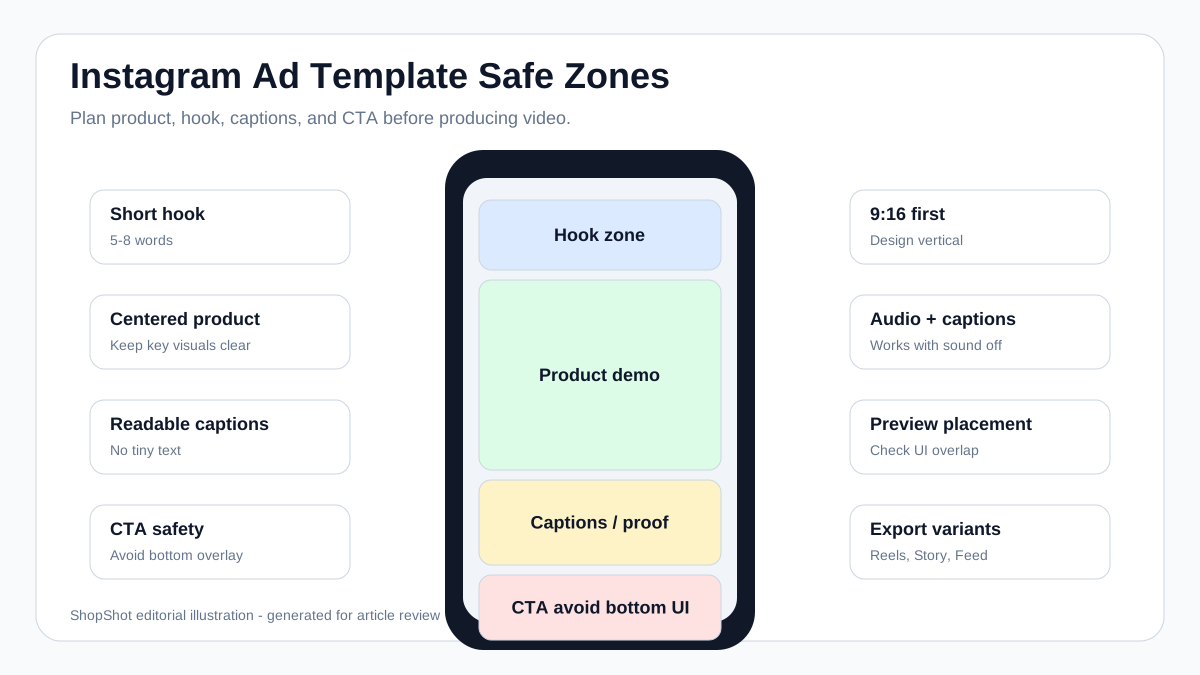
The best template is not just a pretty layout. It tells your team where the product appears, where the hook goes, where captions stay readable, where the CTA sits, and which version should be used for Reels, Stories, Feed, or carousel.
This guide gives you practical Instagram ad templates for ecommerce product videos. Use them when you are building Reels ads, Stories ads, Feed videos, product launches, retargeting creatives, or AI-generated video variants.
For sizing context, also review our Instagram Reel size and dimensions guide. If you want to turn these templates into video ads, use ShopShot's ecommerce video ads tool.
Quick Answer
For most ecommerce Instagram video ads, start with three templates:
| Placement | Best Template | Use Case |
|---|---|---|
| Reels / Stories | 9:16 vertical product demo | Prospecting, product education, UGC-style ads |
| Feed | 4:5 or 1:1 product proof video | Retargeting, catalog-style creative, comparison |
| Carousel | 1:1 product story cards | Feature breakdown, before/after, review sequence |
Meta's Instagram Reels ad documentation says Reels ads can appear between organic Reels and that video creative should be fullscreen and vertical. Meta's Instagram ad page also describes photo ads as square, landscape, or portrait, and Stories as a full-screen ad format. In practice, ecommerce teams should create separate vertical and feed-friendly versions instead of relying on one creative to fit every placement.
Why Template Design Matters
Meta's public Reels ads guide says Reels ads built as 9:16 video, with audio, and with key creative elements in the safe zone showed 34.5% lower cost per result than image ads on Reels in Meta-cited tests. For ecommerce teams, that means the template should be designed for vertical viewing first, not cropped from a horizontal product video.
High-ranking Instagram ad template pages usually win because they combine three things: format specs, visual layout examples, and a clear production workflow. The gap for ecommerce sellers is that most template pages stop at design size. They do not explain which template should be used for cold traffic, product education, retargeting, catalog promotion, or AI video generation.
That is the job of this article: use the specs as the guardrail, then choose the template based on the product selling problem.
Build the Instagram Ad Template Kit First
Do not make one Instagram ad template and resize it everywhere. Build a small placement kit so each version has a clear job.
| Asset | Recommended Use | Ratio | Ecommerce Creative Job |
|---|---|---|---|
| Reels video | Prospecting, product education, UGC-style demo | 9:16 | Stop the scroll and show the product in motion |
| Stories video | Offer, launch, limited-time CTA, direct response | 9:16 | Move quickly from problem to product to CTA |
| Feed portrait video | Retargeting, product proof, review, comparison | 4:5 | Show more product detail without feeling cramped |
| Feed square creative | Catalog support, carousel, sale announcement | 1:1 | Keep product, claim, and CTA readable in grid-friendly layouts |
| Carousel | Feature breakdown, multiple products, before/after | 1:1 or 4:5 | Split the product story into swipeable claims |
If you only have time to create three assets, make one 9:16 Reels/Stories version, one 4:5 Feed proof version, and one 1:1 carousel cover. That covers discovery, retargeting, and product comparison without overproducing.
Instagram Ad Template Specs Ecommerce Teams Should Not Ignore
Template libraries often show attractive designs, but ecommerce ads fail when the product is cropped, the price is covered by UI, or captions become unreadable on mobile. Use this practical spec checklist before writing the creative brief.
| Placement | Minimum Practical Canvas | Best Length for Cold Ecommerce Ads | Template Rule |
|---|---|---|---|
| Reels | 1080 x 1920 | 6-15 seconds for cold tests, longer only for education-heavy products | Put the product moment in the first 2 seconds |
| Stories | 1080 x 1920 | 5-15 seconds or 3-4 fast frames | Keep CTA and discount away from the bottom UI area |
| Feed portrait | 1080 x 1350 | 10-20 seconds | Use larger product close-ups and fewer overlay words |
| Feed square | 1080 x 1080 | 6-15 seconds | Make the central product shot readable without sound |
| Carousel | 1080 x 1080 per card | 3-6 cards for most products | One claim per card; do not turn it into a product page screenshot |
Two practical rules matter more than exact dimensions:
- Design for mobile preview, not desktop editing comfort.
- Keep the product, the main claim, and the proof line in the center-safe area.
Template 1: Product Demo Reels Ad
Use this for cold traffic when the buyer does not know your product yet.
| Time | Visual | Text / Voiceover | Goal |
|---|---|---|---|
| 0-2s | Product in use or result shot | "This fixes [problem] in [time/context]." | Stop the scroll |
| 2-6s | Close-up demo | "Here is how it works." | Explain the mechanism |
| 6-11s | Before/after or benefit shot | "No [pain point], no [old workaround]." | Build desire |
| 11-15s | Product hero + offer | "Try it for [use case]." | Move to click |
Layout
- Top area: Short hook, 5-8 words.
- Middle area: Product, hand demo, or result shot.
- Lower-middle area: Captions and proof line.
- Bottom area: Avoid key details because platform UI and CTA overlays may cover it.
Example Hook Lines
- "My drawer finally stays organized."
- "The 30-second fix for dry cuticles."
- "I stopped wasting half the bottle."
- "This is why my desk looks cleaner."
- "Watch the before and after."
Template 2: Review-Style UGC Ad
Use this when trust matters more than feature education.
| Section | What to Include |
|---|---|
| Hook | A believable customer-style line |
| Context | Who the product is for |
| Test | What the person tried |
| Result | What changed or felt different |
| CTA | Soft action: "See the product" or "Try it today" |
Script Template
"I bought this because [specific problem]. I was skeptical because [objection]. After using it for [time/context], the biggest difference was [result]. If you deal with [problem], this is the product I would start with."
Best For
- Beauty and skincare
- Home organization
- Pet products
- Fitness accessories
- Apparel fit demonstrations
- Kitchen gadgets
Placement Decision Table
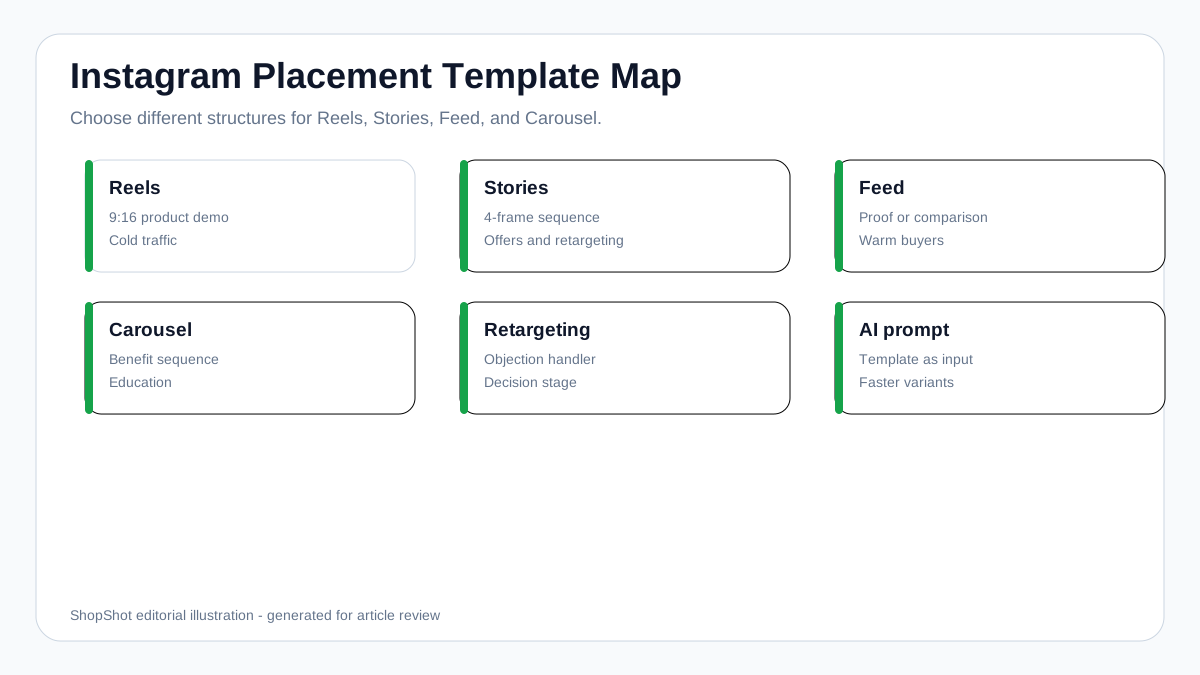
| If Your Goal Is... | Use This Placement | Template Pattern |
|---|---|---|
| Reach new buyers | Reels | Product demo or creator-style hook |
| Promote a short offer | Stories | 3-4 frame problem-solution sequence |
| Retarget product viewers | Feed | Proof, review, or comparison video |
| Explain multiple benefits | Carousel | One product point per card |
| Test creative fast | Reels + Stories | Same hook, different opening visuals |
Template 3: Problem-Solution Story Ad
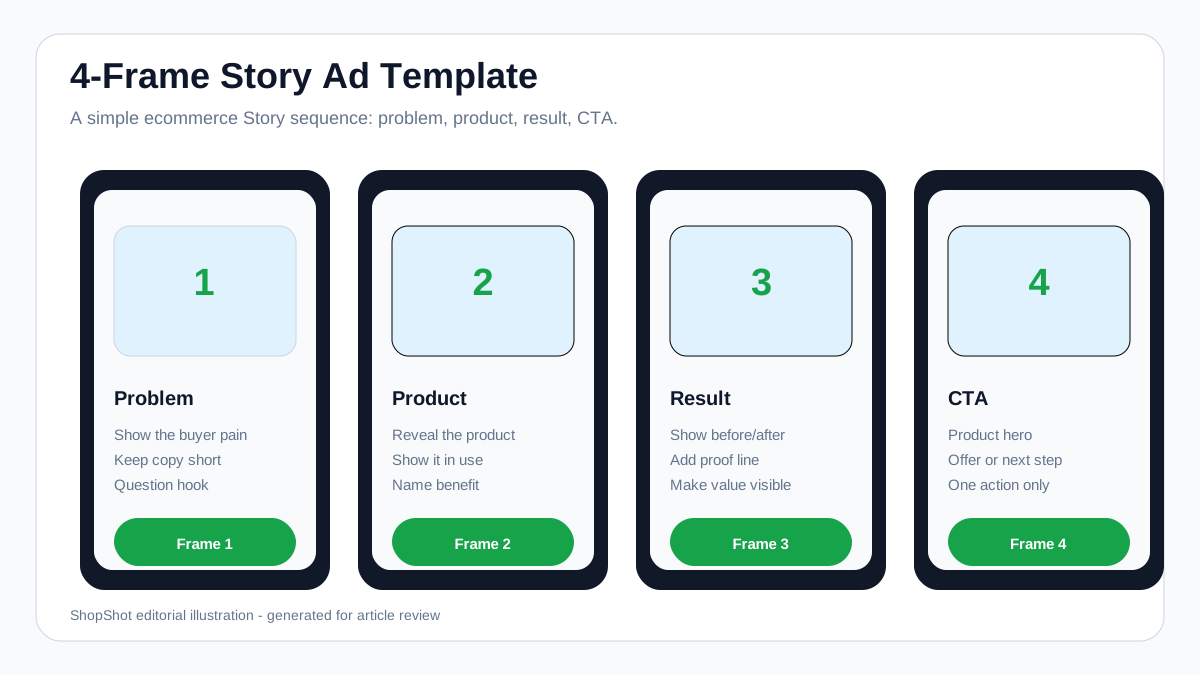
Stories move fast, so the message needs to be instantly clear.
| Frame | Visual | Copy |
|---|---|---|
| 1 | Problem scene | "Still dealing with [pain point]?" |
| 2 | Product appears | "Use [product] instead." |
| 3 | Result | "Cleaner / faster / easier / more comfortable." |
| 4 | CTA | "Shop the product" |
Keep each frame simple. A viewer should understand the ad without sound.
Template 4: Feed Retargeting Product Proof Ad
Use Feed when the buyer has already visited your site, watched a video, or clicked a product page.
| Element | Recommendation |
|---|---|
| Format | Feed-friendly square or portrait version |
| Hook | Benefit or objection answer |
| Main visual | Product close-up, review, comparison, or before/after |
| Proof | Rating, review snippet, ingredient/material detail, use case |
| CTA | "See details", "Shop now", "Compare styles" |
Example Structure
Headline on screen: "Still comparing desk organizers?"
Scene order:
- Show the messy old setup.
- Show the product installed.
- Add one proof line: "Fits cables, chargers, and daily essentials."
- End with a clean product hero and CTA.
Template 5: Carousel Product Story
Carousel ads work well when one video cannot explain the full product story.
| Card | Role | Example |
|---|---|---|
| 1 | Hook | "The easiest way to organize your daily carry." |
| 2 | Problem | "Everything used to pile up on the counter." |
| 3 | Product demo | "Drop keys, wallet, charger, and watch here." |
| 4 | Proof | "Designed for small spaces." |
| 5 | CTA | "Shop the organizer." |
Keep each card focused on one idea. Do not cram the full product page into the carousel.
Which Instagram Ad Template Should You Use?
| Goal | Best Template | Why |
|---|---|---|
| Cold traffic | Product Demo Reels Ad | Shows value fast |
| Build trust | Review-Style UGC Ad | Reduces skepticism |
| Promote offer | Story Ad | Works with fast, direct CTA |
| Retarget visitors | Feed Product Proof Ad | Reinforces decision details |
| Explain multiple benefits | Carousel Product Story | Breaks the product story into steps |
| Test hooks quickly | Reels variants | Lets you isolate opening lines |
Safe-Zone Planning for Instagram Product Ads
Instagram ad layouts can be covered by captions, profile details, buttons, and interaction UI. The safest approach is to keep the product and key claim near the visual center and avoid putting price, coupon, or CTA text at the extreme top or bottom.
Use this practical zone plan:
| Zone | Use It For | Avoid |
|---|---|---|
| Top | Short hook only | Long claims, discount codes |
| Center | Product, face, demo, before/after | Tiny text |
| Lower-middle | Captions, proof, feature label | Critical CTA too low |
| Bottom | Visual support only | Price, legal text, product name |
Before publishing, preview the creative inside Ads Manager or the placement preview, not just in your editing tool.
Product Page to Instagram Ad Template Brief
The fastest way to produce better Instagram product ads is to turn the product page into a structured creative brief before opening an editor. This keeps the template from becoming a generic design.
| Product Page Input | What to Extract | Where It Goes in the Ad |
|---|---|---|
| Product title | Simple product name customers understand | Final hero frame and CTA |
| Main image | Clean product hero or use-case image | Center product area |
| Review text | Short proof line with a real buyer concern | Lower-middle caption or Feed proof ad |
| Feature bullets | One visible mechanism or differentiator | Demo scene or carousel card |
| Objections | Price, fit, quality, shipping, setup, trust | Retargeting Feed ad or UGC review script |
| Offer | Bundle, discount, trial, free shipping | Stories or final frame only |
Example brief for a skincare product:
Product: Cuticle repair oil
Buyer problem: Dry cuticles after hand washing
Main proof: Review mentions visible improvement after nightly use
Template: Review-style UGC Reels ad
Opening visual: Close-up of dry cuticles, then product application
Caption style: Large, high-contrast, 5-7 words per line
CTA: See the nail care set
Claim limit: Do not promise medical treatment or permanent results
This brief gives the designer, creator, or AI video tool enough constraints to make a useful ad instead of a generic lifestyle clip.
Ecommerce Template Examples
Beauty Product
Hook: "My cuticles looked dry even after lotion."
Template: Review-style UGC.
Visuals:
- Close-up before shot
- Product application
- 7-day result
- Review line
- Product hero
CTA: "See the nail care set."
Apparel Product
Hook: "A black dress that does not wrinkle after sitting."
Template: Product demo Reels.
Visuals:
- Full outfit shot
- Fabric stretch or movement
- Sit/walk test
- Detail close-up
- Size/fit line
CTA: "Check your size."
Home Product
Hook: "This drawer used to be impossible to close."
Template: Problem-solution Story.
Visuals:
- Messy drawer
- Product insert
- Organized result
- Product bundle
CTA: "Shop the organizer."
How to Turn a Template Into AI Video Prompts
When using an AI product video tool, do not prompt only with "make an Instagram ad." Give the tool the template. ShopShot can use this structure to turn product details, images, buyer objections, and CTA direction into platform-ready video variants.
Use this prompt structure:
Create a 15-second Instagram Reels product video for [product].
Template: product demo.
Audience: [buyer].
Opening hook: [hook].
Scenes:
1. Show the buyer problem.
2. Show the product in use.
3. Show the visible result.
4. End with product hero and CTA.
Style: UGC review, clean captions, vertical full-screen format.
Avoid placing important text at the bottom of the frame.
How to Test Instagram Ad Templates Without Confusing the Results
If you change the hook, visual style, offer, CTA, and placement at the same time, you will not know what improved performance. Test one major variable at a time.
| Test Round | Keep Constant | Change | What You Learn |
|---|---|---|---|
| Round 1 | Product, offer, placement | Opening hook | Which buyer problem stops the scroll |
| Round 2 | Winning hook, product, offer | First visual | Whether demo, result, or face-led opening works better |
| Round 3 | Hook and first visual | Proof line | Which evidence makes the product believable |
| Round 4 | Creative angle | Placement | Whether Reels, Stories, or Feed is the better buying context |
| Round 5 | Winner concept | CTA wording | Which next action feels natural |
For low-budget ecommerce testing, create 3-5 Reels variants first. Once one hook shows promise, adapt it into a Feed proof version and a Stories offer version. That sequence is usually more useful than launching ten unrelated templates at once.
Common Instagram Ad Template Mistakes
Avoid these issues before spending on distribution:
- Cropping a horizontal product video into 9:16 without redesigning the text.
- Placing the discount, product name, or CTA in the lowest part of the frame.
- Using a beautiful template that never shows the product being used.
- Starting with a brand logo instead of a buyer problem or visible result.
- Writing captions that are too small to read on mobile.
- Reusing the exact same creative for Reels, Stories, Feed, and carousel without previewing each placement.
- Making every template offer-led, which can fatigue retargeting audiences quickly.
FAQ
What is the best Instagram ad template for ecommerce product videos?
For most ecommerce brands, the best starting template is a 9:16 vertical product demo for Reels and Stories, plus a feed-friendly proof version for retargeting. This gives you both prospecting and retargeting coverage.
Should Instagram product ads be Reels or Feed videos?
Use Reels for discovery and product education. Use Feed for retargeting, proof, comparison, and offer reinforcement. Most ecommerce brands should not rely on one format.
Where should I place the CTA in an Instagram video ad?
Place the CTA in the lower-middle or final product hero frame, but avoid the extreme bottom where platform UI may overlap. Also repeat the CTA in the ad setup when available.
Can I use the same video for Stories and Reels?
You can start with the same vertical concept, but review the preview for each placement. Reels, Stories, and Feed have different viewing behavior, UI overlays, and pacing expectations.
How many Instagram ad templates should an ecommerce brand use?
Start with three: product demo, UGC review, and problem-solution. Add carousel and retargeting proof templates once you have winning hooks and product angles.
What should an ecommerce Instagram ad template include?
An ecommerce Instagram ad template should include a hook area, product-use area, readable caption zone, proof line, CTA frame, and placement notes for Reels, Stories, Feed, or carousel. The template should also define what must stay inside the safe visual center.
Sources Checked
- Meta for Business: Instagram ads
- Meta for Business: Stories ads
- Meta for Business: Instagram and Facebook Reels ads
- Instagram Help Center: Create Instagram Reels ads in Meta Ads Manager
- Coinis: Instagram Ad Template: Complete Guide to Creating High-Converting Ads
- MagicLibrary: Instagram ad templates