
Last reviewed: May 11, 2026. Platform specs, ad policies, and creative tools can change; verify final requirements inside Ads Manager before launch.
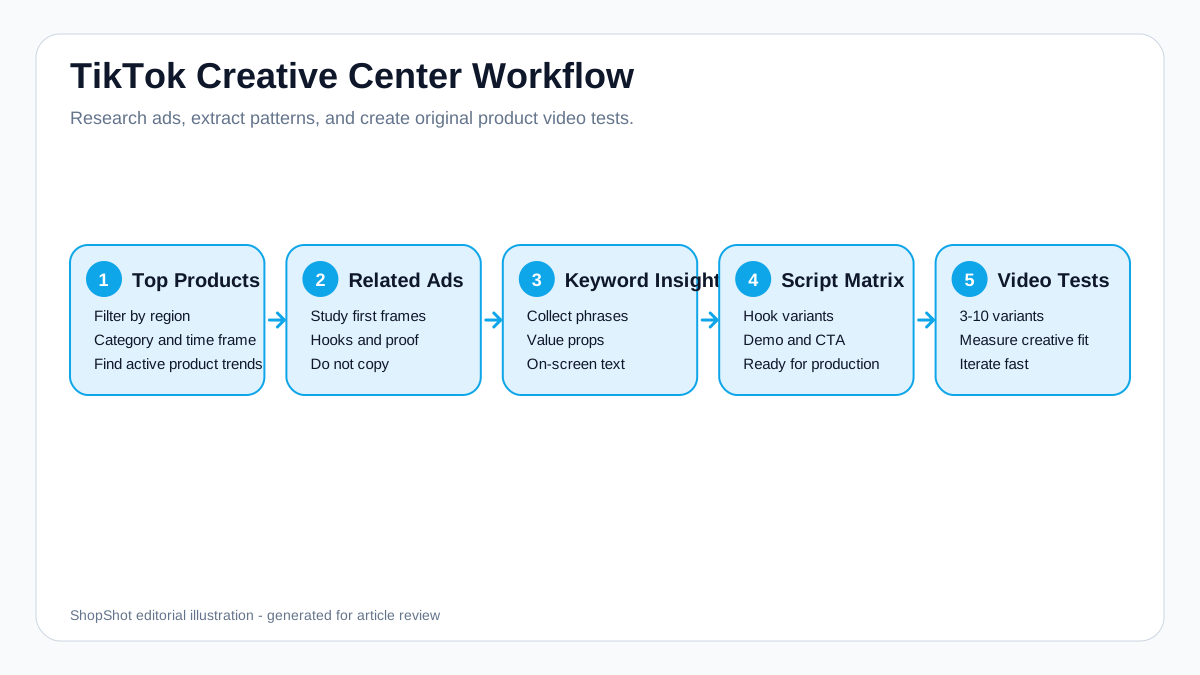
TikTok Creative Center is one of the fastest ways to find product ad ideas before you spend money on new creatives. For ecommerce sellers, the goal is not to copy a viral ad. The goal is to understand which products, hooks, angles, captions, sounds, and visual patterns are already getting attention in your category, then turn those patterns into original product video tests.
This guide shows a practical workflow for using TikTok Creative Center as an ecommerce creative research tool.
If you already sell on TikTok Shop, pair this process with our guide on how to make TikTok Shop product videos with AI. If you need to turn the research into actual video variants, use the TikTok UGC video generator or the main AI video generator.
Quick Answer
Use TikTok Creative Center in five steps:
- Start with Top Products to find active product trends in your region and category.
- Open related ads to study hooks, offers, product demos, and creator delivery styles.
- Use Keyword Insights and Top Ads to collect the phrases people respond to.
- Convert patterns into a script matrix instead of copying one ad.
- Generate 3-10 product video variants and test different hooks, openings, formats, and CTAs.
TikTok says Top Products can be filtered by region, category, and time frame, and that the Details view can show performance trends, audience insights, related ads, and related hashtags. That makes it especially useful for ecommerce brands that need fresh product ad concepts, not just general TikTok inspiration.
Editorial Method
This workflow is built for ecommerce teams that need original ad variants, not copied competitor creatives. Review at least 10-20 ads in the same region and category, record the hook, first frame, proof type, and CTA, then turn those patterns into your own product-specific script matrix.
Why TikTok Creative Center Matters for Ecommerce
Most product video teams have the same problem: they need more ad angles than they have production time.
TikTok Creative Center helps because it shows real creative patterns from TikTok's ad ecosystem. For a product brand, that means you can answer questions like:
- Which products are appearing in active ads right now?
- What hooks are brands using in my category?
- Are creators leading with pain points, demonstrations, social proof, price, or curiosity?
- What video length and pacing patterns appear repeatedly?
- Which product benefits are being made visual?
The output should be a testing plan, not a swipe file. If three winning ads in your category open with a problem statement, your next move is not to copy their script. Your next move is to write five original problem-led hooks for your own product.
What TikTok Creative Center Includes
TikTok Creative Center is not one feature. It is a set of research, trend, and creative production tools. Stackmatix frames it as a free research tool for top-performing ads, trending formats, keyword data, and creative quality checks. Metricool breaks the platform into Inspiration, Trends, and Creative Tools, which is a useful way for ecommerce teams to decide where to look first.
| Creative Center Area | What It Helps You Find | Ecommerce Use |
|---|---|---|
| Top Ads Dashboard | Ads filtered by region, industry, objective, period, language, format, and performance metrics | Study what brands in your category are already testing |
| Keyword Insights | Keywords appearing in ad voiceover, text overlay, and ad copy | Turn buyer language into hooks, captions, and voiceover |
| Creative Insights | Creative patterns and best-practice recommendations, including ecommerce filters | Find formats worth adapting before production |
| Top Products | Popular products by region, category, and period | Identify product categories and shopping angles with current demand |
| Trends | Trend moments, signals, hashtags, songs, creators, and videos | Separate short-lived trend formats from durable category behavior |
| Creative Tools | Video editor, templates, script generation, Commercial Music Library, and AI assistance | Turn research into TikTok-native production inputs |
For product teams, the order matters. Start with Top Products and Top Ads to understand buyer demand, use Keyword Insights to write the hook, then use Creative Insights and templates to shape the format. Trends and music should support the product angle, not replace it.
TikTok Creative Center Research Workflow
| Step | What to Do | What to Capture | Ecommerce Use |
|---|---|---|---|
| 1. Choose region and category | Filter by your selling market and product category | Region, category, time range | Prevents you from copying trends from the wrong market |
| 2. Audit 15-20 top ads | Watch recent top ads from start to finish | First 2 seconds, pacing, format, CTA, audio | Turns browsing into structured research |
| 3. Review Top Products | Look for products, subcategories, and popularity changes | Product type, trend direction, audience | Shows what people are responding to now |
| 4. Open related ads | Watch ads connected to a product or category | Hook, first frame, demo style, CTA | Builds your product video pattern library |
| 5. Check Keyword Insights | Find phrases used in active ads | Pain-point phrases, benefit phrases, urgency terms | Improves captions, on-screen text, and voiceover |
| 6. Build a script matrix | Turn patterns into original variants | Hook, claim, scene, proof, CTA | Gives your editor or AI video tool clear inputs |
| 7. Score before production | Check hook, format, audio, message, and compliance | Missing creative requirements | Prevents weak variants from reaching budget |
| 8. Test variants | Produce multiple versions from the same product page | CTR, hold rate, CPA, comments | Separates creative taste from performance |
Step 0: Audit Top Ads Before You Touch Production
Stackmatix recommends filtering the Top Ads Dashboard by industry, target country, and a recent time window, then watching 15-20 top ads before producing new creative. That is the right discipline for ecommerce teams because one ad is anecdotal, but 15 ads reveal category patterns.
When reviewing Top Ads, do not only save the URL. Score the creative:
| Ad Element | What to Check | Why It Matters |
|---|---|---|
| First 1-2 seconds | Face, movement, bold text, product result, question, or claim | Predicts whether the viewer stops scrolling |
| Format | Creator-led, product demo, text overlay, comparison, green screen, or voiceover | Shows which production style fits the category |
| Pacing | Scene changes in the first 5 seconds | Reveals whether the ad feels native or slow |
| Audio | Trending sound, original voiceover, music-only, or silent-first | Affects watchability and creator feel |
| CTA | Soft CTA, shop link, offer, or hard purchase prompt | Shows where the ad sits in the funnel |
| Landing-page match | Does the product page prove the same claim? | Prevents click-to-page mismatch |
Metricool notes that Top Ads can be sorted by performance goals such as reach or CTR, and that individual ad views can show metrics such as likes, comments, shares, CTR, budget, and interactive time analysis. For ecommerce, this matters because a strong hook is not enough. You want to see where viewers click, where they remain, and whether the ad's strongest moment happens before the product appears.
Step 1: Start With Top Products
For ecommerce brands, Top Products is usually more useful than browsing random viral videos. TikTok's own help center describes Top Products as a Creative Center feature that highlights trending products featured in TikTok ads. It also notes that Top Products is available on desktop and can be filtered by region, category, and time frame.
Use this section to answer three questions:
- Is my product category active on TikTok right now?
- Which related products are getting advertiser attention?
- Are the winning examples about price, problem solving, novelty, demonstration, or trust?
Do not overreact to one trending product. Look for repeated patterns across 10-20 ads.
What to Record
Create a simple sheet with these columns:
| Product Pattern | Example Notes | Possible ShopShot Angle |
|---|---|---|
| Everyday problem | "My desk was always messy..." | Start with a relatable problem scene |
| Visual transformation | Before/after cleaning, styling, organizing | Show the product result in the first 3 seconds |
| Mini demo | Hands show how the item works | Use product images plus motion captions |
| Social proof | "I saw this everywhere..." | Add review-style voiceover |
| Offer angle | Bundle, discount, limited launch | End with product page CTA |
Product Trend Check
Metricool points out that Top Products can surface performance analytics, audience analytics, related videos, and associated hashtags. Use those details to answer four ecommerce-specific questions:
| Question | Why It Matters |
|---|---|
| Is the product trend rising or already saturated? | Avoid chasing a format after competitors have exhausted it |
| Which audience appears most interested? | Helps choose creator style, language, and offer |
| Which related videos explain the product best? | Helps decide between demo, review, or comparison |
| Which hashtags are category-relevant? | Helps align organic and paid content around the same buyer language |
Step 2: Study Related Ads Without Copying Them
When you open details for a product, TikTok says Creative Center can show related ads, performance analytics, audience insights, and related hashtags. Treat this as a creative diagnosis tool.
For each related ad, write down:
- First frame: What is visible before the viewer understands the product?
- Hook type: Is it curiosity, pain point, claim, demonstration, review, or comparison?
- Product visibility: Does the product appear immediately or after setup?
- Proof: Is the ad using reviews, creator experience, before/after, or a live demo?
- CTA: Does it push TikTok Shop, a discount, a product page, or a soft "try this" message?
The best ecommerce ads usually make the product visible early. If the ad spends 7 seconds setting up a joke and the product appears at the end, it may get engagement but weak buyer intent.
What to Save From Each Ad
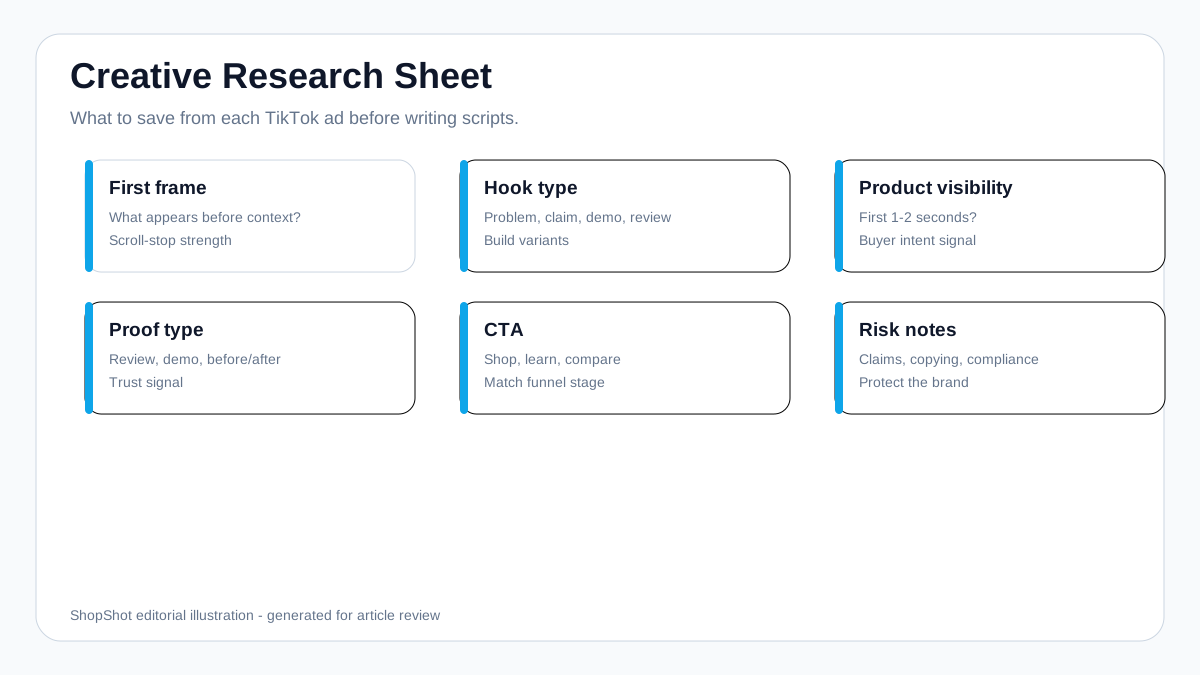
| Field | Why It Matters | How to Use It |
|---|---|---|
| First frame | Predicts scroll-stop strength | Rebuild the opening around your product result |
| Hook type | Shows whether the ad leads with pain, demo, claim, or review | Create 3-5 original hook variants |
| Product visibility | Reveals how early the product enters the story | Make buyer intent clear before the viewer swipes |
| Proof type | Shows what creates trust | Match the proof to your product category |
| CTA | Shows the funnel stage | Use TikTok Shop, website, discount, or comparison CTAs intentionally |
| Timeline behavior | Where clicks, conversions, or viewer drop-off happen | Move product proof earlier when the ad waits too long |
Step 3: Turn Keywords Into Hook Ideas
TikTok's Keyword Insights help page says the tool highlights top keywords and phrases from TikTok ads, and can be filtered by region and industry. Use it to find language that appears in ads, then rewrite that language for your own product. For product ads, use keyword research to write on-screen text and voiceover lines that sound like the buyer's problem.
Do this:
- Search a product category or problem.
- Save high-frequency phrases that match your product.
- Rewrite each phrase into a hook.
- Keep hooks short enough to fit on screen.
Example:
| Keyword Pattern | Hook Variant | Best For |
|---|---|---|
| "before and after" | "I tested this for 7 days. Here is the before and after." | Beauty, home, cleaning, fitness |
| "must have" | "This is the one desk upgrade I should have bought earlier." | Home office, gadgets, organization |
| "TikTok made me buy it" | "I kept seeing this everywhere, so I tested it on my own product setup." | Trend-driven products |
| "does it work" | "I wanted to know if this actually works, so I tried it on camera." | Skeptical categories |
| "gift idea" | "If they are impossible to shop for, start here." | Giftable products |
Metricool notes an important limitation: Keyword Insights comes from TikTok ads, not organic rankings. Treat it as paid creative language, not a complete TikTok SEO dataset. A phrase can be useful for ad hooks even if it is not the best organic caption keyword.
Step 4: Build a Product Ad Script Matrix
The mistake is writing one "perfect" script. TikTok creative performance is too variable for that. Build a matrix instead.
| Variant | Hook | Product Moment | Proof | CTA |
|---|---|---|---|---|
| A | Problem-first | Show product solving the problem | Review line | "Shop the product" |
| B | Demo-first | Product appears in first frame | Before/after | "See it in action" |
| C | Creator review | Face or voiceover opens | Personal test | "Try it today" |
| D | Comparison | Old way vs new way | Time saved | "Upgrade your setup" |
| E | Offer-led | Bundle or discount | Product benefits | "Get the launch deal" |
For ShopShot, the inputs can be simple:
- Product URL or product images
- 3-5 buyer pain points
- 3 benefits
- Preferred platform: TikTok, Reels, Shorts, or Meta ads
- Desired style: UGC review, product demo, comparison, or offer video
Then generate several short videos from the same research base instead of commissioning one expensive asset.
Step 5: Use Creative Insights Without Chasing Every Trend
Creative Insights is useful because it turns aggregate ad behavior into creative patterns. Metricool notes that Creative Insights can be filtered for ecommerce and measured by metrics such as CTR, view-through rate, ad spend, and ad spend change. That is more useful than copying a viral creator trend because it keeps the research tied to ad performance.
Use Creative Insights to decide:
- Whether the product should open with a person, product close-up, text overlay, or result.
- Whether the category needs a demonstration before a claim.
- Whether voiceover, subtitles, or text-only pacing is common in the market.
- Whether the CTA should appear only at the end or be introduced earlier.
Do not treat a trend as strategy. Metricool separates trend moments, trend signals, and trend forces. For ecommerce, a trend moment might inspire one hook this week; a trend signal may reveal a durable buyer behavior; a trend force can shape the category for months. Only build product video systems around the second and third type.
Step 6: Use Creative Tools as Production Inputs
TikTok Creative Center also includes tools such as templates, video editing resources, Script Generator, Symphony Assistant, and the Commercial Music Library. These can speed up execution, but they should not replace product-specific strategy.
Use them this way:
| Tool | Use It For | Ecommerce Caution |
|---|---|---|
| Templates | Structure a TikTok-native edit faster | Replace generic placeholders with real product benefits |
| Script Generator | Produce a first draft from product name, industry, description, keywords, and duration | Rewrite for buyer language and proof |
| Symphony Assistant | Brainstorm hooks, creative analysis, or ad script angles | Verify claims before publishing |
| Commercial Music Library | Find tracks approved for business or ad use | Do not rely on consumer trending sounds that are not business-safe |
| Interactive add-ons | Add motion or engagement | Keep the product and CTA visible |
For ShopShot, the best workflow is: use Creative Center for research, write a product-specific script matrix, then generate video variants with product images, captions, and voiceover direction.
Step 7: Match Creative Center Insights to TikTok Ad Specs
Research is only useful if your final ad fits the platform.
TikTok's current help documentation for auction in-feed ads recommends vertical 9:16 creative for Non-Spark Ads and lists 540x960 px or higher as the vertical minimum. It also notes that safe zones depend on dimensions, caption length, and additional formats, so avoid placing key product text or price badges at the very bottom of the frame.
Use this production checklist:
| Element | Recommendation |
|---|---|
| Format | Vertical 9:16 for TikTok-first product ads |
| Opening | Product, result, or problem visible in the first 1-2 seconds |
| Text | Keep product claim and offer away from UI overlays |
| Voiceover | Match the hook; do not read a generic product description |
| CTA | Use one action: shop, learn, compare, claim offer, or see demo |
| Variants | Test hooks separately from offers when possible |
Step 8: Run a Creative Quality Preflight
Before you spend on production or launch a paid test, score each concept against a quality checklist. Stackmatix recommends reviewing hook quality, format and pacing, audio, messaging, CTA, and compliance before budget goes live. For ecommerce, this becomes a practical preflight:
| Check | Pass Standard |
|---|---|
| Hook | Product problem, result, or curiosity is clear in the first 1-2 seconds |
| Native format | Vertical 9:16, no borders, no recycled platform watermark |
| Pacing | Scene changes happen fast enough for short-form viewing |
| Audio | Voiceover or music starts immediately and does not bury the message |
| Captions | Key claim is readable without sound |
| Single message | One product angle, not five features |
| CTA | One next step that matches the landing page |
| Compliance | No unsupported claims, restricted-category issues, or hidden key text |
This checklist is also useful before generating AI product videos. If the brief fails here, the output will usually fail too.
Example: Turning Creative Center Research Into 5 Ad Ideas
Product: portable blender.
Research pattern: Top ads show quick demos, before/after drink texture, gym/busy-morning context, and creator-style voiceover.
| Ad Idea | Opening Line | Scene Plan |
|---|---|---|
| Problem-first | "I kept skipping breakfast because cleanup took too long." | Messy counter -> product close-up -> smoothie demo |
| Demo-first | "Watch this make a smoothie in under a minute." | Ingredients -> blend -> pour -> product hero |
| Comparison | "Old blender vs this portable one." | Side-by-side setup -> cleanup comparison |
| Social proof | "I saw this all over TikTok, so I tested it." | Creator-style review with product shots |
| Offer-led | "If you meal prep smoothies, this bundle makes more sense." | Product + accessories + CTA |
This is the right way to use Creative Center: borrow the structure, not the ad.
Weekly Research Cadence
TikTok creative cycles move quickly. Stackmatix recommends checking Creative Center weekly at minimum; that cadence is reasonable for ecommerce brands that run ongoing ad tests.
Use a simple weekly rhythm:
| Day | Task | Output |
|---|---|---|
| Monday | Review Top Ads and Creative Insights | 5 new hook patterns |
| Tuesday | Check Top Products and related hashtags | 2 product angles to test |
| Wednesday | Build script matrix | 3-5 new variants |
| Thursday | Generate or edit videos | TikTok-ready drafts |
| Friday | Preflight and launch small test | Learn which hook earns budget |
Testing 3-5 variants is usually more useful than testing one or flooding a small budget with too many versions. Fewer than three gives weak signal; too many can spread early spend too thin.
Common Mistakes
Copying One Ad Too Closely
This creates legal and brand risk, and it rarely builds a durable creative system. Translate patterns into new scripts.
Choosing Viral Ads Instead of Relevant Ads
A funny viral ad for a snack brand may not help a high-consideration skincare product. Filter by product category and buyer intent.
Ignoring Product Page Reality
If the ad promises a benefit your product page does not prove, conversion will break after the click.
Making Only One Version
Creative Center is a research tool. Its real value comes when you turn insights into multiple testable variants.
Using Trends Without Checking Business Use
Metricool notes that the Commercial Music Library can help filter music for organic content and ad creation. Do not assume every consumer trend or sound is approved for a business account or paid ad.
Treating Keyword Insights Like Organic SEO Data
Keyword Insights is valuable, but it reflects language used in ads. Use it for hooks, captions, and paid creative messaging; combine it with search and customer research before deciding long-term organic content strategy.
FAQ
Is TikTok Creative Center free?
TikTok Creative Center is available through TikTok for Business. Some features and views may require login or desktop access. For ecommerce research, start with Top Products, Top Ads, and Keyword Insights.
Can I copy ads from TikTok Creative Center?
No. Use it for research and pattern recognition. Copying another brand's creative, script, creator style, or product claims can create legal, platform, and brand trust problems.
What should ecommerce brands track from TikTok Creative Center?
Track hooks, product categories, demo formats, benefit language, audience clues, hashtags, and CTA patterns. Then turn those observations into original product video variants.
How many TikTok ad variants should I create from one research session?
Create at least 3-5 variants from one product angle: a problem-first version, demo-first version, review-style version, comparison version, and offer-led version. Bigger accounts can test more, but small brands should still avoid betting on one creative.
Should I use TikTok Creative Center before creating AI product videos?
Yes. Creative Center gives the strategy; AI video generation gives you production speed. Research first, then generate videos with clearer hooks, scenes, and voiceover direction.
How often should ecommerce brands check TikTok Creative Center?
Weekly is a practical baseline. Review Top Ads, Creative Insights, Keyword Insights, and Top Products before planning the next batch of product video variants.
Sources Checked
- TikTok Business Help Center: How to use Top Products
- TikTok Business Help Center: TikTok Auction In-Feed Ads
- TikTok Business Help Center: Keyword Insights
- Stackmatix: TikTok Creative Center Best Practices
- Metricool: Guide to TikTok's Creative Center
- ShopShot internal plan: latest competitor keyword data from 2026-05-11