
Quick Answer
To add a TikTok Shop link to a video, create or upload the video in TikTok, open the posting screen, tap Add Link, choose Products, select the item from your TikTok Shop showcase or eligible product list, edit the product name if needed, and post. TikTok says videos with product links go through an additional review process, so the product anchor may not appear immediately. If you forgot the link, creators can use TikTok Shop Creator Center's Link products tool for eligible videos posted in the last 30 days.
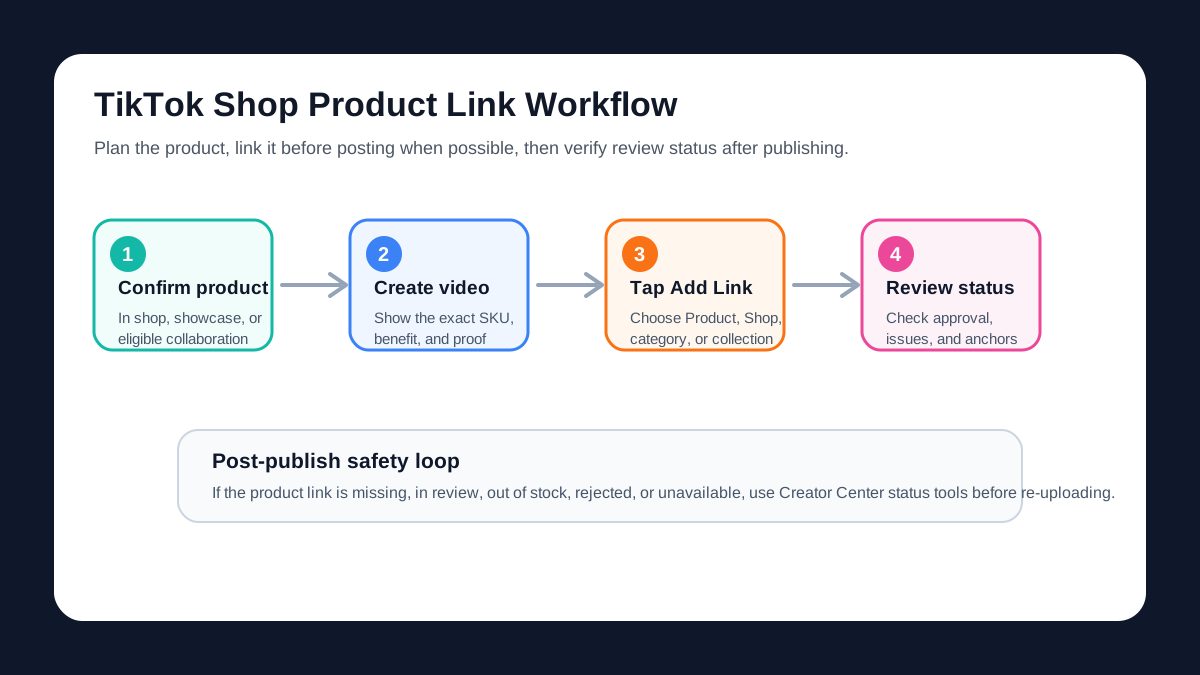
For ecommerce sellers, the linking step is not just a button click. The video must show the same product, variant, claim, and offer that the linked Product Details Page can prove. A product link that sends shoppers to the wrong SKU, an out-of-stock item, or a page with different claims can waste views and create review issues.
If you are still building the creative, use ShopShot's TikTok Shop video generator to create a product-specific video first. If you need the broader production workflow, pair this guide with How to Make TikTok Shop Product Videos with AI.
Before You Add a TikTok Shop Product Link
Check the product and video before you open the posting screen. TikTok's public guidance says you need a TikTok Shop setup before adding product links, and the link should take shoppers to a Product Details Page. That means the content should already match the product page.
Use this preflight checklist:
| Check | Pass standard | Why it matters |
|---|---|---|
| Product eligibility | The product is available in your shop, showcase, collaboration plan, or allowed product list. | If the product is missing or no longer eligible, the anchor can fail or require relinking later. |
| Product-video match | The exact product, variant, use case, and claim in the video match the linked item. | TikTok's relinking guidance warns that replacement products should match visuals, function, features, brand, and category. |
| Product page proof | The Product Details Page supports the claim, offer, ingredient, material, size, or compatibility mentioned in the video. | A strong video can still leak conversions if the page cannot prove the promise. |
| Audio rights | The video uses audio that is safe for commercial or shoppable content. | TikTok's post-publish Link Products tool lists Commercial Music Library audio as an eligibility requirement. |
| CTA clarity | The script tells viewers what the product link helps them do. | A visible product anchor works better when the video sets up a clear shopping reason. |
| Review readiness | Claims, visuals, and product category comply with TikTok Shop content requirements. | Product links may be reviewed before appearing on the video. |
Do not wait until the final post screen to decide which item the video should sell. Start from the product page, then write the hook, demo, proof, and CTA around that item.
How to Add a TikTok Shop Link Before Posting
The normal workflow is the safest because the product link is part of the video before it goes live.
1. Create or upload the video
Open TikTok and create the video, or upload the edited product video from your camera roll. Keep the product visible early. For ecommerce videos, the first few seconds should show the item, problem, use case, or result before asking viewers to shop.
2. Open Add Link on the post screen
On the final posting screen, choose Add Link. TikTok's public business help describes the flow as Add Link, then Products, then choosing the product you want to feature.
3. Choose the product
Select the product from your showcase, shop, collaboration product list, or available product module. If TikTok gives you the option to link a shop, category, collection, or product, choose the most specific destination that matches the video.
For most ecommerce product videos, link the exact product. Use a shop, category, or collection only when the video clearly covers a set of products, such as "three organizers for a small kitchen" or "summer travel minis."
4. Edit the displayed product name
TikTok lets you edit the product name shown with the link. Use plain shopper language:
| Weak product name | Better product link label |
|---|---|
| SKU-4837 Blue | Blue Mini Desk Vacuum |
| New Arrival | Leak-Proof Travel Bottle |
| Beauty Item | Vitamin C Serum for AM Routine |
| Bundle 2 | Spice Rack 2-Pack |
Keep the label specific, but do not exaggerate. The product link should help viewers recognize the item from the video.
5. Preview and post
Before posting, confirm the link appears under Add Link and the product name is readable. Then publish. TikTok says product-linked videos are submitted for additional review. The anchor may appear after approval, not always instantly.
How to Add a Product Link After Posting
If you forgot to add the link, do not delete the video immediately. TikTok Shop Seller Center documentation describes a Link Products tool that lets creators add product links to eligible short videos posted in the last 30 days.
The two common entry points are:
| Entry point | Where to go | Best use |
|---|---|---|
| TikTok Shop toolkit | TikTok Shop Creator Center, then TikTok Shop toolkit, then Link products | Review eligible videos and add missing links in one workflow. |
| Videos tab | TikTok Shop Creator Center, Videos tab, Create tab, then Link products | Work from the video list when you already know which post needs a link. |
TikTok's eligibility notes for post-publish linking include videos posted in the last 30 days, Commercial Music Library audio, a matching product, and compliance with TikTok Shop Content Policy. If the video is older, uses restricted audio, or does not clearly match the product, plan a new upload instead.
Seller vs Creator Workflow
The right workflow depends on whether you own the shop, create affiliate content, or manage both sides.
| Role | Main goal | Link source | QA priority |
|---|---|---|---|
| Seller publishing on brand account | Send viewers to the exact product page or shop item. | Own TikTok Shop catalog, category, collection, or product. | Product page accuracy, inventory, claims, and offer match. |
| Creator promoting a product | Add a commissionable product link that matches the content. | Showcase, collaboration product, or recommended product list. | Product approval, audio eligibility, and product-video match. |
| Agency or freelancer | Deliver a ready-to-post asset and linking instructions. | Client catalog or creator partnership setup. | File handoff, SKU notes, product label, claim limits, and review checklist. |
| Seller using creators | Keep winning videos monetized when products change. | Creator product link, relinking, or new collaboration product. | Anchor status, inventory, replacement product match, and content rights. |
If you manage multiple creators, document the product link plan in the brief. A creator should know the exact product name, variant, approved claims, video angle, CTA, and what to do if the product link is not available during posting.
Product Link Not Showing: Troubleshooting Matrix
When the product link does not show after posting, first separate normal review delay from a real failure. TikTok's Product Link Status Review tool shows product link review status in Creator Center under the Video tab and Manage tab.
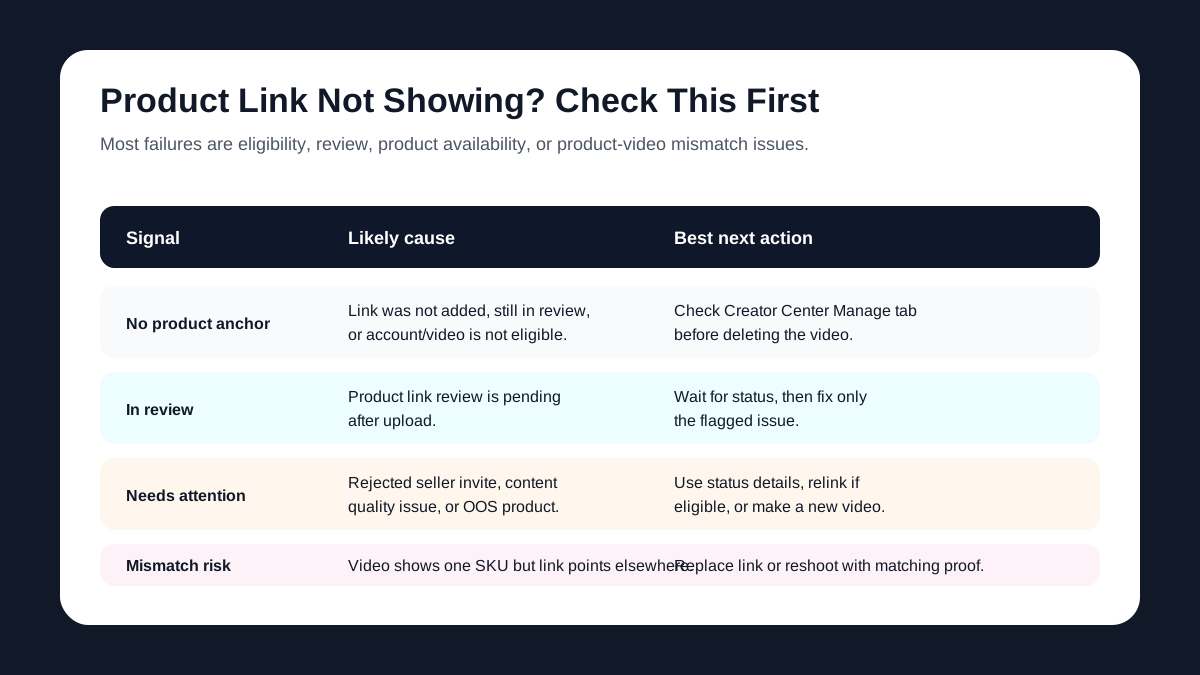
| Symptom | Likely cause | What to check | Best action |
|---|---|---|---|
| No product anchor after posting | Product link is still under review, not approved, or was not added correctly. | Creator Center, Video tab, Manage tab, product link status. | Wait if it is in review; fix the specific status issue if flagged. |
| Product link needs attention | Seller rejected the promotion, invite expired, product is out of stock, or content quality was flagged. | Status Review details and product availability. | Use the recommended fix, choose another eligible product, or upload a compliant new video. |
| Product is out of stock | Linked product is unavailable. | Product page inventory and abnormal anchor status. | Ask seller about restock, relink if eligible, or make a replacement video. |
| Link points to wrong item | Product selected does not match what the video shows. | Product title, variant, image, brand, category, and offer. | Replace the link before publishing if possible; otherwise use relinking only when the replacement truly matches. |
| Old video cannot be linked | Video fails post-publish eligibility. | Age, audio source, product match, and policy compliance. | Recreate or repost with a compliant product link plan. |
Do not fix every issue by deleting the post. If the video is performing and the issue is product availability, TikTok's Product Relinking feature may allow eligible creators to replace unavailable products while keeping traffic and engagement.
Ecommerce Video Checklist Before You Publish
Use this checklist when the video is ready but before the link is added:
- The first frame shows the product, outcome, or buyer problem.
- The product in the video matches the product link exactly.
- The video mentions only claims the product page can support.
- The CTA tells viewers why to tap the product link.
- The linked product is in stock or actively available.
- The product name shown in the link is clear to a shopper.
- Any price, discount, bundle, shipping, or guarantee matches the Product Details Page.
- Audio is safe for commercial or shoppable use.
- Captions do not cover the product anchor area or key visual proof.
- The video has a fallback plan if the product link enters review or needs attention.
For script structure, use UGC Scripts for Product Ads. For hook testing, use UGC Video Hooks for Product Ads.
A Practical Workflow for ShopShot Users
If you are making a TikTok Shop video from product photos or a product URL, use this workflow:
| Step | Input | Output |
|---|---|---|
| Product truth | Product page, photos, reviews, exact SKU, offer, claim limits | A short brief that defines what the video may say. |
| Video angle | Product problem, demo, review, comparison, or offer | One script and one visual direction. |
| ShopShot draft | Product images, brief, hook, CTA, and platform target | TikTok Shop-ready video concept. |
| Link plan | Exact product, link label, category or collection fallback | Posting instructions for seller or creator. |
| Post-publish QA | Product link review status, anchor visibility, product page match | Published shoppable video or clear fix list. |
The key is to plan the product link before generating the video. A good TikTok Shop video does not just entertain. It shows the product clearly enough that the product link feels like the natural next step.
Common Mistakes
Mistake 1: Showing one variant but linking another
If the video shows a black bag and the link opens a beige bag by default, shoppers hesitate. Keep the visual, title, and destination aligned.
Mistake 2: Using a broad shop link for a single-product demo
A shop or category link can work for collections, but a product demo should usually link the exact item. Fewer steps usually means less conversion leakage.
Mistake 3: Forgetting review time
Product-linked videos may need review. Build launch calendars with a buffer instead of posting a campaign video minutes before a sale starts.
Mistake 4: Letting AI invent unsupported claims
AI-generated scripts can add claims that sound useful but are not on the product page. Remove unsupported health, durability, compatibility, ingredient, or performance claims before adding the product link.
Mistake 5: Re-uploading too quickly
If a product link does not show, check Creator Center status before deleting the video. The issue may be review delay, product availability, or a fixable anchor status.
FAQ
How do I add a TikTok Shop link to a video?
Create or upload the video, go to the post screen, tap Add Link, select Products, choose the product you want to feature, edit the product name if needed, and post. The link may appear after TikTok reviews it.
Can I add a TikTok Shop product link after posting?
Yes, if the video is eligible. TikTok Shop's Link Products tool can add product links to short videos posted in the last 30 days when the video, audio, product, and content policy requirements are met.
Why is my TikTok Shop product link not showing?
Common reasons include review delay, product link issues that need attention, expired invites, seller rejection, out-of-stock products, content quality violations, restricted audio, or a mismatch between the video and linked product.
Should I link a product, shop, category, or collection?
For a single-product demo, link the exact product. Use a shop, category, or collection when the video clearly features multiple products or a broader shopping set.
Can I relink a TikTok Shop video if the product is unavailable?
TikTok's Product Relinking feature can help eligible creators replace unavailable products in some situations, such as out-of-stock or delisted products. The replacement should closely match the original video's visuals, function, features, brand, and category.
Sources Checked
- TikTok For Business: Add Product Links to TikTok Videos
- TikTok Shop Seller Center: How to Link Products to Videos
- TikTok Shop Seller Center: How to Link Products to Videos After You've Posted
- TikTok Shop Seller Center: How to Use the Product Link Status Review Tool
- TikTok Shop Seller Center: How to Relink Products
- TikTok Shop Seller Center: Shoppable Video Tools to Create High-Quality Videos
Bottom Line
Adding a TikTok Shop link to a video is simple when the product, video, and link all match. Plan the exact product before editing, add the link before posting when possible, use Link Products only for eligible post-publish fixes, and check product link status before assuming the anchor failed.