
TikTok Shop product videos need to do two jobs at once: feel native enough for a fast TikTok feed and stay accurate enough for a commerce listing. A good clip shows the product early, proves one buying reason, avoids unsupported claims, and gives the shopper a clear next action.
This checklist is for ecommerce sellers, operators, and creative teams that want a repeatable QA gate before publishing videos to TikTok Shop listings, organic posts, Spark Ads, or paid TikTok placements. If you need a generator workflow after planning the video, use the live TikTok Shop video generator. If you need broader short-form inspiration, pair this page with the TikTok Creative Center workflow for ecommerce ads.
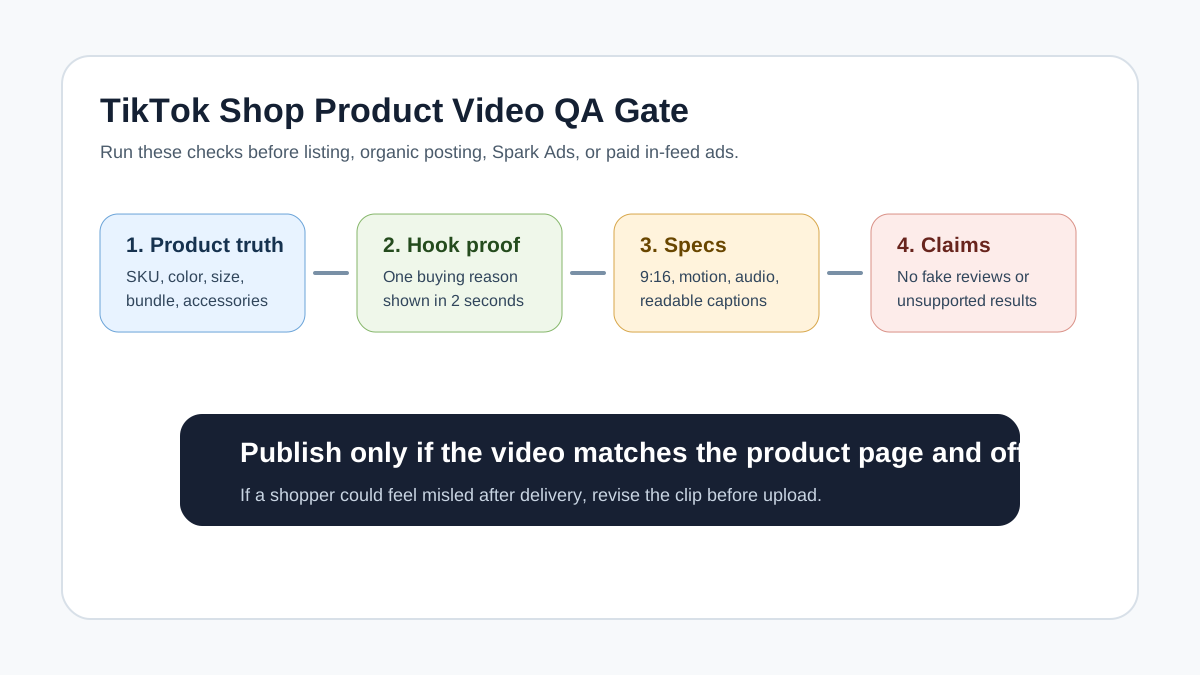
Quick Answer
Use a vertical 9:16 TikTok Shop product video that shows the product in the first two seconds, demonstrates one specific use case, keeps captions readable, and matches the product listing exactly. Before publishing, check product accuracy, listing compliance, ad specs, audio quality, intellectual property, testimonial claims, and whether the CTA leads to the correct product or offer.
For most ecommerce sellers, the best first version is not a polished brand film. It is a clear product demonstration: problem, product reveal, proof, objection, and CTA. A listing clip should make the product easy to understand. A TikTok ad version should add a stronger hook, faster pacing, and a testable offer.
TikTok Shop Product Video Checklist
Use this table before uploading or handing the clip to a media buyer.
| Check | Pass condition | Fix before publishing |
|---|---|---|
| Product visible early | The product or result appears in the first 1-2 seconds | Opening starts with logo, packaging, or vague lifestyle footage |
| Listing match | Color, size, bundle, accessories, and claims match the TikTok Shop listing | Video shows a variant or accessory not included in the product |
| One buying reason | The video proves one clear reason to buy | It tries to cover every benefit and becomes hard to follow |
| Native pacing | Shots change quickly but still show the product clearly | Slow cinematic intro or static slideshow |
| Captions | Large, high contrast, mobile-readable text | Tiny captions near the bottom or right interface rail |
| Audio | Clear sound, voiceover, music, or product sound | Silent ad version or muffled audio |
| Claims | Claims are visible, factual, and supported by the product page | Unsupported medical, performance, or before-after claims |
| Reviews and testimonials | Real customer proof is used accurately, or fictional examples are clearly ad-style | AI actor or creator appears to give a fake real-customer testimonial |
| IP and brand use | Logos, music, images, and competitor references are allowed | Unlicensed music, copied competitor footage, or confusing brand use |
| CTA | CTA matches the product, price, offer, and destination | Video promotes an expired discount or wrong product page |
Listing Video vs TikTok Ad Video
TikTok Shop sellers often reuse the same clip everywhere. That is efficient, but it can create a weak listing video or a weak ad. The same product proof can be reused, but the edit should change based on placement.
| Video type | Main job | Best structure | Risk to avoid |
|---|---|---|---|
| Product listing video | Help a shopper understand the item on the listing page | Product close-up, feature demo, scale, included items, simple CTA | Overly promotional claims that do not match the listing |
| Organic TikTok Shop post | Earn attention and drive discovery | Hook, demo, proof, objection, shop prompt | Looking like a static catalog clip |
| Spark Ad | Turn a post or creator-style asset into paid reach | Native hook, creator proof, product tag, CTA | Treating scripted claims as independent customer experience |
| Non-Spark in-feed ad | Drive clicks or purchases from paid traffic | Fast hook, product proof, offer, clear CTA | Weak audio, static visuals, or unreadable text |
| Retargeting cut | Answer the buyer's remaining objection | Review proof, price, bundle, guarantee, CTA | Repeating the same prospecting hook |
The safest workflow is to create one accurate product proof asset, then cut it into listing, organic, and paid versions. For example, a 25-second product demo can become a 15-second TikTok Shop post, a 12-second offer ad, and a 20-second retargeting clip.
The 5-Part Shot Map
A TikTok Shop product video should be planned before generation or filming. Use this shot map to avoid generic AI footage and unfocused creator clips.
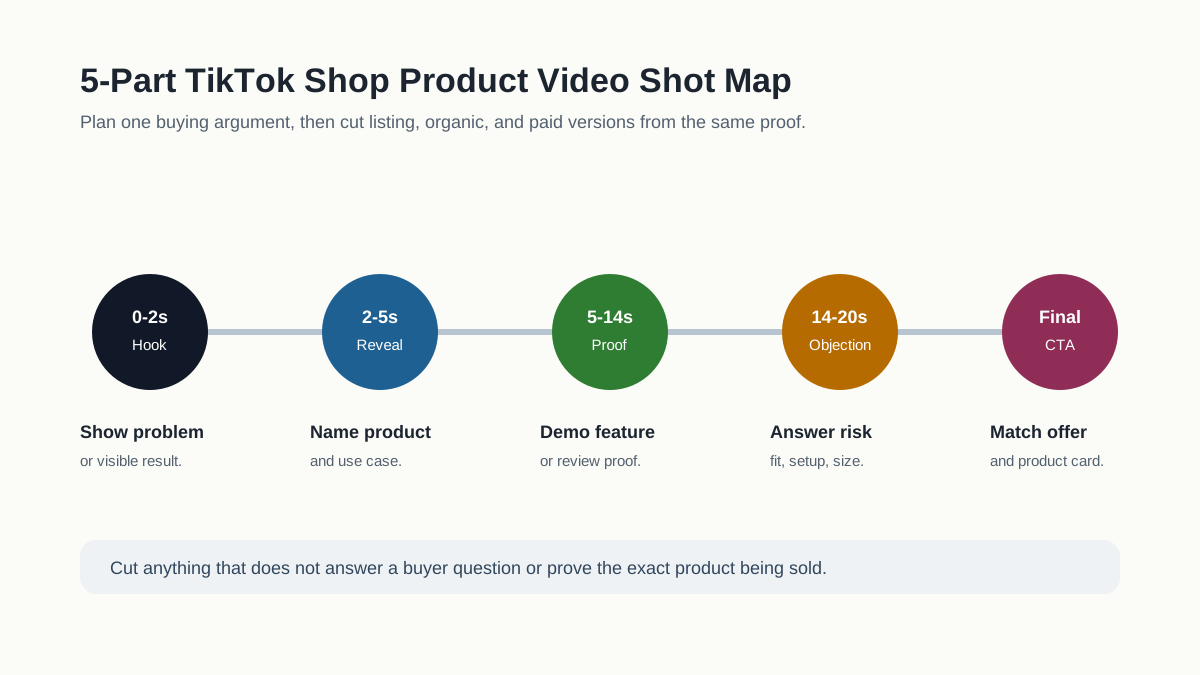
| Scene | Time | What to show | Example caption | QA note |
|---|---|---|---|---|
| Hook | 0-2 seconds | Problem, result, or surprising use moment | "No more messy desk cables" | Product or outcome must be visible immediately |
| Product reveal | 2-5 seconds | Product in hand, on surface, or in real context | "This magnetic dock keeps them sorted" | Do not hide the product behind effects |
| Proof | 5-14 seconds | Feature, texture, size, included parts, or before-after | "Three slots. One-hand release." | Claim must be visible or supported |
| Objection answer | 14-20 seconds | Cleaning, fit, compatibility, durability, setup, or shipping | "Fits USB-C, Lightning, and watch cables" | Do not imply unsupported compatibility |
| CTA | Final 2-4 seconds | Product packshot, price, bundle, or shop prompt | "Tap the product card for both colors" | CTA must match the live offer |
This structure works whether you film with a phone, brief a creator, or generate scenes from product images. The important point is that every scene has a commercial job. If a shot does not answer a buyer question, cut it.
Product Listing Checks Before the Video
TikTok Shop's product listing guidance emphasizes clear and accurate listings. For video, that means the clip must represent what the customer will receive. Do this before writing the script:
- Confirm the exact SKU, variant, color, size, and bundle shown in the video.
- List the included accessories and remove anything that is only a prop.
- Check whether the product has restricted claims, safety claims, ingredient claims, or regulated category limits.
- Pull one product-page proof point: customer review, material, measurement, guarantee, compatibility, or use case.
- Decide whether the video is for listing clarity, cold discovery, retargeting, or creator-style proof.
- Write one sentence the viewer should remember after watching.
For example, "portable blender" is too broad. "This cup-sized blender makes one smoothie at a desk without moving to the kitchen" is a stronger video brief because it names the use case, setting, and buying reason.
Creative Specs and Format Gate
TikTok's current in-feed ad specs recommend vertical 9:16 video and support common video file types. TikTok also states that ad content should be dynamic and should not rely on static images as the primary element. For ecommerce teams, that creates a practical standard even when the first version is organic or listing-focused.
| Asset requirement | Practical ecommerce recommendation |
|---|---|
| Aspect ratio | Build a 9:16 vertical master first |
| Resolution | Use at least 1080 x 1920 when possible, even if lower minimums exist |
| File type | Export MP4 or MOV from your editor or AI workflow |
| Motion | Use real product movement, hand interaction, scene changes, or caption motion |
| Audio | Include clear sound, voiceover, music, or product sound; do not rely on a silent ad |
| Caption placement | Keep important text center-safe and away from lower controls and right-side UI |
| Length | Keep first tests short: usually 12-30 seconds for product discovery |
If you are using AI-generated visuals, check that the AI did not change the product shape, logo, color, size, texture, or included accessories. A beautiful generated clip that changes the product is not publishable commerce creative.
Claim and Testimonial Safety
TikTok Shop content policy requires promoted content to be accurate, compliant, and consistent with the products being promoted. The FTC's review and testimonial guidance also matters when videos use creators, AI actors, review language, or influencer-style scripts.
Use this claim review table:
| Claim type | Safer use | High-risk use |
|---|---|---|
| Product feature | Show the feature operating in the video | Claiming a feature not visible or not in the listing |
| Before-after | Use only truthful, typical, supportable examples | Dramatic result with no substantiation |
| Review quote | Use real review language and do not change meaning | Invented review from an AI customer or fake buyer |
| Creator statement | Disclose sponsorship or commercial relationship where required | Presenting a paid or scripted statement as independent proof |
| Health, beauty, or supplement claim | Use cautious, verified product facts | Medical, weight-loss, cure, or guaranteed-result language |
| Scarcity or discount | Match the current live offer | "Today only" or price claim that is not true |
The most useful rule is simple: if a buyer could feel misled after receiving the product, fix the video before publishing.
Script Template for TikTok Shop Product Videos
Use this template to create a controlled first draft:
Hook: [Buyer problem or desired result in one short sentence]
Product reveal: [What the item is and who it is for]
Proof scene: [Visible feature, review proof, comparison, or demonstration]
Objection answer: [Size, cleaning, compatibility, setup, delivery, materials, or trust]
CTA: [One action that matches the product card or listing]
Claim limits: [What the video must not say]
Visual limits: [What the product must not be changed into]
Example:
Hook: Stop losing lip balm at the bottom of every bag.
Product reveal: This mini organizer keeps daily beauty items in one zip pouch.
Proof scene: Show balm, mirror, cards, and keys fitting in separate pockets.
Objection answer: Show the pouch inside a small crossbody bag.
CTA: Tap the product card to choose the color.
Claim limits: Do not claim waterproof unless the product page proves it.
Visual limits: Do not add extra pockets or a shoulder strap.
If you need more hook ideas, use the UGC video hooks for product ads. If you need a full script library, use the UGC scripts for product ads.
AI Workflow for Product Video Variants
AI is useful for TikTok Shop videos when it increases variant speed without weakening product truth. A good workflow looks like this:
- Collect product photos, PDP copy, real dimensions, customer review snippets, and current offer.
- Build the product truth file and claim limits.
- Generate or edit three hook variants, not one final video.
- Keep product proof and CTA stable across the first test.
- Export listing, organic, and paid versions separately.
- Run the QA checklist on a phone.
- Publish only the versions that match the listing and destination.
| Variant | Change | Keep stable |
|---|---|---|
| Problem hook | Different opening problem | Same product proof and CTA |
| Demo hook | Start with product action | Same offer and claim limits |
| Review hook | Lead with real review language | Same product footage and listing match |
| Retargeting cut | Answer one objection | Same product card and offer |
Do not generate random variations forever. TikTok Shop sellers need a controlled testing matrix, not a folder full of pretty clips that cannot be compared.
Pre-Publish QA Gate
Before publishing, watch the video once as a buyer and once as a policy reviewer.
| Gate | Buyer question | Publisher question |
|---|---|---|
| First frame | Do I know what product this is? | Is the product shown accurately? |
| Hook | Do I care within two seconds? | Is the hook truthful and not clickbait? |
| Demo | Can I see how it works? | Does the demo match the listing and included items? |
| Text | Can I read the main claim on a phone? | Is the caption away from interface overlays? |
| Audio | Can I understand the message without strain? | Is the audio licensed and clear? |
| Proof | Do I believe the benefit? | Is the proof visible, sourced, or supportable? |
| CTA | Do I know what to do next? | Does the CTA match the current product card, price, and offer? |
If the answer is unclear at any gate, do not publish yet. Regenerate, edit, or split the video into a simpler version.
Common TikTok Shop Video Mistakes
- Starting with a logo instead of the product or result.
- Showing lifestyle footage before the viewer understands what is being sold.
- Using AI scenes that change the product shape or included accessories.
- Treating a listing video like a brand film instead of a buying aid.
- Making a creator or AI actor sound like a real customer when the line is scripted.
- Putting price, discount, or CTA text too low on the screen.
- Reusing a paid ad cut as the only listing video even though it does not show size or contents.
- Publishing one asset everywhere without adapting for listing, organic, and paid use.
FAQ
What should a TikTok Shop product video include?
Include the product in the first two seconds, one clear use case, visible proof, readable captions, and a CTA that matches the product card or listing. The video should make the buying decision easier, not just look entertaining.
How long should a TikTok Shop product video be?
For first tests, keep most product videos around 12-30 seconds. Use shorter cuts for paid prospecting and slightly longer clips when the product needs a real demo, setup explanation, or objection answer.
Can I use AI-generated product videos on TikTok Shop?
Yes, but review them carefully. AI-generated product videos must still match the real product, listing, claims, offer, and destination page. Do not publish a video if the AI changes the product or invents proof.
Do TikTok Shop videos need captions?
Yes. Captions help shoppers understand the product quickly on mobile. Keep captions short, high contrast, and away from interface areas where buttons, product cards, or controls may cover them.
Are AI actors safe for TikTok Shop product videos?
They can be useful for explaining a product, but avoid fake testimonials. Do not make an AI actor appear to be a real customer with a real experience unless that is true and properly supported.