
If you want to compare pricing for UGC video production tools, do not start with the monthly subscription price. Start with one question:
How much does it cost to produce one usable video ad that your ecommerce team can actually test, publish, or add to a product page?
That number is usually different from the price shown on a pricing page. A $29 plan can be expensive if it only creates a few usable exports. A creator marketplace can look expensive per video but may include real product handling, usage rights, and revision support. An AI UGC tool can look cheap per draft but still waste budget if credits disappear during failed generations, avatar tests, or script changes.
This guide breaks down the pricing models behind UGC video production tools in 2026, including AI avatar tools, ecommerce product video generators, creator marketplaces, and hybrid workflows. The goal is not to rank every tool. The goal is to help you calculate the real cost before you pay.
For a broader tool comparison, use the UGC video tools comparison hub. If you need a wider production budget view first, read Ecommerce Video Production Cost: 2026 Pricing Guide.
Use cost per usable ad as the main buying metric.
A tool can look cheap on a pricing page and still be expensive if credits are consumed by weak drafts, revisions, watermark limits, or unclear usage rights.
Quick answer: how should ecommerce teams compare UGC tool pricing?
Compare UGC video production tools by cost per usable ad, not cost per month.
| Pricing signal | Why it matters | What to check before buying |
|---|---|---|
| Monthly price | Sets your baseline cash cost | Does the plan include enough exports for your creative testing volume? |
| Credits or video allowance | Controls how many attempts you get | Are revisions, regenerations, avatars, voiceover, and exports charged separately? |
| Usable output rate | Shows how many drafts survive review | How many generated videos are good enough to publish without major editing? |
| Usage rights | Determines whether ads can run on paid channels | Are commercial rights, paid media rights, and post-cancellation rights included? |
| Watermark and export limits | Affects publishability | Are watermark removal, HD export, and aspect ratios included? |
| Human review time | Adds hidden labor cost | How much time does your team spend fixing scripts, captions, pronunciation, and claims? |
For ecommerce sellers, this metric is more useful than "cost per generated video" because most paid creative workflows discard weak variants.
The 5 pricing models behind UGC video production tools
Most UGC video production tools fall into one of five models.
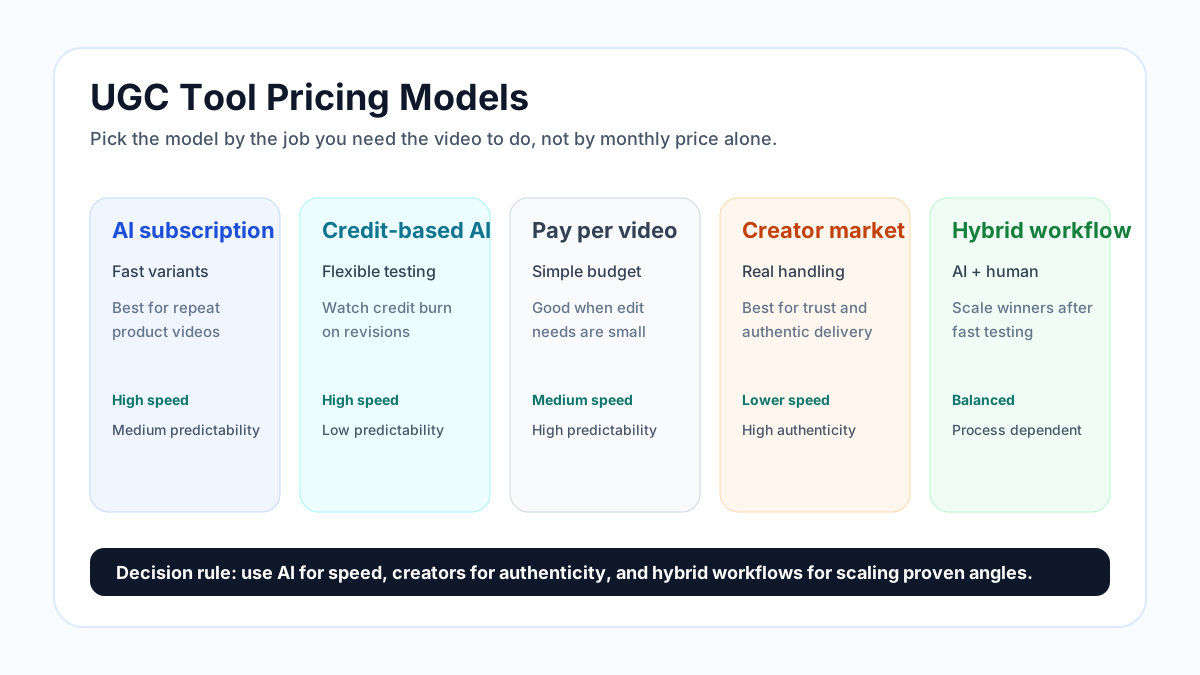
Visual guide: compare pricing models by speed, authenticity, and cost predictability before reading the detailed table.
| Model | Common pricing structure | Best for | Main risk |
|---|---|---|---|
| AI subscription tool | Monthly plan with video, minute, or credit limits | Repeat product videos and ad variants | Credits can disappear during failed attempts |
| AI credit-based tool | Pay for credits used across avatars, voices, videos, and premium models | Flexible teams testing many formats | Hard to predict cost per approved ad |
| Pay-per-video AI tool | Fixed number of videos per month or per purchase | Simple budgeting | Expensive if every edit consumes another video |
| Creator marketplace | Pay creators or buy creator credits | Real UGC, unboxing, testimonial, product handling | Slower turnaround and higher per-video cost |
| Hybrid workflow | AI drafts plus human creator or editor review | Scaling winners after fast testing | Needs strong process control |
The right model depends on whether you are paying for speed, authenticity, volume, or trust.
Real pricing signals from current UGC and AI video tools
Pricing changes often, so always verify the vendor's live pricing page before purchase. As of April 29, 2026, these examples show how different pricing models work.
Current pricing snapshot checked on April 29, 2026
This snapshot is not an apples-to-apples ranking. It shows how different platforms expose pricing, allowances, and cost traps. Always re-check the live pricing page before buying because AI video plans change often.
| Provider or workflow | Public price or allowance checked | Pricing unit to watch | What can change your real cost |
|---|---|---|---|
| HeyGen | Free: $0/month with 3 videos per month. Creator: $29/month. Pro: $99/month. Creator includes AI voiceover, voice cloning, 1080p export, and 175+ languages and dialects. Source: HeyGen pricing. | Plan tier, video length, export quality, premium usage | Premium AI features, 4K needs, translation, avatar use, and team workflow |
| Creatify | Free: 10 monthly credits and up to 2 video ads with watermark. Starter: $33/month, 100 credits, up to 20 videos per month, 300 AI actors, 75+ languages, watermark removal. Source: Creatify pricing. | Credits and video allowance | Revisions, premium models, larger actor library, video duration, and ad-launch features |
| MakeUGC | Monthly page shows Start up at $49/month for 5 AI-generated videos and Growth at $69/month for 10 AI-generated videos. It also lists credit costs for models and says edits to an already generated video can count as a new video credit. Source: MakeUGC pricing. | Video allowance plus model credits | Product-in-hand feature tier, model choice, edits, custom avatars, batch mode, and credit burn |
| Trend | Starter package: $550 for up to 6 videos or 15 photos, shown as $91.67 per video. Larger packages show lower per-video pricing, down to $69.14 per video on the Scale package. Source: Trend pricing. | Creator credits and package size | Shipping, creator selection, brief complexity, package size, and renewal cadence |
| Insense | UGC campaigns start at $100 per video. Platform notes creator collaboration cost varies by raw assets, edited assets, expert support, and collaboration type. Source: Insense pricing. | Creator fee plus platform/transaction fees | Raw footage, edited footage, revision rounds, creator tier, usage rights, and TikTok Shop commission models |
| ElevenLabs voice layer | Text to Speech is billed per character. Speech to Text is billed per audio minute. Dubbing is billed per source audio minute. Source: ElevenLabs API pricing. | Characters, audio minutes, dubbing minutes | Script length, localization, voice cloning, dubbing, and regeneration volume |
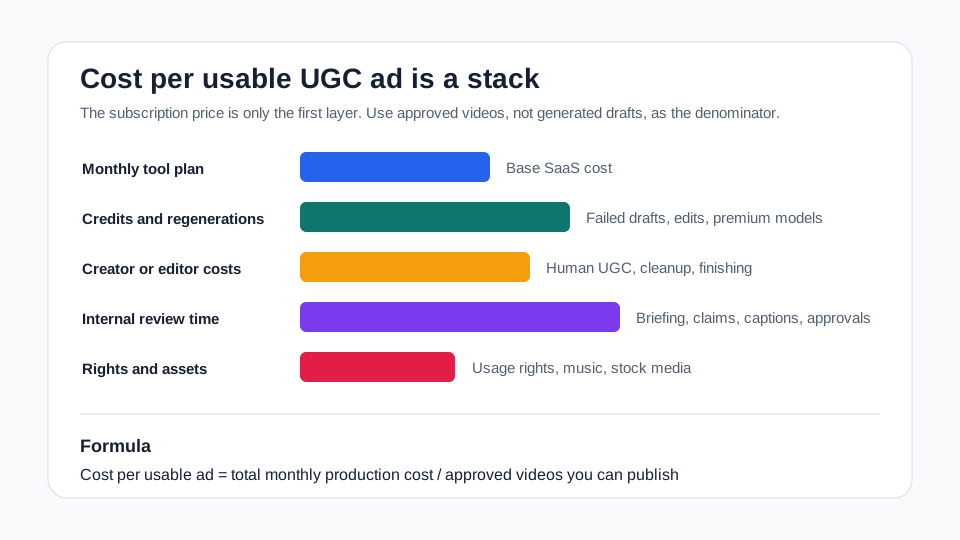
The chart above shows why the cheapest monthly subscription is not always the cheapest production workflow. The more drafts you reject, the more cost shifts from "tool price" to "review time, retries, and rights."
| Tool or platform type | Public pricing signal | What ecommerce teams should learn from it |
|---|---|---|
| HeyGen-style AI avatar video tools | HeyGen lists a free tier with 3 videos per month, a Creator plan at $29/month, and a Pro plan at $99/month, with features such as AI voiceover, voice cloning, HD exports, and larger premium usage tiers on paid plans. Source: HeyGen pricing. | Low entry cost does not mean low production cost. Check export quality, premium usage, video length, language support, and whether avatar or voice features are included in your tier. |
| Creatify-style AI ad generators | Creatify lists a free plan with 10 monthly credits and watermarked exports. Its Starter plan shows $33/month, 100 credits, and up to 20 videos per month. Source: Creatify pricing. | Credits are the real constraint. You need to understand whether one video, one revision, one avatar, or one premium model consumes credits differently. |
| MakeUGC-style AI UGC tools | MakeUGC says each subscription includes a specific number of videos and access to AI video creation, an ad maker, script maker, video licensing, and 150+ avatars. It also states that edited already-generated videos can count as a new video credit unless the issue is a system error. Source: MakeUGC pricing. | Revision economics matter. A tool can be affordable for first drafts but more expensive if small changes burn new video credits. |
| Creator marketplaces | Trend's public packages show videos starting around $91.67 each at entry package level and around $69.14 each at larger package level, with full licensing and distribution rights included. Source: Trend pricing. | Human UGC can be more expensive per asset, but it may include real product use, creator selection, and distribution rights. |
| Influencer and UGC marketplaces | Insense says UGC campaigns start at $100 per video and that creator cost varies by collaboration type, raw assets, edited assets, and expert support. Source: Insense pricing. | Human creator pricing is not just production cost. Rights, raw footage, revision policy, shipping, and campaign complexity affect the real price. |
These examples show why "which tool is cheapest?" is the wrong question. A better question is:
Which workflow gives you the lowest cost per approved video for the type of creative you need?
Cost per generated video vs cost per usable video
UGC tools often make the first number easy and the second number invisible.
| Metric | What it means | Why it can mislead |
|---|---|---|
| Cost per generated video | Plan cost divided by total generated exports | Includes unusable drafts, broken scripts, weak avatars, wrong pacing, and failed creative angles |
| Cost per usable video | Plan cost divided by videos that pass review and get published | More accurately reflects ad testing and ecommerce production economics |
| Cost per winning video | Total production cost divided by videos that beat your control creative | Useful for paid media, but needs ad performance data |
Example:
The numbers below are illustrative planning examples, not market averages. Use them to understand the calculation method, then replace them with your own tool plan, creator quote, and approval rate.
| Scenario | Monthly cost | Generated videos | Usable videos | Cost per generated video | Cost per usable video |
|---|---|---|---|---|---|
| Tool A looks cheap | $49 | 30 | 6 | $1.63 | $8.17 |
| Tool B looks expensive | $99 | 40 | 20 | $2.48 | $4.95 |
| Human UGC batch | $700 | 8 | 7 | $87.50 | $100.00 |
Tool A wins if you only count generated exports. Tool B wins if you count approved variants. Human UGC may still win for products where real handling and trust are more important than volume.
Hidden costs that change UGC tool pricing
The headline price rarely includes the full workflow.
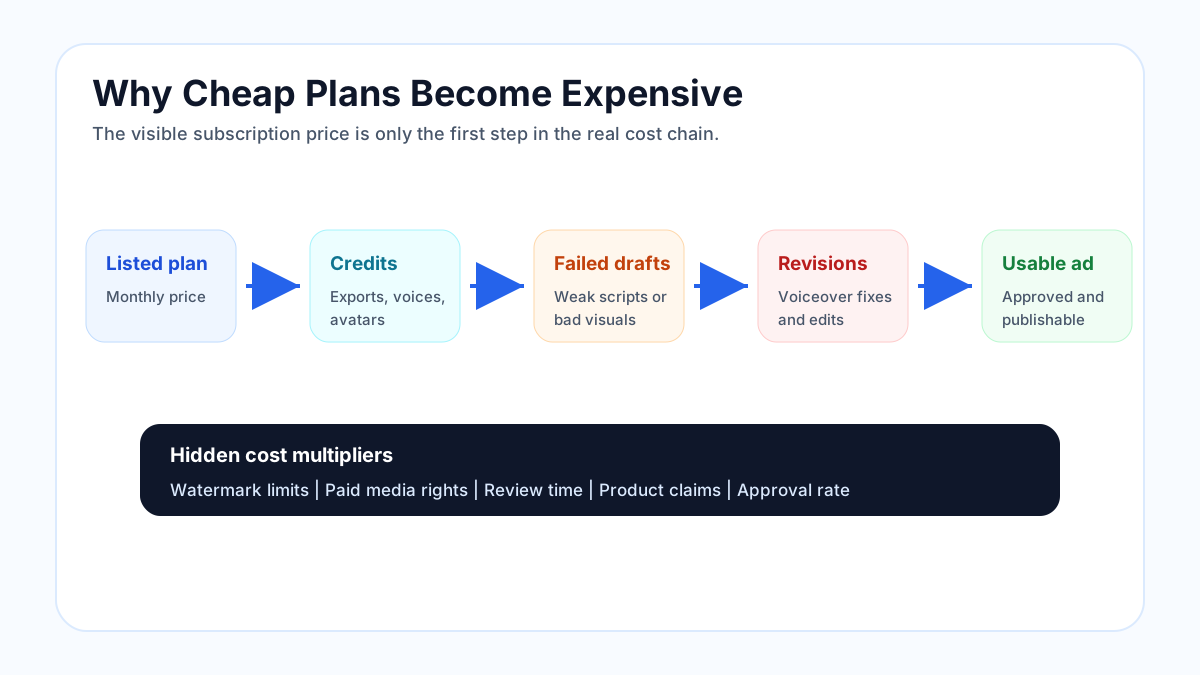
Hidden-cost map: credits, failed drafts, revisions, usage rights, and review time all change the real cost per usable ad.
1. Failed attempts
AI UGC tools are improving, but not every generation is usable. You may reject drafts because the avatar looks unnatural, the product is not shown clearly, the script sounds fake, the pacing is too slow, or the CTA feels wrong.
When comparing tools, ask:
- Do failed generations consume credits?
- Can you preview scripts before rendering?
- Can you edit captions, timing, pronunciation, and B-roll before final export?
- Does a minor edit count as a new video?
2. Revision policy
Revision rules matter more than most buyers expect. Some tools treat edits as a new generation. Some creator marketplaces include limited revision rounds. Insense, for example, describes a revision process that allows up to three revisions before content acceptance under its terms and conditions. Source: Insense pricing.
For ecommerce, revisions are common because product videos often need:
- Correct pronunciation of product names
- Accurate claim wording
- Better product close-ups
- Stronger hook timing
- Platform-safe captions
- Updated offer, price, or promo language
3. Commercial usage rights
Usage rights can change the real price. Organic social use, paid ads, whitelisting, Spark Ads, Amazon listings, Shopify product pages, and email embeds can require different terms depending on the platform or creator.
Before paying, confirm:
- Can you run the video as paid advertising?
- Can you use it on product pages?
- Can you use it after canceling the subscription?
- Are stock clips and music royalty-free?
- Are avatar likeness, voice, and creator permissions covered?
MakeUGC states that users own their creatives after the plan ends and can use them across channels without restrictions, with royalty-free stock footage. Source: MakeUGC pricing. That kind of usage-rights language is worth checking on every tool.
4. Voiceover and localization
Voiceover can be included, credit-based, or routed through another platform. If your UGC workflow needs multiple languages, voice cloning, or high-quality narration, audio cost can become a separate line item.
Dedicated audio platforms often meter usage differently from video tools. ElevenLabs, for example, states that Text to Speech is billed per character, Speech to Text per audio minute, and dubbing per source audio minute. Source: ElevenLabs API pricing.
If voiceover is central to your ad style, read Compare AI Voiceover Options in UGC Video Tools.
5. Team time
Even low-cost AI video can become expensive if a marketer spends hours fixing every output. Count internal review time when comparing tools.
Use this estimate:
Internal review cost =
review hours per month x hourly cost of marketer or founder time
If a $49 tool needs 10 hours of cleanup and a $99 tool needs 2 hours, the $99 tool may be cheaper in real business terms.
Ecommerce scenarios: which pricing model works best?
Scenario 1: Solo Shopify seller testing 3 products
You need:
- 3 product demo videos
- 3 hooks per product
- 2 CTAs per product
- Basic captions
- 9:16 exports for TikTok, Reels, and Shorts
Best pricing model:
AI product video subscription or AI UGC tool.
Why:
You need volume and speed more than a perfect creator endorsement. The goal is to test product angles, not produce a brand film.
Internal links:
Scenario 2: TikTok Shop seller launching a new product
You need:
- Product hook videos
- Creator-style demos
- Objection-handling clips
- Offer-led variants
- Fast refresh cycles
Best pricing model:
Hybrid AI plus selective human UGC.
Why:
AI can generate many early variants quickly. Human UGC can help once you know which angle deserves a more authentic creator version.
Internal link:
Scenario 3: Paid media team refreshing Meta and TikTok ads weekly
You need:
- 20 to 50 variants per month
- Different hooks and first frames
- Product demo edits
- 9:16, 4:5, and 1:1 exports
- Clean usage rights
Best pricing model:
Credit-based AI ad generator or ecommerce AI video workflow.
Why:
Paid media needs creative testing velocity. According to IAB's 2025 Digital Video Ad Spend and Strategy Full Report release, 86% of video buyers were using or planning to use GenAI for video ad creative, and buyers projected GenAI creative would reach 40% of all ads by 2026. Source: IAB.
Internal link:
Scenario 4: High-trust product category
You need:
- Real product use
- Clear claims
- Authentic creator delivery
- Strong compliance review
- Maybe expert or customer proof
Best pricing model:
Human creator marketplace, then AI repurposing for variants.
Why:
If the product depends on trust, transformation, health-adjacent claims, financial outcomes, or personal results, fake-feeling UGC can damage credibility. Use real creator footage where authenticity matters, then use AI to create cutdowns, captions, hooks, and platform versions.
Important compliance note:
The FTC's final rule on fake reviews and testimonials addresses reviews and testimonials that misrepresent that they are from someone who does not exist, including AI-generated fake reviews, or from someone who did not have real experience with the product. Source: FTC.
Do not use AI avatars or synthetic voices to invent customer experiences.
Pricing comparison checklist
Use this checklist before choosing a UGC video production tool.
| Question | Why it matters |
|---|---|
| How many final exports are included? | Prevents overpaying for a plan that cannot support your monthly creative volume |
| How are credits consumed? | Shows whether revisions, premium avatars, voices, or model upgrades increase cost |
| What counts as a video? | Some tools count a tiny edit as a new video |
| Are watermarks removed? | Watermarked videos are usually not suitable for paid ads |
| Is HD export included? | Product detail matters on PDPs and ads |
| Are commercial rights included? | Paid usage rights are required for ad workflows |
| Can you keep using videos after canceling? | Avoids losing asset value when you switch tools |
| Does the tool support your platforms? | TikTok, Reels, YouTube Shorts, Facebook Ads, Shopify, and Amazon need different formats |
| Can it show the actual product? | Avatar-heavy UGC tools may underperform for products that need close visual inspection |
| How much team time does review take? | Labor can exceed subscription cost |
A simple cost model you can copy
Use this sheet structure:
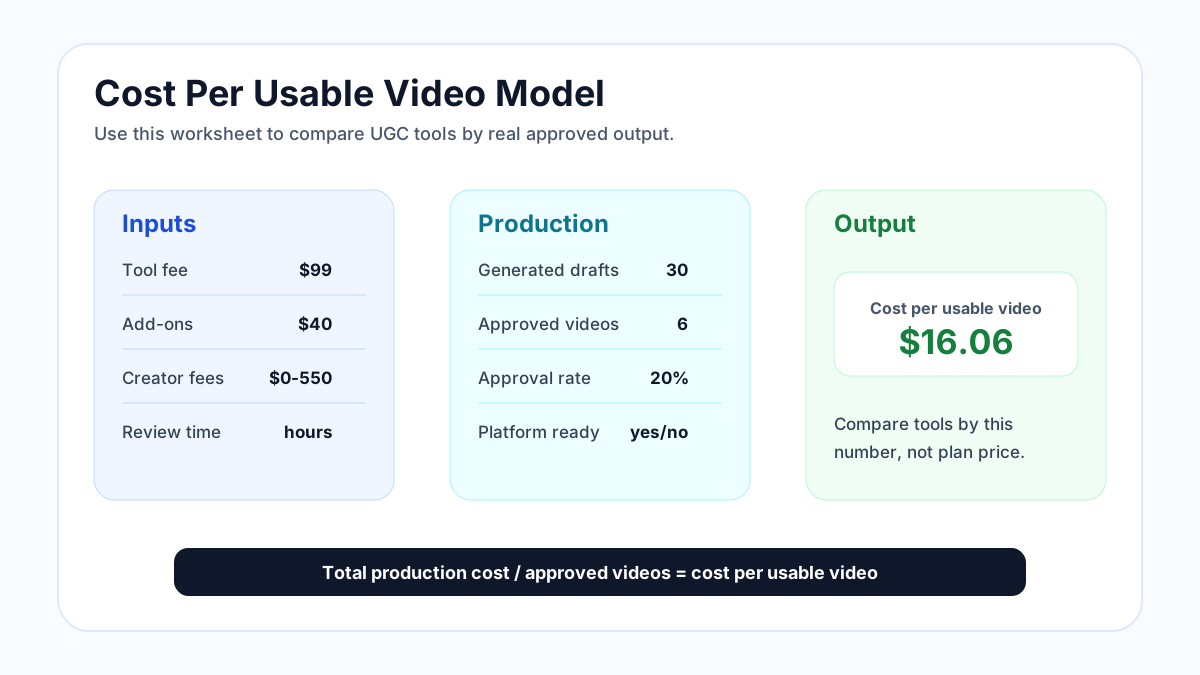
Worksheet view: total production cost divided by approved videos gives a clearer tool comparison metric than plan price.
The sample values below are placeholders for budgeting. They are not a claim about any specific vendor's performance.
| Input | Example value |
|---|---|
| Monthly tool cost | $99 |
| Extra credits or add-ons | $30 |
| Creator or editor cost | $0 |
| Internal review hours | 4 |
| Internal hourly cost | $40 |
| Total generated videos | 40 |
| Usable videos | 18 |
Calculation:
Total monthly production cost = $99 + $30 + (4 x $40)
Total monthly production cost = $289

Cost per generated video = $289 / 40 = $7.23
Cost per usable video = $289 / 18 = $16.06
Now compare this with a creator marketplace:
| Input | Example value |
|---|---|
| Creator package | $700 |
| Shipping samples | $60 |
| Internal brief and review time | $120 |
| Delivered videos | 8 |
| Usable videos | 7 |
Total production cost = $880
Cost per usable video = $880 / 7 = $125.71
The AI workflow is cheaper for variant testing. The creator workflow may still be worth it when real handling, credibility, or human expression matters.
Where ShopShot fits in the pricing decision
ShopShot is built for ecommerce teams that need product-first videos without filming. That makes it different from generic video editors and avatar-first UGC tools.
Use ShopShot when your priority is:
- Turning product images into short product videos
- Creating multiple variants for the same SKU
- Building product page, TikTok Shop, Reels, and Shorts assets quickly
- Testing hooks before paying for creator production
- Reducing dependency on filming, agencies, or manual editing
Use a human creator marketplace when your priority is:
- Real unboxing footage
- True customer or creator experience
- Creator likeness and audience trust
- Lifestyle footage in a real setting
Use both when:
- You want AI for testing and creator content for winners
- You need catalog-scale coverage plus occasional human-led campaigns
- You want to reduce production cost without removing authenticity from every asset
Helpful next reads:
- Best AI Video Generators for E-Commerce Sellers
- How to Create E-Commerce Product Videos with AI
- Promotional Video Company vs AI Tools
- Best UGC Video Creation Tools for Instagram Reels
Common pricing mistakes
Mistake 1: Buying the cheapest plan before defining monthly creative volume
If your team needs 30 usable videos per month, a plan that only supports 5 to 10 useful outputs will slow you down.
Mistake 2: Ignoring revision cost
UGC videos often need small changes. A weak revision policy can turn a cheap plan into an expensive one.
Mistake 3: Treating AI UGC and real UGC as direct substitutes
They solve different problems. AI is strong for speed, testing, product coverage, and format variation. Human UGC is strong for lived experience, trust, and authentic product handling.
Mistake 4: Forgetting usage rights
If you plan to run ads, use videos on product pages, or keep assets after canceling, rights language matters.
Mistake 5: Counting every generated draft as production success
Generated does not mean usable. Usable means the video is accurate, brand-safe, platform-ready, and strong enough to publish.
FAQ
What is the cheapest UGC video production tool?
The cheapest tool depends on how many videos you can actually publish. A low monthly price can be expensive if credits are limited, exports are watermarked, or most drafts need heavy editing. Compare cost per usable video, not just subscription price.
Are AI UGC tools cheaper than human creators?
Usually, yes for high-volume testing. AI tools can create many variants quickly. Human creators usually cost more per video, but they can provide real product use, authentic delivery, and stronger trust for sensitive or high-consideration products.
How much should I budget for UGC video tools each month?
For early ecommerce testing, budget around one tool subscription plus time for review and editing. For paid media testing, budget based on the number of usable variants you need, not the number of drafts you expect to generate.
What is the biggest hidden cost in UGC video production tools?
The biggest hidden cost is usually unusable output. Failed generations, weak scripts, bad pronunciation, unclear product visuals, and extra revision cycles increase the real cost per approved video.
Should I choose a credit-based UGC tool or a creator marketplace?
Choose a credit-based AI tool when you need fast variant testing and product coverage. Choose a creator marketplace when you need real product handling, authentic creator delivery, and stronger trust. Many ecommerce teams use AI first, then pay creators for proven angles.