
When you compare AI voiceover options in UGC video tools, the best choice is not always the most realistic voice. For ecommerce videos, the best voiceover option is the one that makes the product clear, keeps claims accurate, fits the platform, and can be produced at the volume your store needs.
For most ecommerce teams:
- Use built-in AI voiceover when speed and volume matter most.
- Use dedicated text-to-speech tools when pronunciation, localization, or audio quality matters more.
- Use voice cloning only when you have clear consent and a real reason to preserve a specific voice.
- Use human voiceover when the product needs trust, emotion, or personal experience.
- Use no voiceover when captions, product visuals, and music communicate faster than speech.
This guide compares the main AI voiceover options for UGC-style product videos, TikTok Shop videos, Instagram Reels, YouTube Shorts, Facebook ads, and Shopify product page videos.
If you are comparing the full tool stack, start with the UGC video tools comparison hub. If cost is your main question, read Compare Pricing for UGC Video Production Tools.
Quick comparison: which AI voiceover option should you use?
| Voiceover option | Best for | Main advantage | Main risk |
|---|---|---|---|
| Built-in AI voice inside a UGC tool | Fast product videos, batch variants, early ad tests | Fastest workflow | Voice may sound generic or mispronounce product terms |
| AI avatar voice | Talking-head UGC, scripted demos, founder-style explainers | Synchronized with avatar delivery | Can feel fake if the voice and visual performance do not match |
| Dedicated text-to-speech tool | Higher-quality narration, localization, pronunciation control | Better audio control | Adds another workflow step and pricing model |
| Voice cloning | Founder voice, creator voice, brand spokesperson voice | Consistency across many videos | Requires consent, rights control, and careful disclosure |
| Human voiceover | Trust-sensitive products, premium launches, emotional storytelling | Most natural and expressive | Slower and more expensive |
| Captions-only | Product demos, quick hooks, silent-first social feeds | Lowest friction and no voice risk | Less emotional range and weaker accessibility if captions are poor |
The most practical ecommerce workflow is often:
Generate 5-10 script variants -> create AI voiceover drafts -> test short videos -> replace winning voiceovers with better AI or human audio if needed
Specific voiceover options to compare
Use this table before choosing a UGC video tool or a separate AI voice tool. The best option depends on whether your bottleneck is speed, audio quality, trust, localization, or consent.
| Voiceover option | Example tools or workflow | Best ecommerce use case | Cost or rights signal to check | Watch-out |
|---|---|---|---|---|
| Built-in AI voice inside video tools | HeyGen-style, Creatify-style, MakeUGC-style workflows | Fast ad variants, product demos, short PDP explainers | Whether voiceover is included in the plan or consumes credits | Generic voices, pronunciation errors, weak emotion |
| Avatar-synced voice | AI presenter or talking-avatar tools | Talking-head explainers where a presenter helps simplify the product | Whether avatar, voice, lip-sync, and export quality share the same credit pool | Avatar and voice mismatch can feel fake |
| Dedicated TTS or API voice | ElevenLabs-style TTS and dubbing workflows | Higher-quality narration, localization, product-name pronunciation control | Text-to-speech characters, audio minutes, custom voice rights, dubbing minutes | Adds another tool and cost model |
| Consent-based voice clone | Founder voice, licensed creator voice, approved spokesperson voice | Scaling a known voice across many product videos | Written consent, commercial rights, revocation terms, platform disclosure rules | Highest legal and trust risk if consent is unclear |
| Human creator or voice actor | Real UGC creator, founder recording, hired voice actor | Testimonials, premium launches, trust-sensitive products | Usage rights, paid ad rights, revision rounds, raw audio ownership | Slower, more expensive, harder to revise at scale |
| Platform-native voice or captions | CapCut/TikTok-style editing flow, captions-only social videos | Visual-first demos, quick hooks, silent-feed variants | Whether audio/captions are exportable without watermark and usable commercially | Less brand control and weaker emotional range |
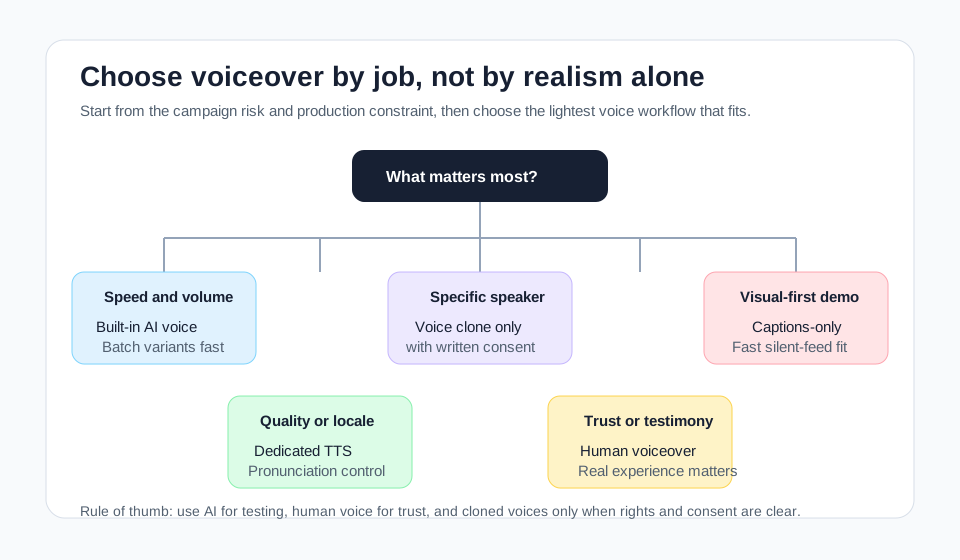
The decision map keeps the voiceover choice tied to the job. Use AI voice for fast testing, dedicated TTS for quality and localization, human voice for trust, and cloned voices only when permission is documented.
Data note: this article compares voiceover workflows for ecommerce UGC videos. It does not claim to be a hands-on lab ranking of every voice model. Pricing, metering, and platform-policy references were checked on April 29, 2026; voice quality should still be tested with your own product names, scripts, and target languages before purchase.
Why voiceover matters more in UGC videos than in polished brand videos
UGC-style videos are built around perceived authenticity. A polished brand video can use a voiceover that sounds like a commercial. A UGC-style video usually needs a voice that feels informal, specific, and believable.
In ecommerce, voiceover affects:
- Whether the viewer understands the product in the first 3 seconds
- Whether the video sounds like a real person or a scripted ad
- Whether product names and feature claims are accurate
- Whether captions align with spoken words
- Whether the ad feels native to TikTok, Reels, Shorts, or Meta placements
- Whether the brand avoids fake-testimonial risk
The voice is not just audio. It is part of the trust signal.
Option 1: Built-in AI voiceover inside UGC video tools
Built-in AI voiceover is the fastest option. Many UGC video tools and AI video generators let you paste a script, choose a voice, and render a video without leaving the editor.
Use it when:
- You need many product video variants quickly
- You are testing hooks, objections, and CTAs
- The script is simple and factual
- The video is for early paid ad testing
- You do not need a specific creator identity
Watch out for:
- Product name mispronunciation
- Robotic pacing
- Overly polished "AI announcer" tone
- Weak emotional range
- Limited control over pauses and emphasis
- Credits consumed during voice retries
Best ecommerce use cases:
| Video type | Built-in AI voice fit |
|---|---|
| TikTok Shop product demo | Strong fit if the script is short and direct |
| Shopify product page explainer | Strong fit for factual feature walkthroughs |
| Instagram Reel product teaser | Good fit when voice is secondary to visual hook |
| UGC testimonial | Risky if the voice implies real customer experience |
| High-consideration product ad | Use cautiously; human or founder voice may perform better |
Built-in AI voiceover is usually the right starting point. It helps you learn which scripts deserve better audio before you spend money on a human voice or custom clone.
Option 2: AI avatar voice
AI avatar UGC tools combine a synthetic person, a script, and a matching synthetic voice. This can work well for scripted product pitches, especially when you need a talking-head format.
Use it when:
- The video needs a person speaking directly to camera
- The product benefits from a presenter explaining the value
- You need fast variations of the same script
- The message is factual and not framed as a real customer experience
Avoid it when:
- The product needs real handling or physical demonstration
- The avatar claims personal experience it did not have
- The voice sounds too polished for the platform
- The viewer needs to inspect product texture, scale, fit, or movement
AI avatar voiceover works best when the script is written like a creator would actually speak:
Weak:
This revolutionary multifunctional product enhances your daily lifestyle experience.
Stronger:
I would use this for one thing: fixing the messy corner on my desk without buying another shelf.
The second version sounds more native because it gives a concrete use case and avoids generic product language.
Option 3: Dedicated text-to-speech tools
Dedicated text-to-speech tools are useful when the built-in voice inside a UGC video tool is not good enough. They usually give you more control over voice style, pronunciation, language, pacing, and sometimes API workflows.
Use dedicated TTS when:
- You need better pronunciation for brand or product names
- You need multiple languages
- You need consistent voice across many videos
- You want to separate audio generation from video generation
- You are producing larger campaigns where audio quality affects performance
Dedicated tools may price audio differently from video tools. ElevenLabs states that Text to Speech is billed per character, Speech to Text per audio minute, and dubbing per source audio minute. It also says custom voices can be referenced through the API, including professional, cloned, and designed voices. Source: ElevenLabs API pricing.
That matters because your cost model changes:
Video tool pricing = credits, videos, minutes, exports
Voice tool pricing = characters, audio minutes, dubbing minutes, voice features
If your videos use many script variations, voice cost can grow with every rewrite. Keep scripts short during testing, then polish the winning versions.
Option 4: Voice cloning
Voice cloning can be useful, but it is the highest-risk AI voiceover option.
Good use cases:
- A founder wants a consistent voice across product videos
- A brand has licensed a spokesperson voice
- A creator has explicitly granted permission for synthetic versions
- A team needs localized dubs while preserving a known speaker identity
Bad use cases:
- Cloning a creator without written consent
- Cloning a customer voice to simulate a testimonial
- Cloning a celebrity or competitor voice
- Making a voice say something the real person never endorsed
- Creating fake customer reviews or fake product experience
Compliance matters here. The FTC's final rule on fake reviews and testimonials addresses testimonials that misrepresent that they come from someone who does not exist, including AI-generated fake reviews, or from someone who did not actually experience the product. Source: FTC.
For UGC ads, the practical rule is simple:
Do not use voice cloning to manufacture trust.
Use it only to scale a voice you have the right to use.
Option 5: Human voiceover
Human voiceover is still the best choice when trust, emotion, and nuance matter more than speed.
Use human voiceover when:
- The product is expensive or high-consideration
- The script needs emotional delivery
- The ad is built around founder credibility
- The video includes real creator footage
- The category has compliance sensitivity
- A synthetic voice makes the claim feel less believable
Human voiceover is slower. It may require hiring, recording, revisions, rights management, and editing. But for some products, a real voice can outperform a synthetic one because the viewer hears hesitation, emphasis, rhythm, and personality.
Use AI voice for volume. Use human voice when the voice itself carries trust.
Option 6: Captions-only UGC videos
Not every UGC video needs voiceover. Many short-form product videos work with captions, product visuals, and music.
Captions-only can work well for:
- Visual before-and-after demos
- Product reveal videos
- Fast hook videos
- Silent-first social feeds
- Comparison videos with clear on-screen labels
- Product page clips where the shopper is already reading
Captions-only is weaker when:
- The product needs explanation
- The hook depends on personality
- The offer is complex
- The buyer needs reassurance
- The video is used in placements where sound is common
For ecommerce teams, the right test is not "voiceover or no voiceover." Test both.
Variant A: AI voice + captions
Variant B: captions only
Variant C: human voice + captions
Then compare thumb-stop rate, hold rate, click-through rate, add-to-cart rate, and product page engagement.
Match voiceover style to video intent
| Video intent | Recommended voiceover option | Why |
|---|---|---|
| Hook testing | Built-in AI voice or captions-only | Fast and cheap enough to test many angles |
| Product feature demo | Built-in AI voice or dedicated TTS | Needs clarity and pronunciation accuracy |
| Founder-led story | Founder recording or consent-based voice clone | Trust depends on speaker identity |
| Customer-style testimonial | Real creator voice | Synthetic testimonial can create trust and compliance risk |
| Product comparison ad | Dedicated TTS or human voice | Requires controlled pacing and precise wording |
| Multilingual localization | Dedicated TTS or dubbing tool | Better language and pronunciation control |
| Shopify PDP explainer | Built-in AI voice, dedicated TTS, or captions-only | Depends on how much explanation the product needs |
| TikTok Shop video | Built-in AI voice, creator voice, or captions-only | Native feel matters more than studio polish |
For Shopify-specific workflows, see How to Make Product Videos for Shopify Without a Camera. For TikTok Shop, read How to Make TikTok Shop Product Videos with AI.
Platform and disclosure considerations
AI voiceover is not just a creative choice. Platforms increasingly care about synthetic media transparency.
YouTube Shorts
YouTube says creators must disclose meaningfully altered or synthetically generated content when it seems realistic. Its examples include cloning someone else's voice to create voiceovers or dubs, while cloning one's own voice for voiceovers or dubs is listed among examples that do not require disclosure by creators. Source: YouTube Help.
For ecommerce Shorts:
- Disclose realistic synthetic content when required.
- Do not make an AI voice sound like a real person gave advice if they did not.
- Keep claims tied to the product page and substantiation.
TikTok
TikTok says people are required to label AI-generated content that contains realistic images, audio, or video, and it has also described automatic labeling efforts for AI-generated content. Sources: TikTok AI labels and TikTok transparency update.
For TikTok Shop videos:
- Label realistic AI-generated audio or avatar content when required.
- Avoid fake creator or fake customer claims.
- Use AI voiceover for product facts, not invented personal experience.
Meta ads
Meta says it labels ads created or significantly edited using its in-house generative AI creative features, with more visible labeling when a photorealistic AI-generated human is included. Source: Meta.
For Facebook and Instagram ads:
- Expect transparency norms to keep tightening.
- Keep synthetic presenter videos factual.
- Do not rely on fake identity or fake testimonial framing.
Voiceover evaluation scorecard
Use this scorecard before choosing a voiceover option.
| Criterion | What good looks like | Score 1-5 |
|---|---|---|
| Naturalness | Sounds like a person speaking naturally, not a polished ad read | |
| Product clarity | Pronounces product name, feature terms, sizes, and materials correctly | |
| Platform fit | Sounds native to TikTok, Reels, Shorts, or Meta instead of like a TV commercial | |
| Trust fit | Does not overclaim or imply fake personal experience | |
| Editing control | Lets you adjust pauses, emphasis, pacing, and pronunciation | |
| Localization | Supports your target languages and accents without awkward delivery | |
| Cost control | Pricing stays predictable across script variants and revisions | |
| Rights and consent | Voice rights are clear, especially for cloned or creator voices | |
| Workflow speed | Does not slow down video production or publishing | |
| Caption alignment | Spoken words match captions and on-screen claims |
As an internal QA heuristic, any voiceover below 35 out of 50 should not be used in paid ads without revision. Treat this as a review threshold, not an industry benchmark.
A practical workflow for ecommerce UGC voiceover
Step 1: Build a product truth file
Before generating voiceover, write a short source document:
- Product name
- One-sentence value proposition
- Top 3 features
- Top 3 buyer objections
- Allowed claims
- Claims to avoid
- Product dimensions, material, fit, compatibility, or setup notes
- Offer and CTA
This prevents AI voice scripts from drifting into generic or inaccurate claims.
Step 2: Write voice scripts like spoken UGC
Use short lines. Avoid brand-speak.
Weak:
Our innovative design enables an enhanced user experience for modern lifestyles.
Better:
This is the part I care about: it folds flat, so it actually fits in the drawer.
Step 3: Generate 3 voice directions
Create at least three versions:
- Direct and practical
- Curious and conversational
- Fast and offer-led
Do not judge only by realism. Judge by whether the voice makes the product easier to understand.
Step 4: Check claims and pronunciation
Before rendering final videos, review:
- Product name
- Brand name
- Measurements
- Ingredient or material claims
- Before-and-after language
- Shipping, discount, and guarantee wording
- Any statement that sounds like personal experience
Step 5: Pair voiceover with captions
Most short-form videos still need captions. Captions help with silent viewing and reduce misunderstanding.
Use captions to reinforce:
- Product name
- Key benefit
- Proof point
- Offer
- CTA
Avoid captions that contradict the voiceover or add unsupported claims.
Step 6: Test voice variants against creative performance
For ads, compare:
- 3-second hold rate
- Average watch time
- Click-through rate
- Cost per click
- Add-to-cart rate
- Purchase conversion rate
- Comment quality
The best-sounding voice is not always the best-performing voice. Let performance data decide.
How ShopShot users should think about voiceover
ShopShot is built for ecommerce product video workflows, so the voiceover should support the product instead of becoming the whole ad.
Use AI voiceover in ShopShot-style workflows when:
- The product benefit can be explained in 1 or 2 sentences
- You want multiple hook variants for the same SKU
- You need fast videos for TikTok, Reels, Shorts, or product pages
- You are testing which product angle gets attention
Use captions-only when:
- The product visual is self-explanatory
- The first frame and text hook do most of the work
- You want a faster, more native short-form feel
Use human or consent-based creator voice when:
- The video claims personal experience
- The product requires trust
- The ad uses creator footage or founder positioning
- The voice itself is part of the brand
Related workflows:
- How to Create E-Commerce Product Videos with AI
- How to Clone Viral Product Videos for Your Store
- AI Video Ad Generator for Ecommerce
- Best UGC Video Creation Tools for Instagram Reels
Common mistakes when using AI voiceover in UGC videos
Mistake 1: Using a voice that sounds too polished
UGC videos should not sound like a corporate explainer. A slightly casual voice often feels more native.
Mistake 2: Letting AI invent personal experience
Do not say "I tried this for 30 days" unless a real person did. Use factual product language instead.
Mistake 3: Ignoring product pronunciation
Bad pronunciation immediately reduces trust. Always test product names, model numbers, materials, and brand terms.
Mistake 4: Cloning voices without a consent record
Keep written permission for any cloned voice used in commercial content. Voice cloning without permission creates legal, platform, and brand risk.
Mistake 5: Forgetting captions
Voiceover does not replace captions. Short-form ecommerce video should still work with sound off.
Mistake 6: Choosing voice based on taste instead of performance
Marketers often pick the voice they personally like. Paid creative should be judged by viewer behavior.
FAQ
What is the best AI voiceover option for UGC videos?
The best AI voiceover option for UGC videos depends on the goal. Built-in AI voiceover is best for fast ecommerce variants. Dedicated text-to-speech tools are better for quality and localization. Human voiceover is best for trust-sensitive products. Voice cloning should only be used with clear consent.
Should ecommerce UGC videos use AI voice or human voice?
Use AI voice when you need speed, volume, and script testing. Use human voice when the video depends on trust, personal experience, emotional delivery, or creator authenticity. Many teams test with AI voice first, then upgrade winning scripts with human audio.
Is voice cloning safe for product videos?
Voice cloning is safe only when you have the right to use the voice and the content does not mislead viewers. Do not clone a creator, customer, celebrity, or employee voice without permission. Do not use cloned voices to create fake testimonials.
Do AI voiceover UGC videos need disclosure?
Sometimes. Platform rules vary, but realistic synthetic audio, cloned voices, AI avatars, or altered media may require disclosure. YouTube, TikTok, and Meta all provide guidance around altered or synthetic content and AI-generated media. Check the upload and ad policies for the platform you use.
Can captions replace voiceover in UGC product videos?
Yes, for simple product demos, fast hooks, and visual-first videos. Captions-only videos can work well on silent feeds. For complex products, trust-building stories, or comparison ads, voiceover can improve clarity.