
Last reviewed: May 15, 2026. Platform specifications, ad review standards, and recommended placements can change; confirm final requirements inside TikTok Ads Manager, Meta Ads Manager, Google Ads, or the platform you use before launch.
Quick Answer
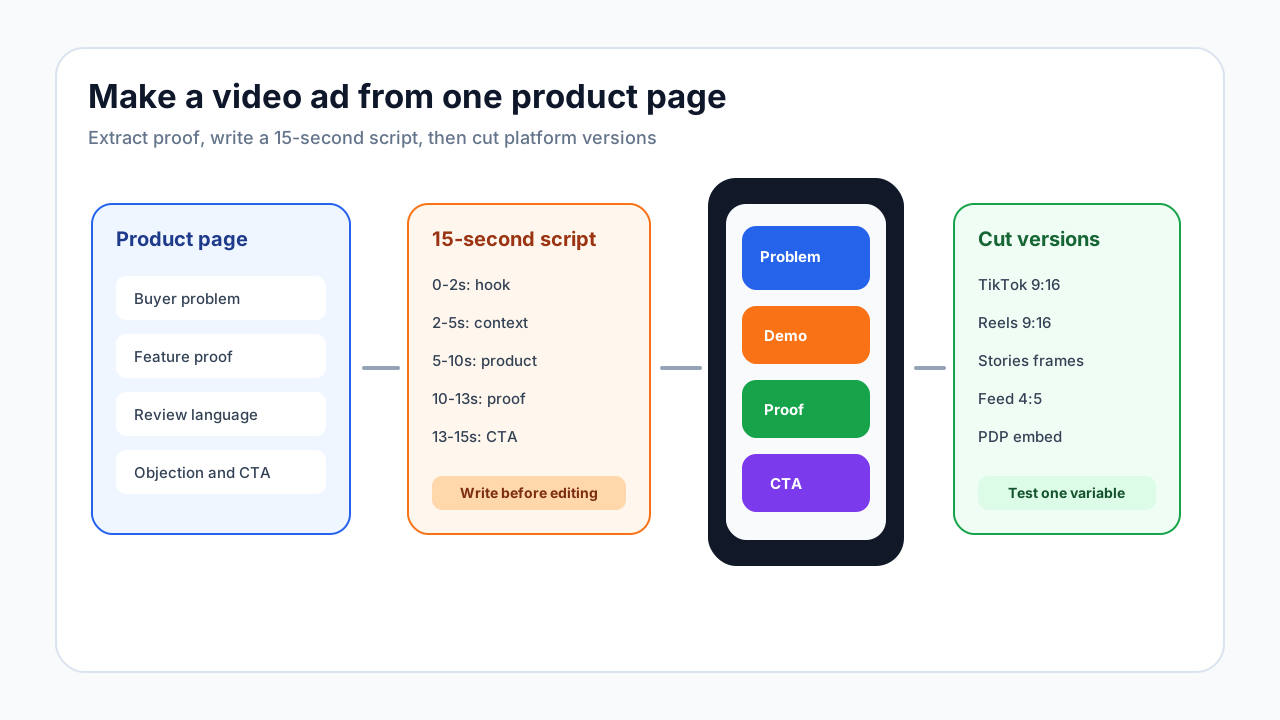
To make a video ad for an ecommerce product, use the product page as the creative brief. Pick one buyer problem, write a 3-second hook, show the product in use, prove one specific claim, and end with one CTA. Build the first cut as a 9:16 short-form ad, then adapt it for Feed, Stories, Reels, TikTok, Shorts, retargeting, and product-page use.
For related execution pieces, use the UGC script templates, the TikTok Creative Center workflow, and the Instagram ad template guide.
The Ecommerce Video Ad Workflow
Most generic video ad tutorials start with editing software. Ecommerce teams should start earlier, with the product page, because the product page contains the raw material that makes the ad believable.
Use this sequence:
- Pick one product and one audience.
- Extract the buyer problem, top feature, proof, and objection from the PDP.
- Choose the ad angle: problem-solution, demo, comparison, review, or retargeting.
- Write a 15-second script before editing.
- Build a shot list from the script.
- Create the first vertical version.
- Adapt it into placement-specific cuts.
- Run a controlled test and improve one variable at a time.
This article uses a practical example so the workflow is not abstract.
Example Product: Travel Jewelry Organizer
Product: compact travel jewelry organizer.
Buyer: frequent weekend traveler who packs necklaces, earrings, and rings in a toiletry bag.
Buyer problem: necklaces tangle, earrings get lost, and packing jewelry feels more annoying than it should.
Product proof: separate necklace tabs, earring panel, ring section, compact zipper case, and a visible open/close packing demo.
Claim limit: do not claim it "prevents all tangles" unless there is evidence. Use safer wording such as "helps keep pieces separated."
This level of specificity makes the ad easier to write and easier for reviewers to approve. It also helps the page rank for the long-tail query because the reader gets an actual working example, not only high-level advice.
Step 1: Pull Ad Inputs From the Product Page
| PDP element | What to extract | How to use it in the ad |
|---|---|---|
| Hero image | The clearest product view | Opening product reveal or final frame |
| Feature bullets | One visual mechanism | Separate tabs, zipper case, washable liner, compact fold |
| Reviews | Buyer language and proof | "I could finally pack earrings without losing one." |
| Size chart | Objection answer | Show what fits inside instead of saying "spacious." |
| Product photos | B-roll list | Close-up, open case, packed case, hand using it |
| Offer | Final CTA | Bundle, discount, free shipping, or product page CTA |
| Warnings or limitations | Claim boundaries | Avoid claims the product page does not support |
Do not start with a vague prompt like "make a cool video ad." Start with the product proof you can actually show.
Step 2: Choose the Right Video Ad Angle
| Angle | Best for | Hook example | Proof required |
|---|---|---|---|
| Problem-solution | Simple product with obvious pain | "Stop packing necklaces like this." | Old way vs organized product shot |
| First-use demo | Products with setup, fit, texture, or reveal | "I tried this travel case before my next trip." | Hands-on use from start to finish |
| Comparison | Upgrade from a common workaround | "Pouch vs jewelry organizer: here is the difference." | Side-by-side visual |
| Review proof | New brand or trust gap | "The part I actually use is the earring panel." | Review detail or usage context |
| Retargeting | PDP visitors who did not buy | "Not sure what fits inside? Here is the answer." | Size or feature objection answer |
For a first campaign, problem-solution or first-use demo is usually easier to produce than a broad lifestyle ad.
Step 3: Write a 15-Second Script
Use this structure before opening an editor:
| Time | Purpose | Travel jewelry organizer script |
|---|---|---|
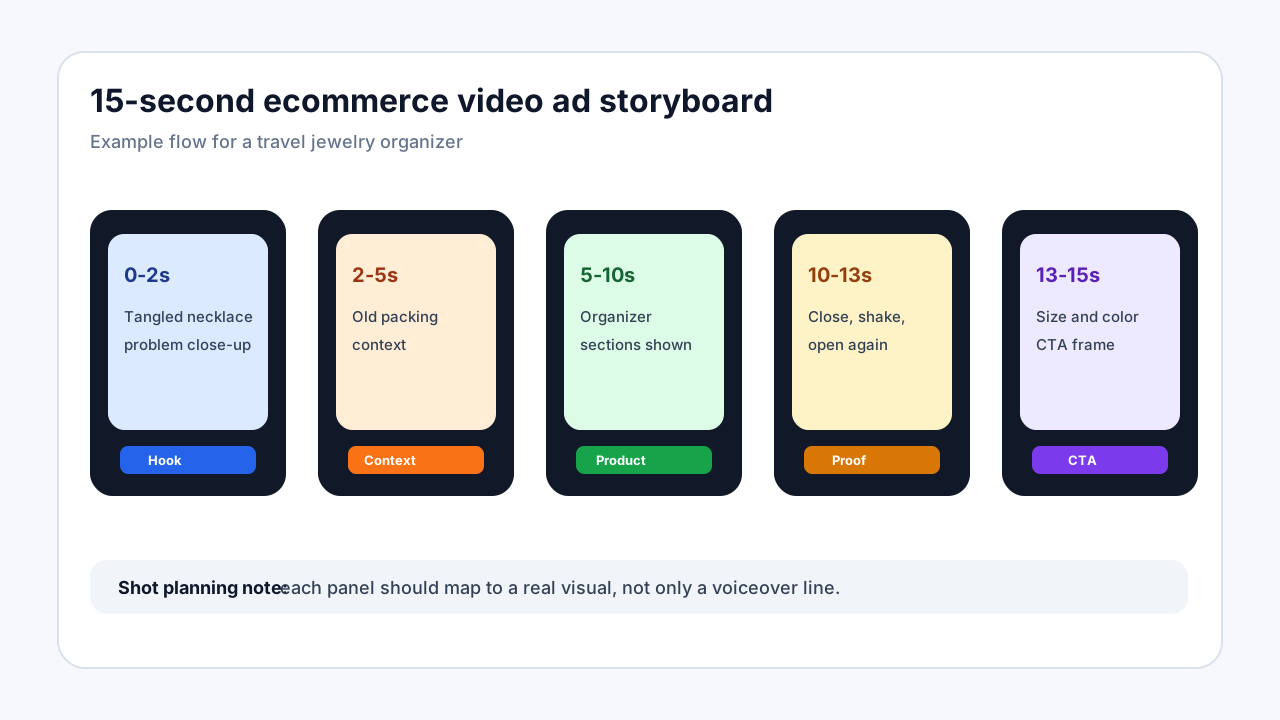
| 0-2s | Hook | "Stop packing necklaces loose in your toiletry bag." |
| 2-5s | Context | "That is how they turn into one knot by the time you land." |
| 5-10s | Product moment | "This organizer gives necklaces, rings, and earrings separate spots." |
| 10-13s | Proof | "Here is what it looks like closed, shaken in the bag, and reopened." |
| 13-15s | CTA | "Check the size and color options before your next trip." |
Short-form ads do not need a full brand introduction. They need a clear reason to keep watching.
Step 4: Turn the Script Into a Shot List
| Shot | Visual | Production note |
|---|---|---|
| Problem close-up | Tangled necklace in a pouch | Shoot tight so the problem is obvious on mobile. |
| Product reveal | Organizer opened flat | Use clean light and keep hands out of the product details if they block view. |
| Mechanism | Necklace tabs, earring panel, ring section | Match each feature to one buyer problem. |
| Stress test | Close the case, place it in a bag, reopen it | Use honest demonstration; do not overpromise. |
| Final frame | Product plus CTA text | Keep CTA readable and singular. |
If you do not have fresh footage, build a first concept from product photos, captions, AI voiceover, and simple motion. Use real footage when the product requires texture, fit, durability, or hands-on proof.
Step 5: Build the First Vertical Version
Start with 9:16 because TikTok, Reels, Stories, and Shorts are usually vertical-first environments. TikTok's help documentation, Meta's Reels ad guidance, and Google's video ad guidance all point toward mobile-first creative planning for short-form placements.
Practical production rules:
- Put the product or the buyer problem in the first frame.
- Use readable captions from the start.
- Keep product labels, UI overlays, and CTA text away from the bottom and right-side app controls.
- Avoid tiny product details that disappear on mobile.
- Export a clean master so you can cut placement versions later.
Step 6: Adapt the Ad by Placement
| Placement | Cut to make | What changes |
|---|---|---|
| TikTok | 9:16 short-form version | Faster hook, native-feeling captions, product early |
| Instagram Reels | 9:16 vertical version | Cleaner visual pacing, strong opening image |
| Stories | 2-4 simple frames | Fewer details, bigger text, direct CTA |
| Feed | 4:5 or square-friendly version | More readable proof and product view |
| YouTube Shorts | 9:16 short version | Clear hook, captions, and direct product explanation |
| Product page | 16:9 or embedded-friendly version | Slower proof, fewer ad-style overlays |
| Retargeting | Objection-first version | Size, fit, price, shipping, or comparison answer |
One universal crop often creates weak ads. Text gets covered, the product sits too low, or the hook feels native to one platform and awkward on another.
Step 7: Add Proof Without Creating Claim Risk
Ecommerce video ads need proof, but proof should match the product evidence.
| Proof type | Good use | Risky use |
|---|---|---|
| Demo | Show how the product opens, fits, folds, cleans, or stores | Editing out steps that affect buyer expectations |
| Review snippet | Show real buyer language | Using a review that implies unsupported performance |
| Measurement | Show what fits or how large it is | Hiding size context |
| Comparison | Show old workaround vs product | Making vague competitor superiority claims |
| Before/after | Show visible organization or setup | Using lighting/editing to exaggerate results |
If a paid creator, affiliate, employee, or gifted product is involved, add a clear disclosure. The FTC's endorsement guidance is especially relevant for review-style and creator-style ads.
Step 8: Test the Ad Like a System
Do not test five completely different ads and then guess why one worked. Use a controlled matrix:
| Test | Keep stable | Change | Decision |
|---|---|---|---|
| Hook test | Product moment, proof, CTA | First 2 seconds | Which problem gets attention |
| Proof test | Winning hook, CTA | Demo vs review vs comparison | Which proof earns intent |
| CTA test | Winning hook and proof | "See details" vs "Shop now" vs "Compare sizes" | Which action fits funnel stage |
| Placement test | Core script | TikTok, Reels, Feed, Stories, Shorts | Which cut earns the best economics |
| Voiceover test | Script and visuals | Human, AI, founder, creator | Which delivery style feels credible |
If voiceover is the uncertain piece, compare options with the AI voiceover guide for UGC video tools.
Ecommerce Video Ad QA Checklist
Run this checklist before publishing:
- The first frame has a product or problem, not only a logo.
- The ad makes one promise, not five.
- The product appears clearly before the midpoint.
- Captions are readable without sound.
- The CTA is visible and specific.
- Claims match the product page, reviews, and available proof.
- Any paid relationship, gifted product, or endorsement is disclosed when required.
- The crop works for the intended placement.
- The landing page reinforces the same product claim and offer.
What to Improve After the First Test
| Weak signal | Likely issue | Fix |
|---|---|---|
| Low thumb-stop or view rate | Hook is too slow or unclear | Start with problem/result close-up. |
| Good views but low clicks | Product value is unclear | Add mechanism and proof earlier. |
| Good clicks but weak conversion | Ad promise and PDP mismatch | Align CTA, offer, price, and claim. |
| High comments asking the same question | Missing objection answer | Build a retargeting or FAQ ad. |
| High cost per usable video | Production process is inefficient | Compare tool, creator, and AI costs before scaling. |
For budgeting and production planning, see the ecommerce video production cost guide and the UGC video production tools pricing guide.
FAQ
What is the fastest way to make a video ad for an ecommerce product?
The fastest workflow is to use the product page as the source: one buyer problem, one product moment, one proof point, and one CTA. Build a 15-second vertical version first, then adapt it for other placements.
Do I need a camera to make ecommerce video ads?
Not always. You can make first-pass video ads from product images, PDP copy, captions, AI-generated scenes, voiceover, and simple motion. Use a camera or creator footage when the product needs physical proof, real handling, fit, texture, or durability evidence.
What should the first 3 seconds show?
Show the buyer problem, product result, comparison, or product in action. Avoid opening with a logo, abstract brand statement, or long setup.
How long should an ecommerce video ad be?
Start with 15 seconds for short-form paid social. Use 30 seconds when the product needs explanation, proof, or objection handling. Product-page videos can be longer if viewers need detail before buying.
How many versions should I create before testing?
Create 3-5 hook variants around the same product moment before changing the offer, proof, or placement. This makes the test easier to interpret.
Sources Checked
- TikTok video ad specifications: TikTok Ads Help Center
- Meta Reels ad format guidance: Meta for Business Reels Ads
- YouTube and Google video ad guidance: Google Ads Help
- FTC disclosure and endorsement guidance: FTC Endorsement Guides FAQ
- ShopShot TikTok workflow reference: TikTok Creative Center for ecommerce product ads