
Quick Answer
An Amazon Sponsored Brands video checklist should confirm the campaign goal, landing page, video specs, product proof, first-two-second hook, captions, safe zone, language match, moderation risk, and launch QA before upload. Build the ad around one shopper problem, show the product early, keep the main cut around 15-30 seconds when possible, and verify that every claim is supported by the detail page or Brand Store.
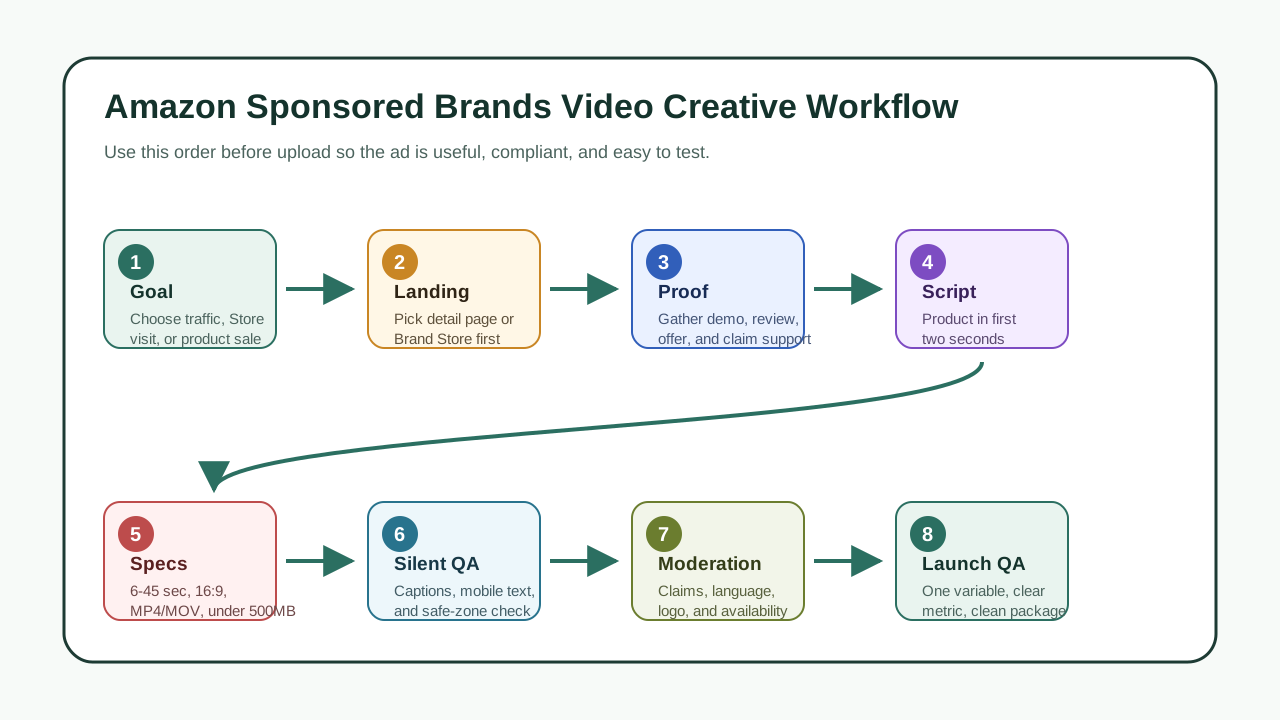
Sponsored Brands video is not just a video file. It is a shopping ad unit that combines product details, video, brand logo, headline text, and a click path to a Brand Store or product detail page. Amazon's own specs say these ads can appear in desktop and mobile shopping results and on product detail pages, so the creative has to work in a fast comparison environment.
This guide is written for ecommerce sellers, Amazon brand owners, and growth teams that need a practical pre-upload checklist. It does not replace Amazon Ads setup or legal review. It gives your creative team a repeatable way to make a video asset that is easier to approve, easier to understand on mobile, and easier to test against sales or traffic goals.
When This Checklist Fits
Use this checklist when you are preparing a Sponsored Brands video campaign and need to turn a product page, reviews, benefits, and offer into a compliant creative asset.
It fits these jobs:
| Job | Best creative angle | Landing page to test | Why it works |
|---|---|---|---|
| Launch a hero SKU | Problem, product reveal, proof | Product detail page | Sends shoppers straight to the item they saw |
| Build brand discovery | Category story, bundle, lifestyle use | Brand Store | Lets shoppers compare a broader product set |
| Retarget category shoppers | Objection, review proof, offer | Product detail page or Store subpage | Answers hesitation without overloading the ad |
| Support a seasonal push | Use case, gift angle, urgency | Store campaign page | Keeps creative and merchandising aligned |
| Test a new product position | Hook variant, demo, CTA | Product detail page | Isolates whether the message earns clicks |
The page should not be treated as a generic Amazon product video generator article. The target query is about Amazon Sponsored Brands video creative: what to prepare, what to avoid, and how to check the asset before uploading it.
What Amazon Sponsored Brands Video Requires
Amazon's current Sponsored Brands video specs and guidelines define the production baseline. Treat these as the floor before you start scripting:
| Requirement | Practical creative rule | Why it matters |
|---|---|---|
| Duration | 6-45 seconds; plan the first test around 15-30 seconds | Long enough to show proof, short enough for search results |
| Dimensions | 1280x720, 1920x1080, or 3840x2160 | Keeps the file in approved HD or UHD formats |
| Aspect ratio | 16:9 for the Sponsored Brands video spec page | Prevents distorted or rejected exports |
| File format | MP4 or MOV | Matches Amazon's upload requirements |
| File size | 500 MB or below | Prevents upload friction |
| Codec | H.264 or H.265 | Keeps playback compatible |
| Frame rate | Common 23.976-30 fps values | Avoids odd exports from editing tools |
| Audio | PCM, AAC, or MP3; minimum 44.1 kHz sample rate | Keeps voiceover and music technically acceptable |
Sponsored Brands video has two important campaign paths:
| Path | Best use | Creative implication |
|---|---|---|
| Product detail page campaign | One product or one tight bundle | Show the exact product early and match claims to the detail page |
| Brand Store campaign | Brand discovery, collections, or multi-product education | Use brand cues, category context, and a reason to explore more products |
Amazon's Sponsored Brands page also describes prominent placements such as shopping results and product pages. That means the creative competes with product images, price, rating, titles, and competitor listings. The video must be clear even when the shopper is comparing quickly.
The 14-Point Amazon Sponsored Brands Video Checklist
1. Pick One Campaign Goal
Do not start with "make a nice video." Choose one measurable job:
- Increase clicks to a product detail page.
- Introduce a product line through a Brand Store.
- Support a seasonal promotion.
- Lift consideration for a higher-price item.
- Test whether a specific product benefit creates demand.
Your goal controls the creative. A detail-page ad should make one product unmistakable. A Brand Store ad can show a broader story, but it still needs a clear reason to click.
2. Decide the Landing Page Before Writing
Amazon Sponsored Brands video can send shoppers to a Brand Store or a product detail page depending on the campaign setup. Choose the destination before you write the script.
| Landing page | Use when | Creative check |
|---|---|---|
| Product detail page | The ad is about one SKU, one ASIN, or one bundle | Video, headline, and detail page must show the same product |
| Brand Store | The ad introduces a product family, comparison, or brand story | The first screen of the Store should continue the same promise |
| Store subpage | The ad targets a category or seasonal use case | The subpage should not make shoppers hunt for the featured product |
If the ad says "waterproof travel organizer," the landing page should immediately support that claim. If the landing page leads with a different product or a generic brand story, the click will feel broken.
3. Collect Product Proof Before the Hook
Good Sponsored Brands video creative is built from proof, not adjectives.
Use this proof board:
| Proof type | What to collect | How it appears in the video |
|---|---|---|
| Product identity | Main product image, packaging, model, color, variant | First two seconds or first product frame |
| Use proof | Demo, before/after, setup, material, size, compatibility | Middle scene or split-screen |
| Review proof | Common customer wording, objections, top questions | Caption or voiceover, if claim is supportable |
| Brand proof | Logo, brand color, Store promise, category focus | End frame or consistent visual style |
| Offer proof | Coupon, bundle, shipping promise, warranty, availability | CTA scene only if the landing page confirms it |
| Risk proof | Restrictions, compatibility limits, age or health caveats | Script guardrail and moderation check |
If you cannot support a claim with the detail page, Brand Store, packaging, documentation, or a legitimate customer proof point, keep it out of the ad.
4. Show the Product Immediately
Amazon's getting-started guide recommends showing the product very early and communicating product function quickly. That advice matters because the ad appears inside shopping behavior, not a passive video feed.
Use one of these first-two-second openings:
| Opening type | Example structure | Best for |
|---|---|---|
| Product in hand | Product appears in a realistic use moment | Beauty, kitchen, home, accessories |
| Problem frame | Shopper sees the pain, then the product | Organization, repair, fitness, pet |
| Result first | Finished outcome appears before the method | Decor, skincare, tools, creative products |
| Comparison | Old way vs product-assisted way | Higher-price or feature-heavy products |
| Close-up detail | Texture, mechanism, material, screen, ingredient | Products where proof is visual |
Avoid logo-only intros. The shopper needs to understand what is being sold before they decide whether to watch.
5. Keep the First Cut Tight
The spec range allows 6-45 seconds, but your first production target should usually be 15-30 seconds. That length leaves room for the product, one proof point, one objection, and one click reason.
Use this simple scene map:
| Time | Scene | Job |
|---|---|---|
| 0-2 sec | Product and buyer problem | Make the ad identifiable fast |
| 2-6 sec | Main use case | Show why the product exists |
| 6-14 sec | Proof or demo | Make the benefit believable |
| 14-22 sec | Objection or differentiator | Explain why this product, not any product |
| 22-30 sec | CTA and landing page match | Tell the shopper what happens after the click |
If the product needs more explanation, make a 30-45 second version after the short version works. Do not use the longer cut to add generic brand filler.
6. Design for Silent Autoplay
Amazon's ad unit description says video can autoplay when enough pixels are on-screen, and videos start without audio by default. That means the ad must make sense without sound.
Before export, watch the video muted and ask:
- Can the shopper identify the product in the first two seconds?
- Can the main benefit be understood from visuals and captions?
- Are captions readable on a phone?
- Does the CTA make sense without voiceover?
- Does music add mood without carrying essential information?
Closed captions are not a minor accessibility feature. They are the backup system for the default viewing state.
7. Keep Text Out of Risky Interface Areas
Amazon's specs warn sellers to avoid placing important information in the lower-right safe area where controls may appear. Treat that corner as risky space.
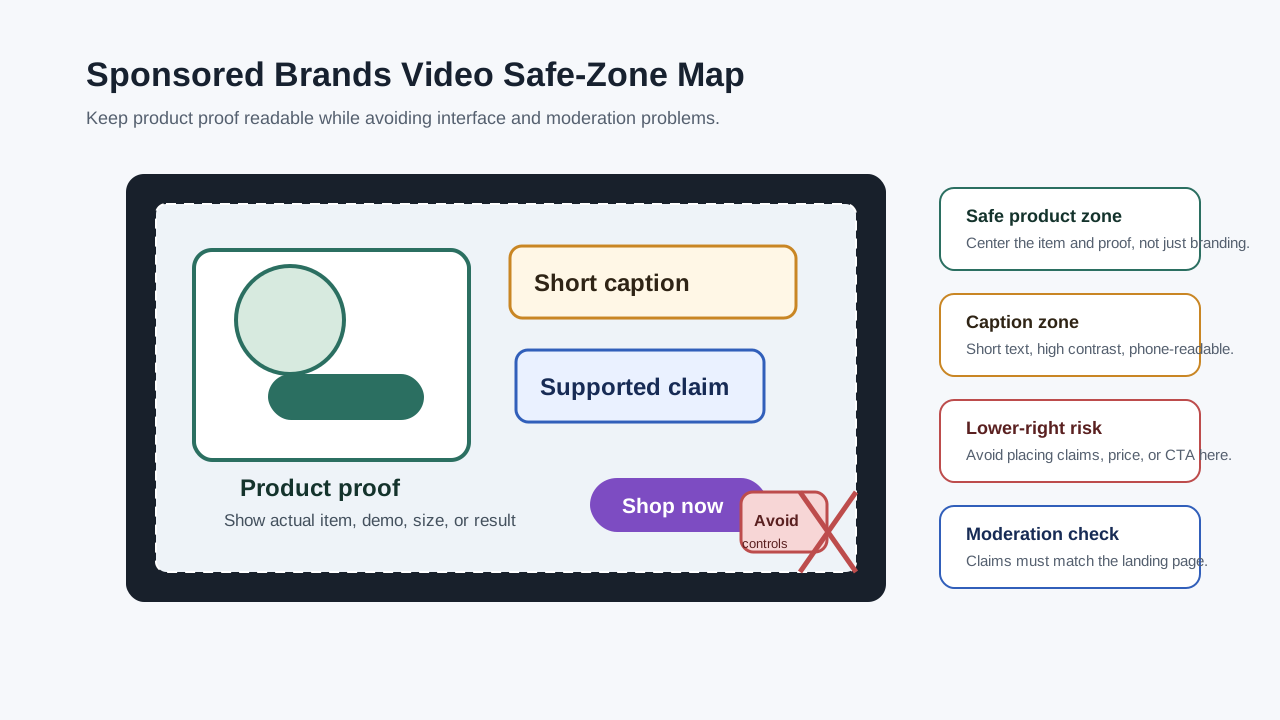
Use a conservative layout:
| Element | Placement rule |
|---|---|
| Product | Center or slightly left/right, never hidden by text |
| Caption | Upper third or lower-left with enough margin |
| Offer | Middle-left or end card, not lower-right |
| Logo | End frame or quiet corner, not as the opening-only message |
| CTA | End frame with space around it |
Also avoid letterboxing or pillarboxing. Black, blurred, or colored bars make the ad feel repurposed and can create moderation risk.
8. Match Language to the Marketplace
Amazon's specs advise that video language should match the site where it appears. If the video runs in an English-speaking marketplace, use English on-screen text or English voiceover. If it runs in Italy, use Italian text or Italian voiceover.
For multi-market sellers, do not rely on one master file unless the product has almost no language content. Build language versions:
| Market need | Better approach |
|---|---|
| Same visuals, different marketplaces | Swap captions, voiceover, and end card |
| Same product, different claims by region | Localize claims and legal wording |
| Same brand, different landing pages | Match CTA wording to each marketplace destination |
This is especially important when product claims, disclaimers, or offer language differ by country.
9. Make Claims Moderation-Ready
Amazon's moderation guide emphasizes claims, substantiation, prohibited content, branding, logo quality, image quality, language, and copy standards. In practice, the creative team should keep a claim log before upload.
| Claim type | Safer version | Riskier version |
|---|---|---|
| Performance | "Helps keep cables organized" | "The only cable organizer you need" |
| Comparison | "Designed for compact travel packing" | "Better than every competitor" |
| Review | "Customers mention the compact size" | "Everyone loves this" |
| Health or wellness | "Supports a bedtime routine" | "Cures sleep problems" |
| Price | "See current coupon on Amazon" | "Lowest price ever" unless verified |
Avoid fake urgency, unsupported superiority claims, competitor attacks, misleading before/after results, and unavailable promotions. If a claim needs a footnote, legal review, or detail-page support, document it before upload.
10. Use a Real Product Demonstration
Sponsored Brands video can introduce your brand, but ecommerce shoppers still need to understand the product. A practical demo usually outperforms abstract brand motion.
Strong demo scenes include:
- Unboxing and what comes in the package.
- Size comparison against a familiar object.
- Product used in the real environment.
- Close-up of material, texture, screen, mechanism, or fit.
- Before/after setup, cleanup, organization, or transformation.
If you use AI-assisted production, keep the product accurate. Do not invent product features, textures, colors, packaging, or usage outcomes that the customer will not receive.
For teams that need fast variants, ShopShot's Amazon product video generator can help turn product images and structured prompts into listing-ready creative drafts. The checklist still matters because the output should be reviewed against Amazon's specs, claims, and landing-page match before upload.
11. Build a Modular Script
A modular script makes testing cheaper. You can replace the hook, proof, or CTA without rebuilding the entire video.
| Module | What to write | Variant idea |
|---|---|---|
| Hook | Buyer problem or visual result | Pain point vs result-first |
| Product reveal | What the product is | Close-up vs use scene |
| Demo | How the product solves the problem | Speed demo vs comparison |
| Objection | Why the shopper can trust it | Review proof vs material proof |
| CTA | What to do after the click | "See it on Amazon" vs "Shop the bundle" |
Use the product video script template if you need a reusable structure before production. For more visual angles, review the product video examples for ecommerce and adapt only the scenes that fit Amazon search behavior.
12. Check Mobile Readability
Watch the export on an actual phone or a phone-sized preview. A desktop preview hides most readability problems.
Use this mobile QA:
- Product is recognizable at thumbnail size.
- Captions use short phrases, not full paragraphs.
- Text contrast is high enough over the video.
- Product details are not blocked by captions.
- Logo is readable but not taking over the first frame.
- End card has one CTA, not three competing messages.
If the product is small, use macro shots and hand context. If the product has many parts, show one key feature at a time.
13. Prepare the Upload Package
Before you enter Campaign Manager, keep a clean package ready:
| Asset | Required check |
|---|---|
| Final video | Correct duration, aspect ratio, format, size, codec, and safe-zone layout |
| Thumbnail or opening frame | Product is visible and not misleading |
| Brand logo | Clear, readable, and consistent with the brand |
| Headline text | Specific, grammatical, and aligned with the landing page |
| Landing page | Product, price, claim, and offer match the ad |
| Claim log | Every specific claim has support |
| Market version | Language and CTA match the target marketplace |
Store these files together so that a rejected ad can be diagnosed quickly. If you only have a final MP4 and no claim log, you will waste time guessing why moderation failed.
14. Define the First Test Before Launch
A Sponsored Brands video checklist is incomplete without a testing plan. Choose one variable to learn from:
| Test | What changes | What to watch |
|---|---|---|
| Hook test | First two seconds | Click-through rate and video engagement |
| Landing page test | Product detail page vs Brand Store | Click quality, attributed sales, Store engagement |
| Proof test | Demo vs review caption | CTR, conversion rate, ACOS |
| Offer test | Bundle CTA vs single-product CTA | Conversion rate and average order value |
| Length test | 15 seconds vs 30 seconds | Completion behavior and downstream sales |
Do not change hook, offer, landing page, and audience all at once. If performance changes, you will not know which part caused it.
A Creative Brief Template for Sponsored Brands Video
Use this brief before you ask a designer, creator, editor, or AI video tool to produce the ad.
| Field | Fill this in |
|---|---|
| SKU or ASIN | The exact product or bundle |
| Campaign goal | Traffic, product discovery, Store visit, seasonal push, retargeting |
| Landing page | Product detail page, Brand Store, or Store subpage |
| Shopper problem | One sentence in customer language |
| Main product proof | Demo, material, feature, review, comparison, or result |
| Claim limits | Claims to avoid or qualify |
| First frame | What appears in the first two seconds |
| Silent-view message | What the viewer understands without audio |
| CTA | One action that matches the destination |
| Marketplace | Language, units, offer terms, and compliance notes |
| Test variable | The one thing this version is meant to test |
This brief is intentionally simple. A short, accurate brief usually produces better ecommerce video than a long brand document that never tells the editor what to show first.
Common Reasons Sponsored Brands Video Creative Fails
| Problem | Why it hurts | Fix |
|---|---|---|
| Logo intro only | Shoppers do not know what is being sold | Open with product use or product close-up |
| Generic lifestyle footage | Weak link between ad and purchase intent | Add product proof and detail-page match |
| Tiny product on screen | Mobile shoppers cannot inspect it | Use close-ups and fewer objects |
| Text in lower-right corner | Interface controls may cover it | Move text to a safer area |
| Unsupported claims | Moderation or trust risk | Keep a claim log and align with the landing page |
| Wrong language version | Marketplace mismatch | Localize captions, voiceover, and CTA |
| Too many CTAs | Confusing next step | Use one CTA tied to one landing page |
| Repurposed wide video with bars | Looks low quality and may violate formatting guidance | Export a clean approved aspect ratio |
How ShopShot Teams Can Produce Variants Faster
The hard part is not making one polished video. The hard part is making enough clean variants to learn what Amazon shoppers respond to.
A practical workflow:
- Pull product images, title, bullets, reviews, and offer details.
- Write three hooks using the same proof board.
- Generate one 15-30 second product-first draft.
- Review it muted for clarity and safe-zone issues.
- Export one detail-page version and one Brand Store version if both destinations are valid.
- Track which hook, proof point, and CTA ran in each campaign.
For cost planning, compare this workflow with the ecommerce video production cost guide. For broader creative strategy, the AI ecommerce product video workflow shows how to turn product assets into repeatable drafts without starting every SKU from scratch.
FAQ
How long should an Amazon Sponsored Brands video be?
Amazon's Sponsored Brands video specs allow 6-45 seconds. For most ecommerce tests, start with a 15-30 second cut because it gives enough room for product proof, a benefit, and a CTA without slowing down the shopping moment.
Should Sponsored Brands video link to a Brand Store or product detail page?
Use a product detail page when the video is about one specific product or bundle. Use a Brand Store when the video introduces a product line, category, seasonal collection, or brand story that needs more browsing context.
Do Sponsored Brands video ads need sound?
They can include sound, but they should work without it. Amazon's ad unit starts muted by default, so captions, product visuals, and on-screen proof need to carry the message.
Can I use AI-generated product video for Amazon ads?
You can use AI-assisted production as a drafting workflow, but the final ad should accurately represent the real product, packaging, features, and claims. Review the video against Amazon's specs, moderation rules, and landing page before uploading.
What is the most important creative check before upload?
The most important check is message-to-landing-page match. The product, claim, offer, and CTA in the video should be immediately supported by the product detail page or Brand Store destination.
Sources Checked
- Amazon Ads: Sponsored Brands video ad specs and guidelines
- Amazon Ads: Sponsored Brands product overview
- Amazon Ads: Get started with Sponsored Brands video
- Amazon Ads: Sponsored Brands and display ads moderation guide
- Amazon Ads: Sponsored Products video guide
- Amazon Ads: Ad specs, ad sizes, dimensions, and policies