
Last reviewed: May 27, 2026
Product video examples are useful only when they show the product argument, not just the editing style. An ecommerce brand does not need one beautiful video. It needs a small library of product videos that answer different buyer questions: What is it? How does it work? Why should I trust it? Is it different from the cheaper option? Will it fit my use case? What should I do next?
This guide breaks down practical product video examples for ecommerce product detail pages, TikTok, Instagram Reels, Meta feed, YouTube Shorts, Google video placements, and Amazon product campaigns. The examples are written for ecommerce teams that need repeatable product video ideas, not a generic brand-film mood board.
Quick Answer
The best product video examples for ecommerce usually fall into eight formats: product-in-use demo, problem-solution video, feature proof, comparison, founder or expert explanation, customer-style review, offer-led short ad, and PDP buying-assurance video. A product detail page video should reduce purchase anxiety, while TikTok and Reels videos should earn attention fast and show the product in motion. Meta and Google video ads need more format discipline because one campaign may serve across feed, Reels, Shorts, in-stream, and in-feed placements.
A useful starter set for one ecommerce SKU is:
- One 20-45 second product detail page video that shows setup, scale, texture, fit, or result.
- One 9:16 TikTok or Reels short with a direct hook in the first three seconds.
- One comparison video that shows the product against a common alternative.
- One objection-handling video for price, durability, sizing, shipping, ingredients, or setup.
- One customer-style review video that uses specific proof instead of broad praise.
- One offer-led ad variant for promotions, bundles, or seasonal campaigns.
- One silent-friendly product feature video for shopping placements where audio may not carry the message.
Use these examples as a production map. If you need the broader creation process, pair this article with how to create ecommerce product videos with AI and how to make a video ad for an ecommerce product.
Source Context Checked for 2026
Current platform guidance points in the same direction: ecommerce product videos need product clarity, placement-specific formatting, and enough creative variety for testing.
TikTok's official creative best practices were last updated in June 2025 and recommend TikTok-first creative, vertical 9:16 orientation, visible safe-zone content, sound, people on screen where useful, hooks early in the video, clear calls to action, and continuous testing with varied creatives. TikTok Creative Center is also positioned as a public resource for trends, ad examples, top ads, keyword insights, top products, and script generation.
Shopify's product media guidance confirms that product pages can use uploaded videos or embedded YouTube/Vimeo links, with uploaded files supporting MP4, MOV, and WebM, up to 10 minutes, up to 1 GB, and up to 4K resolution. That matters because a PDP video can be more explanatory than a short ad, but it still needs to be compressed into a usable buying aid.
Google Ads guidance for Video views campaigns notes that multi-format video ads can serve across skippable in-stream, in-feed, and Shorts ads, and recommends providing different orientations. Google's specs list horizontal, vertical, and square HD options, which reinforces the need to design product videos as a family of assets rather than one crop.
Amazon Ads' ecommerce creative specs and Sponsored Products video guide add a stricter shopping-context lesson: the product shown in the creative must correspond to the detail page, custom images should not duplicate ecommerce elements such as price or CTA, and Sponsored Products video is meant to show product features that help shoppers understand and compare the product. Amazon also describes uploading multiple feature videos for a single product so shoppers can navigate to the most relevant feature.
Meta's Reels ads guidance, visible in current search snippets even though the page itself may require login from this environment, emphasizes 9:16 video with audio and key creative elements in the safe zone. That aligns with the same practical rule: make product videos native to the placement where they will run.
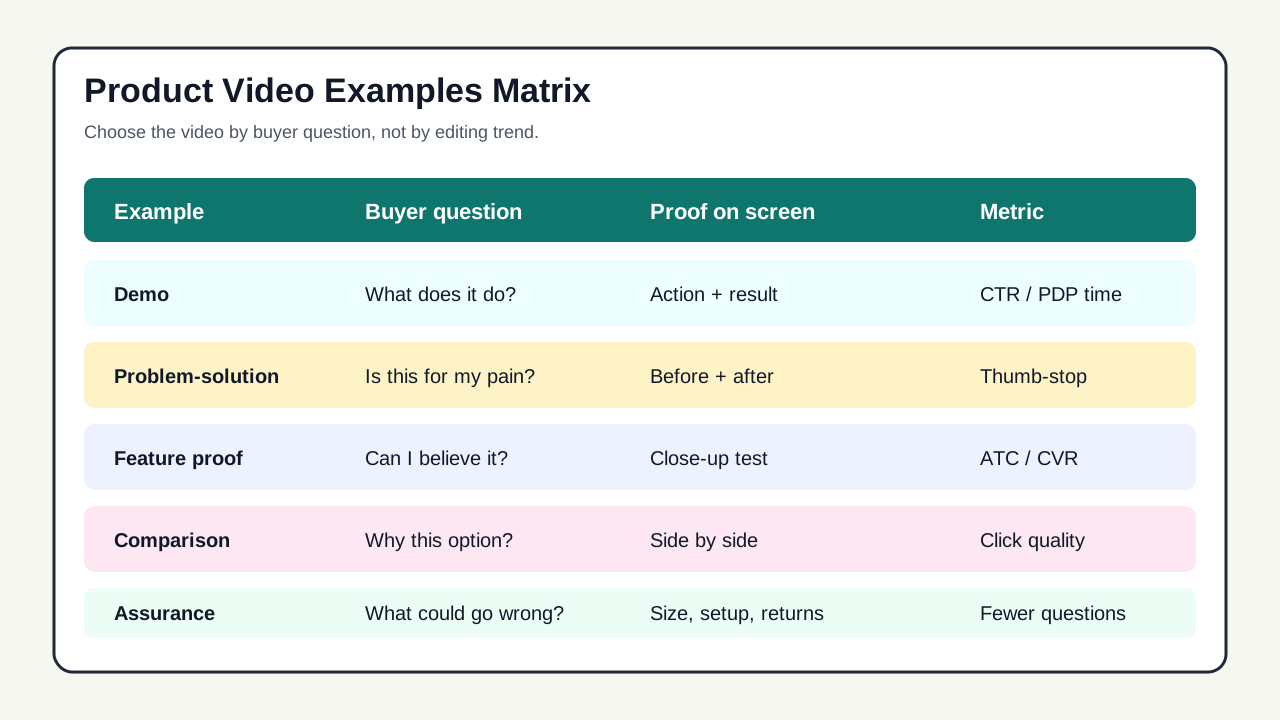
Product Video Examples Matrix
Start with the buyer question, then choose the format. This avoids the common mistake of copying a viral editing style without knowing what the video is supposed to prove.
| Product video example | Buyer question it answers | Best placement | What must appear on screen | Success signal |
|---|---|---|---|---|
| Product-in-use demo | What does it actually do? | PDP, TikTok, Reels, YouTube Shorts | Product, hand/action, result, scale cue | Higher PDP engagement or click-through rate |
| Problem-solution video | Is this for my pain point? | TikTok, Reels, Meta prospecting | Pain moment, product transition, outcome | Thumb-stop rate and qualified clicks |
| Feature proof | Can I believe the claim? | PDP, Amazon, retargeting | Close-up proof, test, ingredient, measurement, before/after state | Add-to-cart lift or lower returns/questions |
| Comparison video | Why this instead of the default option? | Meta feed, YouTube, PDP | Side-by-side alternative, specific differentiator | Better click-to-conversion rate |
| Review-style video | Do people like me trust it? | TikTok, Reels, retargeting | Specific user context, product detail, grounded result | Comment quality and conversion rate |
| Founder or expert explanation | Why was this product made this way? | PDP, email, retargeting | Person, product, reason behind design choice | Time on page and assisted conversion |
| Offer-led short | Is now the right time to buy? | Meta, TikTok, email/SMS landing pages | Offer, product, deadline or bundle logic | Revenue per visitor and ROAS |
| Buying-assurance video | What could go wrong? | PDP, cart, retargeting | Sizing, shipping, setup, warranty, contents | Lower support tickets and fewer abandoned carts |
Example 1: Product-in-Use Demo
A product-in-use demo is the safest first video for most ecommerce brands because it creates clarity. The buyer sees the item moving in a real context instead of guessing from still photos. This is especially important for apparel fit, beauty texture, kitchen tools, home products, pet products, fitness accessories, gadgets, and anything where scale is hard to judge from a static image.
A good demo starts with the product already in action. Do not spend the first five seconds introducing the brand. Show the moment that tells the viewer what the product is. For a portable blender, show fruit, water, the twist-on lid, the blend, and the pour. For a posture corrector, show the before posture, the product being adjusted, and the visible after posture. For skincare, show texture, application, absorption, and the final finish.
| Scene | What to show | Copy angle |
|---|---|---|
| 0-3 seconds | Product solving the visible task | "Make a smoothie at your desk." |
| 3-8 seconds | Close-up of the main mechanism | "USB-C rechargeable, leak-resistant lid." |
| 8-15 seconds | Real use context | "Fits in a gym bag or office drawer." |
| 15-25 seconds | Result or transformation | "Blend, rinse, and go." |
| Final frame | Product plus CTA | "See colors and bundles." |
For a PDP, this can be 20-45 seconds and more deliberate. For TikTok or Reels, compress the same idea into one quick proof moment and use captions to carry the claim.
Example 2: Problem-Solution Product Video
Problem-solution videos work when the product fixes a frequent, visual frustration. They perform poorly when the problem is vague. "Tired of messy counters?" is weaker than showing a coffee pod drawer jammed, a cable pile falling off a desk, or a dog tracking mud through the entryway.
The strongest version is concrete:
- Show the exact problem.
- Name it in simple language.
- Show the product entering the scene.
- Show the cleaner, faster, easier, safer, or better result.
- End with the next step.
For example, a travel organizer brand might open with a suitcase being repacked at an airport bench. The product appears as labeled pouches that separate chargers, skincare, and documents. The result is not "organized life." The result is "find the passport cable and lip balm in five seconds."
This format is especially useful for prospecting ads because the buyer does not need to know the brand yet. The pain point earns attention first. Then the product earns the click.
Example 3: Feature Proof Video
Feature proof videos should be specific enough to survive a skeptical viewer. Instead of saying "durable," show the seam pull, drop test, water bead, material thickness, or warranty-relevant detail. Instead of saying "fast," show the stopwatch or a side-by-side setup. Instead of saying "comfortable," show the adjustable strap, movement test, or fit range.
The best feature proof videos isolate one claim. Do not try to prove five features at once. A cookware brand can create separate videos for heat distribution, scratch resistance, handle grip, cleaning, and storage. A single 45-second video about everything usually becomes too abstract for ad placements and too shallow for the PDP.
Use feature proof when:
- The product has a claim that shoppers may doubt.
- The PDP has repeated questions about one feature.
- Reviews mention a benefit that can be shown visually.
- A competitor alternative looks similar in photos.
- You need retargeting creative that goes deeper than the first hook.
For Amazon-style shopping placements, keep feature proof literal. Amazon's guidance for Sponsored Products video focuses on product features and product detail alignment, so avoid lifestyle claims that the PDP cannot support.
Example 4: Side-by-Side Comparison
Comparison videos work when buyers are already considering alternatives. The comparison does not need to attack a competitor. It can compare old vs new, disposable vs reusable, manual vs automatic, ordinary bag vs organized bag, powder vs capsule, or generic tool vs product-designed workflow.
| Rule | Why it matters | Example |
|---|---|---|
| Compare one decision at a time | Too many claims create confusion | "Regular towel vs quick-dry towel after a gym shower" |
| Make the visual difference obvious | The viewer should understand without sound | Water absorption, packing size, setup time |
| Avoid unsupported superlatives | Platform review and trust risk | Use "packs smaller" if shown, not "best towel ever" |
The comparison should end with the product's decision logic. For example: "Choose this if you need a gym towel that dries before it goes back in the bag." That is more useful than "Shop now" alone because it tells the buyer why the product exists.
Comparison videos belong on PDPs, retargeting campaigns, and email/SMS landing pages. They can also work on TikTok and Reels if the comparison is visible in the first second.
Example 5: Customer-Style Review Video
A customer-style review video should sound like a specific shopper, not a script of generic praise. The difference is detail. "I love this" is weak. "I used it on a three-day trip and did not need a second charger" is useful. "Great quality" is weak. "The zipper did not snag when the pouch was full" is useful.
For compliance and trust, avoid making fake testimonial claims. If the person is an actor, presenter, employee, or AI avatar, do not imply that they are a real customer with a personal experience they did not have. Use customer-review language only when the claim is grounded in real feedback, a verified review, or a disclosed reenactment.
A strong customer-style structure is:
- "I bought this for [specific use case]."
- "The part I cared about was [buyer anxiety]."
- "Here is what happened when I used it."
- "The detail that surprised me was [specific proof]."
- "I would recommend it for [specific buyer], not [bad-fit buyer]."
This format is valuable because it filters the audience. Ecommerce teams often chase broad praise, but a product video that says who the product is not for can improve click quality and reduce returns.
Example 6: Founder or Expert Explanation
Founder and expert videos work when the product has design reasoning that still photos cannot explain. This can include ingredient choices, sourcing, manufacturing details, ergonomic design, sizing decisions, care instructions, or why a product is priced higher than a commodity alternative.
The mistake is turning the video into a company story. The founder is not the point. The product decision is the point. The founder should appear only to explain something the buyer needs to believe.
| Segment | Length | Job |
|---|---|---|
| Product decision | 3-5 seconds | "We changed the clasp because the old style opened in bags." |
| Proof | 8-12 seconds | Show the clasp, stress test, or assembly detail. |
| Buyer benefit | 5-8 seconds | Explain how the change affects real use. |
| Fit guidance | 5-10 seconds | Clarify who should choose this product or variant. |
| CTA | 2-4 seconds | Point to size guide, bundle, PDP, or quiz. |
Use founder or expert videos more often for premium products, technical products, health-adjacent categories, beauty, baby, home improvement, and any SKU where shoppers need trust before they care about a discount.
Example 7: Offer-Led Product Video
Offer-led videos can drive revenue, but they are easy to overuse. If every video leads with a discount, the brand trains shoppers to wait. Use offer-led videos when the promotion is the actual reason to act now: bundle launch, seasonal kit, limited inventory, gift deadline, product restock, or trial-size entry point.
The product still needs to be visible before the offer. A discount attached to an unclear product does not create qualified demand. Open with the use case or product result, then introduce the offer as a reason to act.
Example for a skincare bundle:
- Show the three products used in order.
- Name the routine outcome: cleanse, treat, hydrate.
- Show the bundle packaging and size.
- Explain the offer: bundle saves compared with buying separately.
- Add deadline only if the deadline is real.
For Meta or TikTok, test offer-led videos against proof-led videos. If the offer variant gets cheaper clicks but weaker conversion rate, the discount may be attracting the wrong traffic. Use creative ads examples for ecommerce video testing to map those tests before scaling spend.
Example 8: PDP Buying-Assurance Video
A buying-assurance video belongs close to the product detail page, cart, or retargeting flow. It answers the doubts that stop a shopper after they already understand the product.
Common topics include:
- What comes in the box.
- How to choose the right size, shade, bundle, or variant.
- How long setup takes.
- How the product is cleaned, charged, stored, or refilled.
- How shipping, warranty, returns, or fit guarantees work.
- What the product does not do.
This type of video rarely wins as a cold prospecting ad because it lacks the drama of a hook. It can still be one of the highest-value videos in the library because it removes friction from shoppers who are already close to buying.
Placement Planning: PDP vs TikTok vs Meta vs Amazon
The same product can need different examples by placement. Do not treat a PDP video, a TikTok ad, and an Amazon feature video as interchangeable.
| Placement | Best product video example | Format bias | Creative priority | Common mistake |
|---|---|---|---|---|
| Product detail page | Demo, feature proof, buying assurance | 16:9, 1:1, or embedded video depending on theme | Clarity and objection handling | Opening like a brand ad instead of helping the buyer decide |
| TikTok | Problem-solution, demo, review-style | 9:16 vertical, sound, captions | Fast hook and native pacing | Over-polished edit that hides the product |
| Instagram/Facebook Reels | Demo, review-style, offer-led | 9:16 vertical, audio, safe zone | Immediate product context and clear CTA | Text or product hidden behind UI overlays |
| Meta feed | Comparison, feature proof, offer-led | 1:1, 4:5, or adapted vertical | Readable value proposition | Running only a Reels crop everywhere |
| YouTube Shorts | Demo, comparison, problem-solution | Vertical for Shorts, other orientations for broader campaigns | Hook plus visible result | Reusing a landscape PDP video without reframing |
| Amazon | Feature proof, product detail alignment | Product feature videos and shopping creative rules | Product accuracy and measurable feature detail | Making broad lifestyle claims or duplicating ecommerce UI elements |
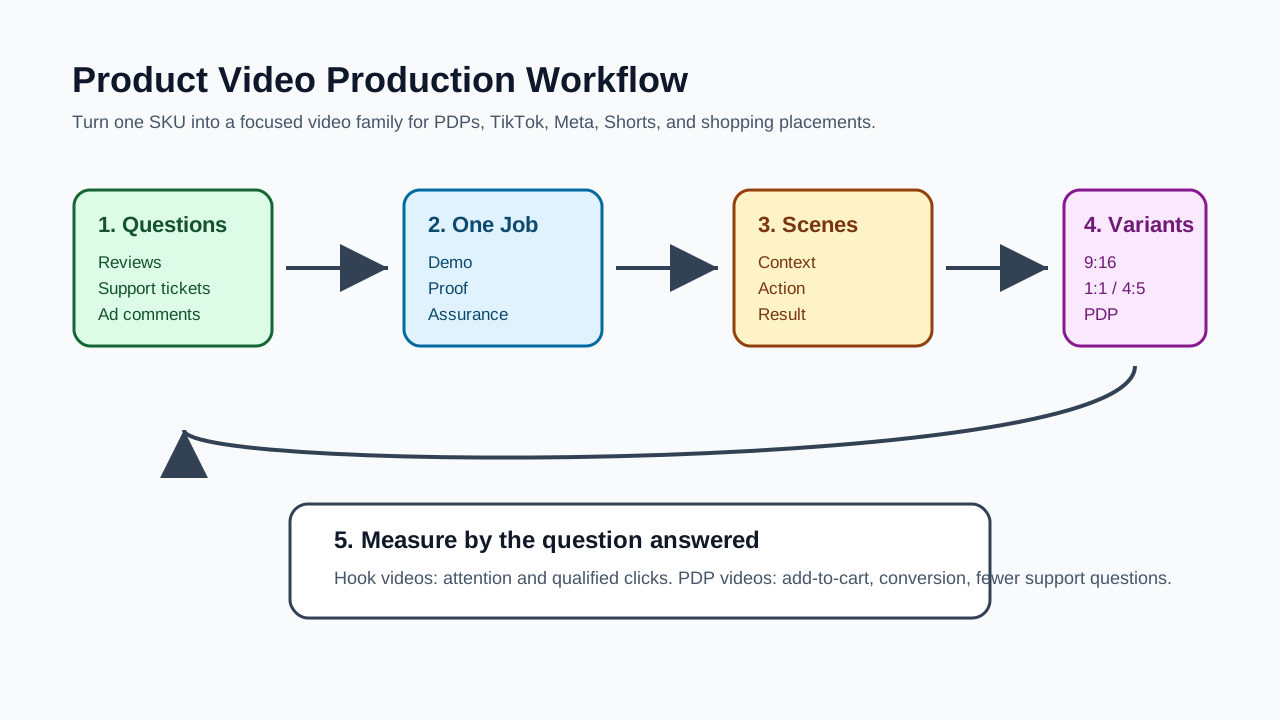
A Practical Workflow for Creating Product Video Examples
Use this workflow when building a video set for one SKU. It keeps the work focused and prevents the team from producing ten videos that all say the same thing.
Step 1: Pull the Product Questions
Collect questions from product reviews, support tickets, ad comments, search terms, returns, competitor reviews, and PDP analytics. Group them into four buckets:
| Bucket | Example question | Video response |
|---|---|---|
| Clarity | "How big is it?" | Scale demo with hand, bag, shelf, or body reference |
| Trust | "Will it break?" | Durability or material proof |
| Fit | "Is this for my use case?" | Scenario-specific demo |
| Value | "Why is it worth this price?" | Comparison or founder explanation |
Step 2: Pick One Primary Job Per Video
Each video should answer one question. If the video is a PDP buying-assurance asset, do not also force it to be a TikTok hook. If the video is a TikTok prospecting asset, do not bury the hook under a detailed setup explanation.
Step 3: Write a Scene List Before the Script
For product videos, visuals matter more than voiceover. Write the scene list first:
- Product shown in context.
- Product moving or being used.
- Close-up proof.
- Result or comparison.
- Buyer next step.
Then write voiceover and captions around the visuals. This is also where AI video tools can help: turn a product page, still images, and a product claim into multiple scene options before production.
Step 4: Produce a Format Family
Build a video family instead of one file:
| Asset | Use | Notes |
|---|---|---|
| 9:16 vertical short | TikTok, Reels, Shorts | Keep key text and product inside safe zones |
| 1:1 or 4:5 variant | Meta feed, Instagram feed | Make text readable without tiny captions |
| PDP version | Product page and email | Slower pacing, more explanation, less hype |
| Silent-friendly version | Shopping placements and muted autoplay | Use text overlays and visual proof |
| Retargeting cut | Warm audiences | Handle objections and compare alternatives |
Step 5: Measure by Question Answered
Do not judge every product video by the same metric. A hook video should improve attention and click-through. A PDP video should improve engagement, add-to-cart, conversion, or support quality. A buying-assurance video may not get viral watch time, but it can reduce hesitation near purchase.
Script Templates for Product Video Examples
Use these templates as starting points. Replace the brackets with specific product facts.
| Format | Opening hook | Proof scene | CTA |
|---|---|---|---|
| Demo | "Here is how [product] works in [real situation]." | Show the action from start to result | "See the full product details." |
| Problem-solution | "If [pain point] keeps happening, try this." | Show before, product, after | "Check colors and bundles." |
| Feature proof | "We tested [claim] so you do not have to guess." | Close-up test or measurement | "Compare the specs on the product page." |
| Comparison | "This is the difference between [default option] and [product]." | Side-by-side result | "Choose the version that fits your routine." |
| Review-style | "I used this for [specific use case]." | Personal context plus detail | "Shop the exact product shown." |
| Founder | "We designed this part differently because [buyer problem]." | Design detail and use case | "See why it matters on the product page." |
| Offer-led | "The [bundle/kit/restock] is live for [season/use case]." | Product set and value explanation | "Get the bundle while it is available." |
| Assurance | "Before you buy, here is how [size/setup/shipping] works." | Direct answer with visual proof | "Use the guide before checkout." |
What to Avoid in Ecommerce Product Videos
Product videos fail when they create more questions than they answer. Avoid these patterns:
- Starting with a logo animation before the viewer knows what the product is.
- Showing lifestyle footage without a clear product action.
- Using generic claims such as "premium," "best," "life-changing," or "must-have" without proof.
- Copying a competitor's hook while changing none of the product evidence.
- Making testimonial claims from actors, employees, or AI presenters without disclosure.
- Building only a vertical version and then letting platforms crop it into feed placements.
- Relying on voiceover when the placement may be muted or skimmed.
- Using prices, discounts, or review claims in visuals that may conflict with live ecommerce modules.
How Many Product Video Examples Should One SKU Have?
For a new SKU, start with five to seven videos. That is enough variety to learn without turning production into chaos.
A practical first batch:
- PDP demo.
- Short-form problem-solution ad.
- Feature proof video.
- Review-style or creator-style video.
- Comparison video.
- Objection-handling retargeting video.
- Offer-led version if there is a real promotion.
For a hero product with real ad spend, expand into 12-20 variants by changing the first three seconds, the buyer segment, the proof point, the offer, and the placement crop. Use dynamic creative optimization for ecommerce video ads when you need a disciplined testing system.
FAQ
What is the best product video example for a product page?
The best first product page video is usually a product-in-use demo that shows setup, scale, operation, and result. It should help the shopper understand the product faster than reading the full PDP.
Are TikTok product videos different from PDP product videos?
Yes. TikTok product videos need a faster hook, vertical framing, sound or captions, and a native feed rhythm. PDP videos can be slower and more explanatory because the shopper is already evaluating the product.
Should ecommerce brands use customer-style review videos?
Yes, but only when the claims are honest and specific. Do not imply a real customer experience if the presenter is an actor, employee, or AI avatar. Use grounded details from real reviews, product tests, or disclosed reenactments.
How long should ecommerce product videos be?
For short-form ads, 10-30 seconds is often a practical starting range. For PDP demos or feature explainers, 20-60 seconds can work when the video answers real purchase questions. Amazon Sponsored Products video requires at least seven seconds for product feature videos.
Do product videos need sound?
Sound helps on TikTok and Reels, but the video should still make sense visually. Use captions, close-ups, and readable overlays so the product argument survives muted autoplay and fast scrolling.
Sources Checked
- TikTok For Business, Creative best practices for performance ads: https://ads.tiktok.com/help/article/creative-best-practices
- TikTok For Business, About Creative Center: https://ads.tiktok.com/help/article/creative-center?redirected=2
- Shopify Help Center, Product media types: https://help.shopify.com/en/manual/products/product-media/product-media-types
- Google Ads Help, About Video views: https://support.google.com/google-ads/answer/13982458
- Amazon Ads, eCommerce display creatives: https://advertising.amazon.com/resources/ad-specs/ecommerce
- Amazon Ads, Sponsored Products video guide: https://advertising.amazon.com/en-gb/library/guides/sponsored-products-video
- Meta for Business, Instagram and Facebook Reels ads: https://www.facebook.com/business/ads/facebook-instagram-reels-ads