
Last reviewed: May 20, 2026.
Quick Answer
Dynamic creative optimization for ecommerce video ads means using structured creative variables - hooks, product shots, proof, offers, voiceovers, presenters, captions, and formats - so ad platforms can test combinations while your team learns which message actually moves buyers.
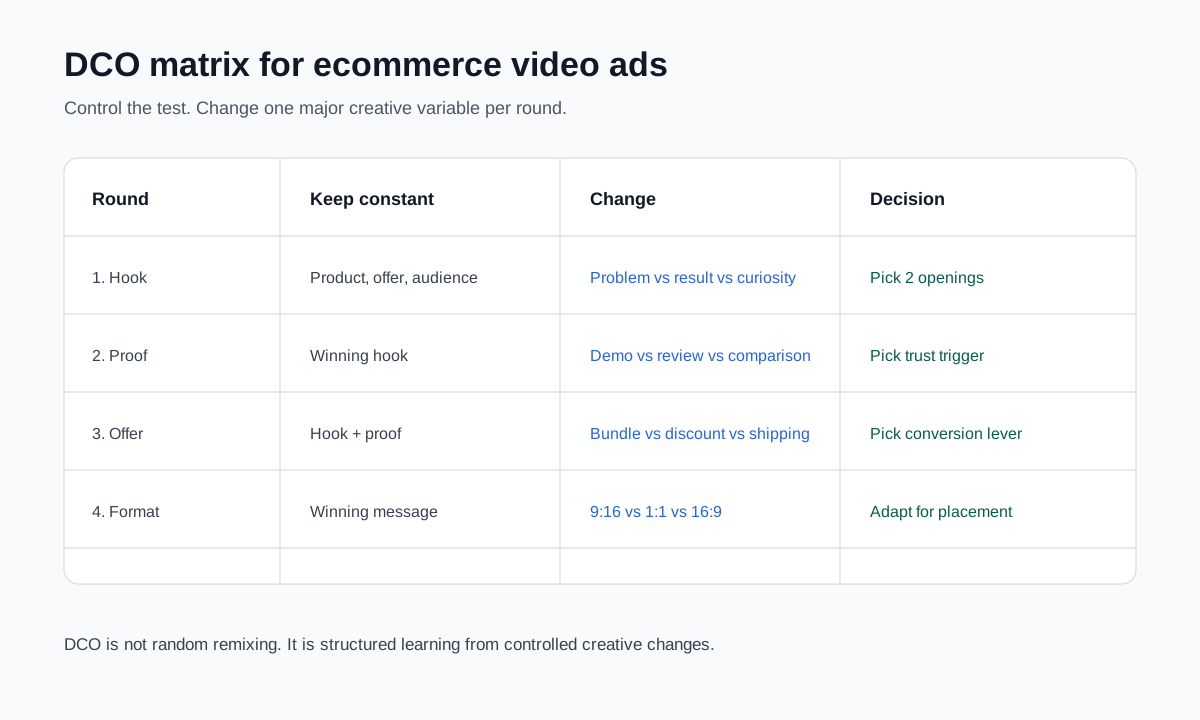
The important word is structured. DCO is not "make 50 random AI videos and let the algorithm figure it out." For ecommerce brands, the winning setup is a controlled creative matrix: keep the product, audience, and offer stable while changing one major variable at a time. Then use platform automation on Meta, TikTok, or Google to distribute variants, but use human review to protect product accuracy, claims, brand fit, and learning quality.
If you are still building the first ad, start with how to make a video ad for an ecommerce product. If you already have UGC-style assets, use the structure in UGC videos for ecommerce before scaling variants.
Why Ecommerce Video DCO Is Different From Display DCO
Dynamic creative optimization started as a way to assemble ad elements dynamically: image, headline, copy, call to action, product feed, and audience signal. That logic still matters. But ecommerce video ads add harder creative questions:
- Does the first 2 seconds show a buyer problem or only a pretty product shot?
- Is the product shown accurately in motion?
- Does the proof come from a real review, real demonstration, or unsupported claim?
- Does the same message work in 9:16 Reels and 1:1 Feed?
- Does the AI voiceover sound natural for the target market?
- Does a creator, AI actor, or product-only format create more trust?
- Is the platform "enhancing" the ad in a way that changes the message?
This is why ecommerce DCO should be treated as a creative learning system, not just a media buying feature.
Google's Demand Gen creative guidance emphasizes giving the system high-quality assets across videos, images, and formats. Google's Performance Max asset group documentation explains that text, images, videos, logos, and final URLs can be combined across surfaces, with asset reporting used to compare performance. Meta's Advantage+ creative tools can resize, generate text, and help deliver creative across placements. TikTok's Smart Creative combines videos or images, text, and calls to action while monitoring fatigue and refreshing creative combinations.
The common pattern is clear: platforms want more usable creative inputs. Your job is to provide better inputs, not more noise.
The Ecommerce DCO Matrix
| Test round | Keep constant | Change | What you learn |
|---|---|---|---|
| 1. Hook | Product, offer, audience, visual proof | Problem hook vs result hook vs curiosity hook | What stops the scroll |
| 2. Product proof | Winning hook, offer, audience | Demo vs review snippet vs comparison shot | What builds trust |
| 3. Offer | Winning hook and proof | Discount vs bundle vs free shipping vs urgency | What moves intent |
| 4. Presenter | Same script, proof, offer | Product-only vs creator vs AI actor vs voiceover | What format buyers trust |
| 5. Placement | Winning concept | 9:16, 1:1, 16:9, short cut, long cut | Where the concept survives |
| 6. Localization | Same winning concept | Language, captions, voice, currency, cultural reference | Whether the idea travels |
This matrix keeps the creative test readable. If you change the hook, product shot, offer, voice, and format all at once, you may get a winning ad but no useful learning.
What to Test First
Start with the highest leverage variable: the hook.
For ecommerce video ads, the opening usually determines whether the viewer stays long enough to understand the product. Test three hook families before you test small design changes.
| Hook family | Example for a travel jewelry organizer | When to use |
|---|---|---|
| Problem hook | "Your necklaces should not arrive tangled." | Buyer has a familiar pain point |
| Result hook | "Pack a weekend of jewelry in one flat case." | Product outcome is easy to visualize |
| Objection hook | "A tiny pouch is why your earrings disappear." | Buyer already uses a bad workaround |
| Comparison hook | "Loose pouch vs structured organizer." | Product advantage is visible side by side |
| Gift hook | "A practical gift for frequent travelers." | Product has seasonal or gifting intent |
Only after you have a hook signal should you test proof, offer, voice, and format.
Controlled DCO Workflow for Small Ecommerce Teams
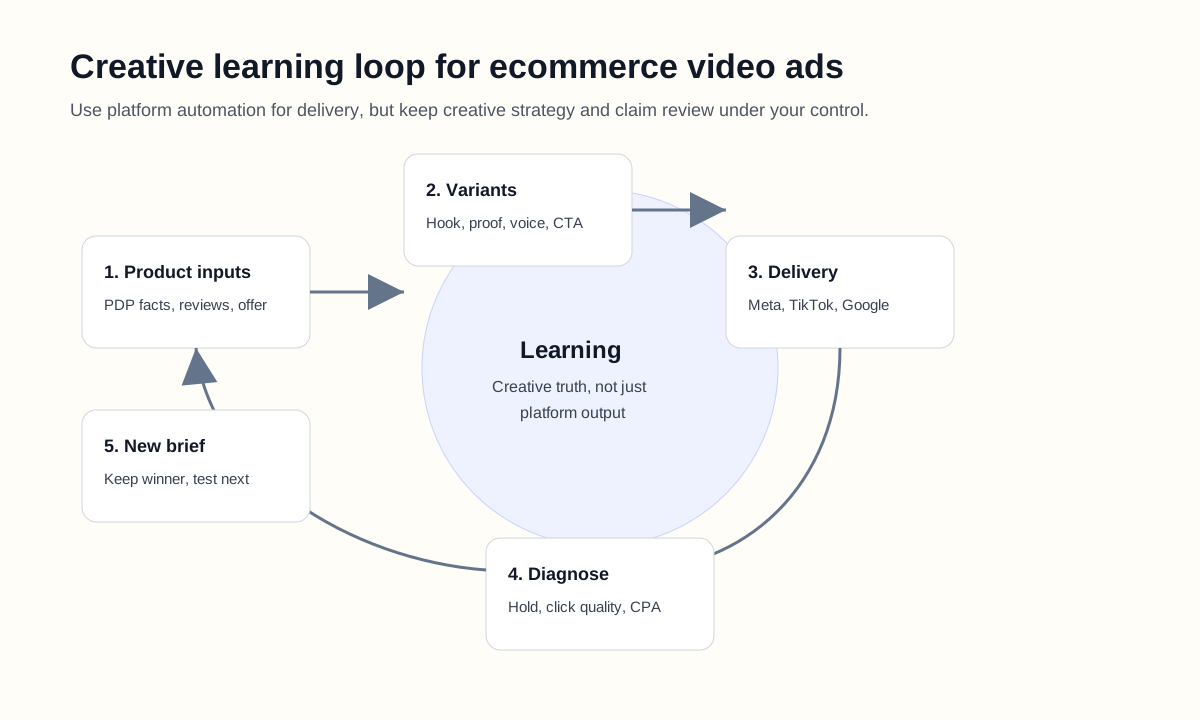
Step 1: Build a product truth sheet
Before generating variants, write a one-page source brief:
| Field | Example |
|---|---|
| Product | Travel jewelry organizer |
| Buyer | Frequent travelers who pack jewelry in pouches |
| Main problem | Tangled necklaces and missing earrings |
| Product proof | Flat case, separate compartments, zipper closure, color options |
| Offer | 15 percent off travel accessories bundle |
| Claim limits | Do not say waterproof, luxury leather, or "never tangles" unless proven |
| Required visuals | Open case, packed case, side-by-side with pouch, color options |
This sheet prevents AI-generated scripts and platform automation from drifting away from the real SKU.
Step 2: Generate a small set of variants
Start with 6-9 variants, not 50.
| Variant group | Count | Example |
|---|---|---|
| Hook variants | 3 | Problem, result, comparison |
| Proof variants | 2 | Demo shot, review snippet |
| Format variants | 2 | 9:16 short, 1:1 feed |
This gives enough variety for learning without creating a reporting mess.
Step 3: Publish with controlled labels
Name each asset in a way your team can understand later:
| Bad label | Better label |
|---|---|
video_final_3.mp4 |
organizer_problem-hook_demo-proof_9x16_v1 |
new_ai_ad.mp4 |
organizer_result-hook_review-proof_1x1_v1 |
tiktok_test.mp4 |
organizer_comparison-hook_demo-proof_9x16_v1 |
Good naming is not busywork. It lets you connect platform results back to creative decisions.
Step 4: Read the right metrics
DCO can hide the reason a creative won if you only look at blended campaign results.
| Metric | What it tells you | What it does not tell you |
|---|---|---|
| 2-second or 3-second hold | Whether the opening earns attention | Whether the buyer is qualified |
| Thumb-stop rate | Whether the first visual works | Whether the offer is persuasive |
| CTR | Whether the ad creates click intent | Whether the click will convert |
| Add-to-cart rate | Whether the landing and product fit the promise | Whether the hook alone worked |
| CPA or ROAS | Whether the whole system worked | Which creative element caused the result |
| Comment quality | Whether viewers trust the ad | Exact conversion value |
| Return or refund signal | Whether the ad overpromised | Early creative winner |
For ecommerce, do not let a high CTR trick you. A hook can create cheap curiosity clicks while lowering purchase quality.
Step 5: Turn the result into the next brief
At the end of a test, write one learning sentence:
- "Problem hook beat gift hook, but only when paired with the side-by-side pouch comparison."
- "AI actor version got attention, but product-only demo generated better add-to-cart rate."
- "Free shipping CTA improved CTR, but bundle offer produced higher AOV."
That learning becomes the next creative brief.
Platform Automation: What to Trust and What to Control
Meta
Meta Advantage+ creative tools can help adapt assets across placements and generate text or visual adjustments. This is useful when you already have strong product creative. It is less useful when your source creative is unclear, overclaimed, or off-brand.
Control manually:
- Product claim language.
- Before-after framing.
- Brand colors and logos.
- Any auto-generated text.
- Cropping that hides the product or price.
- Whether the ad still matches the landing page.
TikTok
TikTok Smart Creative combines creative assets and can use fatigue detection and refresh logic. TikTok's Smart+ updates also add more automation and creative controls in selected flows. For ecommerce teams, the opportunity is faster creative rotation. The risk is losing control over which product scene, CTA, or creator-style asset is being emphasized.
Control manually:
- Which videos enter the creative pool.
- Whether Spark or creator content has proper permission.
- AI-generated or auto-enhanced creative quality.
- First 2 seconds, since TikTok intent is heavily driven by the opening.
- Product claim and disclosure safety.
Google Demand Gen and Performance Max use asset groups, multiple creative formats, and AI-powered asset assembly across YouTube, Discover, Gmail, Search, Maps, Display, and other placements depending on campaign type. Google's documentation also notes that assets and videos may be resized, combined, or generated if you do not provide enough video assets.
Control manually:
- Upload at least one strong video asset yourself.
- Provide vertical, square, and landscape options where relevant.
- Check asset reporting instead of judging only blended campaign results.
- Review auto-generated video output before letting it carry brand messaging.
- Keep final URL and product page alignment tight.
Example: DCO Plan for a Portable Blender
Product: portable blender for smoothies.
Buyer: apartment renters, gym-goers, and office workers who want quick drinks without a large blender.
Round 1: Hook test
| Variant | Hook | Visual |
|---|---|---|
| A | "No full-size blender on your counter?" | Small blender next to large blender |
| B | "Blend a smoothie at your desk." | Desk setup and bottle close-up |
| C | "The easiest post-gym smoothie is the one you can carry." | Gym bag and product |
Keep offer, proof, voiceover, and CTA identical.
Round 2: Proof test
Use the winning hook, then test:
| Proof type | Scene |
|---|---|
| Feature proof | USB charging, detachable cup, compact size |
| Use proof | Fruit added, blend process, pour shot |
| Comparison proof | Product next to full-size blender or shaker bottle |
Round 3: Offer test
Use the winning hook and proof:
| Offer | CTA |
|---|---|
| Bundle | "Get the blender plus travel lid." |
| Discount | "Save 15 percent today." |
| Shipping | "Free shipping on the smoothie set." |
At the end, your team should know the winning buyer angle, proof type, and offer. That is more valuable than simply knowing "video 4 won."
How AI Helps DCO Without Making It Messy
AI is useful when it speeds up controlled variation:
- Generate 10 hook options from one product truth sheet.
- Turn a product page into a 15-second script.
- Create voiceover versions for different markets.
- Rewrite the same benefit for TikTok, Reels, and Shorts.
- Create AI actor or product-only variants for format testing.
- Produce short retargeting versions from a longer product explainer.
AI becomes harmful when it creates variation without discipline:
- New product claims not found on the product page.
- Different offers in every variant.
- Product visuals that do not match the actual SKU.
- Too many variables changed at once.
- Winning ads that cannot be explained or repeated.
If you use AI actors or influencer-style creative, review the boundaries in AI actors for product videos and AI influencer generator for ecommerce product ads.
When to Stop a Bad Variant
Do not wait forever for weak creative to "learn." But do not kill variants before they have a fair chance.
Use this practical rule:
| Signal | Action |
|---|---|
| Low hold rate and low CTR | Replace the hook or opening visual |
| Good hold rate but weak CTR | Improve product proof or CTA |
| Good CTR but weak add-to-cart | Check landing page match and buyer quality |
| Good add-to-cart but weak purchase | Review price, offer, trust, shipping, or checkout |
| Negative comments about product accuracy | Pause and fix the creative |
| Platform favors one asset too early | Split the test manually or create cleaner asset groups |
For small accounts, exact statistical confidence may be hard. That makes clean test design more important, not less.
What Not to Do
- Do not upload random AI videos with different products, offers, hooks, and formats into one test.
- Do not let platform automation rewrite regulated or sensitive claims without review.
- Do not compare a polished agency video against a rough AI draft and call the result "DCO."
- Do not judge a creative only by CTR.
- Do not ignore comments that reveal confusion, mistrust, or product mismatch.
- Do not keep testing tiny color changes if the hook and proof are weak.
- Do not build a new video from memory. Use a product truth sheet.
Recommended DCO Setup for One Product
For one ecommerce SKU, start with:
| Asset | Recommended count | Notes |
|---|---|---|
| Hook scripts | 5-10 | Choose 3 to publish first |
| Product proof shots | 3-5 | Close-up, demo, comparison, review |
| Voiceover options | 2 | Brand voice and creator-style voice |
| Formats | 2-3 | 9:16 first, then 1:1 or 16:9 if needed |
| CTAs | 2 | Product page CTA and offer CTA |
| Test rounds | 3-4 | Hook, proof, offer, placement |
This gives you enough creative diversity without losing the ability to learn.
Internal Links for the ShopShot Cluster
Use this article as the testing layer in the ShopShot content cluster:
- Planning the first product ad: How to Make a Video Ad for an Ecommerce Product
- Building UGC-style variants: UGC Videos for Ecommerce
- Comparing production cost: UGC Video Production Tools Pricing
- Choosing agency vs AI production: Video Marketing Agency vs AI Video Tool
- Working with AI presenters: AI Actors for Product Videos
FAQ
What is dynamic creative optimization for ecommerce video ads?
It is a structured way to test creative variables such as hooks, product shots, proof, offers, captions, voiceovers, presenters, and formats so ecommerce video ads improve through controlled learning.
Is DCO only for large ecommerce brands?
No. Small brands can use a simple matrix with 6-9 variants per product. The key is to test one major variable per round instead of creating random combinations.
What should I test first in ecommerce video ads?
Test the hook first. If viewers do not stay past the opening, they will not see the product proof, offer, or CTA. After the hook, test proof, offer, presenter style, and format.
Can AI help with dynamic creative optimization?
Yes. AI can generate scripts, voiceovers, product-only cuts, AI presenter versions, and placement variants. But humans still need to control product accuracy, claims, brand fit, and test interpretation.
How do I know if a DCO test worked?
Look for a clear learning, not only a winning ad. A useful test tells you which hook, proof type, offer, or format improved qualified clicks, add-to-cart rate, CPA, or ROAS.
Sources Checked
- Meta Advantage+ creative
- Google Ads Creative Excellence Guide for Demand Gen Campaigns
- Google Ads: How asset groups work
- TikTok Ads Manager: About Smart Creative
- TikTok Ads Manager: About upgrades to Smart+
- Two-stage dynamic creative optimization under sparse ambiguous samples for e-commerce advertising
- ShopShot internal planning files:
seo_article_plan_latest_competitor_keywords_2026-05-11.md,shopshot_seo_sop_v2_2026-05-18.md, andpseo-interface-plan-ugc-video-tools.md