
Last reviewed: May 15, 2026. Production costs, platform specifications, ad policies, and AI tool capabilities can change; confirm final requirements before launch.
Quick Answer
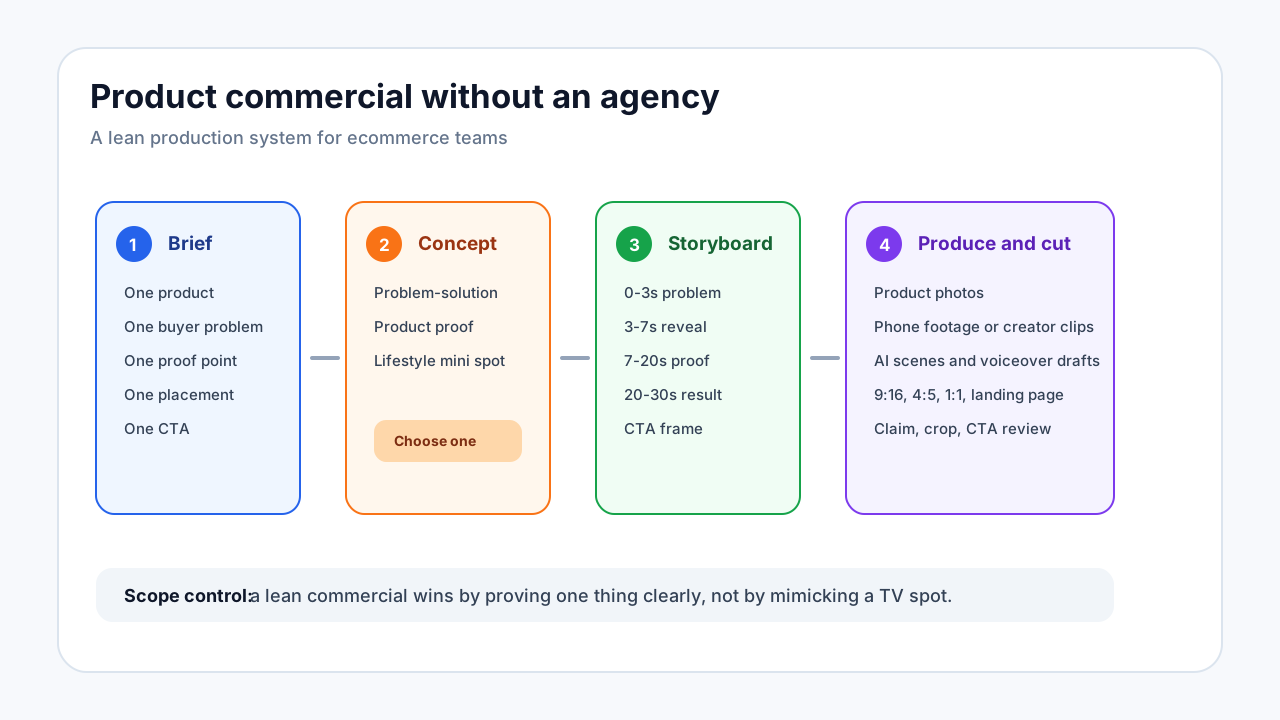
You can make a commercial video for a product without hiring an agency by narrowing the brief: one product, one buyer problem, one proof point, one offer, and one primary placement. Use AI for scripting, scene planning, captions, voiceover drafts, and variant generation, but keep the product claims grounded in real product evidence.
This guide is for ecommerce teams that need a product commercial strong enough for ads, landing pages, or product pages, but do not need a full agency shoot. If you need a lighter creator-style ad, start with the UGC script templates for product ads. If budget is the main question, compare production models in the ecommerce video production cost guide.
Commercial Video vs Video Ad vs UGC Video
These formats overlap, but they should not be planned the same way.
| Format | Main job | Best length | Typical proof | Best use |
|---|---|---|---|---|
| Commercial video | Present the product with a polished story | 15-60 seconds | Product mechanism, visual problem-solution, offer | Landing pages, product pages, paid social, brand campaigns |
| Video ad | Drive a measurable action in one placement | 6-30 seconds | Hook, demo, review, CTA | TikTok, Reels, Shorts, Feed, retargeting |
| UGC video | Make the product feel buyer-led or creator-led | 15-45 seconds | Personal use, review detail, first-use demo | Paid social, creator ads, retargeting |
If you are skipping an agency, do not try to recreate a national TV spot. Build a sharp ecommerce commercial that can be produced from product photos, short clips, AI scenes, captions, voiceover, and a simple storyboard.
What an Agency Usually Adds
Knowing what you are removing helps you decide what to replace with a lean workflow.
| Agency layer | What it does | Lean replacement |
|---|---|---|
| Strategy deck | Defines audience, message, offer, and creative direction | One-page ecommerce creative brief |
| Creative concept | Builds the commercial idea | Three angle options: problem-solution, product proof, lifestyle demo |
| Production crew | Handles lighting, camera, talent, location, sound | Product photos, founder footage, creator clips, AI scenes, stock-free product visuals |
| Copywriter | Writes script and CTA | PDP-to-script workflow and proof checklist |
| Editor | Cuts variants and formats | Template-based editing with placement-specific exports |
| Producer | Manages deadlines and approvals | Production checklist with claim, crop, and offer review |
The goal is not to remove judgment. The goal is to put judgment into a smaller repeatable system.
Example Product: Cordless Desk Lamp
Product: cordless rechargeable desk lamp.
Buyer: apartment renter or home-office worker who wants warm desk lighting without visible cables.
Buyer problem: desk looks cluttered, outlet placement is annoying, and the buyer wants a lamp that can move from desk to nightstand.
Product proof: cordless placement, brightness modes, close-up switch, charging shot, before/after desk setup.
Claim limits: do not claim exact battery life unless the product page and testing support it. Use safer language such as "designed for flexible desk and bedside use."
Step 1: Write a One-Page Commercial Brief
Use a brief like this before generating scenes or editing:
Product:
Cordless rechargeable desk lamp

Audience:
Apartment renters and home-office workers who want cleaner lighting without cable clutter

Buyer problem:
Desk setup looks messy and outlets are not where the lamp needs to be

Commercial promise:
Warm desk lighting that can move where the buyer needs it

Proof to show:
Lamp on desk, lamp moved to nightstand, brightness mode close-up, charging shot

Primary placement:
9:16 Reels/TikTok/Shorts version first, then landing-page cut

CTA:
Check colors, dimensions, and charging details

Claim limits:
Avoid unsupported battery-life promises and do not imply the lamp works in unsafe environments
Step 2: Pick One Commercial Concept
| Concept | Best for | Structure | Example hook |
|---|---|---|---|
| Problem-solution commercial | Simple products with a visible before/after | Messy setup, product reveal, clean result, CTA | "Your desk light should not create more clutter." |
| Product proof commercial | Products with a mechanism or feature | Feature close-up, demo, proof, offer | "A cordless lamp that moves from desk to bedside." |
| Lifestyle mini-commercial | Products tied to routine or mood | Morning/evening scene, product use, final setup | "One lamp for the desk, reading corner, and nightstand." |
For most ecommerce products, start with problem-solution or product proof. A lifestyle commercial needs better visuals and usually takes more time to make believable.
Step 3: Build a 30-Second Storyboard
| Time | Scene | Visual | Voiceover or caption |
|---|---|---|---|
| 0-3s | Problem | Cable-heavy desk, lamp cord crossing the setup | "Your desk light should not create more clutter." |
| 3-7s | Product reveal | Cordless lamp placed on a clean desk | "This cordless lamp keeps the setup flexible." |
| 7-13s | Mechanism | Hand taps brightness control, lamp moves from desk to side table | "Move it from work mode to reading mode without chasing an outlet." |
| 13-20s | Proof | Close-up of light on notebook, charging port, color/finish detail | "Use the brightness mode you need, then recharge it when you are done." |
| 20-26s | Result | Clean desk before/after or evening bedside scene | "Cleaner light, fewer visible cables." |
| 26-30s | CTA | Product hero with dimensions or colors | "Check the size, colors, and charging details." |
This is commercial enough to feel polished, but still specific enough for ecommerce performance.
Step 4: Decide What to Film, Generate, or Assemble
| Asset | Best source | Notes |
|---|---|---|
| Product hero image | Existing product photography | Use the cleanest product image for final frame and product reveal. |
| Hands-on demo | In-house phone footage or creator clip | Needed when the mechanism must be trusted. |
| Lifestyle room scene | AI-assisted scene, product photo composite, or original footage | Make sure the product does not look distorted or misleading. |
| Voiceover | Founder voice, creator voice, or AI voiceover | Compare voice options if the product needs credibility. |
| Captions | Editor or AI caption tool | Burn in important points for sound-off viewing. |
| Retargeting cut | Same assets with objection-first script | Useful after product page visits. |
AI can help you move faster, but do not use it to fake product performance, real customer experience, or claims the product cannot support.
Step 5: Use AI Where It Actually Helps
Use AI for:
- Turning PDP copy into script options.
- Creating three concept directions from the same product brief.
- Drafting voiceover and caption variants.
- Planning shot lists and safe margins for 9:16, 4:5, and 1:1 cuts.
- Generating non-deceptive background scenes when the product remains accurate.
- Creating first-pass retargeting versions from the winning concept.
Do not rely on AI for:
- Showing a product feature that does not exist.
- Inventing reviews or testimonials.
- Making exact durability, health, safety, income, or battery-life claims without evidence.
- Replacing real footage when the buyer needs to see fit, size, texture, or physical handling.
For voiceover choices, use the AI voiceover options guide. For cost planning across tools and creator workflows, use the UGC video production tools pricing guide.
Step 6: Make Placement Versions
| Version | Use | What to change |
|---|---|---|
| 9:16 short-form commercial | TikTok, Reels, Shorts, Stories | Fast hook, larger captions, product early |
| 4:5 feed cut | Instagram/Facebook Feed | More centered product, readable proof text |
| 1:1 square cut | Feed and some retargeting placements | Simplify motion and leave text safe margins |
| Landing-page cut | Product page or landing page | Slower pacing, more proof, fewer ad-style overlays |
| Retargeting cut | PDP visitors or cart abandoners | Start with size, charging, price, shipping, or objection answer |
Do not crop after editing if the crop breaks the product view. Plan the frame before production.
Cost and Time Planning Without an Agency
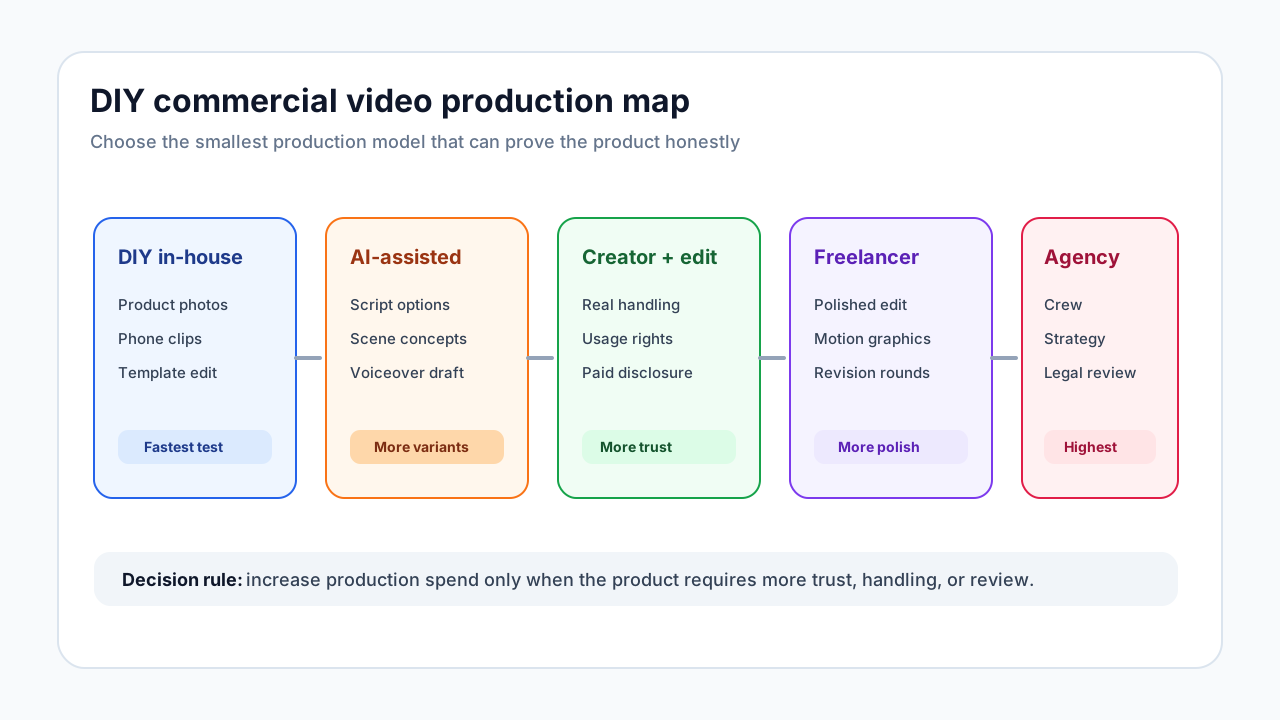
Costs vary widely by category, talent, location, usage rights, and number of revisions. Use this as a planning model rather than a universal quote.
| Production model | Typical inputs | Best for | Hidden cost |
|---|---|---|---|
| DIY in-house | Product photos, phone footage, AI script, template edit | Fast product-page and ad tests | Team time and weak footage quality |
| AI-assisted workflow | Product photos, AI scenes, AI voiceover, editor review | Variant testing and concept validation | Unusable outputs and claim review |
| Creator plus editor | Creator footage, product sample, usage rights, editor | UGC-style commercial with real handling | Creator revisions, shipping time, licensing |
| Freelancer production | Script, editor, motion graphics, light shoot | More polished landing-page commercial | Scope creep and revision cycles |
| Agency production | Strategy, crew, talent, shoot, edit, approvals | Complex brand campaign or regulated product | Lead time and higher upfront budget |
If your main goal is performance learning, produce a lean commercial first. If the product is going into retail, TV, major brand launch, or a regulated category, agency review may still be the safer path.
When You Still Need an Agency
Hire an agency or specialist production partner when:
- You need a national campaign, retail launch, or high-stakes brand film.
- The product requires actors, location permits, complex lighting, or physical stunts.
- The category has legal, medical, financial, safety, or child-related review risk.
- You need original product photography, packaging shots, and commercials in one production cycle.
- Your internal team cannot judge whether claims, usage rights, and disclosure language are safe.
Skipping an agency is a production strategy, not a reason to skip review.
Commercial Video QA Checklist
Before publishing:
- The commercial has one central promise.
- The product appears clearly in the first third.
- Each claim is supported by PDP facts, footage, reviews, or testing.
- The voiceover and captions say the same thing.
- The final CTA matches the product page.
- Crops are checked for 9:16, 4:5, 1:1, and landing-page embeds.
- Usage rights cover the intended placements.
- Any creator, testimonial, gifted product, or material connection is disclosed when required.
- The video does not imply the product was used by a real customer if the scene is AI-generated.
A Simple Production Schedule
| Day | Task | Output |
|---|---|---|
| Day 1 | Build brief, choose concept, write script | Approved one-page brief and 30-second storyboard |
| Day 2 | Gather assets and shoot simple footage | Product photos, hands-on clips, voiceover draft |
| Day 3 | Create first edit | 9:16 commercial draft |
| Day 4 | Review claims, crop, captions, and CTA | Final short-form version |
| Day 5 | Cut placement variants | Feed, product page, and retargeting versions |
| Day 6-7 | Launch small test | Initial results by hook, proof, and CTA |
This schedule is realistic for a lean ecommerce team because it avoids the slowest agency-style steps: broad concept exploration, large shoot logistics, and multiple stakeholder review cycles.
FAQ
Can I make a commercial video without an agency?
Yes, if the goal is ecommerce performance creative, product-page education, or a lean product commercial. Use a narrow brief, real product proof, AI-assisted planning, and placement-specific exports. Use an agency when the campaign is high-risk, heavily regulated, or production-heavy.
What is the difference between a commercial video and a video ad?
A commercial video usually presents a polished product story and can be used on ads, landing pages, and product pages. A video ad is built for a specific placement, audience, CTA, and measurable response. Ecommerce brands often need both, but the first version should still be ad-ready.
How long should a product commercial video be?
For paid social, 15-30 seconds is usually the practical starting range. For landing pages or product pages, 30-60 seconds can work when the product needs more explanation, proof, or objection handling.
What should I prepare before making a commercial video?
Prepare the product page, buyer problem, product proof, offer, claim limits, primary placement, asset list, script, shot list, and usage-rights requirements.
What parts of a product commercial can AI help with?
AI can help with scripts, scene planning, captions, voiceover drafts, background concepts, and placement variants. It should not invent product performance, fake real customer experience, or replace hands-on footage when the buyer needs to inspect the product.
Sources Checked
- TikTok video ad specifications: TikTok Ads Help Center
- Meta Reels ad format guidance: Meta for Business Reels Ads
- YouTube and Google video ad guidance: Google Ads Help
- FTC disclosure and endorsement guidance: FTC Endorsement Guides FAQ
- Production scope reference: Lemonlight video production company guide