
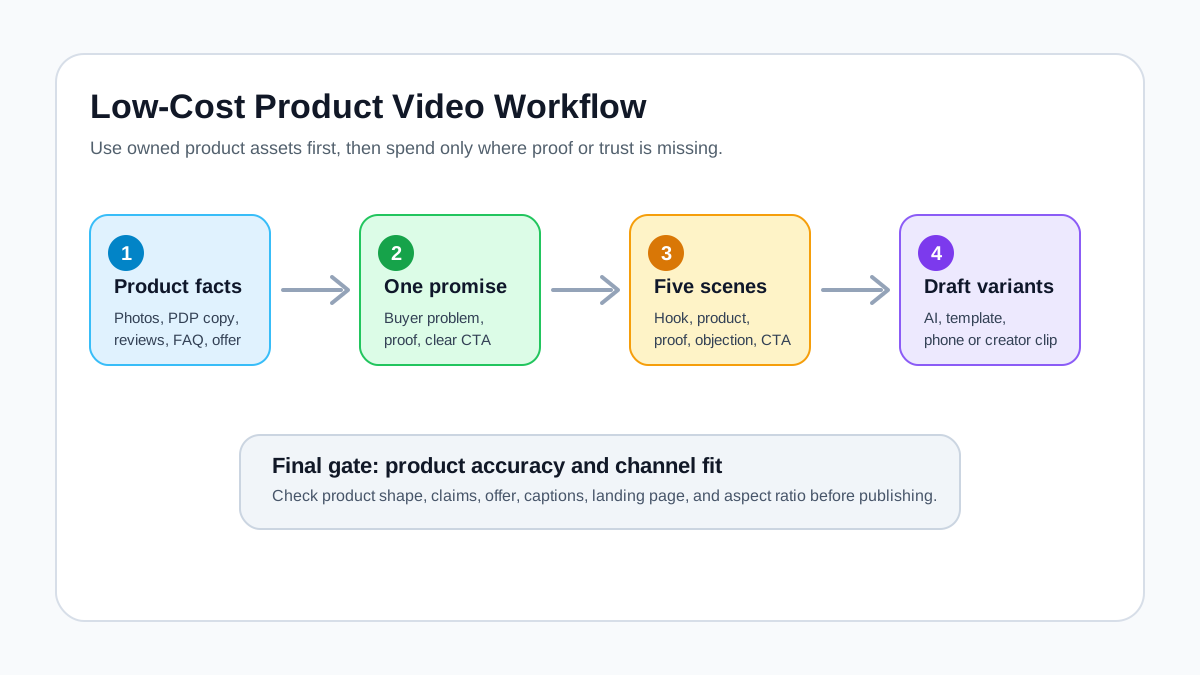
You can make engaging product videos cheaply by starting with the product assets you already have: product photos, a product page, customer questions, reviews, use cases, and a clear offer. The low-cost workflow is simple: define one buyer problem, write a short script, plan five scenes, create a video draft from existing assets, then review product accuracy before publishing.
Quick Answer
The cheapest useful product video is not the video with the most effects. It is the one that makes the product easy to understand quickly. For ecommerce, that usually means a 15-30 second video with a clear hook, product reveal, proof moment, and CTA. You can make it with product images, simple captions, AI-assisted video generation, and a repeatable script template instead of hiring a full production crew for every SKU.
If you want a broader AI workflow, read how to create ecommerce product videos with AI. If you need a script format, use the product video ad script template.
Start With the Product, Not the Camera
Expensive product videos often start with a shoot: location, lighting, talent, camera, props, editing, and revisions. Cheap product videos should start with a product decision: what does the buyer need to understand before they click, add to cart, or keep watching?
Use this simple planning table before creating the video:
| Question | What to write down | Example |
|---|---|---|
| Who is the buyer? | One specific buyer group | Busy parents packing school lunches |
| What problem do they have? | One concrete pain point | Food containers leak inside bags |
| What does the product do? | One plain-language benefit | The lid locks each section separately |
| What proof can you show? | Feature, review, comparison, use case | Close-up of seal and locking clips |
| What should the viewer do next? | One CTA | Choose a size and add to cart |
This step costs nothing, but it prevents most weak videos. If you cannot explain the product in this table, the video will probably become a generic montage.
Use a Five-Scene Product Video Template
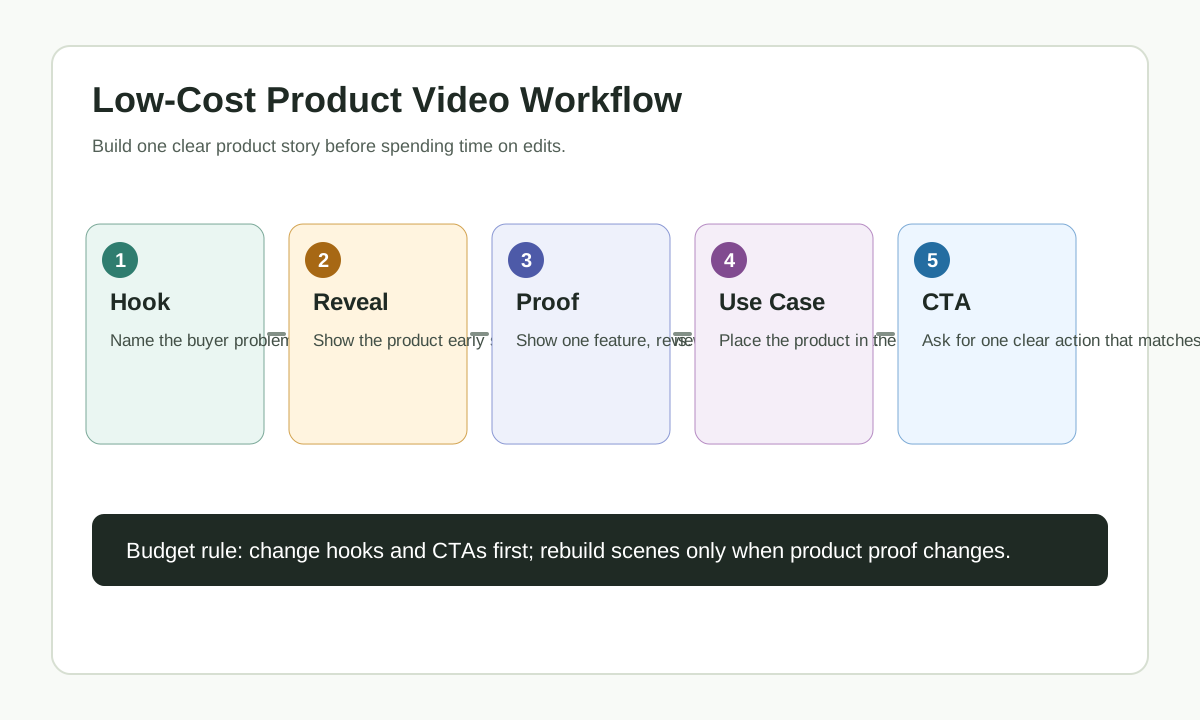
You do not need a complicated storyboard for a cheap product video. Use five scenes:
| Scene | Purpose | Example caption |
|---|---|---|
| 1 | Hook the buyer with the problem | "Lunch leaks should not ruin your bag." |
| 2 | Show the product clearly | "A two-layer lunch box with separate sections." |
| 3 | Show the mechanism or proof | "Clip locks and silicone seal hold sauces in place." |
| 4 | Show the use case | "Pack it for work, school, or meal prep." |
| 5 | Give the CTA | "Pick your size and build your lunch kit." |
This template works because every scene has a job. It also keeps the video short enough for TikTok, Reels, Shorts, Meta ads, Shopify product pages, and retargeting cuts.
For more visual planning, use the product video storyboard template.
Format the Video Before You Export
Cheap product videos become expensive when one finished file has to be rebuilt for every channel. Decide the first export format before you generate variants, then adapt the same script and scenes for the next placement.
| Channel or use case | Practical starting format | Low-cost production note |
|---|---|---|
| TikTok, Reels, Shorts | 9:16 vertical | Keep the product, caption, and CTA away from app UI areas |
| Meta feed or mixed placements | 1:1 or 4:5 plus a 9:16 cut | Plan captions that still work if the frame is cropped |
| YouTube or product education | 16:9 or 9:16 depending on placement | Use horizontal for longer explainers and vertical for Shorts-style discovery |
| Shopify product page | 1:1, 4:5, or embedded 16:9 | Prioritize product clarity over social-style transitions |
| Retargeting proof clip | Reuse the strongest proof scene | Start with the product proof, not a cold-audience hook |
Google Ads currently recommends horizontal, vertical, and square video ratios for broad video coverage, while Meta recommends matching aspect ratio to placement. TikTok Creative Center also lets you sort Top Ads by metrics such as CTR and 2-second or 6-second view rate, which is useful when choosing hooks before production.
Make Product Videos From Existing Assets
A low-cost product video does not require a new shoot if you already have strong product materials.
| Existing asset | How to use it in a video | Cost impact |
|---|---|---|
| Product photos | Use as packshots, close-ups, or motion scenes | Avoids a new shoot |
| Product page copy | Turn bullets into captions and voiceover | Avoids script writing from scratch |
| Reviews | Use as proof or objection handling | Adds trust without filming testimonials |
| FAQ answers | Convert common objections into scenes | Makes the video more useful |
| Product demo clips | Recut into hooks, proof, and CTA versions | Extends existing footage |
| Offer details | Use in final frame | Makes the video commercially useful |
If your product is visual, product images are enough to start. If the product depends on texture, scale, fit, durability, or results, add at least one real proof asset before publishing.
Write a Cheap Product Video Script
Keep the script plain. A low-cost product video gets expensive when teams spend too much time rewriting clever copy.
Use this script:
Hook: [Name the buyer problem]
Product: [Show what the product is]
Proof: [Show the feature, use case, review, or comparison]
Objection: [Answer the main hesitation]
CTA: [Tell the viewer what to do next]
Example:
Hook: Your gym bag should not smell like yesterday's shoes.
Product: This ventilated shoe pouch separates sneakers from clean clothes.
Proof: Mesh panels release moisture while the zipper keeps dirt contained.
Objection: It folds flat when you are not using it.
CTA: Add one to your travel kit before your next workout.
This structure can become a TikTok ad, a Shopify product page video, a YouTube Short, or a Meta retargeting ad. Change the hook or CTA first; do not rebuild the whole video every time.
Compare Cheap Production Options
There is no single cheapest method for every product. The best option depends on what assets you already have.
| Method | Best for | Strength | Watch-out |
|---|---|---|---|
| Phone video | Products that need real handling | Authentic and cheap | Needs decent lighting and clean audio |
| Product photo slideshow | Simple products with good images | Fast and easy | Can feel static if captions are weak |
| AI product video draft | Products with strong photos or URLs | Fast variants without editing from scratch | Must review accuracy and claims |
| Template editor | Brand promos and sale videos | Easy layout and captions | Can look generic |
| Creator/UGC clip | Products where trust matters | Human context | Usage rights and quality vary |
| Freelancer edit | Existing footage that needs polish | Better pacing | Costs more per revision |
For many ecommerce sellers, the best low-cost stack is simple: product photos plus an AI-assisted draft plus a quick human review. Use creator footage or a freelancer only for products where real handling or human trust is critical.
Use AI to Create Variants, Not Just One Video
AI is most useful when you need multiple product video drafts without starting over each time. Instead of making one "perfect" video, make three controlled variants.
| Variant | Change | Keep the same |
|---|---|---|
| Problem hook | Start with the pain point | Product proof and CTA |
| Benefit hook | Start with the result | Product proof and CTA |
| Objection hook | Start with the hesitation | Product proof and CTA |
| Offer cut | Change discount, bundle, or free shipping message | Product story |
| Retargeting cut | Start with proof or review | Product and offer |
This is where tools like ShopShot fit the workflow. The product facts stay stable, while the creative angle changes. That helps small teams test ideas without paying for a full production cycle each time.
For ad-specific production, see AI Video Ad Generator for E-Commerce.
Keep the Video Cheap by Limiting Scope
Most product videos get expensive because the scope is vague.
Avoid this brief:
Make a cool video for our product.
Use this brief:
Make a 20-second vertical video for this product photo. Open with the problem of cluttered bathroom counters, show the organizer clearly, show the drawer and divider mechanism, mention easy cleaning, and end with "Organize your sink in minutes."
The second brief is cheaper because it removes guesswork. It tells the editor or AI tool what to show, what to say, and where the viewer should go next.
Run a Product Accuracy Check
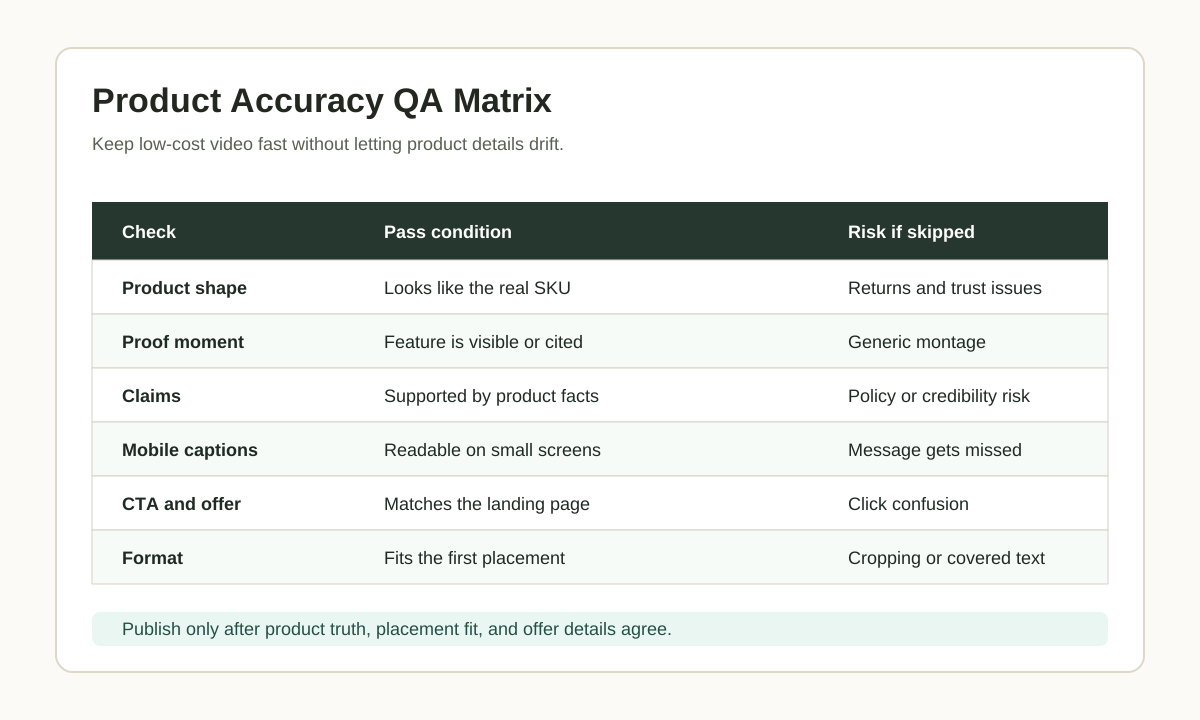
Cheap production should not mean careless production. Before publishing, check the video against the real product.
| QA item | Pass condition |
|---|---|
| Product shape | The product still looks like the real item |
| Key feature | The important feature is visible or accurately described |
| Claim | Every claim is supported by real product information |
| Caption | Text is readable on mobile |
| CTA | The final action matches the landing page |
| Format | The video fits the channel where it will run |
| Offer | Price, discount, or shipping message is current |
| Audio | Music or voiceover is safe for the intended use |
This is especially important for AI-generated drafts. AI can speed up production, but your team still owns the final claims.
A One-Hour Low-Cost Product Video Workflow
Use this workflow when you need a quick first video:
| Time | Task | Output |
|---|---|---|
| 10 minutes | Fill out the product planning table | Buyer, problem, proof, CTA |
| 10 minutes | Write the five-scene script | Hook, product, proof, objection, CTA |
| 15 minutes | Generate or assemble the first draft | Short product video draft |
| 10 minutes | Create two hook variants | Three total versions |
| 10 minutes | Review product accuracy and captions | QA-approved draft |
| 5 minutes | Export for the first channel | Ready for upload or test |
Do not try to create every possible platform version at once. Start with one channel, learn from it, then adapt.
Check Platform Fit Before You Export
Cheap production works best when the first draft is built for the channel where it will run. Do not make one generic landscape video and crop it later if the first channel is Shorts, TikTok, Reels, or a mobile product page.
| Channel or page | Low-cost format check | Why it matters |
|---|---|---|
| YouTube and Google video ads | Prepare 1080p versions in vertical, square, or horizontal format depending on placement. | Google's current video ad specs list 1080p as recommended and support vertical, square, and horizontal HD assets. |
| YouTube Shorts-style ads | Keep the main action in a short vertical cut, often 10-30 seconds for action-oriented campaigns. | Short vertical ads need a faster hook and less unused background space. |
| TikTok ads | Build for 9:16 vertical viewing, readable captions, sound, and visible content inside the safe zone. | TikTok's creative guidance favors platform-native vertical creative over reused desktop-style assets. |
| Meta Reels or Stories | Keep text and product proof away from interface overlays and test vertical or square crops. | Meta placement guidance uses different aspect ratios across placements, so captions and CTAs must survive the crop. |
| Shopify product page | Use product media that helps shoppers understand size, function, and quality. | Shopify supports product images, 3D models, and videos, but the media should clarify the product rather than act like a generic brand ad. |
This check is not a reason to create five different videos before launch. It is a reason to make one clean vertical or square version first, then adapt only after the product story passes QA.
Common Mistakes
The first mistake is hiding the product. If the product does not appear early, viewers may not understand what the video is about.
The second mistake is adding too many benefits. One video should sell one main idea.
The third mistake is using unsupported claims. Do not let AI invent durability, medical, financial, or performance results.
The fourth mistake is publishing the same video everywhere without adapting format. A Shopify page video, TikTok ad, and Meta retargeting cut do not need the same opening.
The fifth mistake is skipping internal reuse. One good product video can become a product page embed, an ad draft, a Short, a GIF-style email visual, and a retargeting proof clip.
FAQ
What is the cheapest way to make a product video?
The cheapest useful method is to start with product photos, product page copy, a simple script, and a short five-scene structure. Use AI or a template editor to create the first draft, then review the product details before publishing.
Can I make product videos without filming?
Yes, if the product can be explained with existing photos, product details, captions, and motion. Products that depend on texture, fit, scale, or live demonstration may still need at least a short real clip.
How long should a cheap product video be?
For ecommerce, start with 15-30 seconds. That is long enough to show a problem, product, proof, and CTA without forcing the viewer through a full commercial.
Do AI product videos work for ads?
They can work as ad drafts when the product is clear, the claim is accurate, and the video has a strong hook. Do not publish AI-generated ads without checking product accuracy, offer details, and platform fit.
What should I include in a product video?
Include one buyer problem, a clear product reveal, one proof moment, one objection answer, and one CTA. Avoid trying to explain every feature in one short video.
Sources Checked
- Google Ads Help: About video ad specs
- Google Ads Help: YouTube Shorts ads asset specs and best practices
- TikTok Ads Help: Creative best practices for performance ads
- TikTok Ads Help: How to use the Top Ads Dashboard
- Meta Business Help: Aspect ratios supported by placements in Meta Ads Manager
- Shopify Help Center: Product media
Conclusion
You do not need expensive production to make an engaging product video. You need a clear product story, useful assets, a short script, a simple scene plan, and a review process that protects product accuracy. Start with one product, create three hook variants, publish the best version, and use what you learn to improve the next batch.