
Quick Answer
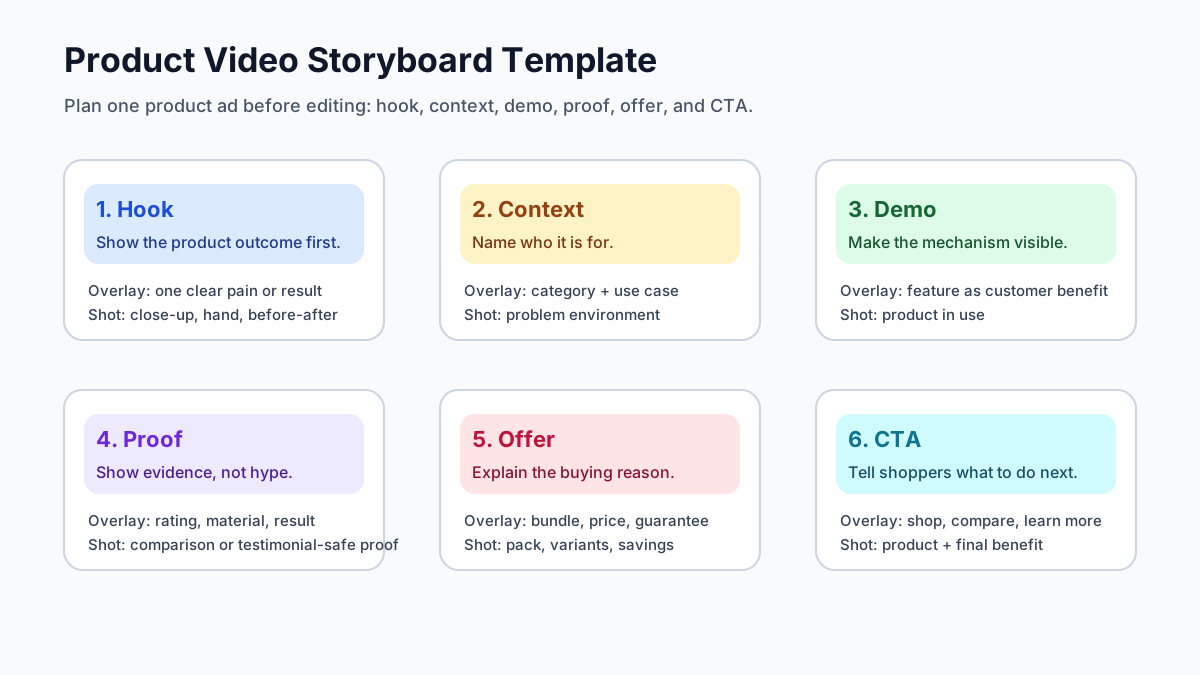
A product video storyboard template helps ecommerce teams plan a video before they generate, shoot, or edit it. The most reliable structure is six scenes: hook, context, product demo, proof, offer, and CTA. For each scene, write the customer question it answers, the visual shot, the text overlay, the evidence needed, and the platform cut you will export.
Use this template when a product page, ad brief, or script is ready, but the video still feels vague. It prevents the common problem of making a nice-looking product video that has no clear first frame, no visible product proof, and no version that fits TikTok, Reels, Shorts, Meta feed, and the product detail page.
Why Ecommerce Product Videos Need a Storyboard
Generic storyboard templates are built for films, training videos, or brand campaigns. Ecommerce ads need a tighter version because the viewer is usually on a phone, moving quickly, and deciding whether the product solves a specific problem.
That changes the storyboard job. You are not only planning shots. You are planning shopper comprehension.
A good ecommerce storyboard should answer five questions before editing starts:
- What will the shopper understand in the first two seconds?
- Which product detail proves the main benefit?
- Which claim needs visual evidence?
- Which frame can survive a 9:16, 1:1, or 4:5 crop?
- What should the shopper do after the video ends?
This is also where AI video generation becomes more predictable. If you ask an AI tool for "a product video," the result can drift into generic lifestyle footage. If you give it a storyboard with scene intent, product details, proof, and CTA, the output is easier to review and adapt.
For script-first planning, pair this guide with Product Video Script Template for Ecommerce Ads. For a full production workflow, use How to Make a Video Ad for an Ecommerce Product.
The Product Video Storyboard Template
Use this as the working template for a 15-30 second ecommerce product video.
| Scene | Shopper question | Visual direction | Overlay copy | Evidence required |
|---|---|---|---|---|
| Hook | Why should I stop scrolling? | Show the result, pain, or transformation first. | One short outcome or problem line. | Product visible or outcome clear. |
| Context | Is this for me? | Show the use case, setting, or target buyer. | Name the use case or product category. | Avoid vague lifestyle filler. |
| Demo | How does it work? | Show hands, motion, before-after, texture, scale, or setup. | Turn a feature into a customer benefit. | Product action must be visible. |
| Proof | Can I trust the claim? | Show review-safe proof, material detail, comparison, or measured result. | One factual claim only. | Use real PDP data or verified product facts. |
| Offer | Why buy now? | Show bundle, variants, price anchor, guarantee, or urgency. | Clarify the offer without clutter. | Offer must match landing page. |
| CTA | What should I do next? | End on product plus benefit. | Shop now, compare sizes, see details, or learn more. | CTA should match destination page. |
The template is intentionally simple. If a scene does not answer a shopper question, remove it. If a product needs more education, split the demo into two scenes instead of adding a long brand intro.
Scene-by-Scene Example: Portable Blender
Here is a filled storyboard for a portable blender ad.
| Time | Scene | Shot | Overlay | Voiceover or caption |
|---|---|---|---|---|
| 0-2s | Hook | Finished smoothie poured at a desk. | "No kitchen needed." | "Make a real smoothie anywhere." |
| 2-5s | Context | Fruit, water, and blender next to a work bag. | "For office mornings." | "Add fruit, liquid, and press once." |
| 5-10s | Demo | Close-up of blending and cup removal. | "Blends in 30 seconds." | "The cup detaches, so there is no extra bottle." |
| 10-14s | Proof | Show scale, charging port, and cleaning rinse. | "USB-C + rinse clean." | "Small enough for a bag, easy to clean after use." |
| 14-18s | Offer | Show colors and bundle. | "2 colors. Travel lid included." | "Pick the color that fits your routine." |
| 18-20s | CTA | Product on desk with final smoothie. | "Shop portable blenders." | "See details and reviews today." |
Notice what is missing: no logo intro, no abstract lifestyle montage, and no unsupported "best blender ever" claim. The storyboard makes the product visible, puts the benefit in plain language, and gives the editor a concrete shot list.
Platform Cuts to Plan Before Editing
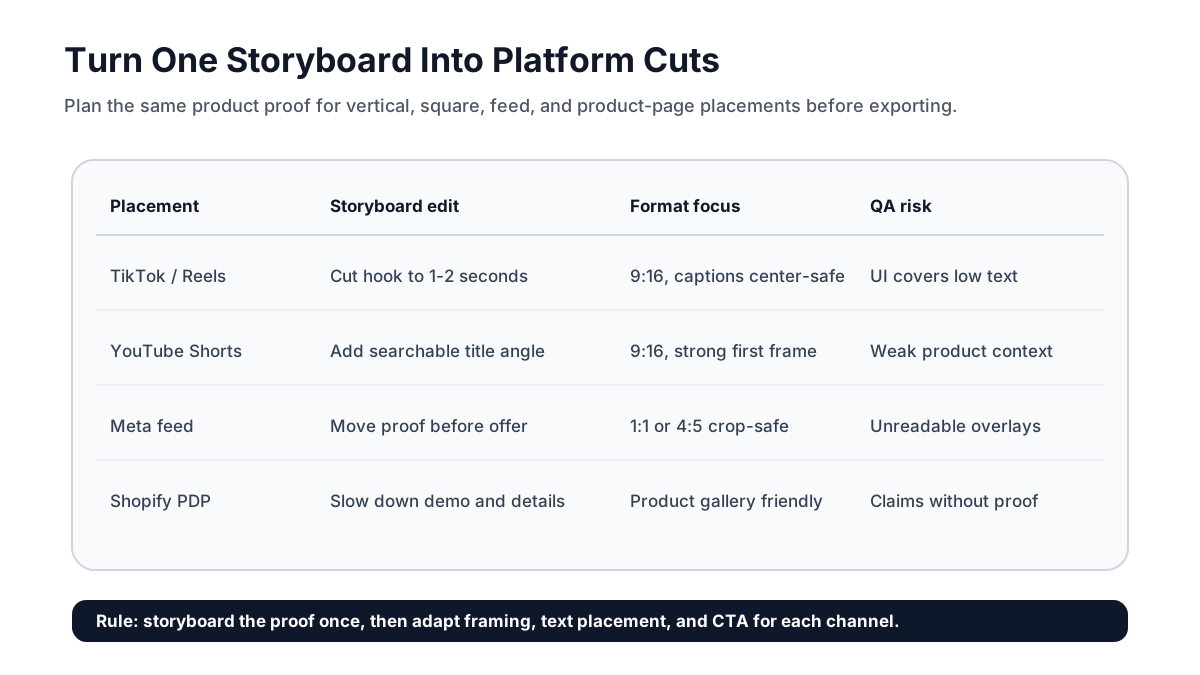
One storyboard should become several platform cuts, not one universal export. The source scenes can stay the same, but framing, text placement, CTA, and pacing need to change by placement.
| Platform or placement | Default cut | Storyboard adjustment | Source checked |
|---|---|---|---|
| TikTok in-feed | 9:16 vertical | Put the product and hook in the first frame; keep low text clear of interface areas. | TikTok lists vertical 9:16 as recommended for auction in-feed ads and accepts square and horizontal formats too. |
| Instagram Reels | 9:16 vertical | Keep product name, price, and CTA in a center-safe area. | Use this with the existing Instagram Reels safe-zone template. |
| YouTube Shorts | 9:16 vertical | Add a searchable product-category angle and a strong first frame. | Google says vertical 9:16 assets are best suited for Shorts ad inventory. |
| Meta feed | 1:1 or 4:5 | Crop demo and proof scenes so the product remains readable in feed. | Meta recommends adapting aspect ratios by placement group. |
| Shopify product page | Gallery-friendly product demo | Slow down the mechanism and remove ad-only urgency. | Shopify supports product media including videos and externally hosted videos. |
The biggest storyboard mistake is planning only the vertical ad. If the product also needs a product-page video, a Meta retargeting cut, and a YouTube Shorts version, decide that before editing. Otherwise, key product details end up outside the crop.
A 7-Step Workflow
1. Collect Product Inputs
Start with the product page, product photos, reviews, support tickets, and offer details. Pull only claims you can prove. If the product page says "water-resistant," the storyboard can show splashes only if the rating and use case are accurate.
Create a short input block:
- Product category
- Main buyer
- Primary pain point
- Top three benefits
- Proof points from PDP, reviews, or specs
- Offer and CTA
- Required platform cuts
2. Choose One Main Angle
Do not put every benefit into one ad. Pick one angle for each storyboard:
| Angle | Best for | Storyboard emphasis |
|---|---|---|
| Problem-solution | Products that solve an obvious irritation | Start with the pain, then show the product action. |
| Before-after | Visual categories like cleaning, beauty, home, and organization | Make the transformation the hook and proof. |
| Demo-first | Products with a novel mechanism | Show the mechanism before explaining features. |
| Proof-first | Products with review, material, or spec advantages | Show the evidence before the offer. |
| Gift or bundle | Seasonal and AOV-focused products | Show variants, packaging, and use occasions. |
If you need multiple angles, create multiple storyboards. That gives ad platforms and creative teams cleaner variants to test.
3. Write the Scene Cards
Each scene card should include:
- Goal: what the scene proves.
- Visual: what appears on screen.
- Overlay: the shortest readable text.
- Audio: voiceover, caption, or sound cue.
- Product detail: SKU, color, size, ingredient, material, or feature.
- Risk check: claim, policy, crop, or readability issue.
This gives designers, AI tools, and editors the same source of truth. It also makes review faster because stakeholders can approve the logic before anyone spends time on final video polish.
4. Build a Shot List From the Storyboard
Turn the storyboard into production instructions. A scene like "show the product is compact" is not enough. The shot list should say "hand places the product next to a phone and sunglasses inside a small tote bag."
This is where ecommerce videos gain trust. Shoppers need visual proof of size, texture, fit, assembly, ingredients, or result. A storyboard that stays abstract will not fix weak product proof later.
5. Generate or Edit the First Draft
If you are using ShopShot or another AI video workflow, feed the storyboard as structured input. Keep the scenes short and specific. For manual editing, use the storyboard as the timeline order.
For platform-specific production, route vertical social concepts to tools like TikTok Shop video generation, Instagram Reels video generation, or YouTube Shorts video generation. For Shopify page media, use the article with Shopify product video checklist.
6. QA the Draft Against the Storyboard
Use this QA table before publishing:
| QA item | Pass condition | Common failure |
|---|---|---|
| First frame | Product, result, or pain is clear without sound. | Abstract intro or logo-only opening. |
| Product proof | Viewer can see how the product works. | Feature is mentioned but not shown. |
| Claim safety | Every claim has product-page evidence. | AI invented a stronger claim than the PDP supports. |
| Text readability | Overlay is readable on mobile. | Too many words or low-contrast text. |
| Crop safety | Key details survive 9:16, 1:1, and 4:5 versions. | Product or price is cut off. |
| CTA match | CTA matches destination page and offer. | Ad says discount, landing page does not. |
7. Save the Winning Storyboard
When a video performs well, keep the storyboard as a reusable creative pattern. Do not only save the final file. Save the scene order, hook, proof type, offer, CTA, platform cuts, and result notes. That becomes a repeatable product video system for the next SKU.
When to Use AI and When to Film
AI is useful when the product can be represented from photos, clean product data, simple motion, and clear text overlays. Filming is better when the product needs tactile proof, complex assembly, precise human use, or regulated claims.
| Product type | AI-friendly storyboard | Film-first storyboard |
|---|---|---|
| Accessories | Size, styling, variants, bundle offer | Close-up material proof if texture matters. |
| Beauty | Routine steps, pack shots, ingredient callouts | Real application, skin result, compliance-sensitive claims. |
| Home goods | Before-after, organization, space saving | Installation, durability, scale, weight. |
| Apparel | Outfit combinations and color variants | Fit, drape, fabric movement, size comparison. |
| Electronics | Use case, ports, setup, feature tour | Screen behavior, latency, detailed operation. |
For most ecommerce teams, the strongest workflow is mixed: use AI to create fast storyboard variants, then film or supply real product footage for proof moments that must be exact.
Internal Link Map for This Topic
This article should sit between script planning, product-video production, and platform execution:
- Use Product Video Script Template for Ecommerce Ads before this article when the wording is not ready.
- Use How to Make a Video Ad for an Ecommerce Product when you need the full PDP-to-video workflow.
- Use Product Video Examples for Ecommerce when choosing an angle.
- Use Ad Copy to Video Script Workflow when starting from a paid social ad or landing page headline.
- Use ShopShot AI Video Generator when you are ready to turn product inputs into video concepts.
FAQ
What is a product video storyboard template?
A product video storyboard template is a planning sheet that maps each video scene to a shopper question, visual shot, text overlay, proof point, and CTA. It turns a product page or script into a clear editing plan.
How many scenes should an ecommerce product video storyboard have?
Most ecommerce product video ads need five to seven scenes. A strong default is hook, context, demo, proof, offer, and CTA. Shorter products can combine context and demo; complex products can split the demo into two scenes.
Should I storyboard before using an AI video generator?
Yes. A storyboard gives the AI tool clearer creative constraints. It reduces generic footage, unsupported claims, weak hooks, and missing product proof.
What is the best length for a product video ad storyboard?
For paid social, plan 15-30 seconds. For a Shopify product page, a slower 20-45 second demo can work if the product needs explanation. The storyboard should set the length by scene, not by guesswork.
Can one storyboard work for TikTok, Reels, Shorts, Meta, and Shopify?
One storyboard can be the source plan, but each platform should get a cut. Adapt aspect ratio, text placement, pacing, CTA, and product proof for each placement.
Sources Checked
- Google Ads Help: About video ad specs
- Google Ads Help: YouTube Shorts ads asset specs and best practices
- TikTok Ads Help: Auction In-Feed Ads
- TikTok Advertising Policies: Ad format and functionality
- Meta Business Help: Best practices for aspect ratios across placements
- Shopify Help Center: Adding product media
- Shopify Dev Docs: Product media
- Miro storyboard template guide
- Canva storyboard templates
- StudioBinder commercial storyboard guide
Bottom Line
A product video storyboard template is not extra paperwork. It is the fastest way to keep ecommerce video ads specific, proof-led, and reusable. Plan the hook, demo, proof, offer, and CTA before editing, then adapt the same storyboard into platform cuts for social ads, Shorts, Reels, Meta feed, and product pages.