
Quick Answer
An ad copy to video script workflow turns a static ecommerce message into a sequence of visual scenes: hook, product proof, demo, objection handling, offer, and CTA. Start with the product page, customer proof, and one campaign promise. Then convert each line of copy into what the shopper sees, hears, reads, and clicks next.
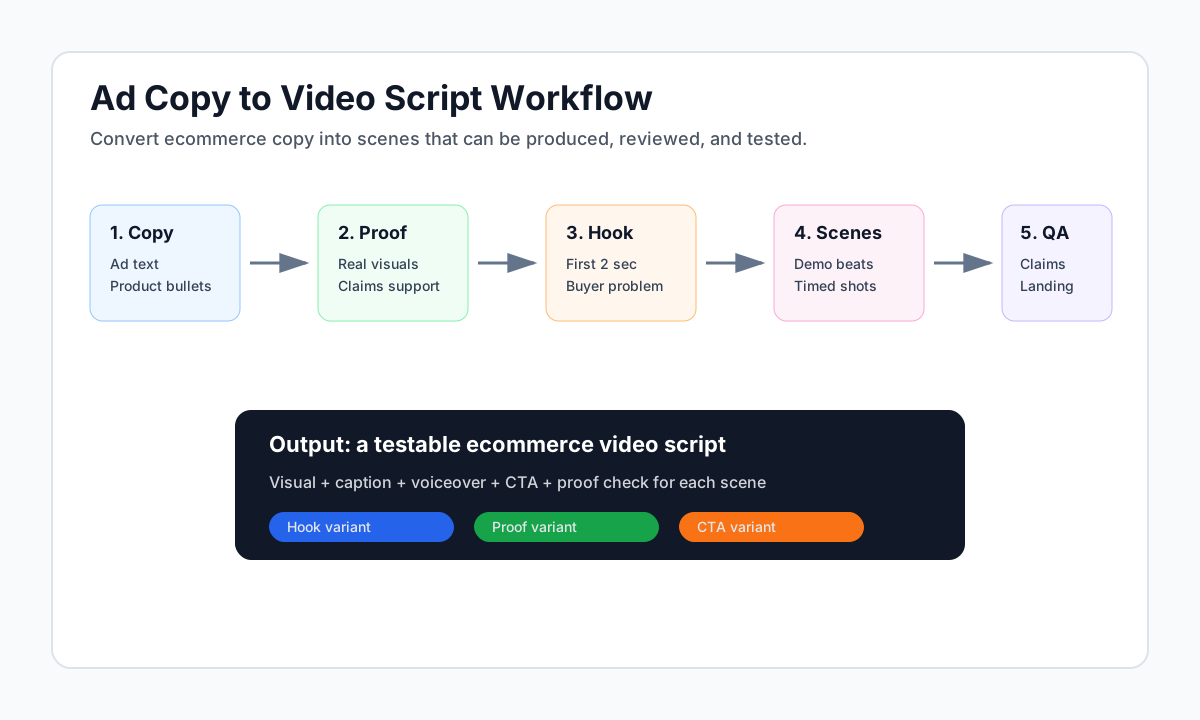
This guide is for ecommerce marketers, founders, media buyers, and creative teams who already have written ad copy but need a practical script for TikTok, Reels, Shorts, YouTube, Meta, or product page video. It is not an ad copy generator page and it is not a generic video maker list. The goal is to help you convert existing copy into a testable product video brief without losing claim accuracy, landing page match, or platform fit.
Good ecommerce video scripts are not just "the same copy with motion." A product video has timing, framing, proof, audio, captions, safe zones, and a final click path. If your copy says "portable blender for busy mornings," the script needs to show a busy morning, the blender size, what goes in it, how fast it works, and why the viewer should believe the claim.
When This Workflow Fits
Use this workflow when you have one of these inputs:
| Input you already have | Best video script output | Main risk to control |
|---|---|---|
| Facebook or Google ad copy | 15-30 second product benefit video | Turning every sentence into crowded text |
| Product page bullets | Demo script with scenes and captions | Listing features without showing proof |
| UGC brief | Creator-style script with hook and objection | Making the claim sound fake or unverified |
| Email or landing page hero copy | Paid social video angle | Keeping too much brand background |
| Review snippets | Proof-led script | Using testimonials that are not real or representative |
| Offer copy | Promotion video | Landing page or price mismatch |
The workflow works best for products that can be explained visually: beauty, home goods, kitchen tools, apparel, accessories, supplements, pet products, electronics, and giftable items. It also helps AI-assisted production because a script with scenes, captions, and proof constraints produces more useful drafts than a loose prompt.
The Difference Between Ad Copy and a Video Script
Ad copy is a persuasion line. A video script is a sequence of evidence.
| Element | Ad copy asks | Video script asks |
|---|---|---|
| Hook | What line gets attention? | What image or moment stops the scroll? |
| Benefit | What should the buyer want? | What use case can the viewer understand in seconds? |
| Proof | What makes the claim believable? | What object, action, review, or comparison shows it? |
| Objection | What hesitation should we answer? | What scene removes that hesitation? |
| Offer | Why act now? | Where does the offer appear without hiding the product? |
| CTA | What should the shopper do? | What landing page will match the message? |
A strong video script does not need to repeat every word from the original copy. It should preserve the argument while making the proof visual.
The 8-Step Ad Copy to Video Script Workflow
1. Choose One Campaign Promise
Start with one promise, not a pile of features. The promise should answer what the shopper gets if they keep watching.
Examples:
| Weak promise | Stronger video promise |
|---|---|
| "Premium skincare for everyone" | "A 30-second morning routine for dry winter skin" |
| "Durable travel organizer" | "Pack chargers, cables, and adapters without digging through your bag" |
| "High quality kitchen tool" | "Chop vegetables faster without pulling out a full-size processor" |
| "Better pet grooming" | "Remove loose fur before it lands on the couch" |
The promise controls the script. If the promise is about speed, show timing. If it is about size, show scale. If it is about comfort, show the product in use.
2. Split Copy Into Claim, Proof, and CTA
Paste your existing ad copy into three buckets:
| Copy line | Bucket | Script question |
|---|---|---|
| "Keeps your iced coffee cold for hours" | Claim | What visual proves temperature or duration? |
| "Double-wall stainless steel" | Proof | Can we show the material or insulation detail? |
| "Thousands of happy customers" | Risky proof | Is this exact claim supported and current? |
| "Get 20% off this week" | CTA or offer | Does the landing page show the same offer? |
Do not write scenes yet. First decide which lines deserve screen time.
Use this filter:
- Keep copy that changes buying confidence.
- Rewrite vague adjectives into visible proof.
- Remove claims that cannot be supported.
- Move detailed specs into captions only when they are easy to read.
- Keep one CTA that matches the destination.
3. Build the Proof Board
Before you write dialogue, collect the evidence the video can actually show.
| Proof type | What to collect | How to use it in the script |
|---|---|---|
| Product proof | Images, angles, packaging, size, materials | Product close-up, unboxing, texture shot |
| Use proof | Demo steps, before/after, setup, environment | Middle scene or split-screen |
| Customer proof | Real review themes, objections, questions | Caption or voiceover, if compliant |
| Offer proof | Coupon, bundle, guarantee, shipping promise | End frame or CTA scene |
| Platform proof | Specs, aspect ratio, placement constraints | Export notes and safe-zone rules |
| Brand proof | Logo, color, product line, trust cue | End card or subtle overlay |
If the proof board is thin, the video will become a generic claim video. Fix the proof board before writing more lines.
4. Pick the First Two Seconds
The first two seconds should make the product and problem obvious. Meta's Instagram video ad guidance recommends showing the brand and key message early, and TikTok Creative Center examples often highlight pain points, product use, or question-led hooks in the opening seconds. The principle is simple: do not make the viewer wait to understand what is being sold.
Hook patterns that work for ecommerce:
| Hook pattern | Example script opening | Best for |
|---|---|---|
| Problem first | "Still packing cables like this?" | Organization, travel, home |
| Result first | "This is what my counter looks like after 20 seconds." | Kitchen, cleaning, beauty |
| Product in hand | "I use this before every gym session." | Supplements, apparel, accessories |
| Common question | "Does it fit a 13-inch laptop?" | Bags, cases, electronics |
| Side-by-side | "Old way vs this compact tool." | Tools, appliances, higher-ticket items |
Avoid abstract logo intros, slow product spins, and opening captions that say only "Introducing..." without a buyer problem.
5. Convert the Copy Into a Scene Table
Now turn copy into scenes. This is where the workflow becomes production-ready.
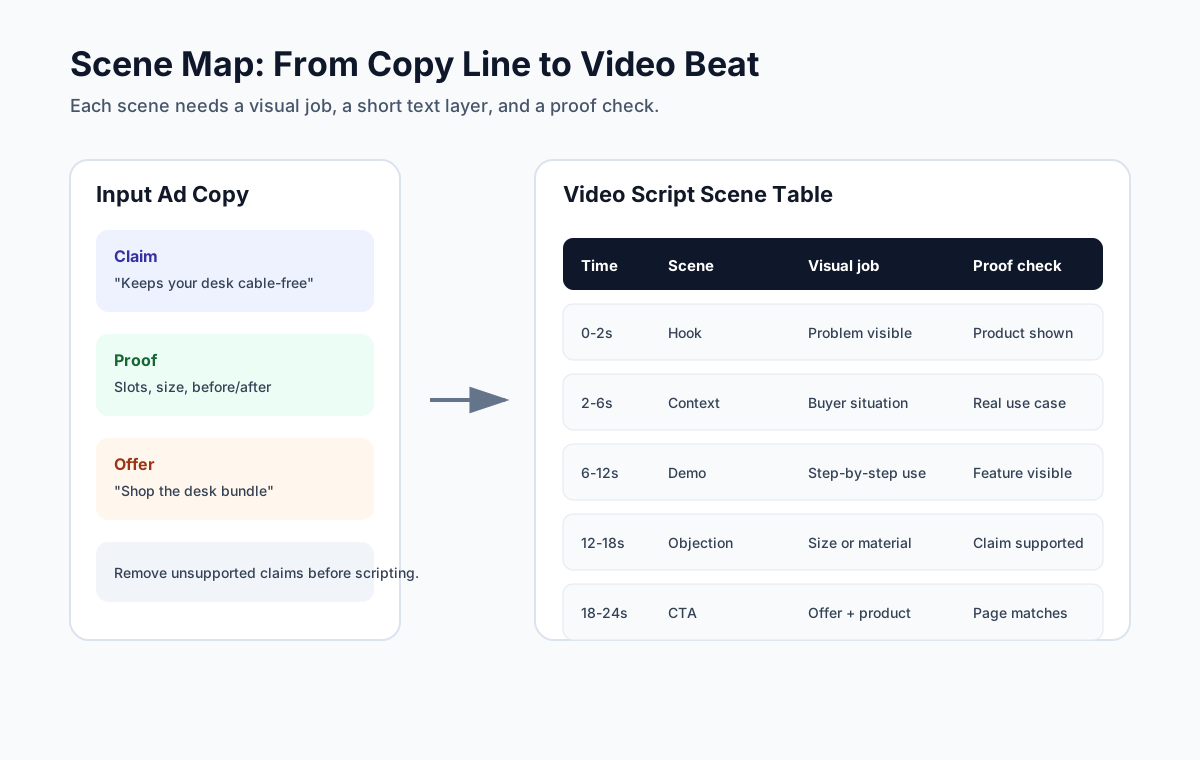
Use this scene table:
| Time | Scene | Visual | Voiceover or caption | Proof check |
|---|---|---|---|---|
| 0-2 sec | Hook | Product solving the main problem | "Turn a cluttered drawer into a 10-second setup." | Product visible |
| 2-6 sec | Context | Buyer situation or before state | "Most organizers hide the one cable you need." | Real use case |
| 6-12 sec | Demo | Product used step by step | "Each pocket keeps one charger, one adapter, one cable." | Feature shown |
| 12-18 sec | Objection | Close-up, size, material, comparison | "Slim enough for a work tote." | Scale shown |
| 18-24 sec | Offer or CTA | Product plus landing page promise | "See the travel bundle today." | Destination matches |
This table prevents the most common script mistake: writing a nice paragraph that gives the editor no idea what to show.
6. Write for Silent Viewing and Sound-On Viewing
Many video ads are watched silently at first, while TikTok and Reels also reward audio that feels native. Write the script so either mode works.
| Layer | Job | Rule |
|---|---|---|
| Visual | Explain the product without words | Product appears early and often |
| Caption | Carry the main message when muted | Short phrases, high contrast, not in risky UI areas |
| Voiceover | Add pacing, trust, and emotion | Conversational, not a readout of every caption |
| On-screen text | Highlight the key claim or step | One idea per screen |
| Sound or music | Set pace and platform feel | Support the message, do not carry essential proof |
Google's video guidance supports square and vertical video assets for mobile placements, while Meta's safe-zone guidance reminds advertisers not to hide important text under interface controls. For ecommerce scripts, that means the script should include placement notes, not just words.
7. Add Claim and Landing Page QA
Every script needs a claim check before production.
| Script line | QA question | Safer rewrite if needed |
|---|---|---|
| "Best travel organizer" | Can you substantiate "best"? | "Designed for compact travel packing" |
| "Customers love it" | Do you have real review support? | "Customers often mention the compact size" |
| "Lowest price" | Is this currently true on the landing page? | "See today's bundle offer" |
| "Cures skin irritation" | Is this a regulated or health claim? | "Helps support a simple skincare routine" |
| "AI reviewer says..." | Is the endorsement real and disclosed? | Remove or clearly label synthetic content |
FTC guidance and the consumer reviews rule make fake reviews and false testimonials a serious risk, including AI-generated fake reviews. If the video uses a testimonial, creator-style narration, or review-like wording, make sure the experience is real, material connections are disclosed when needed, and claims are not misleading.
8. Create Three Test Variants
One script is a starting point, not a testing system. Google recommends testing different messages and creatives, and that same idea applies to ecommerce video scripts.
Build three variants from the same proof board:
| Variant | What changes | What stays fixed |
|---|---|---|
| Hook test | First two seconds | Product, proof, CTA, landing page |
| Proof test | Demo proof vs review proof | Hook, offer, landing page |
| CTA test | Product page CTA vs bundle CTA | Hook, proof, visual style |
Do not change everything at once. If the hook, offer, length, format, and audience all change, you cannot learn which part improved results.
Copy-to-Script Templates
Template 1: Problem-Solution Product Video
Use this when the original ad copy is pain-point driven.
| Script part | Fill-in line |
|---|---|
| Hook | "Still dealing with [problem]?" |
| Product reveal | "This [product] is built for [specific situation]." |
| Demo | "Use it to [step 1], [step 2], and [visible result]." |
| Proof | "The [feature/material/design] helps [specific benefit]." |
| Objection | "It fits [constraint], so you can [use case]." |
| CTA | "See [product/bundle] on the page." |
Example:
Still losing charging cables in your travel bag? This compact tech pouch keeps each cable, adapter, and charger in its own slot. Open it once, grab what you need, and get back to work. See the travel bundle today.
Template 2: Product Page Bullet to Demo Script
Use this when the input is a product page with feature bullets.
| Product page bullet | Video conversion |
|---|---|
| "Water-resistant fabric" | Pour or wipe test, then close-up texture |
| "Fits 13-inch laptop" | Laptop slides into compartment |
| "Adjustable strap" | Strap adjusted on body |
| "Multiple pockets" | Items placed in each pocket |
| "Lightweight design" | Hand carry or scale comparison |
Do not read the bullets aloud. Show the feature, then add a short caption that explains why it matters.
Template 3: Review-Led UGC Script
Use this only when the review or testimonial source is real and allowed.
| Part | Example |
|---|---|
| Hook | "I bought this because my desk was always covered in cables." |
| Use scene | "Now my charger, adapter, and mouse all have a spot." |
| Proof | "The pouch opens flat, so I can see everything at once." |
| Honest limit | "It is not for large headphones, but it is perfect for daily tech." |
| CTA | "If your work bag is chaos, check the organizer page." |
The honest limit matters. It makes the video more credible and reduces mismatch between the ad and product reality.
Platform Notes for Script Writers
Different platforms do not need entirely different ideas, but they do need different execution notes.
| Platform or placement | Script adjustment | Source-backed reason |
|---|---|---|
| TikTok | Make the hook conversational and product-visible in the first 3-6 seconds | TikTok Creative Center examples highlight pain points, questions, and fast product context |
| Instagram Reels | Show brand and key message early; keep it concise | Meta recommends early brand/message cues and shorter videos for Instagram video ads |
| YouTube Shorts | Write a vertical cut with product and caption clarity | Google supports vertical videos in YouTube-eligible campaigns including Shorts |
| Meta Feed | Keep text readable and avoid interface-safe-zone conflicts | Meta safe-zone guidance warns against obstructing visuals and important text |
| Google Demand Gen or video assets | Prepare vertical, horizontal, and square versions when possible | Google video guidance supports vertical and square assets for mobile-friendly delivery |
| Product page video | Slow down the demo and show product details | On-site shoppers need proof, not just a scroll-stopping hook |
If you use ShopShot's AI video generator to draft variants, keep these platform notes in the prompt and review the output before export. AI can speed up the first cut, but the final script still needs claim control and landing page match.
A Practical Ecommerce Example
Original ad copy:
"Meet the spill-proof snack cup parents actually keep in the stroller. Soft silicone flaps help toddlers reach snacks without dumping the whole cup. Dishwasher safe. Shop the two-pack today."
Script:
| Time | Visual | Caption or voiceover |
|---|---|---|
| 0-2 sec | Stroller tray with spilled snacks, then product enters | "Snack spills again?" |
| 2-5 sec | Toddler hand reaches through silicone flaps | "Soft flaps help little hands grab one piece at a time." |
| 5-9 sec | Cup tipped sideways with snacks staying mostly inside | "Built for stroller walks, car seats, and errands." |
| 9-13 sec | Parent puts cup parts in dishwasher rack | "Dishwasher safe after the day gets messy." |
| 13-17 sec | Two colors side by side | "Shop the two-pack before your next outing." |
QA notes:
- Avoid saying "never spills" unless you can prove that exact claim.
- Show the product with real snacks and real scale.
- Keep the offer visible only if the landing page shows the two-pack.
- Use captions because the viewer may watch muted.
This is the difference between copy and a script. The copy promises convenience. The script shows the situations that make the promise believable.
Common Mistakes When Turning Copy Into Video
| Mistake | Why it hurts | Better fix |
|---|---|---|
| Putting the full ad copy on screen | Mobile viewers cannot read it fast enough | Use one idea per scene |
| Opening with logo animation | The viewer does not know the product | Open with product use or problem |
| Showing lifestyle footage only | The product proof is weak | Add demo, close-up, or comparison |
| Using unsupported review claims | Trust and compliance risk | Use real, representative, documented proof |
| Ignoring safe zones | Captions or CTAs can be hidden | Add placement notes to the script |
| Using one format everywhere | Cropping breaks the message | Create vertical, square, and horizontal notes |
| Changing too many variables | Test results become unclear | Build variants from one proof board |
For a reusable writing structure, start with the product video ad script template. For broader campaign messaging, use the ad creative AI workflow to turn product pages into video ad inputs before writing the scene table.
Production Brief Checklist
Before you hand off the script, confirm:
- Campaign promise is one sentence.
- Product appears in the first two seconds.
- Every claim has a proof source.
- Script includes visual, caption, voiceover, and CTA layers.
- Safe-zone notes are included for vertical placements.
- Landing page matches the offer and product shown.
- At least three variants are planned.
- File format needs are clear for each platform.
- Review or testimonial language is real, allowed, and disclosed when needed.
- The final article or ad has a measurable test variable.
If you need visual references, compare your script against the product video examples for ecommerce. If you are planning a testing batch, the UGC video ads testing guide can help you decide how many hook and proof variants to produce first.
FAQ
How do I turn ad copy into a video script?
Split the copy into claim, proof, objection, offer, and CTA. Then map each part to a timed scene with a visual, caption, voiceover line, and proof check. The final script should show the claim instead of simply repeating the copy.
Should the video script use the exact same words as the ad copy?
No. Preserve the argument, but rewrite for motion and timing. A video script needs visual proof, short captions, and scene direction. Long ad copy usually has to become fewer words and clearer visuals.
How long should an ecommerce video ad script be?
For most first tests, write a 15-30 second script. That is enough time for a hook, product reveal, demo proof, objection, and CTA. Longer videos can work when the product needs more explanation, but they should not add generic filler.
Can AI turn ad copy into a product video script?
AI can draft useful scene ideas if you provide the product page, proof points, platform, offer, and claim limits. A human should still check accuracy, landing page match, testimonial compliance, and whether the product is shown correctly.
What is the biggest mistake in copy-to-video scripts?
The biggest mistake is treating video as animated text. Ecommerce video should show product use, proof, and the buyer situation. If the viewer can understand the message only by reading every caption, the script is too text-heavy.
Sources Checked
- Google Ads Help: Best practices guide for responsive display ads
- Google Ads Help: About video ad formats
- Google Ads Help: Create an effective video ad with square and vertical videos
- Meta Business Help Center: Best Practices for Instagram Video Ads
- Meta Business Help Center: About text overlays and the safe zone for ads in Stories and Reels
- TikTok Creative Center: Top Ads Spotlight
- TikTok Creative Center: Creative Patterns
- FTC: Final Rule Banning Fake Reviews and Testimonials