
Quick Answer
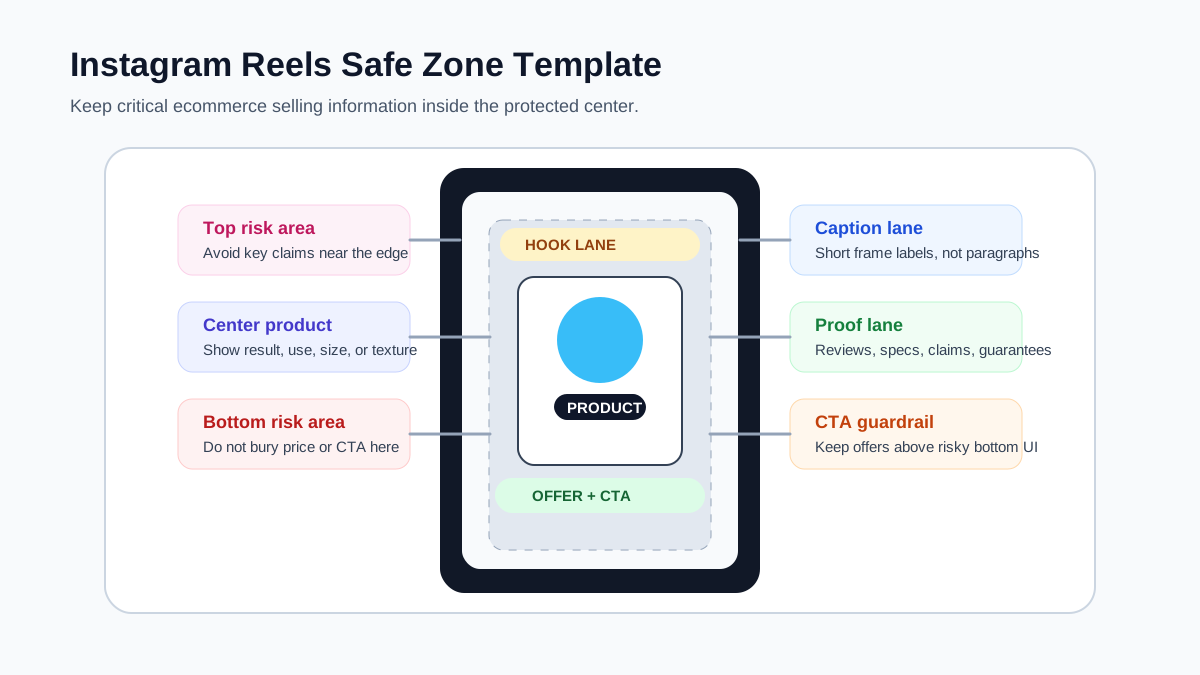
An Instagram Reels safe zone template helps ecommerce teams keep the product, offer, captions, logo, and call to action away from areas that can be covered by app controls, captions, profile elements, or cropping. Start with a 9:16 vertical canvas, keep critical selling information in the center, avoid relying on the top and bottom edges, and preview the same creative as a Reel, Story, and Feed placement before publishing.
For a broader format reference, pair this checklist with the Instagram Reel size and dimensions guide. If you need a full ad layout before production, use the Instagram ad template for ecommerce product videos.
Why Reels Safe Zones Matter for Product Ads
Instagram Reels are usually consumed full-screen, but the video is not viewed as a clean 1080 x 1920 design canvas. The app adds interface controls, profile information, captions, buttons, and interaction areas. In ads, the same creative may also be reused in Stories, Feed, or Advantage+ placements. A product video that looks readable in the editor can lose the price, CTA, review quote, or product detail after it is delivered.
That problem is more expensive for ecommerce than for brand awareness content. A lifestyle Reel can survive if a decorative text layer is partly covered. A product ad cannot. If the key benefit, offer, or "before and after" proof sits under the caption area or too close to the bottom call-to-action region, the shopper may never see the reason to click.
The safe-zone workflow also helps AI-generated and template-based product videos. When you generate a draft from product images, PDP copy, or UGC scripts, the AI tool may place captions where they look balanced visually, not where they survive Instagram UI overlays. A written safe-zone brief gives the creative system clear layout constraints before export.
Use This Ecommerce Reels Safe Zone Template
Use this template as a planning grid before making the video, not only as a final QA overlay.
| Zone | What belongs there | Ecommerce rule | Common failure |
|---|---|---|---|
| Center product zone | Product in use, result, before-after moment, key texture, feature proof | Keep the product or visible outcome near the visual center so cropping and UI overlays do not hide it. | Product is too low and competes with captions or CTA controls. |
| Hook lane | One short opening claim or problem statement | Keep it readable in the first 1-2 seconds and do not place it at the extreme top edge. | The opening text is decorative, long, or partly hidden. |
| Caption lane | Subtitles or voiceover captions | Keep captions short, high contrast, and inside the central readable area. | Captions cover the product or sit under interface buttons. |
| Proof lane | Review snippet, ingredient proof, size comparison, guarantee, shipping note | Use one proof point per frame and make the evidence visible. | Multiple badges compete with the product shot. |
| Offer and CTA lane | Discount, bundle, shop now cue, trial note, final action | Keep it near the lower center but above risky bottom controls. | The discount or CTA is placed at the very bottom. |
| Logo lane | Small brand mark or product pack | Keep it secondary. The product and offer should do the selling. | Logo is large, centered, and delays the product proof. |
The goal is not to remove all text from the edges. The goal is to keep critical conversion information away from risky areas. Decorative background, motion trails, color blocks, and non-essential texture can extend to the full canvas. Product facts, claims, price, review proof, and CTA should stay protected.
Reels Safe-Zone Workflow for Ecommerce Ads
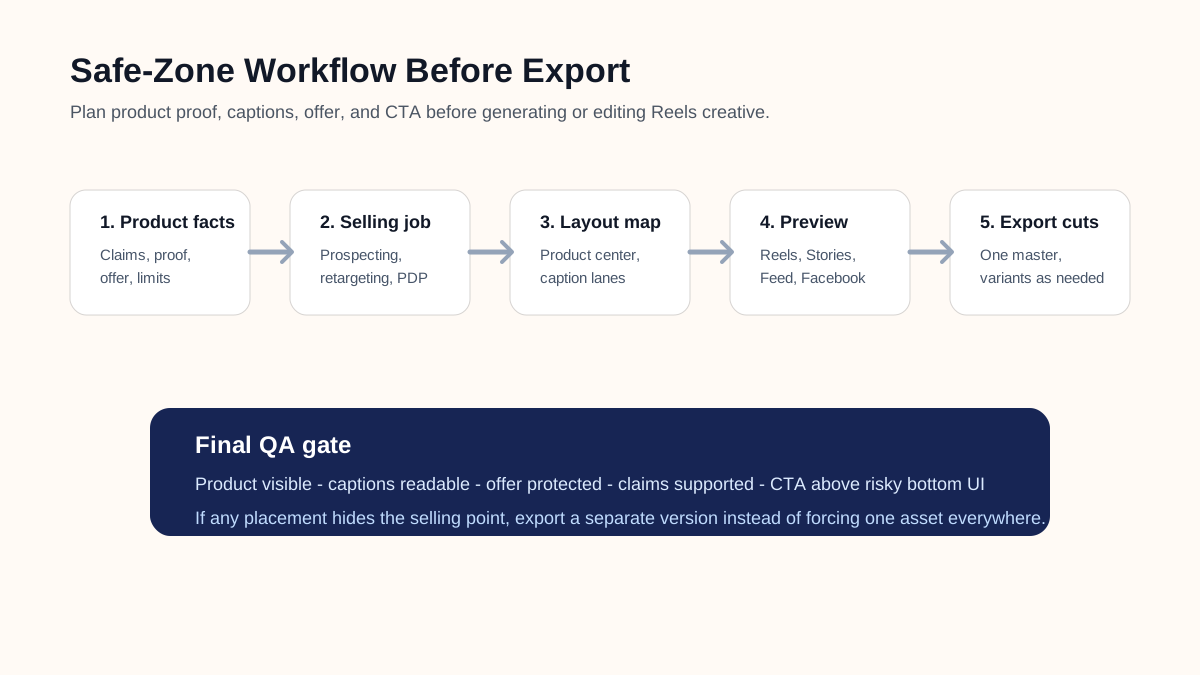
Follow this workflow before exporting a Reel, Story, or multi-placement Meta ad.
1. Decide the job of the Reel
Do not start with the visual template. Start with the commercial job.
| Job | Best safe-zone priority | Example |
|---|---|---|
| Cold prospecting | Fast product context and one clear hook | "This solves the messy drawer problem in 10 seconds." |
| Retargeting | Proof, review, comparison, or offer | "4.8-star review, now in the travel size." |
| PDP support | Product detail and buying reassurance | "Fits under standard cabinets. No drilling." |
| Launch or seasonal sale | Offer clarity and final CTA | "Bundle save 20 percent until Sunday." |
If the job is unclear, the safe zone becomes a decoration exercise. For paid ecommerce creative, every protected area should support either attention, comprehension, proof, or action.
2. Mark the product moment first
The first protected element should be the product moment, not the caption. Choose the moment that makes the product understandable without sound:
- A hand using the product.
- The product solving the visible problem.
- A before-after comparison.
- A size or texture close-up.
- A package plus result shot.
Place that moment in the center product zone. Then write captions around it. This prevents the most common Reels mistake: clear text layered over a product that the viewer can no longer inspect.
3. Write captions as frame labels, not paragraphs
Reels captions should help a scrolling shopper understand the frame instantly. Avoid sentence blocks. Use short frame labels:
| Weak caption | Better safe-zone caption |
|---|---|
| "This storage organizer is perfect for people who want their kitchen to look more organized." | "Clear counter in 10 seconds" |
| "Our serum includes hyaluronic acid and niacinamide for a brighter-looking routine." | "Hydration + barrier support" |
| "You can use this travel bottle when you are going to the gym, airport, or office." | "Leak-proof gym bag size" |
Shorter captions are easier to keep inside the safe zone and easier for AI video tools to render legibly.
4. Keep claims and proof together
If a frame says "clinically tested," "waterproof," "BPA-free," "ships in 2 days," or "4.8 stars," the proof context should be visible in the same frame or nearby sequence. Safe-zone placement is not only about cropping. It is also about avoiding unsupported claims that look detached from the product.
For products with regulated or sensitive claims, keep the language conservative and evidence-based. A safe-zone template should not encourage larger claims just because there is room for them.
5. Preview in multiple placements
Even if the main target is Instagram Reels, preview the asset as:
- Instagram Reels full-screen.
- Instagram Stories.
- Instagram Feed preview if the campaign can serve there.
- Facebook Reels or Stories if using Meta placements.
Meta's public guidance for Stories and Reels warns that text, logos, and other key creative elements can be covered by interface elements, and its Instagram Reels ad guide snippet recommends leaving roughly 14 percent of the top, 35 percent of the bottom, and 6 percent on each side free from key creative elements. Treat those numbers as a guardrail, then still use placement previews because app UI and delivery contexts can vary.
Safe-Zone Checklist Before Export
Run this QA table after the first draft and before uploading the creative.
| Check | Pass condition | Fix if it fails |
|---|---|---|
| Product is visible without sound | Viewer can understand what is being sold in the first 2 seconds. | Move product use or result shot into the center zone. |
| Hook survives UI overlays | Opening text is not at the extreme top or bottom. | Shorten hook and move it inward. |
| Captions are readable | Captions are high contrast and do not cover the product proof. | Split captions across frames or move product shot. |
| CTA is protected | Final action cue is visible above risky lower controls. | Place offer and CTA in the lower-center protected area. |
| Offer is specific | Discount, bundle, deadline, or product benefit is concrete. | Replace vague "Shop now" frame with a specific reason. |
| Claim has context | Claims are supported by visible product fact, review, source, or conservative wording. | Remove unsupported absolute claims. |
| Mobile preview passes | Creative is checked on a phone-sized preview, not only desktop editing canvas. | Reframe, crop, or enlarge critical text. |
| Placement preview passes | Reels, Stories, Feed, and Facebook placements do not hide key elements. | Export separate variants by placement. |
This same QA works when using ShopShot's Instagram Reels video generator. Generate the draft quickly, but keep the final human review focused on product clarity, safe-zone layout, captions, claims, and CTA.
Where to Place Product, Caption, Offer, and CTA
The following structure works for most ecommerce Reels ads:
- First frame: product or problem visual in the center, one short hook above or beside it.
- Middle frames: product proof in the center, captions in short lines, one claim per frame.
- Comparison frame: before-after or old-new layout with both sides inside the protected center.
- Offer frame: product plus specific offer, not only a generic CTA.
- Final frame: product, logo, and CTA together, with the CTA above the risky bottom edge.
Avoid putting all conversion text in the final frame. Many viewers decide whether to keep watching before the CTA appears. A better Reels safe-zone template distributes selling information across the video: hook first, product proof second, reason to act third.
Example Safe-Zone Layouts by Product Type
| Product type | Best center visual | Caption idea | Offer or CTA placement |
|---|---|---|---|
| Beauty serum | Texture drop, face-safe application, packaging | "Hydration without heavy shine" | Lower-center final frame with product pack visible |
| Apparel | Fit movement, fabric stretch, pocket or seam detail | "Stretch fit, office-ready" | Mid-lower frame with size range note |
| Home organizer | Before-after drawer or shelf | "From clutter to sorted" | Final frame with bundle or set size |
| Electronics accessory | Plug-in moment, compatibility shot, problem solved | "Works with USB-C laptops" | Lower-center CTA plus compatibility badge |
| Pet product | Pet using product, size comparison, cleaning proof | "Washable cover, grippy base" | Final frame with product and trust note |
| Food or supplement | Package, serving, flavor cue, compliant benefit wording | "Daily pouch, no measuring" | Final frame with product pack and subscription option |
For more script structure, use the product video ad script template. For hook testing, pair this with UGC video hooks for product ads.
Should You Use One Reels Creative Across All Meta Placements?
You can start with one master concept, but you should not assume one export will work everywhere. Reels and Stories often favor a 9:16 vertical frame, while Feed may show the same creative in a different context with captions, profile text, or cropping. A product demo that is safe in Reels can still feel too zoomed-in or text-heavy in Feed.
Use this decision table:
| Situation | Use one export? | Better action |
|---|---|---|
| Product centered, minimal text, simple CTA | Usually yes | Preview all placements before publishing. |
| Heavy captions or price badges | No | Create a Reels/Stories cut and a Feed cut. |
| Product detail requires close-up inspection | Maybe | Export a vertical cut plus a square or 4:5 detail cut. |
| Regulated or claim-sensitive product | No | Build placement-specific claim and disclaimer checks. |
| Retargeting offer with deadline | Maybe | Keep deadline and CTA inside protected lower-center area. |
If you already use the broader Meta video ad specs for ecommerce, treat this Reels template as the Instagram-specific production layer.
Common Mistakes to Fix
Mistake 1: Designing for the editor, not the app
The video editor shows a clean canvas. Instagram does not. Add overlay guides or export a preview frame before finalizing typography.
Mistake 2: Treating the safe zone as empty space
The protected area is not dead space. It is where the product, proof, and readable captions should live. The risky edges can still carry motion, background, and secondary visuals.
Mistake 3: Making the product too small
Safe-zone discipline does not mean shrinking everything. If the product is tiny, the ad may pass the overlay check but fail the sales job. Use closer product shots and fewer words.
Mistake 4: Putting price or discount at the very bottom
Discounts and CTAs often end up at the bottom because that feels natural in design tools. On Reels and Stories, that is often where interface controls compete with the message. Move the offer upward and keep it short.
Mistake 5: Reusing TikTok layouts without review
TikTok and Reels both reward vertical, native-feeling creative, but their UI overlays, captions, and campaign contexts are not identical. Recheck every text and CTA position before repurposing a TikTok ad.
FAQ
What is the Instagram Reels safe zone?
The Instagram Reels safe zone is the safer central area of a vertical video where important product visuals, text overlays, logos, offers, and CTAs are less likely to be cropped or covered by interface elements. It is a planning guide, not a guarantee that every device and placement will render identically.
What size should an Instagram Reels safe zone template use?
Start with a 9:16 vertical canvas. Instagram Help Center guidance says reels can be uploaded between 1.91:1 and 9:16, with minimum 30 FPS and minimum 720-pixel resolution. For ecommerce ads, 9:16 is usually the cleanest starting point because it matches the full-screen Reels environment.
Can I use the same safe zone for Reels and Stories?
Often, but you should still preview both. Meta's public safe-zone guidance treats Stories and Reels as placements where important text, logos, and visual information can be covered by app UI. A strong template keeps critical selling points away from top, bottom, and side risk areas, then validates the result in placement previews.
Where should captions go in an ecommerce Reel?
Place captions near the center, close enough to the product moment to explain it, but not directly on top of the product detail. Use short lines and split longer explanations across frames.
Should my logo be inside the safe zone?
Yes, but it should not be the largest protected element. For ecommerce Reels, the product, proof, and offer usually matter more than a large logo. Keep the logo visible but secondary.
Sources Checked
- Meta Business Help: About text overlays and the safe zone for ads in Stories and Reels, checked June 19, 2026.
- Instagram Help Center: Reel size and aspect ratios, checked June 19, 2026.
- Meta Ads Guide: Instagram Reels ad specs and safe-zone snippet, checked June 19, 2026.
- ShopShot live pages checked:
/tools/instagram,/blog/instagram-reel-size-dimensions-guide,/blog/instagram-ad-template-ecommerce-product-videos, and/blog/meta-video-ad-specs-ecommerce.