
Quick Answer
Meta video ad specs for ecommerce should start with placement fit: 9:16 for Reels and Stories, 4:5 or 1:1 for Feed, safe text zones, mobile-readable captions, product shown early, and a landing page that matches the product, offer, and claim. Build the creative as a placement system, not one file cropped everywhere.
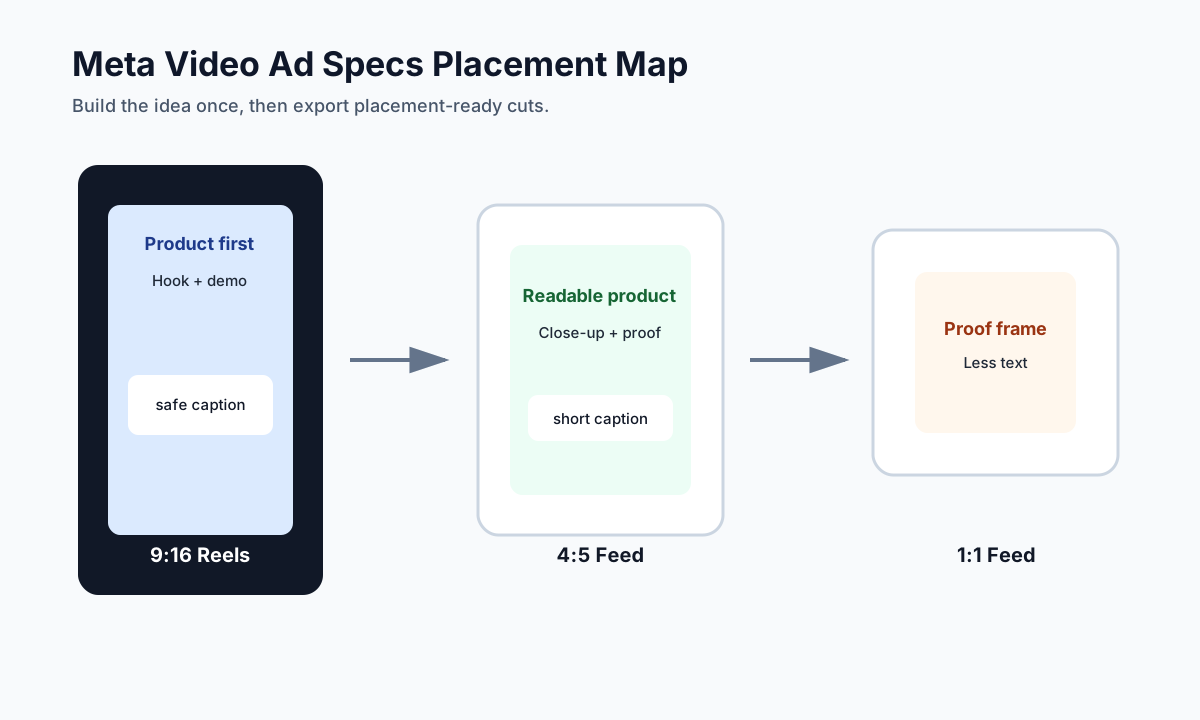
This guide is for ecommerce teams preparing video ads for Facebook, Instagram, Reels, Stories, Feed, and Advantage+ placements. It is not a replacement for Meta Ads Manager or legal review. It is a practical creative and upload checklist that helps you avoid rejected files, cropped captions, weak mobile readability, and landing page mismatch.
Meta placements can distribute the same campaign across very different surfaces. A product video that looks clear in Feed can fail in Reels because the CTA, caption, or product demo sits under interface controls. A 9:16 UGC-style cut can feel native in Reels but look awkward if cropped into a square feed unit. Specs matter because ecommerce video has to show the product, prove the promise, and stay readable while the shopper is moving fast.
When This Checklist Fits
Use this checklist when you are creating or reviewing ecommerce video ads for Meta before upload.
| Situation | Best action | Why it matters |
|---|---|---|
| You have one hero product video | Create placement-specific exports | Prevents bad crops and hidden captions |
| You are using Advantage+ placements | Prepare creative for multiple surfaces | Lets delivery choose placements without breaking the ad |
| You are repurposing TikTok or UGC | Add Meta safe-zone and landing-page QA | Avoids interface overlap and claim mismatch |
| You are testing product hooks | Keep specs fixed and change one creative variable | Makes results easier to read |
| You are launching a promo | Verify offer text and destination | Prevents a click from landing on a different promise |
The target query is spec and checklist intent. The page should support Meta and Facebook ad production workflows, not compete with tool or generator pages.
The Placement-First Rule
Do not start with "make one video." Start with the placements where the ad will run.
| Placement family | Common creative fit | Ecommerce script adjustment |
|---|---|---|
| Reels | 9:16 vertical, fast hook, creator-native pacing | Product and problem visible in the first seconds |
| Stories | 9:16 vertical, clear tap-through CTA, safe zones | Keep text away from top and bottom UI areas |
| Facebook Feed | 4:5, 1:1, or placement-supported video | Use readable captions and product close-ups |
| Instagram Feed | 4:5 or 1:1 often works well | Put brand/product cue early and keep copy concise |
| In-stream or video feed | Wider or longer-form-friendly cut | Add context but avoid generic brand filler |
If you only export one 16:9 file, Meta may still deliver it, but the creative will usually waste mobile screen space. If you only export a 9:16 file, it may not fit every feed environment cleanly. The best ecommerce workflow prepares a vertical cut and a feed cut from the same proof board.
Core Meta Video Ad Specs to Check
Meta's Ads Guide changes by objective, placement, and ad format, so always verify the final upload in Ads Manager. The production baseline below is the safe creative checklist your team should use before upload.
| Spec area | Practical rule | Creative reason |
|---|---|---|
| Aspect ratio | Plan 9:16 for Reels/Stories and 4:5 or 1:1 for Feed | Protects mobile screen coverage and avoids awkward crops |
| Resolution | Export the highest practical resolution for the chosen ratio | Keeps product details sharp |
| File type | Use common video formats accepted by Ads Manager, such as MP4 or MOV | Reduces upload friction |
| Duration | Keep first tests short, usually 15-30 seconds for product ads | Fits fast mobile browsing and creative testing |
| Text overlays | Keep essential text inside safe zones | Prevents UI controls from hiding captions or CTAs |
| Captions | Make the message understandable without sound | Many viewers start muted or in noisy environments |
| Thumbnail or first frame | Show product, use case, or buyer problem | Improves clarity before the viewer commits |
| Landing page | Match product, offer, and claim | Prevents low-quality clicks and trust loss |
Specs are not the creative strategy. They are the guardrails that keep a good script from being damaged during delivery.
The 12-Point Meta Video Ad Specs Checklist
1. Choose the Placement Set First
Before writing the script, decide whether the campaign will use:
- Reels only.
- Stories only.
- Feed-focused placements.
- Advantage+ placements or broad automatic placement delivery.
- A manual split where each placement gets a tailored cut.
Broad placement delivery is useful, but only if the creative can survive multiple surfaces. If your product proof is hidden under captions in Reels or cropped from a Feed version, the algorithm is optimizing with a weaker asset.
2. Build Two Master Cuts
For most ecommerce teams, two master cuts are enough:
| Master cut | Best use | Production note |
|---|---|---|
| 9:16 vertical | Reels, Stories, mobile-first placements | Put product and key text away from UI controls |
| 4:5 or 1:1 feed cut | Facebook Feed, Instagram Feed, mixed feed placements | Use larger product close-ups and fewer text lines |
Do not simply crop the center of one file after editing. Plan the frame before production. A product demo shot for 9:16 may need more top and bottom room than a square feed version.
3. Put the Product in the First Seconds
Meta's Instagram video ad guidance recommends showing the brand and key message early. For ecommerce, the more practical rule is: show the product, the buyer problem, or the result before the viewer has to guess.
Good openings:
| Product type | Opening scene |
|---|---|
| Skincare | Texture applied, result context, routine step |
| Apparel | Fit or motion shot, not a folded product only |
| Home goods | Problem setup, then product in use |
| Kitchen | Ingredient, tool action, finished outcome |
| Pet | Problem behavior, product use, cleaner result |
Avoid a logo-only intro. Brand recall matters, but product clarity comes first in a direct-response ecommerce video.
4. Keep Captions Mobile-Readable
Captions should work at phone size. A caption that looks acceptable on a desktop editor can become unreadable in Reels.
Use this rule:
- One idea per caption.
- Short lines, not paragraphs.
- High contrast over video.
- Text does not cover the product.
- Essential words stay inside the safe area.
- Do not stack headline, price, coupon, disclaimer, and CTA in the same frame.
If the caption has to shrink below comfortable mobile size, the script is trying to say too much.
5. Respect Reels and Stories Safe Zones
Meta's safe-zone guidance warns advertisers to avoid placing important text, logos, or visual information where interface elements can cover them.
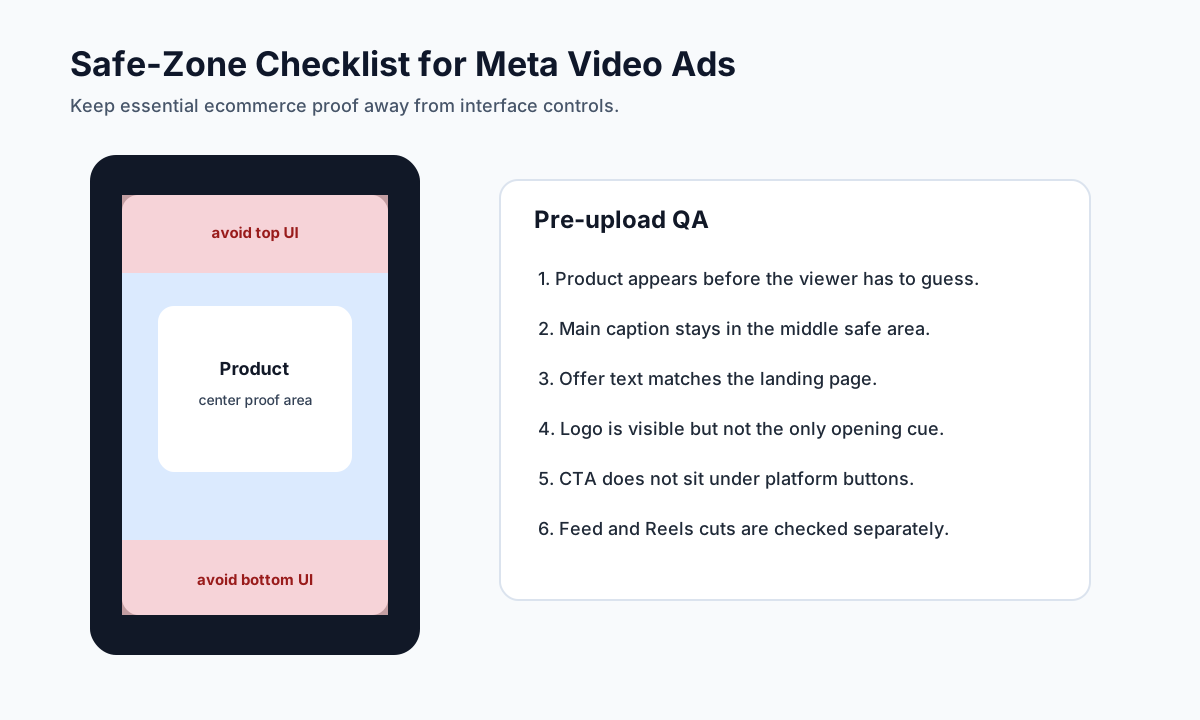
Use a conservative layout:
| Element | Safer placement |
|---|---|
| Product | Center or center-left/right, never under CTA controls |
| Main caption | Middle third, with enough margin |
| Offer | Mid-screen or end card, not close to top/bottom UI |
| Logo | Subtle early cue or end card, not the only opening frame |
| CTA | End frame text that does not duplicate the platform button |
Safe zones are especially important when repurposing TikTok-style videos. A caption placed for one app can land under buttons in another.
6. Match the Script to the Destination
Every ecommerce video ad should pass a message-to-page match test.
| Video claim | Landing page must show |
|---|---|
| "Two-pack bundle" | The bundle, current price, and availability |
| "Made for sensitive skin" | Ingredient or product detail support |
| "Fits carry-on luggage" | Size information or product photo proof |
| "Summer sale" | Same sale or current offer |
| "Reviewers mention comfort" | Real review support or approved testimonial wording |
If the video and landing page do not match, the problem is not only conversion rate. It can also weaken user trust and create review risk.
7. Avoid Overloading the First Frame
Many ecommerce ads try to solve every problem in the first frame: product, logo, price, sale, review, guarantee, coupon, and CTA. The result is unreadable.
Use a hierarchy:
- Product or buyer problem.
- One core benefit.
- One proof cue.
- One CTA at the end.
For more complex products, use a scene sequence instead of a crowded first frame.
8. Prepare a Claim Log
Before upload, keep a simple claim log:
| Claim in video | Proof source | Safer wording |
|---|---|---|
| "Best for travel" | Unsupported unless you have a clear basis | "Built for compact travel packing" |
| "Customers love it" | Real review data required | "Customers often mention the slim design" |
| "Lowest price" | Current offer and comparison basis required | "See today's offer" |
| "Works for every skin type" | Risky broad claim | "Designed for daily hydration routines" |
| "Creator tested" | Real creator experience and disclosure required | "Demo shown with licensed presenter" |
This is where creative QA and compliance meet. The FTC's fake review rule is a useful reminder: do not create fake review language, false testimonials, or AI-generated endorsements that imply a real person had an experience they did not have.
9. Export a Hook Test, Not Just a Final Cut
For paid social, the first seconds often decide whether the rest of the asset gets a chance.
Create three hook versions from the same body:
| Hook test | Example | What you learn |
|---|---|---|
| Problem hook | "Still packing cables like this?" | Whether pain language earns attention |
| Result hook | "Desk reset in 20 seconds." | Whether outcome-first framing works |
| Product hook | "This compact pouch holds the whole charger kit." | Whether direct product clarity works |
Keep the rest of the script and landing page constant. Otherwise, performance differences are hard to interpret.
10. Check Feed Cut vs Reels Cut Separately
Do not review only one preview. Review each cut in a phone-sized viewport.
| QA question | Feed cut | Reels/Stories cut |
|---|---|---|
| Is the product visible at thumbnail size? | Required | Required |
| Are captions readable? | Required | Required |
| Are important details cropped? | Check edges | Check top/bottom UI areas |
| Is the CTA clear? | End card or caption | End card plus platform button awareness |
| Does the first frame explain the ad? | Required | Required |
If one cut fails, fix that cut. Do not assume the other placement will compensate.
11. Use Existing Meta Cluster Links
ShopShot already has Meta and Facebook support content. This article should connect the spec checklist to practical examples and testing pages.
Use the Facebook video ad checklist for ecommerce when you need policy and creative QA. Use Facebook video ad examples when you need scene ideas. Use Facebook Reels ads vs Feed ads when you need placement strategy.
For production speed, ShopShot's Facebook ads tool can help generate product video drafts, but the final export still needs safe-zone, claim, caption, and landing-page review.
12. Recheck Specs Before Upload
Meta's Ads Guide is the final source of truth for a specific ad objective and placement. Before upload:
- Open the relevant Ads Guide placement.
- Confirm aspect ratio and file recommendations.
- Preview the ad in each selected placement.
- Watch the ad muted.
- Check captions and safe zones.
- Confirm product and offer match the destination.
- Save the final script and claim log with the export.
This is a small step, but it prevents expensive mistakes when you scale creative testing.
Meta Placement Script Template
Use this template to brief a designer, creator, or AI video workflow.
| Field | What to fill in |
|---|---|
| Product | Exact SKU, product line, or bundle |
| Placement set | Feed, Reels, Stories, or Advantage+ placements |
| Master cuts | 9:16 vertical plus 4:5 or 1:1 feed cut |
| Hook | One buyer problem, result, or product moment |
| Product proof | Demo, material, review theme, comparison, or size proof |
| Safe-zone note | Where captions, logo, and CTA can appear |
| Claim limits | Claims to avoid or qualify |
| Destination | Product page, collection page, offer page, or landing page |
| Test variable | Hook, proof, CTA, offer, or format |
This template works with the product video ad script template if you need a fuller scene-by-scene script.
Example: One Product, Two Meta Cuts
Product: compact countertop blender.
Ad promise: "Make a single-serve smoothie without using a full-size blender."
| Scene | 9:16 Reels cut | 4:5 Feed cut |
|---|---|---|
| Hook | Hand places bulky blender next to compact blender | Split frame shows counter space before/after |
| Demo | Fruit goes in, blend, pour | Wider counter shot with product close-up |
| Proof | Cup size and blade close-up | Text callout for single-serve size |
| Objection | Quick rinse under sink | Close-up cleaning step |
| CTA | "See the compact blender bundle" | Product plus bundle offer |
Same message. Different framing. That is the core of Meta video ad specs for ecommerce: the creative idea can stay consistent, but the format must respect where the ad appears.
Common Spec and Creative Mistakes
| Mistake | Why it hurts | Fix |
|---|---|---|
| One 16:9 file used everywhere | Wastes mobile screen space | Add 9:16 and feed-friendly cuts |
| Caption under Reels controls | Key message gets hidden | Use safe-zone templates |
| Tiny product in the frame | Viewers cannot inspect it | Use close-ups and fewer props |
| Long intro before product | Weak scroll-stop | Show product or problem immediately |
| Offer not on landing page | Trust and conversion loss | Match page before launch |
| Too many overlays | Low readability | One text idea per scene |
| Unsupported claims | Compliance risk | Use a claim log and safer wording |
| All variables change in one test | No clear learning | Keep one test variable |
For broader production planning, compare this checklist with the ecommerce video production cost guide. If you are building a testing batch, use the UGC video ads testing guide to plan how many variants to run before judging performance.
FAQ
What aspect ratio should I use for Meta video ads?
Use 9:16 for Reels and Stories. For Feed, prepare a 4:5 or 1:1 cut when possible. The safest ecommerce workflow is to create at least one vertical cut and one feed-friendly cut instead of forcing one crop everywhere.
Are Facebook video ad specs and Instagram video ad specs the same?
They overlap, but placement behavior differs. Reels, Stories, Feed, and in-stream environments have different framing, interface, and viewing patterns. Always check the specific placement in Meta's Ads Guide before upload.
How long should ecommerce Meta video ads be?
Most first tests should be short, often 15-30 seconds, with the product and key message visible early. Longer videos can work for complex products, but do not add time unless the extra scenes add proof.
Do Meta video ads need captions?
Yes, captions are strongly recommended. The ad should be understandable without sound, and captions help viewers understand the product, benefit, and CTA in mobile environments.
Can I use the same video for Reels and Feed?
You can use the same concept, but you should usually export separate cuts. Reels needs vertical framing and safe-zone protection, while Feed often benefits from a square or 4:5 composition with larger product detail.
Sources Checked
- Meta Ads Guide
- Meta Business Help Center: Best Practices for Instagram Video Ads
- Meta Business Help Center: About text overlays and the safe zone for ads in Stories and Reels
- Meta Business Help Center: Advantage+ placements
- Google Ads Help: Create an effective video ad with square and vertical videos
- FTC: Final Rule Banning Fake Reviews and Testimonials