
Last reviewed: June 2, 2026
Facebook video ad examples are useful only when they explain the buying job behind the creative. A skincare demo, a kitchen gadget comparison, a fashion try-on, and a supplement retargeting ad should not follow the same script. Each one has a different trust gap, visual proof requirement, placement fit, and landing-page promise.
This guide breaks ecommerce Facebook video ads into practical examples that product marketers can adapt. It is written for teams that sell physical products through Shopify, Amazon, TikTok Shop, owned storefronts, or catalog campaigns and need video examples for Reels, Feed, Stories, collection ads, retargeting, and Advantage+ placements.
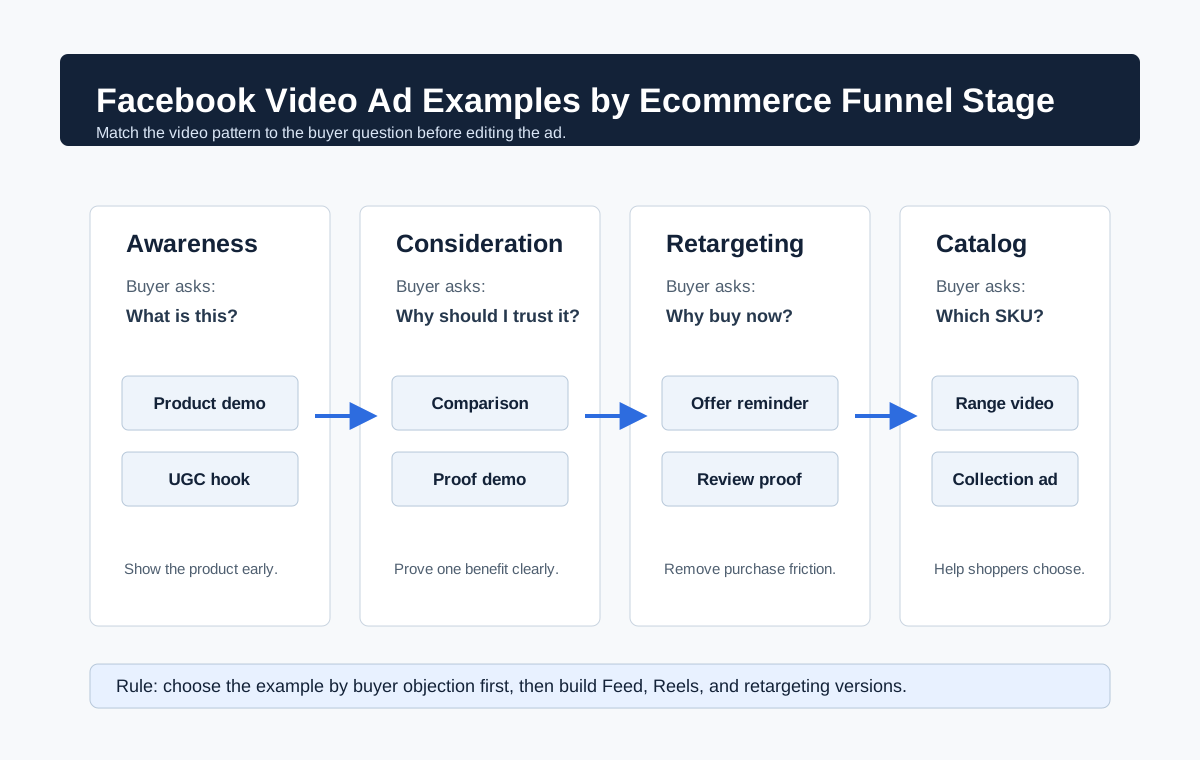
Quick Answer
The best Facebook video ad examples for ecommerce usually fall into seven repeatable patterns: product-in-use demos, UGC problem-solution clips, before-and-after proof, comparison ads, unboxing or first-impression videos, offer-led retargeting ads, and collection-style product range videos. A strong example shows the product in the first three seconds, uses mobile-safe captions, proves one clear benefit, matches the landing page, and has a version built for the placement where it will run.
Use this shortlist when planning a new batch:
- Use a product-in-use demo when shoppers need to understand how the product works.
- Use a UGC problem-solution ad when the purchase depends on trust and relatability.
- Use a before-and-after ad only when the claim is accurate, policy-safe, and supported on the product page.
- Use a comparison ad when the product replaces a common alternative.
- Use an unboxing or first-impression ad when the packaging, texture, setup, or reveal creates desire.
- Use an offer-led retargeting ad when the shopper already knows the product but needs urgency or reassurance.
- Use a collection or range ad when the category has several SKUs and the buyer may need to browse before choosing.
If you need a launch QA layer before publishing, use the Facebook video ad checklist for ecommerce. If you need a broader testing system, pair these examples with creative ads examples for ecommerce video testing.
Source Context Checked for 2026
Meta's public video ad resources continue to position video across Feed, Stories, Reels, in-stream, Messenger, carousel, collection, and Instant Experience surfaces. Meta's Reels page frames Facebook and Instagram Reels ads as immersive, built-for-mobile placements inside Meta Advantage delivery. Instagram's Help Center says reels can use aspect ratios from 1.91:1 to 9:16, with a minimum frame rate of 30 FPS and minimum resolution of 720 pixels. Meta's collection ad page describes a product-sales format that can combine a cover image or video with product discovery. Meta's Advantage+ creative page says the system can use automatic image sizing, text generation, and creative variations across placements and audiences.
Current SERP results for "facebook video ad examples ecommerce" are heavy on generic inspiration lists, broad ad-format explainers, and agency posts. The content gap is a product-specific examples guide that tells ecommerce teams which video pattern to use, what to show, what to avoid, and how to turn each example into a testing batch without competing with a Facebook ad generator tool page.
How to Read These Examples
Do not copy a Facebook video ad example because the edit looks polished. Copy the job it performs. For ecommerce, a video ad must move a shopper from one belief to the next:
| Buyer question | Creative job | Example pattern |
|---|---|---|
| What is this product? | Show the product clearly and early | Product-in-use demo |
| Does it solve my problem? | Show the before state and result | Problem-solution UGC |
| Can I trust the claim? | Add proof, context, and limitations | Proof-led demo |
| Why not buy the alternative? | Compare the old way with the product | Comparison ad |
| What will I receive? | Show packaging, setup, texture, or scale | Unboxing or first impression |
| Why buy now? | Repeat the offer and remove purchase friction | Retargeting ad |
| Which SKU is right for me? | Show product range and browsing path | Collection or catalog ad |
The best example is the one that answers the highest-friction question in the buyer's mind. A technical product often needs a demo. A beauty product often needs texture, shade, or routine context. A home product may need scale and installation proof. A gift product may need packaging, reaction, and shipping reassurance.
Example 1: Product-in-Use Demo
A product-in-use demo is the safest starting point for most ecommerce brands because it turns product claims into visible behavior. The first frame should show the product in the user's hand, room, outfit, desk, kitchen, bag, or routine. The viewer should not need to wait for a logo animation to understand what is being sold.
Example structure
| Moment | What to show | Copy angle |
|---|---|---|
| 0-2 seconds | Product doing the main action | "This folds a full grocery run into one tote." |
| 3-6 seconds | Close-up of the feature | "Reinforced base, spill-proof lining, wide handles." |
| 7-11 seconds | Real use case | "Car trunk to kitchen in one trip." |
| 12-15 seconds | Offer and CTA | "Shop the travel-ready tote today." |
This format works well for cookware, organizers, travel accessories, kitchen tools, pet products, fitness gear, cleaning products, and home improvement items. The creative should be edited around the useful action, not the product spec list.
What makes it work
The product appears before the claim. The visual proof is specific. The ad does not ask the viewer to imagine the benefit; it shows the benefit in context. For Facebook Feed, a 4:5 or 1:1 cut can work if the product remains large. For Reels and Stories, a 9:16 version should keep the product, caption, and CTA inside safe zones.
Common mistake
The brand starts with lifestyle footage that looks expensive but does not identify the product. In a paid social feed, vague atmosphere is usually weaker than a clear first-frame demonstration.
Example 2: UGC Problem-Solution Video
A UGC-style ad works when the product solves a felt problem and the shopper needs a human reason to care. The creator does not need to sound like a professional spokesperson. In many categories, plain language is more believable than studio polish.
Example script
| Scene | Visual | Spoken or captioned line |
|---|---|---|
| Hook | Creator points to messy drawer | "I kept buying organizers that only worked for a week." |
| Problem | Drawer jam, products falling out | "The issue was depth, not width." |
| Product | Insert adjustable organizer | "This one expands and locks into the actual drawer size." |
| Proof | Open and close drawer smoothly | "Now everything stays visible." |
| CTA | Creator shows final setup | "I wish I had found this before buying three others." |
This example works for storage, beauty, wellness, parenting, pet care, fashion fit, bedding, and hobby products. It is especially useful when a shopper needs to see someone like them use the product.
What makes it work
The ad begins with a real problem, then introduces the product as the mechanism that resolves it. The creator should mention one specific old frustration, not a generic "I love this product" statement. The result should be visible enough to understand on mute.
Policy and trust note
If the creator discusses health, body, finance, sensitive traits, or dramatic personal transformation, keep the claim precise and supported. Meta review can consider text, image, video, thumbnail, targeting, and destination page together. The landing page should carry the same proof standards as the ad.
Example 3: Before-and-After Proof Ad
Before-and-after creative is powerful but easy to misuse. It is strongest when the result is objective, product-driven, and not tied to a sensitive personal attribute. For ecommerce, safer examples include cleaning, organization, lighting, repair, setup, styling, cooking texture, desk cable management, and product assembly.
Example structure
| Moment | Visual | Guardrail |
|---|---|---|
| Before | Messy cable tray under desk | Avoid exaggerating the problem |
| Action | Attach cable clips and route cords | Show real steps, not magic jump cuts |
| After | Clean desk underside and visible floor | Keep result believable |
| Proof | Pull one cable without tangling | Demonstrate continued use |
| CTA | "Build a cleaner desk setup" | Match the product page claim |
What makes it work
The viewer can compare the old state and new state without reading a long caption. The result does not rely on a vague promise. The ad shows the mechanism between the before and after, which makes the claim more credible.
Common mistake
The ad shows an extreme "before" and a perfect "after" without the product process. That can feel staged, and in sensitive categories it can create review risk. Use the product as the hero of the transformation.
Example 4: Comparison Ad
Comparison ads work when the product replaces a familiar alternative. The point is not to attack a competitor. The point is to dramatize a choice the shopper already understands.
Example structure
| Old way | New way | Best for |
|---|---|---|
| Paper towels for every spill | Washable absorbent cloths | Home and kitchen |
| Bulky travel bottles | Flat refillable pouches | Travel accessories |
| One-color lamp | Adjustable warm/cool light | Home decor |
| Disposable filters | Reusable stainless insert | Coffee and kitchen |
| Generic phone grip | Magnetic stand and wallet | Consumer electronics |
What makes it work
The ad frames the product as a practical upgrade. Use side-by-side footage, cost-per-use context, setup time, or convenience proof. If you mention price, savings, durability, or environmental impact, the product page should support it with clear details.
Placement tip
Comparison ads can perform well in Feed because viewers have more room to scan side-by-side visuals and captions. For Reels, simplify the comparison into one old-way shot and one new-way shot, then use a short center-safe caption.
Example 5: Unboxing or First-Impression Video
Unboxing ads work when the arrival experience is part of the value. This includes giftable products, premium packaging, beauty items, apparel, accessories, collectibles, home goods, and products where scale or texture matters.
Example structure
| Moment | What to capture | Why it matters |
|---|---|---|
| First frame | Package opening or product reveal | Creates immediate curiosity |
| Close-up | Material, texture, stitching, finish, or contents | Answers quality questions |
| Setup | Product being placed, worn, mixed, or assembled | Shows what the buyer will do |
| Reaction | Real first impression or gift moment | Adds emotional proof |
| CTA | Shipping, bundle, or gift note | Connects the example to purchase intent |
What makes it work
The video helps the shopper picture ownership. It shows what arrives, how big it is, how it feels, how it is packaged, and how quickly it becomes useful. This matters for products that are hard to judge from a PDP image alone.
Common mistake
The ad spends too long on the box and not enough time on the product. Packaging is a support act. The product still needs to be visible early.
Example 6: Offer-Led Retargeting Video
Retargeting ads should not repeat the same cold-traffic hook. The viewer may already know the product. The job is to remove hesitation, clarify the offer, or remind them why the product fits their use case.
Example structure
| Audience | Creative angle | Video example |
|---|---|---|
| Product viewers | Clarify key feature | 10-second product proof with one benefit |
| Add-to-cart users | Remove purchase friction | Shipping, returns, size guide, bundle, or guarantee |
| Past buyers | Cross-sell | Product pairing or refill reminder |
| Video viewers | Move from curiosity to proof | Testimonial or comparison ad |
| Catalog browsers | Help choose SKU | Range video or "which one is for you" guide |
What makes it work
The message acknowledges the buyer's stage. It does not explain the entire brand again. A good retargeting video can be shorter than a prospecting video because the viewer already has context.
Landing-page match
If the retargeting ad mentions a discount, bundle, free shipping threshold, size guide, or guarantee, that information should be visible on the landing page. Mismatched offers waste clicks and can create trust issues.
Example 7: Collection or Product Range Video
Meta collection-style ecommerce ads can combine a cover image or video with product browsing. For brands with multiple SKUs, the cover video should explain the category promise while the product tiles let shoppers choose.
Example structure
| Cover video idea | Product grid role | Best for |
|---|---|---|
| "Three ways to style the travel set" | Show individual bags or colors | Fashion and accessories |
| "Build your desk setup in 15 seconds" | Show lamp, mat, organizer, stand | Home office |
| "Choose your shade by undertone" | Show product shades | Beauty |
| "Starter kit versus refill kit" | Show bundles and refills | Consumables |
| "Pet cleanup kit in action" | Show spray, wipes, brush, towel | Pet products |
What makes it work
The video creates desire; the product grid creates choice. The cover video should not try to explain every SKU. Use it to sell the category outcome, then let the product cards handle browsing.
Common mistake
The cover video is a brand montage with no product logic. For ecommerce, collection ads need a clear bridge between the video and the SKUs below it.
Example 8: Founder or Expert Demonstration
A founder or expert demo works when the product has a design decision that is hard to appreciate from a normal ad. This could be a fabric choice, ingredient logic, engineering detail, sourcing decision, or category misconception.
Example structure
| Moment | What to say | Visual support |
|---|---|---|
| Hook | "We changed this seam because the old version failed here." | Point to the exact product area |
| Explanation | One design decision | Macro shot or side-by-side |
| Proof | Test, use case, or customer feedback | Real product in use |
| CTA | "See the updated version" | Product page or collection |
What makes it work
The person on camera adds authority, but the product proof still carries the ad. This is useful for premium products, technical products, and brands that need to justify price.
Common mistake
The founder tells the brand origin story for 30 seconds before showing the product. Save that for organic content. Paid video needs a fast proof point.
Example 9: Review Mining Ad
A review mining ad turns customer language into a video concept. Instead of saying "people love it," the ad dramatizes the exact phrase customers repeat.
Example structure
| Review phrase | Video concept |
|---|---|
| "I did not realize how small it folds." | Show it folding into a drawer, bag, or suitcase |
| "The color matches everything." | Show three outfits or room settings |
| "My dog stopped slipping on the floor." | Show before/after traction context |
| "It made cleanup faster." | Time the cleanup process |
| "The refill lasts longer than expected." | Show usage over days or servings |
What makes it work
The ad uses customer vocabulary, which often maps better to search and conversion intent than internal marketing copy. It also gives the creative team a repeatable way to create variants without inventing claims.
Trust note
Do not fabricate reviews. If a phrase comes from a real review, keep it accurate and do not imply a universal result. If the claim is measurable, the product page should support it.
Example 10: AI-Assisted Product Video
AI-assisted product videos can help ecommerce teams move faster when they need many variations from limited assets. The safest use is to turn existing product images, PDP points, and approved claims into short ad concepts without inventing product behavior.
Example structure
| Input | Output | Guardrail |
|---|---|---|
| Product image | Motion scene or short UGC-style clip | Keep product appearance accurate |
| PDP bullets | Caption sequence | Do not add unsupported claims |
| Customer review theme | Hook variants | Preserve review meaning |
| Existing demo clip | Placement-specific cutdowns | Check crop and safe zones |
| Offer copy | Retargeting version | Match landing page details |
What makes it work
AI helps with speed and variation, but the ad still needs human QA. Check product accuracy, captions, claims, offer match, and placement previews before launch. If you are using ShopShot to turn product assets into video, route the final creative through the AI video generator for Facebook ads and then apply the same QA standards used for manual video.
Ecommerce Facebook Video Ad Matrix
Use this matrix to pick examples by product type and buyer friction.
| Product type | Highest buyer friction | Best first example | Secondary example |
|---|---|---|---|
| Beauty and skincare | Texture, shade, routine fit, trust | UGC problem-solution | Unboxing or review mining |
| Home organization | Before state and visible result | Before-and-after proof | Product-in-use demo |
| Kitchen tools | Mechanism and ease of use | Product-in-use demo | Comparison ad |
| Apparel and accessories | Fit, styling, quality, scale | Try-on or first impression | Review mining |
| Pet products | Real pet behavior and mess context | UGC demo | Before-and-after proof |
| Fitness gear | Form, safety, and repeat use | Expert demonstration | Product-in-use demo |
| Electronics | Setup, compatibility, and use case | Comparison ad | Founder/expert demo |
| Consumables | Taste, refill cycle, or habit | Review mining | Retargeting offer |
| Gifts | Packaging and emotional reaction | Unboxing | Product range video |
| Multi-SKU catalogs | Choice and navigation | Collection/range video | Retargeting SKU guide |
Placement Notes for Facebook Video Ad Examples
The same example should usually have more than one export. Meta can adapt creative across placements, and Advantage+ creative may help with sizing and variations, but ecommerce brands should still review the result. A product label, price, subtitle, or CTA that looks fine in Feed may be covered or cropped in a vertical placement.
| Placement family | Useful example types | Creative note |
|---|---|---|
| Facebook Feed | Demo, comparison, founder proof, retargeting | 4:5 or 1:1 can work well; keep captions readable |
| Facebook Reels | UGC, problem-solution, fast demo, review mining | Build 9:16 versions with key text inside safe zones |
| Stories | Offer, first impression, quick demo | Use simple sequence and clear CTA |
| In-stream | Product proof or brand story | Front-load the message because context is interrupted |
| Collection | Range video, hero demo, category promise | Pair the video with product tiles that match the promise |
| Retargeting placements | Objection handling, offer reminder, review proof | Use the buyer's previous action as context |
Testing Workflow: Turn Examples into a Batch
One good Facebook video ad example should become a testing batch, not a single upload. The goal is to vary the hook, proof angle, format, and landing-page promise without changing everything at once.
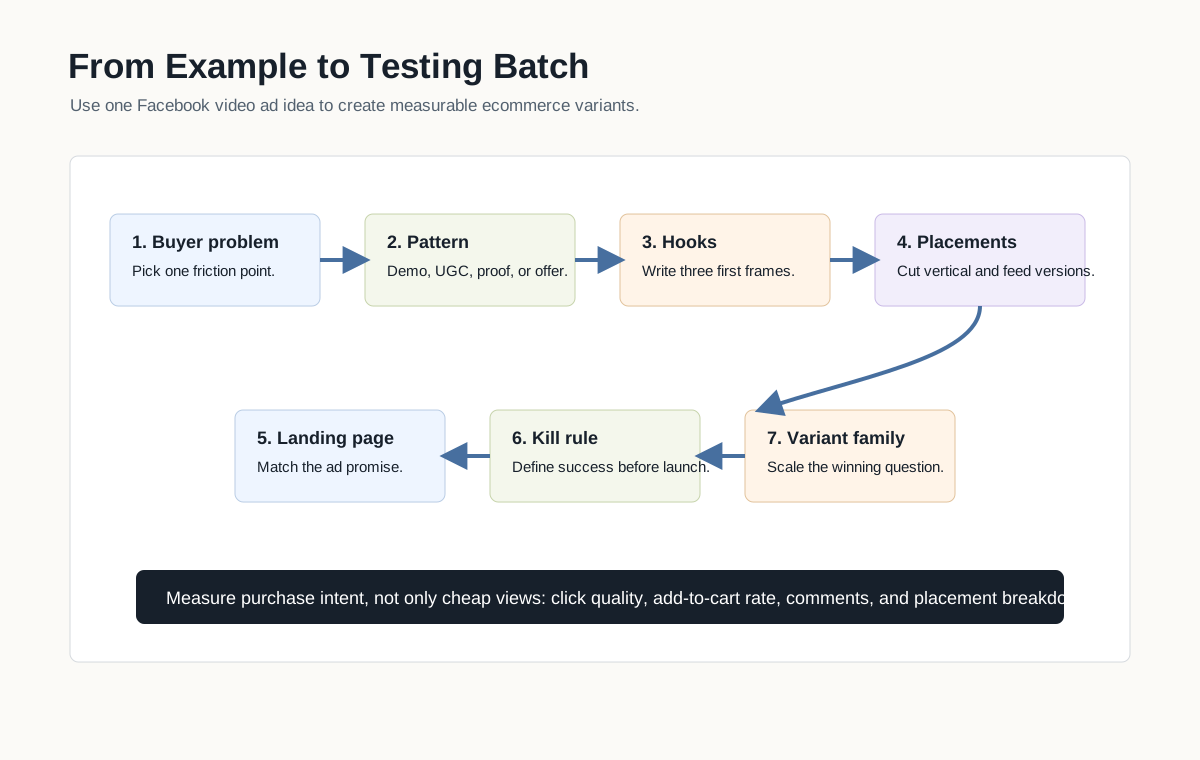
Step 1: Choose one product and one buyer problem
Do not start with "we need five videos." Start with a specific buyer question. For example: "Will this bag fit under an airplane seat?", "Does this serum feel sticky?", or "Can this tool actually clean grout faster?"
Step 2: Pick two example patterns
Choose one direct proof pattern and one trust pattern. For a cleaning product, that might be before-and-after plus UGC. For a premium accessory, that might be unboxing plus comparison.
Step 3: Write three hooks per pattern
The hook should identify the product, problem, or surprising use case. Avoid vague hooks like "You need this." Use concrete hooks:
- "I tested this on the messiest part of my kitchen."
- "This tiny pouch replaced three travel bottles."
- "The difference is not the material. It is the shape."
- "I bought it for the packaging, but kept it for the refill system."
Step 4: Build two placement versions
Create at least one vertical 9:16 version for Reels and Stories and one feed-safe 4:5 or 1:1 version. Keep the product, captions, proof moment, and CTA visible in both.
Step 5: Match each creative to a landing page
The landing page should continue the same promise. If the ad is a comparison, the page should explain the comparison. If the ad is a shade finder, the page should make shade selection easy. If the ad is a bundle offer, the page should show the bundle.
Step 6: Launch with a kill rule
Decide in advance which signals matter. For ecommerce, do not judge only by cheap views. Watch thumb-stop rate, click quality, add-to-cart rate, product page engagement, purchase conversion, comments, and placement breakdown.
Step 7: Turn winners into families
When one example works, do not simply increase spend forever. Build a family around it:
| Winning signal | Next variants |
|---|---|
| Hook wins but conversion is weak | Keep hook, change proof and landing-page match |
| Demo wins in Feed | Cut a Reels version and a retargeting version |
| UGC wins for one persona | Test two additional personas or use cases |
| Comparison wins | Test old-way variations and cost-per-use angle |
| Retargeting offer wins | Test urgency, guarantee, and bundle framing |
How These Examples Differ from Generic Inspiration Lists
Most inspiration lists show ads as screenshots. That is helpful for design taste, but it is not enough for ecommerce execution. A product team needs to know:
- Which buyer objection the ad answers.
- Which product proof belongs in the first three seconds.
- Which placement version is needed.
- Which landing page should receive the click.
- Which claim must be supported.
- Which metric should decide whether the example scales.
That is why examples should be stored as reusable creative briefs. A screenshot library is a swipe file. A brief library is a production system.
Internal Link Map for This Topic
Use this guide as the examples layer in the Facebook ads cluster. It should connect to:
- Facebook video ad checklist for ecommerce for pre-launch QA.
- Meta Advantage+ placements for ecommerce video ads for placement decisions.
- Product video examples for ecommerce for PDP, TikTok, and Meta example coverage.
- Dynamic creative optimization for ecommerce video ads for variation and testing logic.
- Creative ads examples for ecommerce video testing for broader creative testing.
- AI video generator for Facebook ads when the team needs a product-to-video workflow rather than another manual editing process.
FAQ
What are the best Facebook video ad examples for ecommerce?
The best examples are product-in-use demos, UGC problem-solution videos, before-and-after proof, comparison ads, unboxing videos, offer-led retargeting ads, collection ads, and review mining ads. The right choice depends on the buyer objection, product category, and placement.
How long should a Facebook ecommerce video ad be?
Many ecommerce ads should prove the product quickly and can work in 10 to 20 seconds, but length is not the real rule. Put the product and hook in the first three seconds, then use only the time needed to show proof, offer, and CTA. More complex products may need a longer demo or a separate retargeting video.
Should ecommerce brands use UGC or polished product videos?
Use both when the category supports it. UGC is useful for trust, relatability, and problem-solution storytelling. Polished product video is useful for premium positioning, technical proof, packaging, and catalog consistency. The best testing plan compares the role each format plays rather than treating one style as universally better.
Can I use the same Facebook video ad for Feed, Reels, and Stories?
You can upload one asset, but it is safer to create placement-ready versions. Reels and Stories usually need a vertical 9:16 cut with center-safe captions. Feed can often use 4:5 or 1:1. Always preview the ad because important text, product labels, and CTAs can be cropped or covered.
How many Facebook video ad examples should I test at once?
Start with a small batch that has clear differences: two example patterns, three hooks each, and two placement formats. That gives enough variation to learn without making analysis impossible. If one pattern wins, build more variants around the winning buyer problem, not just the same visual style.
Are AI-generated Facebook video ads safe for ecommerce?
AI-generated or AI-assisted video ads can be safe when they accurately represent the product, use approved claims, preserve the offer, and are reviewed before launch. They become risky when they invent results, alter the product appearance, add unsupported text, or create a landing-page mismatch.
Sources Checked
- Meta for Business: Video ads
- Meta for Business: Facebook and Instagram Reels ads
- Instagram Help Center: Reel size and aspect ratios
- Meta for Business: Collection ads
- Meta for Business: Advantage+ creative
- Meta Advertising Standards
- Current SERP review for "facebook video ad examples ecommerce", "Facebook video ad examples ecommerce product brands", and "facebook video ad examples for ecommerce product brands 2026" on June 2, 2026