
Last reviewed: June 4, 2026
Facebook Reels ads and Feed ads can both sell ecommerce products, but they do different jobs. Reels is a full-screen, vertical, entertainment-first environment where the ad has to feel native before it can persuade. Feed is a mixed-content environment where shoppers expect posts, links, product context, comments, captions, and offers in the same scroll.
For ecommerce teams, the wrong question is "Which placement is better?" The practical question is "Which placement matches this product, this buying stage, and this creative asset?" A 9:16 creator demo that feels natural in Reels can look cramped or oddly cropped in Feed. A Feed ad with a clear headline, product proof, and offer can feel too slow in Reels if the opening frame is built around reading instead of motion.
This guide explains when to use Facebook Reels ads, when to use Feed ads, how to adapt one product video into both placements, and how to test the split without letting Meta's delivery algorithm hide the creative problem.
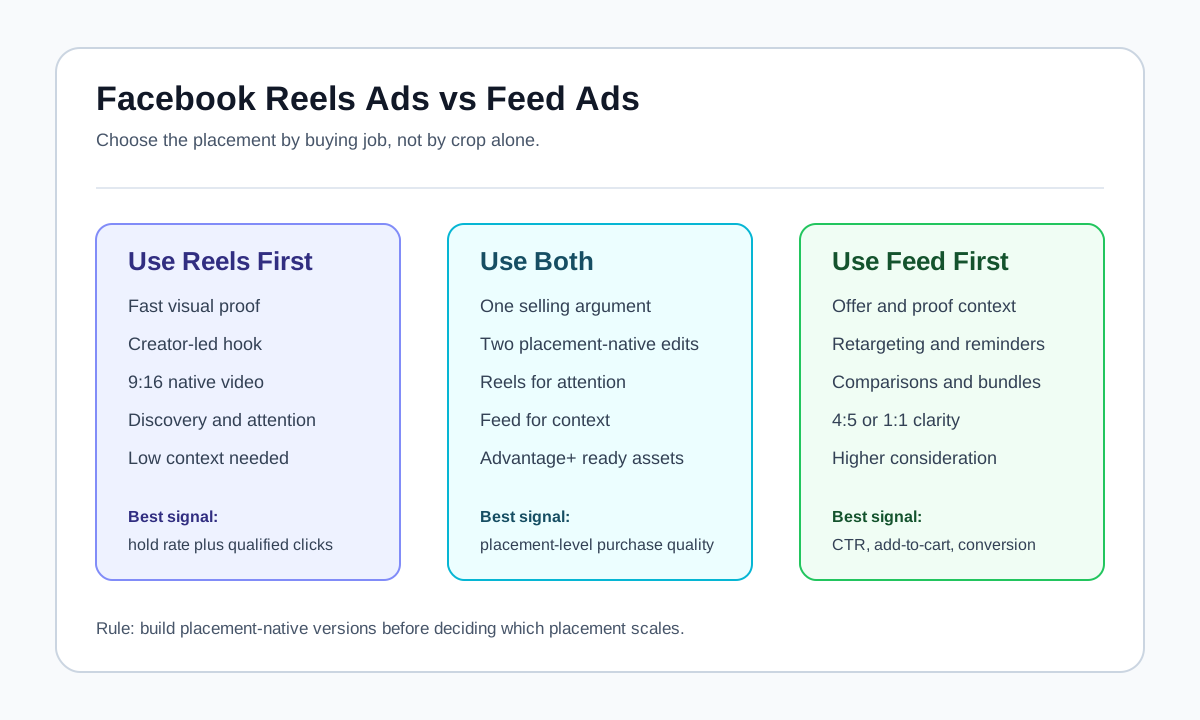
Quick Answer
Use Facebook Reels ads when the product needs fast visual proof, creator-style demonstration, sound-on storytelling, or a mobile-native discovery moment. Use Feed ads when the product needs more context, comparison, offer framing, comments, retargeting, or a product page click from shoppers who are already willing to read. For most ecommerce accounts, the strongest setup is not Reels only or Feed only. Build a 9:16 Reels version for attention and a 4:5 or 1:1 Feed version for context, then compare placement-level results after both versions have enough spend and clean tracking.
The simplest rule:
| Goal | Better first test | Why |
|---|---|---|
| Introduce a visual product quickly | Reels | Full-screen vertical motion can show the product before the viewer reads. |
| Explain features, price, guarantee, or bundle | Feed | The surrounding text, headline, and landing-page context matter more. |
| Scale a creator or UGC concept | Reels | The format rewards direct, native, person-led creative. |
| Retarget cart visitors or product viewers | Feed | The shopper already knows the product and may need proof, offer, or reassurance. |
| Compare product variants or collections | Feed | Multiple products, thumbnails, and catalog context are easier to understand. |
| Test a new hook angle | Reels first, then Feed | Reels exposes weak openings quickly; Feed validates purchase context. |
If you already have a broad Meta placement strategy, pair this article with Meta Advantage+ placements for ecommerce video ads. If you need creative examples before building the test, use Facebook video ad examples for ecommerce product brands. For a launch QA layer, use the Facebook video ad checklist for ecommerce. To turn the final angle into a product video workflow, start from the Facebook ads tool page.
Source Context Checked for 2026
Meta's public Reels ads page describes Reels ads as immersive, built-for-mobile placements inside the Meta Advantage delivery system. The same page recommends including Reels through Advantage+ placements or selecting Facebook Reels and Instagram Reels manually under Stories and Reels, and it emphasizes vertical video, audio, and safe-zone messaging.
Meta's Advantage+ placements page says automated placements can distribute ads across Facebook, Reels, Instagram Stories, Instagram Feed, Messenger, and Audience Network. Meta's manual placement help says placement availability depends on objective, ad type, and settings, and that not all placements are available for every ad. Meta's video ad page positions video across Feed, Stories, in-stream, carousel, collection, Messenger, and Instant Experiences, with the Ads Guide as the technical reference point.
Current search results for "facebook reels ads vs feed ads ecommerce" are mostly broad Meta placement explainers, agency spec sheets, and general "best ad size" guides. The content gap is an ecommerce-specific decision framework: which placement to use by product type, funnel stage, asset shape, offer complexity, and testing plan.
The Real Difference: Reels Is a Format, Feed Is a Context
Reels and Feed are often compared as if they are only two rows in Ads Manager. That hides the practical creative difference.
Reels behaves like a short-form video environment. The viewer is usually moving through full-screen clips. The ad competes with entertainment, creator content, trending sounds, fast edits, captions, and product demos that begin immediately. A Reels ad has very little patience available. If the product is not visible, the problem is vague, or the creator sounds like an ad before earning attention, the viewer can swipe past before the selling point appears.
Feed behaves like a mixed information stream. The viewer sees posts, comments, links, carousels, product photos, videos, and ads. Feed gives an ecommerce brand more room to use primary text, a headline, social proof, product context, price anchoring, and a landing-page promise. That extra context can help higher-consideration products, bundles, accessories, supplements, apparel fit decisions, home goods, and products with a clear offer.
The creative mistake is treating both placements as a crop problem. You cannot simply cut a Feed ad into 9:16 and expect it to feel native in Reels. You also cannot rely on a fast Reels clip to explain a detailed offer in Feed without adding enough context.
Reels vs Feed at a Glance
| Dimension | Facebook Reels ads | Facebook Feed ads |
|---|---|---|
| Viewer mode | Watching short-form vertical videos | Scanning mixed posts, links, videos, and social context |
| Best creative shape | Native 9:16 vertical video | 4:5, 1:1, or placement-adjusted video/image variants |
| Opening priority | Motion, product, creator, or problem in the first seconds | Clear product, headline, caption, offer, or proof |
| Sound | More valuable because Reels is video-native | Useful, but captions and mute-safe clarity still matter |
| Copy support | Limited on-screen safe-zone text | Primary text, headline, description, comments, and link context |
| Strong use case | Discovery, UGC hooks, demos, fast proof | Retargeting, offers, comparisons, catalog context, education |
| Common failure | Looks like a recycled Feed ad or overproduced brand spot | Looks too small, too text-heavy, or visually slow on mobile |
| Ecommerce metric to watch | Thumb-stop, hold rate, landing-page view quality | CTR, add-to-cart rate, conversion rate, comment quality |
When Facebook Reels Ads Are the Better First Bet
Reels should be your first test when the product benefit can be shown quickly and the story benefits from a person, a visible transformation, or a fast demonstration.
1. The product has visible proof
Reels works well when a shopper can understand the value from motion. Examples include a kitchen tool solving a messy task, a beauty product being applied, a pet accessory in use, a fitness item being demonstrated, a cleaning product removing a stain, or a travel product solving a packing problem.
In these cases, a Reels ad can answer "What does it do?" before the viewer needs to read a claim. That matters because many ecommerce products lose attention when the ad opens with a logo, packaging shot, generic lifestyle footage, or abstract benefit statement.
2. The hook depends on a creator
Creator-led ads often feel more natural in Reels because the placement already trains viewers to expect faces, voice, movement, and opinion. A strong creator opening is specific:
- "I did not think this would fit my carry-on."
- "This is the only pan I use when I cook for two."
- "I bought this because my dog kept sliding on the floor."
- "I tried the viral organizer, but this part is what surprised me."
The creator should not spend the first five seconds introducing the brand. The product, problem, or result needs to appear immediately.
3. You need fast hook learning
Reels can expose weak hooks quickly because the placement punishes slow starts. If three product hooks all have similar production quality but one produces better early retention, that is useful learning for the whole Meta account.
For example, a skincare brand might test:
| Hook | Reels opening |
|---|---|
| Problem hook | "My makeup kept separating by lunch." |
| Routine hook | "I added this one step before SPF." |
| Proof hook | "Here is the texture after six hours." |
| Objection hook | "I thought this would feel greasy." |
The winning Reels opening can then inform Feed copy, product page headlines, email subject lines, and retargeting angles.
4. The product is low to medium consideration
Reels is strongest when the viewer can move from curiosity to click with limited explanation. This often includes accessories, simple beauty products, impulse-friendly home products, gifts, pet products, kitchen tools, and apparel with an obvious visual reason to care.
Higher-consideration products can still use Reels, but the Reels ad should usually send traffic into a stronger education layer, such as a product page, comparison page, quiz, bundle page, or review-heavy landing page.
When Facebook Feed Ads Are the Better First Bet
Feed should be your first test when the product needs context, copy, comparison, retargeting, or a clearer offer frame.
1. The buyer needs more information before clicking
If the product has a technical feature, a price objection, a subscription model, multiple variants, a warranty, a bundle, or a strong guarantee, Feed gives you more places to explain the promise. The creative can still be video-first, but the surrounding text can carry context that would feel cramped inside Reels.
For example, a Feed ad for a premium desk chair can show the chair in use while the primary text explains the return window, size range, assembly time, and posture benefit. A Reels ad can tease the comfort proof, but Feed can support the purchase decision.
2. The ad is built for retargeting
Retargeting often performs better with clarity than novelty. A cart visitor, product page viewer, or engaged video viewer may not need a fresh entertainment hook. They may need:
- A reminder of the product benefit.
- A bundle or limited-time offer.
- A review quote.
- A shipping or return reassurance.
- A comparison against the old solution.
- A product page angle they did not notice the first time.
Feed gives you room to combine the product visual with the offer and proof.
3. The product range matters
Feed is often easier for collections, catalogs, product ranges, color variants, size options, and comparison ads. Reels can show one hero product beautifully, but Feed can help a shopper understand choice.
If the buying decision is "Which SKU is right for me?", Feed is usually stronger. If the buying decision is "Why should I care at all?", Reels may be stronger.
4. The creative relies on reading
Some ecommerce ads depend on a claim, a comparison chart, a before-after label, or a review quote. These can work in Reels if the text is short and safely placed, but dense reading is a Feed job.
If your ad cannot be understood without pausing to read multiple lines, do not force it into Reels as the main version. Build a Reels-native teaser and a Feed version that handles the explanation.
Product Category Fit
| Ecommerce category | Reels angle | Feed angle | Starting recommendation |
|---|---|---|---|
| Beauty and skincare | Texture, routine, transformation, creator trial | Ingredients, reviews, shade/skin-type context | Reels for discovery, Feed for proof and retargeting |
| Apparel and accessories | Try-on, fit check, styling transition | Size, bundle, color, review, offer | Use both, but separate try-on from offer |
| Home and kitchen | Fast demo, before-after, setup | Feature explanation, comparison, bundle | Reels for demo, Feed for purchase context |
| Pet products | Pet reaction, problem moment, quick use | Safety, sizing, material, reviews | Reels for attention, Feed for trust |
| Supplements and wellness | Routine context, unboxing, habit cue | Claims boundaries, ingredients, reviews, offer | Feed usually needs to carry compliance and proof |
| Electronics and gadgets | Use case, setup speed, surprising feature | Specs, compatibility, warranty, comparison | Feed for context, Reels for demo hooks |
| Gifts | Reaction, reveal, packaging | Shipping dates, personalization, bundle | Reels for desire, Feed for urgency |
The Best Setup Is Usually Two Assets, Not One Crop
The most reliable ecommerce workflow is to produce one idea in two placement-native assets:
- A 9:16 Reels version that opens with motion, product, creator, or problem.
- A Feed version that uses 4:5 or 1:1 framing, clearer product visibility, primary text, headline, and offer context.
That does not mean producing two entirely separate ads. It means designing the idea with placement in mind before editing.
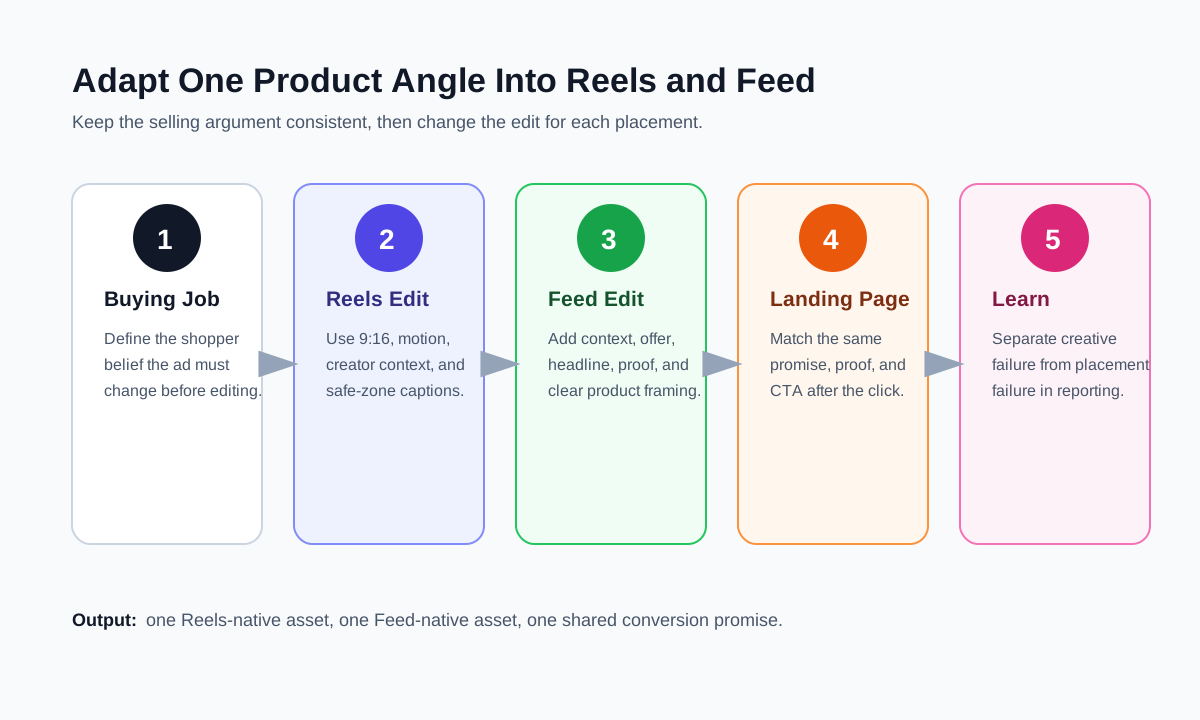
Creative Adaptation Workflow
Use this workflow when turning one product angle into Reels and Feed versions.
Step 1: Define the buying job
Write one sentence before editing:
This ad should make the shopper believe that [product] solves [problem] better than [current alternative] because [proof].
Example:
This ad should make the shopper believe that the compact garment steamer removes travel wrinkles faster than a hotel iron because it heats quickly and fits in a carry-on.
That sentence keeps the Reels and Feed versions aligned, even if the edit changes.
Step 2: Build the Reels version first when the idea is visual
For a Reels-first ad, start with a 9:16 canvas and design around thumb-stop:
| Time | Reels job | Example |
|---|---|---|
| 0-2 seconds | Show the problem or result | Wrinkled shirt next to packed suitcase |
| 3-5 seconds | Introduce product in use | Steamer gliding over fabric |
| 6-10 seconds | Prove the benefit | Split-screen before and after |
| 11-15 seconds | Add simple CTA | "Pack it for your next trip." |
Keep captions short and central. Avoid putting critical text too close to the top, bottom, or right edge where interface elements can compete with it.
Step 3: Build the Feed version around clarity
For Feed, the first frame still matters, but the ad can use more context:
| Feed element | Job |
|---|---|
| First frame | Make product and benefit obvious in the scroll |
| Primary text | Explain the buying situation or objection |
| Headline | State the offer, product category, or outcome |
| Video/body | Show proof, setup, comparison, or use case |
| CTA | Match the product page promise |
The Feed version can use a slower proof sequence than Reels because the shopper has more context around the ad. Still, it should not begin with brand filler.
Step 4: Match the landing page to the placement
A Reels click often comes from curiosity. The landing page should continue the same visual promise quickly, preferably with the same product image, creator proof, or before-after context near the top.
A Feed click often comes from a more explicit claim or offer. The landing page should confirm the specific claim in the primary text or headline. If the Feed ad says "Save 20% on the travel kit," the destination should not make the shopper hunt for the kit.
Step 5: Separate creative failure from placement failure
Do not conclude "Reels does not work" after testing one recycled Feed asset in Reels. Do not conclude "Feed is too expensive" after testing one vague creator clip with no product context.
Before making the placement call, ask:
- Was the Reels version actually built for vertical viewing?
- Did it show the product or problem immediately?
- Did the Feed version use text and headline context?
- Did both versions point to the same landing-page promise?
- Did each placement receive enough spend to learn?
- Did breakdowns show one placement scaling while another only received leftover delivery?
How to Test Reels vs Feed Without Fooling Yourself
Meta's delivery system can optimize across placements, but ecommerce teams still need clean creative learning. The testing plan should answer two separate questions:
- Which creative idea earns attention and intent?
- Which placement version turns that attention into sales?
Test design for a new product
| Phase | Setup | What to learn |
|---|---|---|
| 1. Hook test | Three Reels-native hooks, same product and offer | Which opening earns watch time and qualified clicks |
| 2. Adaptation test | Winning Reels hook adapted into Feed and Reels | Whether the idea survives outside Reels |
| 3. Offer test | Feed variants with offer/proof changes | Which purchase context improves conversion |
| 4. Scale test | Advantage+ placements with placement-ready assets | Whether Meta can distribute efficiently with enough asset coverage |
This sequence prevents a common mistake: testing placements before you have a workable idea.
Test design for an existing product
If the product already sells from Feed, do not rebuild the whole account around Reels. Start by adapting the highest-converting Feed angle into a Reels-native version.
For example:
- Feed winner: "Three reasons this organizer works in small apartments."
- Reels adaptation: Creator opens a packed drawer, uses the organizer, then shows the final drawer in under 15 seconds.
- Feed retargeting version: Review quote, space-saving claim, bundle offer, and product page CTA.
The goal is not to make both placements look identical. The goal is to make the same selling argument fit each environment.
Metrics That Matter by Placement
| Metric | Reels interpretation | Feed interpretation |
|---|---|---|
| Thumb-stop or 3-second view rate | Measures opening strength | Useful but less complete because Feed has more context |
| Average watch time | Shows whether the short-form story holds | Shows whether the video supports the copy |
| CTR | Can be low if the ad entertains but does not create intent | Often more tied to copy, offer, and landing-page promise |
| Landing page views | Filters accidental or low-quality clicks | Useful for diagnosing slow pages or weak click quality |
| Add to cart | Shows product-market and landing-page fit | Strong retargeting signal |
| Purchase ROAS | Final business metric, but too slow for early hook decisions | Final business metric, especially for retargeting and offers |
| Comments and saves | Can reveal curiosity, objections, or product questions | Often surfaces buying objections and trust gaps |
For Reels, do not celebrate views if landing-page view quality is poor. For Feed, do not overvalue CTR if the clicks do not add to cart or convert.
Creative Rules for Reels
Use these rules when the ad is built for Reels:
- Start with the product, problem, result, or creator in the first two seconds.
- Use 9:16 vertical framing when possible.
- Keep critical text inside safe zones.
- Make the product large enough to understand on a phone.
- Use sound or music intentionally, but keep the ad understandable with captions.
- Avoid long setup, brand intros, slow lifestyle scenes, and tiny product shots.
- Make the CTA a natural next step, not a hard interruption.
The strongest Reels ads often feel like a product moment the viewer would have watched even without the ad label.
Creative Rules for Feed
Use these rules when the ad is built for Feed:
- Make the first frame visually clear in a mixed scroll.
- Use the primary text to frame the problem, proof, or offer.
- Keep the headline specific.
- Use 4:5 or 1:1 versions when those better preserve product visibility.
- Make captions readable on mobile.
- Use social proof, shipping, guarantee, or bundle context when relevant.
- Align the landing page with the exact promise in the ad.
Feed is not a license to make slow ads. It is a chance to add context that would not fit cleanly into Reels.
Common Mistakes
Mistake 1: Uploading one 9:16 video everywhere
A 9:16 ad may perform well in Reels and Stories, but it can be cropped, resized, or visually awkward in some Feed contexts. Even when the platform can adapt it, the product may become too small, the captions may sit in the wrong place, or the first frame may lose context.
Build a Feed-safe version when the ad needs to sell in Feed.
Mistake 2: Turning a Feed ad into Reels by cropping it
Cropping a Feed ad into vertical does not make it native. If the opening relies on reading a headline, product specs, or a slow product pan, it will usually feel like a repurposed ad.
Rewrite the first seconds for Reels. Put motion or human context first.
Mistake 3: Comparing Reels prospecting to Feed retargeting
Reels often receives more cold discovery delivery, while Feed may carry retargeting and offer context. Comparing raw ROAS without audience, objective, and funnel stage context can create false conclusions.
Separate prospecting tests from retargeting tests.
Mistake 4: Letting Advantage+ placements hide asset gaps
Advantage+ placements can distribute ads across multiple surfaces, but it cannot fully fix missing creative versions. If you only give the system one asset, it has fewer useful options.
Use automation with enough placement-ready creative, not as a substitute for placement-ready creative.
Mistake 5: Ignoring comments and objections
Feed comments can reveal objections that the ad should answer. Reels comments can reveal whether the hook feels believable or confusing. Ecommerce teams should mine both.
If viewers ask the same question repeatedly, turn that question into a new Feed proof ad or a Reels objection hook.
A Practical Allocation Framework
Use this as a starting point, then adjust by account data:
| Situation | Suggested creative mix |
|---|---|
| New product with strong visual demo | 60% Reels concepts, 40% Feed proof and offer concepts |
| Existing bestseller with retargeting volume | 40% Reels refresh, 60% Feed proof, offer, and comparison concepts |
| Premium product with high consideration | 30% Reels attention hooks, 70% Feed education and trust-building |
| Impulse-friendly accessory | 70% Reels hooks, 30% Feed offer and bundle context |
| Catalog or multi-SKU brand | 35% Reels hero product moments, 65% Feed and catalog-friendly variants |
This is a creative planning split, not a permanent media-buying rule. Meta's delivery can move budget where performance is strongest, but you should feed the system with enough useful asset types.
Ecommerce Examples
Example: Skincare serum
Reels version: A creator applies the serum, shows texture, and gives one specific use case: "I use this before makeup because it does not pill." The ad shows the product, texture, and final skin finish quickly.
Feed version: A 4:5 demo with primary text explaining the skin type, routine step, return policy, and review proof. The headline points to the product page promise.
Example: Kitchen gadget
Reels version: A fast problem-solution clip: messy chopping board, product in use, clean result, close-up of the mechanism.
Feed version: Product-in-use video plus copy explaining dishwasher safety, material, size, bundle discount, and "before dinner prep" use case.
Example: Travel accessory
Reels version: Packing transition, product fitting into a carry-on, quick benefit caption.
Feed version: Comparison against the old packing method, product dimensions, shipping cutoff, and review quote.
Example: Pet product
Reels version: Pet reaction or problem moment, then product solving the issue.
Feed version: Safety details, sizing guide, material notes, guarantee, and UGC review proof.
Recommended Batch for One Week
For a small ecommerce brand, a practical weekly batch could look like this:
| Asset | Placement intent | Hook |
|---|---|---|
| Reels 1 | Discovery | "I did not expect this tiny product to solve this." |
| Reels 2 | Discovery | "The old way took me twice as long." |
| Reels 3 | Objection | "I thought it would be too small, but..." |
| Feed 1 | Prospecting context | Product demo plus main benefit and review proof |
| Feed 2 | Retargeting | Offer, guarantee, and product page promise |
| Feed 3 | Comparison | Product vs old alternative |
Build the Reels ads around attention and proof. Build the Feed ads around context and purchase confidence. Then review placement breakdowns, creative-level performance, and post-click metrics before deciding where to scale.
If you need more test patterns, compare this placement batch against the broader creative ads examples for ecommerce video testing framework.
FAQ
Are Facebook Reels ads better than Feed ads for ecommerce?
Not always. Facebook Reels ads are often better for visual discovery, creator-led demos, and fast product hooks. Feed ads are often better for context, retargeting, offers, comparison, and products that need more explanation before the click.
Should I use Advantage+ placements or manual placements?
Advantage+ placements can work well when you provide placement-ready assets for Reels, Feed, Stories, and other surfaces. Manual placements can be useful for controlled testing, diagnosing creative fit, or isolating a specific placement. For scaling, many ecommerce accounts use Advantage+ placements with separate assets that are designed for the major placement groups.
Can I use the same video for Reels and Feed?
You can start from the same concept, but the final assets should usually differ. Reels needs a 9:16, fast, native opening. Feed often needs a clearer first frame, a 4:5 or 1:1 layout, stronger text context, and a headline or offer.
What aspect ratio should ecommerce brands use?
For Reels, plan around 9:16 vertical video. For Feed, test 4:5 and 1:1 versions depending on product visibility, text layout, and the placement preview. Do not rely on automatic cropping to protect important captions or product details.
Which placement should I test first for a new product?
If the benefit is highly visual, test Reels hooks first. If the product is expensive, technical, regulated, or bundle-based, start with Feed context and use Reels to test attention angles. The right answer depends on how much explanation the shopper needs before clicking.
How many creative variants do I need?
For one product angle, build at least two Reels hooks and two Feed versions. A stronger batch is three Reels hooks, one Feed prospecting version, one Feed retargeting version, and one comparison or review-led Feed version.
Sources Checked
- Meta for Business: Instagram and Facebook Reels ads
- Meta for Business: Advantage+ placements
- Meta for Business: Video ads
- Meta Help: Select manual ad placements in Meta Ads Manager
- Meta for Business: Advantage+ creative
- Instagram Help Center: Create Instagram Reels ads in Meta Ads Manager
- Meta Transparency Center: Advertising Standards
- SERP review on June 4, 2026 for "facebook reels ads vs feed ads ecommerce", "facebook reels ads ecommerce", and "facebook feed ads ecommerce".
Next Step
If you are planning a Meta test this week, do not ask the media buyer to choose Reels or Feed in isolation. Give the account one Reels-native version and one Feed-native version of the same selling argument, then judge the result by placement-level attention, click quality, add-to-cart rate, and purchase data. To produce the creative batch faster, turn the winning product angle into a ShopShot script, generate the first product video draft, and adapt the framing for Reels and Feed before launch.