
Quick Answer
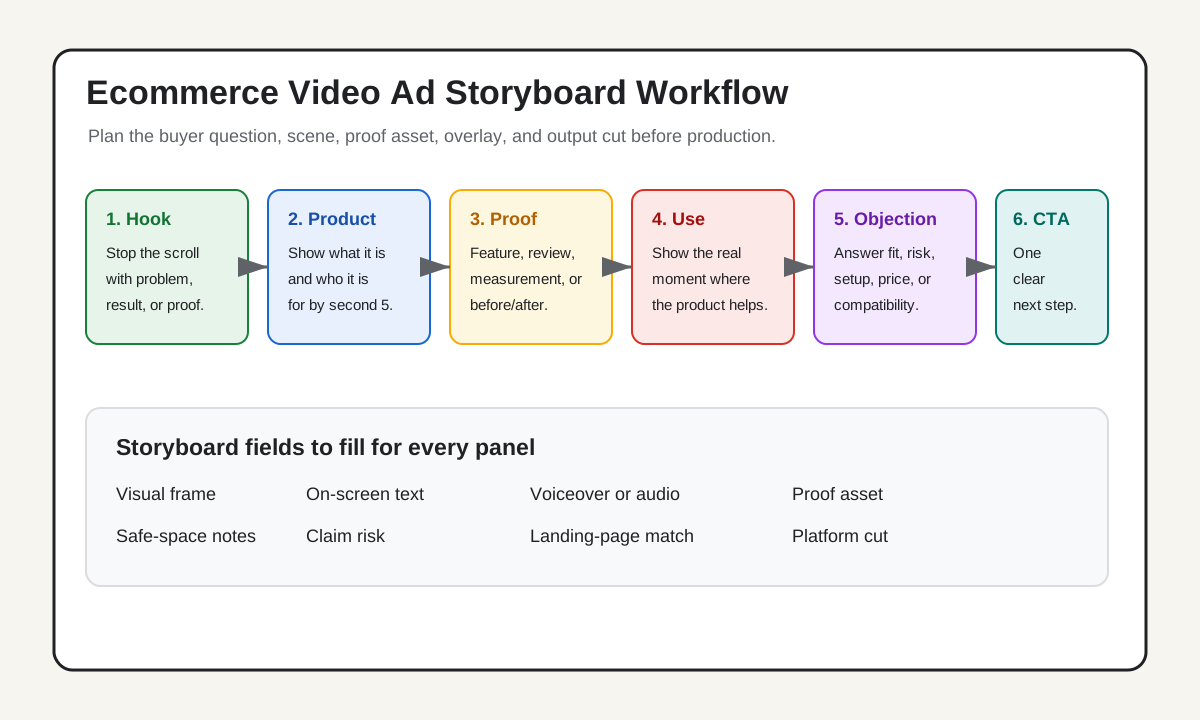
A video ad storyboard template helps an ecommerce team plan the first shot, hook, product proof, caption, CTA, and platform version before the video is edited or generated. For product ads, the best storyboard is not a film-school drawing exercise. It is a practical grid that connects each scene to one buyer question: why should I stop, what is this product, what proves the claim, what objection is answered, and what should I do next?
Use this simple structure for most ecommerce video ads:
- Hook frame: show the problem, result, comparison, or product in the first 1 to 3 seconds.
- Product frame: make the product and use case obvious by second 5.
- Proof frame: show the feature, review, demonstration, or size/detail that supports the claim.
- Objection frame: answer the reason a shopper might hesitate.
- CTA frame: give one next step, such as shop, compare size, choose a bundle, or watch the demo.
- Platform cut: decide whether the same storyboard needs a TikTok, Reels, Shorts, feed, or landing-page version.
If the script is already written, pair this with the product video script template. If the product story is still unclear, start with the product video brief template first.
Why Ecommerce Storyboards Need A Different Template
Generic storyboard templates are useful for organizing a video, but ecommerce ads need stricter decisions. A brand video can spend time on mood. A product ad has to make a shopper understand the offer quickly enough to keep watching.
That changes the storyboard. Each panel should carry a sales job, not just a visual description. The opening panel has to earn attention. The next panel has to reveal the product. A proof panel needs to make the claim believable. A CTA panel has to match the landing page or product page.
This is also why a storyboard should be built before using an AI video generator. A vague prompt like "make a product ad" can produce a nice-looking clip that misses the buyer objection or shows the product too late. A structured storyboard gives the video system clearer inputs: scene order, product focus, on-screen text, proof assets, and desired output format.
TikTok's current creative guidance recommends a hook, body, and close structure, with the value proposition communicated early. Google's ABCDs for video ads also emphasize attention, early branding or product presence, connection, and direction. A storyboard is where those ideas become actual frames.
The Ecommerce Video Ad Storyboard Template
Use this table before filming, editing, or generating a video. The point is to prevent the common mistake of writing a voiceover first and hoping visuals will fit later.
| Panel | Time | What the viewer should understand | Required input | Example |
|---|---|---|---|---|
| 1. Hook | 0-3 seconds | Why this video matters | Pain point, result, comparison, or surprise | "Still using three bins under one sink?" |
| 2. Product reveal | 3-5 seconds | What product is being shown | Product image, package, model shot, or demo shot | Organizer slides into cabinet |
| 3. Proof scene | 5-12 seconds | Why the claim is believable | Feature, review, measurement, material, or before/after | Drawer pulls out with bottles visible |
| 4. Use moment | 12-18 seconds | How the shopper would use it | Real context, hand interaction, setup step | Load cleaners, adjust width, close cabinet |
| 5. Objection answer | 18-23 seconds | Why a common concern is handled | Size note, compatibility, care, policy, or caveat | "Measure pipes first; no drilling needed" |
| 6. CTA | 23-30 seconds | What to do next | Offer, page, bundle, size guide, or demo link | "Check your cabinet size and shop today" |
For a 15-second ad, keep the same logic but merge the use moment and objection answer:
| Short version | Scene job |
|---|---|
| 0-2 seconds | Name or show the problem |
| 2-5 seconds | Reveal product and use case |
| 5-10 seconds | Show the strongest proof |
| 10-13 seconds | Remove one objection |
| 13-15 seconds | Give one CTA |
The template is intentionally narrow. A short product ad should not explain every feature. It should make one shopper decision easier.
Step 1: Pull Storyboard Inputs From The Product Page
Do not start with the blank storyboard. Start with the product page, reviews, photos, and offer.
Create a one-page input sheet:
- Product: the exact product or bundle.
- Buyer: the most likely shopper segment.
- Use case: the moment where the product matters.
- Main promise: the one claim the video can support.
- Proof: the feature, review, demo, spec, ingredient, or material detail behind the promise.
- Objection: the most likely reason someone hesitates.
- CTA: the next step the landing page can actually support.
For example, a travel toiletry bag might use this input sheet:
| Input | Example |
|---|---|
| Buyer | Weekend travelers who hate leaking bottles |
| Use case | Packing liquids in a carry-on |
| Promise | Keep small items visible and separated |
| Proof | Clear compartments, hanging hook, leak-resistant pouch |
| Objection | "Will it fit my full-size products?" |
| CTA | "Check the compartment dimensions" |
That input sheet stops the storyboard from becoming generic. The storyboard should not say "perfect for travel" unless a frame shows the product solving a travel problem.
Step 2: Choose The First Frame Before The First Line
Many product videos start with a line like "You need this." That line rarely works by itself because the viewer has no reason to care yet. Choose the first frame first, then write the line around what the frame proves.
Use this decision table:
| If the product is strongest at... | First frame | Hook line |
|---|---|---|
| Solving a visible mess | Before state | "This drawer looked organized until I opened it." |
| Showing a result | After or side-by-side | "Here is the 10-second result." |
| Answering skepticism | Test or close-up | "I thought it would feel flimsy too." |
| Explaining size or fit | Measurement shot | "Measure this part before you buy." |
| Highlighting an offer | Bundle or cart view | "The bundle only makes sense if you use all three." |
This keeps the opening frame and the opening sentence aligned. If the frame shows a product close-up but the line talks about a discount, the ad feels disconnected. If the frame shows a messy cabinet and the line names the same problem, the viewer understands the story immediately.
Step 3: Build Panels Around Proof, Not Vibes
The proof scene is the most important panel for ecommerce. It is the place where a claim becomes believable.
Use safer proof types:
| Proof type | Strong storyboard note | Weak storyboard note |
|---|---|---|
| Feature proof | "Close-up: magnetic lid keeps scoop attached" | "Show premium quality" |
| Review proof | "Overlay one verified review phrase about fit" | "Show happy customer" |
| Demo proof | "Pour water, wipe surface, show final texture" | "Show product working" |
| Measurement proof | "Ruler next to 12-inch shelf opening" | "Show size" |
| Comparison proof | "Old bin vs adjustable frame side by side" | "Show why ours is better" |
Avoid broad lines that the page cannot support: "best ever," "guaranteed results," "works for everyone," or "clinically proven" unless the brand can substantiate the claim and the platform context allows it.
If the video uses a creator, influencer, affiliate, or AI presenter, the storyboard should also mark the disclosure location. The FTC Endorsement Guides expect material connections to be disclosed clearly when they are not obvious. In practice, that means the storyboard should reserve space for disclosure text or voiceover near the endorsement, not hide it at the end.
Step 4: Add Captions And Safe-Space Notes
Short-form video ads often fail because the storyboard ignores overlays. A panel that looks good as a sketch can break once the platform UI, captions, price badge, and CTA are added.
Add four notes to each panel:
- On-screen text: the exact caption or overlay.
- Audio: voiceover, sound effect, or no audio.
- UI safety: whether the text avoids platform buttons, captions, and bottom overlays.
- Asset source: product image, demo clip, review screenshot, AI-generated scene, or landing-page asset.
This is especially important when repurposing one storyboard into several formats. A 9:16 TikTok or Reels cut may need larger captions and fewer small product details. A 1:1 feed cut may need more centered framing. A product page video can move slower because the shopper is already evaluating the product.
Step 5: Make Platform Cuts From The Same Core Storyboard
Do not make five unrelated videos for five placements. Start with one core storyboard and create platform cuts from it.
| Placement | Best adjustment | What to avoid |
|---|---|---|
| TikTok ad | Faster hook, native wording, vertical product proof | A polished intro that delays the product |
| Instagram Reels ad | Clean visual overlays, strong product beauty frame | Tiny text near the bottom UI |
| Facebook feed video | More context in captions and proof frame | A silent video with no readable message |
| YouTube Shorts ad | Product visible early, direct CTA | A vague brand story before the product |
| Landing-page video | More demo and objection handling | Reusing a fast social cut with no context |
The core storyboard can stay the same:
- Problem.
- Product.
- Proof.
- Objection.
- CTA.
The platform cut changes pacing, crop, caption size, and final CTA.
A Copy-And-Paste Storyboard Template
Use this fill-in version for a new product video ad:
Campaign goal:

Product:

Buyer:

Main promise:

Proof asset:

Objection:

CTA:

Panel 1 - Hook:
Time:
Visual:
On-screen text:
Voiceover:
Proof or asset:

Panel 2 - Product reveal:
Time:
Visual:
On-screen text:
Voiceover:
Proof or asset:

Panel 3 - Proof:
Time:
Visual:
On-screen text:
Voiceover:
Proof or asset:

Panel 4 - Use moment:
Time:
Visual:
On-screen text:
Voiceover:
Proof or asset:

Panel 5 - Objection:
Time:
Visual:
On-screen text:
Voiceover:
Proof or asset:

Panel 6 - CTA:
Time:
Visual:
On-screen text:
Voiceover:
Proof or asset:
For AI video generation, turn each panel into a scene prompt. Keep the product asset and claim consistent across scenes so the output can be reviewed. ShopShot works best when the input is specific: product photo, use case, hook, proof scene, and CTA. Start with the ShopShot AI video generator after the storyboard is ready, not before.
QA Checklist Before Production
Run this checklist before the video is made. It is cheaper to fix a storyboard than to fix a bad video after launch.
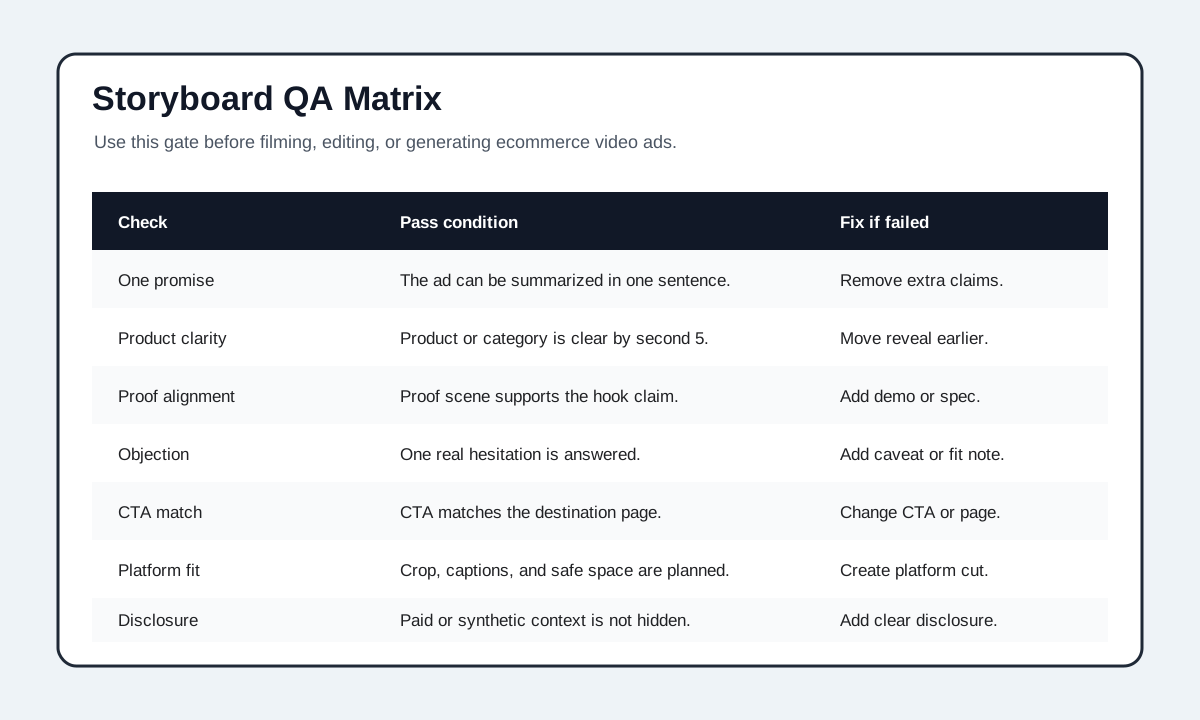
| Check | Pass condition |
|---|---|
| One main promise | The storyboard can be summarized in one sentence. |
| Product clarity | The product or category is clear by second 5. |
| Proof alignment | The proof scene supports the exact claim in the hook. |
| Objection handling | One real buyer concern is answered without overexplaining. |
| CTA match | The CTA matches the landing page, product page, offer, or size guide. |
| Platform fit | Crop, caption size, and safe space are planned before export. |
| Disclosure | Any paid, gifted, affiliate, or synthetic-presenter context is not hidden. |
| Test discipline | Variants change one major variable, such as hook or proof, not everything. |
This checklist also helps creative testing. If each storyboard changes the hook, proof, offer, and format at the same time, the test result will be hard to interpret. Start with three variants that change only the hook frame, then keep the proof and CTA stable.
Example: Turning One Product Page Into Three Storyboards
Imagine the product is a desk cable organizer. The product page includes a magnetic lid, adhesive mount, three color options, and reviews mentioning cleaner desk setups.
Storyboard A: Problem-first
Panel 1: Messy cables behind a laptop. Text: "Still untangling this every morning?"
Panel 2: Product reveal under the desk edge. Text: "This cable box hides the clutter without drilling."
Panel 3: Close-up of magnetic lid opening. Text: "Magnetic lid keeps chargers reachable."
Panel 4: Hand routes three cables. Text: "Set it up in under a minute."
Panel 5: Adhesive mount shown with clean desk. Text: "Check desk surface before applying."
Panel 6: Final desk shot. Text: "Choose your color and clean up the desk."
Storyboard B: Proof-first
Panel 1: Side-by-side before and after. Text: "The desk cleanup is all in this one detail."
Panel 2: Close-up of the lid and cable path.
Panel 3: Review overlay about a cleaner workspace.
Panel 4: Hand removes one charger without pulling others out.
Panel 5: Color options shown.
Panel 6: CTA to compare colors.
Storyboard C: Objection-first
Panel 1: Hand checks desk underside. Text: "Do not buy this before checking your desk edge."
Panel 2: Show fit requirement.
Panel 3: Product mounted in the right spot.
Panel 4: Cable organization demo.
Panel 5: Caveat: not for rough or dusty surfaces.
Panel 6: CTA to check compatibility.
Those three storyboards can become separate videos, but they do not require three different product stories. They test the first angle while keeping the product proof mostly stable.
Common Mistakes
The first mistake is storyboarding only the visuals. Ecommerce videos also need captions, proof, CTA, platform crop, and claim review. A pretty panel that cannot support the ad claim is not ready.
The second mistake is treating the storyboard as a finished script. A storyboard should guide the script, but it should not force every word. If the visual proof is strong, the voiceover can be shorter.
The third mistake is hiding the product. A lifestyle opening can work, but the shopper still needs to understand the product quickly. If the product is not visible or obvious by second 5, the storyboard should be tightened.
The fourth mistake is forgetting the landing page. A video that says "compare sizes" should send the shopper to a page where sizes are easy to compare. A video that says "shop the bundle" should match the actual bundle offer.
FAQ
What is a video ad storyboard template?
A video ad storyboard template is a planning grid for the scenes, captions, proof, timing, and CTA of an ad. For ecommerce, it should connect each panel to a buyer question, not just describe camera shots.
How many panels should an ecommerce video ad storyboard have?
Most 15 to 30 second ecommerce ads work with five or six panels: hook, product reveal, proof, use moment, objection answer, and CTA. Longer product page videos can add more demo panels.
Should I storyboard before using an AI video generator?
Yes. A storyboard gives the AI video generator clearer scene prompts and gives your team a QA checklist for the output. It reduces vague videos that look polished but miss the buyer problem.
What should be in the first storyboard panel?
The first panel should show the problem, result, comparison, product, or objection that makes the shopper care. It should align with the first text overlay or voiceover line.
Can one storyboard work for TikTok, Meta, and YouTube Shorts?
One core storyboard can work across platforms, but each platform cut should adjust pacing, crop, caption size, safe space, and CTA. Do not export the same file everywhere without checking the format.
Sources Checked
- TikTok Creative Codes and creative best practices, checked July 15, 2026, for hook-body-close structure, early value proposition, product visibility, and vertical production guidance.
- Google Ads Help: About the ABCDs of effective video ads, checked July 15, 2026, for attention, branding/product presence, connection, and direction guidance.
- StudioBinder: How to Create a Commercial Storyboard, checked July 15, 2026, for general commercial storyboard process and panel planning context.
- FTC Endorsement Guides: What People Are Asking, checked July 15, 2026, for disclosure and material connection guidance.