
Quick Answer
A product video brief template is the planning document that tells a creator, editor, or AI video tool what the ecommerce video must prove. It should define the buyer, product truth, offer, proof scenes, script angle, platform version, visual assets, CTA, claim limits, and QA checks before anyone films or generates the first draft.
For ecommerce teams, the brief is more than creative direction. It is the control layer between the product page and the finished ad. A strong brief prevents generic lifestyle footage, unsupported claims, wrong aspect ratios, missing product proof, and CTAs that send shoppers to the wrong page.
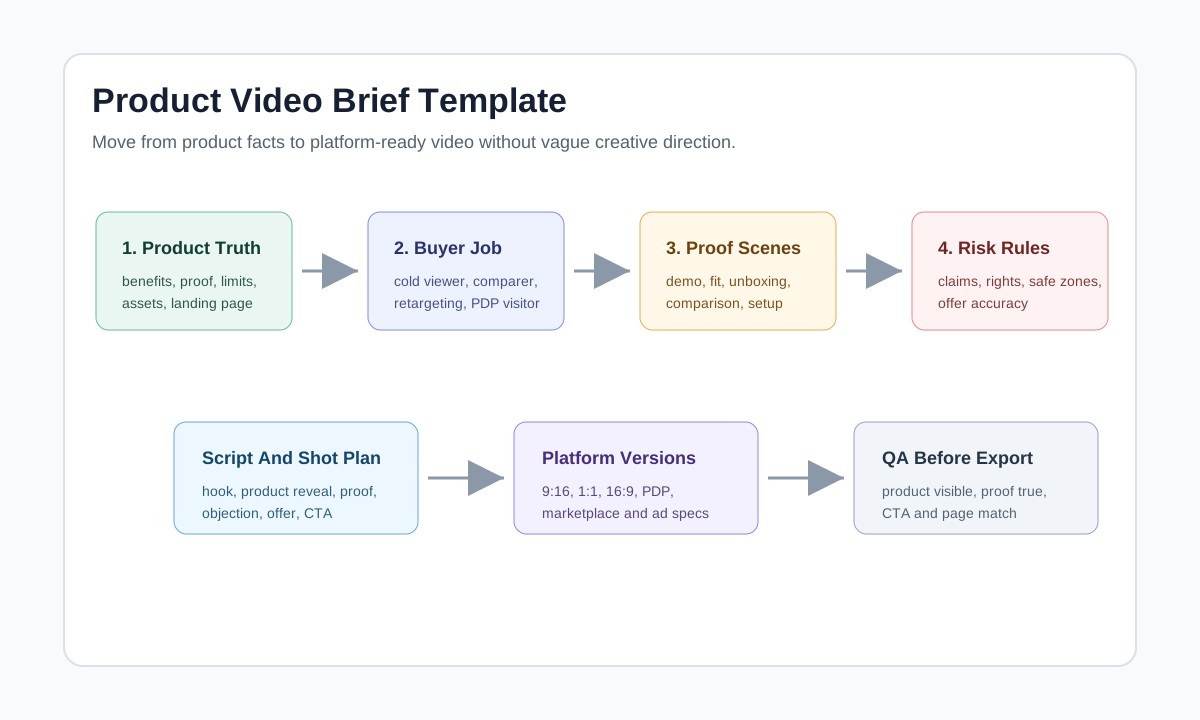
Use this template before you write a product video ad script, make a product video shot list, or generate variants with AI product video prompts. If you already have a brief but the videos feel vague, the missing field is usually product proof or platform-specific QA.
Why Ecommerce Product Videos Need a Brief
A generic video brief can say "make a premium product video." An ecommerce product video brief needs to say what the video must make a shopper believe, what it is allowed to claim, and where the click should land.
That difference matters because ecommerce videos sit close to purchase decisions. A buyer may be comparing fit, checking size, evaluating ingredients, looking for a setup step, or deciding whether a bundle is worth it. If the brief only lists mood, brand voice, and runtime, the final video can look polished while failing to answer the buying question.
Current platform guidance also makes the brief more operational. Google Ads video specs separate horizontal, vertical, and square video requirements. YouTube's ABCDs framework emphasizes attention, branding, connection, and direction. Meta's video ad guidance focuses on capturing attention and driving business goals. Amazon Seller Central guidance for product videos emphasizes product visibility, accurate information, and professional presentation. Those are not just export details. They are briefing requirements.
Copy This Product Video Brief Template
Use the table below as the master brief. Keep it short enough to fill in quickly, but specific enough that the next person does not have to guess.
| Brief field | What to write | Ecommerce example |
|---|---|---|
| Product | Exact product, variant, price range, and offer status | Stainless steel travel mug, 16 oz, black and cream, starter bundle live |
| Buyer | One buyer state and one purchase barrier | Commuter who wants coffee from home but worries about leaks |
| Goal | One video goal | Drive product page visits from cold TikTok and Reels traffic |
| Product truth | Benefits the page can support | Covered lid, cup holder fit, reusable stainless design |
| Proof scenes | Visual evidence the video must show | Lid closing, mug in car cup holder, mug beside laptop |
| Do-not-say list | Claims, words, or shots to avoid | Do not say spill-proof or guarantee exact heat retention |
| Hook angle | First-frame idea | "Coffee cold before work?" with mug and commute scene |
| Script format | Demo, comparison, review-style, unboxing, tutorial, offer | Demo plus objection answer |
| Platform versions | Required formats and channels | 9:16 for Reels/TikTok, 1:1 crop for feed, PDP version without hard sell |
| CTA and destination | Action and matching page | "Check the commute setup" -> product page section with demo |
| Assets | Approved photos, reviews, logo, URL, color, font, product page | PDP URL, 6 product images, logo, two approved review quotes |
| QA owner | Who approves claims, page match, and final export | Brand owner checks claims; media buyer checks platform and CTA |
| Success metric | The first metric to judge | Landing page view rate and add-to-cart rate, not only views |
The best version of this brief is not the longest version. It is the version that removes ambiguity. If the brief says "show premium quality," replace it with a visual instruction: "macro shot of the stainless rim, hand closes lid, product label readable."
The 7-Part Ecommerce Video Brief Framework
1. Product Truth
Start with facts that can be shown. Product truth includes the product's use case, materials, dimensions, included items, approved claims, price or offer, page URL, and risk boundaries.
Weak product truth:
- Premium design
- Great for busy people
- Makes life easier
Strong product truth:
- 16 oz mug fits common car cup holders
- Lid covers the drinking opening during commute use
- Product page supports reusable stainless design language
- No approved spill-proof or exact heat-retention claim
This field keeps the video useful and defensible. It also helps AI generation. A vague prompt asks the model to invent style. A product truth file tells the model what must stay visible.
2. Buyer State
One product can need several different videos. A cold viewer needs fast context. A comparison shopper needs proof. A product detail page visitor needs uncertainty reduction. A retargeted viewer may need a bundle, accessory, refill, or offer reminder.
| Buyer state | Brief focus | Best video type |
|---|---|---|
| Cold social viewer | Problem, product category, fast proof | Hook-led demo |
| Comparison shopper | Size, material, before-after, included items | Side-by-side comparison |
| PDP visitor | Fit, setup, care, dimensions, compatibility | Product explainer |
| Retargeting viewer | Offer, bundle, accessory, refill, review proof | Reminder or offer video |
| Marketplace shopper | Product visibility, feature demo, accurate listing details | Clear product demonstration |
Do not write one brief for all five states. Use one master product truth file, then create a short brief for each buyer job.
3. Proof Scene
Every ecommerce product video should contain at least one proof scene. A proof scene is the visual moment that earns the claim.
| Claim in script | Proof scene to request | Risk if missing |
|---|---|---|
| "Fits under a desk" | Product placed under a real desk with scale context | Viewer cannot judge size |
| "Easy to set up" | Hands complete setup in two or three steps | Claim feels generic |
| "Good for travel" | Product packed in bag, car, or suitcase | Lifestyle scene is too vague |
| "Includes everything" | Unboxing shot with all included parts | Bundle or kit confusion |
| "Made for small spaces" | Product beside common household object | Scale is unclear |
The proof scene should appear before the main CTA. If the proof comes after the CTA, the shopper has not yet been given a reason to click.
4. Script and Scene Order
The brief should not contain a full script unless the team needs one. It should define the script structure.
A reliable ecommerce sequence is:
- Hook: show the problem or product action in the first frame.
- Product reveal: identify the product plainly.
- Proof: show the claim, not just say it.
- Objection answer: handle size, fit, setup, ingredients, durability, compatibility, or what is included.
- Offer or next step: show the bundle, page, guide, or product detail.
- CTA: ask for one action that matches the page.
If you need the full copy layer, use the product video ad script template after the brief is approved. If you need camera-level instructions, turn the sequence into the shot list template.
5. Platform Version
The brief should list platform versions before production starts. Otherwise, the team may create one beautiful 16:9 video that cannot be cropped into Reels, TikTok, Shorts, PDP modules, or marketplace placements without losing the product or CTA.
| Destination | Brief requirement | Common mistake |
|---|---|---|
| TikTok or Reels | 9:16 vertical version, fast first frame, readable captions | Product appears too late or text sits under UI |
| Meta feed | 1:1 or 4:5-friendly framing, clear product and CTA | Vertical creative cropped awkwardly |
| YouTube Shorts | Vertical proof, title/description alignment, strong first seconds | Treating Shorts like a mini TV ad |
| Google/YouTube video ads | Horizontal, vertical, and square assets when needed | Only one ratio exported |
| Shopify PDP | Slower details, fit, setup, and objections | Overly salesy social ad reused on product page |
| Amazon product video | Product-focused, accurate, clean presentation | Unsupported claims or vague brand montage |
For channel checks, pair the brief with Meta video ad specs, YouTube Shorts product video specs, and Amazon product video requirements.
6. CTA and Landing Page
The CTA belongs in the brief because it controls both the final scene and the click destination. A video that says "Compare the sizes" should not send viewers to a homepage. A video that says "Shop the bundle" should not send viewers to a product page where the bundle is hidden.
Good CTA and destination pairs:
| CTA | Destination |
|---|---|
| See the setup | Product page module with setup video |
| Compare the sizes | Size guide or comparison section |
| Shop the starter kit | Exact bundle page |
| Check the ingredients | Product page ingredient section |
| Watch the routine | PDP or landing page with the full routine |
For more wording options, use product video CTA examples after the brief defines the buyer state and proof scene.
7. QA and Measurement
The brief should define what "approved" means. Otherwise, reviewers judge the video by taste instead of the job it was supposed to do.
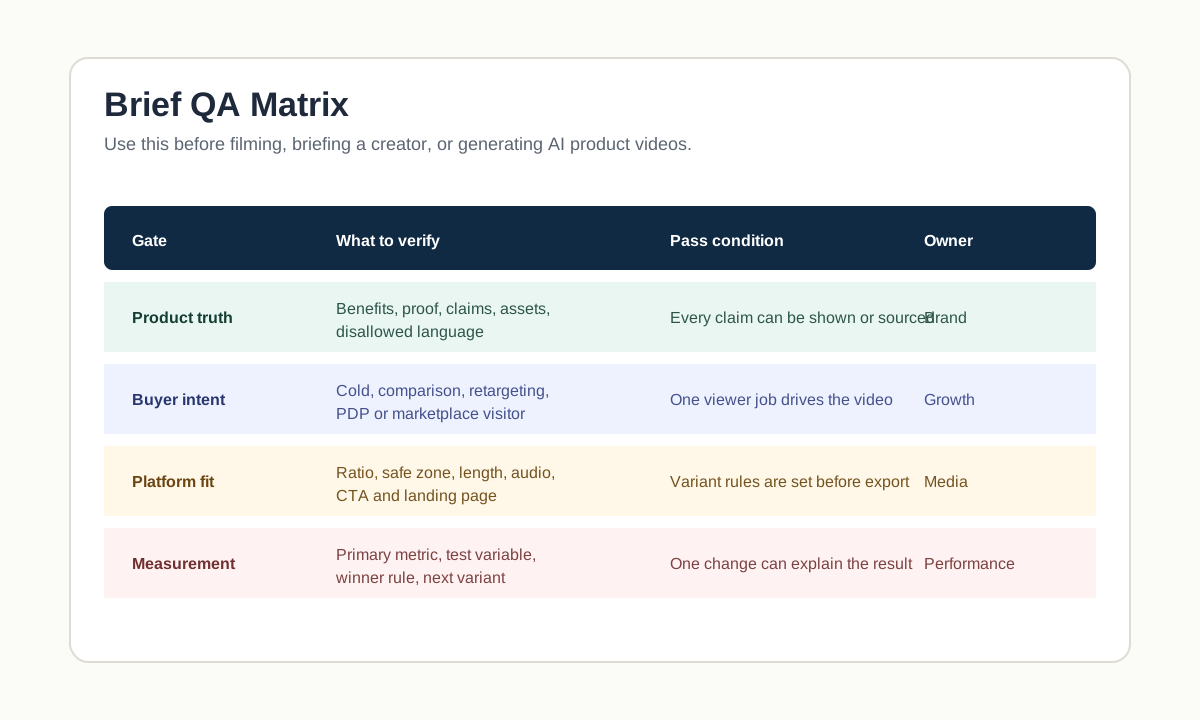
Use four QA gates:
| QA gate | Pass condition |
|---|---|
| Product truth | Product, variant, offer, and claims match the source page |
| Buyer intent | One buyer state drives the hook, proof, and CTA |
| Platform fit | Aspect ratio, safe zone, audio, caption, and length rules are known |
| Measurement | One primary metric and one test variable are defined |
If the test is about the hook, do not also change the offer, landing page, product angle, and CTA. Use how many UGC video ads to test to keep variant decisions clean.
Example Brief: Travel Mug Product Video
Here is a filled brief for a 20-second vertical ecommerce ad.
| Field | Filled example |
|---|---|
| Product | 16 oz stainless steel travel mug, black and cream, starter bundle available |
| Buyer | Office commuter who wants coffee from home but worries about messy bags |
| Goal | Drive product page visits from cold TikTok and Instagram Reels viewers |
| Product truth | Covered lid, car cup holder fit, reusable stainless design, desk-friendly size |
| Proof scenes | Mug in cup holder, lid close-up, mug packed in bag side pocket, mug on desk |
| Do-not-say list | Do not say spill-proof, leak-proof, keeps hot for exact hours, or medical benefit |
| Hook | "Coffee cold before your first meeting?" |
| Script structure | Problem hook, product reveal, commute proof, detail close-up, bundle CTA |
| Platform versions | 9:16 TikTok/Reels, 1:1 feed crop, no-hard-sell PDP cut |
| CTA | "Check the commute setup" |
| Destination | Product page section with video, dimensions, care notes, and bundle |
| Metric | Landing page view rate first, add-to-cart rate second |
This brief is specific enough for a creator, editor, or AI tool. It tells them what to show, what not to claim, which platform versions matter, and how performance will be judged.
Brief-to-Production Workflow
-
Pull facts from the product page.
Gather approved copy, images, dimensions, reviews, price, offer, and current landing page URL. -
Choose one buyer job.
Pick cold awareness, comparison, PDP education, retargeting, or marketplace support. -
Fill the master brief.
Keep the brief to one page if possible. Add links to source assets instead of pasting every asset into the document. -
Build the script and shot list.
Use the brief to write the hook, proof sequence, objection answer, CTA, and shot instructions. -
Generate or film the first version.
If using AI, paste the product truth, proof scenes, do-not-say list, and platform version into the prompt. If using a creator, require shot-by-shot delivery. -
Run QA before export.
Check product visibility, claim safety, caption readability, safe zones, page match, and CTA clarity. -
Create controlled variants.
Change one variable at a time: hook, proof scene, CTA, format, offer, or landing page.
For AI production, the brief can become the input for ShopShot's AI video generator. Keep the brief factual, then let the tool produce variants inside those boundaries.
Common Product Video Brief Mistakes
Mistake 1: Briefing Mood Instead of Proof
Mood words such as premium, modern, viral, aesthetic, and authentic do not tell the video what to prove. Keep brand tone, but add proof instructions.
Better: "Show the product opening, fitting inside a backpack side pocket, and sitting in a car cup holder."
Mistake 2: Mixing Too Many Buyer Jobs
One brief should not target cold traffic, retargeting, PDP education, and Amazon listing support at the same time. The video will become too broad.
Better: create one product truth file and separate briefs for each buyer job.
Mistake 3: Leaving Claims to the Editor
If the editor has to decide whether "spill-proof" is allowed, the brief is incomplete. Put claim limits and approved language in the brief.
Mistake 4: Adding Platform Specs After Production
Safe zones, ratios, captions, audio, and duration should be known before filming or generation. Retroactive cropping often hides the product, price, or CTA.
Mistake 5: Measuring the Wrong Thing
Views are useful for reach, but they may not tell you whether the brief worked. For ecommerce product videos, choose a metric tied to the video job: landing page view rate, product page engagement, add-to-cart rate, checkout start, or hold rate on the proof scene.
FAQ
What should a product video brief include?
A product video brief should include product facts, buyer state, campaign goal, proof scenes, script angle, do-not-say list, required assets, platform versions, CTA, landing page, QA owner, and success metric.
How is a product video brief different from a script?
The brief defines the goal, proof, constraints, and approval rules. The script turns that strategy into spoken lines, captions, and scene order. Write the brief first, then write the script.
Can I use one brief for all video platforms?
Use one product truth file, but create platform-specific brief notes. TikTok, Reels, Shorts, Meta feed, Google/YouTube video ads, Shopify PDP video, and Amazon product video have different framing and pacing needs.
Is a product video brief useful for AI video generation?
Yes. A brief is one of the best inputs for AI video generation because it gives the model product facts, visual proof, claim limits, scene order, and export requirements instead of a vague style prompt.
Who should approve the product video brief?
The brand or ecommerce owner should approve product truth and claims. The media buyer should approve platform fit, CTA, and measurement. The creator, editor, or AI operator should confirm that the requested scenes can actually be produced.