
Quick Answer
Amazon product video requirements are easiest to pass when the video is product-specific, truthful, readable without sound, and consistent with the listing page. Before upload, confirm that the video shows the exact product or variation, avoids unsupported claims, uses a clean thumbnail, includes captions or on-screen text for key proof, and has a clear buyer purpose. Treat the video as product detail content first, not a recycled social ad.
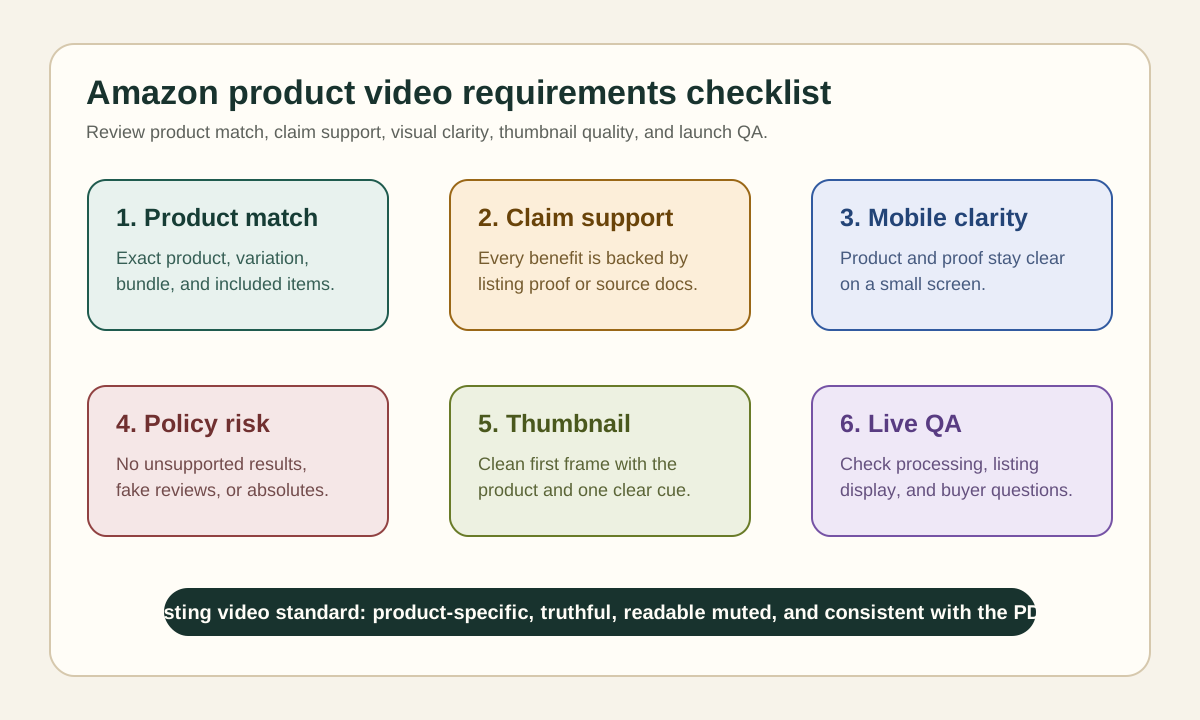
If you need a faster production path, use the Amazon product video generator to create the draft, then use this checklist as the approval and listing QA layer. For ad-specific creative, use the separate Amazon Sponsored Brands video checklist. For broader PDP planning, compare this with the Shopify product video checklist and the product video examples for ecommerce.
Why Amazon Listing Videos Need a Different QA Layer
A product video on Amazon does not work like a generic TikTok, Meta, or YouTube Shorts asset. Social videos can lead with entertainment, a creator hook, or a broad lifestyle promise. Amazon shoppers are already close to a product decision. They want the video to confirm fit, use, size, contents, proof, and whether the product matches the listing.
That changes the production standard. A good Amazon listing video should answer a buying question that static images cannot answer well. It may show how a bag opens, how a kitchen product fits under a cabinet, how a supplement package looks in hand, or what comes in the box. It should not make the shopper wonder whether the video belongs to a different SKU.
The pSEO boundary is also important. This article is not trying to own "Amazon video generator" or "Amazon product video maker" intent. That belongs to the tool page. This page owns the requirements and checklist intent: what sellers should check before uploading or refreshing Amazon listing videos.
Amazon Product Video Requirements at a Glance
Use this table as the first pass before you spend time editing.
| Requirement area | What to check | Seller QA question |
|---|---|---|
| Product match | The video shows the exact product, bundle, or variation being sold | Would a shopper recognize the same item from the main image? |
| Claim support | Every benefit, comparison, or result is supported by listing copy or evidence | Can we prove this line if the listing is reviewed? |
| Visual clarity | Product, size, function, and contents are visible on mobile | Can the buyer understand the video on a small screen? |
| Audio independence | Key proof is readable without sound | Does the video still work muted? |
| Thumbnail | The first frame or thumbnail is clean and product-specific | Would this thumbnail help a shopper click for more detail? |
| Policy risk | No medical, financial, absolute, prohibited, or competitor-bashing claims | Are we staying within the category and marketplace rules? |
| Landing-page consistency | The listing title, bullets, images, and video tell the same story | Does the video introduce a promise the PDP does not support? |
This is why Amazon product video requirements should sit between script approval and final upload. If you review only after upload, you may discover that the video is technically polished but not listing-safe.
Decide Which Video Type the Listing Needs
Start by choosing the video job. Many rejected or weak listing videos fail because they try to be an ad, demo, unboxing, review, and brand story at the same time.
| Video type | Best for | What to show | What to avoid |
|---|---|---|---|
| Product demo | Products with moving parts, setup steps, or hidden features | Hands, product motion, before and after use | Vague lifestyle scenes with no product detail |
| Size and fit | Apparel, accessories, storage, furniture, bags, cases | Dimensions, scale, model fit, placement context | "Fits everyone" or unsupported universal claims |
| Unboxing | Kits, bundles, gifting items, multi-piece products | Package, included parts, setup order | Showing items not included in the order |
| Comparison | Products with a clear alternative or old workaround | Feature difference, use-case difference, side-by-side proof | Naming competitors or claiming "best" without proof |
| How-to | Products that need assembly or technique | Step-by-step use, safety note, final result | Turning the video into a full manual |
| Brand proof | Premium products where trust matters | Materials, process, warranty, support, packaging | Overly generic founder story with no product evidence |
If the product is simple, one strong demo video may beat three thin videos. If the product is complex, create one product demo and one objection-handling video instead of forcing every point into one long asset.
Build the Video From Listing Evidence
Do not begin with "make this more viral." Begin with the evidence already on the Amazon listing and supporting product materials.
Create a short source brief:
- Product title and ASIN or SKU.
- Variation shown in the video.
- Main buyer problem or use case.
- Feature proof from the listing bullets.
- Size, material, compatibility, or included-parts facts.
- Common shopper objection from reviews or questions.
- Claim lines that must not be changed.
- Claims that are not allowed or not supported.
This process keeps the video aligned with the listing. It also gives editors and AI video tools a grounded source of truth. If you use ShopShot's AI video generator, feed it product images, a specific script, and the proof points you can defend. Then review the output against this article before upload.
Script Structure for an Amazon Product Video
Amazon listing videos usually work best when they answer the shopper's next question fast. Use a simple structure:
| Time | Job | Example line or scene |
|---|---|---|
| 0-3 seconds | Identify the product and use case | "This expandable organizer is made for under-sink storage." |
| 3-8 seconds | Show the main feature | Drawer slides out, width adjusts, product sits under cabinet |
| 8-15 seconds | Prove the benefit | Bottles become visible; no drilling shown |
| 15-22 seconds | Handle an objection | Show measurement range, package contents, or installation step |
| 22-30 seconds | Close with buying clarity | Product shown with size reminder or included-parts recap |
Avoid vague openings such as "You need this in your life" or "This changed everything." Amazon shoppers are already on the listing. Use the first seconds to confirm the exact product and the reason to keep watching.
Product Claims and Compliance Checks
The safest Amazon product video is specific. The riskiest one is dramatic. Most sellers get into trouble when they make a stronger claim in the video than the listing can support.
Use safer proof language:
| Risk area | Safer wording | Riskier wording |
|---|---|---|
| Performance | "Designed to help keep cables organized." | "Ends all cable clutter forever." |
| Fit | "Fits shelves from 18 to 24 inches wide." | "Fits every shelf." |
| Health or beauty | "Shows the applicator and texture." | "Removes wrinkles in days." |
| Durability | "The stainless steel body is shown in use." | "Indestructible." |
| Reviews | "Reviewers mention the soft lining." | "Everyone loves the soft lining." |
| Comparison | "Replaces three loose bins with one frame." | "Better than every competitor." |
If the video uses a person, creator, or testimonial-style narration, keep the endorsement rules in mind. The FTC's endorsement guidance says material connections should be disclosed when they are not obvious. For Amazon listing content, also avoid implying that a fictional or AI-generated person is a real buyer with personal product experience.
Visual Requirements Sellers Often Miss
Amazon product video requirements are not just about text claims. Visual details can also create friction.
First, match the product variation. If the listing sells black, white, and blue versions, do not upload a video that makes the blue product look like the default unless the listing context is clear. If the video is attached to a variation, the shown product should not confuse buyers.
Second, keep included items honest. An unboxing video should not show props, accessories, refills, or bundles that are not included unless the distinction is obvious. Buyers notice this, and listing reviews can surface it.
Third, make text readable on mobile. Use large captions, avoid thin fonts, and keep the most important words away from the edge of the frame. Product detail pages are often viewed on phones, so tiny proof labels do not help.
Fourth, avoid stock-like filler. A listing video should show the actual product or a faithful product render. Abstract lifestyle footage may look polished, but it rarely answers the shopper's question.
Thumbnail and First-Frame Checklist
The thumbnail is part of the buying path. A good thumbnail tells the shopper what the video will clarify.
Check these points:
- The product is visible and not cropped awkwardly.
- The frame is not mostly text, logo, or a person's face with no product.
- The shown variation matches the listing.
- The image is clean enough to understand at small size.
- Any text is short and factual.
- The thumbnail does not imply a discount, guarantee, or result that the listing does not support.
For many products, the best thumbnail is the product in use with one proof label, such as "Tool-free setup," "Fits 18-24 inch shelves," or "Includes 4 replacement heads." Keep it concrete.
Pre-Upload Workflow
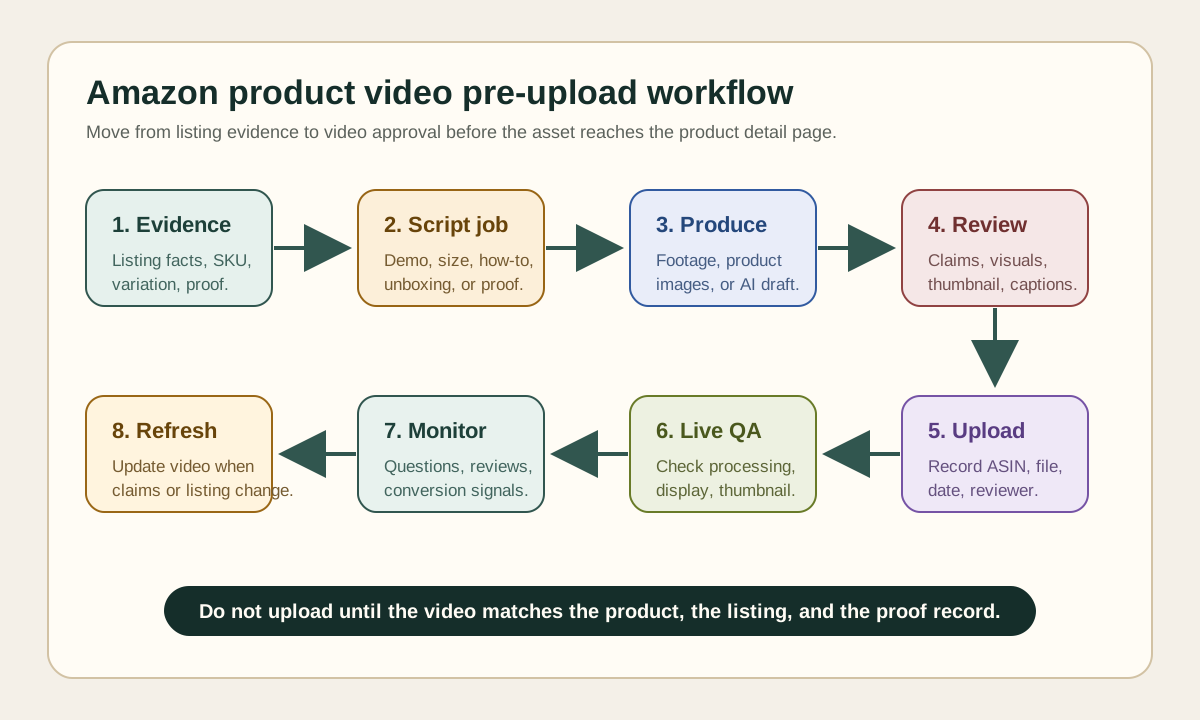
Use this workflow before uploading a new Amazon product video.
- Pick one ASIN, SKU, or variation family.
- Choose the video job: demo, size, unboxing, comparison, how-to, or brand proof.
- Pull approved facts from the listing, packaging, product page, and support docs.
- Write a 20-45 second script with product, proof, objection, and close.
- Create the video from product images, product footage, or a controlled AI draft.
- Review claims against the listing and source brief.
- Review visuals for product match, included items, readable captions, and thumbnail clarity.
- Upload the video and record the date, title, ASIN, source file, and reviewer.
- Check the live listing after processing.
- Watch reviews, questions, conversion movement, and any moderation feedback.
This workflow is intentionally boring. That is the point. Amazon listing videos are conversion assets. The goal is fewer surprises, clearer proof, and a smoother review process.
How This Differs From Amazon Sponsored Brands Video
Amazon Sponsored Brands video and organic product listing video overlap, but they are not the same asset.
| Area | Product listing video | Sponsored Brands video |
|---|---|---|
| Primary job | Help shoppers evaluate a product on the detail page | Capture attention in ad inventory |
| Opening | Product and buying question first | Hook and brand/product clarity fast |
| CTA | Implicit: continue evaluating or buy | Explicit ad click behavior |
| Creative pressure | Accuracy, fit, proof, listing consistency | Attention, pacing, policy, landing-page match |
| Best internal guide | This requirements checklist | Amazon Sponsored Brands video checklist |
If you want one source asset for both, plan the listing version first. Then cut a shorter ad version with a stronger opening and a clearer paid-media CTA. Do not use the ad version as the listing video if it hides product details behind a fast hook.
QA Table Before Upload
Run this final QA table before the file leaves your content system.
| Check | Pass condition |
|---|---|
| Exact product | The shown item matches the listing or intended variation. |
| One main purpose | The video has one job and does not try to cover every feature. |
| Supported claims | Every benefit, comparison, or result is backed by listing evidence. |
| Readable muted | Captions or on-screen text carry the key proof without sound. |
| Mobile clarity | Product details are visible on a phone screen. |
| Honest contents | Props and included items are not misleading. |
| Clean thumbnail | The first frame or selected thumbnail is product-specific and factual. |
| No risky language | No unsupported health, financial, absolute, competitor, or fake testimonial claims. |
| Internal record | Source file, reviewer, date, ASIN, and script are saved. |
| Post-upload review | The live listing is checked after processing. |
For feeds and Google surfaces that use product video URLs, also read the Google Merchant Center video link checklist. It covers crawlable URLs, video length, resolution, and feed-side QA that are different from Amazon's listing workflow.
Common Mistakes
The first mistake is recycling a paid social ad without editing. A TikTok-style video may have a good hook, but it may delay the product, exaggerate the claim, or rely on a trend that feels out of place on a product detail page.
The second mistake is using a generic brand video. A shopper on a listing does not need a broad company montage. They need to understand this product.
The third mistake is hiding proof in the voiceover. Many shoppers watch muted or skim. Put the key proof in the scene itself and reinforce it with concise text.
The fourth mistake is treating approval as the only success metric. A video can pass review and still fail the shopper because it does not answer the right question. Track conversion, questions, returns, and review language after publishing.
FAQ
What are Amazon product video requirements?
Amazon product video requirements are the technical, content, and policy checks sellers should satisfy before adding a video to a product listing. In practice, the video should match the product, avoid unsupported claims, show useful product detail, and stay consistent with the listing page.
How long should an Amazon product video be?
Most product listing videos should be short enough to answer one buying question clearly, often around 20 to 45 seconds. Complex products can need longer demos, but the video should still stay focused on product evaluation rather than brand storytelling.
Can I use the same video for Amazon and social ads?
You can reuse the same product proof, but edit the video for the channel. Amazon listing videos should be clearer and more product-specific. Social ads can use stronger hooks and pacing, as long as the claims and product details remain accurate.
Should Amazon product videos include captions?
Yes. Captions or on-screen text help shoppers understand the video without sound and make product proof easier to scan. Keep captions short, factual, and readable on mobile.
Can AI-generated video be used for Amazon product listings?
AI-generated video can help create drafts from product images, but the seller still needs human review. Check that the product shape, color, use, included items, and claims match the real listing before upload.
Sources Checked
- Amazon Ads: Get started with Sponsored Brands video, checked June 29, 2026, for ad-specific creative guidance and the distinction between ad video and listing video.
- Amazon Ads: Create streaming TV and video ad campaigns, checked June 29, 2026, for Amazon video ad inventory context and mobile-first product clarity.
- Amazon: How to use product videos to boost sales, checked June 29, 2026, for seller education on product videos and listing conversion value.
- FTC: Endorsement Guides, checked June 29, 2026, for endorsement and material connection disclosure guidance.
- Google Merchant Center Help: Video link attribute, checked June 29, 2026, for product video URL QA concepts used in feed-side checks.