
Quick Answer
The Google Merchant Center video link checklist is simple: submit only product-specific videos, use crawlable YouTube or direct video URLs, keep each video between 6 and 240 seconds, stay under 500 MB, use 9:16, 16:9, or 1:1, meet at least 720p resolution, and make sure the product page proves every claim shown in the video. Google says the optional video_link attribute became available in the 2026 product data specification update, with serving and policy or quality validation beginning June 30, 2026.
For ecommerce teams, the practical job is not only adding one more feed field. The video has to match the exact offer, variant, landing page, and product data. A polished video that shows the wrong bundle, expired discount, unsupported result, or inaccessible hosted file may not serve, even if the Shopping offer itself remains eligible.
If you already make product videos with ShopShot, use this guide as the Merchant Center QA layer after your script, storyboard, and product page checks. For the broader production system, pair it with the product video storyboard template, the product video ad script template, and the Shopify product video checklist.
What Changed in 2026
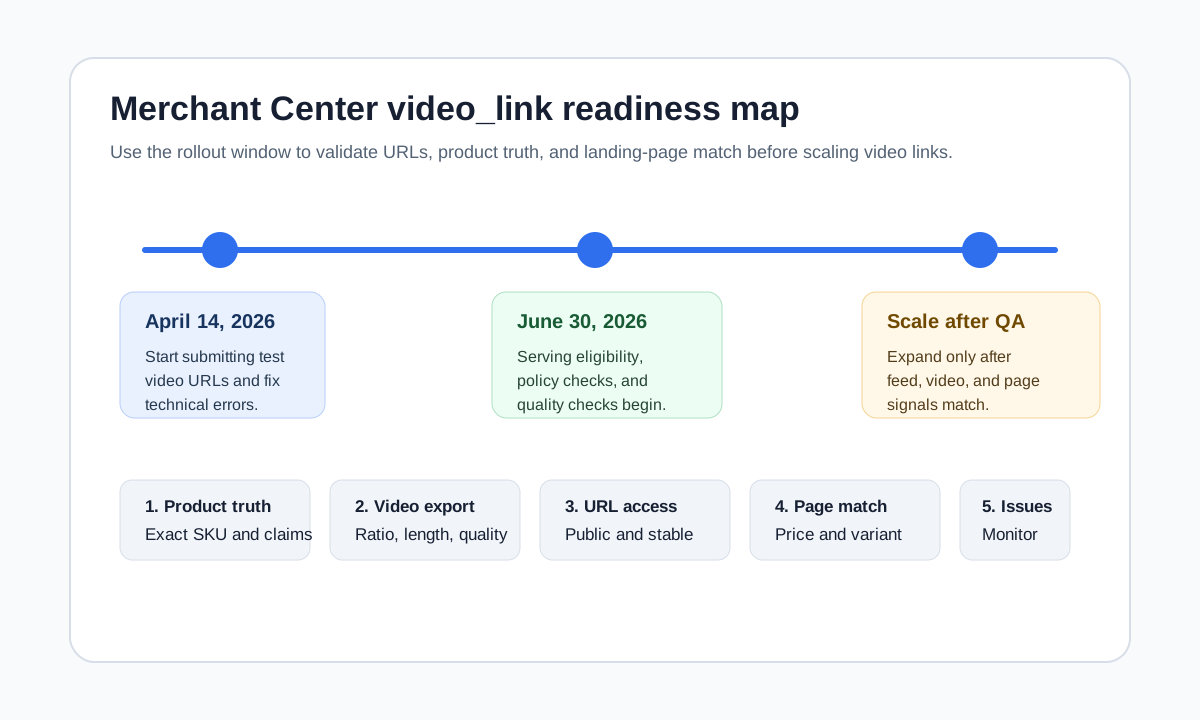
Google's 2026 Merchant Center product data specification update introduced a new optional video_link attribute. Google says merchants can start submitting product video links now, while technical validation errors started April 14, 2026. The bigger operational date is June 30, 2026: videos submitted through video_link become eligible to serve, and Google begins reporting policy or quality warnings and errors for those videos.
That timing creates a useful window. Ecommerce teams can prepare product-specific videos, add the attribute in the feed or Merchant API, and find technical issues before the richer video surface matters commercially.
| Date | What Google says changes | What ecommerce teams should do |
|---|---|---|
| April 14, 2026 | The 2026 product data update is announced, and technical validation can begin for video_link. |
Start submitting a small test set and fix URL, file type, and encoding issues. |
| June 30, 2026 | Videos can become eligible to serve, and policy or quality checks begin. | Audit product truth, rights, landing-page match, and video quality before scaling. |
| January 31, 2027 | Separate image minimum-resolution enforcement begins for image attributes. | Treat videos and images as one product media QA system, not separate tasks. |
The important nuance: Google says policy or quality video errors prevent the video from serving, but do not affect serving of the associated offer. That should reduce panic, but it should not reduce discipline. A video that never serves is still wasted production time, and a mismatch between creative, feed, and landing page can expose broader account quality issues.
Use the Video Link Attribute Only for Product-Specific Videos
video_link is not a place to upload a brand reel, founder story, or generic ad montage. Google's help page says videos can add visuals beyond image attributes by showing the product from different angles or demonstrating it in use. Its best practices also say to submit links for the specific product or products being presented, not videos that represent the whole company.
That distinction matters for stores with many variants.
| Product situation | Better video choice | Risky video choice |
|---|---|---|
| Single SKU with one color | One product demo showing the exact product and key use case. | A brand lifestyle montage where the item appears for one second. |
| Apparel item with colors and sizes | A video for the exact color family or a variant-neutral fit demo. | A video that shows a color unavailable on the linked product page. |
| Bundle offer | A video showing the exact bundle contents and purchase page. | A single-product video submitted to a bundle feed item. |
| Product family | Separate videos for hero SKUs or product groups. | One broad collection video attached to every item in the catalog. |
| Regulated or claim-sensitive product | A demonstration limited to supported, page-backed claims. | Before-and-after claims without proof on the product page. |
If the same video could be attached to 300 unrelated SKUs, it is probably too generic for video_link. Use it as a social ad, homepage asset, or collection-page video instead. Merchant Center product media should help a shopper understand the exact item they are comparing.
Format Requirements to Check Before Submission
Google's video_link documentation gives the key technical requirements. Treat them as an export checklist before the video URL enters the feed.
| Requirement | Practical check | Production note |
|---|---|---|
| URL format | Use http:// or https://; keep the URL ASCII and RFC 3986 compliant. |
Encode special characters in video URLs, especially commas. |
| URL type | Use a YouTube URL or a direct raw video file URL from another host. | If not using YouTube, do not link to a landing page with an embedded player. |
| Repeated field | Up to 10 video links can be submitted. | Start with one or two strong videos per product before scaling. |
| Supported formats | Use a supported video file format such as MP4 or MOV. | MP4 is usually the easiest production handoff. |
| Length | Keep the video between 6 and 240 seconds. | For ecommerce, 10 to 45 seconds is usually enough for a product use case. |
| File size | Stay within the 500 MB maximum. | Compress exports before uploading to your video host. |
| Aspect ratio | Use 9:16, 16:9, or 1:1. | Choose based on product detail, not just the source social platform. |
| Resolution | Use at least 720p, such as 1280x720. | Export higher when text overlays or small product details matter. |
| Access | Make the video publicly crawlable and stable. | Googlebot must be able to access it without login, robots restrictions, or expiring URLs. |
The most common failure is not length or aspect ratio. It is URL discipline. A share link, expiring CDN URL, blocked file, or page URL that contains a player can look fine to a human and still fail as product feed data.
Build the Video From Feed Truth First
Do not open a video editor first. Start with the Merchant Center item and the landing page. Pull the facts that the video is allowed to show:
- Product title, brand, SKU, and variant.
- Product images and additional images.
- Price, sale price, availability, and bundle details.
- Color, material, size, pattern, capacity, compatibility, or ingredients.
- Claims from the product page, reviews, certifications, tests, or documentation.
- Shipping, return, warranty, and delivery constraints that influence buyer trust.
- Any claim you must avoid because the product page does not prove it.
Google's product data specification emphasizes accurate, correctly formatted product data and warns that conflicting data between a feed and website can cause problems. Video raises the same issue visually. If a product feed says "blue", the landing page defaults to black, and the video shows white, the shopper and the crawler receive three different stories.
Use this lightweight brief before production:
| Brief field | Example for an ecommerce video | Why it matters |
|---|---|---|
| Exact item | "Acacia spice rack, 2-tier, natural wood." | Prevents a generic category video. |
| Buyer use case | "Small-kitchen spice organization under cabinet." | Keeps the video useful and searchable. |
| Required proof | "Fits shelves at least 11 inches deep." | Avoids visual claims the page cannot support. |
| Variant limits | "Show natural wood only; black variant out of stock." | Protects feed-to-page consistency. |
| Destination page | Canonical product URL for the exact SKU or group. | Reduces landing-page mismatch. |
| Video host | YouTube URL or direct MP4 URL. | Supports crawlable video_link submission. |
Choose the Right Video Type
Not every product needs a cinematic ad. For video_link, the safest first asset is usually a product clarity video: show what the product is, how it works, and why the product page claim is believable.
| Video type | Best for | What to show |
|---|---|---|
| 360 or angle video | Products where texture, shape, or finish matters. | Front, side, close-up, scale, and variant context. |
| In-use demo | Products that solve a clear task. | Setup, use, result, and any compatibility limits. |
| Size and fit explainer | Apparel, accessories, furniture, storage, and devices. | Dimensions, fit comparison, model or room context, and variant notes. |
| Feature proof | Products with a few measurable benefits. | The feature in action plus the page-backed claim. |
| Bundle walkthrough | Kits, sets, subscription boxes, and gift bundles. | Every included item and what is not included. |
For inspiration, review product video examples for ecommerce. Then turn the selected pattern into a short script using the product video ad script template. If you need a faster production path from product photos or URLs, use the ShopShot AI video generator, then run the Merchant Center checks before submitting the final URL.
Landing Page Match Is Part of Video QA
Google Shopping policies focus on trustworthy, transparent, professional listings and destinations. The video should make that easier, not harder. Before you attach a video to a feed item, open the exact product landing page and verify the page supports what the video shows.
| Video claim or scene | Landing page must show | Failure mode |
|---|---|---|
| Discount, price, or bundle | Current price, offer terms, and exact included items. | Video promises an offer that the page no longer has. |
| Product result | Evidence, explanation, or a realistic product description. | Video exaggerates the outcome. |
| Variant, color, or size | The same variant available or clearly selectable. | Video shows a variant the shopper cannot buy. |
| Compatibility | Supported models, sizes, materials, or use cases. | Product appears compatible with something unsupported. |
| Shipping or delivery speed | Matching shipping information and location limits. | Creative implies faster delivery than the page. |
| Review or social proof | Review source, rating context, or proof on page. | Video uses unsupported testimonial language. |
For Shopify sellers, use the Shopify product video checklist before Merchant Center submission. It catches product page gaps that become more visible when video appears beside feed data.
A Practical Video Link Workflow
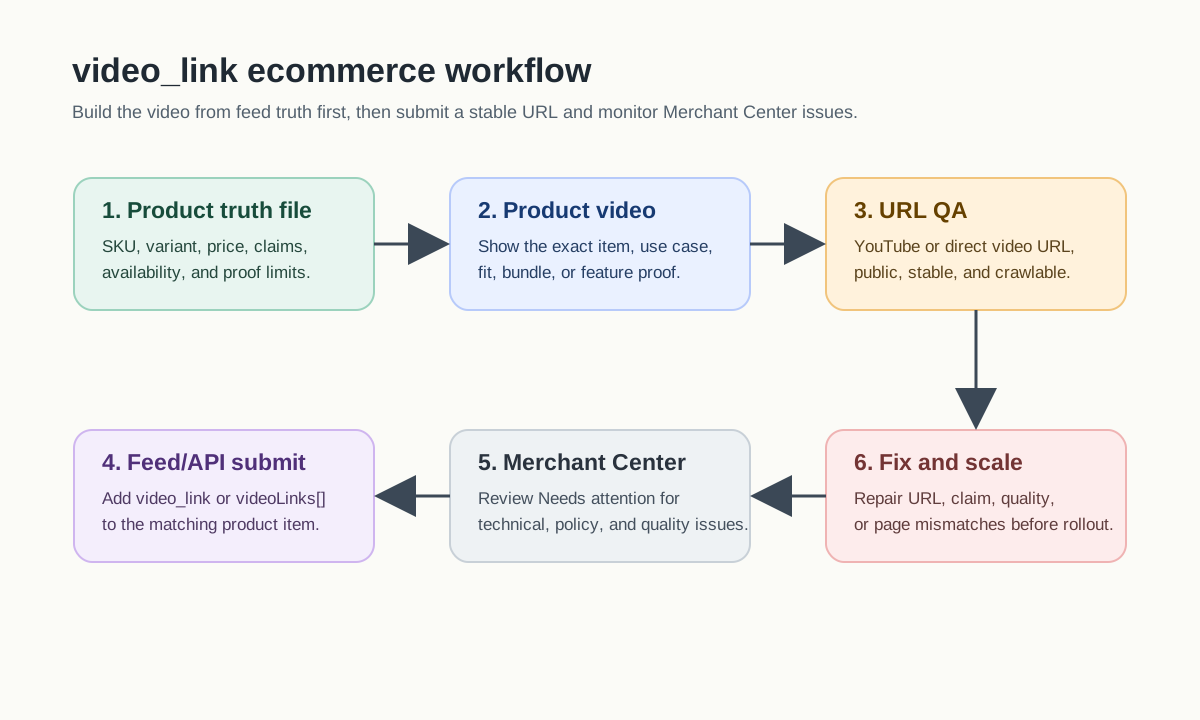
1. Pick a test set
Start with 10 to 30 products, not the whole catalog. Choose products with stable inventory, strong images, clear use cases, and product pages that already convert. Avoid products with frequent price changes or high claim risk in the first batch.
2. Create one video per product job
Define the job before production:
- Show the product from angles.
- Demonstrate setup or use.
- Explain size, fit, or compatibility.
- Prove one benefit visually.
- Walk through a bundle.
Keep the video close to the item. If the product needs a broader educational video, publish that as a blog or PDP asset first and use a shorter product-specific cut for video_link.
3. Export for Google's accepted shapes
Use one of the accepted ratios: 9:16, 16:9, or 1:1. For products with small details, avoid over-cropping a vertical social ad. A square or landscape demo may show the item more clearly than a repurposed full-screen short.
4. Host with crawlability in mind
Use a YouTube URL or a direct raw video file URL. If you self-host, make sure the URL is stable, publicly accessible, and not blocked by robots rules. Do not use signed URLs that expire, session-gated media, or redirects that require cookies.
5. Add the feed or API value
In a text feed, separate multiple video URLs with commas. In XML, use the g:video_link element. In the Merchant API, the product attributes resource includes videoLinks[] as a list of video URLs for the item.
6. Monitor Merchant Center issues
After June 30, 2026, check Merchant Center's "Needs attention" section for policy and quality warnings or errors related to videos. Keep a simple log: product ID, video URL, warning, fix, date fixed, and whether the video started serving.
QA Checklist Before You Submit
Use this checklist as a final gate.
| Gate | Pass condition |
|---|---|
| Product specificity | The video shows the exact item, variant, bundle, or clearly related product group. |
| Rights | The brand owns marketing rights for all visuals, people, music, voice, and creator content. |
| URL | The link is HTTP or HTTPS, stable, public, crawlable, and either YouTube or a direct video file. |
| Technical fit | File type, length, file size, aspect ratio, and resolution meet Google's requirements. |
| Product truth | Every claim in the video is supported by the product page or reliable product documentation. |
| Landing page | Price, availability, variant, offer, and proof match the video. |
| Visual quality | The video is not blurry, has no black bars, and keeps the product readable. |
| Feed consistency | Product ID, title, image, availability, and variant data match the linked product page. |
| Monitoring | Someone is assigned to review Merchant Center issues after submission. |
Common Mistakes to Avoid
Submitting a brand video for every SKU
Brand videos are useful, but they usually do not help shoppers compare an exact product. Use product-specific videos for video_link and keep brand storytelling for collection pages, ads, or the homepage.
Using an expiring file URL
Signed URLs are convenient for private delivery, but they are risky for Merchant Center product data. Use stable public URLs that Googlebot can access.
Showing an unavailable variant
If the video shows the red color, but only black is in stock, shoppers may click into a mismatch. Either update the video, map it to the right item group, or wait until the variant is available.
Letting AI invent product claims
AI-generated scenes can make a product look more capable than it is. Keep the product truth file next to the prompt. Remove claims about health, safety, durability, performance, materials, compatibility, or savings unless the page supports them.
Treating video errors as harmless
Google says video policy or quality errors will not affect the associated offer's serving. That does not mean the issue is meaningless. If many product videos are mismatched, inaccessible, or low quality, the media program is not ready to scale.
FAQ
What is the Google Merchant Center video link attribute?
video_link is an optional product data attribute that lets merchants submit product video URLs in Merchant Center. Google says videos can provide additional visuals beyond product images, such as different angles or demonstrations of the product in use.
When do Google Merchant Center video link checks begin?
Google announced technical validation beginning April 14, 2026. Serving eligibility plus policy and quality validation checks begin June 30, 2026.
Can I submit a YouTube URL for video_link?
Yes. Google's requirements allow YouTube URLs. If you use another host, the URL should point directly to a raw video file in a supported format, not to a landing page with a video player.
How long should an ecommerce product video be for video_link?
Google requires 6 to 240 seconds. For most ecommerce products, keep the first version short and specific: show the product, use case, key proof, and landing-page match.
Will a bad video_link hurt my Shopping offer?
Google says policy or quality errors with videos can prevent the video from serving, but they will not affect serving of the associated offer. Still, you should fix video errors because inaccessible or mismatched videos waste production effort and weaken product media quality.
Sources Checked
- Google Merchant Center Help: Video link [video_link], checked June 23, 2026.
- Google Merchant Center Help: Merchant Center product data specification update 2026, checked June 23, 2026.
- Google Merchant Center Help: Product data specification, checked June 23, 2026.
- Google for Developers: Merchant API ProductAttributes, checked June 23, 2026.
- Google Merchant Center Help: Shopping ads policies, checked June 23, 2026.