
Quick Answer
The best AI product video prompts for ecommerce ads do not start with cinematic style. They start with product facts: buyer problem, proof, offer, visual constraints, platform, scene order, and QA rules. A strong prompt tells the AI what must stay true, what can vary, and what the final video is supposed to make the shopper do.
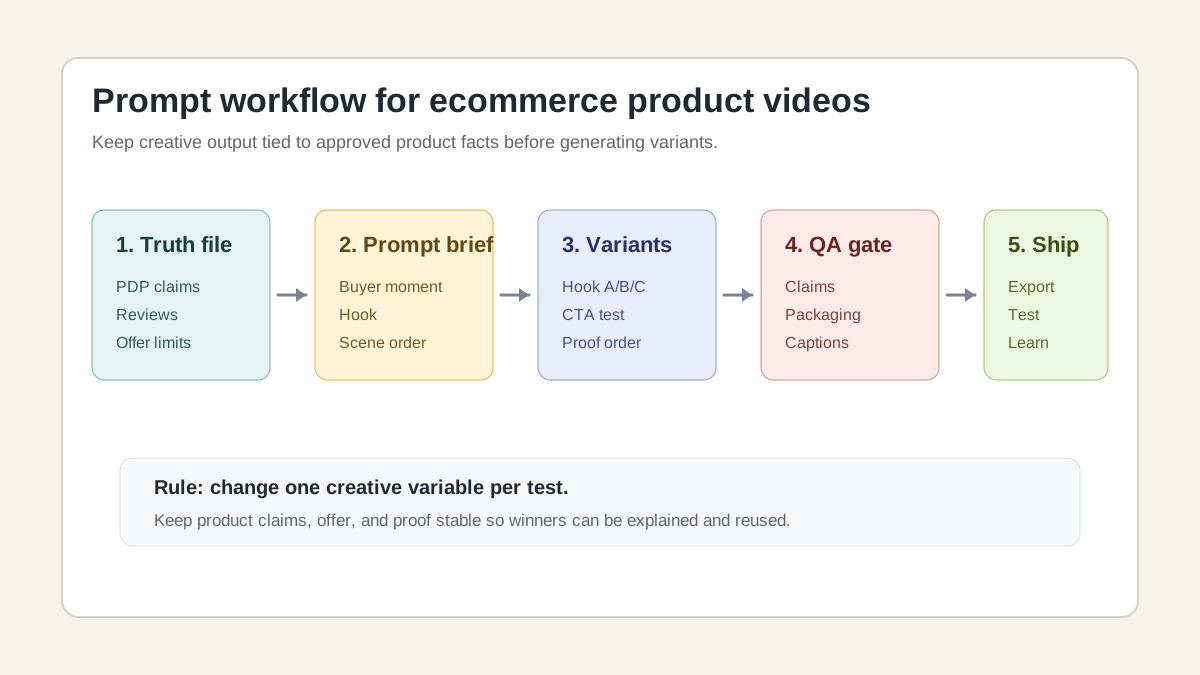
Use AI product video prompts as a production system, not as one-off magic lines. Extract product claims from the PDP, convert them into a hook and scene plan, generate three to five controlled variants, then run a claim, visual, and platform QA pass before publishing.
Why Generic AI Video Prompts Fail for Product Ads
Generic prompts often produce attractive videos that do not sell the product. They describe a mood, a camera move, or an aesthetic, but they do not protect the details that matter in ecommerce: the product label, the use case, the offer, the proof, the buyer objection, and the call to action.
That is why a product video prompt should behave more like a creative brief than a single sentence. OpenAI's prompt guidance emphasizes clear instructions, enough context, and iteration. Google Gemini's prompting guidance also frames prompt design as an iterative process for steering models toward higher-quality outputs. For ecommerce video, that means each prompt needs inputs, constraints, output format, and a review loop.
There is also platform pressure. TikTok Creative Center is built around finding ad examples, creative triggers, trends, and performance signals. Google's YouTube ABCDs focus on attention, branding, connection, and direction. Meta's creative guidance stresses practical, engaging ad creative rather than expensive production alone. A useful AI prompt should translate those principles into repeatable video instructions.
If you already have a full script workflow, pair this guide with the product video ad script template. If you need to turn the prompt into scenes before generation, use the product video storyboard template. For final production, send the approved prompt and assets through ShopShot's AI video generator.
The Prompt Formula That Works for Ecommerce
Use this order when writing AI product video prompts:
- Product truth: what the product is, who it is for, and what claims are approved.
- Buyer moment: the situation where the shopper notices the problem.
- Hook: the first three seconds and why the viewer should keep watching.
- Proof: visual demo, review language, ingredient/material detail, comparison, or use-case evidence.
- Scene plan: sequence, shot length, camera framing, captions, and product visibility.
- Platform constraints: aspect ratio, safe-zone awareness, length range, subtitle style, and CTA.
- Variation rule: what can change across variants and what must remain fixed.
- QA rule: what the AI must avoid, including false claims, distorted packaging, unreadable labels, and unsupported before-after claims.
| Prompt component | What to include | Why it matters |
|---|---|---|
| Product truth | Product category, core benefit, approved proof, disallowed claims | Prevents beautiful but inaccurate output |
| Buyer moment | Real use case, pain point, shopping context | Makes the ad feel specific instead of generic |
| Hook | Visual open, spoken or captioned line, first-frame action | Controls the scroll-stopping moment |
| Scene plan | 4-6 short scenes with product visibility rules | Turns the prompt into a shootable ad structure |
| Platform constraint | TikTok, Reels, Shorts, Meta feed, YouTube ad, PDP | Keeps framing and CTA aligned with distribution |
| QA rule | Label accuracy, claim safety, no fake testimonial, no fake discount | Reduces compliance and brand risk |
The key rule: never ask the AI to invent product facts. Ask it to dramatize facts you already approved.
Five Reusable AI Product Video Prompts
These prompts are written as complete examples so you can see the level of specificity. Replace the product facts with your own approved PDP copy, reviews, offer, and claim boundaries.
Prompt 1: Problem-Solution UGC Ad
Create a 20-second vertical ecommerce product video ad for an insulated travel mug. The buyer is a commuter whose coffee gets cold before the train arrives. Open with a close-up of a hand touching a lukewarm disposable cup and the caption "Cold coffee before 9 a.m.?" Show the travel mug being filled, placed in a backpack side pocket, opened at a desk, and poured with visible steam. Keep the brand label readable in at least three scenes. Use a casual UGC style, natural kitchen and office lighting, fast cuts, and captions under 7 words each. Do not claim exact temperature retention unless the approved product copy includes it. End with "Keep your morning coffee hot longer" and a shop-now CTA.
Best use: top-of-funnel TikTok, Reels, or Shorts where the product solves a simple daily pain point.
Prompt 2: Product Page to Video Ad
Turn this product page angle into a 25-second product video ad for a posture-support desk chair cushion. The buyer works from home, sits for long hours, and wants comfort without replacing the chair. Structure the video as five scenes: uncomfortable sitting, cushion placement, side-view posture change, close-up material detail, and final desk setup. Mention only approved claims: breathable cover, contoured shape, removable washable cover. Avoid medical claims, pain-cure language, and unrealistic before-after body changes. Keep the tone practical, not clinical. Add captions for each scene and end with "Upgrade the chair you already use."
Best use: a safer first draft when the product has comfort, wellness, or body-positioning claims that need careful wording.
Prompt 3: Review-Led Social Proof Ad
Create a 15-second UGC-style video ad for a refillable pet hair roller. Use this review angle: "I keep one by the couch and one in the car." Open with pet hair on a black sweater, then show the roller cleaning the sweater, couch cushion, and car seat. Make the product action visible in every scene. Use a warm home setting, real-life mess, and quick captions. Do not show impossible instant cleaning across an entire room. The CTA should be "Keep one where the hair happens."
Best use: products with strong review language and obvious visual proof.
Prompt 4: Offer Variant for Meta and Google Ads
Create a 30-second ecommerce video ad for a skincare starter kit. The objective is conversion, not brand awareness. Use a clean product demo structure: show the kit, explain the three-step routine, show texture close-ups, show travel-size convenience, then show the limited bundle offer. Keep brand colors consistent and avoid before-after skin transformation claims. Include early brand visibility in the first five seconds, one clear benefit per scene, and a final offer card. Generate three variants: one with a price-saving angle, one with a routine-simplification angle, and one with a giftable-bundle angle. Keep all product claims identical across variants.
Best use: paid social and YouTube-style campaigns where creative variants need controlled testing.
Prompt 5: PDP Explainer Video
Create a 35-second product detail page explainer video for a modular closet organizer. The shopper is already considering the product and needs to understand fit, assembly, and use cases. Start with the final organized closet, then show the parts, assembly sequence, adjustable shelves, storage categories, and finished result. Use clean lighting and slower pacing than a TikTok ad. Captions should answer buyer objections: "Adjustable shelves," "No drill setup," "Works for shoes and folded clothes," and "Measure your closet before ordering." Do not include a hard-sell discount CTA. End with "Check the size guide before you buy."
Best use: PDP video, Amazon-style product detail video, Shopify product page support, and retargeting.
Prompt-to-Asset Workflow
The workflow below keeps prompts tied to the truth file instead of letting each creative drift.
-
Build the product truth file.
Include the product name, category, buyer, approved benefits, proof points, disallowed claims, offer, available images, and required platform. -
Choose one buyer moment.
Do not ask for a video that targets everyone. A reusable mug for commuters, parents, hikers, and office workers needs different hooks. -
Write the first prompt as a scene plan.
Use the formula above. Define scenes, captions, product visibility, and what must not change. -
Generate three controlled variants.
Change only one variable at a time: hook, setting, proof order, CTA, or offer framing. If every element changes, you will not know why one video performed better. -
Run a QA pass before export.
Check product accuracy, platform framing, caption readability, claim safety, offer accuracy, brand consistency, and image quality. -
Publish, measure, and feed the winner back into the next prompt.
Use the how many UGC video ads to test guide to decide how many variants are enough before judging performance.
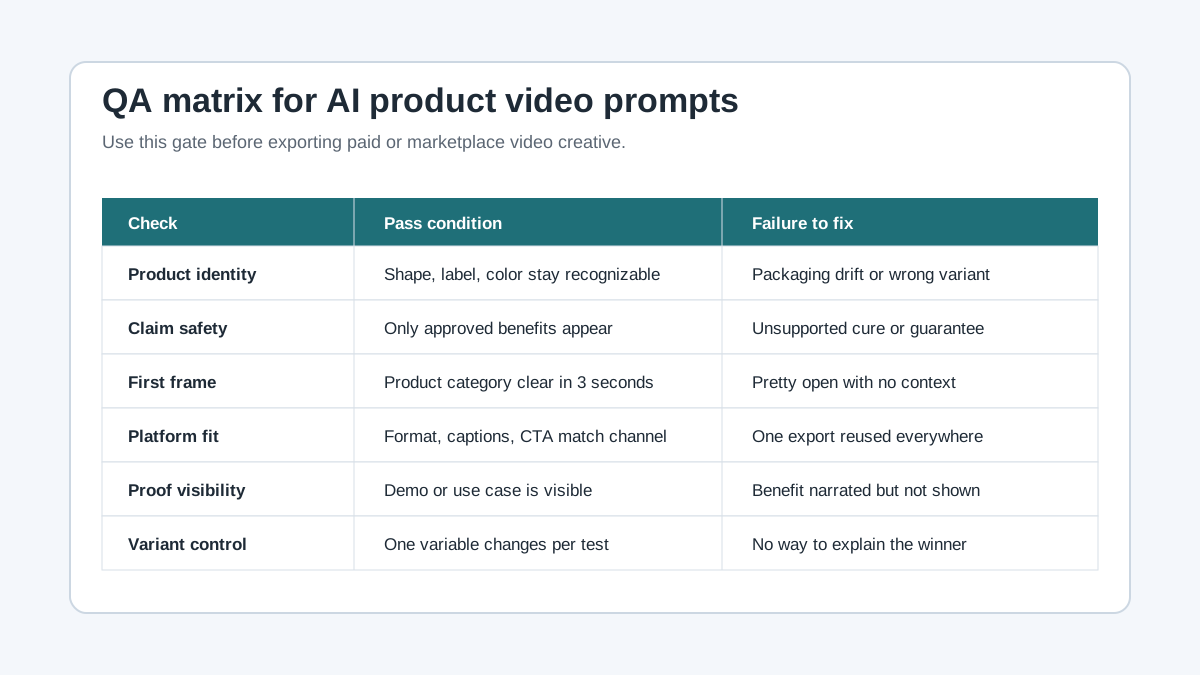
Prompt QA Checklist Before Publishing
| QA check | Pass condition | Common failure |
|---|---|---|
| Product identity | Product shape, label, color, and core use stay recognizable | AI changes packaging, flavor, size, or material |
| Claim safety | Every benefit appears in approved product copy or review evidence | Prompt adds cure, guaranteed result, or unsupported comparison |
| First-frame clarity | Viewer can identify product category within three seconds | Opening is cinematic but unclear |
| Platform fit | Aspect ratio, captions, and CTA match the channel | Same video is reused unchanged across every placement |
| Proof visibility | Demo or use case is visible, not only narrated | Video says the product works but never shows how |
| Variant discipline | One major variable changes per test | Hook, offer, setting, and CTA all change at once |
| Brand consistency | Colors, tone, and offer match store assets | AI creates a brand look that the store does not use |
For regulated, wellness-adjacent, beauty, supplement, finance, child-safety, or medical-adjacent products, add a stricter legal and claims review. AI can make a weak claim sound confident; confidence does not make it safe.
How to Adapt Prompts by Channel
| Channel | Prompt emphasis | Practical rule |
|---|---|---|
| TikTok and Reels | Native hook, fast proof, everyday setting | Ask for a casual first-frame action before product explanation |
| YouTube Shorts | Attention, branding, connection, direction | Use a clear first scene, early brand cue, and one specific next action |
| Meta feed and Reels ads | Variant testing, offer clarity, readable captions | Generate controlled versions for hook, proof, and CTA |
| Product detail page | Clarity, fit, assembly, use case, objections | Slow down the pace and answer buyer questions |
| Amazon or marketplace video | Product accuracy, allowed claims, clear demo | Avoid unsupported superlatives and invented proof |
Platform specs still matter, but prompts should not be overloaded with every technical detail. Keep the prompt focused on creative direction, then use a separate export checklist for dimensions, length, safe zones, file size, and captions. For channel-specific specs, use the YouTube Shorts product video specs, Meta video ad specs, and Amazon product video requirements guides.
Example Product Truth File
Before you prompt, prepare a short truth file like this:
| Field | Example |
|---|---|
| Product | Insulated stainless steel travel mug |
| Buyer | Daily commuter who drinks coffee slowly |
| Main problem | Coffee gets cold before the morning routine is done |
| Approved benefits | Leak-resistant lid, fits common car cup holders, double-wall insulation |
| Proof | Product photos, customer review about commute use, PDP material detail |
| Disallowed claims | Exact temperature hours, medical or performance claims, fake review quotes |
| Offer | Starter discount for first order |
| Required output | 20-second vertical ad, three hook variants, captions included |
This truth file is short enough for daily production, but it prevents most prompt failures. It also gives reviewers a stable reference when deciding whether an AI-generated video is publishable.
Internal Link Plan for This Cluster
This article should support, not replace, ShopShot's generator and existing template pages.
Use these pages as the production path:
- Start with the UGC video brief template when creator direction is still unclear.
- Turn the brief into scenes with the product video ad script template.
- Convert scene order into visual planning with the product video storyboard template.
- Generate the final creative with ShopShot's AI video generator.
- Decide test volume with how many UGC video ads to test.
That hierarchy keeps "AI product video prompts" as a supporting blog topic. It does not compete with the main AI video generator page or tool pages.
FAQ
What is an AI product video prompt?
An AI product video prompt is a structured instruction that tells an AI video system what product to show, which buyer problem to focus on, what claims are approved, how scenes should flow, and what output rules the video must follow.
How long should an ecommerce video prompt be?
Long enough to include product facts, buyer context, scene order, platform, and QA rules. For most ecommerce ads, that is usually 120-250 words. A one-line prompt is often too vague for product-accurate output.
Should I prompt for one finished ad or multiple variants?
Prompt for multiple controlled variants. Keep product claims, offer, and proof stable, then vary one element such as hook, setting, CTA, or proof order. This makes testing results easier to interpret.
Can AI product video prompts replace a script?
No. A prompt can include script instructions, but ecommerce ads still need a claim-safe script or scene plan. Use prompts to generate and adapt creative, not to invent unverified claims.
What should I check before publishing AI-generated product videos?
Check product identity, label accuracy, approved claims, caption readability, platform fit, offer accuracy, and whether the video implies a result you cannot prove. If any item fails, revise the prompt and regenerate before publishing.
Sources Checked
- OpenAI, "Prompt engineering": https://developers.openai.com/api/docs/guides/prompt-engineering
- OpenAI Help Center, "Prompt engineering best practices for ChatGPT": https://help.openai.com/en/articles/10032626-prompt-engineering-best-practices-for-chatgpt
- Google AI for Developers, "Prompt design strategies": https://ai.google.dev/gemini-api/docs/prompting-strategies
- TikTok For Business, "About Creative Center": https://ads.tiktok.com/help/article/creative-center
- TikTok For Business, "Creative best practices for performance ads": https://ads.tiktok.com/help/article/creative-best-practices
- Google Ads Help, "About the ABCDs of effective video ads": https://support.google.com/google-ads/answer/14783551
- Meta Business Help Center, "Best practices to make your ad more engaging": https://www.facebook.com/business/help/370852930116232
- AdCreative.ai, "Best AI Product Video Prompts for Ecommerce Ads": https://www.adcreative.ai/post/best-ai-product-video-prompts-for-ecommerce-ads