
Quick Answer
For ecommerce product videos, the safest YouTube Shorts specs are a vertical 9:16 video at 1080 x 1920 pixels, with the product and key text kept inside the central safe area so YouTube interface elements do not cover them. Organic Shorts can be square or vertical and can run up to three minutes, but product ads and performance creative should usually stay under 60 seconds, with many action-focused Shorts working best in the 10 to 30 second range.
The practical ecommerce rule is simple: make the first frame show the product or buying problem, use captions that are readable on mobile, keep the logo, price, offer, and CTA away from edge overlays, and export a vertical master before adapting the video to other placements.
Use this checklist before publishing:
| Spec item | Recommended setup for ecommerce |
|---|---|
| Canvas | 9:16 vertical |
| Resolution | 1080 x 1920 pixels |
| Minimum vertical resolution for ads | 720 x 1280 pixels |
| Organic Shorts length | Up to 3 minutes if square or vertical |
| Shorts ad creative length | Usually under 60 seconds; 10-30 seconds for action-focused ads |
| Caption style | Large, high-contrast, inside the safe area |
| Product visibility | Product or use case visible in the first 1-2 seconds |
| CTA | One clear next step, repeated visually or by voiceover |
If you need a production workspace instead of a checklist, use the YouTube Shorts video generator. If you are still planning the broader content system, start with our guide to create ecommerce product videos with AI.
Why YouTube Shorts Specs Matter for Product Videos
Most ecommerce product videos are made from assets that were not designed for vertical video: product photos, product detail page copy, review snippets, lifestyle images, and a few brand graphics. That material can work well on Shorts, but only if the format protects the product story.
Shorts is a fast mobile feed. A shopper may see only a few seconds before swiping. If the video starts with a slow brand intro, a tiny product shot, or captions hidden under interface elements, the creative loses the chance to explain what is being sold.
Specs also affect paid distribution. Google Ads can dynamically fit videos to devices, but its official video ad specs still recommend Full HD exports such as 1080 x 1920 pixels for vertical video, and YouTube Shorts ad guidance prioritizes vertical 9:16 assets for the Shorts format. Horizontal and square assets can be accepted in some cases, but they can display with blurred areas or less efficient use of the screen.
For ecommerce teams, this means format is not a finishing detail. It should guide the script, frame, caption, and call to action from the start.
The Core YouTube Shorts Specs to Use
Use this table as the working spec sheet for product videos, product launch clips, creator-style demos, and short paid ads.
| Requirement | Best ecommerce choice | Why it matters |
|---|---|---|
| Aspect ratio | 9:16 vertical | Fills the Shorts feed and avoids awkward crop or blurred padding. |
| Resolution | 1080 x 1920 pixels | Matches Google Ads' recommended Full HD vertical dimensions. |
| Minimum resolution | 720 x 1280 pixels for vertical ads | Lower quality can make product details, labels, and textures hard to inspect. |
| File format | MP4 or another YouTube-supported video format | MP4 is usually the cleanest export choice for teams and ad workflows. |
| Organic length | Square or vertical videos up to 3 minutes can be Shorts | Useful for deeper demos, but not a reason to make every product clip long. |
| Ad length | Under 60 seconds for Shorts feed behavior; 10-30 seconds for many action ads | Keeps the product pitch tight and easier to test. |
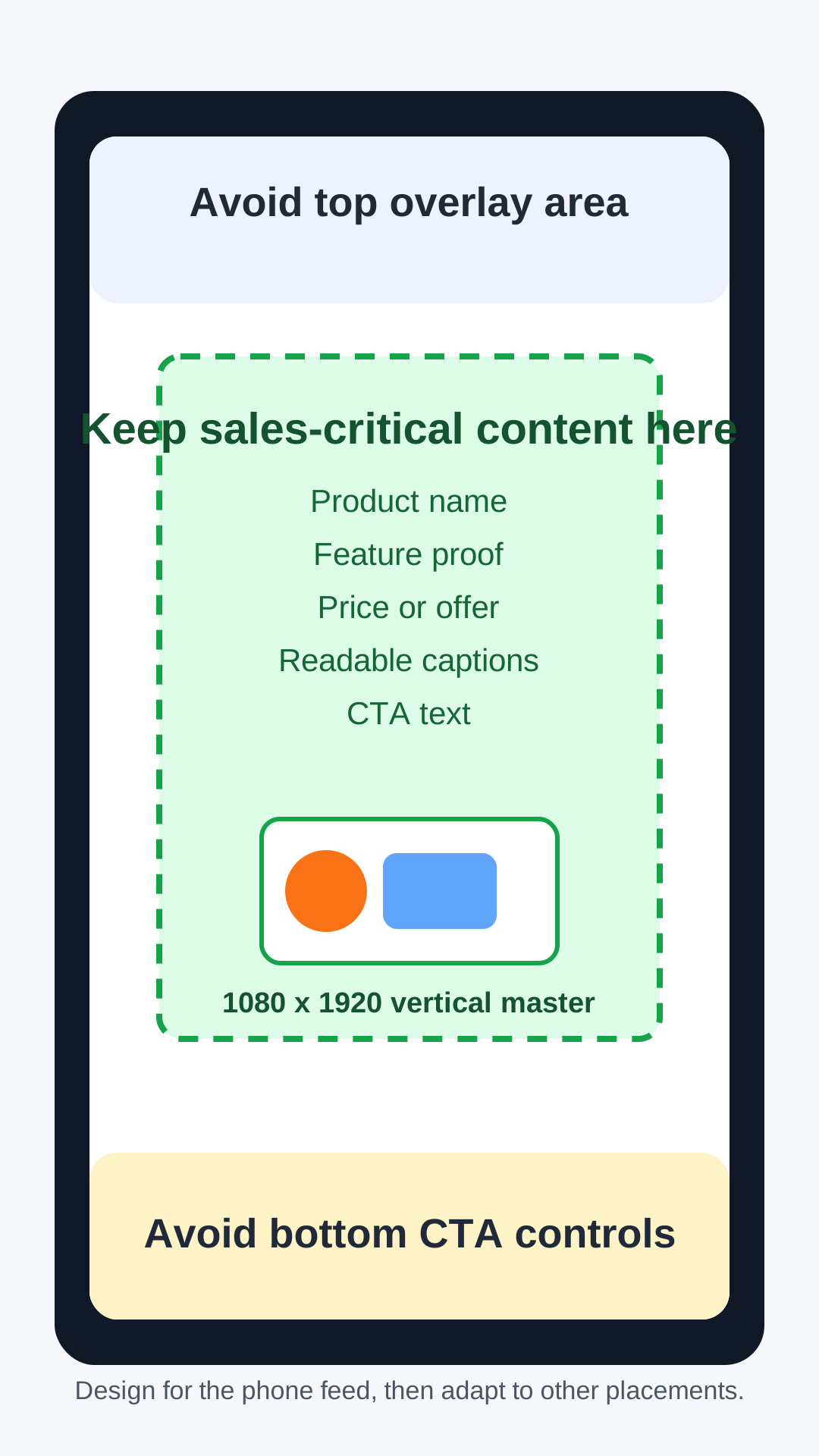
| Text placement | Center-safe, away from top and bottom controls | Protects price, offer, coupon, and CTA from overlays. |
| Audio | Voiceover, music, or both when relevant | Shorts is social-first, but captions should still carry the message when muted. |
| CTA asset | Clear CTA line plus campaign headline/description when running ads | Shorts ad CTA overlays can use campaign text when available. |
The biggest mistake is treating 1080 x 1920 as a simple resize. A resized video can still fail if the product is too small, the text sits too low, or the important demo happens outside the safe area.
Safe Zones: Where to Place Product, Price, and CTA
YouTube's ad spec guidance warns that overlays, CTAs, and buttons can appear in different places depending on format, campaign type, and screen. The exact interface can change, so avoid designing edge-to-edge text that only works in a clean mockup.
For ecommerce product videos, protect these elements:
- Product name
- Product close-up or feature proof
- Price, discount, bundle, or shipping message
- Review quote or rating
- Coupon code
- CTA such as "Shop the bundle" or "Check the size guide"
Place those elements in the central visual field. Use top and bottom areas for background motion, lifestyle context, or nonessential decoration. If the product fills the whole frame, make sure its most important feature is still visible without relying on tiny edge detail.
Ecommerce Script Structure for Shorts
Specs will not save a weak script. A product video also needs a tight sequence that matches how people decide whether to keep watching.
Use this structure for a 15 to 30 second ecommerce Short:
| Time | Job of the scene | Example for a travel bottle |
|---|---|---|
| 0-2 seconds | Hook the buying problem or outcome | "Your shampoo bottle should not leak in your bag." |
| 2-5 seconds | Show the product clearly | Close-up of the silicone travel bottle flexing. |
| 5-10 seconds | Prove the main claim | Flip test, squeeze test, cap close-up. |
| 10-15 seconds | Show the use case | Packing cube, carry-on pouch, gym bag. |
| 15-22 seconds | Remove one objection | "TSA-size, refillable, and easy to rinse." |
| 22-30 seconds | Give one CTA | "Pick your color set before your next trip." |
This follows the same logic as Google's ABCD framework for effective video ads: capture attention, show the brand or product early, create a connection, and direct the viewer to a next step. For ecommerce, the product should not be hidden until the reveal. The product is the ad.
If you need a reusable script layout, use our product video ad script template. If you need examples before writing your own, review these product video examples for ecommerce.
Organic Shorts vs Shorts Ads
Organic Shorts and paid Shorts can share the same vertical master, but they should not always use the same edit.
| Use case | Organic Shorts | Shorts ads |
|---|---|---|
| Main goal | Discovery, audience building, proof, education | Reach, traffic, leads, purchases, remarketing |
| Ideal feel | Native, useful, entertaining, creator-led | Native but more direct about product and CTA |
| Length | Can be longer for tutorials or demos | Usually tighter, especially for action campaigns |
| CTA | Soft CTA, comment prompt, store mention | Clear action such as shop, learn more, compare, or sign up |
| Measurement | Views, retention, subscribers, comments, clicks | Views, view rate, CTR, conversions, CPA, ROAS |
| Risk | Too little product clarity | Looking like a generic ad inside a social feed |
For organic Shorts, a longer product demo can work if every section earns its place. For ads, keep the first test batch more disciplined: one hook, one product promise, one proof point, one CTA.
A Pre-Publish Workflow for Ecommerce Teams
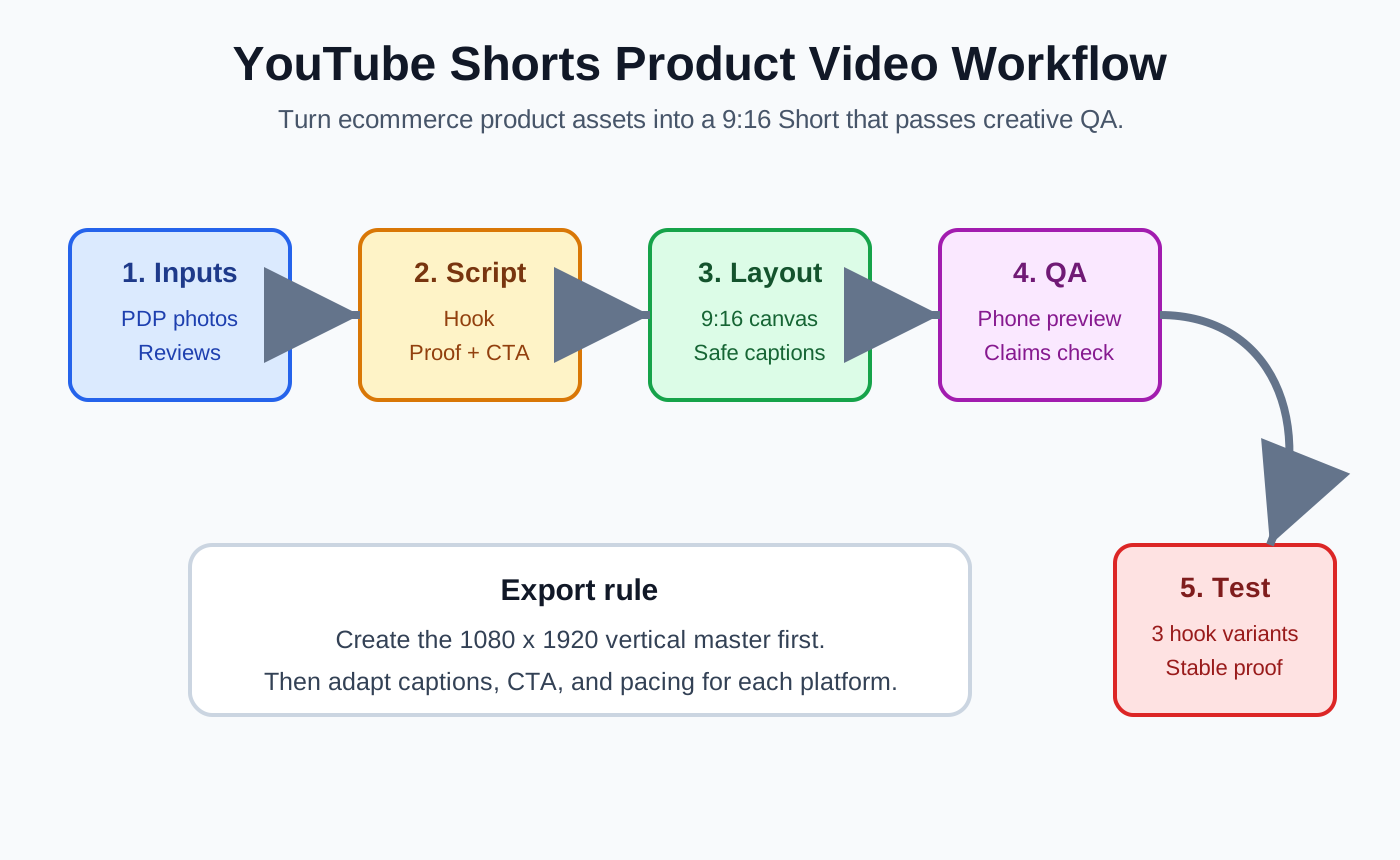
Use this workflow before exporting your Short or sending it into an AI video tool.
- Pull the product page inputs: product name, buyer problem, use case, proof, objection, and CTA.
- Choose one placement goal: organic Short, remarketing ad, product launch ad, or product detail page teaser.
- Write a 15 to 30 second script before editing visuals.
- Build the video on a 1080 x 1920 canvas, not a landscape canvas that you crop later.
- Keep product proof and captions inside the safe area.
- Add captions or text overlays that can be read on a mobile screen.
- Check the first two seconds without sound.
- Watch the export on a phone, not only on a desktop preview.
- Create two or three hook variants while keeping the proof and CTA stable.
- Publish or launch only after the QA checklist passes.
ShopShot can help turn product photos and short script prompts into vertical product creative. For a broader ad workflow, see how to make a video ad for an ecommerce product.
QA Checklist Before Uploading
Run this table before publishing a Short or sending it to Google Ads.
| Check | Pass condition |
|---|---|
| Format | The exported video is 9:16 vertical, ideally 1080 x 1920 pixels. |
| Product clarity | A shopper can identify the product or use case in the first two seconds. |
| Safe area | Product name, offer, price, captions, and CTA are not at the extreme top or bottom. |
| Caption readability | Captions are large enough on a phone and have enough contrast. |
| One main claim | The video has one clear promise, not a list of unrelated benefits. |
| Proof | At least one shot demonstrates the feature, use case, review, or comparison. |
| CTA | The final scene tells the viewer what to do next. |
| Sound-off test | The video still makes sense with sound muted. |
| Sound-on test | Voiceover or music supports the product story instead of distracting from it. |
| Compliance | Claims, testimonials, discounts, and before-after visuals are supported by product evidence and ad policy review. |
The compliance row matters for AI-assisted production. Faster production can create more variants, but it can also create unsupported claims faster. If the product page cannot prove a claim, do not put that claim in the Short.
Common Formatting Mistakes
The first mistake is making a vertical video where the product is technically visible but too small. A product that looks fine on a desktop editor may be unreadable in a phone feed. Zoom in on the product detail that proves the claim.
The second mistake is placing the main caption at the bottom of the video. Bottom captions often collide with interface elements, CTA overlays, or the natural thumb zone. Put essential text higher and keep it brief.
The third mistake is reusing a TikTok or Instagram Reel with a watermark, trend reference, or CTA that makes no sense on YouTube. A Short can be repurposed, but the CTA and caption should fit YouTube.
The fourth mistake is making the video too long because Shorts can be up to three minutes. Length is available, not mandatory. A product comparison or tutorial may need more time, but a paid product ad usually benefits from a tighter edit.
The fifth mistake is changing too many creative variables at once. If one version has a new hook, new creator, new offer, new price card, and new demo angle, the team cannot learn what actually changed performance.
Testing Plan for the First Batch
Start with one product and three Shorts. Keep the product proof and CTA stable, then test only the hook angle.
| Variant | Hook angle | What stays the same | What you learn |
|---|---|---|---|
| A | Problem-first | Product proof, CTA, length, format | Whether the pain point stops the scroll. |
| B | Demo-first | Product proof, CTA, length, format | Whether the visual action is enough to earn attention. |
| C | Objection-first | Product proof, CTA, length, format | Whether removing hesitation improves clicks or conversions. |
For an ecommerce store, a clean test is more useful than a large messy batch. Compare early retention, click-through rate, add-to-cart rate, conversion rate, and cost per result. Then keep the winning angle and test the next variable, such as creator style, offer, or proof scene.
FAQ
What are the best YouTube Shorts specs for ecommerce product videos?
Use a 9:16 vertical video at 1080 x 1920 pixels. Keep the product, captions, price, offer, and CTA inside the central safe area so YouTube interface elements do not cover them.
Can ecommerce Shorts be longer than 60 seconds?
Organic Shorts can be square or vertical and run up to three minutes. For ecommerce ads and performance creative, shorter videos often work better. Start with 10 to 30 seconds for action-focused ads and extend only when the product needs more explanation.
Should I make one video for Shorts, TikTok, and Instagram Reels?
You can start from one vertical master, but adjust captions, CTA wording, pacing, and platform-specific references before publishing. Do not assume a recycled clip is ready if the safe zones or CTA do not fit YouTube.
Do I need captions for YouTube Shorts product videos?
Yes. Captions help when viewers watch without sound, and they make product claims easier to understand quickly. Keep captions short, high-contrast, and away from top and bottom interface areas.
What should appear in the first two seconds?
Show the product, the buyer problem, or the result the shopper wants. Avoid slow logos or vague lifestyle openings unless the brand is already familiar enough to carry the opening.
Sources Checked
- Google Ads Help: About video ad specs, checked June 16, 2026, for vertical resolution, aspect ratio, file size, supported formats, thumbnails, and safe-zone guidance.
- Google Ads Help: YouTube Shorts ads asset specs and best practices, checked June 16, 2026, for Shorts ad best practices, vertical asset priority, length guidance, CTA overlay notes, and mobile optimization.
- YouTube Help: Understand three-minute YouTube Shorts, checked June 16, 2026, for the current square/vertical up-to-three-minute Shorts classification.
- Google Ads Help: About the ABCDs of effective video ads, checked June 16, 2026, for Attention, Branding, Connection, and Direction creative guidance.