
Quick Answer
A strong UGC video brief template tells a creator or AI video workflow what product proof to show, which buyer problem to open with, what claims are allowed, which format to deliver, and how the brand will review the final ad. For ecommerce teams, the brief should be specific enough to protect the product message but flexible enough that the creator still sounds natural.
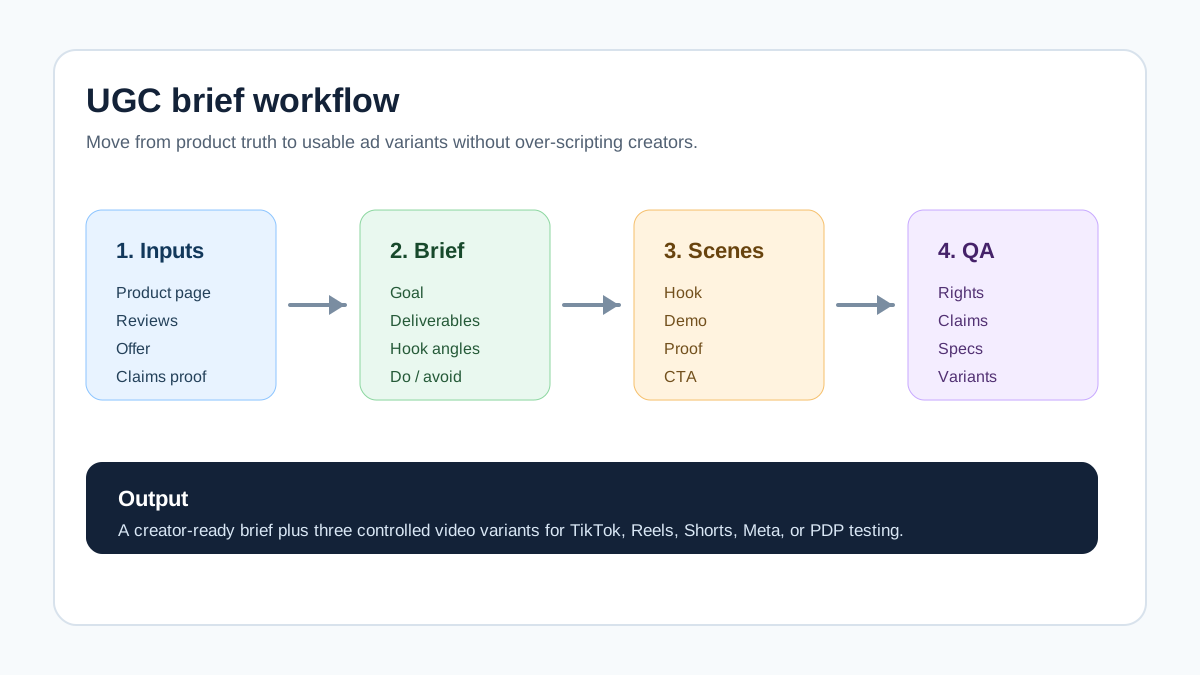
Use this simple structure:
- Campaign goal and target shopper.
- Product truth file: features, proof, offer, objections, and restricted claims.
- Deliverables: ratio, length, platform, raw footage, edited cut, captions, and deadline.
- Creative direction: hook angles, scene prompts, talking points, do and avoid list.
- Rights and review: usage terms, disclosure notes, revision rounds, approval process.
- Testing plan: which variables change across each version.
If you already have a script, use the product video script template to turn it into scenes. If you are still building hooks, start with the UGC video hooks guide.
Why Ecommerce UGC Briefs Fail
Most weak UGC briefs are either too vague or too controlling.
The vague version says, "Create an authentic video about our product." That gives the creator freedom, but it does not tell them which product claim matters, what the shopper already believes, what the ad must avoid, or how the footage will be used after delivery.
The controlling version gives a full word-for-word script and asks the creator to perform it. That may protect the message, but it often removes the reason a brand hired a UGC creator in the first place: natural language, believable pacing, and lived-in product use.
Ecommerce needs a middle path. The brief should define the commercial job of the video: reduce uncertainty, show product proof, answer one buying objection, and create a reusable ad asset. The creator should still decide how to say it in their own voice.
That matters for paid social and AI-assisted production. TikTok's creative guidance favors a clear hook, body, and close. Google's ABCDs framework asks advertisers to capture attention, brand early, create connection, and direct the viewer. Meta's creative guidance emphasizes placement, format, and visual design. A good UGC brief translates those principles into concrete product scenes.
The UGC Video Brief Template
Copy this template into your project doc, creator platform, or AI video prompt builder.
| Brief section | What to include | Ecommerce example |
|---|---|---|
| Campaign goal | The one action the video should support | Drive purchases for a new travel bottle bundle |
| Target shopper | Buyer context, pain, and trigger moment | Commuters who spill coffee in bags |
| Product proof | Feature, review, spec, demo, or comparison | Leakproof lid, cup-holder fit, 4.7-star review theme |
| Hook angles | 3 to 5 opening ideas, not one forced script | Spill problem, morning routine, bag test, comparison |
| Deliverables | Ratio, length, raw footage, edited version, captions | 3 vertical clips, 15-25 seconds, raw + edited, captioned |
| Required scenes | The product moments that must appear | Close lid, turn bottle upside down, place in bag |
| Do / avoid | Brand rules, claim rules, and visual limits | Do show real liquid; avoid "guaranteed no leaks forever" |
| Rights and review | Usage period, paid usage, approvals, revisions | 6 months paid social usage, 2 revision rounds |
| Testing plan | What changes between variants | Same proof, 3 different hooks |
This template is intentionally built around product evidence. It stops the brief from becoming a mood board with no conversion logic.
Step 1: Define the Buyer Problem
Before asking for content, define the buying question the video must answer. Ecommerce UGC performs best when it helps a shopper make a decision, not when it merely announces that a product exists.
Use this prompt:
The shopper is considering this product because they want [outcome] but worry about [objection]. The video should show [proof] so the shopper believes [specific claim].
Examples:
| Product type | Buyer problem | Proof the brief should request |
|---|---|---|
| Skincare | "Will this feel heavy or irritate my skin?" | Texture shot, ingredient callout, routine placement |
| Kitchen tool | "Will it actually save time?" | Before/after prep sequence and cleanup shot |
| Apparel | "Will it fit my body type?" | Try-on movement, fabric close-up, size context |
| Home organizer | "Will it fit my space?" | Measurement shot and setup sequence |
| Pet product | "Will my pet use it?" | Real use moment, safety detail, owner reaction |
Do not brief creators only on demographics. "Women 25-34" is not enough. A creator needs the decision context: what the shopper is unsure about and what proof can reduce that uncertainty.
Step 2: Build a Product Truth File
The product truth file is the most important part of the UGC video brief template. It keeps the creator from inventing claims and helps an AI video workflow stay grounded.
Include:
- Product name and exact model or variant.
- Primary use case.
- Main feature and why it matters.
- Reviews or customer language that can be paraphrased.
- Specs that can be shown visually.
- Offer details, if they are stable.
- Claims that require proof.
- Claims that are not allowed.
- Competitor or old-solution comparison, if appropriate.
For example:
| Truth file item | Bad version | Better version |
|---|---|---|
| Feature | "Amazing insulation" | "Keeps drinks cold for up to 24 hours, per product spec" |
| Review theme | "Customers love it" | "Reviews often mention no metallic taste and easy cleaning" |
| Comparison | "Better than every bottle" | "Replaces disposable iced coffee cups during commutes" |
| Claim limit | "Best bottle ever" | "Do not claim leakproof beyond the listed lid use instructions" |
This file also helps with compliance. If a creator gives a testimonial-style statement, the FTC's endorsement guidance says material connections should be disclosed when they are not obvious. Put that expectation in the brief instead of trying to fix it after filming.
Step 3: Specify Deliverables Like an Editor
A UGC brief should not just say "one video." It should describe the asset package the team needs.
| Deliverable | Recommended brief language |
|---|---|
| Edited vertical ad | "One 15-25 second 9:16 edited video with captions and CTA." |
| Raw footage | "Send all usable raw clips without music or baked-in text." |
| Hook variants | "Record three opening hooks using the same product proof." |
| Usage cutdowns | "Leave enough clean footage for 6-second and 10-second cutdowns." |
| Product audio | "Capture natural product sounds if relevant, plus clean voiceover." |
| Static frame | "Provide one clear product-in-use frame for thumbnail testing." |
Raw footage matters because ecommerce teams often need to adapt one creator shoot for TikTok, Instagram Reels, YouTube Shorts, Meta placements, product detail pages, and email. Edited-only delivery can lock the brand into one version that cannot be tested.
If you plan to repurpose the asset through ShopShot's AI video generator, ask for clean product shots, clear hand movements, and enough scene separation to turn footage into new variants.
Step 4: Give Hook Angles, Not a Rigid Script
Creators usually sound better when they own the wording. Instead of forcing exact lines, give hook angles and required product proof.
| Hook angle | When to use it | Example creator prompt |
|---|---|---|
| Problem-first | The pain is obvious | "Open with the everyday problem this solves." |
| Demo-first | The product is visual | "Start by showing the product doing the key job." |
| Objection-first | Shoppers hesitate before buying | "Start with the concern people have before ordering." |
| Comparison | The old solution is familiar | "Compare the product to the workaround buyers already use." |
| Routine | The product fits a habit | "Show where this product belongs in your real routine." |
Then pair the hook with required scenes:
| Scene | Creator direction | Why it matters |
|---|---|---|
| Hook | Show or say the buyer problem in the first 3 seconds | Improves attention and message clarity |
| Product reveal | Show the product clearly by second 5 | Avoids vague lifestyle footage |
| Proof | Demonstrate one feature or review-backed claim | Builds trust |
| Objection answer | Address sizing, setup, ingredients, material, or use limits | Reduces purchase friction |
| CTA | Tell viewers the next step in plain language | Converts attention into action |
This approach works for human creators and AI-assisted storyboarding. The creative idea stays natural, but the commercial job of each scene is clear.
Step 5: Add Platform-Specific Notes
The same product proof can be reused, but the brief should state where the footage will run.
| Platform or placement | What the brief should clarify |
|---|---|
| TikTok ads | Native hook, fast product clarity, vertical framing, creator-style delivery |
| Instagram Reels | Clean overlays, safe-zone awareness, product visibility, caption readability |
| YouTube Shorts | Fast opening, early brand or product cue, clear CTA |
| Meta feed or Reels | Visual clarity without sound, captioned benefit, placement-safe text |
| Product detail page | Longer proof, setup clarity, less hype, more buyer assurance |
For a platform-specific production checklist, pair this brief with Instagram Reels product video checks, YouTube Shorts product video specs, or Meta video ad specs.
Step 6: Include Rights, Review, and Disclosure
This section prevents avoidable production problems.
Include:
- Whether the brand can run the video as paid ads.
- How long usage rights last.
- Whether the brand can edit, crop, subtitle, or translate the content.
- Whether the creator can post the content organically.
- How many revisions are included.
- Deadline for raw footage and edited files.
- Disclosure language for paid, gifted, affiliate, or sponsored relationships.
- Restrictions around health, financial, environmental, or performance claims.
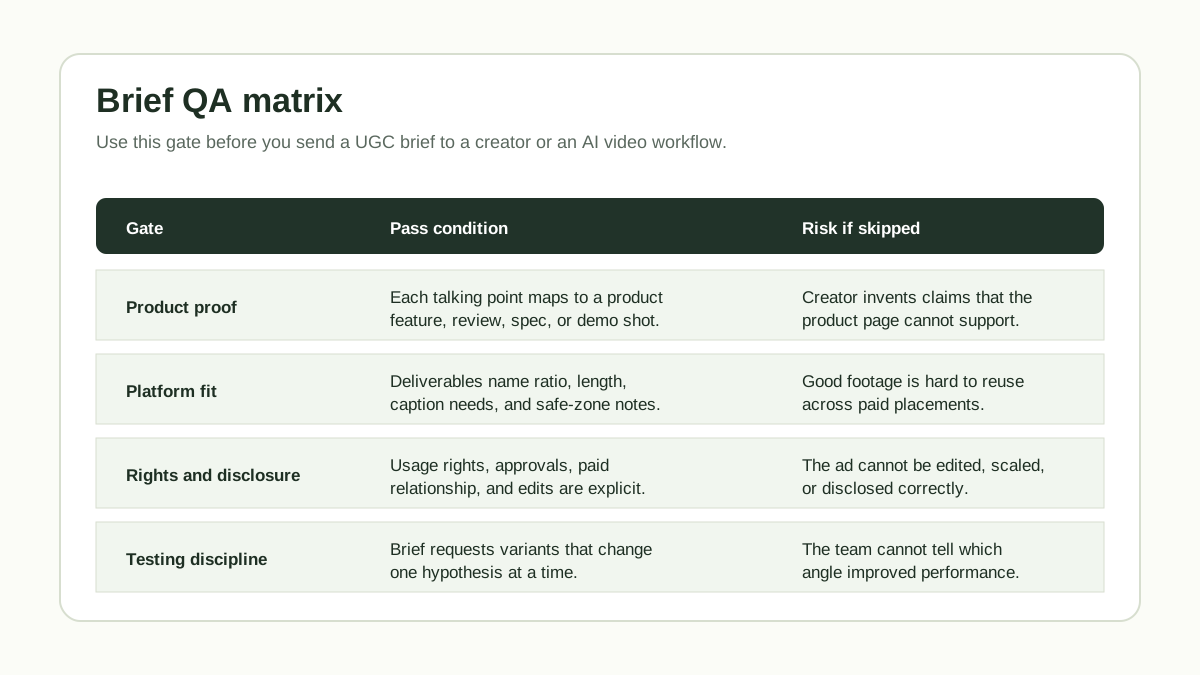
Do not bury this in a separate email thread. If the creator does not see usage and disclosure expectations in the brief, the team may receive a good video that is hard to legally or operationally use.
Step 7: Turn One Brief Into Testable Variants
The brief should make testing easier. Do not ask for five totally different ads at once. Ask for variants that change one major variable.
| Variant | What changes | What stays stable |
|---|---|---|
| A: Problem hook | Opening problem | Product proof, CTA, offer |
| B: Demo hook | First visual moment | Product proof, CTA, offer |
| C: Objection hook | First concern answered | Product proof, CTA, offer |
This keeps the test readable. If Variant B wins, the team can infer that the demo-first opening worked better than the problem-first or objection-first opening. If every scene, claim, creator angle, offer, caption style, and CTA changes at once, the result may perform better but teach the team very little.
For a deeper testing system, connect this brief to the how many UGC video ads to test workflow.
Copy-and-Paste UGC Brief Template
Use this compact version for a creator or internal AI video workflow.
Campaign goal:
What should this video help the shopper do?

Target shopper:
Who is watching, what do they want, and what makes them hesitate?

Product truth:
Product name, use case, proof points, reviews, specs, offer, and claims to avoid.

Deliverables:
Ratio, length, platform, raw footage, edited version, captions, deadline, and file format.

Creative direction:
Three hook angles, required product scenes, tone, do list, avoid list, and CTA.

Rights and review:
Paid usage, edit rights, disclosure expectations, revision rounds, and approval deadline.

Testing plan:
Which versions should change the hook, proof, creator style, or CTA?
QA Checklist Before Sending the Brief
Run this checklist before the brief goes out.
| Check | Pass condition |
|---|---|
| One buying question | The brief names the shopper uncertainty the video must resolve. |
| Product appears early | The required scenes show or name the product in the first 5 seconds. |
| Proof is specific | Every claim maps to a feature, demo, review, spec, or allowed offer. |
| Creator freedom remains | The brief gives angles and talking points, not only a rigid script. |
| Usage rights are clear | Paid usage, edits, duration, and raw footage are defined. |
| Disclosure is covered | Paid, gifted, affiliate, or sponsored relationships are addressed. |
| Platform fit is clear | Ratio, length, captions, and safe-zone needs are included. |
| Variants are controlled | Each requested version changes one clear testing variable. |
Common Mistakes
The first mistake is briefing aesthetics instead of proof. "Make it clean and authentic" does not tell the creator what product evidence needs to appear. Add the demo, spec, review theme, or objection that matters.
The second mistake is hiding restrictions. If the product cannot make a medical, performance, or environmental claim, say that plainly. Creators should not discover claim limits after they have already filmed.
The third mistake is asking for only one final edited cut. If the ad works, the team will want cutdowns, alternate captions, new hooks, and platform variants. Ask for raw footage up front.
The fourth mistake is asking the creator to do strategy, scripting, production, compliance, and media testing alone. The brief should separate responsibilities: the brand owns the product truth and claim boundaries; the creator owns natural delivery and relatable scenes.
FAQ
What is a UGC video brief template?
A UGC video brief template is a repeatable document that tells a creator what video to make, which product proof to show, what deliverables to send, and how the brand can use the content.
How long should a UGC video brief be?
For a simple ecommerce ad, keep the brief to 600-1,200 words plus product links and visual references. It should answer the creator's key questions without becoming a full brand manual.
Should a UGC brief include a script?
It can include a loose scene structure, hook examples, and required talking points. Avoid forcing every line unless the product is highly regulated or the creator has agreed to scripted delivery.
What should ecommerce brands include in every UGC brief?
Include the campaign goal, target shopper, product proof, deliverables, platform specs, hook angles, do and avoid rules, usage rights, disclosure expectations, review process, and testing plan.
Can I use the same UGC brief for AI video generation?
Yes, but make the scene prompts more explicit. AI video workflows need clear product inputs, visual actions, proof moments, caption text, and QA checks so the output can be reviewed against the brief.
Sources Checked
- TikTok Creative Codes, checked June 23, 2026, for hook, body, and close creative structure.
- Google: ABCDs of effective video ads, checked June 23, 2026, for attention, branding, connection, and direction principles.
- Meta for Business: Expand your ad creative strategy, checked June 23, 2026, for placement, format, and visual design guidance.
- FTC Endorsement Guides: What People Are Asking, checked June 23, 2026, for material connection disclosure expectations.