
Last reviewed: June 19, 2026. Instagram Reels specs, safe-zone guidance, ad placements, and AI creative tools change often, so verify final exports in Meta Ads Manager before launch.
Quick Answer
Use an Instagram Reels product video checklist before you generate, edit, or launch ecommerce creative. A Reels-ready product video should be vertical 9:16, keep product proof and captions away from interface overlays, show the product in the first two seconds, use one clear hook, match the landing-page offer, and avoid fake review or AI-avatar claims. Build the video from a product truth file, then export at least three controlled variants: a problem hook, a product demo hook, and a proof or offer hook.
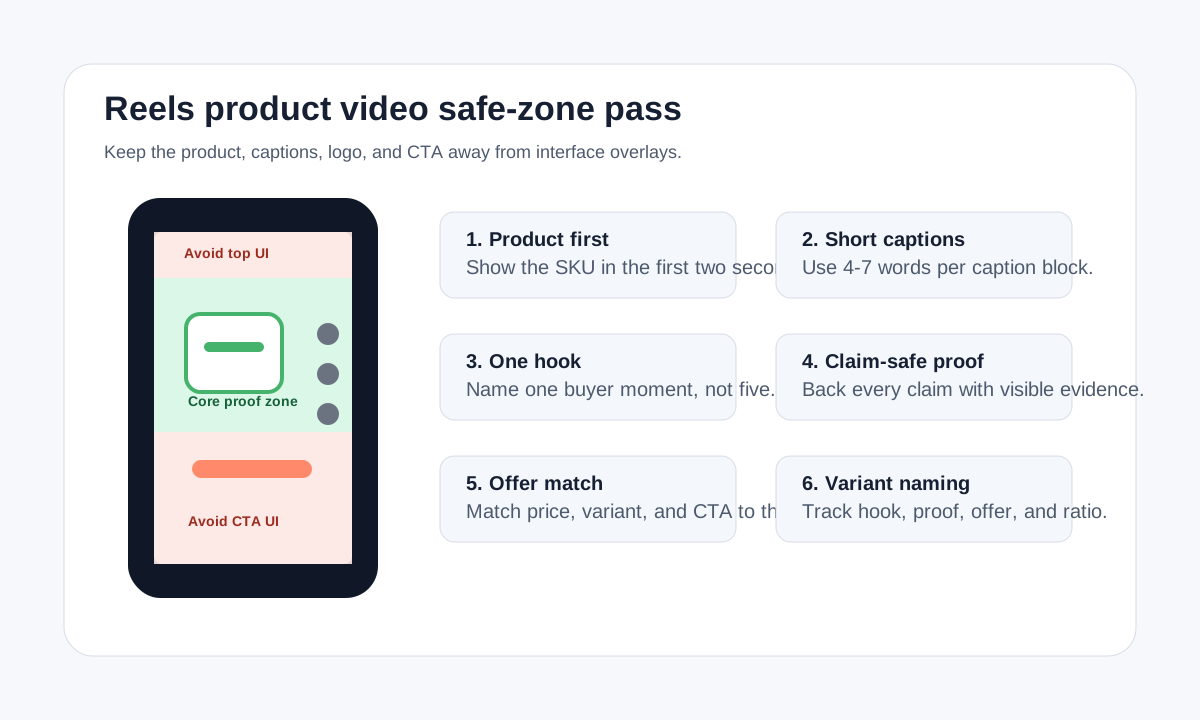
If you need the generator workflow, start with the Instagram Reels video generator. If you need layout ideas, pair this checklist with the Instagram ad template for ecommerce product videos, the Instagram Reels safe zone template, and the Instagram Reel size and dimensions guide.
Who This Checklist Is For
This guide is for ecommerce sellers, media buyers, founders, and creative teams making Instagram Reels product videos from product images, product pages, creator clips, or AI-generated drafts. It is not a generic Reels growth guide. The goal is to make product-led Reels that can survive real ad review, mobile viewing, landing-page comparison, and performance testing.
Use it when:
- You have a product photo or PDP and need a vertical video.
- You are adapting a TikTok, Shopify, Meta, or YouTube Shorts creative for Instagram Reels.
- You are using AI to generate an ecommerce product video and need a launch QA gate.
- Your previous Reels looked good but had weak product clarity, low click-through rate, or caption overlap.
The checklist is intentionally practical. Every item should help a buyer understand the product or help a marketer avoid wasted spend.
The Instagram Reels Product Video Gate
Run this gate before you produce the first draft:
| Gate | Pass condition | Why it matters |
|---|---|---|
| Product clarity | The item appears clearly in the first two seconds. | Reels viewers scroll fast; delayed product reveal weakens ecommerce intent. |
| 9:16 framing | The main version is vertical and designed for full-screen viewing. | Reels inventory is full-screen and mobile-first. |
| Safe zones | Product, text, logo, and CTA avoid the top, bottom, and side interface areas. | Captions, profile UI, buttons, and CTAs can cover key information. |
| One hook | The first line addresses one buyer problem, use case, proof point, or offer. | Multiple ideas in the opening reduce comprehension. |
| Product truth | Claims come from the product page, real reviews, specs, or visible proof. | AI and creator-style videos can invent benefits if not constrained. |
| Landing match | Price, offer, bundle, variant, and CTA match the destination page. | Mismatched Reels create trust loss and wasted clicks. |
| Caption readability | Captions are short, high contrast, and readable on a phone. | Many users watch with sound off or in noisy contexts. |
| Variant plan | At least three versions test one variable at a time. | Reels creative testing needs learning, not random generation. |
If one of these fails, fix the brief before generating more videos. A weak brief usually creates more weak variants.
Step 1: Build a Product Truth File
Before opening an AI video tool or briefing a creator, write a compact product truth file. This keeps the Reels video specific and claim-safe.
| Input | Example | Use in the Reel |
|---|---|---|
| Product identity | "Magnetic phone stand with fold-flat hinge and aluminum body" | Opening product reveal and on-screen label |
| Buyer problem | "Desk videos and calls look unstable when the phone is propped against a laptop" | Problem hook |
| Visible proof | Hinge close-up, angle adjustment, product in a backpack pocket | Demo scenes |
| Review language | "Heavy enough not to tip over" from a real customer review | Proof caption if review use is approved |
| Claim limits | Do not say "works with every phone case" unless verified | Script guardrail |
| Offer | "Buy two, save 15%" | Final CTA only if live on the landing page |
AI tools work better when the product truth file defines what must be true. Creator briefs also improve because the creator knows what to demonstrate, not just what to say.
Step 2: Choose the Reels Job
An Instagram Reel can serve different ecommerce jobs. Pick one before writing the hook.
| Reels job | Best use | Opening angle | CTA |
|---|---|---|---|
| Product discovery | Cold audiences and broad interest targeting | Show the annoying problem or desired result | "See how it works" |
| Product demo | Warm traffic, product page retargeting, catalog support | Show the product mechanism immediately | "Choose your size" |
| Review proof | Retargeting and social proof angles | Use real review language or creator demonstration | "Read customer reviews" |
| Offer push | Promotion, bundle, seasonal sale | Show product plus offer fast | "Shop the bundle" |
| Objection handler | Abandoned cart or product comparison | Answer one hesitation | "Check the details" |
For a new SKU, start with product discovery and product demo. Those two videos usually reveal whether the buyer problem and product proof are strong enough before you test more subtle creative angles.
Step 3: Keep the Safe Zone Clean
Meta's public Reels guidance emphasizes full-screen 9:16 creative and safe zones because interface elements can cover text and product details. Treat safe zones as a design constraint, not a final export check. For a reusable frame overlay, use the dedicated Instagram Reels safe zone template for ecommerce; use this article for the broader production, claim, landing-page, and testing checklist.
Use these practical rules:
- Keep the product center-weighted when possible.
- Put captions in short blocks, not full sentences across the bottom.
- Keep brand marks and discount labels away from the lower action area.
- Do not place the only CTA at the very bottom of the frame.
- Leave enough side margin for UI and cropping differences across placements.
- Preview the video on a phone before launch, not only in a desktop editor.
If the product is small, use a close-up first and a wider lifestyle scene later. If the product is wearable, show the full product early, then cut to fit, texture, and use-case proof.
Step 4: Write a Hook That Names the Buyer Moment
Weak Reels often open with generic lines such as "This product is amazing" or "You need this." Strong ecommerce hooks name a specific moment.
| Hook type | Formula | Example |
|---|---|---|
| Problem hook | "Stop [annoying moment] when [use case]." | "Stop balancing your phone against your laptop during calls." |
| Demonstration hook | "Watch [product] do [visible action]." | "Watch this stand fold flat and lock at desk height." |
| Comparison hook | "[Old way] vs [product way]." | "Laptop camera angle vs fold-flat phone stand angle." |
| Proof hook | "[Specific proof] in [short time]." | "Three angles, one hinge, no desk wobble." |
| Offer hook | "[Bundle/discount] for [specific buyer]." | "Build a two-desk setup without buying two bulky mounts." |
Write three hooks before generating video. Keep the rest of the script stable so you can learn which opening works.
Step 5: Map the Scenes Before Generation
Do not ask AI to "make a Reel" from one vague prompt. Build a five-scene map first.
| Scene | Visual | Caption | QA note |
|---|---|---|---|
| 1. Hook | Messy desk with phone leaning on laptop | "Stop bad call angles" | Product problem is real and recognizable. |
| 2. Product reveal | Stand unfolds beside the phone | "Fold-flat phone stand" | Product shape and material stay accurate. |
| 3. Mechanism | Close-up of hinge and angle adjustment | "Locks at your angle" | Do not imply unsupported weight limits. |
| 4. Use case | Phone on desk during a call or product demo | "Desk, travel, creator kit" | Scene matches actual use. |
| 5. CTA | Packshot with offer or product page cue | "Pick your color" | Offer and variants match the landing page. |
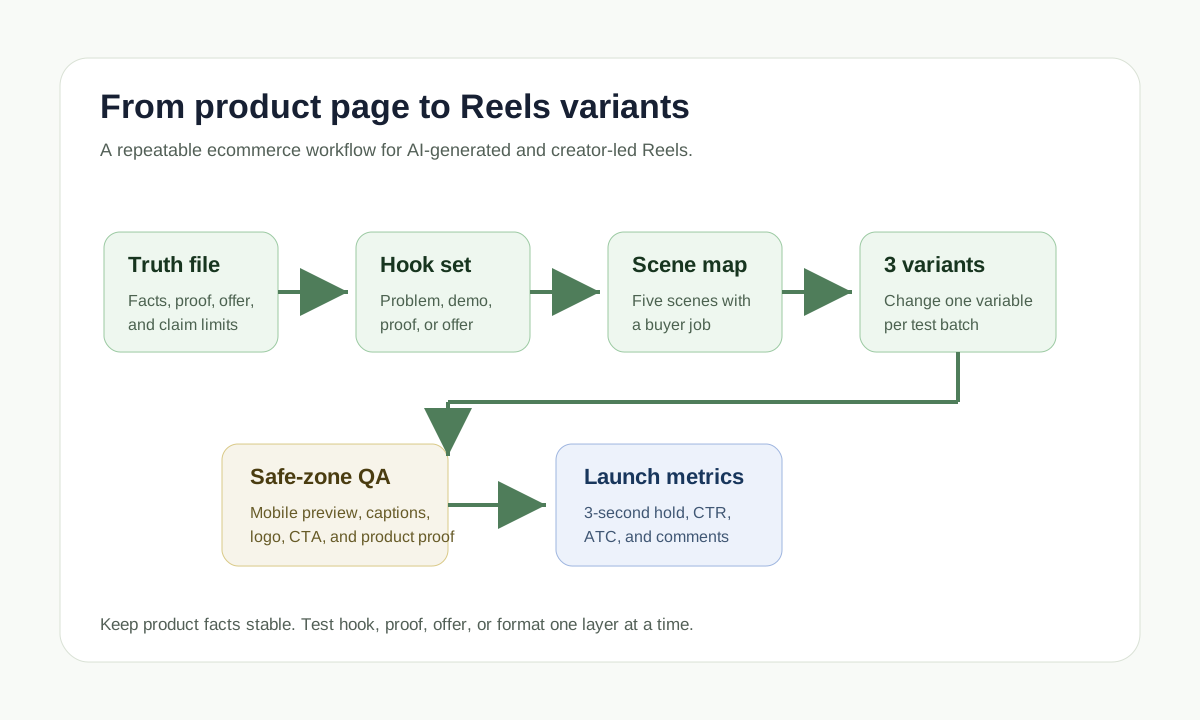
This scene map works whether you use ShopShot's AI video generator, a creator brief, a manual editor, or a hybrid workflow.
Step 6: Generate Controlled Variants
Instagram Reels product videos should be tested in controlled batches. If every version changes the hook, product shot, caption style, CTA, voice, offer, and background, you will not know what improved performance.
Use this first batch:
| Variant | Change | Keep stable |
|---|---|---|
| A: Problem hook | Opening line and first visual | Product proof, offer, CTA, caption style |
| B: Demo hook | Opening line and first visual | Product proof, offer, CTA, caption style |
| C: Proof hook | Opening line and first visual | Product proof, offer, CTA, caption style |
After the first batch, test one more variable: offer, proof type, creator voice, caption design, or opening product angle. Keep a naming system such as sku-reels-hookA-proof1-offer1-9x16-v01.mp4 so the media buyer can trace performance back to the creative decision.
Step 7: Run Claim, Review, and AI-Avatar QA
Reels product videos often use creators, AI presenters, reviews, or avatar-style scripts. That makes trust review part of the production workflow.
Use this QA table:
| Risk | Check before launch | Fix |
|---|---|---|
| Fake testimonial | Does the speaker appear to describe personal product experience that did not happen? | Rewrite as product explanation or use real customer proof. |
| Unsupported result | Does the video promise a result the product page cannot substantiate? | Replace with visible mechanism or factual feature. |
| AI presenter confusion | Could viewers think an AI actor is a real customer? | Avoid first-person customer claims or add clear context. |
| Review misuse | Is review text real, representative, and allowed for ads? | Use approved review snippets or remove. |
| Offer mismatch | Does the Reel mention an expired discount or unavailable variant? | Update the CTA or landing page. |
| Product distortion | Did AI change color, texture, size, packaging, accessories, or logo? | Regenerate with stricter product references. |
FTC guidance matters here because consumer reviews and testimonials can become advertising claims when used in marketing. Fictional or AI-generated people can be useful for explanation, but they should not be used to fake consumer experience.
Step 8: Match Reels to the Landing Page
An Instagram Reel is not finished until the destination page supports it. Check the page after the creative is approved:
| Reel element | Landing-page match |
|---|---|
| Product name | Same name, variant, color, and pack size |
| Offer | Same discount, threshold, bundle, and expiry |
| Proof | Same review, rating, feature, material, or mechanism |
| CTA | Same action: shop, customize, choose size, compare, or learn |
| Visual promise | Same product shape and visible accessories |
| Shipping or guarantee | Same terms and region limits |
If the Reel says "choose your size" but the page opens on one default SKU, fix the page or change the CTA. If the Reel shows a bundle that is not preselected, make the bundle easy to find.
Step 9: Launch With a Measurement Plan
Reels creative needs both platform metrics and ecommerce metrics.
| Metric | What it tells you | What to change |
|---|---|---|
| First 3-second hold | Whether the hook and first product shot stop scroll | Test a clearer problem or earlier product reveal |
| Average watch time | Whether scenes and captions keep attention | Shorten filler, simplify captions, move proof earlier |
| Click-through rate | Whether the offer and CTA create intent | Test product-benefit CTA or stronger proof |
| Add-to-cart rate | Whether the landing page matches the video promise | Align page proof, price, variant, and offer |
| Cost per usable variant | Whether production is scalable | Reuse winning scene maps and reduce revision loops |
| Comment quality | Whether viewers understand or question the product | Add objection-handling cut or clearer demo |
For broader testing structure, use how many UGC video ads to test. For channel specs beyond Instagram, use Meta video ad specs for ecommerce.
Pre-Launch Checklist
Use this final checklist before upload:
- The video is built for 9:16 Reels viewing.
- Product and main caption are not covered by likely UI overlays.
- Product appears in the first two seconds.
- The hook names one buyer moment.
- Captions are readable on a phone.
- The product is not visually distorted by AI.
- Any review or testimonial is real, approved, and not misleading.
- AI presenters do not pretend to be real customers.
- Offer, price, variant, and CTA match the landing page.
- File name includes SKU, hook, proof, and ratio.
- At least three variants are ready for testing.
- The winning version can be adapted into feed, Story, or product-page cuts.
FAQ
What size should an Instagram Reels product video be?
Create the main version as a vertical 9:16 video and keep important text, logos, product proof, and CTAs away from interface overlays. Always preview the final file on mobile before launch.
How long should an ecommerce Instagram Reel be?
Most product-led Reels should be short enough to communicate one idea quickly. A 10-25 second ad is often enough for a product hook, demo, proof point, and CTA, while a product-page explainer can be longer if the buyer needs more detail.
Can I reuse a TikTok product video as an Instagram Reel?
Yes, but remove platform-specific marks, recheck safe zones, confirm caption placement, and adapt the CTA to the Instagram landing path. Reusing the concept is safer than blindly reposting the same file.
Are AI-generated Instagram Reels safe for ecommerce ads?
They can be safe when the product is accurate and claims are checked. Do not let AI invent reviews, customer experiences, product materials, results, discounts, or usage contexts that your landing page cannot support.
How many Instagram Reels variants should I test per product?
Start with three variants for one product: problem hook, demo hook, and proof hook. Keep product proof and CTA stable in the first test so performance differences are easier to interpret.
Sources Checked
- Meta Business Help: About text overlays and the safe zone for ads in Stories and Reels
- Meta for Developers: Reels Ads creative requirements
- Meta Business Ads Guide: Instagram Reels ad specs
- Meta Business Help: Best practices for aspect ratios across placements
- Meta Business Help: About Advantage+ Creative
- FTC: Consumer Reviews and Testimonials Rule Q&A