
Quick Answer
A product video shot list template turns a script or storyboard into exact visual instructions: what to show, when to show it, how close the product should be, what proof must appear on screen, and what platform constraints the editor or AI video tool must respect. For ecommerce ads, the shot list should cover the hook, product reveal, use-case proof, objection answer, offer, CTA, safe-zone notes, and final QA.
Use the template below before filming, briefing a creator, or generating a product video with AI. It keeps the video specific enough to sell the product without drifting into unsupported claims, vague lifestyle footage, or shots that cannot fit TikTok, Reels, Shorts, Meta, YouTube, Amazon, or PDP placements.
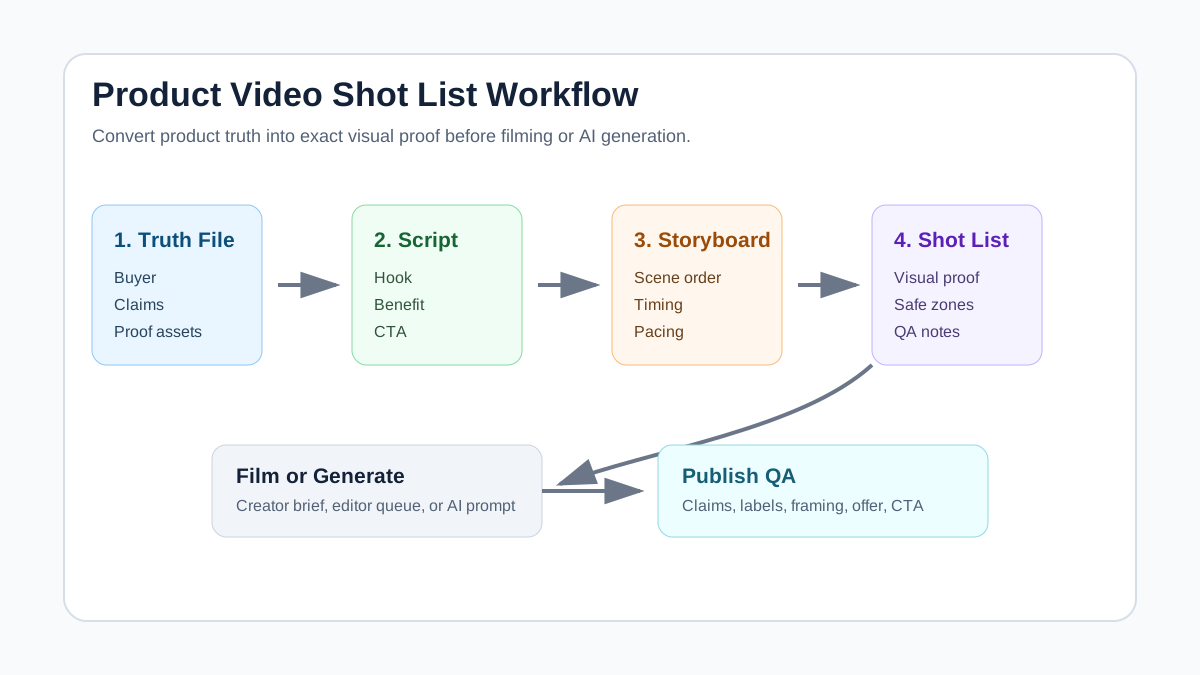
Why Ecommerce Videos Need a Shot List
A script tells people what the ad should say. A storyboard shows the order of scenes. A shot list tells the production system exactly what visual proof to capture.
That distinction matters for ecommerce because shoppers do not buy from a nice sentence alone. They need to see the product, understand the use case, trust the claim, and know the next action. A weak shot list creates common ad problems: the product appears too late, the label is unreadable, the hands hide the feature, the safe zone covers the price, or the final CTA shows an offer that is not on the landing page.
The shot list is also useful when you use AI. If the prompt says "make a premium skincare ad," the model may invent a mood. If the shot list says "macro texture shot, bottle label readable, approved claim only, no before-after skin transformation," the output has a better chance of staying useful and reviewable.
For upstream planning, start with the product video ad script template, then turn the scene order into the product video storyboard template. When the visual plan is approved, use AI product video prompts or ShopShot's AI video generator to produce variants.
The Product Video Shot List Template
Copy this structure into a brief, spreadsheet, or prompt file. Keep each row specific enough that a creator, editor, or AI tool can execute it without guessing.
| Shot | Time | Visual instruction | Product proof | Caption or VO | Platform note |
|---|---|---|---|---|---|
| 1. Hook | 0-3s | Show the buyer problem or surprising product action in the first frame | Product category visible | One short problem line | Keep text away from UI overlays |
| 2. Product reveal | 3-5s | Show package, product, or main item in hand | Label, size, color, or variant readable | Name the product plainly | Use close crop for mobile |
| 3. Use-case proof | 5-10s | Show the product solving one specific use case | Demo, fit, texture, assembly, before-use context | Explain one approved benefit | Do not imply unverified results |
| 4. Objection answer | 10-15s | Show detail that removes a purchase doubt | Measurement, material, included parts, care step | Answer one buyer question | Slow down if the detail is small |
| 5. Social or review angle | 15-20s | Show user context, review-inspired line, or comparison | Only use real approved review language | Keep testimonial wording accurate | Avoid fake creator claims |
| 6. Offer or bundle | 20-24s | Show offer card, bundle, or product set | Price, promo, or included items match landing page | One clear offer line | Make numbers readable |
| 7. Final CTA | 24-30s | Product hero, store page, or final use scene | Product still visible | One action: shop, learn, compare, or build | Use final frame that can become thumbnail |
If your video is only 15 seconds, compress the structure into hook, reveal, proof, objection answer, and CTA. If it is a product detail page video, slow the structure down and add more fit, assembly, sizing, or care shots.
Shot Types to Include by Product Category
Different products need different evidence. A beauty product needs texture and application clarity. A home product needs scale, setup, and before-use context. A fashion product needs fit, movement, and fabric detail. Do not reuse the same shot list for every SKU.
| Category | Must-have shots | Risk to avoid | Better instruction |
|---|---|---|---|
| Beauty and skincare | Texture, application amount, packaging, routine order | Unsupported skin transformation | "Show texture and routine step, no before-after claim" |
| Apparel and accessories | Fit on body, close fabric detail, movement, size context | Only flat-lay shots | "Show model walking, sitting, and close zipper detail" |
| Home and kitchen | Scale, setup, use, cleaning or storage | Abstract lifestyle montage | "Show product next to common object for size" |
| Electronics | Ports, setup, screen, cable, result | Unreadable interface | "Show hand plugging cable, screen visible for two seconds" |
| Supplements and wellness | Packaging, serving method, routine context | Medical or guaranteed-result claims | "Show label and usage ritual, avoid cure language" |
| Pet products | Pet interaction, mess, use step, safety detail | Overstated instant result | "Show realistic before-use and after-use area only" |
The main test is simple: if a reviewer paused any shot, would they understand what the product is and why that visual belongs in the ad?
Build the Shot List From a Product Truth File
Before you create shots, gather a short product truth file. This prevents the shot list from becoming a wish list of claims that the product page cannot support.
| Field | Example |
|---|---|
| Product | Leak-resistant stainless steel travel mug |
| Buyer | Commuter who carries coffee from home |
| Approved benefit | Fits common car cup holders, keeps drink covered, reusable |
| Visual proof | Lid close-up, cup holder fit, backpack side pocket, desk pour |
| Disallowed claims | Exact heat-retention hours, spill-proof guarantee, health claim |
| Primary placement | TikTok Shop, Instagram Reels, Meta retargeting, Shopify PDP |
| Offer | Starter discount or bundle, if currently live |
| Required assets | Product photos, packaging, logo, review quotes, landing page URL |
Once the truth file is done, write shots only for facts you can show. This is where many ecommerce videos improve quickly. Instead of "show premium quality," the shot list becomes "macro shot of stainless steel rim, hand closes lid, mug placed in bag side pocket."
Workflow: From Script to Shot List to AI Video
-
Choose one buyer problem.
Do not plan one video for every buyer. A travel mug for commuters needs a different first shot than the same mug for hikers or parents. -
Mark the script by scene.
Highlight the hook, product reveal, proof, objection answer, offer, and CTA. If a spoken claim has no visual proof, rewrite it or add a shot that supports it. -
Convert each scene into a camera instruction.
Use plain production language: close-up, hand demo, over-the-shoulder, product-on-table, texture macro, packaging reveal, screen recording, or final hero. -
Add platform constraints.
Google/YouTube recommends 16:9, 9:16, and 1:1 video ad formats with safe-zone awareness. TikTok in-feed ads support vertical, horizontal, and square formats, and TikTok policy requires dynamic, legible video with audio. Amazon Sponsored Brands video is 16:9 only, so an Amazon shot list needs different framing than a vertical TikTok ad. -
Generate or film the first version.
If you use AI, paste the approved shot list into the prompt. If you use a creator, attach the shot list to the creator brief and require a shot-by-shot delivery check. -
Run QA before export.
Check product identity, claim safety, label readability, safe zones, offer accuracy, audio, subtitles, and CTA. -
Turn the winner into variants.
Change one variable at a time: first shot, proof order, CTA, setting, or offer. Use the how many UGC video ads to test guide before judging performance.
Platform Notes for the Shot List
Your shot list should not be overloaded with every export setting, but it should warn the creator or AI tool about framing risk.
| Platform or use case | Shot-list implication | Source to check before export |
|---|---|---|
| TikTok or TikTok Shop | Use vertical-first framing, dynamic motion, audio, and readable text | TikTok in-feed specs and ad format policy |
| Instagram Reels and Meta ads | Keep key text, product, logo, and CTA inside safe zones | Meta safe-zone and video ad guidance |
| YouTube Shorts and YouTube ads | Plan for 9:16, 1:1, or 16:9 variations with safe areas | Google video ad specs |
| Amazon Sponsored Brands video | Build a separate 16:9 version, 6-45 seconds, with clear product demo | Amazon Sponsored Brands video specs |
| Shopify or PDP video | Slow down product details, fit, scale, setup, and objections | Your own PDP questions and support tickets |
For channel-specific checks, use the YouTube Shorts specs for ecommerce product videos, Meta video ad specs for ecommerce, TikTok ad specs for ecommerce product videos, and Amazon product video requirements.
Example Shot List: Travel Mug Ad
Here is a complete example for a 20-second vertical ad.
| Shot | Visual | Caption or voiceover | QA note |
|---|---|---|---|
| Hook | Hand picks up a cold disposable cup at a train platform | "Coffee cold before work?" | Problem is visible in first frame |
| Reveal | Travel mug placed next to keys and phone | "Pack a better morning cup" | Mug size is clear |
| Proof 1 | Lid closes, mug goes into backpack side pocket | "Covered lid for commute days" | Avoid saying spill-proof unless approved |
| Proof 2 | Mug fits car cup holder | "Fits the drive too" | Show actual fit, not a fake crop |
| Detail | Close-up of stainless interior and lid | "Reusable stainless design" | No unsupported heat-retention hours |
| Offer | Product plus bundle card | "Starter bundle available" | Offer must match landing page |
| CTA | Mug on desk beside laptop | "Shop the travel mug" | Final frame can be used as thumbnail |
This is much stronger than a generic instruction like "make a lifestyle ad for a travel mug." It gives the production system visual evidence, approved wording, risk boundaries, and a final action.
Common Shot List Mistakes
The Product Appears Too Late
If the first five seconds are mood footage, the ad may look polished but fail as product creative. Put the product category, problem, or demo in the first frame.
Every Shot Says the Same Thing
Five different angles of the product on a table are not five different proof points. Each shot should do a job: identify, demonstrate, answer, prove, offer, or direct.
Claims Are Spoken but Not Shown
If the ad says "easy to clean," show the cleaning motion. If it says "fits in a small bag," show the product going into a small bag. If the proof cannot be shown honestly, revise the claim.
The Same Shot List Is Used for Every Placement
Vertical social ads, YouTube ads, Amazon Sponsored Brands video, and PDP explainers have different pacing and framing needs. One source shot list can create variants, but it should not be exported unchanged everywhere.
Safe Zones Are Added Too Late
Safe-zone review belongs in the shot list, not only at export. If the price, logo, or CTA is planned in a risky corner, the final edit may be unusable for Reels, Shorts, TikTok, or in-feed ads.
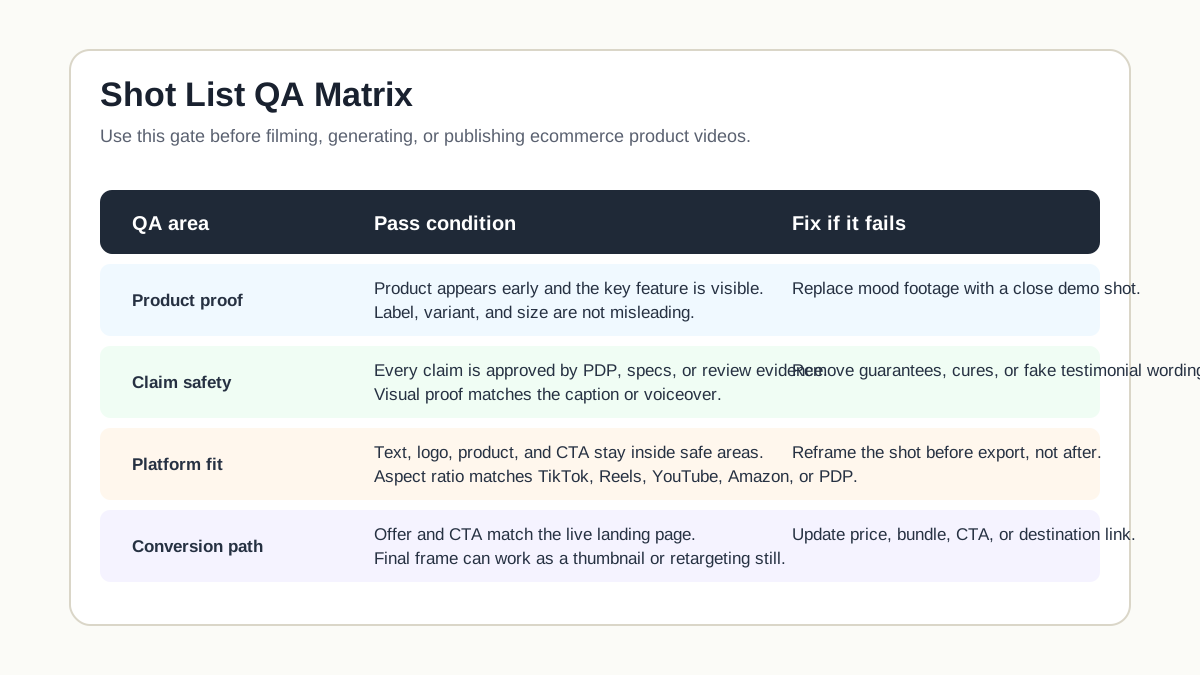
Pre-Publish QA Checklist
| Check | Pass condition |
|---|---|
| Product visibility | Product or product category appears within the first three seconds |
| Label and variant | Label, color, size, or variant is not distorted or misleading |
| Claim proof | Every benefit is shown, sourced from approved copy, or removed |
| Caption readability | Captions are short, high-contrast, and outside risky UI zones |
| Platform framing | Vertical, square, or horizontal framing matches the destination |
| Offer accuracy | Price, bundle, discount, and availability match the landing page |
| Audio and subtitles | Audio is clear when required; subtitles support silent viewing |
| CTA | The final shot gives one clear next action |
| Internal workflow | Script, storyboard, prompt, and shot list agree with each other |
Use this checklist with AI features that improve UGC product video quality when you are reviewing generated videos. If the video fails the QA pass, edit the shot list before regenerating. Regenerating from the same vague instruction usually repeats the same problem.
FAQ
What is a product video shot list?
A product video shot list is a scene-by-scene production checklist that defines the exact visuals needed for a product video. It includes timing, camera framing, product proof, captions, platform notes, and QA requirements.
How is a shot list different from a storyboard?
A storyboard shows the sequence of scenes. A shot list gives production-level instructions for each scene: what to capture, what proof must be visible, what text appears, and what risks to avoid.
Should I make one shot list for every platform?
Start with one master shot list, then create platform variants. TikTok and Reels usually need vertical-first framing and faster proof. Amazon Sponsored Brands video needs a 16:9 version. PDP videos can move slower and answer more buyer questions.
Can I use a shot list with AI video tools?
Yes. A shot list is one of the best inputs for AI video tools because it turns a vague creative idea into controlled scenes, product visibility rules, and claim boundaries.
What should every ecommerce shot list include?
Every ecommerce shot list should include the hook, product reveal, proof shot, objection-answer shot, offer or value shot, final CTA, platform framing note, and claim-safety QA.
Sources Checked
- Google Ads Help, "About video ad specs": https://support.google.com/google-ads/answer/13547298
- TikTok Ads Manager, "TikTok Auction In-Feed Ads": https://ads.tiktok.com/help/article/tiktok-auction-in-feed-ads
- TikTok Advertising Policies, "Ad Format and Functionality": https://ads.tiktok.com/help/article/tiktok-ads-policy-ad-format-and-functionality
- Meta Business Help Center, "About text overlays and the safe zone for ads in Stories and Reels": https://www.facebook.com/business/help/980593475366490
- Meta Ads Guide, "Awareness Video Ad Specs on Facebook Feed": https://www.facebook.com/business/ads-guide/update/video
- Amazon Ads, "Sponsored Brands video creative": https://advertising.amazon.com/resources/ad-specs/sponsored-brands-video