
Quick Answer
The AI features that improve UGC product video quality are the ones that make the product easier to understand without changing what the buyer will actually receive. For ecommerce teams, the highest-value features are product image cleanup, background control, auto captions, voice cleanup, hook and script generation, aspect-ratio resizing, scene consistency checks, and disclosure-ready QA for synthetic people or voices.
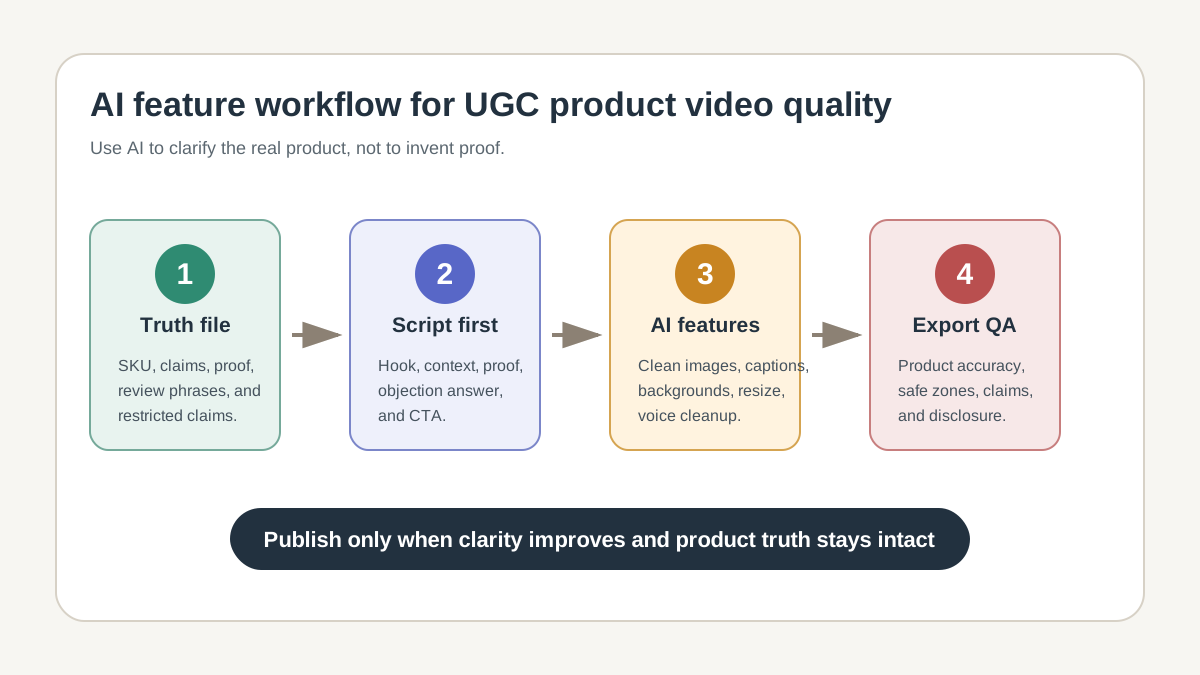
If you are building video ads from product photos, do not treat every AI feature as a creative upgrade. Some features improve clarity, while others create policy, trust, or product-accuracy risk. The practical test is simple: does the feature help shoppers understand the real product faster, or does it make the video look more impressive than the product can support?
This guide gives ecommerce sellers a feature-by-feature checklist for UGC-style product videos. Use it with a product video ad script template, a UGC video brief, and your final export workflow in ShopShot's AI video generator.
What "Quality" Means in a UGC Product Video
UGC quality is not the same as studio polish. A good UGC product video feels fast, useful, and believable. The buyer should understand the product, the use case, the proof, and the next action before the video ends.
For ecommerce, quality has five layers:
| Quality layer | What it means | AI feature that can help | What to verify manually |
|---|---|---|---|
| Product clarity | The item is visible, named, and shown in context. | Product image cleanup, background removal, product-focused framing. | Color, size, texture, packaging, and included accessories still match the listing. |
| Message clarity | The first seconds explain why the product matters. | Hook generation, script suggestions, caption summaries. | The hook is specific, not a generic "you need this" opener. |
| Proof | Claims are supported by visible product details, reviews, specs, or real use cases. | Review mining, claim extraction, scene planning. | No unsupported performance, health, safety, or income claims are added. |
| Platform fit | The video works in TikTok, Reels, Shorts, Meta, or Amazon placements. | Auto resize, safe-zone overlays, trim suggestions. | Text, logo, price, and CTA do not sit under platform UI. |
| Trust | The video does not hide synthetic media, fake testimonials, or altered product facts. | AI disclosure checks, voice/avatar consent checks, policy prompts. | Any synthetic person, voice, or heavy AI edit is disclosed where required. |
This is why "more AI" is not automatically better. A face-swap, fake creator testimonial, or unreal product demonstration can make the video look more native, but it can also reduce trust and trigger platform review. The best AI features reduce friction while keeping the product truthful.
The AI Features Worth Prioritizing
Product Image Cleanup
Start with the product, not the avatar or background. Product image cleanup is useful when it removes blur, stray objects, bad lighting, or messy backgrounds from source photos. It is risky when it changes material, shape, color, size, label text, or the way the product performs.
Use cleanup for:
- Sharpening a product photo that is slightly soft.
- Removing clutter behind a product.
- Standardizing shadows and brightness across scenes.
- Preparing consistent cutouts for different placements.
Avoid cleanup for:
- Making a small product look larger than it is.
- Removing warnings, labels, ingredients, or compatibility notes.
- Changing fabric texture, colorway, packaging, or bundle contents.
- Creating a "before and after" result that the product cannot deliver.
TikTok Shop's AI-generated content guidance says sellers should show products accurately and not use AI to alter product appearance or fabricate unrealistic results. Treat that as the baseline for every channel, not just TikTok Shop.
Background Control
Background replacement is one of the safest AI features when it improves context. A skincare product can move from a cluttered desk to a clean bathroom shelf. A kitchen tool can appear on a countertop. A pet accessory can appear near a sofa.
The background should support the use case, not become the claim. If the product has not been tested outdoors, do not show it surviving rain. If a home goods item is not heat-resistant, do not place it beside open flame. If a supplement or beauty product needs careful claim review, avoid medical-looking scenes that imply clinical proof.
For UGC-style ads, the best backgrounds are ordinary and specific:
| Product type | Better AI background | Risky AI background |
|---|---|---|
| Beauty tool | Bathroom counter with soft natural light. | Clinic room implying medical authority. |
| Fitness accessory | Home workout area with normal floor space. | Extreme transformation scene. |
| Kitchen gadget | Countertop with ingredients nearby. | Restaurant-grade setting that implies professional performance. |
| Fashion item | Mirror selfie, closet, or outdoor walk. | Luxury setting that makes material quality look higher than it is. |
| Pet product | Living room, entryway, or car back seat. | Unsafe use scenario or impossible pet behavior. |
Auto Captions and Text Layout
Auto captions are usually a quality upgrade because many shoppers watch without full attention and many feeds are scanned before they are heard. Captions also make claim review easier because your team can read the ad like a script.
The mistake is letting captions cover the product. For short-form placements, keep the first text block short, place the key message away from UI overlays, and avoid stacking captions, price, logo, and CTA in the same corner. YouTube's Shorts ad guidance recommends vertical 9:16 creative and warns advertisers to keep critical elements out of top, bottom, and right-side interface zones.
Use captions for:
- The first product promise.
- The main objection.
- One or two proof points.
- A clear CTA.
Do not use captions for:
- Long paragraphs.
- Tiny legal disclaimers that users cannot read.
- Keyword stuffing.
- Claims that do not appear in the product page or evidence file.
Hook and Script Generation
Hook generation can improve UGC product video quality when it turns scattered product facts into a clear first three seconds. It becomes low quality when every product gets the same generic opener.
Good hooks are built from four inputs:
- The product's most visual problem.
- The buyer's real objection.
- The proof you can show on screen.
- The placement where the ad will run.
For example, "Stop wasting money on bad product videos" is too broad. "This travel bottle does not leak when it is upside down in a tote" is more useful because it names the product category, shows a proof scene, and gives the viewer a reason to keep watching.
If you need more opening patterns, pair this checklist with UGC video hooks for product ads. Then use how many UGC video ads to test to decide how many hook variants to ship before judging performance.
Voice Cleanup and Synthetic Voice
Voice cleanup is usually low risk. It removes hiss, balances volume, and makes the creator or presenter easier to understand. Synthetic voice is more sensitive because it may sound like a real person who did not record the endorsement.
Use synthetic voice when:
- The script is brand narration, not a fake personal testimonial.
- You own or have permission to use the voice.
- The voice does not imitate a public figure, creator, customer, or employee without permission.
- The disclosure rules for the channel and market are checked.
TikTok's advertising policy distinguishes minor AI edits such as lighting, background edits, and denoising from significant AI-generated media. It also says undisclosed AI-generated content may be rejected or restricted. For ecommerce sellers, the safest workflow is to label significant synthetic voice or realistic AI media before review, not after a rejected ad.
Aspect Ratio Resizing
Auto resizing saves time, but it is not a final QA step. A 16:9 product demo can be cropped into 9:16 and still lose the product, the hands, the CTA, or the price.
Use AI resizing to create drafts for:
- TikTok and Reels: 9:16 vertical.
- YouTube Shorts: 9:16 vertical with text outside UI red zones.
- Meta feed: 1:1 or 4:5, depending on campaign setup.
- Amazon Sponsored Brands video: follow Amazon's current placement specs and review rules.
Then manually check the first frame, product visibility, caption location, logo position, and CTA. Google's Demand Gen documentation also describes AI asset optimization and creative enhancements, but the same page frames them as a way to improve coverage and creative assets, not as a replacement for final brand and policy review.
The Feature Risk Matrix
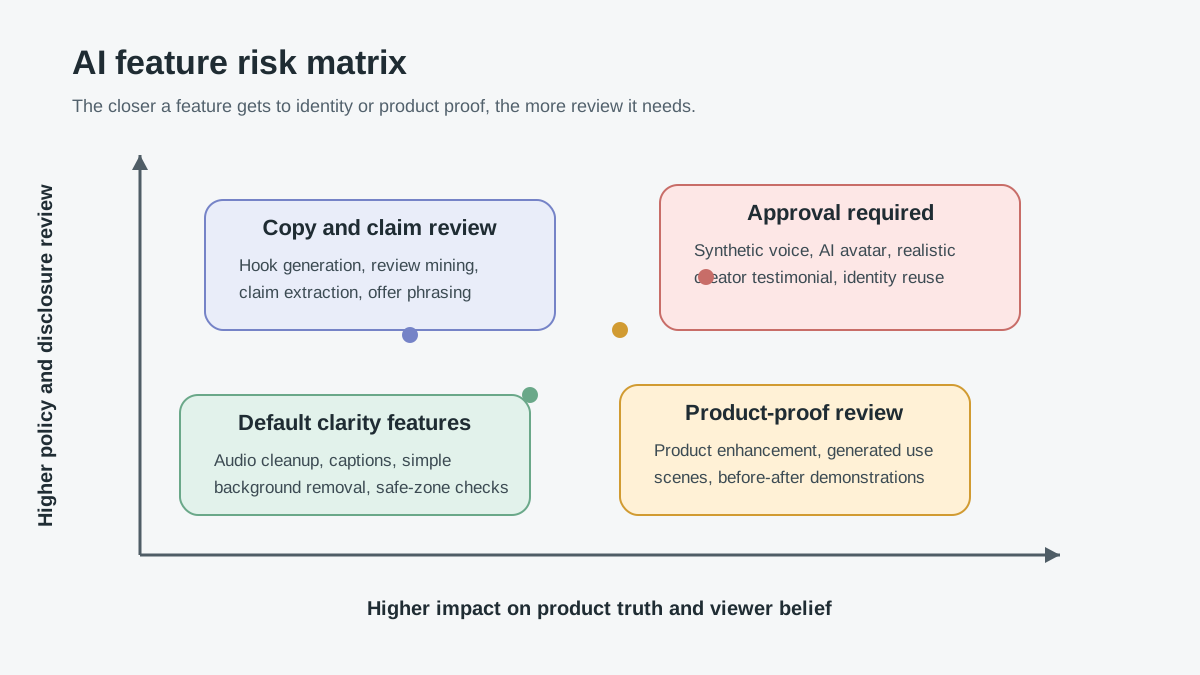
Some AI features should be default. Others should require approval before export.
| AI feature | Quality upside | Main risk | Approval level |
|---|---|---|---|
| Denoising and audio leveling | Cleaner voice, easier comprehension. | Minimal, unless it hides required spoken disclosure. | Standard QA. |
| Auto captions | Better scanability and accessibility. | Text covers product or adds unsupported claims. | Standard QA. |
| Background removal | Cleaner product focus. | Product edge artifacts or misleading use context. | Standard QA for simple scenes; manager review for claim-heavy scenes. |
| Hook generation | Faster creative testing. | Generic hooks or exaggerated claims. | Copy review. |
| Product image enhancement | Better visual clarity. | Changes true color, shape, scale, or packaging. | Product-page match review. |
| Synthetic voice | Fast localization and narration. | Voice rights, endorsement confusion, disclosure risk. | Legal/policy review for realistic voices. |
| AI avatar or synthetic creator | Faster presenter-style ads. | Fake testimonial, identity misuse, disclosure risk. | Approval required. |
| Generated product-in-use scene | Stronger demonstration. | Shows performance the product cannot support. | Approval required with evidence. |
The rule of thumb: the closer a feature gets to identity, performance proof, or product transformation, the more review it needs.
A Practical QA Workflow Before Publishing
Use this workflow for every AI-assisted UGC product video before it reaches ad upload or organic publishing.
1. Lock the Product Truth File
Create a short evidence file before generating scenes:
- Product name and model.
- Exact color, size, material, and package contents.
- Approved claims from the product page.
- Prohibited claims or claims that need substantiation.
- Customer review phrases that are safe to paraphrase.
- Visual proof you can show.
This prevents the AI tool from inventing benefits. It also gives your reviewer a source of truth when checking captions, voiceover, and scenes.
2. Generate the Script Before the Video
Do not begin with "make a viral ad." Start with a script. A good UGC script has a hook, product context, proof scene, objection answer, and CTA. If the script is weak, AI video features will only make a weak message look polished.
Use the product video storyboard template when the video needs multiple scenes, or the UGC video brief template when a creator, avatar, or internal reviewer needs production instructions.
3. Build One Baseline Video and Two Controlled Variants
The fastest workflow is not to generate ten random videos. Build one baseline version, then change only one variable per variant:
- Variant A: different hook.
- Variant B: different first visual.
- Variant C: different proof angle.
- Variant D: different CTA.
This makes performance data useful. If every video changes the hook, voice, caption, background, offer, and CTA at once, you will not know which AI feature improved quality.
4. Run the Product Accuracy Pass
Pause the video at the first frame, first product close-up, proof moment, price/offer frame, and CTA. Compare those frames to the product listing.
Check:
- Does the product look like the SKU being sold?
- Are color and material accurate?
- Are dimensions implied correctly?
- Are included accessories clear?
- Does the scene imply a use case the product cannot support?
- Are before/after or performance moments substantiated?
For Amazon placements, also check the current Amazon Ads specs for the exact product and campaign type. Amazon's Sponsored Brands video spec page lists video duration, dimensions, file format, aspect ratio, codec, frame rate, and other requirements; these details can differ from social-feed exports.
5. Run the Disclosure and Endorsement Pass
If the video uses a synthetic person, AI voice, heavily generated realistic scene, or review-style statement, ask two questions:
- Would a viewer reasonably think a real customer, creator, or expert personally used the product?
- Does the platform or jurisdiction require a label, disclaimer, or AI-generated content toggle?
The FTC's endorsement guidance is built around a simple truth-in-advertising principle: endorsements must be honest and not misleading. For ecommerce UGC ads, that means an AI avatar should not imply personal experience with a product, and a synthetic voice should not turn a brand claim into a fake customer testimonial.
Best Feature Stack by Video Type
| Video type | Best AI feature stack | Features to avoid or review carefully |
|---|---|---|
| TikTok Shop product demo | Product cleanup, hook generation, captions, 9:16 safe-zone check. | Unreal generated product use, fake creator testimonial, undisclosed realistic AI person. |
| Meta/Reels prospecting ad | Hook variants, caption layout, background control, quick resize. | Over-polished avatar ads that feel less native than product proof. |
| YouTube Shorts product ad | Vertical crop, first-frame hook, captions, CTA placement. | Text in UI red zones, slow intro, horizontal asset with bad crop. |
| Amazon video ad | Product-first script, clean background, spec-compliant export. | Social-style claims, unsupported comparisons, wrong aspect ratio for placement. |
| PDP explainer video | Product image cleanup, clear scene sequence, voice cleanup. | Claims that go beyond PDP copy or support documentation. |
The best stack is usually boring: clean the product image, write a specific hook, add readable captions, check safe zones, and verify claims. The risky stack is the one that adds a synthetic person, voice, transformation, and performance claim without an evidence file.
How to Score AI-Assisted UGC Video Quality
Before publishing, score the video on a 1-5 scale in each category:
| Score area | 1 point | 3 points | 5 points |
|---|---|---|---|
| Product visibility | Product is hard to see. | Product appears but not consistently. | Product is clear in the hook, proof scene, and CTA. |
| Hook specificity | Generic opener. | Mentions product category. | Names a real buyer problem and visible proof. |
| Claim safety | Claims are broad or unsupported. | Most claims match the PDP. | Every claim can be traced to product facts, tests, or approved copy. |
| Platform fit | Wrong ratio or text placement. | Fits the ratio but needs layout cleanup. | Ratio, safe zones, length, and CTA match the placement. |
| Trust | Synthetic elements are unclear. | Most synthetic use is labeled or obvious. | AI use, endorsement context, and product accuracy are all review-ready. |
Publish only when the total score is at least 20 out of 25 and no single category scores below 3. A video with a strong hook but poor product accuracy should not ship.
Common Mistakes
Using AI to Create Proof Instead of Showing Proof
AI can help turn proof into scenes. It should not invent proof. A product video can show a real review, a real specification, a real comparison, or a real unboxing detail. It should not create a customer result that your product page cannot support.
Treating Background Removal as a Product Upgrade
Background removal is for clarity. It should not make a budget item look like a luxury product if the listing, price, and materials do not support that impression.
Letting Auto Captions Become the Ad
Captions should clarify the video. They should not carry all the persuasion while the product sits blurry in the background. If the video makes no sense with captions turned off, the visual concept is weak.
Skipping Disclosure Until the Platform Flags the Ad
Disclosure is not just a compliance task. It affects trust. If the video uses realistic synthetic media, label it where the platform requires it and avoid presenting synthetic endorsements as real customer experience.
FAQ
What AI feature improves UGC product video quality the most?
For most ecommerce sellers, the highest-impact feature is not an avatar or generated scene. It is a combination of product image cleanup, specific hook generation, readable captions, and safe-zone-aware resizing. These features improve clarity without changing the product.
Are AI avatars good for UGC product videos?
AI avatars can work for explainer videos, onboarding, or simple product narration. They are risky for testimonial-style UGC because viewers may assume a real person used the product. If you use an avatar, avoid fake personal experience claims and check disclosure requirements.
Can AI-generated product scenes be used in ads?
They can be used when the scene accurately represents the product and does not fabricate performance, size, safety, or results. Generated scenes need a product accuracy pass before publishing.
Should every AI-assisted UGC video be labeled?
Not always. Minor edits such as lighting, background cleanup, or denoising may not require the same treatment as realistic synthetic media. But if the video is fully or significantly AI-generated, uses a synthetic person or voice, or could mislead viewers, use the platform's disclosure tools and a clear label.
How many AI video variants should ecommerce teams test?
Start with one approved baseline and two or three controlled variants. Change one variable at a time, such as hook, first visual, proof scene, or CTA. This produces cleaner learning than generating many random versions.
Sources Checked
- TikTok Advertising Policies: Misleading and false content
- TikTok Shop Academy: AI-Generated Content Restrictions and Requirements
- Google Ads Help: Demand Gen campaign creative asset specifications and guidelines
- Google Business: YouTube Shorts Ads
- Amazon Ads: Sponsored Brands video ad specs and guidelines
- FTC: Endorsement Guides: What People Are Asking
Final Takeaway
The best AI features for UGC product video quality make the product clearer, the message faster, and the review process easier. Use AI to clean, structure, caption, resize, and test. Be careful when AI starts creating identity, product proof, or performance scenes. That is where quality can turn into risk.