
Quick Answer
The best product video CTA is the next action a shopper can actually take after the proof scene. For cold ecommerce ads, use CTAs such as "See it in action," "Watch the fit test," or "Compare the bundle." For warm retargeting, use more direct CTAs such as "Shop the bundle," "Finish your set," or "Check your size." The CTA should match the video proof, the platform button, and the landing page destination.
If the video shows a stain-removal demo, do not end with a vague "Learn more." Ask the viewer to "See the stain test" or "Shop the cleaning kit." If the video compares sizes, do not send the viewer to a generic homepage. Send them to the product page, size guide, collection, or bundle page that completes the promise.
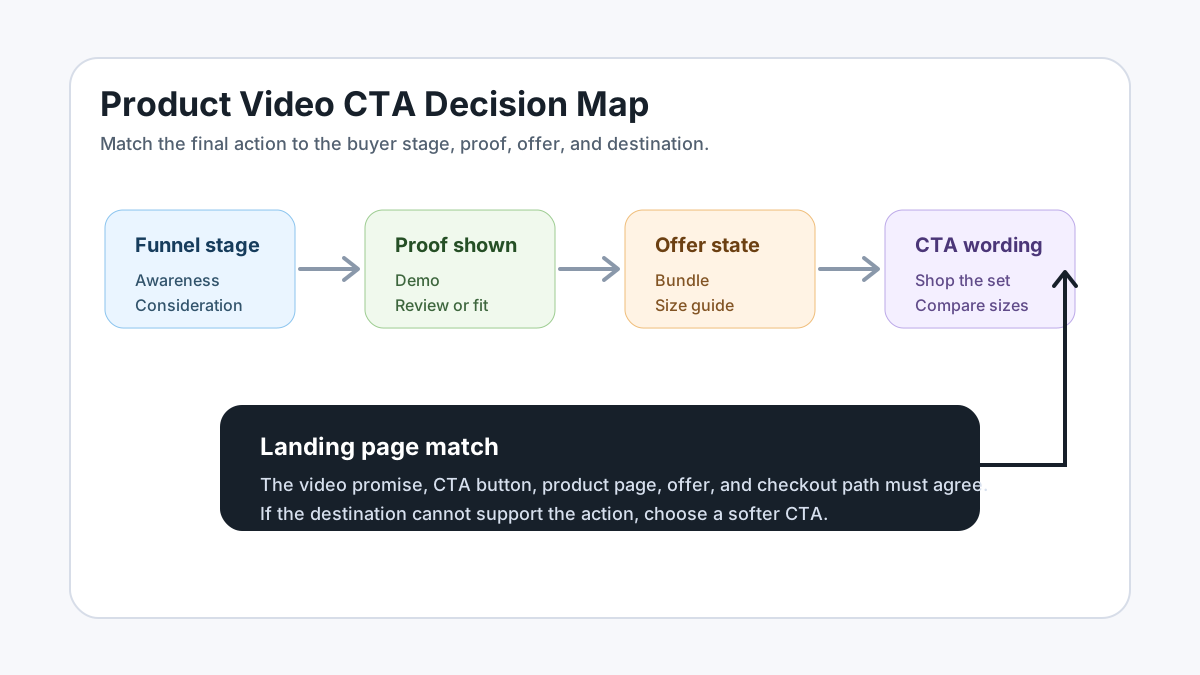
For upstream structure, start with the product video ad script template, then turn the CTA into a shot plan with the product video storyboard template. If you are generating variants with AI, use AI product video prompts for ecommerce ads after you choose the CTA logic.
Why Ecommerce CTAs Fail in Product Videos
Most ecommerce CTAs fail because they are written after the video is already finished. The team writes the hook, shows the product, adds a price frame, and then drops a generic "Shop now" end card into the last second. That can work for a simple offer, but it often loses the reason the viewer watched the video.
A product video is not a static banner. The buyer has just seen a sequence: problem, product, proof, objection, and offer. The CTA should complete that sequence. If the CTA does not connect to the proof, the video feels like content with a sales sticker attached.
Official platform guidance points in the same direction. Google Ads describes the video campaign call-to-action as the button that sends people to the final URL. TikTok creative guidance recommends a hook, unique selling points, and a clear call-to-action. Shopify product media guidance frames video as a way to help customers understand product function and size. For ecommerce teams, the practical rule is simple: the CTA is not only wording. It is the bridge between the proof in the video and the page where the buyer can act.
CTA Decision Table
Use this table before writing the script. Pick the buyer state first, then choose the CTA style.
| Buyer state | Video proof to show | CTA example | Best destination | Avoid |
|---|---|---|---|---|
| First-time viewer | Product in use, fast result, clear problem | See it in action | Product page or product video landing page | Shop now before trust exists |
| Comparison shopper | Side-by-side size, material, bundle, or before-after | Compare the sizes | Size guide, comparison section, or collection page | A homepage with no comparison |
| Offer-ready shopper | Bundle, discount, limited inventory, gift set | Shop the bundle | Exact bundle or offer page | Offer that is not visible on the page |
| Retargeting viewer | Cart item, viewed product, matching accessory | Finish your set | Cart, product, or collection page | Generic brand awareness CTA |
| PDP visitor | Fit, assembly, use case, dimensions, warranty | Check the fit | Product detail page module, size guide, FAQ, or support section | Hard-sell CTA on an education video |
| Amazon or marketplace shopper | Feature demo, packaging, use sequence, claim support | Watch the setup | Listing video or product detail page | Unsupported performance claim |
The CTA is allowed to be soft if the viewer is still learning. It should be direct when the offer and destination are already clear.
25 Product Video CTA Examples You Can Adapt
These examples are written for ecommerce product videos, not generic brand campaigns. Use them in voiceover, captions, end cards, platform CTA buttons, or product page modules.
Demo CTAs
Use demo CTAs when the video proves how the product works.
| CTA | Best use | Script fit |
|---|---|---|
| See it in action | Cold social ad or PDP explainer | After a visible product demo |
| Watch the stain test | Cleaning, home, beauty, or pet products | After a before-after proof shot |
| See the setup in 20 seconds | Assembly, gadget, home, fitness | After showing parts or installation |
| Check the fit | Apparel, accessories, furniture, storage | After size, model, or room context |
| See how it folds | Travel, stroller, storage, bags | After a motion or portability shot |
Offer CTAs
Use offer CTAs only when the offer is visible and true on the landing page.
| CTA | Best use | Script fit |
|---|---|---|
| Shop the bundle | Multi-item kit, gift set, starter set | After showing the full set |
| Choose your color | Apparel, decor, phone cases, accessories | After a color or style montage |
| Build your set | Modular products or mix-and-match bundles | After showing compatible items |
| Get the starter kit | Consumables, skincare, supplements, pet care | After explaining the first-use path |
| Claim the launch offer | New product or seasonal campaign | After the value proposition and price proof |
Objection-Handling CTAs
Use these when the video answers a specific buyer hesitation.
| CTA | Best use | Script fit |
|---|---|---|
| Compare the sizes | Sizing uncertainty | After measurement or model shots |
| Check the ingredients | Beauty, food, supplements, cleaning | After showing product label or formulation |
| See what is included | Bundles, kits, electronics, replacement parts | After unboxing |
| View the care guide | Apparel, bedding, leather, kitchenware | After durability or washability proof |
| Read the fit notes | Shoes, denim, shapewear, technical gear | After model or try-on scene |
Retargeting CTAs
Use these when the viewer already knows the product.
| CTA | Best use | Script fit |
|---|---|---|
| Finish your set | Cart abandoners or viewed accessory shoppers | After showing the missing companion item |
| Pick up where you left off | Returning visitors | After reminding the problem and product |
| Complete your routine | Skincare, wellness, home cleaning, pet care | After showing sequence or habit |
| Add the refill | Consumables and subscription products | After showing empty or nearly empty product |
| Try the best-selling shade | Beauty, apparel, decor | After social proof or top-seller proof |
Education CTAs
Use these when the video is designed to help buyers understand rather than buy immediately.
| CTA | Best use | Script fit |
|---|---|---|
| Learn which size fits | High-consideration product | After size comparison |
| See the product guide | Technical, appliance, or compatibility product | After problem diagnosis |
| Watch the full routine | Beauty, fitness, food prep, pet care | After a short teaser |
| Compare your options | Collection page or product family | After multiple product shots |
| Save this checklist | Organic Shorts, Reels, or TikTok support content | After a useful tutorial |
Match CTA to Platform Button and Page
A CTA has three layers:
- On-screen or voiceover wording.
- Platform button or link element.
- Landing page action.
Those three layers do not need to use the exact same words, but they must not contradict each other.
For example, a video caption can say "Compare the fits," the platform button can say "Learn More," and the landing page can open at a size guide section. That is coherent. But if the caption says "Shop the bundle," the platform button says "Sign Up," and the landing page is a homepage, the user has to solve the funnel instead of buying.
Google's video campaign setup notes that the call-to-action appears as a button and sends people to the final URL. TikTok's ad setup flow asks advertisers to enter text and link elements and verify settings before delivery. That means ecommerce teams should treat the CTA and the final URL as one asset, not two separate fields.
CTA Examples by Channel
TikTok and Reels
Short-form social videos need CTAs that are simple enough to read while the buyer is still watching motion. Use one clear action in the final caption and keep the product visible behind it.
Good TikTok or Reels CTAs:
- "See the before-after."
- "Tap to compare sizes."
- "Shop the starter kit."
- "Save this for your next cleanout."
- "Watch the 10-second setup."
Avoid long CTAs such as "Click the link in our profile to learn more about the complete product collection." The buyer will not read it in a fast feed.
If you need format checks, pair this article with the Meta video ad specs guide and the YouTube Shorts title template.
YouTube Shorts and Video Ads
For Shorts, the CTA needs to work even if the viewer is not ready to buy immediately. YouTube description guidance recommends unique descriptions and one or two main terms in the title and description. For ecommerce Shorts, use the video CTA to drive the next action and use the description to add product context.
Good Shorts CTAs:
- "Compare the fit before you buy."
- "See the full routine."
- "Check the product details."
- "Watch the setup steps."
- "Shop the exact bundle."
For paid YouTube or Google video campaigns, confirm that the platform CTA button, final URL, and video end card all point to the same buyer action.
Product Detail Page Videos
A PDP video CTA does not need to shout "Buy now." The product page already contains purchase controls. The video should help the shopper choose correctly.
Good PDP CTAs:
- "Check your size before adding to cart."
- "See what comes in the box."
- "Compare the small and large version."
- "Review the care steps."
- "Match it with the refill pack."
Shopify product media guidance notes that videos can help customers understand product function and size. That makes PDP CTAs more useful when they reduce uncertainty rather than push urgency.
Product Video CTA Workflow
Use this workflow before producing a batch of ads.
-
Define the buyer state.
Decide whether the viewer is cold, comparing, offer-ready, retargeted, or already on the product page. -
Pick one proof scene.
Choose the scene that earns the CTA: demo, before-after, unboxing, size comparison, review quote, bundle reveal, or use sequence. -
Write the CTA in plain buyer language.
Use words the shopper would use: size, fit, bundle, refill, setup, ingredients, shade, routine, or comparison. -
Match the platform button.
Choose the closest available button. If the exact wording is not available, keep the platform button broad and make the on-screen CTA specific. -
Match the landing page.
Send the click to the page that completes the promise. If the CTA says "Compare sizes," do not send traffic to a page where size details are hidden. -
Test one CTA variable at a time.
Keep the same product, proof, offer, and page while changing only the CTA wording. Then test the destination or proof type separately.
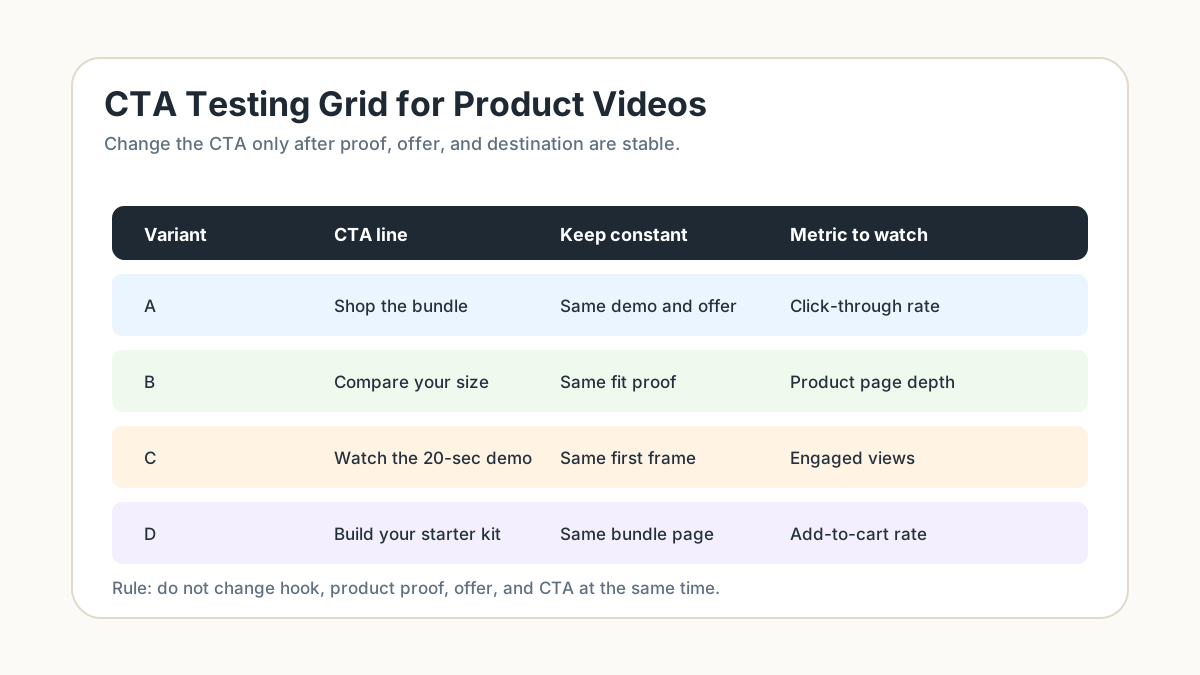
For batch planning, connect this workflow to how many UGC video ads to test. For production, generate variants with ShopShot's AI video generator after the script and CTA rules are fixed.
CTA Testing Matrix
Do not test five different videos and call the winner a CTA winner. If the hook, product angle, offer, format, and landing page all change, you cannot tell whether the CTA mattered.
Use this matrix:
| Test question | Keep constant | Change | Metric to read |
|---|---|---|---|
| Does direct wording help? | Hook, proof, offer, page | "See it in action" vs "Shop the bundle" | Click-through rate and landing page view rate |
| Does proof type matter? | CTA, offer, page | Demo proof vs review proof | Hold rate, click-through rate, add-to-cart rate |
| Does page match matter? | Hook, proof, CTA | PDP vs collection vs bundle page | Bounce, add-to-cart, conversion rate |
| Does CTA timing matter? | Wording, proof, page | Mid-video caption vs end card only | Clicks, completion rate, assisted conversions |
| Does format matter? | CTA and offer | 9:16 short vs 1:1 feed crop | Thumb-stop, click-through, conversion rate |
The cleanest first test is usually wording. Keep the video identical and change only the CTA end card or caption. Once the winner is clear, test destination and proof type.
Common CTA Mistakes
Mistake 1: Using "Shop Now" for Every Video
"Shop now" is clear, but it is not always persuasive. If the video is educational, comparison-based, or proof-led, a more specific CTA can explain why the click is worth it.
Better replacements:
- Replace "Shop now" with "Compare the sizes" when fit is the main barrier.
- Replace "Shop now" with "See the stain test" when proof is the reason to click.
- Replace "Shop now" with "Build your set" when the product is modular.
Mistake 2: Asking for a Click Before Showing Proof
Do not place the main CTA before the buyer understands the product. A small mid-video prompt can work, but the main CTA should follow the proof scene.
Weak sequence:
- Logo.
- Shop now.
- Product appears.
- Claim.
Stronger sequence:
- Problem hook.
- Product action.
- Proof scene.
- CTA matched to proof.
Mistake 3: Sending Every CTA to the Homepage
The homepage is rarely the best destination for a product video. It asks the buyer to restart the search. Use the product page, collection, size guide, bundle page, comparison module, or product media section whenever possible.
Mistake 4: Creating a CTA the Page Cannot Support
If the CTA says "Shop the bundle," the bundle must be visible. If it says "Check ingredients," the ingredient list must be easy to find. If it says "Compare sizes," the size information should not be buried under tabs.
Mistake 5: Hiding the CTA Under Platform UI
Vertical videos often lose text under captions, buttons, safe zones, or bottom navigation. Keep the CTA in a clean area and check mobile previews before launch.
Mini Script Examples
Example 1: Cleaning Product Demo
Hook: "This red sauce stain sat for six hours."
Proof: Show a close-up spray, wait, wipe, and comparison with the untreated side.
CTA: "See the stain test."
Destination: Product page section with demo video, ingredients, and usage instructions.
Why it works: The CTA names the proof the buyer just watched, so the click continues the same thought.
Example 2: Apparel Fit Comparison
Hook: "Same jacket, three body types."
Proof: Show three models with height and size overlays, then a movement test.
CTA: "Compare your fit."
Destination: Size guide or product page with model notes.
Why it works: The CTA answers the buyer's real hesitation before purchase.
Example 3: Bundle Offer
Hook: "The travel pouch is the part everyone forgets."
Proof: Show product, pouch, charger, refill, or accessory packed together.
CTA: "Shop the travel bundle."
Destination: Exact bundle page.
Why it works: The CTA is direct because the offer is concrete and visible.
Example 4: Retargeting Accessory
Hook: "Your organizer works better with the divider set."
Proof: Show the original product with and without the accessory.
CTA: "Finish your setup."
Destination: Accessory product page or cart add-on page.
Why it works: The CTA uses the buyer's existing interest instead of introducing a new product from scratch.
FAQ
What is a good CTA for a product video?
A good product video CTA names the next action that follows the proof. "See it in action," "Compare the sizes," "Shop the bundle," and "Check the fit" are often stronger than a generic "Learn more" because they tell the shopper what they will get after the click.
Should every ecommerce video ad say "Shop now"?
No. "Shop now" works when the offer is obvious and the buyer is ready. For cold traffic, comparison shoppers, and education videos, use a CTA that matches the proof scene, such as "Watch the setup" or "Compare your options."
Where should the CTA appear in a product video?
Place the main CTA after the proof scene, usually near the end. You can add a lighter mid-video prompt if the product is already clear, but do not ask for a purchase before the video has shown why the product matters.
Can one video use multiple CTAs?
Usually no. A product video can have supporting captions, but it should have one primary CTA. Multiple CTAs split attention and make performance data harder to read.
How do I test product video CTAs?
Keep the video, offer, and landing page constant, then test CTA wording first. After that, test destination or proof type. If every element changes at once, you will not know whether the CTA improved results.