
Last reviewed: May 22, 2026
Ad creative AI can help ecommerce teams turn a product page into multiple video ad concepts, but the ranking and revenue opportunity is not in "generating more ads." The advantage comes from converting product facts, buyer objections, reviews, offer details, and platform constraints into controlled video variants that can be tested without drifting away from what the product actually does.
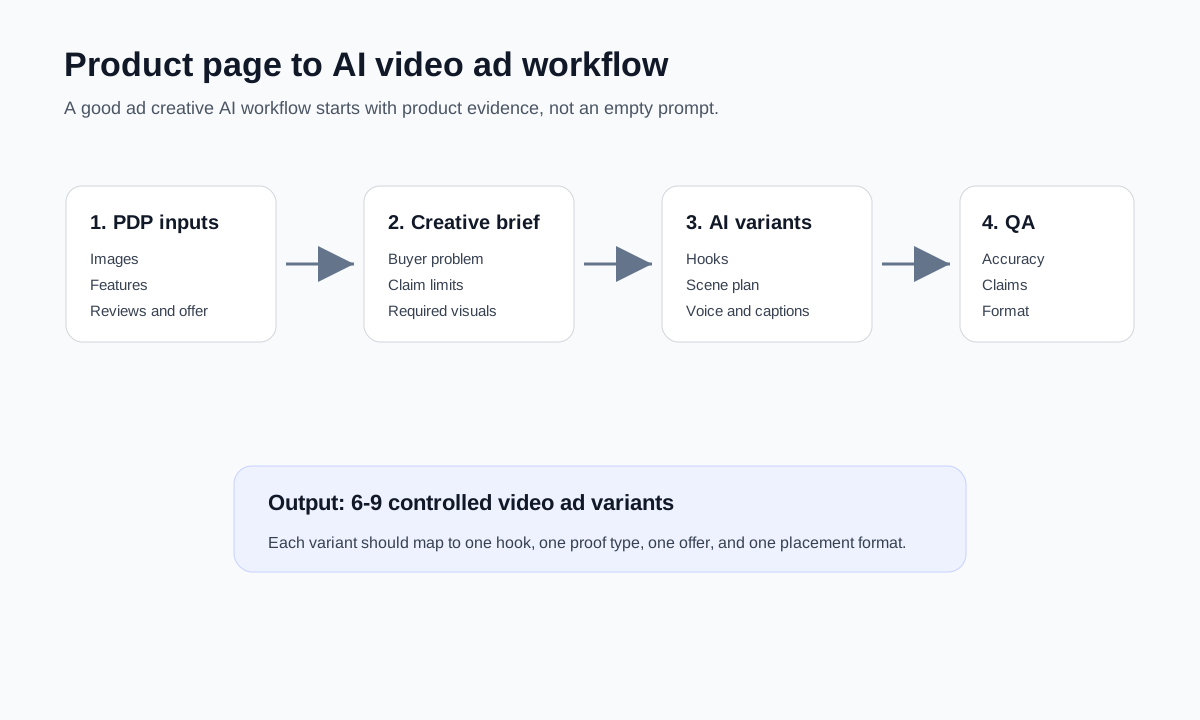
For most ecommerce sellers, the practical workflow is simple: build a product truth sheet, generate several hook and scene directions, create short-form video variants, review every claim, then feed the best assets into paid social, Google Ads, marketplace ads, or organic product content. This article shows how to use ad creative AI for ecommerce video ads without producing generic, inaccurate, or non-compliant creative.
Quick Answer
Ad creative AI for ecommerce video ads works best when it is used as a structured production system, not as a one-click ad generator. Start with the product page, customer reviews, audience objections, price offer, and brand constraints. Turn those inputs into a creative brief. Generate several video concepts across hooks, proof angles, scene layouts, voiceovers, and aspect ratios. Then use a human QA gate to check product accuracy, claims, compliance, platform fit, and landing page match before publishing.
The best use cases are:
- Creating multiple short-form video ad angles from one product page.
- Turning product photos into scene ideas for TikTok, Reels, Shorts, YouTube, and Google Ads.
- Testing hooks, benefits, proof points, and offers before investing in full production.
- Refreshing existing product ads when performance drops.
- Supporting a broader creative testing workflow such as dynamic creative optimization for ecommerce video ads.
The worst use case is letting AI invent benefits, testimonials, results, or usage scenarios that are not supported by the product page.
Why Ecommerce Teams Are Using Ad Creative AI Now
Ecommerce video production has changed because ad platforms increasingly expect more creative variety. A single product video is rarely enough for testing across TikTok, Instagram Reels, YouTube Shorts, Google Demand Gen, Amazon Ads, and product landing pages. Each platform rewards different openings, pacing, crops, captions, offers, and proof formats.
At the same time, major ad platforms are adding AI creative tools directly into their workflows.
Google Ads Asset Studio is positioned as a centralized place to create, edit, manage, and share assets inside Google Ads. Google says it includes AI tools for image generation, image editing, video building, trimming, voiceover, shareable previews, and creative recommendations. Google also notes that generated or edited images can use SynthID watermarking for AI transparency.
Google's Performance Max asset group guidance explains why creative variety matters. Asset groups combine text, images, videos, logos, and final URLs so Google can assemble ads across Search, Maps, Display, YouTube, Gmail, Discover, and partner sites. Google recommends covering all asset types, adding variations, and supplying multiple orientations. It also states that if advertisers do not upload video, videos may be generated from the assets in the group.
TikTok Symphony Creative Studio is an AI-powered TikTok video generation tool for TikTok-optimized content. TikTok lists features such as remixing videos from product descriptions, images, or videos, image-to-video, text-to-video, image generation, voiceover avatars, product avatars, translation, dubbing, and video editing. It is especially relevant for ecommerce teams that need TikTok-native variations rather than polished studio ads.
Amazon Ads Creative Agent shows where ecommerce ad creative is heading. Amazon describes Creative Agent as a conversational AI creative partner that uses product pages, brand stores, websites, audience signals, brand guidelines, and prior ads to develop concepts, storyboards, scripts, images, videos, voiceovers, music, and final ad formats.
The lesson is not that every brand should depend only on platform AI. The lesson is that ad creative AI is becoming part of the normal ecommerce ad workflow. The sellers who benefit will be the ones who give these systems better inputs and tighter review rules.
Search Intent: What People Mean by "Ad Creative AI"
When ecommerce marketers search for "ad creative AI," they usually have one of four needs:
| Searcher need | What they want | Best content answer |
|---|---|---|
| Tool discovery | "Which AI ad creative tool should I use?" | Comparison table, pricing, feature fit, limitations |
| Workflow help | "How do I turn product info into ads?" | Step-by-step ecommerce video ad workflow |
| Creative testing | "How many variants should I create?" | Hook, visual, proof, offer, and format testing matrix |
| Risk control | "Can AI make false ads?" | QA checklist, claims review, rights, compliance, and disclosure guidance |
This page is for the workflow intent. If you need the broader ad build process, start with how to make a video ad for an ecommerce product. If you are comparing AI production cost and tool pricing, use the UGC video production tools pricing guide.
Start With a Product Truth Sheet
Ad creative AI works only as well as the input it receives. A product page usually contains enough material for several video ads, but the information is scattered across titles, bullets, photos, specs, reviews, shipping details, and FAQs. Before prompting any AI tool, convert the product page into a truth sheet.
| Product input | What to extract | Why it matters for AI video ads |
|---|---|---|
| Product title | Core category, model, differentiator | Prevents the ad from drifting into the wrong product category |
| Product images | Angles, use cases, scale, texture, packaging | Helps AI generate scenes that show the actual item clearly |
| Feature bullets | Materials, dimensions, compatibility, included parts | Gives the video concrete proof instead of vague benefits |
| Customer reviews | Repeated praise, objections, use cases, language | Creates hooks that match real buyer concerns |
| Price and offer | Discount, bundle, free shipping, guarantee | Prevents wrong offer claims in ad copy |
| FAQ and support | Sizing, setup, care, safety, returns | Turns friction points into helpful scenes |
| Brand rules | Tone, claims policy, forbidden phrases, visual limits | Keeps AI output inside brand and compliance boundaries |
The truth sheet should be short enough to paste into a creative prompt, but strict enough to block hallucinated claims.
Example product truth sheet:
| Field | Example |
|---|---|
| Product | Travel jewelry organizer case |
| Buyer | Women who travel for work or weekend trips |
| Main problem | Necklaces tangle, earrings get lost, jewelry scratches in luggage |
| Verified features | Compact case, necklace hooks, ring roll, earring panel, zipper closure |
| Proof allowed | Show compartments, packing sequence, before/after bag organization |
| Claims to avoid | "Never tangles," "luxury quality," "indestructible," unverified testimonials |
| Offer | 15 percent off two-pack bundle |
| CTA | Shop the travel set |
This step is where ecommerce teams create the biggest quality gap versus generic AI content. Competitors often prompt with "make me a TikTok ad for this product." A stronger workflow gives AI the same constraints a good creative strategist would use.
Build the Ecommerce Video Ad Brief
Once the truth sheet is ready, convert it into a video ad brief. The brief should define the target buyer, product promise, proof scenes, creative angles, and platform constraints.
Use this structure:
| Brief section | What to write |
|---|---|
| Audience | Who is the buyer, what moment are they in, and what do they already believe? |
| Problem | What pain or friction should the first 3 seconds show? |
| Product role | How does the product solve the problem visually? |
| Proof | What can be shown on screen without exaggeration? |
| Objection | What might stop the buyer from buying now? |
| Offer | What is the specific CTA and landing page promise? |
| Format | TikTok, Reels, Shorts, YouTube, Google, Amazon, or PDP video |
| Guardrails | Claims, regulated terms, logo use, AI avatar rules, and banned words |
For a deeper product video production walkthrough, see how to create ecommerce product videos with AI.
Create Video Variants by Angle, Not by Randomness
The most common mistake is generating 20 nearly identical videos. That creates volume, but not useful learning. A better ad creative AI process creates controlled variants around one variable at a time.
For ecommerce, start with these six variant types:
| Variant type | What changes | Example |
|---|---|---|
| Problem hook | Opening pain point | "Your necklaces should not look like this after every trip." |
| Outcome hook | Desired result | "Pack five days of jewelry in one palm-size case." |
| Proof hook | Demonstration first | Show tangled jewelry, then the organized case |
| Review angle | Real customer language | "I bought it for a wedding trip and used it all weekend." |
| Offer angle | Bundle, discount, urgency | "Two-pack travel set is 15 percent off this week." |
| Comparison angle | Old method versus product | Plastic pouch versus compartment case |
For the first round, create 6 to 9 video variants. That is enough to test different ideas without losing track of why each ad exists.
Match AI Output to Platform Use
Ad creative AI tools can produce many output types, but not every output belongs in every campaign. Use AI for the parts that are easy to test and risky to produce manually at scale. Keep humans in control of claims, realism, and final creative judgment.
| AI output | Best use | Human review requirement |
|---|---|---|
| Hook ideas | Finding multiple opening angles | Remove generic hooks and unsupported promises |
| Scene scripts | Structuring a 15 to 30 second ad | Check that every scene can be filmed or generated truthfully |
| Product image scenes | Testing backgrounds and use cases | Confirm product shape, color, scale, and packaging accuracy |
| Voiceover | Fast narration variants | Check pronunciation, tone, claims, and platform sound fit |
| Captions | Mobile-first comprehension | Check readability, safe area, and offer accuracy |
| AI avatar | Presenter-style ads | Check likeness rights, disclosure rules, and unnatural delivery |
| Format resizing | 9:16, 1:1, 16:9 versions | Check crop, text cutoffs, and product visibility |
If you need ecommerce examples and script patterns, use the UGC videos ecommerce examples and scripts workflow.
A Practical Prompt for Ecommerce Ad Creative AI
Use this prompt as a starting point after building your truth sheet:
You are an ecommerce video ad strategist. Create 9 short-form video ad concepts for the product below.

Goal: Generate controlled creative variants for TikTok, Instagram Reels, YouTube Shorts, and paid social testing.

Product truth sheet:
[paste verified product details]

Rules:
- Do not invent product benefits, testimonials, certifications, results, or discounts.
- Every claim must be supported by the product truth sheet.
- Each concept must have a different hook angle.
- Keep each concept suitable for a 15 to 30 second vertical video.
- Include on-screen text, scene direction, voiceover, CTA, and risk notes.
- Flag any claim that needs human verification before publishing.

Output format:
1. Hook angle
2. First 3 seconds
3. Scene-by-scene plan
4. On-screen text
5. Voiceover
6. CTA
7. What to verify before publishing
This prompt is not enough by itself. The quality comes from the truth sheet and the review pass.
Example: Turning One Product Page Into 9 Video Ads
Assume the product is a portable blender for gym bags, office smoothies, and travel. The product page says it has a rechargeable battery, leak-resistant lid, detachable cup, and USB-C charging. It does not provide medical claims, battery cycle claims, or verified blending comparisons.
| Variant | Hook | Scene plan | CTA |
|---|---|---|---|
| Problem | "Your protein shake should not need a full kitchen." | Gym bag, powder, water, blend, drink | "Make your next shake anywhere." |
| Outcome | "Smoothie in your office bag." | Desk setup, fruit prep, blend, rinse cup | "See the portable blender." |
| Proof | "Three parts, one quick clean." | Cup, blade base, lid, rinse demo | "Shop the compact blender." |
| Travel | "Hotel breakfast upgrade." | Hotel counter, fruit, USB-C charge, blend | "Pack it for your next trip." |
| Objection | "No outlet nearby?" | Show rechargeable use away from outlet | "Check battery details." |
| Comparison | "Big blender versus bag-friendly blender." | Kitchen blender left, portable blender right | "Go smaller for daily shakes." |
| Routine | "Post-workout shake in 20 seconds." | Gym exit, bottle fill, blend, sip | "Build your gym routine." |
| Gift | "For the friend who lives on smoothies." | Gift box, quick demo, lifestyle shot | "Shop the giftable blender." |
| Offer | "Bundle one for home, one for the bag." | Two-pack visual, different use cases | "See bundle pricing." |
Notice the limits. None of these concepts claims weight loss, exact battery life, medical benefits, or "crushes ice" unless the product page verifies those details. That is how you use AI for speed without contaminating the ad with false claims.
Add a QA Gate Before Any AI Ad Goes Live
AI ads can fail in ways that are easy to miss: the product color changes, the logo is warped, a voiceover adds a benefit, the caption promises a discount that ended, or a scene shows use that the product cannot support. Add a QA gate before publishing.
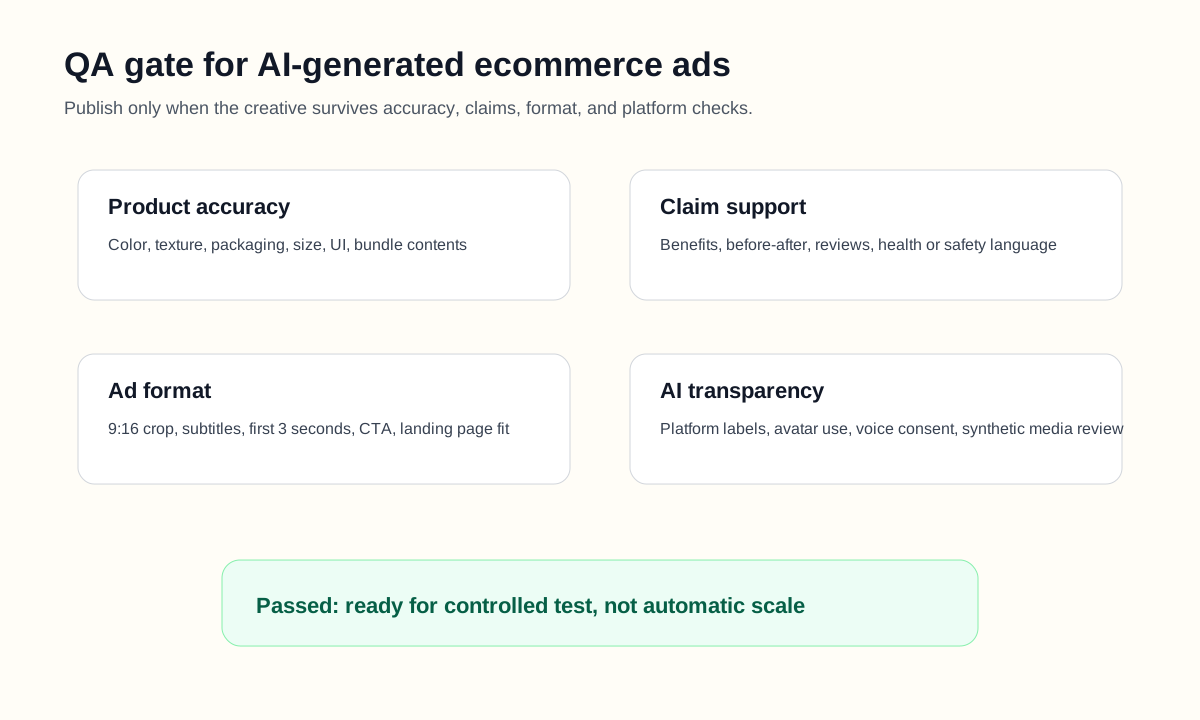
| QA check | Pass condition | Common failure |
|---|---|---|
| Product accuracy | Product shape, color, size, packaging, and included parts match reality | AI changes the product or adds accessories |
| Claim support | Every benefit is supported by the product page, test data, or approved copy | AI invents "best," "guaranteed," or quantified claims |
| Offer accuracy | Price, discount, bundle, shipping, and guarantee match the landing page | Old offer appears in generated caption |
| Platform fit | Aspect ratio, length, captions, safe area, and hook match the placement | Text is cropped in 9:16 or opening is too slow |
| Rights and likeness | Images, music, voice, avatar, and testimonial use are cleared | AI avatar or voice creates likeness concerns |
| AI transparency | Platform disclosure and labeling expectations are reviewed | Team assumes AI disclosure is never needed |
| Landing page match | Ad promise matches PDP content and checkout path | Ad angle sells a use case not visible on the page |
Meta's own AI ads transparency update says it labels ads created or significantly edited with Meta's in-house generative AI creative features, with more visible labels for significant edits and AI-generated photorealistic humans. This is a useful reminder for all ecommerce teams: AI creative is not only a production issue. It is also a transparency and trust issue.
Where ShopShot Fits in the Workflow
ShopShot is useful when the bottleneck is turning ecommerce product inputs into usable product video assets. A typical workflow looks like this:
- Pick one product page or product listing.
- Extract the product truth sheet.
- Choose 3 to 5 creative angles.
- Generate video drafts from product photos, product facts, and buyer objections.
- Review product accuracy, text, voiceover, and visual realism.
- Export platform-ready variants.
- Test the variants in paid social, marketplace ads, product pages, and remarketing flows.
The important part is not making one beautiful video. The important part is making a small set of truthful, distinct variants that answer different buyer hesitations. If you need AI presenter-style content, read the guide to AI actors for product videos.
What Not to Automate
AI can speed up creative production, but ecommerce teams should keep these decisions under human control:
| Decision | Why a human should own it |
|---|---|
| Product claims | False claims can create refund, platform, or legal risk |
| Regulated categories | Beauty, health, finance, supplements, and safety products need stricter review |
| Customer testimonials | Reviews must be real, permissioned, and represented accurately |
| Brand voice | Generic AI copy can make the store look like every other seller |
| Final budget allocation | Creative quality is only one part of performance |
| Winning-ad interpretation | A winning hook may reflect audience fit, offer, timing, or platform delivery |
AI can give you options. It should not decide what your brand is allowed to promise.
How to Test AI-Generated Ecommerce Video Ads
Start with a simple testing plan. Do not test too many variables at once.
Round 1: test hooks.
- Keep the product, offer, video length, and CTA consistent.
- Test 6 to 9 different opening angles.
- Measure thumb-stop rate, 3-second hold, click-through rate, and cost per landing page view.
Round 2: test proof format.
- Keep the winning hook family.
- Test demonstration, review, comparison, before/after organization, and feature close-up.
- Measure view-through, add-to-cart, and conversion rate.
Round 3: test offer and landing page fit.
- Keep the strongest creative concept.
- Test bundle, discount, free shipping, guarantee, and educational CTA.
- Measure conversion rate, CPA, and revenue per session.
Then use the results to refresh your next AI creative brief. This prevents creative testing from becoming random generation.
Recommended Article and Page Cluster
Ad creative AI should sit inside a content cluster, not as an isolated post. For ShopShot, this article can support:
- How to make a video ad for an ecommerce product
- How to create ecommerce product videos with AI
- Dynamic creative optimization for ecommerce video ads
- AI actors for product videos
- UGC videos ecommerce examples and scripts workflow
- UGC video production tools pricing guide
This internal linking pattern gives Google and AI answer engines a clearer entity map: ShopShot covers ecommerce product video creation, AI ad creative, UGC workflows, DCO, product video examples, and platform-specific short-form content.
FAQ
What is ad creative AI for ecommerce?
Ad creative AI for ecommerce is the use of AI tools to generate, edit, resize, script, or test advertising assets for online products. In video advertising, it often means turning product photos, product pages, reviews, and offers into short-form video ad concepts for TikTok, Reels, Shorts, Google Ads, Amazon Ads, or product pages.
Can AI create video ads from a product page?
Yes, AI tools can create video ad concepts from a product page, but the output still needs human review. Product pages can provide titles, images, features, offers, and buyer objections. The risk is that AI may invent unsupported claims or change the product visually, so a QA process is required before publishing.
How many AI video ad variants should an ecommerce brand create?
For an initial test, create 6 to 9 controlled variants. Change one major variable, such as hook angle, proof format, or offer. Creating too many random ads makes results hard to interpret and often produces repetitive creative.
Is AI ad creative safe for ecommerce brands?
AI ad creative is safe only when the brand controls inputs, reviews outputs, and checks claims before launch. Risk increases when AI creates testimonials, health claims, dramatic before-and-after scenes, price offers, or photorealistic people without review.
What should I check before publishing an AI-generated product video ad?
Check product accuracy, claim support, offer accuracy, platform format, music and image rights, AI avatar or likeness use, disclosure expectations, and landing page match. If the ad says something the product page does not support, revise it before launch.