
Quick Answer
The best AI image to video generator for ecommerce is the one that turns a real product image into a usable ad, not just an impressive motion clip. For most sellers, start with ShopShot's AI video generator when the goal is product-image-to-video ads, product page videos, TikTok Shop clips, or short creative tests. Use Adobe Firefly when commercial-use confidence is the main concern, Runway or Luma when cinematic motion matters, Pika for playful social effects, TikTok Symphony for TikTok-native ad drafts, Canva for design-team workflows, and Google Veo when your team needs API or enterprise media generation.
The practical test is simple: can the tool keep the product recognizable, support the claim on the landing page, export for the placement, and make controlled variants without creating rights or accuracy risk?
How We Compared The Tools
For ecommerce, image-to-video quality is not only about motion realism. A beautiful clip can still fail if the product color shifts, the scene invents a feature, or the final file does not match the ad placement.
This comparison uses seven criteria:
| Criterion | Why it matters for ecommerce ads |
|---|---|
| Product fidelity | The product shape, color, logo, material, and packaging need to remain recognizable. |
| Ecommerce workflow | The tool should help with product images, scripts, scenes, captions, and ad variants. |
| Placement fit | TikTok, Reels, Shorts, Meta feed, PDP videos, and Amazon-style creative need different exports. |
| Rights and commercial use | Teams need confidence around training data, generated output rights, stock assets, and music. |
| Creative control | Good tools let you control motion, camera, scene, duration, and brand style instead of hoping. |
| Cost per usable clip | Credits, watermarks, commercial rights, and failed generations change the real cost. |
| QA workflow | A publishable ad needs checks for claims, readability, safe zones, offer match, and landing page consistency. |
Quick Picks
| Best for | Pick | Use it when |
|---|---|---|
| Ecommerce product ads | ShopShot | You want product images or product URLs turned into short product videos and ad variants. |
| Commercial-use confidence | Adobe Firefly | Brand safety, licensed training data, and commercial project eligibility matter more than novelty. |
| Cinematic product motion | Runway | You need more control over a polished visual scene, product atmosphere, or campaign hero asset. |
| High-end motion exploration | Luma | You want cinematic image/video generation and are comfortable reviewing outputs manually. |
| Social effects and fast experiments | Pika | You want stylized effects, playful motion, or quick social variations from a still image. |
| TikTok-ready ad drafts | TikTok Symphony Creative Studio | The campaign will run on TikTok and you want platform-native generation and remixing. |
| Design and template workflow | Canva | Your team already builds social assets in Canva and needs quick video clips inside the same workspace. |
| API and enterprise experiments | Google Veo | Your team needs developer or enterprise access to video generation workflows. |
1. ShopShot: Best For Ecommerce Product-Image-To-Ad Workflows
ShopShot is the best fit when the image is a real product asset and the output needs to become an ecommerce video, not a generic AI scene. The workflow is built around product pages, product images, short scripts, ad variants, TikTok Shop, Shopify, Amazon-style product videos, and paid social creative.
Use ShopShot when you need to:
- Turn product photos or product URLs into short product videos.
- Keep the video tied to the product page, offer, and buyer problem.
- Create multiple ad angles from the same product proof.
- Build a repeatable process for product launches, catalog videos, or paid creative tests.
The limitation is also clear: if you need a highly cinematic film sequence, complex VFX, or long-form storytelling, use a creative lab such as Runway or Luma. ShopShot is strongest when the business question is "Can this product image become a launch-ready product ad?"
For a full ad-selection view, pair this article with the best AI video ad generators guide.
2. Adobe Firefly: Best For Commercial-Use Confidence
Adobe Firefly is a strong choice when the brand's first concern is whether generated content can be used safely in marketing. Adobe describes Firefly image-to-video as trained for commercially safe content and positions Firefly as an all-in-one creative workspace for image, video, audio, and partner models.
Choose Firefly when:
- Legal, brand, or enterprise review is strict.
- You need a marketing-safe starting point for generated clips.
- Your team already works in Adobe creative tools.
- You want image-to-video plus broader creative asset generation.
For ecommerce, Firefly is often better as a brand-safe creative generator than a full product-ad workflow. You may still need a separate process for product proof, scripts, captions, landing-page match, and ad testing.
3. Runway: Best For Cinematic Control
Runway Gen-4 is useful when a still image needs more controlled motion, camera direction, or campaign-quality polish. Runway's Gen-4 help docs describe creating 5 or 10 second videos from an input image and text prompt, with a Turbo version for faster iteration.
Use Runway when:
- You need a more cinematic clip than a template workflow can produce.
- The campaign benefits from atmosphere, camera movement, and art direction.
- You have editors who can refine, select, and assemble the best generations.
- The image is a hero creative asset, not just a catalog product photo.
Runway is less ideal when the team needs many routine SKU videos every week. Credit usage, generation variance, and review time can make the real cost higher than the subscription price suggests.
4. Luma: Best For High-End Motion Exploration
Luma is a good option for teams exploring cinematic motion, image and video generation, or more visual concepting. Luma's current plans emphasize credits, commercial use on paid plans, and access to Luma and third-party image and video models.
Choose Luma when:
- You are developing campaign concepts before final ad production.
- You need polished motion ideas, not just static product layouts.
- A human creative reviewer will select, refine, and reject outputs.
- The project can tolerate iteration before it becomes a final ad.
For product ads, Luma should sit before the QA stage. Treat it as motion exploration, then check product accuracy, claim support, captions, and export fit before publishing.
5. Pika: Best For Social Effects And Fast Variations
Pika is useful when the goal is a quick, shareable, social-first motion effect. Its official site highlights effects and photo-to-video style transformations, and its pricing page shows a credit system with different costs for features and models.
Use Pika when:
- You want to test playful image-to-video hooks.
- The product can benefit from surreal motion or effect-led creative.
- The output is for organic social, creator prompts, or early testing.
- You can review whether the effect still represents the product honestly.
The caution is that social effects can quickly become the message. If the generated motion distracts from the product proof, use it as a top-of-funnel experiment rather than a conversion ad.
6. TikTok Symphony Creative Studio: Best For TikTok-Native Ad Drafts
TikTok Symphony Creative Studio is useful when the destination is TikTok. TikTok describes the tool as a way to generate or remix TikTok-ready videos from product details and existing assets. Its help documentation lists text-to-video, image-to-video, and reference-to-video generation.
Use Symphony when:
- The ad is built primarily for TikTok.
- You want platform-native creative rather than a generic video export.
- You need scripts, remixing, translation, dubbing, or TikTok-style ad drafts.
- You will still check the final ad against product claims and brand rules.
For ecommerce teams, this can be a strong channel-specific layer. It should not replace a broader product-video system if you also need Shopify, Meta, YouTube Shorts, or Amazon-style exports.
7. Canva: Best For Design-Team Workflow
Canva is a practical choice when your team already uses Canva for social posts, ad layouts, presentations, or simple creative production. Canva's AI video pages describe creating video clips from prompts and attaching media in Canva AI or Magic Video workflows.
Use Canva when:
- The team needs a simple editor around the AI-generated clip.
- Brand templates, captions, text overlays, and resized social assets matter.
- The output is a quick social creative, not a precision product demo.
- Non-designers need to assemble assets without a production toolchain.
Canva is strongest as a design and assembly environment. For product accuracy and structured ad testing, combine it with a script, proof, and QA process.
8. Google Veo: Best For API And Enterprise Video Generation
Google's video generation docs describe Veo and Gemini video-generation workflows for developers and enterprise media tools. This is most relevant when a team wants to build internal systems, batch creative experiments, or connect video generation to a larger workflow.
Use Veo when:
- Developers or enterprise teams need API-based generation.
- The workflow needs to connect product data, creative briefs, or media pipelines.
- You are testing video generation as infrastructure, not only as a web app.
- The team can handle governance, prompt control, review, and storage.
For most small ecommerce teams, Veo is not the easiest first tool. It becomes more useful when image-to-video generation is part of a custom production pipeline.
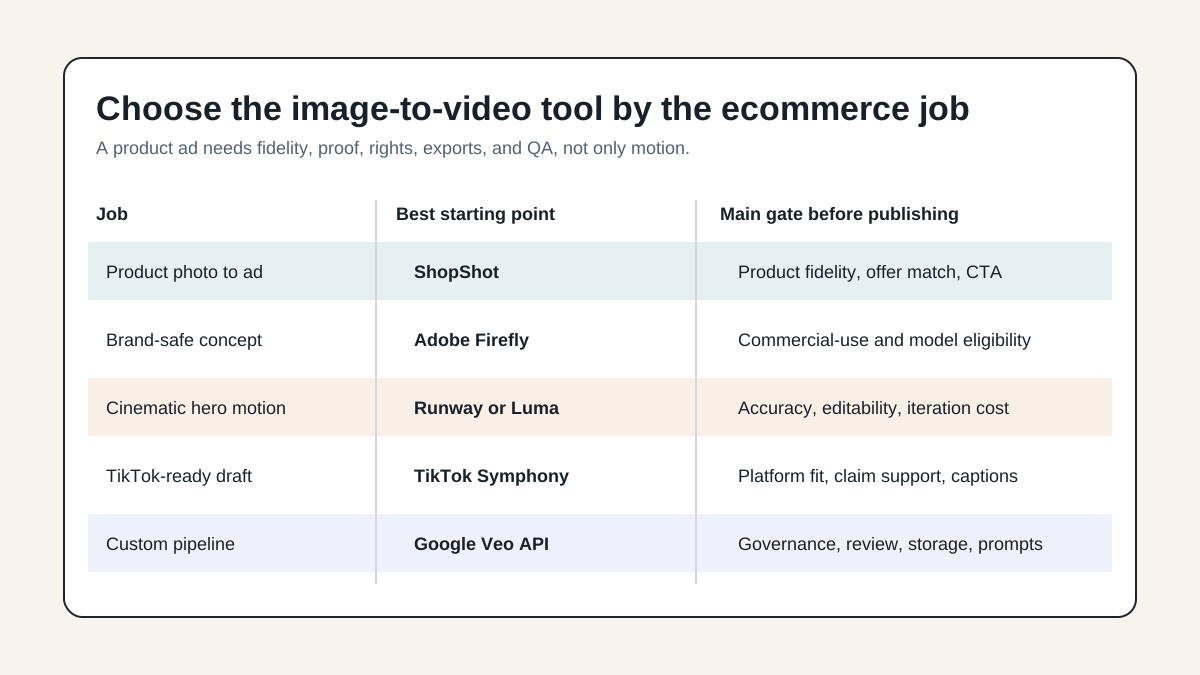
Ecommerce Decision Matrix
| Use case | Best first choice | What to check before publishing |
|---|---|---|
| Product photo to short ad | ShopShot | Product fidelity, offer match, CTA, captions, and export format. |
| Brand-safe creative concept | Adobe Firefly | Commercial-use eligibility, model used, asset rights, and brand review. |
| Hero product motion | Runway or Luma | Product accuracy, motion realism, editability, and cost per approved clip. |
| TikTok ad draft | TikTok Symphony | TikTok fit, claim support, disclosure, caption readability, and landing page match. |
| Social effect test | Pika | Whether the effect still helps the product story and does not create a false claim. |
| Canva social asset | Canva | Brand template, readable text, size variants, and final export quality. |
| Custom generation pipeline | Google Veo | API access, governance, prompt templates, storage, and human review. |
A Safer Product-Image-To-Video Workflow
The biggest mistake is uploading a product photo and asking for "a viral ad." That gives the model too much freedom. A safer ecommerce workflow adds proof before motion.
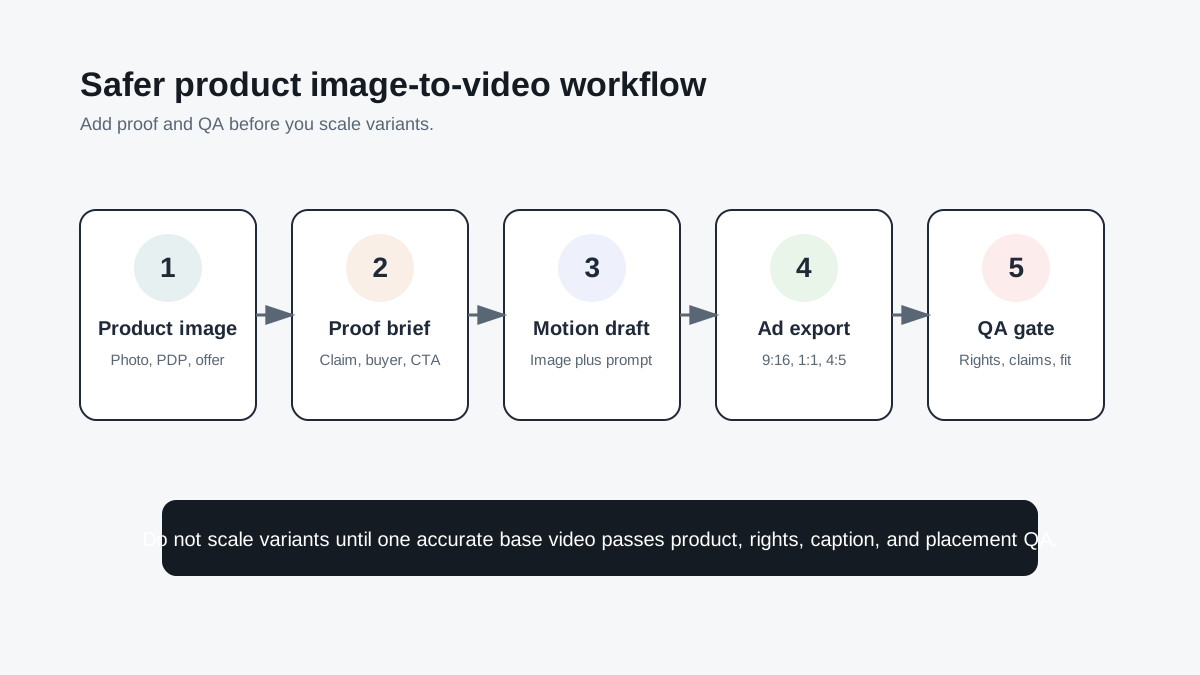
Use this sequence:
- Choose one product image or product page.
- Extract the buyer problem, product proof, offer, and CTA.
- Write a short scene prompt using the product video ad script template.
- Generate one base video before multiplying variants.
- Check the clip against product proof points, landing-page claims, captions, and placement rules.
- Create controlled variants for hook, format, proof angle, or thumbnail.
This workflow keeps image-to-video generation useful for growth teams. It turns the tool into a testing system instead of a slot machine.
Cost: Look At Usable Clips, Not Plan Price
AI video plans are usually priced through credits, subscription tiers, watermarks, commercial-rights differences, or API usage. The cheapest plan is not always the cheapest production workflow.
Use this simple formula:
| Cost factor | What to ask |
|---|---|
| Credits per generation | How many attempts does one acceptable 5 to 10 second clip usually take? |
| Watermark rules | Does the plan allow watermark-free exports for commercial work? |
| Commercial use | Are generated outputs allowed in ads, client work, or ecommerce pages? |
| Editing time | How much human editing is needed before the clip is usable? |
| Failed generations | How often does the product look wrong, drift, or create a false proof? |
| Variant control | Can you change one variable without rebuilding the entire ad? |
If a tool makes beautiful clips but only one in ten is usable for the product, the real cost is ten times the visible generation cost.
QA Checklist Before Using Any AI Image-To-Video Output
Run this checklist before the clip goes into an ad account, product page, or creator brief.
| Check | Pass condition |
|---|---|
| Product identity | The product remains recognizable in shape, color, logo, material, and scale. |
| Claim support | Every benefit in the video is supported by the product page, spec, review, or demo. |
| Rights | Input images, generated output, music, voice, and stock assets are cleared for the use case. |
| Captions | Text is readable on mobile and not blocked by UI controls. |
| Placement | Aspect ratio, duration, safe zone, and file format match the destination. |
| Landing page | Offer, price, bundle, shipping, and CTA match the destination page. |
| Variant discipline | Each test changes one main variable so performance data is useful. |
For a deeper pre-publish review, use the product video proof points guide and the product video production timeline.
FAQ
What is the best AI image to video generator for ecommerce?
For ecommerce product ads, the best starting point is a product-focused workflow such as ShopShot because it connects product images, product facts, scripts, and ad variants. Cinematic tools such as Runway, Luma, and Adobe Firefly can be stronger for campaign visuals, but they still need ecommerce QA before publishing.
Is an image-to-video generator the same as an AI product video generator?
No. An image-to-video generator animates a still image. An AI product video generator should also help with product context, scripts, proof, captions, placement exports, and ad testing. Ecommerce teams usually need the second workflow, not just motion.
Can I use AI image-to-video outputs in paid ads?
Sometimes, but check the specific tool's commercial-use terms, watermark rules, input asset rights, and ad platform requirements. Also verify that the generated video does not imply a product feature, result, or endorsement that the brand cannot substantiate.
Which tool is best for TikTok product videos?
TikTok Symphony is useful for TikTok-native drafts, while ShopShot is better when you need a broader product-video workflow across TikTok Shop, Shopify, Meta, YouTube Shorts, and product pages. Use TikTok-specific tools for channel adaptation, not as the only source of product truth.
How many image-to-video variants should I test?
Start with three controlled variants: one hook change, one proof angle change, and one format or thumbnail change. Keep the product, offer, and landing page stable so you can learn what actually improved performance.
Bottom Line
The best AI image to video generator is not always the most cinematic model. For ecommerce ads, the winner is the tool that keeps the product accurate, respects commercial-use constraints, exports for the right placement, and helps you create testable variants. Start with ShopShot for product-image-to-ad workflows, then add specialist tools when you need brand-safe generation, cinematic motion, TikTok-native drafts, design templates, or API automation.
Sources Checked
- ShopShot AI Video Generator, checked July 13, 2026, for ShopShot's product image, URL, and ecommerce video workflow positioning.
- Adobe Firefly Image to Video, checked July 13, 2026, for image-to-video and commercially safe model positioning.
- Adobe Firefly AI Video Generator, checked July 13, 2026, for text or image prompt video generation and commercial-use notes.
- Runway Gen-4 Video Help, checked July 13, 2026, for image plus prompt generation and duration details.
- Runway Pricing, checked July 13, 2026, for plan, credit, and team pricing signals.
- Pika Pricing, checked July 13, 2026, for credit-based plan details, watermarks, and commercial use notes.
- Luma AI Pricing, checked July 13, 2026, for paid plan, credit, and commercial-use signals.
- TikTok Symphony Creative Studio, checked July 13, 2026, for TikTok-ready video generation from product details and assets.
- TikTok Symphony video generation help, checked July 13, 2026, for text-to-video, image-to-video, and reference-to-video capabilities.
- Canva AI Video Generator, checked July 13, 2026, for AI video clip generation inside Canva workflows.
- Google Gemini API video generation docs, checked July 13, 2026, for Google video generation models and API workflow notes.