
Quick Answer
A product video production timeline for ecommerce ads should move in this order: product brief, proof assets, script, storyboard or shot plan, first draft, QA, format exports, and launch review. For a simple SKU with strong product photos, the timeline can be compressed into a few days. For a higher-risk product, creator clip, or multi-platform launch, add more time for proof, rights, claims, and placement checks.
The practical rule is simple: approve the product story before you multiply variants. AI can help create drafts faster, but it should not skip product accuracy, landing-page consistency, caption readability, safe-zone checks, or rights review. Use the timeline below with the product video brief template, product video script template, and product video budget template.
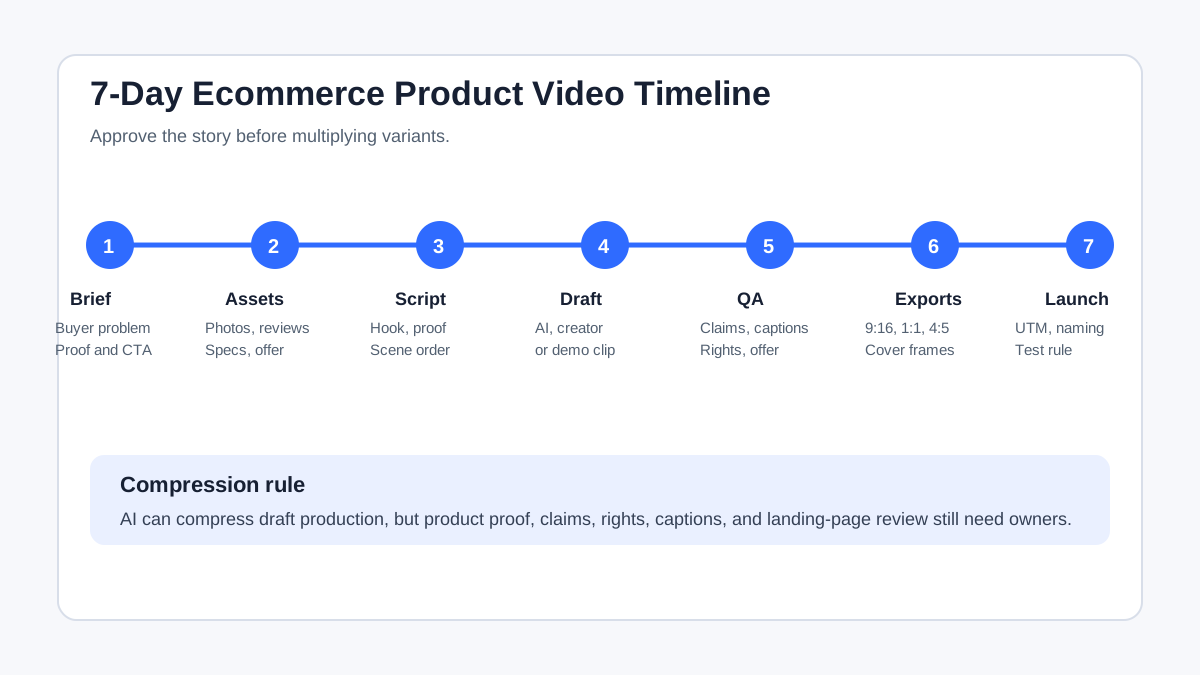
The 7-Day Timeline Template
This timeline is designed for ecommerce teams that need a usable product page video, paid social ad, or launch variant without turning the project into a full agency production cycle.
| Day | Main decision | Output | Do not move forward until |
|---|---|---|---|
| Day 1 | Product story | Approved brief, buyer problem, proof points, CTA | The product claim matches the product page |
| Day 2 | Asset audit | Photos, demo clips, reviews, specs, offer details | Missing proof is identified before scripting |
| Day 3 | Script and storyboard | Hook, scene order, overlay text, shot needs | One base story is approved |
| Day 4 | Draft production | AI draft, template edit, phone demo, or creator clip | The product is visible and the proof is clear |
| Day 5 | QA and revisions | Claim-safe copy, captions, offer match, rights check | No obvious product or policy risk remains |
| Day 6 | Variant exports | 9:16, 1:1, 4:5, retargeting cuts, thumbnails | Each export fits its intended placement |
| Day 7 | Launch handoff | Final files, naming, UTM plan, test matrix | The ad, landing page, and reporting plan match |
Use this as a planning frame, not a promise. A simple AI draft may be ready faster. A creator shoot, regulated claim, or product that needs scale, texture, installation, or fit proof may need more review time.
Day 1: Approve the Product Story
Start with the product story, not the editing tool. A product video timeline fails when the team starts making scenes before it knows which buyer doubt the video must answer.
The brief should define:
- The SKU, bundle, or collection.
- The buyer problem.
- The product promise.
- The proof moment.
- The offer or next step.
- The primary placement, such as a Shopify product page, TikTok Shop listing, Meta ad, or YouTube Shorts ad.
- The line that the video must not cross, such as unsupported results, exaggerated durability, or fake customer testimony.
If the brief is weak, the rest of the timeline becomes revision time. Use Product Video Proof Points for Ecommerce Ads to decide what the video must show before you write the final script.
Day 2: Audit Product Assets
The second day is for source material. This is where ecommerce videos differ from generic brand videos. The video has to show the real product, match the current product page, and avoid inventing proof.
| Asset | Why it matters | Timeline risk if missing |
|---|---|---|
| Product images | Gives AI or editors the real product shape, color, and details | Drafts may look generic or inaccurate |
| Product page copy | Keeps benefits, specs, and offer language consistent | Video claims may drift from the landing page |
| Reviews or FAQs | Reveals buyer objections and natural proof angles | Script may answer the wrong question |
| Demo clips | Shows scale, handling, fit, texture, or setup | You may need a phone shoot or creator clip |
| Brand rules | Protects fonts, colors, tone, and logo usage | Late brand review may force rework |
| Platform target | Sets aspect ratio, captions, safe zones, and length | Exports may need to be rebuilt |
Shopify product pages can include media such as images, videos, and 3D models. Treat those assets as the factual anchor. If a video claim cannot be supported by the PDP, review, spec sheet, or a real demo, do not put it into the ad yet.
Day 3: Script Before You Multiply Scenes
The script is the cheapest place to fix the video. Editing is expensive when the product angle is still changing.
Use a simple ecommerce ad structure:
- Hook: name the problem, buyer desire, or visual surprise.
- Product reveal: show the SKU early.
- Proof: demonstrate the claim or show the product in use.
- Objection answer: address fit, size, material, setup, shipping, use case, or trust.
- CTA: match the landing page and offer.
For the first version, write one base script. Do not create five hooks, three offers, and four proof angles before the core story is approved. If you need a structured starting point, use the product video script template, then turn it into a storyboard or shot list.
Day 4: Produce The First Draft
The first draft should prove whether the story works. It does not need to be the final export.
Choose the production method based on the proof needed:
| Product need | Faster method | When to add more production |
|---|---|---|
| Simple product with strong photos | AI draft or template edit | Add human review for product accuracy |
| Product needs handling proof | Phone demo clip plus AI/editing | Film close-ups before building variants |
| Trust is the bottleneck | Creator or UGC-style clip | Confirm usage rights and disclosure language |
| Product has technical details | Scripted demo or annotated scene | Let a product owner review the wording |
| Existing footage is messy | Editor cleanup and captions | Re-shoot only if proof is unclear |
ShopShot fits the draft stage when the team has product images, product facts, and an approved angle. It can help turn those inputs into a structured video draft for product pages, TikTok Shop, Shopify, and paid social tests. The review still belongs to the team: AI output must be checked against the real product and offer.
Day 5: Run QA Before Exporting Variants
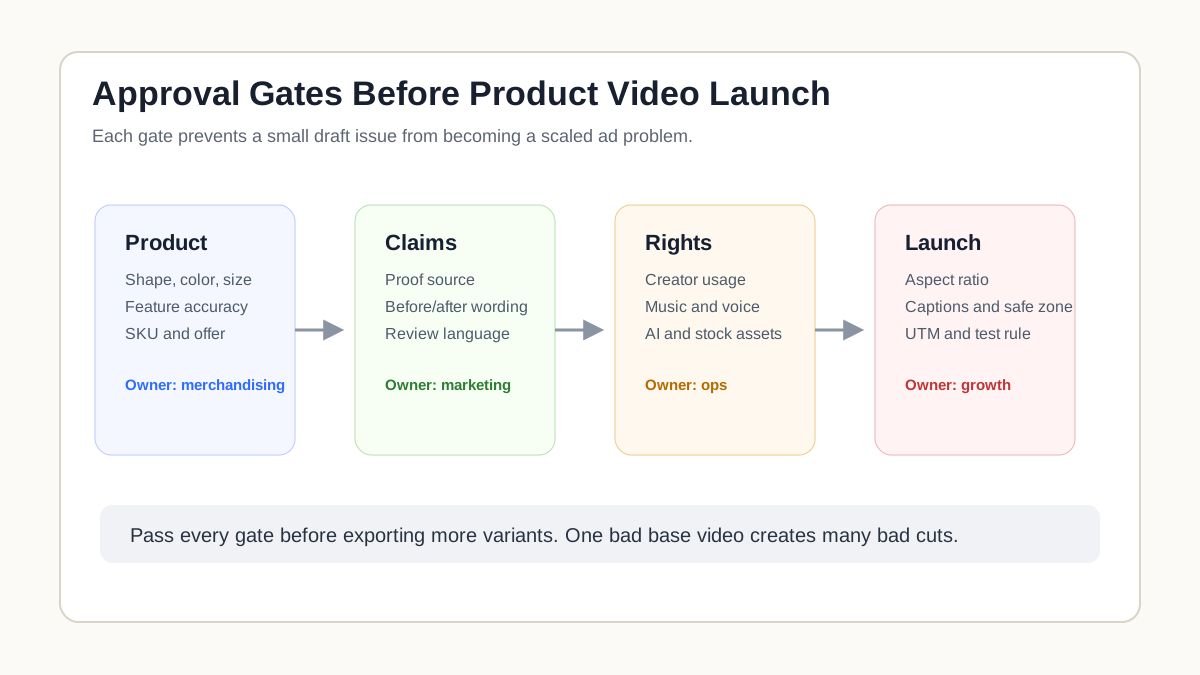
QA before variant production saves time. If the base video has a wrong color, unsupported claim, unreadable caption, or mismatched offer, every variant repeats the error.
Use this QA gate:
| QA area | Check | Owner |
|---|---|---|
| Product accuracy | Shape, color, size, feature, use case | Product or merchandising |
| Claims | Benefit wording, before/after framing, proof source | Marketing or compliance |
| Captions | Readability on mobile, spelling, timing | Creative owner |
| Rights | Creator, music, voice, stock, AI asset usage | Marketing ops |
| Offer match | Price, coupon, shipping, guarantee, landing page | Growth or ecommerce |
| Platform fit | Safe zone, crop, aspect ratio, duration | Paid media |
| Tracking | Final URL, UTM, naming, test cell | Growth ops |
This is also the right time to use the product video compliance checklist. A video that ships one day later with cleaner proof is usually better than a fast launch that creates support tickets, ad disapprovals, or confused buyers.
Day 6: Export Placement-Ready Variants
Only create variants after the base video is approved.
| Variant | What changes | What stays stable |
|---|---|---|
| Hook variant | First 2-3 seconds | Product proof and CTA |
| Format variant | 9:16, 1:1, 4:5, or horizontal | Script order and offer |
| Proof variant | Demo, review, spec, or comparison | Buyer problem and product |
| Retargeting cut | Starts with proof or offer | Landing page and SKU |
| Thumbnail or cover | First frame, product frame, text overlay | Video promise |
Platform requirements should shape the timeline. Google Ads video guidance supports horizontal, vertical, and square HD assets for many YouTube formats. TikTok creative guidance emphasizes vertical 9:16 content, sound, visible content inside the safe zone, and native-feeling creative. Meta placements can use different aspect ratios across feed, stories, reels, and other surfaces. Build these requirements into the export plan instead of discovering them after the first video is approved.
Day 7: Launch Handoff And Test Plan
The final day is not just uploading files. It is the handoff between creative and growth.
Include:
- Final video files with clear names.
- Thumbnail or first-frame choice.
- Caption and overlay copy.
- Destination URL.
- UTM or campaign naming.
- Target placement.
- Variant hypothesis.
- QA owner.
- Launch date.
- Stop or scale rule.
For paid social, avoid testing too many variables at once. If one variant changes the hook, format, offer, CTA, voiceover, and landing page, the result is hard to interpret. A cleaner timeline tests one variable at a time.
Fast, Standard, And Complex Timelines
Not every product needs a full week. Use the timeline that matches the risk.
| Timeline | Best for | What to compress | What not to skip |
|---|---|---|---|
| 48-hour fast path | Simple SKU, strong photos, one placement | Script, AI draft, one QA pass | Product accuracy and offer match |
| 7-day standard path | Product page video or small ad launch | Asset gathering and draft revisions | Claims, safe zones, captions, landing page |
| 2-3 week complex path | Creator footage, launch campaign, technical product | None until proof is clear | Rights, reshoots, approvals, variants |
The common mistake is using a fast-path timeline for a complex product. If buyers need to see fit, scale, ingredients, setup, durability, or real handling, spend more time on proof before you spend on variants.
Timeline Checklist
Use this checklist before launch:
| Question | Pass condition |
|---|---|
| Is the product story approved? | One buyer problem, one proof moment, one CTA |
| Are the source assets complete? | Product images, copy, reviews, specs, offer details |
| Is the script approved before editing? | Hook, proof, objection, CTA all reviewed |
| Is the draft checked against the product page? | No mismatch in claims, price, specs, or offer |
| Are captions readable on mobile? | Text is large enough and not blocked by UI |
| Are variants controlled? | Each test changes one main variable |
| Are export formats placement-ready? | Ratio, resolution, safe zone, and cover frame checked |
| Is the launch plan clear? | Naming, UTM, destination URL, and stop rule documented |
FAQ
How long does ecommerce product video production take?
A simple ecommerce product video can be planned, drafted, reviewed, and exported in a few days if the product assets and offer are ready. A larger campaign, creator clip, or technical product may need one to three weeks because proof, rights, claims, and placement variants require more review.
What should be included in a product video production timeline?
Include the product brief, asset audit, script, storyboard or shot list, first draft, QA, revisions, export formats, landing-page review, rights check, tracking setup, and launch handoff. The timeline should show approval gates, not just editing tasks.
Can AI shorten the product video timeline?
Yes. AI can speed up first drafts, script variations, scene planning, and simple product-image-to-video workflows. It does not remove the need to verify product accuracy, claims, rights, captions, offer consistency, or platform fit.
Should I make variants before the first video is approved?
Usually no. Approve one base video first, then create variants for hook, proof, format, offer, or retargeting. Otherwise every variant may carry the same product error or weak claim.
What causes the most timeline delays?
The biggest delays are missing product proof, unclear ownership of approvals, late claim review, weak source assets, and exports that do not fit the intended placement. Fix those before scaling production.
Sources Checked
- Google Ads Help: About video ad specs
- TikTok Ads Help: Creative best practices for performance ads
- Meta Business Help: Aspect ratios supported by placements in Meta Ads Manager
- Shopify Help Center: Product media
- Amazon Ads: What is video production?
Bottom Line
A product video production timeline should protect the launch, not just organize tasks. Approve the story, gather proof, write the script, create one accurate draft, run QA, then export controlled variants. That sequence keeps ecommerce teams fast without turning product accuracy, rights, and placement fit into last-minute surprises.