
Quick Answer
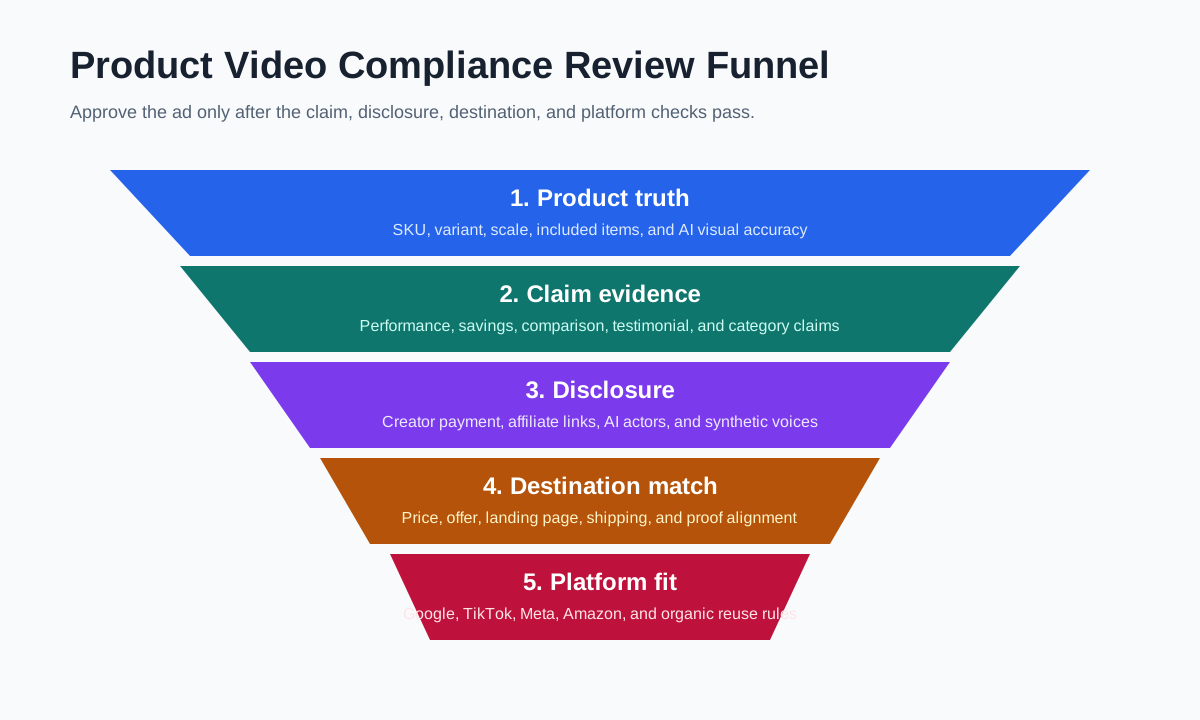
A product video compliance checklist helps ecommerce teams catch risky claims, missing disclosures, mismatched offers, synthetic media issues, and platform-specific ad policy problems before a video goes live. The practical review should cover five areas: product truth, claim evidence, disclosure, destination match, and platform fit.
Use the checklist before exporting the final cut, not after the media buyer has uploaded the ad. That timing matters because small changes in captions, voiceover, AI scenes, or offer text can turn a safe product video into a misleading ad.
If your team already uses a product video script template, a caption QA guide, or a UGC usage rights checklist, this compliance checklist becomes the final gate before publishing.
What Product Video Compliance Means
Product video compliance is the process of checking whether a video ad is truthful, supportable, clear to shoppers, and acceptable for the channel where it will run. It is not just a legal review. It is also a production QA step.
For ecommerce teams, the highest-risk issues usually come from:
- A caption that overstates what the product can do.
- A discount or price that no longer matches the landing page.
- A creator line that sounds like a testimonial but has no real use experience.
- An AI-generated scene that makes the product look larger, faster, cleaner, or more effective than it is.
- A platform cut that follows the wrong specs, language, or safe-zone rules.
That is why product video compliance should sit between creative approval and media upload. Creative teams should still move fast, but the final ad should leave a trail that explains what claims were approved and where the evidence lives.
The Five-Part Product Video Compliance Checklist
| Review area | What to check | Common ecommerce risk | Pass standard |
|---|---|---|---|
| Product truth | Product appearance, included items, variant, size, color, material, use case | AI scene shows a product feature that does not exist | The video matches the real SKU and product page |
| Claim evidence | Performance, durability, health, savings, comparison, and result claims | "Works instantly" or "best on the market" with no support | Every claim maps to approved copy or evidence |
| Disclosure | Creator sponsorship, affiliate relationship, AI actor, synthetic voice, material connection | UGC-style ad hides that the creator was paid | Disclosure is clear, visible, and placed near the claim |
| Destination match | Price, offer, shipping, return policy, product availability, landing page copy | Video says "50% off today" but the page shows a different offer | The ad and destination tell the same story |
| Platform fit | Policy category, format, language, safe zones, thumbnail, audio rights | Amazon or Google rejects the ad after upload | The cut follows the target platform's current rules |
Do not treat this table as a one-time legal memo. Treat it as a working QA layer. The reviewer should be able to mark each claim as approved, edited, removed, or escalated.
Step 1: Freeze the Product Facts Before Editing
Start with a boring product fact sheet. It should include the exact product name, variants, included items, size, materials, price range, current offer, shipping note, warranty language, and product page URL.
This protects the video from a common ecommerce problem: the edit looks good, but the facts drift. A product demo may show a three-pack while the landing page sells one item. A caption may say "waterproof" because the script writer saw "water resistant" in a review. A voiceover may mention free shipping because last month's promotion still sits in the old brief.
The fact sheet should answer these questions:
- What exact SKU or variant is shown?
- What benefits can we state without extra proof?
- Which claims need substantiation before use?
- Which words are banned for this category?
- Which product page must the ad destination use?
For AI-assisted production, add one more check: does the generated scene preserve the real product shape, scale, texture, and usage context? If the AI edit makes a travel bottle look like a full-size blender or turns fabric texture into leather, the video needs correction before compliance review.
Step 2: Classify Every Claim
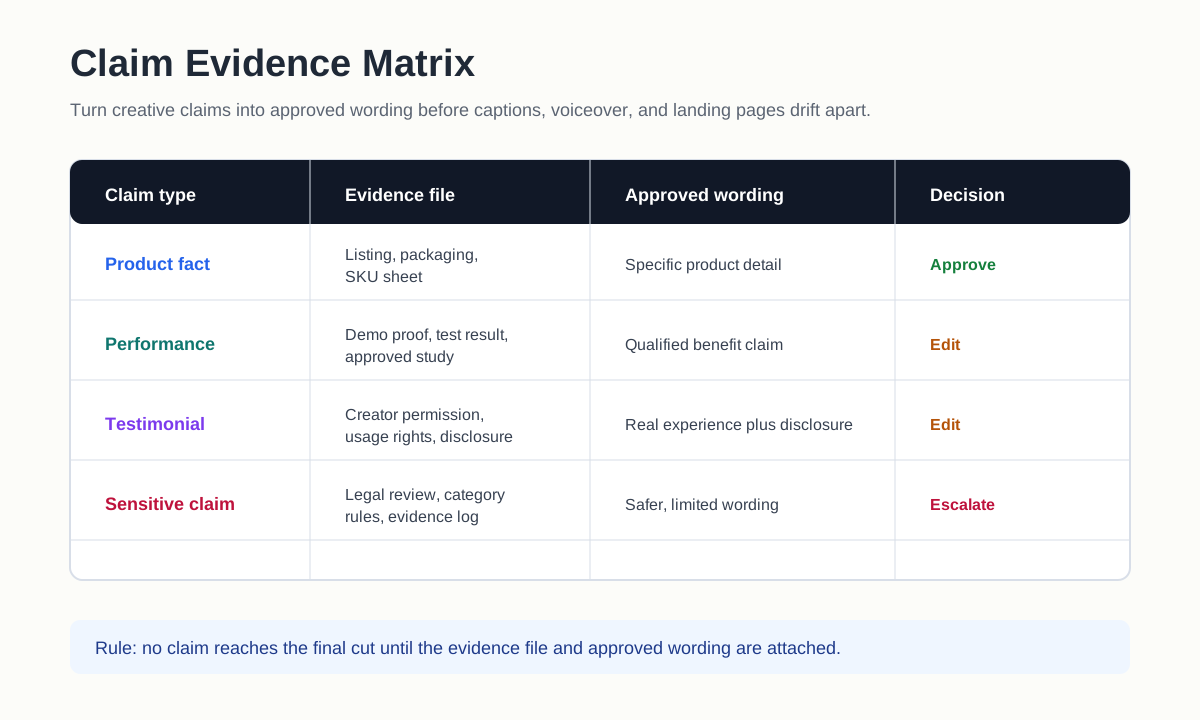
Not every claim carries the same risk. "Includes two replacement pads" is a product fact. "Cuts cleaning time in half" is a performance claim. "Dermatologist recommended" is an authority claim. "Better than Brand X" is a comparison claim. Each type needs a different level of evidence.
| Claim type | Example in a product video | Evidence needed | Safer rewrite |
|---|---|---|---|
| Product fact | "Includes two filters" | Product listing or packaging | Keep if the SKU truly includes two filters |
| Performance | "Removes pet hair in one pass" | Test result, demo footage, or controlled proof | "Designed for quick pet hair pickup" |
| Savings | "Save 40% today" | Current offer page and date | "See today's offer on the product page" |
| Health or body | "Clears acne in 7 days" | Category-specific substantiation and legal review | "Helps support a simple skincare routine" |
| Comparison | "Works better than leading brands" | Comparative test and approved wording | "Built for daily use on carpets and upholstery" |
| Testimonial | "This changed my sleep" | Real user experience plus disclosure | "Creator demo: setup, sound, and fit" |
The FTC's advertising guidance says ad claims need a reasonable basis before they run. For ecommerce video work, that means the evidence file should exist before the caption, hook, or voiceover makes the claim.
Step 3: Review Captions and Voiceover Separately
Captions are easy to overlook because they often arrive late in the edit. They are also where risky claims sneak in. A caption can be more aggressive than the spoken script, especially when a creator or AI tool tries to make the hook punchier.
Review captions line by line:
- Does the text repeat a verified product fact?
- Does it add a new claim that the voiceover never approved?
- Does it make an absolute promise, such as "guaranteed," "instant," "cure," "risk-free," or "best"?
- Does the discount, shipping, or return language match the destination?
- Does the text block cover required disclosure, safety context, or product detail?
Then review voiceover separately. Synthetic voices and AI actors can make a product video feel like a testimonial even when no real customer used the product. If the ad uses a fictional presenter, keep the lines factual: product features, setup steps, use cases, and offer context. Avoid first-person experience claims unless they come from a real person with documented permission and disclosure.
Step 4: Check Disclosure and Material Connection
Disclosure is not just a small hashtag at the end of the post. It should be hard to miss when a viewer is deciding whether to trust the recommendation.
Use disclosure review when the video includes:
- A paid creator, affiliate, ambassador, employee, or gifted product.
- A UGC-style testimonial, product review, or before-after story.
- A synthetic actor, cloned voice, AI-generated presenter, or realistic AI scene.
- A partnership ad, whitelisting setup, or brand-paid boost of creator content.
- A claim that depends on a specific test, sample size, or category limitation.
The safest operational rule is simple: place disclosure where the trust signal appears. If the creator opens with "I tried this for a week," the sponsorship or material connection should not wait until the final frame. If a synthetic presenter looks realistic, the viewer should not have to guess whether the person is real.
This is also where your UGC usage rights checklist matters. Rights, disclosure, and claims review should happen together because the same clip may be approved for organic use but not for paid ads, retargeting, marketplace pages, or cross-platform reuse.
Step 5: Match the Video to the Landing Page
Google's misrepresentation policy calls out unavailable offers, unclear relevance, misleading representation, and unreliable claims. For ecommerce teams, the practical version is straightforward: the shopper should see the same product, price logic, offer, and proof after clicking the ad.
Check these destination items before upload:
- The product in the video is the product on the landing page.
- The color, size, pack count, bundle, and included accessories match.
- The sale price, coupon, free shipping claim, and deadline are current.
- The return, warranty, trial, or guarantee language is not overstated.
- The page contains the evidence implied by the ad, such as reviews, ingredients, specs, or demo details.
- The landing page works on mobile and does not hide important terms.
If the video says "50% off today," but the landing page requires a code, says "up to 50%," or excludes the featured item, rewrite the ad. A compliant video is not just a clean file. It is a consistent ad-to-page experience.
Step 6: Add Platform-Specific Gates
The same product video can be safe on one channel and rejected on another. Keep a platform column in your QA sheet.
| Channel | Extra checks | Why it matters |
|---|---|---|
| Google and YouTube ads | Misrepresentation, exaggerated claims, destination match, manipulated media, unavailable offers | Google can review the ad, website, accounts, and third-party sources |
| TikTok ads | Deceptive practices, unrealistic claims, category restrictions, caption readability, TikTok Shop match | Fast UGC pacing can hide risky claims unless checked line by line |
| Meta ads | Personal attributes, misleading claims, before-after framing, landing page quality | Ad review can flag copy that implies sensitive traits or unrealistic outcomes |
| Amazon Sponsored Brands video | 16:9 file, marketplace language, general-audience content, safe area, product relevance | Amazon requires marketplace-specific language and ad policy acceptance |
| Organic social reuse | Music rights, creator permission, disclosure, product tag accuracy | Organic approval does not automatically cover paid usage |
For platform specs, pair this checklist with your existing Google Ads video specs and Amazon product video requirements workflows.
Step 7: Use a Reviewer Handoff Sheet
The compliance reviewer should not receive only an MP4. They need context. Send a one-page handoff sheet with:
- Final video file name and version number.
- Target channel and placement.
- Landing page URL.
- Product fact sheet.
- Script, captions, and voiceover transcript.
- Claim evidence file.
- Disclosure notes.
- Creator or AI asset notes.
- Open questions and required edits.
This makes review faster because the reviewer does not need to reverse-engineer the ad. It also creates a record for future variants. If the same hook becomes a TikTok cut, a Meta Reels cut, and an Amazon video, the team can see which claims were approved and which ones were channel-specific.
A Practical Approval Workflow
Use this workflow for every paid product video:
- Draft the script from approved product facts.
- Mark each claim as fact, performance, savings, comparison, testimonial, or category-sensitive.
- Create the first video cut.
- Export captions and voiceover transcript.
- Compare the cut against the landing page and offer.
- Check platform rules for the target placement.
- Review disclosure, creator rights, and AI asset usage.
- Remove or rewrite unsupported claims.
- Export a final version with a version number.
- Store the approval notes beside the file.
This is fast enough for daily creative testing. It also keeps your team from approving the same risky claim in ten different variations.
Common Red Flags to Remove
Cut or rewrite these before upload:
- "Guaranteed results" without specific terms and proof.
- "Cures," "treats," or medical-style claims for ordinary consumer goods.
- "Best," "number one," or "leading" without substantiation.
- Before-after visuals that imply typical results when the result is exceptional.
- AI-enhanced product scenes that change size, texture, speed, or output.
- Creator lines that imply real use when the person has not used the product.
- Hidden fees, unclear subscriptions, or offer terms that appear only after checkout.
- Fake UI buttons, fake system notices, or misleading arrows in the video.
The goal is not to make every ad bland. It is to make the proof match the promise. A specific, true claim is usually stronger than a vague superlative.
FAQ
Who should own product video compliance?
Creative, growth, and operations should share it. Creative owns the script and edit. Growth owns channel and destination fit. Operations or legal owns claim evidence, rights, and disclosure rules. One person should have final approval authority.
Do AI-generated product videos need extra review?
Yes. AI-generated or AI-edited product videos need product-accuracy review, claim review, and disclosure review. Check whether the AI changes product appearance, creates a fictional user experience, uses a synthetic presenter, or makes a realistic scene that could mislead shoppers.
Is a product claim safe if it appears on the product page?
Not automatically. The product page is a starting point, not proof by itself. Strong claims may still need substantiation, category-specific review, or softer wording in paid ads.
Should disclosures be in captions or only in the post text?
Use the clearest placement for the viewer. If the material connection, AI presenter, or testimonial affects how viewers judge the claim, put disclosure in or near the video experience, not only in a hidden caption or final-frame note.
What is the fastest way to make compliance review easier?
Write claims in a table before editing. Give every claim an owner, evidence source, and approved wording. Then use the same approved wording in the script, captions, voiceover, and landing page.
Sources Checked
- FTC: Advertising and Marketing, checked July 8, 2026, for truth-in-advertising and evidence-backed claims guidance.
- FTC: Endorsements, Influencers, and Reviews, checked July 8, 2026, for endorsement, review, and material connection disclosure guidance.
- Google Ads Help: Misrepresentation policy, checked July 8, 2026, for misleading representation, unreliable claims, unavailable offers, manipulated media, and destination relevance.
- TikTok Business Help Centre: Deceptive Practices, checked July 8, 2026, for misleading or deceptive claims in ads.
- Amazon Ads: Sponsored Brands video ad specs and guidelines, checked July 8, 2026, for video specs, marketplace language, safe area, and ad policy acceptance criteria.