
Quick Answer
Product video captions for ecommerce ads should do three jobs: make the video understandable with sound off, keep product proof clear on a small screen, and match the exact offer on the landing page. Use short caption lines for the hook, product proof, offer, and call to action, then run a QA pass for readability, safe zones, claim risk, and platform fit before export.
Captions are not just subtitles. In a product video ad, captions are part of the sales argument. They decide what the shopper understands in the first second, whether the proof feels credible, and whether the final action matches the page they will visit.
That is why ecommerce teams should plan captions at the same time as the product video script template, shot list, and CTA examples. If captions are added only after editing, they often repeat the voiceover, cover the product, or make claims the landing page cannot support.
When Product Video Captions Matter Most
Captions matter most when the ad must work before the viewer turns on sound. That includes TikTok, Instagram Reels, Facebook Reels, YouTube Shorts, feed placements, retargeting videos, and product page clips viewed in a noisy or silent environment.
They are also important when the product needs explanation. A mug that keeps coffee warm, a skin-care serum with a usage sequence, a desk accessory with setup steps, or a pet hair remover with visible before-and-after proof all need captions that guide attention.
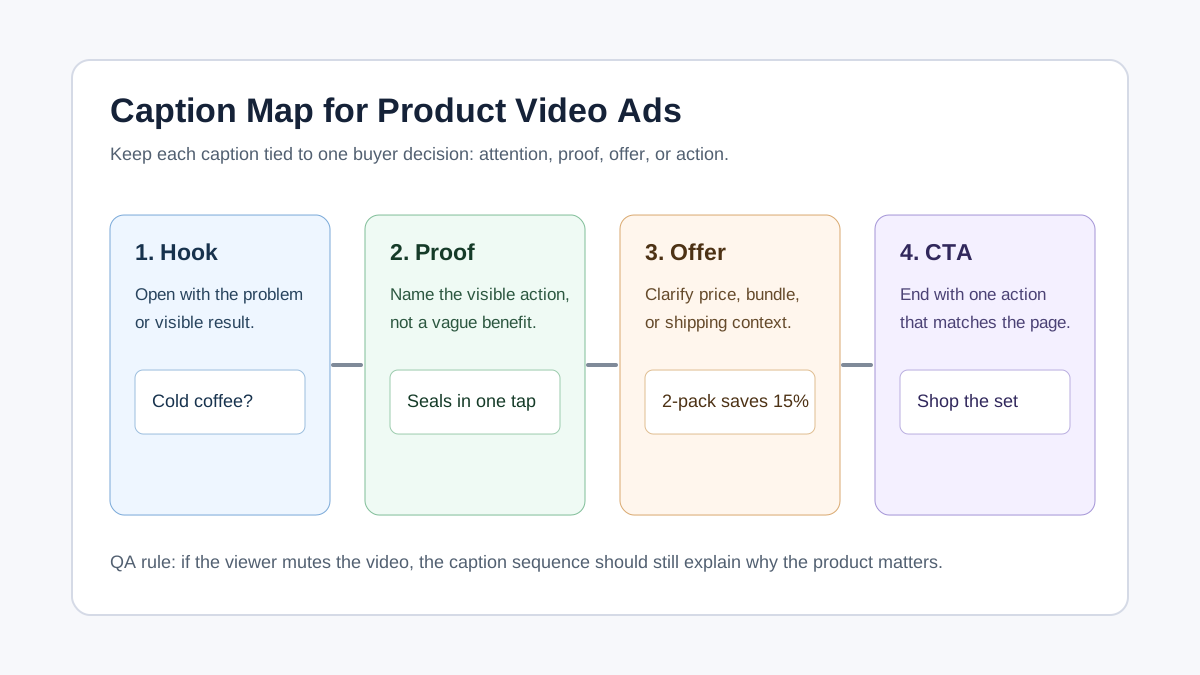
The mistake is treating captions as decoration. A large animated word can stop the scroll, but it does not automatically help the shopper decide. Good captions compress the buyer journey into a few readable moments:
| Caption moment | What the shopper needs to understand | Example caption |
|---|---|---|
| Hook | Why should I stop watching? | Cold coffee before work? |
| Product proof | What does the product visibly do? | Locks heat with one twist |
| Objection | What concern is being answered? | Fits most cup holders |
| Offer | What is the buying reason now? | Bundle saves 15% today |
| CTA | What should I do next? | Shop the commuter set |
If a caption does not answer one of those questions, remove it or move it to the ad copy outside the video.
Caption Strategy by Ad Goal
The best caption style depends on the goal of the video. Prospecting ads need faster context. Retargeting ads can be more specific. Product page videos can be calmer because the shopper is already considering the item.
| Ad goal | Caption style | Good for | Avoid |
|---|---|---|---|
| Cold prospecting | Problem-first, plain language | TikTok, Reels, Shorts, broad social ads | Long feature lists |
| Product proof | Action captions tied to visible scenes | Demo videos, before-and-after edits | Unsupported performance claims |
| Offer testing | Price, bundle, shipping, urgency | Retargeting, sale campaigns | Fine print that cannot be read |
| Objection handling | One concern per scene | Higher-priced products, setup products | Defensive or negative wording |
| Product page support | Step labels and feature proof | PDP videos, Shopify pages, Amazon listing support | Aggressive ad language |
For a first campaign, start with problem-first captions. They are easier to test because the hook, proof, and CTA can each be changed independently. Once you know the winning angle, build product-proof and offer versions around the same footage.
Product Video Caption Examples You Can Adapt
Use these examples as caption patterns, not as fixed scripts. Replace the product, proof, and offer with claims that your product page can support.
Problem-Solution Caption Set
This pattern works when the pain point is obvious on screen.
| Scene | Caption |
|---|---|
| First frame | Still using three bags for one trip? |
| Product appears | This organizer keeps gear sorted |
| Proof close-up | Wet pocket stays separate |
| Use case | Gym, commute, weekend bag |
| CTA | Shop the travel setup |
Before-and-After Caption Set
This pattern works only when the before-and-after is honest and visually supported.
| Scene | Caption |
|---|---|
| Before | Countertop chaos before coffee |
| Product action | Pods, filters, and spoons in one tray |
| After | Everything visible in one pull |
| Buyer context | Built for small kitchens |
| CTA | Organize the coffee corner |
Review-Style Caption Set
This pattern supports UGC-style ads and creator clips.
| Scene | Caption |
|---|---|
| Creator hook | I bought it for one drawer |
| Product demo | Now it holds every charging cable |
| Proof | Labels stay visible |
| Objection | No drilling, no tools |
| CTA | See the drawer kit |
Offer Caption Set
This pattern works for retargeting, but it must match the landing page exactly.
| Scene | Caption |
|---|---|
| Hook | Need one for home and one for work? |
| Bundle | Two-pack saves 15% |
| Proof | Same leakproof lid in both sizes |
| Limit | Colors rotate weekly |
| CTA | Build your set |
Caption Length, Placement, and Readability Rules
For paid social and short-form video, use captions as short visual statements. Most ecommerce captions should stay under seven words per line. If the idea needs more than one short line, split it across scenes.
The practical rule is simple: a viewer should understand the caption while also watching the product. If the caption needs all of their attention, it is too long for a product video ad.
Use this editing checklist:
- Keep each caption line to one idea.
- Use sentence case unless a brand style guide requires otherwise.
- Place captions away from product labels, hands, faces, UI controls, price stickers, and the final CTA button.
- Use enough contrast for small mobile screens.
- Avoid tiny disclaimers inside fast scenes.
- Export platform versions instead of forcing one caption layout into every placement.
Platform safe zones matter because interface elements can cover captions. TikTok notes that safe zone size can change by ad dimension, caption length, and additional formats. Meta also documents safe zones for Stories and Reels so text and logos are not covered or cropped. For channel-specific dimensions, pair this workflow with the Meta video ad specs, TikTok ad specs, and YouTube Shorts product video specs guides.
Do Not Let Captions Create Unsupported Claims
Captions often create risk because they simplify the product promise. A voiceover might say, "Many customers use this desk cushion during long workdays." A rushed caption might become, "Fix back pain at work." Those are not the same claim.
Before publishing, check every caption against approved product copy, test data, reviews, and the landing page. If the caption makes the benefit sound stronger than the page can prove, rewrite it.
| Risky caption | Safer ecommerce caption | Why |
|---|---|---|
Cures dry skin overnight |
Seals in moisture after cleansing |
Describes use instead of medical result |
Never spills in your bag |
Leak-resistant lid for daily carry |
Avoids absolute guarantee |
Lose inches instantly |
Smooth fit under everyday outfits |
Avoids body-change claim |
Best cleaner on Amazon |
Designed for daily kitchen spills |
Avoids unverifiable ranking |
Ships free forever |
Free shipping on today's order |
Matches a specific offer |
This is especially important when using AI-generated captions or adapting scripts from a product video prompts workflow. The generated text may sound persuasive, but your team still owns the accuracy of the published ad.
Workflow: Build Captions From Script to Export
Use this workflow when creating captions for a new ecommerce product video.
1. Start With the Buyer Decision
Choose one decision the video must support. Examples:
- The shopper understands the problem.
- The shopper trusts the product proof.
- The shopper sees why the bundle is useful.
- The shopper knows what to click next.
Do not try to solve all of those in one 15-second edit. Pick the primary decision first, then let captions reinforce it.
2. Mark the Four Caption Moments
In the script, mark the hook, proof, offer, and CTA. If the script has no proof moment, fix the script before writing captions. Captions cannot rescue a video that never shows the product doing something useful.
3. Write Captions Before Final Editing
Draft the captions before locking the edit. This lets the editor leave space in the frame, choose clearer product shots, and avoid placing important text behind platform UI.
4. Run a Silent-View Pass
Watch the video on a phone with sound off. Do not read the script. If the product value is unclear, the captions need work.
5. Run a Claim and Offer Pass
Compare every caption to the product page. Check prices, discounts, shipping, guarantees, product names, sizes, materials, and usage claims. If the landing page says "water-resistant," the caption should not say "waterproof."
6. Export Platform Versions
Make separate exports for major placements when needed. TikTok, Reels, Shorts, feed, and product page embeds do not always share the same visible safe area, caption density, or CTA context.
Caption QA Checklist Before Publishing
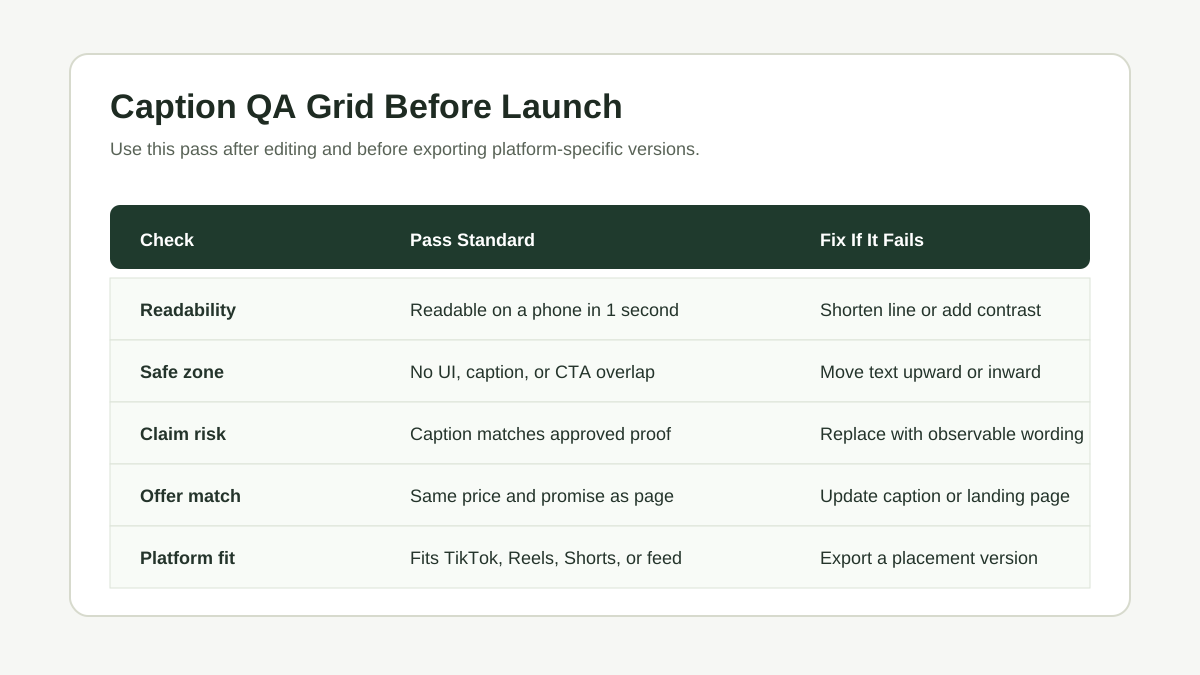
Run this checklist before upload, ad review, or product page embedding.
| QA item | Pass condition | Fix if it fails |
|---|---|---|
| Readability | Caption can be read on a phone in one second | Shorten the line or add contrast |
| Product visibility | Caption does not cover the product action | Move text or reframe the shot |
| Safe zone | Text is not hidden by platform controls | Use platform preview and adjust export |
| Claim safety | Caption matches approved proof | Replace with observable wording |
| Offer accuracy | Price, discount, and CTA match the landing page | Update caption or page before launch |
| Sound-off clarity | Video makes sense without audio | Add step labels or proof captions |
| Brand consistency | Tone matches product and audience | Remove hype or off-brand wording |
| Localization | Translated captions fit the frame | Shorten translation and recheck layout |
For product launches, connect this checklist to the UGC video workflow for product launches so captions, hooks, offers, and landing pages are reviewed together.
Common Caption Mistakes in Ecommerce Ads
Repeating the Voiceover Exactly
If the captions repeat every spoken word, they may become too dense for a short ad. Use subtitles when accessibility or full comprehension requires them, but use on-screen captions to summarize the buyer decision.
Covering the Product Proof
A caption that hides the product in use weakens the ad. Put the proof first: hands, material detail, transformation, fit, size, or setup. Then place the caption where it supports the proof.
Using the Same Caption Layout Everywhere
A caption that works in a square feed ad may fail in a vertical placement. Treat caption layout as part of platform adaptation, not as a single export setting.
Writing Captions as Hype Instead of Evidence
Game changer says less than Stores four cables in one pouch. Ecommerce captions should make the product easier to understand, not just louder.
Ending With a Generic CTA
Learn more is sometimes fine, but product videos often perform better when the CTA matches the offer or use case. Use Shop the starter kit, Build your bundle, See the sizes, or Choose your color when those actions match the landing page.
FAQ
Are captions and subtitles the same for ecommerce videos?
No. Subtitles usually transcribe speech. Ecommerce captions can include speech, but they also highlight product proof, objections, offers, and CTAs. Use subtitles for accessibility and captions for selling clarity.
How many words should a product video caption have?
Most short-form product video captions should stay under seven words per line. Longer details belong in the product page, ad copy, or a slower product page video.
Should every scene have a caption?
Not always. Caption the scenes where the viewer needs context. If a product action is already obvious, leave the frame clean or use a short label.
Can I use AI to write product video captions?
Yes, but review every generated caption for claim accuracy, safe-zone fit, landing-page match, and brand tone. AI can create options quickly, but it can also overstate benefits.
What should I test first: hook captions or CTA captions?
Start with hook captions for cold traffic because they affect whether the viewer keeps watching. Test CTA captions after the hook and proof sequence are already clear.