
Quick Answer
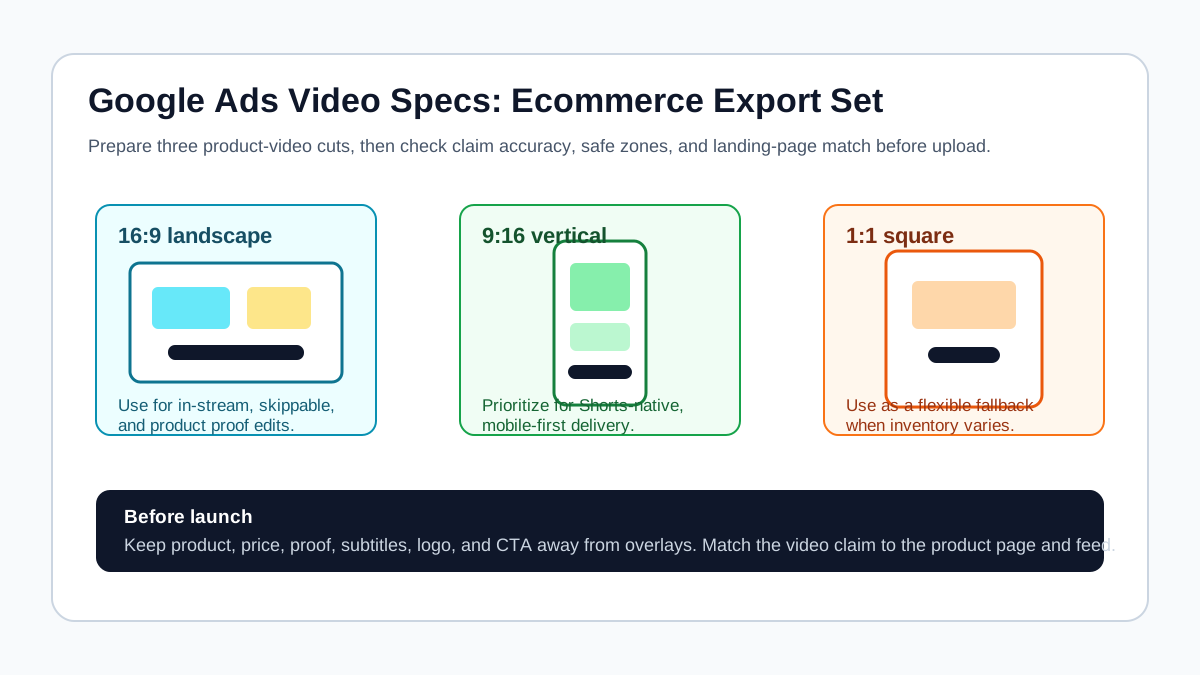
Google Ads video specs for ecommerce product ads should be treated as a pre-launch QA checklist, not just an export preset. Prepare a landscape 16:9 cut, a vertical 9:16 cut, and a square 1:1 cut when the campaign can use multiple placements. Keep the product, price, offer, subtitles, logo, and CTA away from interface overlays. Then confirm that every claim in the video matches the product page, product feed, and final URL before you upload the asset.
For most ecommerce teams, the safe starting set is:
| Export | Practical size | Ecommerce use | Main QA risk |
|---|---|---|---|
| 16:9 landscape | 1920 x 1080 | YouTube in-stream, product proof, longer demos | Product may feel too small on mobile if the crop is wide. |
| 9:16 vertical | 1080 x 1920 | Shorts-native and mobile-first placements | Captions, price, and CTA can collide with overlays. |
| 1:1 square | 1080 x 1080 | Flexible fallback for mixed inventory | The crop can remove context if the product is tall or horizontal. |
If you already have a finished product video, do not upload one file everywhere. Rebuild the first three seconds, caption position, CTA, and product framing for the placement. If you are creating new assets, start with the product video ad script template, turn it into scenes with the product video storyboard template, then export the Google Ads versions from the same approved claim set.
Why Google Ads Specs Matter More for Product Ads
Ecommerce video ads fail in Google Ads for three common reasons: the file is technically accepted but poorly framed, the product claim does not match the landing page, or the creative was built for TikTok/Reels and reused without Google-specific QA. The specs page tells you what can be uploaded. A product-ad checklist tells you what should be uploaded.
That difference matters because Google Ads can distribute video assets across YouTube inventory, Demand Gen campaigns, and Performance Max asset groups depending on your setup. The same product may appear beside a long-form YouTube video, in a Shorts-style mobile surface, or as part of an automated asset combination. A single uncropped product demo is rarely strong enough for all of those contexts.
Use this article as the Google Ads layer in your product-video workflow. For broader production planning, pair it with Create Ecommerce Product Videos with AI. For product feed and destination matching, also use the Google Merchant Center video link checklist.
The Ecommerce Export Matrix
Google's public video ad guidance supports multiple orientations and emphasizes that the right video format depends on the campaign, placement, and user context. For ecommerce, the practical question is not "Which ratio is allowed?" It is "Which ratio preserves the product proof and the buying action?"
| Asset question | 16:9 landscape | 9:16 vertical | 1:1 square |
|---|---|---|---|
| Best for | Product demos, comparison proof, before/after context, longer explanation | Shorts-style hooks, mobile product discovery, fast offer tests | Retargeting, catalog-adjacent creative, mixed-placement backup |
| Opening frame | Product plus use case | Product fills the center third | Product centered with enough negative space |
| Caption placement | Lower third, away from controls | Middle or upper-middle, not at the very bottom | Lower third or side label |
| CTA placement | End card, voiceover, or branded lower third | Center-safe end frame, short text, clear product URL match | Short end card or product-benefit label |
| Common ecommerce mistake | Wide lifestyle shot with tiny product | TikTok-style text too close to right or bottom UI | Cropping off packaging, handle, dimensions, or product bundle |
The best export set usually comes from one master storyboard, not three disconnected edits. Keep the claim, offer, and product proof stable. Change the crop, pacing, and caption layout for each placement.
Google Ads Video Specs Checklist
Run this checklist before uploading product videos to Google Ads or attaching them to a campaign asset group.
| Check | Pass condition | Why it matters for ecommerce |
|---|---|---|
| Aspect ratio | You have the ratio needed for the intended placement: 16:9, 9:16, or 1:1. | Google can accept several formats, but weak crops reduce product clarity. |
| Resolution | The export is high enough quality for the chosen ratio, such as 1080p equivalents for common full-HD cuts. | Low-resolution product details make labels, texture, and proof harder to trust. |
| File format | The file matches Google Ads' supported video upload requirements or is hosted through a supported YouTube flow when required. | A technically invalid file delays launch and can break batch workflows. |
| Duration | The video length matches the campaign purpose. Short direct-response cuts usually need faster proof than brand-story edits. | Product ads often lose buyers if the first proof appears too late. |
| Safe zone | Product, subtitle, price, offer, logo, and CTA are not hidden by overlays or controls. | A discount or "shop now" line hidden by UI can make the ad ineffective. |
| Thumbnail or opening frame | The first visible frame shows the product or buyer problem. | Some surfaces are sound-off or quick-scroll; the first frame must earn attention. |
| Claim match | Every promise in the video matches the product page, feed, price, shipping terms, and availability. | Mismatches can trigger disapproval, wasted clicks, or low post-click trust. |
| Brand and disclosure | Logo, sponsorship, AI-generated actor use, or offer disclaimer is handled clearly where needed. | Ecommerce ads need trust signals, not just motion and music. |
If you generate product videos with AI, use the same QA standard. The fastest path is to build an approved product fact sheet, generate variants in ShopShot's AI video generator, and then check each export against the table above before uploading.
Campaign-Specific Notes
Google Ads has several places where ecommerce video assets can matter. Do not assume one spec sheet covers every strategic decision.
YouTube Video Campaigns
YouTube video campaigns need a video asset that makes sense for the format. In-stream creative can carry more explanation, while Shorts-style creative needs a faster opening and vertical framing. For ecommerce, put the product or buyer problem in the first seconds. A slow logo reveal is usually weaker than a product demonstration, transformation shot, or objection-led hook.
If your video is intended for Shorts inventory, review the YouTube Shorts product video specs guide as a second layer. That page focuses on Shorts framing, length expectations, and mobile-safe creative.
Demand Gen Campaigns
Demand Gen creative is asset-heavy. Treat it like a product discovery system: buyers may see your product while they are browsing visual surfaces, not actively searching for your exact SKU. Your video should make the product category obvious without sound and should not rely on a long setup.
A good Demand Gen ecommerce video often includes:
- A first-frame product or use case.
- A visible benefit or buyer problem.
- A proof moment, such as texture, fit, before/after, size, pack contents, or comparison.
- A CTA that matches the landing page.
Performance Max Asset Groups
Performance Max asset groups combine text, images, logos, videos, final URLs, and other assets across Google surfaces. For ecommerce teams, the operational risk is asset mismatch. The video might say "bundle discount," while the final URL shows a single product. Or the video may show an old package while the product feed has a new image.
Before attaching product videos to an asset group, confirm:
| Asset group item | What to check |
|---|---|
| Final URL | It leads to the exact product, collection, or offer shown in the video. |
| Product feed | Price, availability, image, title, and variant match the video's claim. |
| Headlines | They do not overpromise a result the video only implies. |
| Images | They match the same product version and bundle shown in the video. |
| Video | It has a clear crop and does not depend on tiny unreadable packaging text. |
This is where Google Ads specs connect directly to Merchant Center hygiene. If the product page is not ready, fix that before you scale the video.
A Practical Google Ads Video Workflow
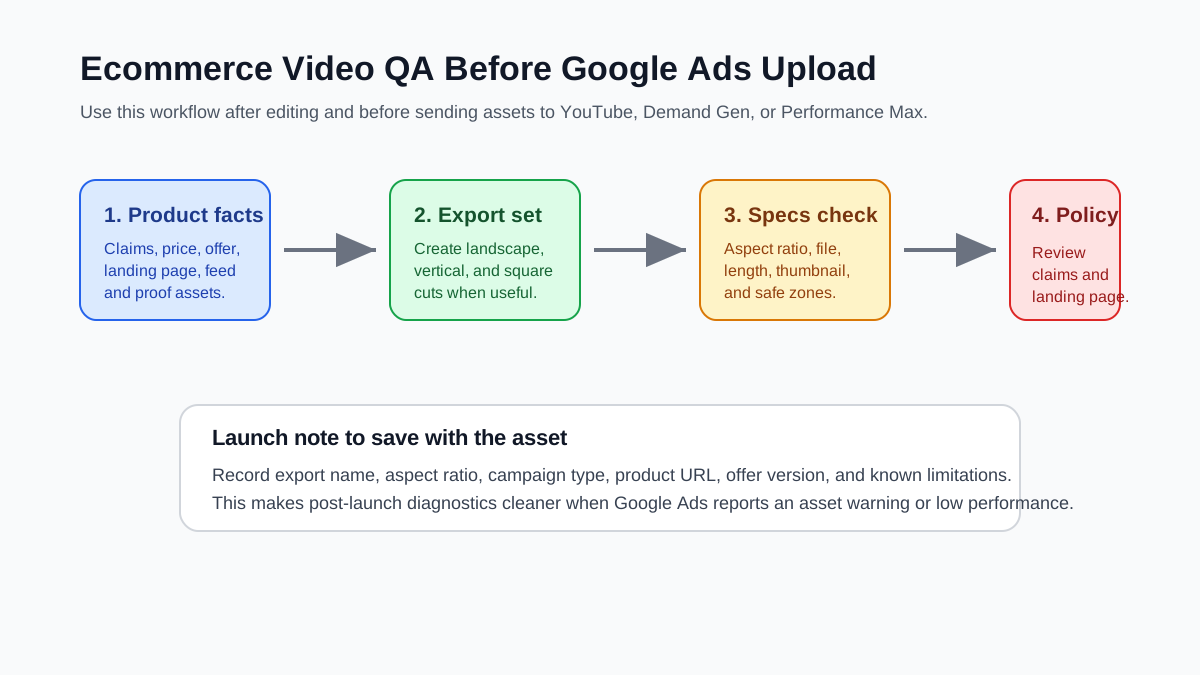
Use this workflow when your ecommerce team needs a repeatable process instead of ad hoc exports.
1. Create a Product Truth Sheet
Write down the exact product name, category, price, offer, landing page, primary buyer objection, proof assets, usage limitations, and claims that are allowed. Keep this document boring and literal. It should answer what the product is, who it is for, what it does, and what the ad is allowed to say.
This protects the video from creative drift. It also gives your editor or AI workflow a clean source of truth.
2. Choose the Campaign Role
Decide whether the video is for prospecting, retargeting, product education, or offer urgency.
| Role | Strong opening | Weak opening |
|---|---|---|
| Prospecting | Buyer problem plus product reveal | Abstract brand montage |
| Retargeting | Objection answer or proof close-up | Generic product category statement |
| Offer test | Offer plus product in use | Discount text with no product context |
| Education | Problem, mechanism, result | Long founder intro before product appears |
The campaign role shapes the video length and opening. It should be decided before export, not after upload.
3. Build One Master Script and Three Crops
Use one approved script so the claim stays consistent. Then adapt the framing:
- Landscape: show product context and proof.
- Vertical: keep the product and subtitle in the center-safe area.
- Square: simplify the frame so the product remains readable.
Do not make the vertical cut by blindly cropping the center of a landscape video. Reframe shots, reposition captions, and rebuild the end card.
4. Run the Specs and Claim Gate
Open the video and check it like a buyer would:
- Can I tell what product this is in the first two seconds?
- Can I read the main benefit without sound?
- Is the product proof visible, not implied?
- Does the CTA match the page I land on?
- Is any price, discount, shipping line, or availability claim still true?
- Are captions, logo, and product labels outside likely interface overlays?
- Would this still make sense if Google places it in a mobile-first context?
If the answer is no, fix the asset before upload. A weak video that passes technical specs can still waste spend.
5. Save a Launch Note
Keep a short note with the export name, aspect ratio, campaign, product URL, offer version, and approved claim set. When Google Ads later flags an asset, reports weak performance, or shows one ratio outperforming another, the team can diagnose the actual variable.
Common Mistakes to Avoid
Uploading Only the TikTok Cut
A TikTok-style ad can inspire the hook, but Google Ads placements and review context are different. Keep the fast opening if it works, but rebuild the safe zones, product framing, and final CTA for Google Ads.
Hiding the Product Behind Captions
Large captions can help short-form video, but ecommerce ads need product inspection. If the caption covers the texture, bundle, before/after proof, or package size, the crop is wrong.
Letting AI Invent Proof
AI-generated product videos still need product truth. Do not let the video imply unverified clinical results, unrealistic before/after changes, fake reviews, unavailable colors, or a bundle that the page does not sell.
Ignoring the Landing Page
Video specs and landing-page trust are connected. If the video promises "same-day shipping" and the product page does not, the issue is not just creative. It is a campaign quality problem.
Measuring All Ratios Together
If you upload landscape, vertical, and square assets but do not label them clearly, performance analysis becomes messy. Use export names that include product, angle, ratio, and date.
Pre-Upload QA Template
Copy this table into your creative review doc before launch.
| QA item | Owner | Pass notes |
|---|---|---|
| Product and variant match the final URL | Ecommerce manager | |
| Price, discount, and shipping claims are current | Growth lead | |
| 16:9, 9:16, and 1:1 exports are available where needed | Creative lead | |
| Captions do not cover product proof or CTA | Editor | |
| First frame shows product or buyer problem | Creative lead | |
| End frame has a clear next action | Growth lead | |
| Product feed and Merchant Center data match | Feed owner | |
| Launch note saved with ratio and campaign role | Media buyer |
This is also a useful handoff if you use an AI production workflow. A clear QA table makes generated creative easier to approve, reject, or revise.
FAQ
What are the best Google Ads video specs for ecommerce?
For most ecommerce product ads, prepare 16:9, 9:16, and 1:1 exports when the campaign can use multiple placements. Use 1080p-equivalent dimensions where possible, keep product proof readable, and check the current Google Ads requirements before upload.
Can I use the same video for YouTube, Demand Gen, and Performance Max?
You can sometimes use the same concept, but you should not rely on one unchanged file. YouTube in-stream, Shorts-style delivery, Demand Gen discovery, and Performance Max asset groups can need different crops, openings, and CTA placement.
Should ecommerce video ads be vertical or landscape?
Use vertical when the placement is mobile-first or Shorts-style. Use landscape when the ad needs more demonstration context. Use square as a flexible fallback. The best choice depends on the campaign role and where the buyer will see the asset.
Do Google Ads video specs prevent disapprovals?
Technical specs help the file upload correctly, but they do not guarantee approval. Ecommerce advertisers still need accurate claims, compliant landing pages, matching product feed data, and clear offer terms.
What should I check after upload?
Check asset status, policy warnings, placement performance, view or engagement quality, click-through behavior, and post-click conversion. If one ratio performs poorly, inspect the opening frame, product size, captions, and CTA before replacing the whole concept.
Sources Checked
- Google Ads Help: About video ad specs, checked June 29, 2026, for current Google Ads video format and upload guidance.
- Google Ads Help: Demand Gen campaign creative asset specifications, checked June 29, 2026, for Demand Gen creative asset requirements.
- Google Ads Help: How asset groups work, checked June 29, 2026, for Performance Max asset group behavior.
- Google Ads Help: YouTube Shorts ads asset specs and best practices, checked June 29, 2026, for Shorts-oriented video guidance.
- Google Ads Help: About the ABCDs of effective video ads, checked June 29, 2026, for creative effectiveness principles.