
Quick Answer
A UGC usage rights checklist helps ecommerce teams confirm exactly where, how long, and in what format a creator video can be used before it appears in paid ads, product pages, emails, landing pages, or retargeting campaigns. The minimum checklist should cover creator permission, paid media rights, edit rights, whitelisting or partnership ad permissions, music and third-party asset clearance, disclosure duties, claim evidence, renewal dates, and the storage location for contracts and raw files.
Use this before you turn a creator video into a paid asset. If you are still writing the creator brief, start with the UGC video brief template, then use this page as the rights and launch gate.
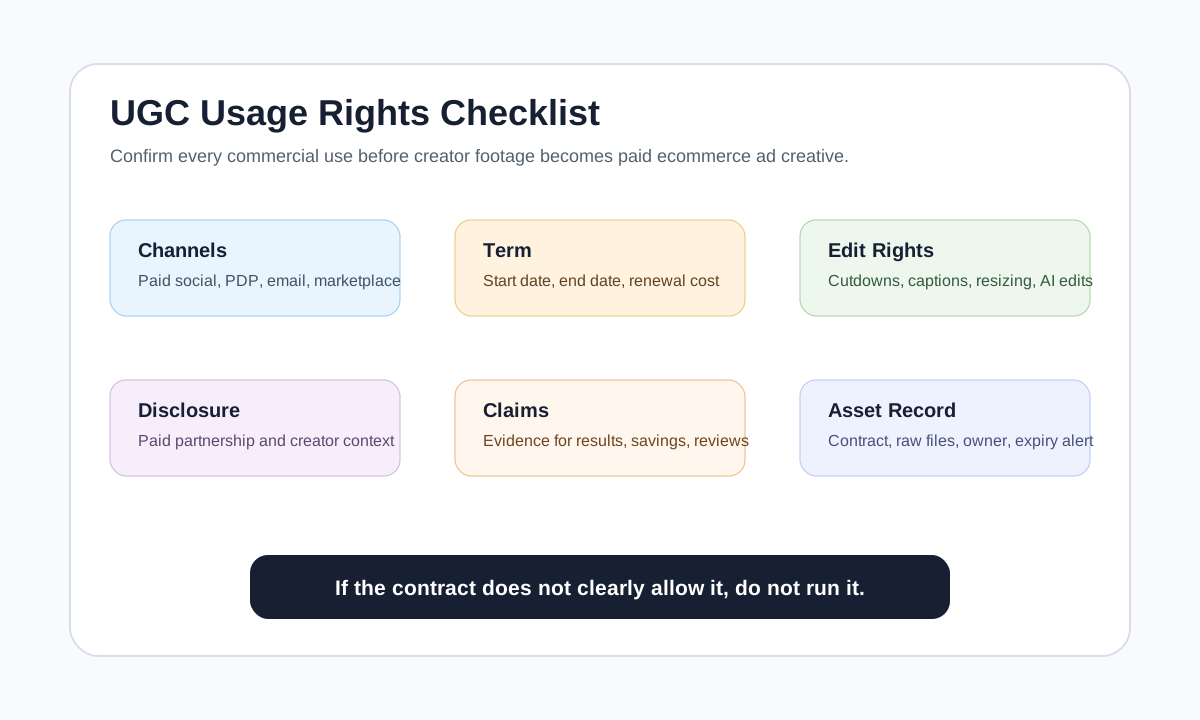
Why Usage Rights Matter
UGC can feel casual, but the legal and operational layer is not casual. A creator may agree to film a TikTok-style demo, but that does not automatically mean your store can run the same clip as a Meta ad for a year, put it on an Amazon listing, translate the voiceover, cut it into YouTube Shorts, or use it in email.
For ecommerce marketers, usage rights are a production control system. They answer five questions:
- Who created the content?
- Who may use it?
- Where may it appear?
- How long may it run?
- What edits, claims, and paid distribution are allowed?
Without those answers, a winning ad can become unusable just when it starts performing. Worse, the team may accidentally run footage outside the contract, use music that was never cleared for paid media, or keep a creator's face in ads after the usage window ends.
The Core Checklist
| Checklist item | What to confirm | Why it matters |
|---|---|---|
| Creator identity | Legal name, handle, payment record, and contact | You need a clear rights holder and audit trail |
| Content scope | Which files, raw footage, stills, captions, hooks, and cutdowns are covered | Avoid assuming all deliverables are included |
| Channel rights | Organic social, paid social, product page, email, marketplace, affiliate, or landing page | Paid usage is often priced separately |
| Platform rights | TikTok, Instagram, Facebook, YouTube, Pinterest, Amazon, Shopify PDP, or other channels | Some creators limit platform use |
| Term length | Start date, end date, renewal notice, and extension cost | Prevent expired ads from staying live |
| Territory | Countries, languages, and regions | Needed for localization and international campaigns |
| Edit rights | Cropping, subtitles, voiceover, hooks, AI edits, translation, and cutdowns | Repurposing often changes the original work |
| Whitelisting | Permission to run ads from the creator handle or partnership tools | Needed for Spark Ads or partnership-style ad flows |
| Exclusivity | Whether the creator may work with competitors | Useful for high-value categories, but costly |
| Music and assets | Confirmation that music, fonts, overlays, and images are licensed for ads | Brands can be liable for third-party rights issues |
| Disclosure | Paid relationship, gifted product, affiliate incentive, and platform labels | Required for trust and compliance |
| Claims | Product claims, before-after claims, savings claims, health claims, and guarantees | Claims need evidence, not just creator language |
The safest operating rule is simple: if the contract does not clearly allow a use case, treat it as not allowed until confirmed.
Rights by Channel
Not every UGC video needs every right. Buying every possible use forever can waste budget, but buying too little can block scale.
| Use case | Rights usually needed | Common mistake |
|---|---|---|
| Organic brand post | Organic social license, creator credit rules, repost permission | Assuming a tag is permission to repost |
| Paid Meta or TikTok ad | Paid social license, edit rights, usage term, disclosure approval | Buying organic rights only, then boosting the post |
| Creator-handle ads | Whitelisting, Spark Ads, Partnership Ads, or similar authorization | Running ads from a creator identity without platform permission |
| Product page video | Website or PDP usage, term length, edit rights | Using social-only footage on the storefront |
| Email or landing page | Owned-channel license and edit rights | Cropping creator video into promotional email without approval |
| Marketplace listing | Marketplace or retail media usage, product claim approval | Using creator footage where stricter claim review applies |
| Localization | Territory, language, subtitle, dubbing, and AI voice permissions | Translating a creator's voice without consent |
For platform-specific ad setup, pair this checklist with the Meta video ad specs guide, the TikTok Shop video workflow, and the YouTube Shorts product video specs.
What to Put in the Creator Brief
The best rights workflow starts before filming. Include these details in the brief so the creator knows how the content may be used:
- Product name, landing page, and required product proof.
- Required deliverables: finished video, raw clips, stills, hooks, voiceover, captions, and thumbnail frame.
- Intended channels: organic, paid social, PDP, email, marketplace, and retargeting.
- Usage term: for example, 30 days for test ads, 3 months for paid social, or 12 months for evergreen PDP video.
- Edit rights: crop, resize, subtitle, reorder clips, add product overlays, localize captions, or create cutdowns.
- Disclosure requirements: paid partnership, gifted product, affiliate relationship, or creator label.
- Forbidden claims: medical, financial, guaranteed result, unrealistic before-after, or unsupported comparison claims.
- Approval flow: who checks the first draft, who approves claims, and who stores the final contract.
Use the product video script template to keep the script claim-safe, and use the UGC hooks guide when you need multiple hook options before filming.
Paid Usage and Whitelisting
Paid usage means the creator's content will be used in ads. Whitelisting, Spark Ads, Partnership Ads, and similar workflows may let the brand run paid media through or alongside the creator identity. These rights should be explicit because they affect compensation, account access, duration, and brand control.
Before launch, answer:
- Can the brand run the content from its own ad account?
- Can the brand run the content from the creator's handle or partnership ad tool?
- Can the brand edit the opening hook, captions, CTA, or product overlay?
- Can the brand use the same video for retargeting, prospecting, and marketplace traffic?
- What happens when the usage term expires?
If your media buyer says, "This ad is winning, keep it live," the operations team should be able to check the rights record in under one minute.
Claim and Disclosure Review
The FTC's endorsement and review guidance focuses on truthful endorsements, disclosed material connections, and avoiding deceptive reviews. TikTok and Meta also expect transparency around commercial content and manipulated or AI-generated media. For ecommerce UGC, that means the rights checklist must include both licensing and claim review.
Use this claim table before approval:
| Claim type | Require before launch | Safer rewrite |
|---|---|---|
| Personal result | Creator actually experienced it and can say it honestly | "This is designed to help with..." |
| Before-after | Real footage, typicality context, and category review | "Here is one demo result from the shoot" |
| Health or body claim | Legal and evidence review | Use product facts, not implied treatment claims |
| Savings claim | Current price evidence and clear comparison | "Costs less than a typical studio shoot" |
| Durability claim | Test record or product spec | "Built with reinforced stitching" |
| Review quote | Permission and accurate wording | Use verified review snippets only |
Disclosure should be clear enough for a normal viewer. Vague wording like "collab" or a hidden tag is weaker than plain language such as "ad," "paid partnership," or platform-native branded content labels where applicable.
Renewal and Asset Tracking Workflow
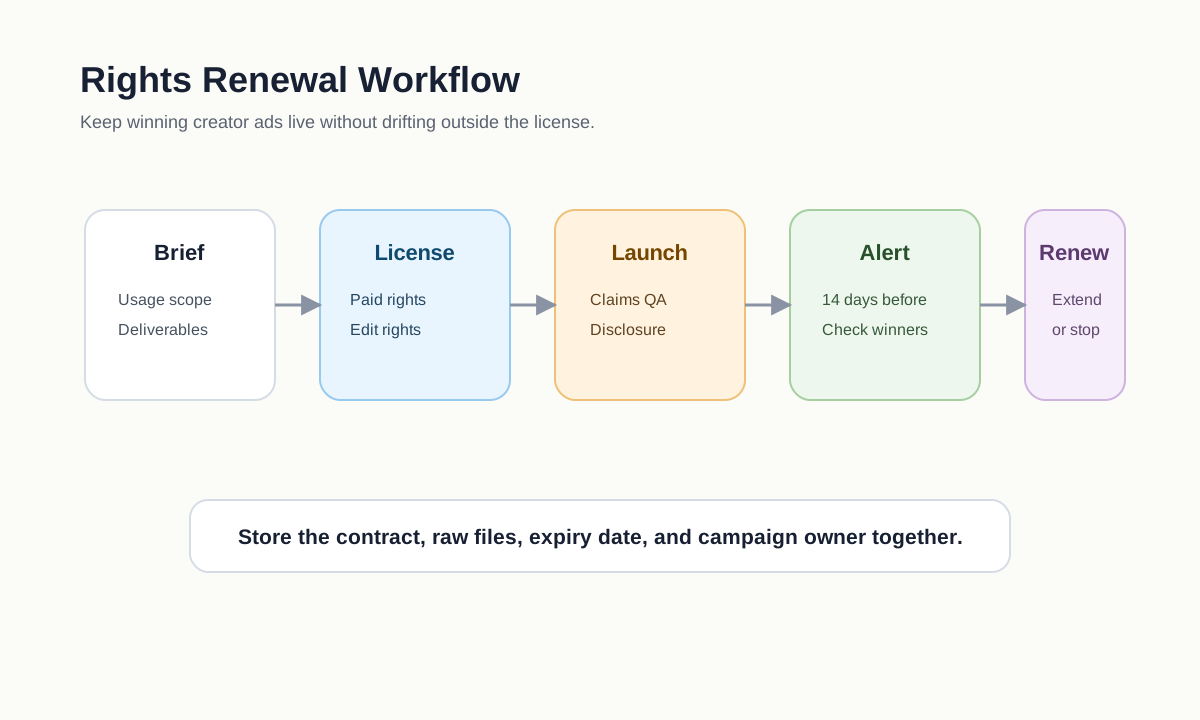
Rights do not end at launch. Create a lightweight asset record for every UGC video:
| Field | Example |
|---|---|
| Creator | Jane Doe, @janedemo |
| Asset ID | 2026-06-travel-steamer-jane-01 |
| Files covered | Final video, raw clips, captions, thumbnail still |
| Paid channels | TikTok, Instagram Reels, Facebook Feed |
| Owned channels | PDP, email, landing page |
| Start date | 2026-06-24 |
| End date | 2026-09-24 |
| Renewal cost | $250 per 90 days |
| Edit rights | Cutdowns, captions, overlays, aspect ratio resizing |
| Restrictions | No Amazon, no AI voice clone, no competitor category |
| Contract location | Shared drive or CRM record URL |
Then set reminders 14 days before expiry. This gives the media team time to renew winners, turn off expired ads, or replace assets with new creator footage.
AI Editing and Repurposing Rights
More ecommerce teams now use AI to create subtitles, cutdowns, translated voiceovers, or product overlays from creator footage. Do not assume creator usage rights automatically include AI editing.
Ask for explicit permission if you plan to:
- Clone or synthesize the creator's voice.
- Translate the creator's spoken words into another language.
- Use the creator's likeness in AI-generated scenes.
- Extend footage with synthetic backgrounds or product interactions.
- Generate new hooks that imply the creator said something they did not say.
If you need synthetic variants, use ShopShot's AI video generator for product-led or presenter-style assets, but keep real creator identity and voice rights separate.
Pre-Launch QA Checklist
Run this final check before any UGC video becomes an ad:
- The usage window is active.
- The channel and placement are covered.
- Paid usage is explicitly allowed.
- Whitelisting or partnership ad permissions are documented if needed.
- Edit rights cover the final cut actually being uploaded.
- Music and third-party assets are cleared for paid advertising.
- Material connection disclosure is visible.
- Product claims match evidence.
- The creator's name, contract, files, and renewal date are stored.
- The campaign owner knows when to stop or renew the asset.
For creative testing structure after rights are approved, use the guide on how many UGC video ads to test.
FAQ
Can I repost customer UGC if they tagged my brand?
Do not assume a tag equals permission. Ask for clear permission and document where you plan to use the content, especially if it will appear in paid ads, product pages, or email.
Do paid ad rights cost more than organic usage rights?
Often, yes. Paid usage usually has broader reach, stronger commercial value, and more creator exposure. Many creators price paid usage by platform, duration, and whether the brand can edit or whitelist the content.
Can I keep running a UGC ad after the usage window expires?
No. Turn it off or renew the rights before the end date. Build expiry reminders into your campaign calendar so winning ads do not accidentally run outside the license.
Do I need separate rights for raw footage?
Usually, yes. A final edited video and raw footage are different deliverables. If you want to create cutdowns, new hooks, thumbnails, or product-page clips, put raw footage and edit rights in the agreement.
Can I use creator footage with AI tools?
Only if your rights allow the specific AI use. Subtitles and basic resizing are different from voice cloning, likeness generation, or synthetic scene extension. Get explicit permission for sensitive AI edits.
Sources Checked
- FTC Endorsements, Influencers, and Reviews: https://www.ftc.gov/business-guidance/advertising-marketing/endorsements-influencers-reviews
- FTC Advertising FAQ for small business: https://www.ftc.gov/business-guidance/resources/advertising-faqs-guide-small-business
- IAB User-Generated Content for Marketing and Advertising guide: https://www.iab.com/wp-content/uploads/2019/06/IAB-UGC-for-Marketing-and-Advertising-FINAL-May-2019-1.pdf
- TikTok About AI-generated content: https://support.tiktok.com/en/using-tiktok/creating-videos/ai-generated-content
- SERP spot check for "UGC usage rights checklist ecommerce ads" on 2026-06-24 showed rights/licensing explainers, agency posts, and legal checklist pages, but few ecommerce-specific launch checklists tied to paid video ads, whitelisting, product claims, and AI repurposing.