
Quick Answer
The best AI video ad generator depends on the ad job. Use ShopShot when you need ecommerce product ads from product images, product pages, scripts, and short testing briefs. Use Creatify or Topview when you want URL-to-video ad variations. Use Arcads, HeyGen, or InVideo when the main format is avatar-led UGC-style ads. Use VEED, CapCut, or Canva when you already have footage and need faster editing, captions, resizing, or templates.
For product ads, do not choose only by video quality. Choose by the full path from product facts to paid-social variants: product input, script control, hook options, aspect ratios, captions, brand safety, editing control, and how quickly your team can produce enough ads to test.
How to Choose an AI Video Ad Generator for Product Ads
A product ad has a stricter job than a generic AI video. It must show the product clearly, explain the buyer problem, prove a specific benefit, fit the placement, and leave the media buyer with clean variants to test.
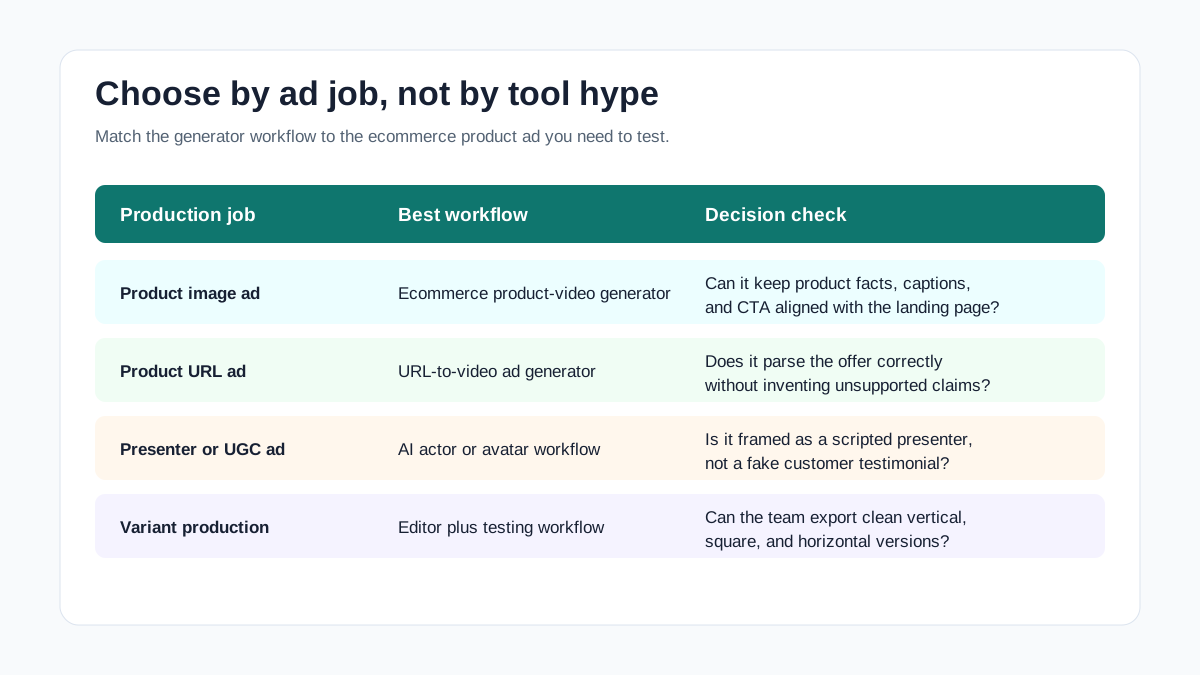
Before comparing tools, define the production job:
| Production job | Best tool type | What to check before buying |
|---|---|---|
| Turn product images into short video ads | Ecommerce product-video generator | Product framing, scene control, captions, CTA, export ratios |
| Turn a product URL into many ad drafts | URL-to-video ad generator | Page parsing, claim accuracy, script editing, variant volume |
| Create UGC-style talking-head ads | AI actor or avatar ad tool | Consent model, avatar realism, voice quality, disclosure policy |
| Refresh existing ad footage | AI editor or video ad maker | Captions, resizing, brand kit, timeline control, export quality |
| Build a testing pipeline | Ad creative platform | Hook variants, naming, campaign handoff, approval workflow |
If your product page, claims, pricing, or offer changes often, favor a tool that lets you control scripts and regenerate small variations quickly. If your main bottleneck is raw footage, favor product-image-to-video or avatar workflows. If your team already has video clips, an AI editor may be more useful than a full generator.
For the script layer, start with a reusable product video ad script template. For the paid creative layer, pair this article with the ad creative AI workflow for ecommerce video ads.
Comparison Table: Best AI Video Ad Generators
This table ranks tools by ecommerce ad fit, not by generic AI video capability.
| Tool | Best fit | Strength | Watch-out |
|---|---|---|---|
| ShopShot | Ecommerce product image and product URL ads | Product-focused workflow for short ad variants | Best for ecommerce/product ads, not broad cinematic production |
| Creatify | URL-to-video product ad variations | Fast ad generation from product URLs and ad-account-oriented workflow | Check script accuracy before launch |
| Topview | Product URL, product image, and viral-style ad drafts | Strong product-ad positioning and variation workflow | Needs human review for claims and brand voice |
| Arcads | AI actor and UGC-style video ads | Realistic presenter-led ad workflow | Avoid fake testimonial framing |
| HeyGen | Avatar-led social and performance ads | Strong avatar and script-to-video workflow | Better for presenter ads than product-only demos |
| InVideo | AI ad workflows with actors, scripts, and scene drafts | Useful for UGC-style and multi-language ad drafts | Review generated claims and scene relevance |
| VEED | AI ad generation plus editing | Good when you need captions, edits, and exports in one workflow | Less specialized for product-page parsing |
| AdCreative.ai | Ad creative assets, product videos, and performance-oriented creative | Broad ad creative suite for marketers | Validate video output against ecommerce needs |
| CapCut or Canva | Editing, templates, captions, resizing | Accessible for teams with existing assets | More editor/template-led than product-ad-generation-led |
1. ShopShot: Best for Ecommerce Product Video Ads
ShopShot is the strongest fit when the source material is a product image, product page, short script, customer benefit, or ecommerce offer. That matters because product ads fail when the tool makes a polished video but loses the actual selling point.
Use ShopShot when you need to:
- Turn product visuals into short ad concepts.
- Create product demos, offer-led videos, or UGC-style product scripts.
- Generate variants for TikTok Shop, Meta, YouTube Shorts, Shopify, or Amazon-style product marketing.
- Keep product facts, captions, benefits, and CTA aligned with the landing page.
The practical advantage is focus. A general AI video tool may produce impressive footage, but product ads need repeatable sales assets. Start with product facts, decide the hook, generate the video, and then check whether the ad matches the offer and landing page. If that last check is weak, use the product video landing page checklist before spending on traffic.
2. Creatify: Best for URL-to-Video Ad Variations
Creatify is built around AI image and video ads, with product URL input and ad variation workflows. That makes it useful for ecommerce teams that want to move quickly from a product page to multiple short ad drafts.
The main use case is not cinematic brand video. It is fast ad iteration: parse product material, generate scripts, create ad variants, and adapt creative for channels. This is useful when the team needs more concepts than a creator shoot can deliver.
Before publishing Creatify-style outputs, verify:
- The script does not invent product claims.
- Price, offer, shipping, and guarantee language match the current page.
- The first three seconds show either the problem, product, or result.
- Captions remain readable after mobile cropping.
- Each variant has one test variable, not five changes at once.
3. Topview: Best for Product URL and Viral-Style Product Ads
Topview is relevant because it positions around product URL, product image, and ad-generation workflows. It can be useful for teams that want a fast path from product inputs to social ad concepts, especially when they need multiple versions for creative testing.
Use it when your creative process starts from:
- A product URL.
- Product images.
- A short product description.
- Existing social ad inspiration.
The risk is the same as any automated ad generator: the tool can make a video that looks usable before the claims are safe. A product ad should not say "clinically proven," "best," "guaranteed," or "customer favorite" unless the landing page and evidence support it.
4. Arcads: Best for AI Actor UGC-Style Ads
Arcads is a better fit when the product ad needs a presenter or creator-style opening. This can work for categories where a person explaining the product improves trust: beauty, apparel, gadgets, home goods, and impulse-buy accessories.
The key distinction is that AI actor ads should be treated as scripted product presentations, not fake customer testimonials. Avoid lines that imply a real buyer experience if the speaker is synthetic. Safer frames include:
- "Here is how this product works."
- "Three things to check before buying."
- "If your current setup has this problem, look for this feature."
- "This is what the product page claims; here is how to verify it."
Pair AI actor ads with product close-ups, proof points, and clear captions. A presenter without product evidence often feels like a low-trust ad.
5. HeyGen: Best for Controlled Avatar-Led Ads
HeyGen is useful when the ad concept depends on a controlled presenter, multilingual delivery, or script-to-video workflow. It is especially relevant for product explainers, offer walkthroughs, and founder-style messages where a talking-head format is acceptable.
For ecommerce product ads, use HeyGen when the visual plan includes more than the avatar. The product still needs screen time. A good avatar ad might use:
- A direct hook from the avatar.
- Product footage or product images.
- A benefit or objection section.
- A quick proof point.
- A CTA aligned with the landing page.
If the whole ad is just a presenter reading claims, the output may be easy to make but weak as paid creative.
6. InVideo: Best for AI Ad Workflows and Drafting
InVideo's ad maker and UGC-style workflows are useful for teams that need AI-assisted scenes, scripts, actors, subtitles, and language versions. It is a practical option when the team wants a draft fast and then expects to edit.
Use it for:
- First-draft storyboards.
- UGC-style ad concepts.
- Multi-language ad drafts.
- Explainers and social ads where the script is already clear.
The important QA step is relevance. AI-generated scenes can look polished while missing the product's real buying trigger. Compare each scene against the product page and delete anything that does not move the buyer toward a decision.
7. VEED: Best for Editing and Exporting Ad Variants
VEED is strongest when the team already has footage, product images, or draft videos and needs AI help with editing, captions, voice, resizing, and exports. Its AI ad tools can generate from product images or text, but its practical advantage is the combination of generation and editor control.
Choose VEED when:
- You need quick captioned versions.
- You want to clean up existing clips.
- You need a YouTube, TikTok, Instagram, or Facebook-ready export.
- You care more about editing speed than automatic product-page parsing.
For a paid-social workflow, this is often the second tool in the chain: generate the first product ad elsewhere, then polish captions, cuts, and platform variants in an editor.
8. AdCreative.ai: Best for Broader Ad Creative Production
AdCreative.ai is broader than a pure video ad generator. It covers ad creatives, copy, product videos, and performance-oriented creative production. That can help marketing teams that manage more than video: static ads, copy tests, product photoshoots, and campaign creative.
Use it when video is part of a larger ad creative system. If your team only needs ecommerce product videos, compare output quality and workflow depth against ecommerce-first tools. If your team needs a mixed ad library, it may be a better fit.
9. CapCut and Canva: Best for Templates, Captions, and Fast Edits
CapCut and Canva are not always the deepest AI product ad generators, but they are useful production tools. Many ecommerce teams already use them for captions, safe-zone adjustments, template variations, brand overlays, and fast edits.
Use them when:
- You already have footage or generated clips.
- You need simple text overlays and captions.
- A non-video specialist will make variants.
- The ad needs template polish rather than a new AI-generated concept.
They are also useful for turning one approved ad into multiple aspect ratios, provided the crop keeps the product, captions, and CTA visible.
Ecommerce Workflow: From Product Page to Test-Ready Video Ads
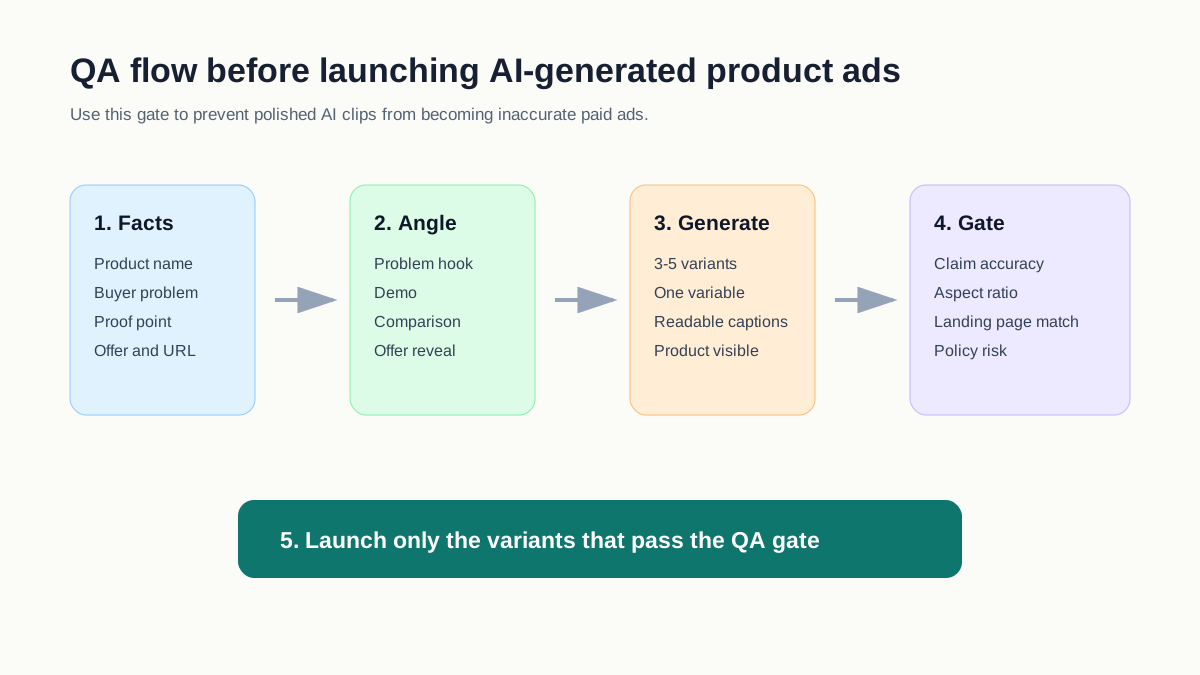
Use this workflow before you publish AI-generated ads:
- Pull the product facts: product name, audience, problem, feature, proof, offer, price range, and landing page URL.
- Pick one ad angle: problem-solution, before-after, comparison, demo, founder note, UGC-style review, or offer reveal.
- Write the hook first. If the hook cannot be understood without sound, rewrite it.
- Generate three to five variants with one variable changed per version.
- Export the core placement sizes: vertical, square, and horizontal when relevant.
- Run policy and landing-page QA before launch.
- Track which hook, offer, format, and CTA produced the best signal.
For Meta and Google placements, aspect ratio support changes by campaign type and placement. Google Ads documentation lists common video aspect ratios including 16:9, 9:16, and 1:1. Meta guidance supports multiple feed and placement ratios. Treat platform specs as a production requirement, not an afterthought. If you need the Meta-specific checklist, use the Meta video ad specs guide.
Testing Matrix for AI Video Product Ads
Do not test "AI tool A vs AI tool B" as the only variable. Test the creative elements that determine performance:
| Variable | Example test | What to measure |
|---|---|---|
| Hook | Problem hook vs product-first hook | Thumb-stop rate, first 3-second hold |
| Proof | Review quote vs product demo | CTR, landing page engagement |
| Format | Avatar ad vs product-only ad | CPC, CVR, qualified clicks |
| Offer | Discount vs bundle vs free shipping | Conversion rate, margin impact |
| Length | 12 seconds vs 20 seconds vs 30 seconds | Hold rate, CPA, completion quality |
| CTA | "Shop now" vs "See how it works" | Click quality, add-to-cart rate |
If your budget is small, start with fewer variables and stronger differences. The goal is not to generate 100 random clips. The goal is to learn which buyer promise and visual proof deserve more spend. Use the UGC ad testing guide when planning variant volume.
What Makes an AI Video Ad Generator Good for Product Ads?
A good product-ad tool should pass these checks:
- It can use product images, product URLs, or product facts without inventing unsupported benefits.
- It lets you edit the script before final generation.
- It can create readable captions and mobile-first layouts.
- It supports ad variants with controlled changes.
- It makes product proof visible, not just abstract AI scenes.
- It exports formats that fit your channels.
- It gives your team enough control to match the landing page.
The best tool is not always the most automated one. If a generator saves ten minutes but creates unclear claims, awkward crops, or off-brand product scenes, it will cost time during review and may waste ad spend.
FAQ
What is the best AI video ad generator for ecommerce product ads?
For ecommerce product ads, choose a tool that understands product images, product pages, captions, and ad variants. ShopShot is the ecommerce-focused option; Creatify and Topview are strong for URL-to-video ad drafts; Arcads, HeyGen, and InVideo are stronger when you need AI actors or UGC-style presenters.
Are AI video ad generators good enough for paid ads?
They can be useful for drafts, testing, and variant production, but every output still needs human QA. Check product claims, landing-page alignment, disclosure risks, captions, aspect ratios, and whether the product is visible enough to sell.
Should I use AI actors in ecommerce ads?
Use AI actors for scripted explainers, demos, and educational product ads. Do not frame an AI actor as a real customer unless you have the rights, disclosure, and evidence needed for that claim. Product proof should still appear in the video.
How many AI video ad variants should I create?
Start with three to five strong variants per product angle. Change one variable at a time, such as the hook, proof point, format, or CTA. More variants help only when the differences are intentional and the budget can produce useful signal.
What should I check before launching an AI-generated video ad?
Check the product claim, offer accuracy, landing page match, caption readability, platform aspect ratio, brand safety, audio clarity, and whether the first three seconds make sense without sound.
Conclusion
The best AI video ad generators are not interchangeable. Pick the tool based on the ad job: product-image ads, URL-to-video drafts, AI actor ads, editor-led variants, or full ad creative systems.
For ecommerce brands, the safest workflow is to keep the product facts close to the video: build the script from the product page, generate controlled variants, check the landing page, and launch only the versions that match the offer. If you need a direct ecommerce production path, start with ShopShot's AI video generator, then use the budget and QA guides to decide how many variants to test.