
Quick Answer
A product video landing page checklist helps ecommerce teams verify that the page after the click matches the video ad before campaign launch. Check seven things: the same product appears above the fold, the video hook is repeated in the page hero, proof is visible near the claim, the offer and price match, checkout works on mobile, policies are easy to find, and every platform-specific requirement is covered.
This matters because product video ads often fail after the click, not inside the video. A strong first frame can earn attention, but a mismatched landing page can lose trust, trigger ad review issues, or waste paid traffic. Use this checklist after the video is approved and before you push the campaign live.
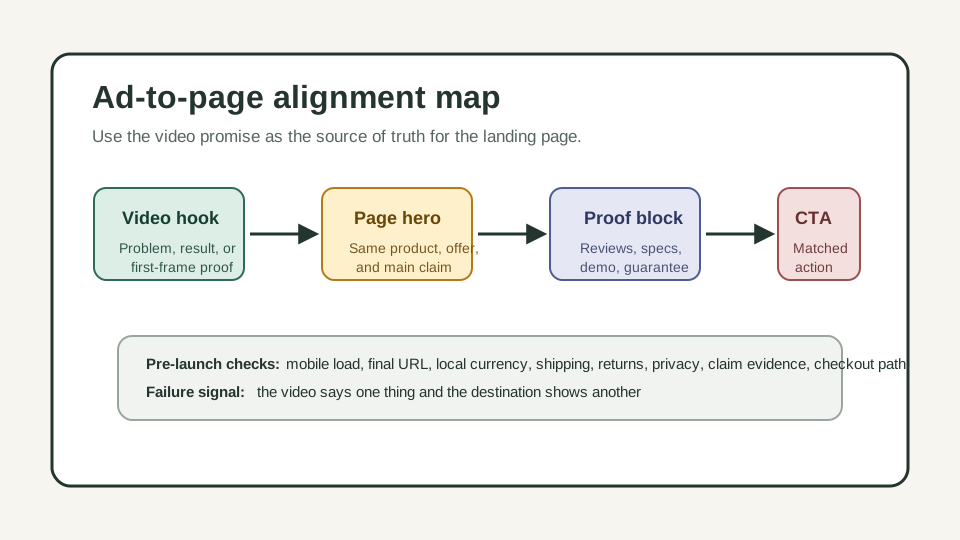
Why the Landing Page Must Match the Product Video
Product video teams usually review the hook, subtitles, aspect ratio, and call to action. Performance teams review budgets and audiences. The landing page sits between those teams, so it is easy to miss.
The landing page is where the shopper confirms whether the video promise is true. If the video says "desk setup in 30 seconds," the destination should show the same desk product, setup proof, shipping terms, and purchase path. If the video shows a bundle, the page should not send the buyer to a single-SKU page with a different price.
Ad platforms care about this too. Google says ad destinations should be functional, useful, safe, and easy to navigate. TikTok says ecommerce landing pages need complete and accurate information, and its ad consistency rules require the promoted product or service to match the landing page. Meta's public ad standards also emphasize relevance between ad components and the promoted product or service.
For ecommerce teams, the practical rule is simple: a product video ad should feel like the opening scene of the landing page, not a separate promise.
Use this guide with Product Video Thumbnail Template for Ecommerce Ads before launch and Product Video Proof Points for Ecommerce Ads when the page needs stronger evidence.
The 7-Point Product Video Landing Page Checklist
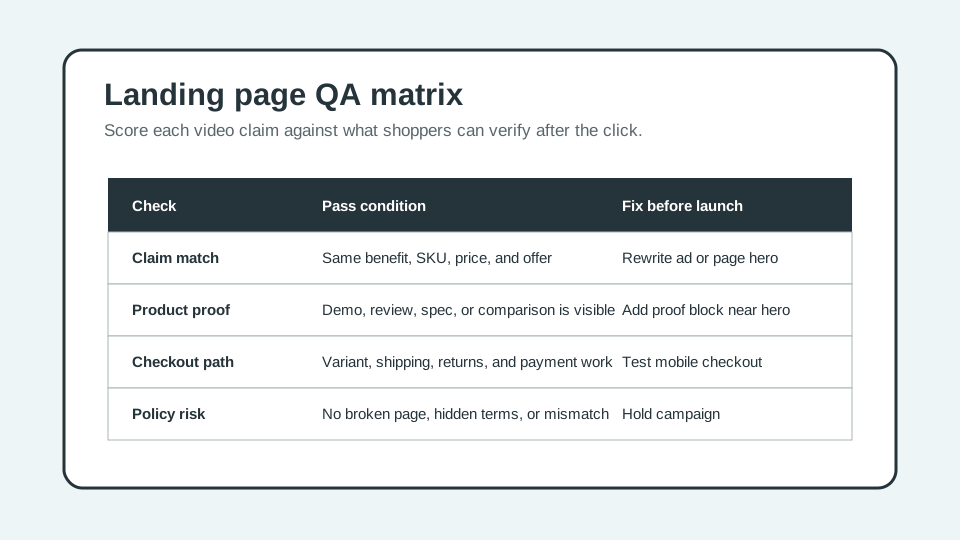
Use this table before every paid social, Shorts, TikTok Shop, Meta, or Google video campaign.
| Check | What to verify | Pass condition | Common failure |
|---|---|---|---|
| Product match | The ad and page show the same product, SKU, variant, and bundle. | The shopper can recognize the exact item within the first screen. | Video shows a bundle; page opens on a collection or generic PDP. |
| Hook match | The page hero repeats the video's main problem, result, or use case. | The first headline or hero block answers the same shopper question as the video. | Video sells a problem-solution angle; page starts with brand copy. |
| Proof match | Claims in the video have visible support on the page. | Reviews, specs, demo media, ingredient details, or comparison points appear near the claim. | Video says "waterproof" but the page only says "durable." |
| Offer match | Price, discount, shipping, bundle, and guarantee are consistent. | The page repeats the offer exactly or explains the condition clearly. | Ad says "20% off today"; page shows full price. |
| Mobile path | Page loads, scrolls, variant selection works, and checkout begins on mobile. | A buyer can add the exact product to cart without desktop-only steps. | Sticky popups, slow scripts, or broken variant selectors block the path. |
| Policy details | Shipping, returns, privacy, terms, and contact information are findable. | Required ecommerce details are visible or linked from the page and footer. | Landing page hides return terms or lacks contact details. |
| Tracking and URL | Final URL, UTMs, redirects, and canonical page are correct. | The ad click lands on the intended page without broken redirects or crawl blocks. | Tracking template sends users to a different domain or 404. |
The checklist should be owned by one person before launch. If creative owns the video and media buying owns the campaign, assign the landing page QA step to the person who can stop launch when the ad and destination do not match.
A Practical Workflow Before Launch
1. Freeze the Video Promise
Write one sentence that captures what the product video promises.
Examples:
- "A portable blender makes a smoothie at a desk without a full kitchen."
- "A pet hair remover clears a sofa in under one minute."
- "A skincare bundle simplifies the night routine into three steps."
This sentence becomes the comparison point for the page. If the page does not prove the sentence, the campaign is not ready.
2. Map Each Scene to a Page Block
Turn the video into a landing page map. The first frame maps to the hero. The demo maps to product media. The proof scene maps to reviews, specs, before-after evidence, or comparison. The offer maps to price, bundle, guarantee, and checkout.
| Video scene | Landing page block | What to check |
|---|---|---|
| First frame or hook | Hero image, headline, or above-fold product block | Same product and same shopper problem. |
| Product demo | Product media gallery, GIF, video, or step section | The mechanism shown in the ad is visible on the page. |
| Proof point | Review, spec table, certification, material detail, or comparison | The claim can be verified without searching. |
| Offer | Price block, variant selector, promotion module, or cart | Discount, bundle, and terms match the ad. |
| CTA | Button, checkout flow, product selector, or form | The action matches the CTA used in the video. |
For script alignment, use Product Video Script Template for Ecommerce Ads. For visual planning, use Product Video Storyboard Template for Ecommerce Ads.
3. Confirm Mobile-First Product Visibility
Most ecommerce video ad traffic is mobile. That makes the first mobile viewport more important than the desktop layout.
Check the page on a phone-width viewport and ask:
- Is the product visible without a long scroll?
- Is the first headline close to the video hook?
- Can the shopper see price, reviews, or proof quickly?
- Does the add-to-cart button appear before unrelated brand sections?
- Do popups block product proof or variant selection?
If the page starts with a large lifestyle banner but the product is hidden below the fold, the video and page are not aligned. Use product media, a short proof line, and a clear CTA above the fold.
4. Check Claim Evidence
Every claim in the video should have a page-level source. Do not rely on a fast overlay if the page cannot support it.
| Video claim type | Page evidence to include | Risk if missing |
|---|---|---|
| Speed | Demo clip, step count, or measured process | The claim feels invented. |
| Material | Spec table, close-up image, or product details | Shoppers cannot verify quality. |
| Review | Real review excerpt, rating context, or testimonial policy | Fake-review or endorsement risk. |
| Before-after | Side-by-side image with conditions explained | Misleading transformation risk. |
| Discount | Price block, coupon terms, expiration, or bundle details | Ad and landing page mismatch. |
| Compatibility | Size chart, fit guide, device list, or ingredient notes | Returns and support issues. |
If the proof cannot be added to the page, edit the video claim down. A weaker claim with evidence beats a stronger claim that the page cannot prove.
5. Verify Offer, Checkout, and Policy Details
A product video can create demand quickly, but the landing page has to remove purchase friction.
Before launch, test:
- The advertised variant is in stock.
- The discount code applies or the sale price is already shown.
- Shipping cost, delivery estimate, return policy, and guarantee are easy to find.
- Size, color, quantity, and bundle selectors work on mobile.
- Payment buttons and cart drawer are not blocked by banners.
- Privacy policy, terms, and contact details are linked.
- The final URL is crawlable and does not require login to view the main product content.
For Shopify stores, product media can include images, 3D models, and video, and the first media item is used as the main product media in several storefront contexts. That means the page's first media item should reinforce the video ad promise, not just show a generic pack shot.
Platform-Specific QA Notes
Different platforms review destinations differently, but the ecommerce principle is consistent: the destination must work, match the ad, and give the buyer enough information.
| Platform | Landing page risk to check | Practical fix |
|---|---|---|
| Google Ads | Destination not working, mismatch, inaccessible page, poor destination experience, or thin original content. | Test final URL, mobile URL, crawlability, page value, and navigation before launch. |
| TikTok Ads | Landing pages that are expired, incomplete, not mobile-friendly, ad-heavy, or inconsistent with the promoted product. | Match product, brand, caption, CTA, local price, shipping, return, privacy, and terms details. |
| Meta ads | Relevance between ad creative, product, audience, and promoted destination. | Keep product, offer, and landing page content aligned; avoid bait-and-switch creative. |
| Google Merchant or Shopping traffic | Broken page, non-live page, file destination, missing product availability, or incomplete commerce details. | Use a live product page, not a PDF or image file, and keep product data current. |
Do not turn this into a legal review. The goal is a practical launch gate: if a shopper clicks the video, can they immediately verify the product, the promise, the offer, and the next step?
Example: Fixing a Mismatched Product Video Page
Imagine a 20-second TikTok product video for a travel jewelry organizer.
The video hook says: "Stop necklaces from tangling in your carry-on." The scenes show a small case, separate necklace tabs, earring holes, and a giftable color set. The CTA says "Shop the travel case."
A weak landing page sends the shopper to a general accessories collection. The first product visible is a makeup bag. The jewelry organizer appears after two scrolls, the bundle colors are out of stock, and the discount in the caption is not on the page.
A stronger landing page does this:
- Hero headline: "Travel Jewelry Organizer for Tangle-Free Packing."
- Main media: product open with necklaces, earrings, and rings visible.
- Proof block: close-up of separate tabs and review excerpt about travel.
- Offer block: color set, sale price, shipping threshold, return policy.
- CTA: "Choose your color."
- FAQ: size, material, carry-on fit, gift packaging, returns.
The video did not change. The page changed so the click made sense.
Internal Link Plan for Better Crawl and Conversion
After publishing a landing page checklist, connect it to articles that sit before and after it in the ecommerce video workflow:
- Use Product Video Brief Template for Ecommerce Ads before writing the ad.
- Use Product Video Shot List Template for Ecommerce Ads before generating or filming.
- Use Product Video CTA Examples for Ecommerce Ads when the end frame and landing page action are not aligned.
- Use How to Make a Video Ad for an Ecommerce Product for the full production workflow.
- Use ShopShot AI Video Generator when you are ready to turn product inputs into video concepts.
These links keep the article in the product-video support cluster without competing with generator or tool pages.
FAQ
What is a product video landing page checklist?
A product video landing page checklist is a pre-launch QA list that compares the video ad promise with the page after the click. It checks product match, hook match, proof, offer, mobile checkout, policies, and tracking.
Should ecommerce video ads send traffic to a product page or a custom landing page?
Use the page that best matches the video promise. A product page works when the ad promotes one SKU and the page already has proof, media, price, and checkout. Use a custom landing page when the ad needs a bundle, quiz, comparison, offer, or category-specific explanation.
What should appear above the fold after a product video ad click?
The same product, the same main benefit, a clear image or product media block, price or offer context, and a visible next action should appear quickly. Do not make the shopper search for the product shown in the video.
How do I check if a landing page matches a video ad?
Write the video's main promise in one sentence, then verify that the landing page hero, product media, proof block, offer, and CTA all support that promise. If one part is missing, fix the page or edit the video.
Can a mismatched landing page cause ad rejection?
Yes. Platform policies differ, but broken destinations, inaccessible pages, incomplete ecommerce details, and mismatch between ad content and destination can affect approval, delivery, or cost. Check the destination before launch.
Sources Checked
- Google Ads Help: Destination requirements
- Google Merchant Center Help: About landing page requirements
- TikTok Advertising Policies: Ad Format and Functionality
- Meta Transparency Center: Introduction to the Advertising Standards
- Shopify Help Center: Adding product media
- ShopShot: Product Video Proof Points for Ecommerce Ads
Bottom Line
A product video landing page checklist protects the money you spend after the video earns the click. Match the product, hook, proof, offer, checkout, and policy details before launch. If the page cannot prove the video promise, fix the page first or make a narrower video.