
Quick Answer
A product video thumbnail template should make the product recognizable, state one buyer-relevant promise, show one proof cue, and leave enough safe space for platform UI. For ecommerce ads, design the thumbnail and the first frame together. A static thumbnail helps in feeds, search, in-feed video placements, and embedded players, while the first video frame matters wherever the platform autoplays or selects a frame automatically.
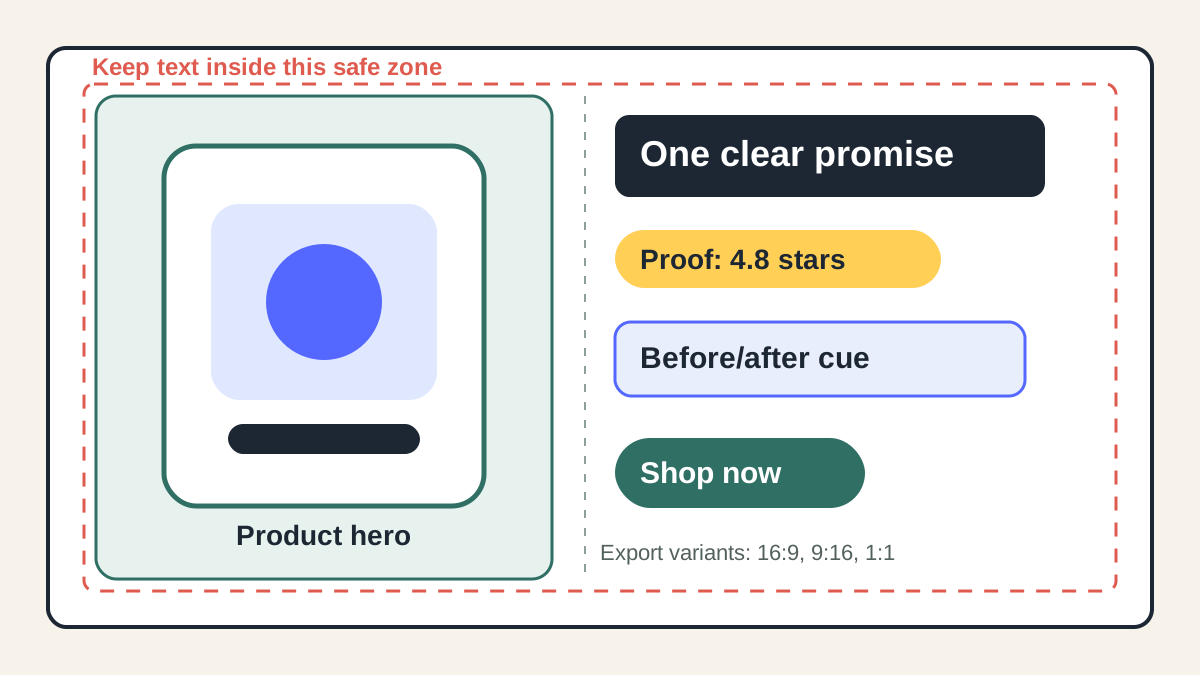
Use a four-layer layout: product hero, short overlay promise, proof cue, and CTA zone. Then export variants for 16:9, 9:16, and 1:1 instead of cropping one image across every placement.
If your team already has a product video script template, use this page as the visual cover layer. The thumbnail should summarize the same buyer problem, proof, and CTA that appear in the script, not introduce a new claim that the video or product page cannot support.
Why Thumbnails Still Matter When Many Ads Autoplay
Video ad buyers often treat thumbnails as a YouTube-only task. That is too narrow. A thumbnail is any pre-play or paused visual that tells a shopper whether the video is worth opening, watching, or trusting. It can be a custom image, a selected frame, or the first frame that appears before motion starts.
Google's YouTube Help states that custom thumbnails are used as preview images and recommends large 16:9 thumbnail files for standard YouTube previews. Google Ads also says in-feed video ads include a thumbnail and text before the viewer clicks to watch. Meta describes video ad thumbnails as the still image people see before a video starts and after it ends. For Shorts-style inventory, Google recommends vertical, social-first assets and notes that only the first 60 seconds play in the Shorts feed.
For ecommerce, that means the first frame has three jobs:
- Show the product clearly enough that the shopper knows the category.
- Make the value proposition scannable before sound or motion starts.
- Avoid a misleading promise that increases clicks but lowers conversion quality.
The best thumbnail is not always the loudest frame. It is the frame that gets the right shopper into the video with the right expectation.
The Ecommerce Thumbnail Template
Build every product video thumbnail from these four layers. If a layer is missing, the thumbnail may still look polished, but it will be harder to diagnose performance.
| Layer | What to include | Keep it tight | Common mistake |
|---|---|---|---|
| Product hero | Product close-up, in-use shot, or before/after result | Product should be identifiable on mobile | Using a lifestyle image where the product is too small |
| Overlay promise | One benefit, problem, or use case | 3-6 words is usually enough | Writing a full headline that cannot be read in feed |
| Proof cue | Rating, review phrase, demo result, ingredient, material, or comparison | Use only supportable proof | Adding "best" or "viral" without evidence |
| CTA zone | Shop, compare, see fit, check size, learn, save | Match the landing page action | Using a hard-buy CTA for a cold educational video |
For a skincare product, the promise might be "Less shine by noon." For a kitchen gadget, it might be "Chops onions faster." For apparel, it might be "Stretch fit, no sag." The text should come from a real buyer objection or product proof, not from generic ad language.
Pick the Right First-Frame Pattern
Different products need different thumbnail logic. A template should not force every item into the same layout.
| Product situation | Best thumbnail pattern | Why it works | Pair it with |
|---|---|---|---|
| Product solves a visible problem | Before/after split with product in the middle | The shopper sees the transformation before reading | Demo or problem-solution script |
| Product has a strong design detail | Product macro shot with one feature label | The visual itself carries the click | Feature proof video |
| Product needs trust | Product plus review/rating cue | Reduces uncertainty before the first second | Testimonial or UGC-style script |
| Product is hard to understand | Three-step mini diagram | Explains the use case without sound | Explainer or tutorial video |
| Product is bought for fit/style | Human or mannequin use frame | Shows scale, styling, and context | Try-on, outfit, or comparison video |
| Offer-driven product | Product plus offer badge | Makes the commercial reason clear | Retargeting or sale creative |
If you are generating video from product images, start with the AI product video prompts guide, then make the thumbnail a separate output requirement. Do not rely on a random generated first frame to carry the ad.
A Step-by-Step Workflow
1. Pull the Product Truth File
Before designing, collect the facts the thumbnail is allowed to show:
- Product name and category.
- Main buyer problem.
- One primary benefit.
- One proof cue from reviews, specs, demo footage, or product page claims.
- One offer or CTA, if the video is promotional.
- Restricted claims to avoid.
This prevents the thumbnail from becoming a separate ad concept that overpromises.
2. Choose One Shopper Question
The thumbnail should answer one question quickly:
- What is this product?
- What problem does it solve?
- What result can I expect?
- Why should I trust it?
- Is this right for my use case?
If the thumbnail tries to answer all five, it becomes cluttered. Use the product video overlay text examples to keep the text short and let the video answer the rest.
3. Design the First Frame Before the Edit
Ask for the first frame in the brief, not after the video is finished. The first shot should already contain the product, angle, and safe-space plan. Then the designer or AI generation workflow can create motion from a frame that also works as a preview.
For vertical placements, design the 9:16 thumbnail first. It is easier to adapt a vertical product-safe layout to square or landscape than to rescue a crowded 16:9 frame for mobile.
4. Export Three Placement Variants
Use one visual concept, but export placement-specific versions:
- 16:9 for standard YouTube previews, embedded players, and some discovery placements.
- 9:16 for Shorts, Reels, Stories, TikTok-style feeds, and mobile-first ad inventory.
- 1:1 or 4:5 for feed placements where square or portrait crops are common.
Do not simply crop the center. Reposition the product, proof badge, and CTA so each version reads on its own.
5. Run the Claim and Cropping Check
Before publishing, confirm:
- The product is not covered by text, play buttons, captions, or platform UI.
- The text remains readable at mobile feed size.
- The proof cue exists on the landing page or product page.
- The CTA matches the campaign objective.
- The thumbnail does not imply a result the video fails to show.
For final export checks, pair this article with the Meta video ad specs guide, YouTube Shorts specs guide, and product video captions QA guide.
Thumbnail Copy Formulas You Can Reuse
Use these formulas as starting points. Replace the bracketed ideas with product-specific proof.
| Formula | Example | Best for | Watch out for |
|---|---|---|---|
| "Stop [problem]" | "Stop bag spills" | Problem-aware shoppers | Do not imply guaranteed prevention |
| "[Benefit] in [moment]" | "Cold brew in 60 sec" | Demo products | Make sure timing is accurate |
| "[Use case] without [pain]" | "Smooth curls without heat" | Beauty, apparel, home | Avoid regulated or health claims |
| "[Proof cue] + product" | "4.8-star travel charger" | Trust-driven products | Use real review data |
| "Before [old state] / after [new state]" | "Before clutter / after calm" | Home, storage, cleaning | Show realistic outcomes |
| "[Who it is for]" | "For small kitchens" | Niche products | Keep the audience specific |
The thumbnail text should not duplicate every caption in the video. A good rule: thumbnail text earns the click, opening overlay confirms the promise, and captions help the viewer follow the argument.
Testing Matrix for Thumbnail Variants
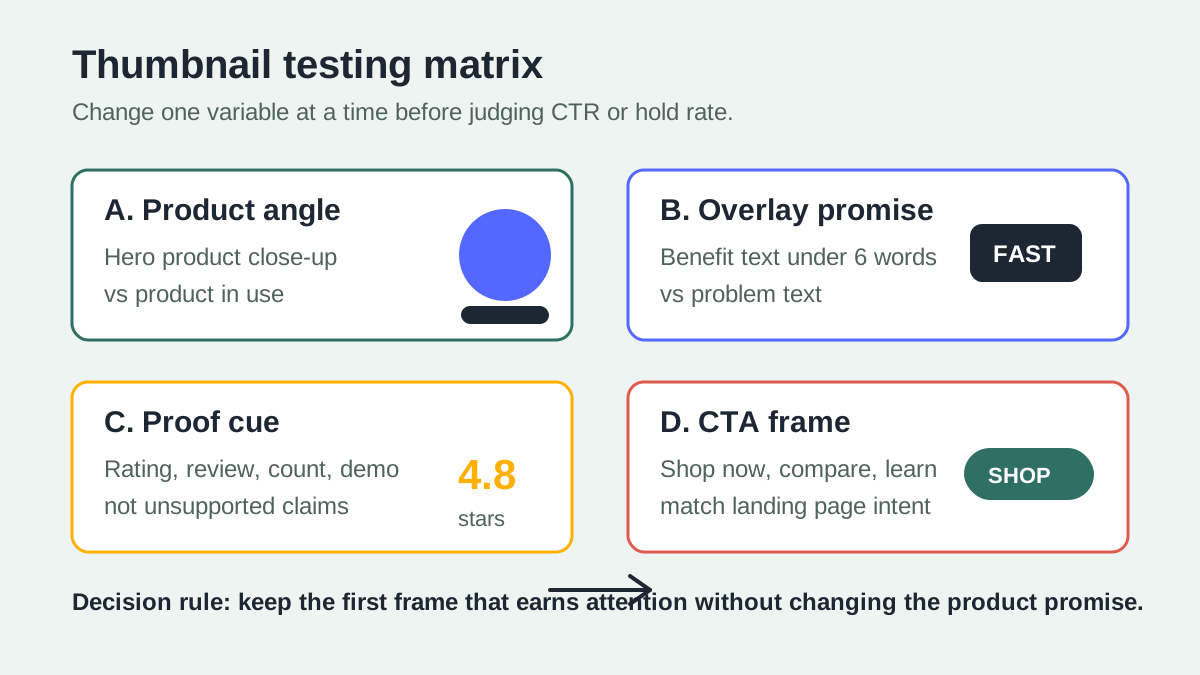
Do not test five random thumbnails at once. Test one variable at a time so you know what changed performance.
| Test variable | Variant A | Variant B | What to measure |
|---|---|---|---|
| Product angle | Close-up packshot | Product in use | Click-through rate and first 3-second hold |
| Overlay promise | Benefit text | Problem text | Click quality and watch-through |
| Proof cue | Rating badge | Review phrase | Trust clicks and conversion rate |
| CTA | "Shop now" | "See it in use" | Landing page click and add-to-cart quality |
| Color contrast | Light background | Dark background | Feed stop rate and readability |
If CTR rises but conversion drops, the thumbnail is probably creating curiosity without buyer fit. If CTR is flat but hold rate rises, the first frame may be doing a better job qualifying viewers. For larger testing plans, use the UGC video ad testing guide.
Common Thumbnail Mistakes
The Product Is Too Small
A lifestyle shot can look premium on desktop and fail on mobile. Ecommerce thumbnails should show the product large enough that a shopper recognizes the category before reading the text.
The Text Is a Second Headline
The thumbnail is not a landing page hero. Keep text short and physical. "Make mornings easier" is vague. "No-spill coffee lid" is clearer.
The Thumbnail Sells a Different Angle Than the Video
If the thumbnail promises a before/after result but the video is a feature walkthrough, viewers feel tricked. This hurts watch quality and trust even when the initial click looks good.
Proof Is Not Verifiable
Ratings, review counts, "doctor recommended," ingredient claims, and time-saved claims need evidence. If the product page cannot support the proof, leave it out or change it to a visual demonstration.
One Crop Is Used Everywhere
Platform UI, play buttons, CTA overlays, captions, and crop behavior vary. A safe 16:9 thumbnail can still fail as a vertical first frame. Export the placements separately.
Pre-Publish Checklist
Use this checklist before the video goes live:
- The product is visible at mobile size.
- The text has one promise, not multiple claims.
- The proof cue is supported by the landing page or product page.
- The first frame and thumbnail match the script angle.
- The design has 16:9, 9:16, and feed-safe variants when needed.
- The thumbnail does not cover faces, hands, product details, subtitles, or the CTA area.
- The image file name describes the asset, not "final-v3.png."
- The thumbnail is reviewed with the same compliance checklist as the video.
For a full claim review, run the product video compliance checklist after you select the winning first frame.
FAQ
Should ecommerce videos use a custom thumbnail or an auto-selected frame?
Use a custom thumbnail when the placement supports it and a planned first frame when it does not. YouTube long-form videos can use custom thumbnails, while Shorts have more limited thumbnail control. For paid social feeds, the first frame often matters as much as the uploaded thumbnail because autoplay behavior varies by placement and user settings.
How much text should a product video thumbnail include?
Use one short promise or proof cue. For most ecommerce thumbnails, 3-6 words is enough. If the product, proof, and CTA cannot be understood without a long sentence, the visual concept is probably too broad.
What size should the thumbnail be?
Build the concept in the placement ratio you need. YouTube recommends large 16:9 custom thumbnails for standard video previews. For mobile-first ads, create a 9:16 version and keep key text away from UI areas. Also create 1:1 or 4:5 feed crops when the campaign uses feed placements.
Can AI generate product video thumbnails?
Yes, but treat AI output as a draft. Check product accuracy, text readability, brand fit, claim support, and crop safety before publishing. For ecommerce, the product must still look like the item the shopper can buy.
What should I test first: thumbnail text or video script?
If the video is already approved, test thumbnail variables first because they change distribution quality without changing the core claim. If viewers click but drop quickly, fix the script or opening scene before testing more thumbnails.
Sources Checked
- YouTube Help: Add custom thumbnails on YouTube for custom thumbnail behavior, file guidance, aspect ratio guidance, and Shorts thumbnail limits.
- Google Ads Help: YouTube Shorts ads asset specs and best practices for vertical assets, Shorts timing, social-first creative, CTA overlay behavior, and text overlay guidance.
- Google Ads Help: About video ad formats for in-feed video ad thumbnail behavior and skippable in-stream timing.
- Meta Business Help Center: About thumbnail images in video ads for the role of thumbnail images before and after video playback.
- Meta Ads Guide for placement-specific creative specs and ratio checks.