
Quick Answer
Product video overlay text examples work best when each line does one job: identify the problem, name the product benefit, prove the claim, explain the offer, or make the next action obvious. For ecommerce ads, keep most overlays to 3-7 words, place important text inside platform safe zones, match the words to the shot on screen, and test the first 3 seconds before polishing the rest of the video.
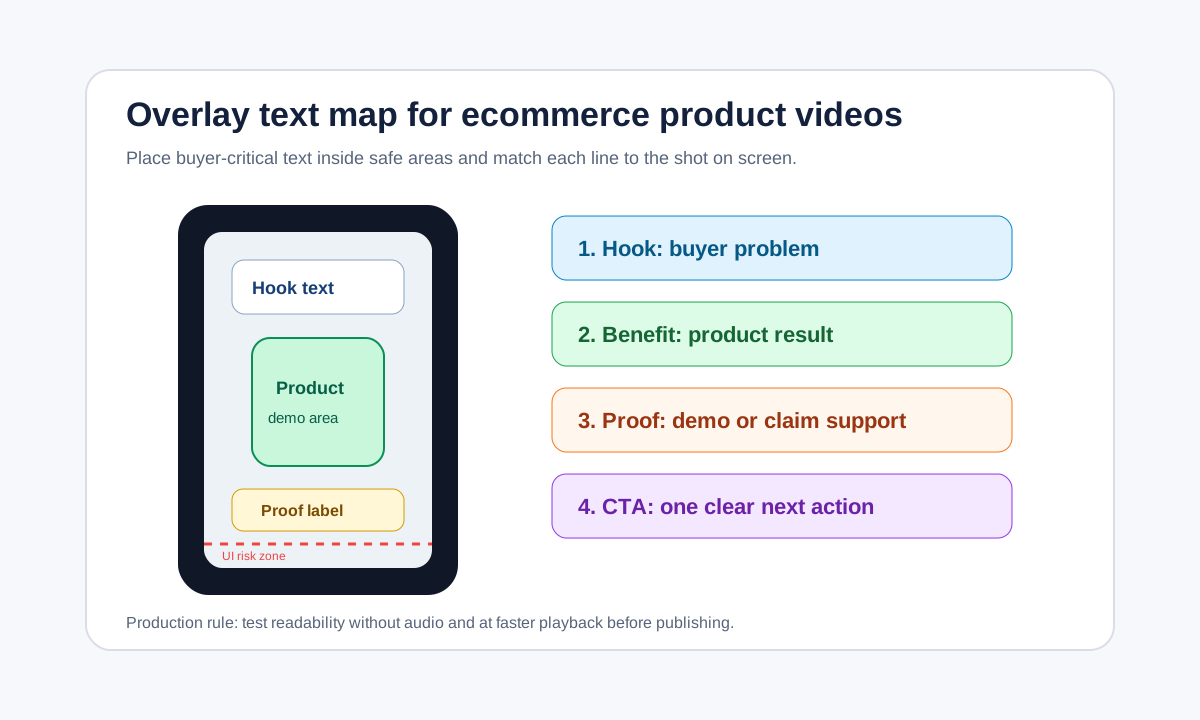
Overlay text is not just decoration. It is the reading layer that helps a shopper understand a product video without replaying it, especially when the first view happens quickly in TikTok, Reels, Shorts, or a YouTube ad placement.
If your video already has a strong shot list, use overlay text to make each shot easier to interpret. If the edit is weak, text will not save it. Start with a clear product demo, then use the examples below to make the message faster.
When Product Video Overlay Text Helps
Use overlay text when the viewer needs instant context. A product shot may show a bottle, gadget, bag, or skincare tool, but the viewer still needs to know what problem it solves, why it is different, and what to do next.
Good overlay text helps in five ecommerce moments:
- The opening hook, when the shopper is deciding whether to keep watching.
- The product reveal, when the item must be understood without audio.
- The proof moment, when a demo, before-after, or close-up needs a label.
- The offer moment, when price, bundle, shipping, or guarantee details matter.
- The CTA moment, when the ad should move from interest to action.
This is a support layer for the full creative system. Pair it with a clear product video shot list, a usable product video brief, and a final CTA check before publishing.
Overlay Text Rules by Screen Moment
| Screen moment | Overlay job | Good length | Example line | Avoid |
|---|---|---|---|---|
| 0-3 seconds | Stop the scroll with the product problem | 3-6 words | "Still packing orders by hand?" | Brand slogan first |
| 3-6 seconds | Name the product or result | 4-7 words | "Label 40 orders in minutes" | Vague benefit words |
| Demo close-up | Explain what the viewer is seeing | 3-6 words | "Peels cleanly, no residue" | Repeating the voiceover |
| Proof shot | Add evidence or constraint | 4-8 words | "Tested on 20 lb boxes" | Unsupported "best ever" claims |
| Offer shot | Clarify the buying reason | 3-7 words | "Bundle saves 18%" | Tiny price text |
| Final frame | Give the next action | 2-5 words | "Build your first video" | Multiple CTAs |
TikTok's current creative guidance recommends using captions or text overlays for context and suggests keeping text readable at a pace of 5-10 words per second. Google also warns that overlays, calls to action, and buttons can appear in different positions across YouTube formats, so important product elements and supers should stay within the safe area. Treat these as practical production constraints, not afterthoughts.
18 Product Video Overlay Text Examples
Use these as starting patterns. Replace the words with your product category, proof point, and offer. The strongest version will come from your actual product page, reviews, tests, or demo footage.
Problem Hooks
| Use case | Overlay example | Best shot behind it |
|---|---|---|
| Pain point | "Tired of tangled cables?" | Messy desk or drawer |
| Time waste | "Still editing every clip?" | Slow manual workflow |
| Quality gap | "Product photos hiding the texture?" | Close-up product detail |
| Before-after | "This was one wash later" | Split before-after frame |
| Shopper doubt | "Will it fit small kitchens?" | Product beside familiar object |
| Ad fatigue | "Your ads look too similar" | Grid of repeated creatives |
Benefit and Demo Lines
| Use case | Overlay example | Best shot behind it |
|---|---|---|
| Speed | "Set up in 30 seconds" | Hands assembling product |
| Convenience | "One button, no app needed" | Single action close-up |
| Sensory proof | "Matte finish, no glare" | Light passing over surface |
| Portability | "Fits inside a carry-on" | Product placed in bag |
| Compatibility | "Works with 12 oz cans" | Product with measured item |
| Durability | "Drop-tested on tile" | Controlled test shot |
Offer and CTA Lines
| Use case | Overlay example | Best shot behind it |
|---|---|---|
| Bundle | "Starter kit saves 18%" | Bundle laid out clearly |
| Urgency | "Restock ships Friday" | Packaging or warehouse shot |
| Trust | "30-day returns included" | Product in use, not a badge wall |
| TikTok Shop | "Tap the product card" | Product visible near safe area |
| Shopify PDP | "See sizes on the product page" | Model or scale comparison |
| AI video workflow | "Turn this image into 5 ads" | Product image becoming variants |
For AI-generated product videos, the overlay text should come from the same brief as the voiceover and captions. A mismatch between on-screen text, voiceover, and product visuals feels synthetic and lowers trust. If you need a repeatable writing input, start with an AI product video prompt, then turn the winning angle into overlay lines.
A Simple Overlay Text Workflow
Follow this workflow before exporting any ecommerce video ad.
- Choose one primary buyer question. Example: "Will this product solve my problem quickly?"
- Split the video into 5-7 shots. Do not write text before the shot list exists.
- Assign one overlay job to each shot: hook, benefit, proof, offer, CTA, or no text.
- Write each line in plain buyer language. If the line sounds like a website headline, shorten it.
- Place the product and text inside the safe area for the target placement.
- Watch the video once without audio. The message should still make sense.
- Watch it again at 1.5x speed. If the text cannot be read, shorten it or hold the frame longer.
- Export two or three variants with different first-frame overlays.
This workflow keeps overlay text tied to the video, not a separate copywriting layer pasted over the final export.
Safe-Zone and Readability Checklist
Most overlay mistakes are not copywriting problems. They are placement and readability problems. Platform UI can cover the bottom, sides, or CTA area, and previews may not match every device.
| Check | Pass condition | Why it matters |
|---|---|---|
| Safe zone | Product, logo, CTA, and key text are not under UI elements | Avoids losing the message on TikTok, Reels, Shorts, and YouTube |
| Contrast | Text is readable over the exact frame, not just a blank background | Ecommerce products often have busy textures |
| Word speed | Text can be read naturally before the next cut | TikTok suggests 5-10 words per second as a text pace |
| Shot match | The overlay describes what is visible now | Prevents generic ad-copy feel |
| Claim support | Every performance, price, health, or durability claim is backed | Reduces review and trust risk |
| Localization | Text does not depend on idioms if the ad will run internationally | Helps reuse the creative across markets |
Google's Performance Max image asset guidance is also useful here: important content should stay in the center safe area, and image assets may be cropped across surfaces. Even when you are editing video, the same discipline applies to thumbnail-style frames and product close-ups.
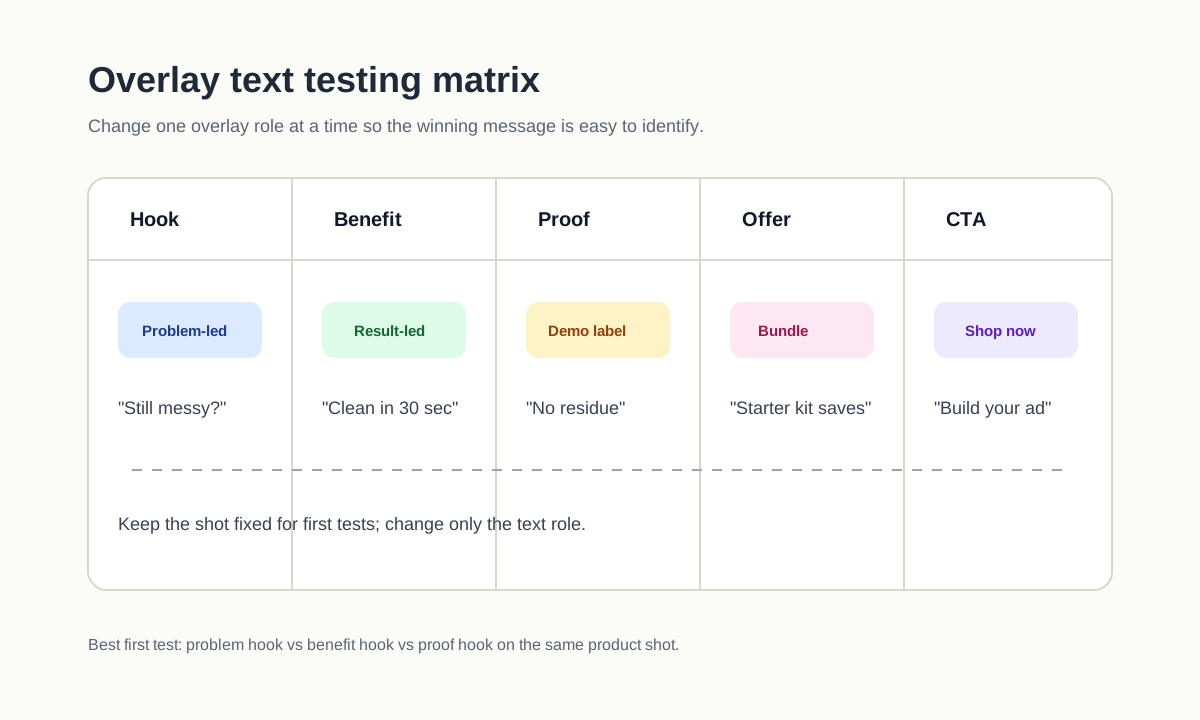
What to Test First
If you only have time for three tests, test these:
- Problem hook vs benefit hook. Example: "Tired of tangled cables?" vs "Organize cables in 30 seconds."
- Text-heavy proof vs visual proof. Example: "Drop-tested on tile" vs the drop test with only a small label.
- Direct CTA vs soft next step. Example: "Shop the bundle" vs "See how it fits your setup."
Do not test font color before you test message angle. Color and style matter, but the first decision is whether the buyer understands the product and wants the next frame.
For campaigns that need multiple concepts, connect this page with a UGC video workflow for launches so each overlay variant maps to a creator angle, product claim, or offer.
Common Overlay Text Mistakes
Starting with a brand line
"Meet BrandName" is usually weak for cold traffic. The shopper does not care about the brand yet. Start with the product problem, product result, or visible use case.
Saying the same thing as the voiceover
If the voiceover says "This label printer saves time," the overlay can say "40 labels in 2 minutes." Use text to sharpen the claim, not duplicate it.
Hiding the product
Ecommerce ads need product clarity. Do not place a large text box over the only shot that proves size, texture, fit, or before-after change.
Using unsupported claims
"Clinically proven," "guaranteed results," "best on TikTok," and "FDA approved" need real substantiation. If the product page cannot support the claim, the overlay should not say it.
Ending with two CTAs
One final action is enough. "Shop now," "Get the bundle," "Try the generator," and "Learn more" should not all appear together.
Mini Templates You Can Copy
Use these short formulas when creating product videos from images, PDP copy, or UGC footage.
| Template | Formula | Example |
|---|---|---|
| Problem to product | "Still [problem]? Try [product type]." | "Still overpacking? Try compression cubes." |
| Demo proof | "[Action] without [pain]." | "Peels off without residue." |
| Comparison | "Before: [old state]. After: [new state]." | "Before: cluttered sink. After: dry counters." |
| Product fit | "Made for [specific buyer/use]." | "Made for narrow apartment closets." |
| Offer | "[Bundle/discount] ends [clear timing]." | "Starter bundle ships this week." |
| CTA | "[Verb] your [result]." | "Build your first product ad." |
If you are using ShopShot to generate product videos, keep the overlay text in the prompt and the review checklist. This makes it easier to create several variants from the same product image without losing message control.
FAQ
How much text should an ecommerce product video use?
Use enough text for the video to make sense without audio, but not so much that the product is hidden. A practical rule is 3-7 words per overlay and no more than one main message per shot.
Should overlay text match captions exactly?
Not always. Captions transcribe or summarize speech. Overlay text should label the selling moment: the problem, result, proof, offer, or CTA. They can overlap, but they should not fight each other.
Where should I place overlay text in a vertical product video?
Keep important text away from edges, bottom UI, profile areas, CTA buttons, and product cards. Check the latest safe-zone guidance for each platform before launch because placements and UI can vary by format and device.
Can overlay text improve ad performance?
It can improve clarity, which can improve watch time and clicks, but it is not a standalone performance lever. The product shot, offer, audience, landing page, and creative angle still matter.
What is the fastest way to create overlay variants?
Write three first-frame overlays from the same shot: one problem-led, one benefit-led, and one proof-led. Keep the rest of the video identical for the first test so the opening text is the real variable.