
Quick Answer
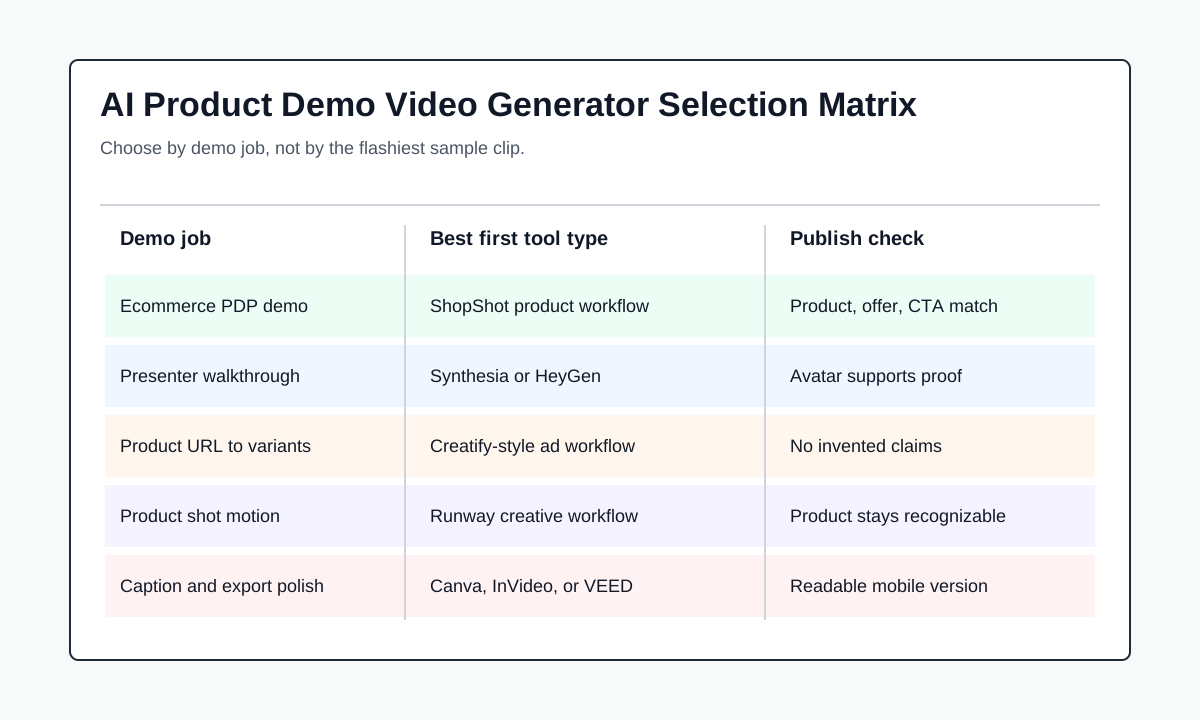
The best AI video generator for product demos depends on the demo job. Use ShopShot's AI video generator when you need ecommerce product demos from product images, product pages, claims, and short scripts. Use Synthesia or HeyGen when the demo needs a presenter, onboarding-style walkthrough, or multilingual explanation. Use Creatify when the demo should become paid-social ad variations from a product URL or image. Use Runway when the product shot needs cinematic motion or a social ad concept. Use Canva, InVideo, or VEED when you already have assets and need captions, layouts, and fast channel-ready exports.
For product demos, do not choose only by visual quality. Choose the workflow that keeps the product accurate, shows the feature or use case clearly, lets you edit claims, and exports versions your team can publish on PDPs, landing pages, email, TikTok, Reels, YouTube Shorts, or paid ads.
How We Compared AI Product Demo Video Generators
A product demo video is not the same as a generic AI video. It has to show what the product does, why the viewer should care, and what proof supports the promise. A polished AI clip can still fail if it hides the product, invents a feature, or sounds like a fake testimonial.
This comparison uses seven criteria:
| Criterion | Why it matters for product demos |
|---|---|
| Product accuracy | The video must match the current product page, feature list, packaging, screenshots, and offer. |
| Demo clarity | The viewer should understand the product, use case, and next step without replaying the clip. |
| Script control | Teams need to edit claims before generation, especially for regulated or performance-sensitive products. |
| Visual control | Good demos need close-ups, screens, steps, captions, and safe crops, not only abstract motion. |
| Presenter fit | AI avatars help with explanations, but the product still needs screen time and evidence. |
| Variant workflow | Launch teams need different hooks, lengths, and placements without changing the whole story. |
| Cost per usable demo | Credits, re-generations, editing time, watermark rules, and review time decide the real cost. |
The best tool is usually the one that matches the demo format, not the one with the flashiest sample reel.
Quick Picks
| Best for | Pick | Use it when |
|---|---|---|
| Ecommerce product demos | ShopShot | You need product images, URLs, proof points, and scripts turned into short product demo videos. |
| Structured presenter demos | Synthesia | You want avatar-led product walkthroughs, localization, training-style explainers, or sales enablement videos. |
| Avatar plus product placement | HeyGen | You need a presenter to explain, hold, or introduce the product in a controlled script. |
| Product URL to video concepts | Creatify | You want fast product-page-to-video drafts and ad-style demo variations. |
| Product shot to social ad | Runway | You need cinematic motion from a strong product shot or concept image. |
| Template and design workflow | Canva | You need an easy design workspace for captions, brand layouts, and social versions. |
| AI product video drafts | InVideo | You want quick product demo drafts with avatars, scenes, and multilingual options. |
| Editing and polish | VEED | You already have clips or generated drafts and need subtitles, resizing, cleanup, and exports. |
1. ShopShot: Best for Ecommerce Product Demo Videos
ShopShot is the best fit when the source material is an ecommerce product image, product page, offer, script, or product proof point. That focus matters because a product demo has a practical job: it should help a shopper understand the product before buying.
Use ShopShot when you need to:
- Turn product images or product pages into short demo videos.
- Convert a product benefit into a visual sequence.
- Create PDP videos, launch videos, ad demos, TikTok Shop clips, or Shopify product videos.
- Keep the video aligned with the landing page, offer, captions, and CTA.
- Generate controlled variants without booking a creator or editor.
The strongest use case is repeatability. A catalog team can use the same workflow for new SKUs, seasonal offers, landing page tests, and paid creative. If the product story is not ready, start with the product video brief template, then turn it into a script with the product video ad script template.
2. Synthesia: Best for Presenter-Led Product Walkthroughs
Synthesia is useful when the product demo needs a structured presenter, voiceover, localization, or sales enablement format. It is a strong fit for software walkthroughs, training-style product explainers, onboarding videos, and B2B product messages.
Use Synthesia when:
- A human-style presenter makes the demo easier to follow.
- The product needs several language versions.
- The video explains a workflow, feature, dashboard, or process.
- The output should feel like a polished business explainer.
For ecommerce product demos, add product visuals, screenshots, product close-ups, or interface captures. A presenter reading a script is not enough. The viewer still needs to see the product in use.
3. HeyGen: Best for Avatar Plus Product Placement
HeyGen is a strong option when the demo needs a controlled avatar, product placement, product photos, or a script-to-video workflow. It is especially useful for product explainers where a presenter introduces the product and then hands off to visual proof.
Use HeyGen when the demo structure is:
- Presenter names the buyer problem.
- Product image, product shot, or screen shows the solution.
- Captions summarize the benefit.
- The CTA matches the landing page.
Avoid fake customer framing. If the speaker is synthetic, write the script as a product explanation, not as a real customer review. Product demos can be persuasive without pretending the avatar personally used the product.
4. Creatify: Best for Product URL to Demo-Ad Variations
Creatify is relevant when the product demo is close to an ad. Its official pages emphasize product URL, product image, and ad variation workflows, which makes it useful for teams that need several demo concepts quickly.
Use Creatify when:
- A product page is the source of truth.
- You need short video drafts for paid social.
- The demo will become multiple ad angles.
- You want to test hooks, presenters, or scene styles quickly.
The QA risk is claim drift. Any tool that summarizes a product page can accidentally exaggerate a benefit, miss a condition, or turn a feature into a promise. Before launching, compare every line against the current product page, pricing, guarantee, and proof.
5. Runway: Best for Product Shot to Social Ad Concepts
Runway is useful when the visual challenge is motion, mood, or creative direction. Its Academy material includes a product-shot-to-social-ad workflow, which is a good fit when you already have a strong product image and want a more cinematic concept.
Use Runway when:
- The product shot is the hero asset.
- The demo needs camera motion, atmosphere, or creative transitions.
- A human editor will select and polish the best output.
- The final video can be checked against product accuracy before publishing.
Runway is less ideal as a fully automated ecommerce demo system. It can create strong motion, but it still needs a separate script, claim review, caption layer, and placement export plan.
6. Canva, InVideo, and VEED: Best for Assembly, Editing, and Exports
Many teams do not need another generation model. They need a faster way to assemble product images, captions, clips, screens, and brand layouts into a clean demo.
Use Canva when non-designers need templates, brand layouts, and simple AI clips inside a familiar design workspace.
Use InVideo when you want quick product video drafts with AI avatars, scenes, voiceovers, and multilingual options.
Use VEED when you already have clips or generated drafts and need subtitles, resizing, cleanup, overlays, and channel exports.
This category often works best after the first generation step. Generate the product demo with a product-focused tool, then use an editor to make the YouTube Shorts, TikTok, Reels, Meta, PDP, and email versions.
Comparison Table: Which Tool Fits Which Demo?
| Demo type | Better first choice | Why |
|---|---|---|
| Ecommerce product page demo | ShopShot | Keeps the workflow close to product images, product facts, offer, and CTA. |
| Product launch ad demo | ShopShot or Creatify | Both can support short promotional variants; ShopShot is more ecommerce-product focused. |
| SaaS feature walkthrough | Synthesia or HeyGen | Presenter and screen-led explanation can make workflow demos easier to follow. |
| AI avatar product explainer | HeyGen or Synthesia | Avatar control and voice options matter more than cinematic motion. |
| Product image to cinematic motion | Runway | Useful when a product shot needs creative motion before editing. |
| Quick template demo | Canva or VEED | Best when you already have assets and need a polished social or PDP version. |
| Multilingual product demo | Synthesia, HeyGen, or InVideo | Localization and voice workflows matter more than pure image-to-video output. |
Product Demo Workflow: From Product Facts to Launch QA
Use this workflow before publishing an AI-generated product demo:
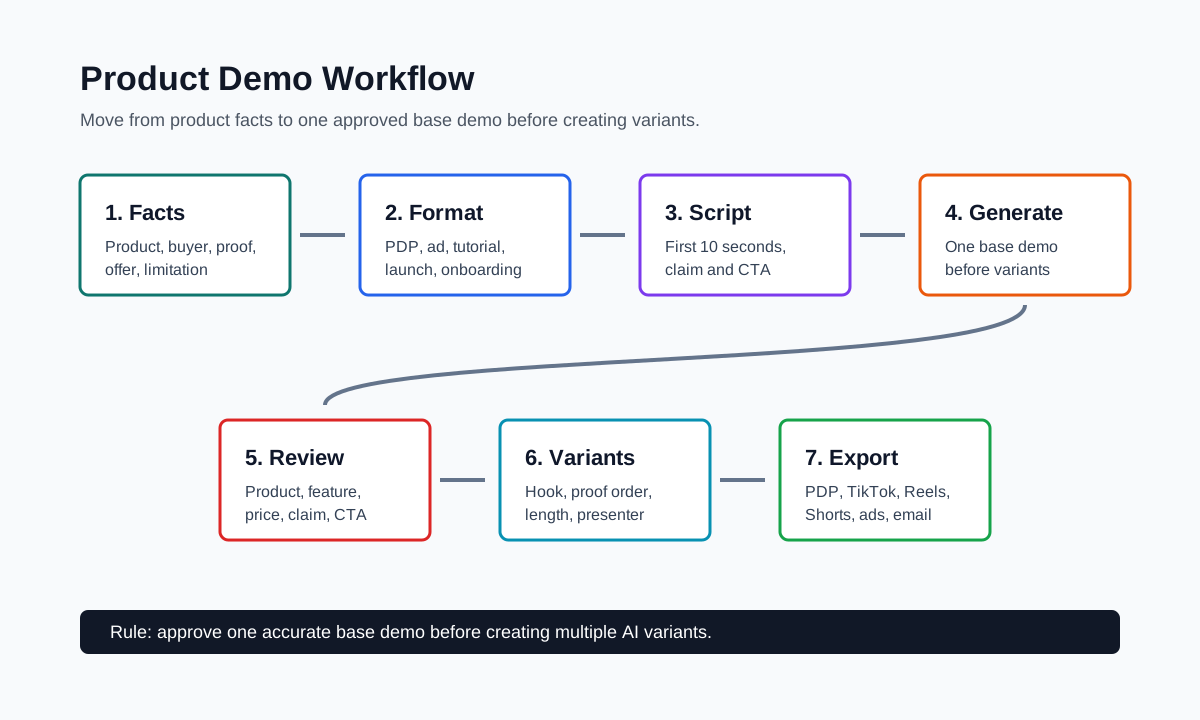
- Collect product facts: name, audience, use case, feature, proof, limitation, offer, and landing page URL.
- Choose the demo format: product page demo, paid ad demo, tutorial, comparison, onboarding walkthrough, or launch teaser.
- Write the first 10 seconds before generating video. The viewer should understand the product without sound.
- Generate one base demo before multiplying variants.
- Review the product, feature, claim, price, offer, and CTA against the source page.
- Create two to five variants with one main change: hook, format, proof order, presenter, length, or CTA.
- Export placement versions only after the story is approved.
This order prevents a common waste pattern: generating many polished videos before the product claim is correct.
Pricing: Compare Cost per Usable Product Demo
Plan price is only one part of the cost. AI video tools often use credits, monthly minutes, exports, watermark rules, or seat-based pricing. For product demos, the better metric is cost per usable demo.
| Cost item | What to ask |
|---|---|
| Generation credits or minutes | How many attempts does one approved demo usually take? |
| Watermark and export limits | Can you publish commercially without a watermark? |
| Script review time | How long does claim and offer review take? |
| Editing time | Do you still need captions, crops, brand overlays, or audio cleanup? |
| Failed outputs | How often does the product, screen, logo, or feature drift? |
| Localization | Are translated versions included, or do they consume extra credits? |
| Team workflow | Can reviewers approve scripts and videos before launch? |
A low monthly plan can become expensive if most drafts need manual repair. A higher plan can be efficient if it produces more publishable demos with less review time.
QA Checklist Before Publishing an AI Product Demo
Run this checklist before the demo goes live:
| Check | Pass condition |
|---|---|
| Product identity | Product, packaging, screenshot, or interface remains recognizable. |
| Feature accuracy | The demo shows what the product actually does today. |
| Claim support | Benefits are supported by the landing page, product specs, reviews, or proof. |
| Offer match | Price, discount, bundle, shipping, and CTA match the destination page. |
| Caption readability | Text is readable on mobile and does not cover the product. |
| Placement fit | Aspect ratio, length, safe zones, and file format fit the channel. |
| Disclosure and rights | Avatar, voice, music, image, and stock assets are cleared for the use case. |
| Variant discipline | Each test changes one main variable so performance data is useful. |
For a deeper launch review, use the product video proof points guide and the product video landing page checklist.
FAQ
What is the best AI video generator for product demos?
For ecommerce product demos, start with ShopShot when you need product images, product pages, scripts, and offers turned into short demo videos. Synthesia and HeyGen are stronger for presenter-led demos, while Runway is stronger for cinematic product motion.
Is an AI product demo video generator different from an AI video ad generator?
Yes. An AI video ad generator is usually optimized for paid creative and fast variants. An AI product demo video generator should explain the product, show how it works, and keep claims aligned with the product page.
Can AI make product demo videos without filming?
Yes, but the input quality matters. You still need product photos, screenshots, a clear script, proof points, and review. AI can reduce filming and editing work, but it should not invent the product story.
Should I use an AI avatar in a product demo?
Use an AI avatar when a presenter helps explain the product, feature, or workflow. Do not use an avatar as a fake customer testimonial. Pair the presenter with real product visuals, captions, and proof.
How many product demo variants should I create?
Start with two to five variants after the base demo is approved. Change one variable at a time, such as hook, presenter, proof order, length, or CTA. More variants help only when the differences are intentional.
Bottom Line
The best AI video generators for product demos are workflow choices, not interchangeable model names. ShopShot is the product-focused option for ecommerce demos from images, product pages, offers, and scripts. Synthesia and HeyGen are better for presenter-led walkthroughs. Creatify fits ad-style demo variants. Runway fits cinematic product-shot concepts. Canva, InVideo, and VEED help turn approved assets into publishable versions.
For most ecommerce teams, the safest path is simple: define the product proof, write the demo script, generate one base version, check claims, then create controlled variants. That keeps AI video useful as a production system instead of a pile of disconnected clips.
Sources Checked
- ShopShot AI video generator, checked July 14, 2026, for ecommerce product image, URL, and video generation positioning.
- Synthesia product demo video maker, checked July 14, 2026, for presenter-led product demo and localization positioning.
- HeyGen AI product video generator, checked July 14, 2026, for product photos, product links, demos, ads, and launch workflows.
- Creatify AI product video generator, checked July 14, 2026, for product image and URL-to-video product video workflows.
- Runway Academy product shot to social ad tutorial, checked July 14, 2026, for product-shot-to-social-ad workflow.
- Canva product video maker, checked July 14, 2026, for template and design-led product video creation.
- InVideo AI product video generator, checked July 14, 2026, for avatar and AI-generated product video drafts.