
Quick Answer
A Pinterest video ads checklist for ecommerce should confirm six things before upload: the product promise is true, the format is chosen before editing, the first 6 seconds show the product clearly, the cover image works without sound, the catalog or destination page matches the video, and each export follows Pinterest's current video specs. For most product campaigns, prepare a 2:3 or 4:5 discovery cut, a short 6-15 second ad cut, and a catalog-safe shopping video version instead of recycling one TikTok or Reels file everywhere.
Pinterest is not just another short-form video feed. People use it to search, plan, save, compare, and shop. That means an ecommerce video ad needs to behave like a visual answer: it should show the product in context, make the use case obvious, and lead to a page or catalog item that keeps the promise.
If you already make social video for TikTok, Reels, or Shorts, start by adapting the same product story to Pinterest's discovery behavior. Then use ShopShot's Pinterest video Pin generator to create a Pinterest-specific version rather than forcing a full-screen social export into a feed where people may scan more slowly and compare many ideas at once.
Why Pinterest Video Ads Need a Separate Checklist
Pinterest video ads can look simple from the outside: upload a video, add a title, choose a campaign, and publish. Ecommerce teams usually run into problems because the creative was not planned for Pinterest before export.
The common failure pattern is familiar:
- A team exports a 9:16 TikTok-style video.
- The product text sits near the bottom or top edge.
- The cover image is a random frame from the middle of the video.
- The title reads like an internal file name.
- The landing page shows a different bundle, price, color, or offer.
- The campaign gets clicks from curious browsers, but the product story does not convert.
Pinterest rewards a different kind of discipline. The video must work as a search result, a saved idea, a shopping asset, and a paid creative. That is why the checklist below starts with product truth and format selection, not with motion effects.
Pinterest Video Ad Formats to Choose Before Editing
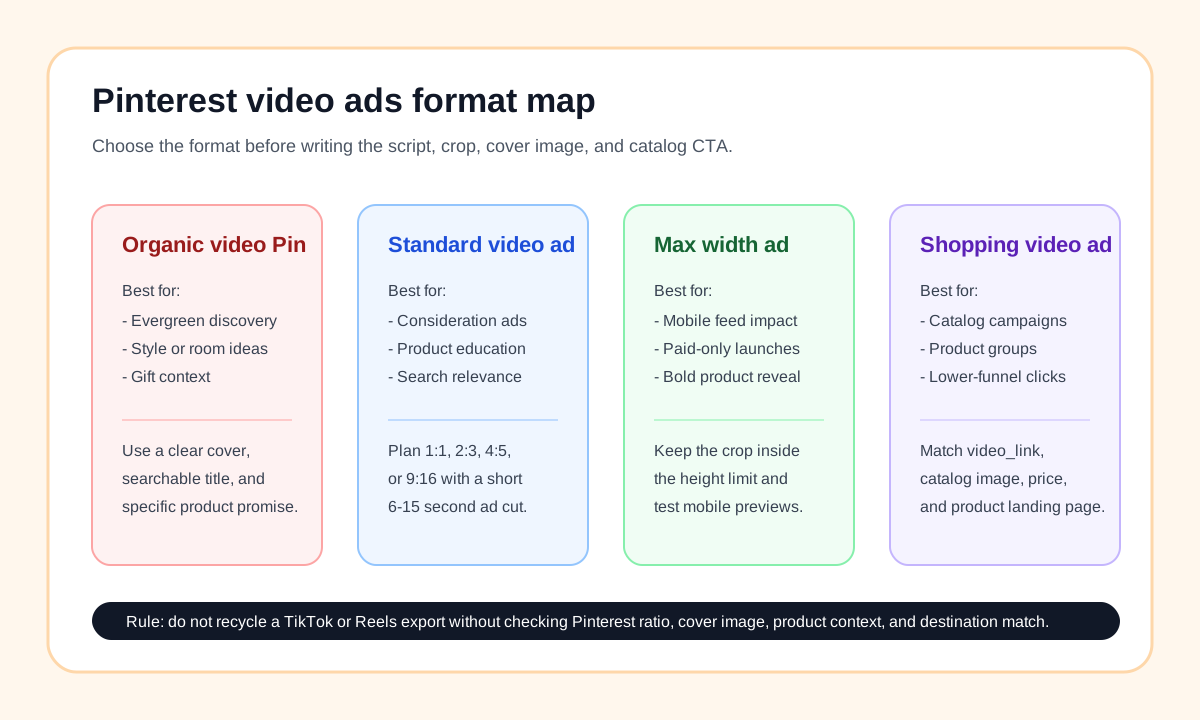
Choose the ad job first. The same product can need a different script, crop, and CTA depending on whether the asset is an organic video Pin, a standard width video ad, a max width video ad, or a shopping video ad.
| Pinterest format | Best ecommerce use | Creative planning rule | Do not use it for |
|---|---|---|---|
| Organic video Pin | Evergreen discovery, style ideas, gift guides, room inspiration, recipe or routine ideas | Make the cover image and title searchable because the Pin may be saved and rediscovered later. | Urgent sale claims that expire quickly. |
| Standard width video ad | Consideration campaigns, product education, category awareness, seasonal product pushes | Build a short video that works in square or vertical ratios and makes sense without audio. | A cluttered horizontal commercial cropped from another platform. |
| Max width video ad | Paid mobile impact, new collection reveal, high-contrast product launch | Keep the product and key text within the mobile crop and preview the feed placement. | Catalog maintenance or low-budget creative tests where standard width is enough. |
| Shopping video ad | Catalog-backed promotion, product groups, retargeting, lower-funnel shopping moments | Match the product, price context, thumbnail, video link, and destination page. | A generic brand video that does not map to a specific product group. |
Pinterest's help documentation lists .MP4, .MOV, and .M4V for video ads, H.264 or H.265 encoding, and up to 2 GB for standard width video ads. It also lists a minimum length of 4 seconds and maximum length of 15 minutes, while recommending 6 to 15 seconds for video ads. For standard width video ads, Pinterest recommends square 1:1 or vertical ratios such as 2:3, 4:5, or 9:16.
That does not mean every ecommerce video should be 15 minutes or 9:16. It means the platform accepts multiple shapes. Your job is to pick the shape that preserves the product, offer, and use case in the feed.
The Ecommerce Pinterest Video Ads Checklist
Use this checklist before upload, not after a campaign starts spending.
| Check | Pass standard | Why it matters |
|---|---|---|
| Product truth | Every claim, price cue, ingredient, material, size, compatibility note, and before/after visual can be supported by the product page. | Pinterest traffic will not convert if the video creates a promise the page cannot prove. |
| Format choice | The video is made for organic Pin, standard width ad, max width ad, shopping video ad, or a named variant. | A video with no format job usually has weak cropping, weak CTA, and vague measurement. |
| First 6 seconds | Product is visible, use case is clear, and one buyer problem or desire is established. | Pinterest recommends short video ad pacing, and the opening frames decide whether a viewer keeps watching. |
| Cover image | The cover shows the product, outcome, or context without needing audio or motion. | A weak cover makes the video hard to understand in search, feed, and saved boards. |
| Pin title | Title is specific, useful, and front-loads the product or use case within the visible portion. | Pinterest allows longer titles, but only part of the title may show in feeds. |
| Description | Description includes product context, use case, audience, and relevant terms without keyword stuffing. | Pinterest says descriptions help its algorithm determine relevance for delivery. |
| Catalog match | Product group, image, video link, price context, and landing page match the creative. | Shopping video ads depend on catalog data and product relevance. |
| Destination page | The landing page has the product, variant, offer, shipping expectation, and proof used in the video. | A mismatch breaks trust and wastes paid traffic. |
| Audio independence | The video can be understood with sound off through product visuals and concise text. | Pinterest's own video guidance notes that some viewers watch without sound. |
| Launch variants | At least two testable cuts exist: discovery/education and shopping/retargeting. | One creative rarely covers both idea discovery and lower-funnel product clicks. |
Build the Creative From Product Truth First
Start with the product page, not a blank script. Pull the facts that the video is allowed to say:
- Product category and exact variant.
- Primary use case or buyer problem.
- Materials, dimensions, compatibility, bundle details, or ingredients.
- Proof points from reviews, ratings, press, tests, or customer photos.
- Offer details that will still be accurate when the ad runs.
- Claims that should be avoided because they are unsupported or regulated.
For example, a home storage brand should not start with "go viral on Pinterest." It should start with a product truth file:
| Product fact | Video use | QA risk |
|---|---|---|
| Fits under standard cabinets | Show the organizer sliding into a cabinet scene. | Need the actual measurement on the product page. |
| No drilling required | Use a short installation moment. | Avoid implying it works on every wall or surface. |
| Holds six spice jars | Show the capacity visually. | Match the exact jar size used in the product listing. |
| Available in white and black | Use two quick variant frames. | Landing page must show both variants in stock. |
This step matters for AI-generated product videos too. If you generate a video from product photos or URLs, the model may make the product look attractive but miss constraints that matter to buyers. Give the creative system the exact product truth before asking for motion, captions, or style.
Use a Pinterest-Specific Hook
Pinterest hooks should feel useful, visual, and context-rich. They can still sell, but they should not feel like a hard interruption.
| Weak hook | Stronger Pinterest hook | Why it works |
|---|---|---|
| "You need this now." | "A cleaner way to store spices under a small cabinet." | Shows context and use case. |
| "Best gadget ever." | "Before-and-after desk setup for a 24-inch workspace." | Gives a measurable scene. |
| "This went viral." | "Three ways to style one linen shirt for summer travel." | Fits discovery and planning intent. |
| "Huge sale today." | "Gift-ready coffee kit for someone who already has a grinder." | Creates a shopping scenario. |
Write the first 6 seconds as a visual promise:
- Show the product or result immediately.
- Name the use case in plain language.
- Give one reason to keep watching.
- Avoid tiny text, rapid claims, or audio-only explanation.
For a quick production route, pair this article with product video examples for ecommerce and the product video ad script template. Use those pages to build the core product story, then adapt the opening frames for Pinterest.
Pinterest Specs QA Before Export
Use current Pinterest specs as the final export gate. The exact campaign setup may vary, but these are the practical checks for ecommerce teams:
| Spec area | What to check | Practical ecommerce note |
|---|---|---|
| File type | Export .MP4, .MOV, or .M4V for video ad use. | .MP4 is usually the simplest handoff format for teams and agencies. |
| Encoding | Use H.264 or H.265. | Avoid obscure exports from editing tools that fail upload or preview. |
| Length | Keep ad cuts in the 6-15 second range unless the concept genuinely needs more time. | Shorter works better for product discovery, gift, style, and comparison concepts. |
| Ratio | Prepare 1:1, 2:3, 4:5, or 9:16 based on the format. | 2:3 and 4:5 are often easier for product detail than a recycled 9:16 video. |
| Title | Keep the most important words early. | Product, use case, and buyer moment should appear before secondary adjectives. |
| Description | Add useful product context. | Descriptions may not show in every feed view, but they still help relevance. |
| Cover | Choose or design a cover frame. | Do not let a blurred transition frame become the thumbnail. |
If you already have a Reels or TikTok export, do not assume it passes. Use the Instagram Reels safe zone template to identify any text that was designed around Meta overlays, then rebuild the Pinterest crop around product clarity and search behavior.
Shopping Video Ads Need Catalog Discipline
Pinterest shopping ads depend on product catalog structure. Pinterest says advertisers can create standard shopping ads, video shopping ads, personalized collections ads, and carousel shopping ads after uploading a product catalog. It also notes that if an item has both a static image and a video, the video can be promoted in the shopping ad.
That makes video powerful, but it also creates a QA trap. A beautiful video will not help if the catalog data and video tell different stories.
Before launching a shopping video ad, check:
- The product group is correct.
- The video link belongs to the exact promoted product or product group.
- The thumbnail does not show a product variant that is out of stock.
- The landing page uses the same product name, variant, and offer.
- The video does not show a bundle if the catalog item is a single product.
- The creative does not imply a discount that is missing on the page.
- The destination page loads quickly on mobile.
For catalog-heavy sellers, this is where AI video production should be strict. Generate a separate product-focused video for each product group instead of one broad "brand story" that points to many unrelated items.
A Simple Pinterest Video Production Workflow
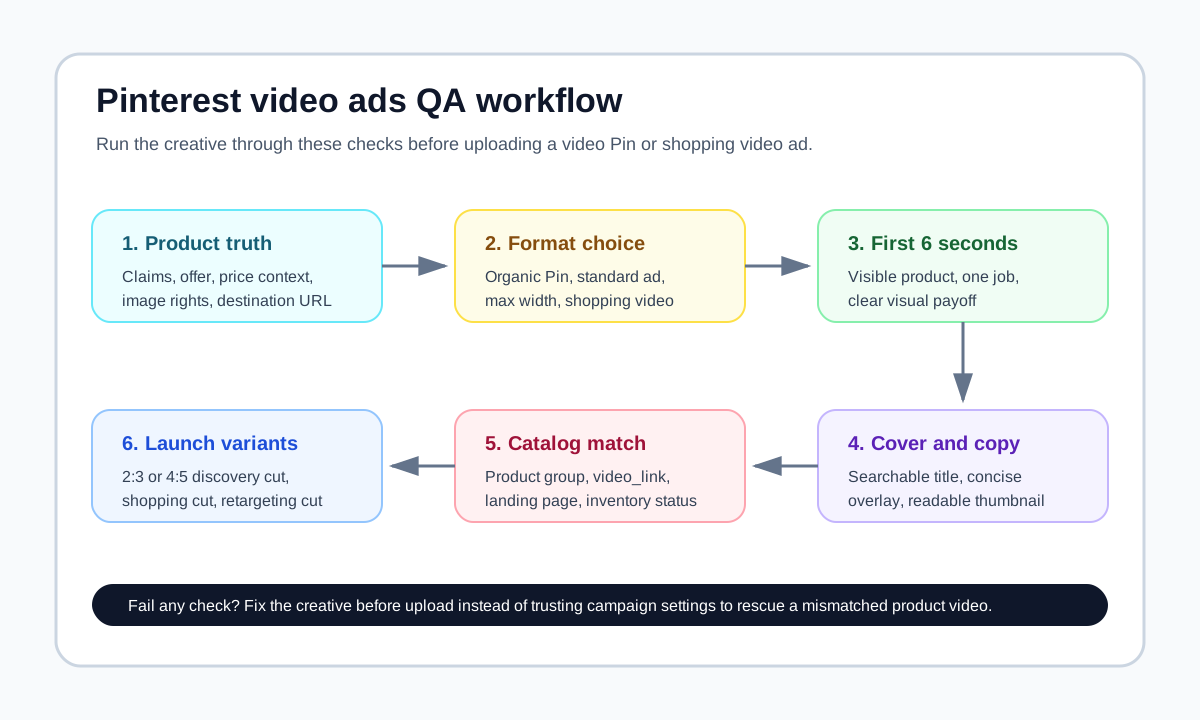
Here is a practical workflow for ecommerce teams using product photos, product URLs, or AI video tools.
1. Create the product truth file
Copy the product title, main benefit, exact variant, price context, materials, dimensions, top reviews, and claim limits into one brief. If the product is seasonal or gift-oriented, add the target moment.
2. Pick the Pinterest job
Choose one:
- Discovery Pin: help shoppers find an idea.
- Standard video ad: explain a product benefit.
- Max width ad: make a paid launch visible.
- Shopping video ad: promote a catalog-backed product.
- Retargeting video: answer an objection from a previous visitor.
3. Write the first 6 seconds
Use this structure:
Frame 1: Product or outcome
Frame 2: Use case
Frame 3: One proof point or visual payoff
Frame 4: Next step or reason to click
Keep the language functional. Pinterest users may be planning, comparing, or saving. The script should help them understand whether the product belongs in their plan.
4. Generate or edit the video
Use product images, lifestyle context, and a short scene map. If using ShopShot, start from the product URL or product images and ask for a Pinterest-specific cut. Avoid generic "viral" instructions unless you also provide product truth and ratio requirements.
5. QA the export
Check the specs, title, description, cover, claims, text readability, and destination match. If the video will become a shopping video ad, verify catalog data before upload.
6. Launch with variants
Do not test only one video. Use a discovery cut, a shopping cut, and a retargeting cut:
| Variant | Opening angle | CTA | Measurement |
|---|---|---|---|
| Discovery cut | "Here is a product idea for this room, outfit, routine, or gift." | Save or click for details. | Saves, outbound clicks, assisted conversions. |
| Shopping cut | "Here is the product, use case, and reason to buy." | Shop the exact item. | Product clicks, add-to-cart rate, conversion rate. |
| Retargeting cut | "Here is the objection answer or missing proof." | Return to product page. | Return visits, checkout starts, purchase rate. |
Common Pinterest Video Ad Mistakes
Mistake 1: Cropping a full-screen social ad without rebuilding the cover
A TikTok or Reels video may work in 9:16, but Pinterest discovery often depends on the cover and title. Create a clean first frame or cover that shows the product and use case at a glance.
Mistake 2: Treating Pinterest like a pure entertainment feed
Pinterest can support fun creative, but ecommerce results usually depend on planning context. Show where the product fits: kitchen, outfit, desk, gift box, routine, room, trip, or event.
Mistake 3: Using vague Pin titles
"Summer must-have" is weaker than "Portable blender for beach smoothies." Put product and use case early because only part of the title may show in feed contexts.
Mistake 4: Letting AI invent claims
Generated copy can sound persuasive while adding unsupported claims. Keep a product truth file and remove claims about health, durability, material, compatibility, or results unless your page proves them.
Mistake 5: Sending shopping traffic to a mismatched page
If the video shows a bundle, do not send the user to a single product page. If the video shows a white variant, do not land on a black variant by default. Small mismatches become conversion leaks.
Internal Linking Plan for the Pinterest Cluster
This article should support the Pinterest tool page, not compete with it. The tool page owns "Pinterest video Pin generator" and related product-video generation intent. This blog owns the pre-publish checklist and specs workflow.
Use these supporting pages when building your Pinterest creative system:
- Pinterest video Pin generator for creating Pinterest-ready product video assets.
- How to create ecommerce product videos with AI for the broader product-video workflow.
- Product video examples for ecommerce for product story patterns.
- Ad copy to video script workflow for turning existing ad copy into scenes.
- Instagram Reels safe zone template when repurposing vertical social assets.
FAQ
What are Pinterest video ads?
Pinterest video ads are paid video creatives that appear in Pinterest surfaces such as feed and search-style discovery contexts. Ecommerce teams use them to show product ideas, product benefits, shopping use cases, and catalog-backed product videos.
What length should Pinterest video ads be?
Pinterest lists video ad length from 4 seconds to 15 minutes and recommends 6 to 15 seconds for video ads. For ecommerce product videos, use the short range unless the product requires a demo, comparison, or setup explanation.
What aspect ratio should ecommerce sellers use for Pinterest video ads?
Pinterest supports square and vertical formats for standard width video ads, including 1:1, 2:3, 4:5, and 9:16. For product discovery, 2:3 or 4:5 often gives more room for product detail and overlay copy than a recycled 9:16 ad.
Can I use the same video for Pinterest, TikTok, and Instagram Reels?
You can reuse the product story, but you should not blindly reuse the same export. Pinterest needs a strong cover image, searchable title, product context, and destination match. TikTok and Reels exports often need recropping and copy changes before Pinterest upload.
Can Pinterest shopping ads use video?
Yes. Pinterest's shopping ads help page describes video shopping ads and notes that advertisers should use the video_link field when preparing the data source for video shopping ad campaigns.
Sources Checked
- Pinterest Business Help: Review ad specs, checked June 20, 2026.
- Pinterest Business Help: Create shopping ads, checked June 20, 2026.
- Pinterest Business: Tap into high-intent shoppers with video ads on Pinterest, checked June 20, 2026.
- ShopShot live page: Pinterest video Pin generator, checked June 20, 2026.