
Quick Answer
A product video voiceover script should do five jobs in order: name the buyer problem, show the product in context, connect each claim to visible proof, keep the spoken line short enough for mobile captions, and end with a CTA that matches the landing page. For most ecommerce ads, write the voiceover after the first frame and proof shots are chosen, not before.
Use this guide when a product page, image set, or rough ShopShot video exists but the ad still sounds generic. The goal is a voiceover that makes the visuals easier to understand, not a speech that explains what the viewer cannot see.
Why Ecommerce Voiceover Scripts Need a Visual Plan
A normal narration script can build context slowly. A product video ad cannot. The viewer may be scrolling with sound muted, half-listening, or comparing several products at once. That means the voiceover has to work with the first frame, captions, product demo, and CTA instead of carrying the whole message alone.
Official platform guidance points in the same direction. Google and YouTube's ABCDs framework emphasizes attention, branding, connection, and direction. TikTok recommends captions or text overlays for context and a clear CTA. Meta's video ad guidance recommends showing the brand or product early. Amazon video ad guidance keeps the product and shopper benefit at the center of the creative.
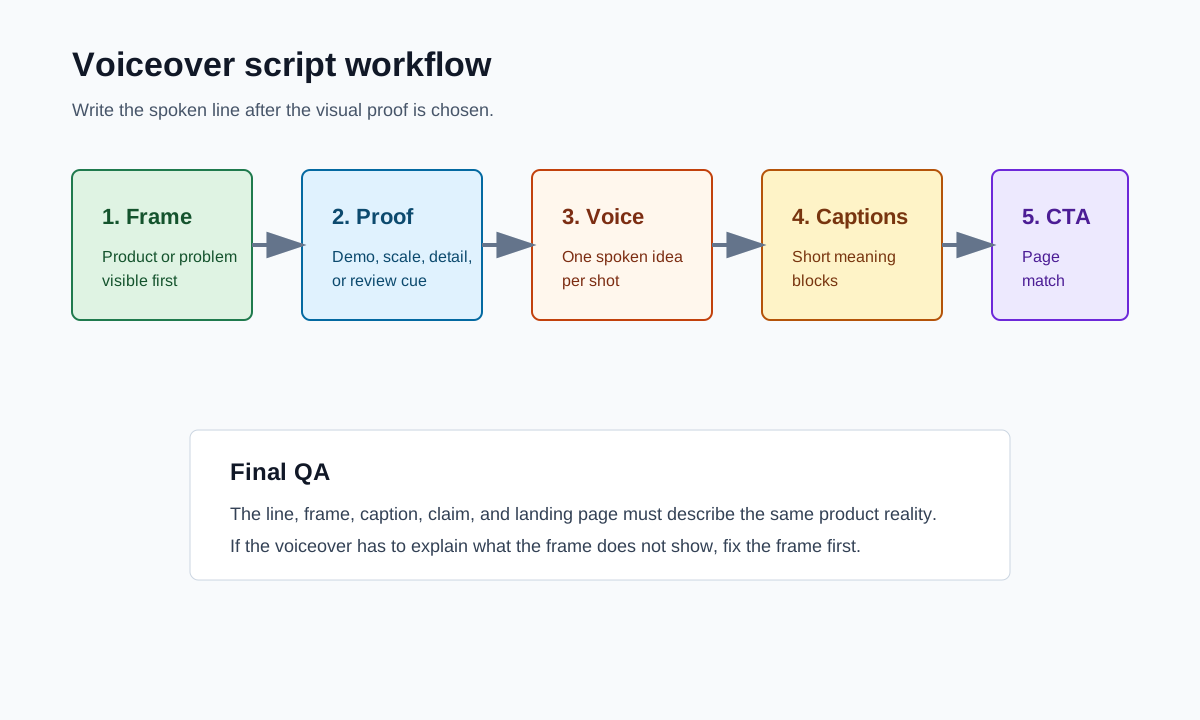
For ShopShot users, the practical workflow is simple: generate or select the visual sequence first, then write the voiceover line that explains each visual beat. If the line and the frame do not support each other, rewrite the line or replace the frame.
If you need the broader structure before writing audio, start with the product video script template and the product video storyboard template.
The Product Video Voiceover Script Formula
| Script beat | Time | What the voiceover should do | Visual proof required |
|---|---|---|---|
| Hook | 0-3s | Name a problem, result, contrast, or use case. | Product, problem, or outcome appears immediately. |
| Product context | 3-6s | Say what the product is and who it helps. | Product is in hand, on body, on desk, in kitchen, or in the real use setting. |
| Main proof | 6-12s | Explain one believable benefit. | Demo, close-up, comparison, review cue, or before-after moment. |
| Buying detail | 12-17s | Handle the likely objection. | Size, material, bundle, setup step, texture, fit, or compatibility. |
| CTA | 17-22s | Tell the viewer the exact next action. | Landing-page offer, product page, collection, or ShopShot workflow is consistent. |
This formula is intentionally narrow. Most product video voiceover scripts become weaker when they try to explain every feature. Pick one job for the ad, then let the visuals do the rest.
Step 1: Start With the Frame, Not the Sentence
Before writing, pause the rough cut at the first frame. Ask one question: what can the viewer understand before the voice starts?
If the first frame already shows the problem, write a line that names the pain. If it shows the result, write a line that frames the outcome. If it only shows packaging, rewrite the opening scene before writing the voiceover.
Good opening voiceover lines:
- "Your travel mug should not leak inside your work bag."
- "This is the two-step setup before the first brew."
- "If your drawer turns into a cable knot, start here."
- "Here is the size difference before you choose a bundle."
Weak opening lines:
- "Introducing our amazing new product."
- "You need this in your life."
- "Welcome back to our store."
- "This product is high quality and affordable."
The strong lines tell the editor what to show. The weak lines could describe almost any product.
Step 2: Keep Claims Beside Proof
A voiceover can create risk when it says more than the video proves. If the line says "lasts all day," the viewer should see duration evidence or a more careful claim. If the line says "fits any bag," the video should show several bags or use softer wording.
Use this proof-near-claim table while scripting.
| Voiceover claim | Better visual support | Safer wording when proof is limited |
|---|---|---|
| "Saves time every morning." | One continuous setup sequence or timer. | "Cuts out one messy setup step." |
| "Keeps drinks cold all day." | Time cue, temperature cue, or source claim from the product page. | "Helps keep drinks cold during the commute." |
| "Fits anywhere." | Product beside bag, drawer, shelf, or hand. | "Fits a small desk drawer or daily bag." |
| "Customers love it." | Real review excerpt with source context. | "A useful proof point to test is a short review cue." |
| "Works for every skin type." | Verified claim from product documentation. | "Check the product page before making skin or health claims." |
This is also why voiceover should be reviewed with the landing page open. The ad, product page, offer, and CTA should describe the same product reality.
For a deeper claims pass, use the product video compliance checklist.
Step 3: Write for Captions and Sound-Off Review
Voiceover and captions do not need to match word for word. The voice can carry warmth and detail. Captions should carry the meaning in short blocks.
A useful rule is one spoken idea per shot. If the shot is a close-up, the line should be specific. If the shot is a product-in-use demo, the line should explain what the viewer should notice. If the shot is an end card, the line should match the CTA.
| Spoken line | Caption block | Why it works |
|---|---|---|
| "The magnetic lid snaps shut before it goes in your bag." | "Lid snaps shut" | Caption points to the proof, not the whole sentence. |
| "Use it on the desk, then fold it flat for travel." | "Desk to travel" | Short enough for mobile reading. |
| "Pick the bundle that matches your routine." | "Choose your bundle" | Matches a product page or collection action. |
| "Create a new product video from the same image set in ShopShot." | "New video from same images" | Explains the workflow without sounding like a hard sell. |
After drafting, watch the video muted. If the story fails without audio, the script is compensating for weak visuals. Fix the sequence, not only the voiceover.
Step 4: Choose the Right Voiceover Style
Different products need different voiceover energy. A skincare routine, kitchen gadget, creator-style UGC review, and B2B product demo should not use the same pacing.
| Product situation | Voiceover style | Avoid |
|---|---|---|
| Impulse TikTok or Reels ad | Fast, visual, direct | Long setup or brand history. |
| Product detail page demo | Calm, clear, instructional | Forced urgency. |
| Comparison ad | Specific, factual, side-by-side | Unsupported superiority claims. |
| High-consideration product | Reassuring, precise, evidence-led | Vague hype. |
| ShopShot workflow demo | Operational and practical | Claims that every output is automatically ready to publish. |
If you generate product video variants in ShopShot, keep the same visual proof and test different voiceover openings. Change one variable at a time: problem line, outcome line, objection line, or CTA.
Step 5: Run the Final Voiceover QA
Before publishing or sending the ad to a buyer, run this final pass.
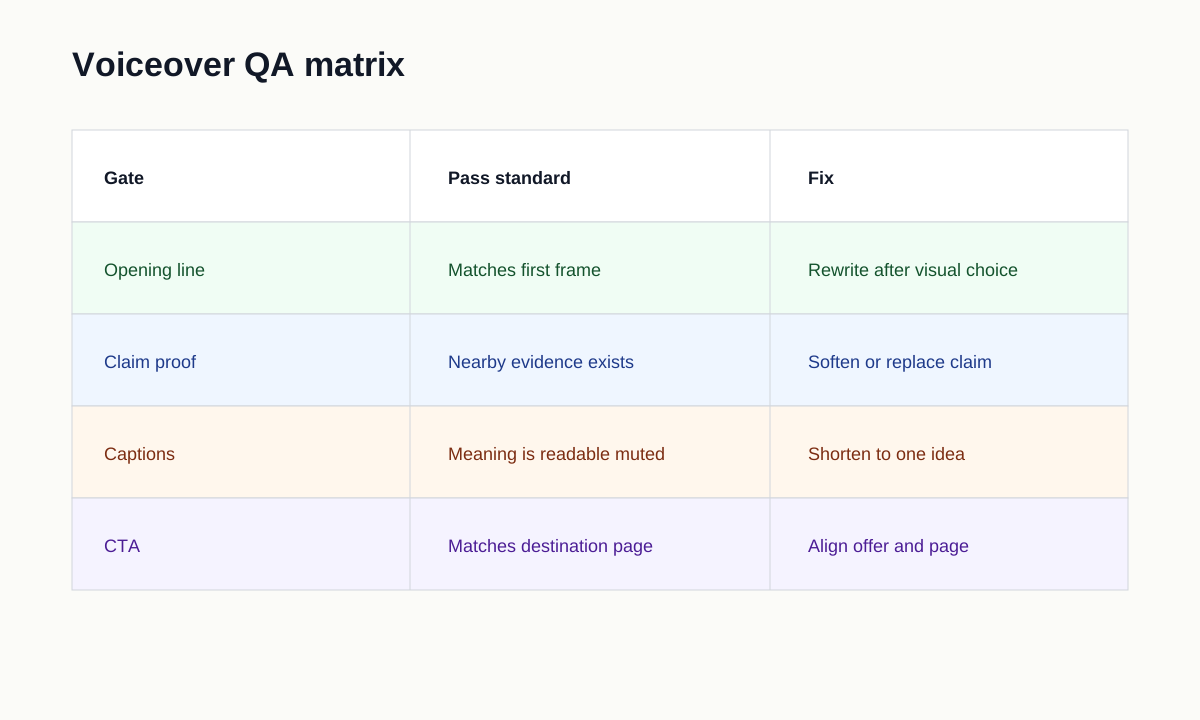
- The first spoken line matches the first frame.
- Product name, product type, and use case are clear by the first few seconds.
- Every claim has nearby visual proof or softer wording.
- Captions summarize meaning instead of duplicating long narration.
- Voiceover does not cover up unclear product footage.
- CTA matches the page destination and offer.
- Spoken price, discount, shipping, and bundle details match the landing page.
- No fake endorsement, fake scarcity, or unrealistic result is implied.
- The audio is clean, not clipped, and not essential for comprehension.
- File names and test names identify the voiceover variant.
For post-launch review, pair this with video ad metrics for ecommerce product videos.
Example: 20-Second Product Video Voiceover Script
| Time | Visual | Voiceover |
|---|---|---|
| 0-3s | Product solves visible problem. | "If your gym bag leaks after every workout, start with the lid." |
| 3-6s | Hand closes product and turns it sideways. | "The snap seal closes before it goes in your bag." |
| 6-10s | Close-up of size and texture. | "The bottle fits a side pocket without hiding the grip." |
| 10-15s | Bundle or color options. | "Pick the size and color that match your routine." |
| 15-20s | End card and product page match. | "Shop the bundle on the product page today." |
This is not a universal script. It is a pattern: problem, proof, buying detail, CTA. Replace every line with product-specific evidence from your product page.
FAQ
What should a product video voiceover script include?
Include a hook, product context, one main proof point, one buying detail, and a CTA. Keep each line tied to the frame the viewer is seeing.
Should the voiceover script come before or after the video edit?
Write a rough angle first, but finalize the voiceover after the first frame, product proof, captions, and CTA are chosen. The final script should support the visuals.
How long should a voiceover be for ecommerce ads?
Many short product ads work best with one concise idea per scene. A 15-25 second ad often needs fewer words than a normal talking script because the product footage carries part of the message.
Can AI-generated product videos use AI voiceover?
Yes, but review the output for pronunciation, claim accuracy, caption match, and brand tone. Human QA is still needed before publishing or running paid traffic.
How can ShopShot help with voiceover scripts?
ShopShot can turn product images or product-page inputs into video concepts and variants. Use the voiceover checklist to choose the clearest hook, proof line, and CTA before launch.