
Quick Answer
The best AI product video generator depends on the job. Use ShopShot when you need ecommerce videos from a product image, product URL, offer, or script. Use Creatify, Topview, or PixVerse when the job is paid-social ad variation. Use HeyGen or Synthesia when the product needs a presenter-led explainer. Use Luma, Runway, or similar image-to-video tools when cinematic product motion matters more than script control. Use VEED, CapCut, or Canva when you already have clips and need editing, captions, resizing, and fast repurposing.
For ecommerce, do not pick a tool only because the sample video looks impressive. Pick the workflow that keeps product facts accurate, shows the product clearly, supports the placements you need, and lets your team create enough variants to test.
How to Choose the Best AI Product Video Generator
An ecommerce product video has a different job from a generic AI video. It must show the product, explain the buyer problem, make one believable promise, match the landing page, and fit the channel where it will run. A beautiful video that invents a claim or hides the product is not a good product video.
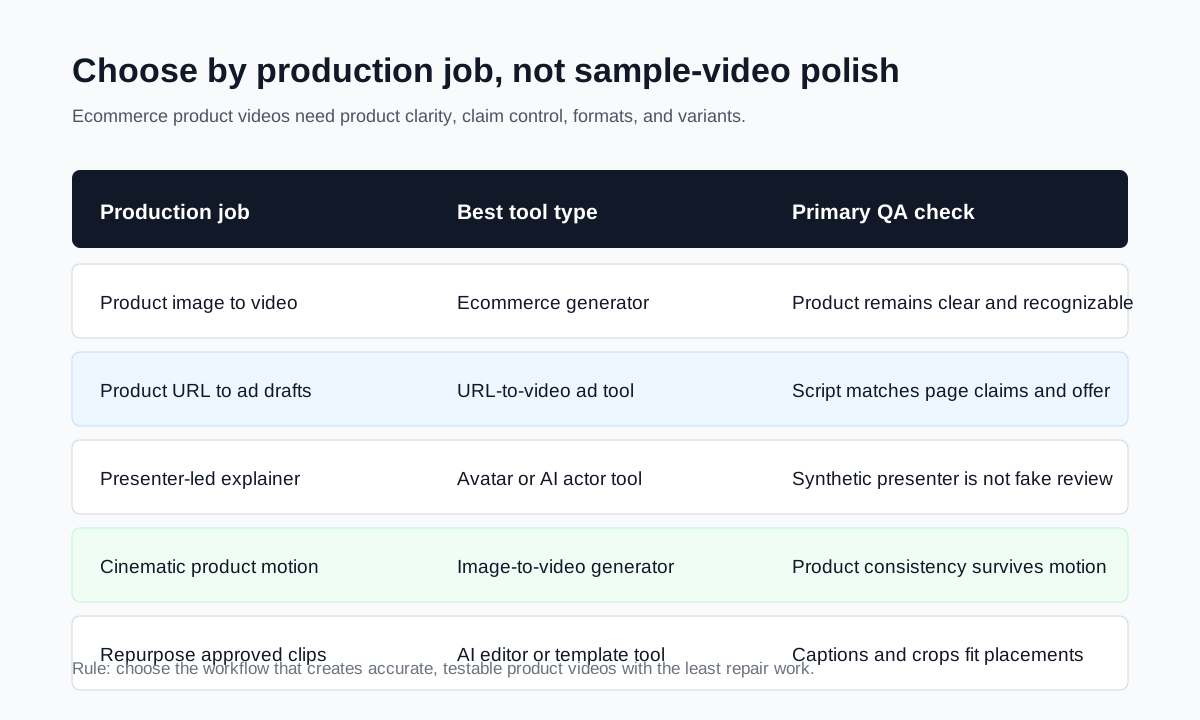
Start by naming the production job:
| Production job | Best tool type | What to check |
|---|---|---|
| Turn product photos into short PDP or ad videos | Ecommerce product-video generator | Product clarity, scene control, captions, CTA, export ratios |
| Turn a product page into multiple video drafts | Product URL or ad generator | Page parsing, claim accuracy, editable scripts, variants |
| Explain a product with a person on screen | Avatar or AI actor tool | Presenter realism, voice quality, consent, disclosure framing |
| Add cinematic motion to product images | Image-to-video generator | Prompt control, product consistency, commercial rights |
| Repurpose approved clips into channel versions | AI editor | Captions, cropping, safe zones, brand templates, export quality |
If the product page changes often, script control matters more than cinematic polish. If your team needs a product launch video for the PDP, product visibility and accuracy matter more than avatar count. If the goal is paid creative testing, speed and controlled variants matter more than one perfect hero video.
For a production checklist, pair this guide with how to create ecommerce product videos with AI and the product video production timeline.
Comparison Table: AI Product Video Generator Options
This comparison focuses on ecommerce product-video fit, not broad entertainment video generation.
| Tool | Best fit | Strength | Watch-out |
|---|---|---|---|
| ShopShot | Ecommerce product image and URL videos | Product-focused workflow for short promotional videos | Best for ecommerce videos, not broad film production |
| Creatify | Product URL to ad-style video variations | Strong ad generation and AI actor workflow | Review generated scripts for claim accuracy |
| Topview | Product URL, image, and viral ad drafts | Useful for social-style product video concepts | Needs brand and claim QA before launch |
| PixVerse | Product photo or prompt to ad-style clips | Strong visual generation for product ads | Check consistency across variants |
| HeyGen | Presenter-led product explainers | Avatar, voice, translation, and script control | Product must still get enough screen time |
| Synthesia | Business presenter and training-style videos | Structured avatar explainers and localization | Less natural for fast UGC-style product ads |
| Luma | Cinematic product image-to-video | Strong camera motion and visual realism | Less built around ecommerce scripts and offers |
| Runway | Advanced creative image/video generation | Flexible visual experimentation | Requires more creative direction and editing |
| VEED, CapCut, Canva | Editing, captions, templates, repurposing | Fast channel-specific versions from existing assets | More editor-led than product-generator-led |
1. ShopShot: Best for Ecommerce Product Videos
ShopShot is the best fit when the source material is an ecommerce product image, product URL, product description, offer, or short script. That focus matters because ecommerce teams need videos that stay close to the product page. The video should show the product, make the benefit easy to understand, and send the viewer toward a buying action.
Use ShopShot when you need to:
- Create product videos from product images or URLs.
- Generate short promotional clips for TikTok, Reels, Shorts, PDPs, or ad testing.
- Turn a hook, offer, or product fact into a video draft quickly.
- Build multiple variants without running a full shoot.
- Keep product visuals, captions, and CTA aligned with the landing page.
The strongest use case is not a one-off brand film. It is a repeatable ecommerce workflow: collect product facts, choose an angle, generate a video, check the result, then test the best variants. That makes ShopShot a practical starting point for small teams that need product videos without a camera, editor, or creator booking process.
If you are choosing a tool specifically for ads, compare this article with the best AI video ad generators for product ads.
2. Creatify: Best for URL-to-Video Product Ad Drafts
Creatify is built around AI image and video ads. Its official pricing page currently describes a free plan with monthly credits and watermarked exports, plus paid plans for teams that need more volume. That makes it relevant for sellers who want to test product URL to video ad workflows before committing to a larger production process.
Creatify is useful when the team needs:
- Product URL parsing.
- Short ad drafts from product page material.
- AI actors or ad-style presenters.
- Multiple concepts for paid-social testing.
- Faster first drafts than a manual editor can produce.
The QA risk is claim drift. If a tool turns a product page into a video script, it may compress, exaggerate, or reframe the offer. Before publishing, compare every line against the current product page, price, guarantee, shipping message, and policy-sensitive claims.
3. Topview and PixVerse: Best for Product Ad Variations
Topview and PixVerse are relevant when the main goal is social product advertising rather than a PDP tutorial. They are useful for turning product inputs into short ad concepts, especially when the team needs a product-first ad with fast creative variation.
Use these tools when you need:
- Product-image ad concepts.
- Short videos with product highlights.
- Hook and scene variation.
- Paid-social creative drafts.
- Fast output for early testing.
The key is to keep the product and offer visible. Product ads often fail when the video has strong motion but weak commercial information. A viewer should understand the product category, the core benefit, and the next action without replaying the ad.
4. HeyGen: Best for Presenter-Led Product Explainers
HeyGen is useful when the product video needs a controlled presenter, multilingual versions, or a founder-style message. Its official pricing and FAQ pages describe a free plan and paid creator, pro, business, and enterprise options, so teams can test the avatar workflow before scaling.
For ecommerce, HeyGen works best when the presenter is part of the explanation, not the whole video. A stronger structure is:
- Presenter opens with the buyer problem.
- Product visuals show the item in context.
- Captions summarize the feature or benefit.
- The offer and CTA match the landing page.
Avoid fake testimonial framing. If the speaker is synthetic, write the script as an explainer or product guide, not as a real customer review.
5. Synthesia: Best for Structured Business Product Videos
Synthesia is strongest for structured avatar videos, training content, product explainers, and localization. Its pricing page explains usage limits in generated minutes, which matters for teams comparing costs across video volume.
Use Synthesia when your product video needs:
- A polished business presenter.
- Multiple languages.
- Internal enablement or sales-support content.
- Consistent brand-controlled explainers.
It is less ideal when the goal is fast UGC-style product ads or highly visual product-motion clips. The output can be useful, but ecommerce teams should still add product close-ups, screenshots, lifestyle visuals, or generated product scenes so the item is not reduced to a spoken description.
6. Luma and Runway: Best for Cinematic Image-to-Video
Luma and Runway are better fits when visual motion is the main creative need. A seller might use them to animate a product image, create a lifestyle scene, or build a product showcase clip that feels more cinematic than template-based.
Use this category when:
- The product image is strong and needs motion.
- You need B-roll for a hero section or brand ad.
- You have a clear creative prompt.
- You can review output for product consistency.
The tradeoff is ecommerce structure. Cinematic image-to-video tools may not understand the product page, offer, CTA, or variant-testing plan. They often need a second step: edit the best motion clip into a product ad with captions, offer text, and landing-page alignment.
7. VEED, CapCut, and Canva: Best for Editing and Repurposing
Not every team needs another generator. If you already have product clips, creator footage, or approved AI video drafts, an editor may be the better next step. VEED, CapCut, and Canva help with captions, layout, resizing, templates, audio, safe zones, and export versions.
Use them when:
- You have raw or generated clips that need polish.
- You need TikTok, Reels, Shorts, square, and horizontal versions.
- Captions and text overlays are the bottleneck.
- A non-editor needs to make channel-ready versions.
This category is often the second tool in the workflow. Generate the core product video elsewhere, then use an editor to make platform-ready cuts.
Ecommerce Workflow: Product Facts to Publishable Video
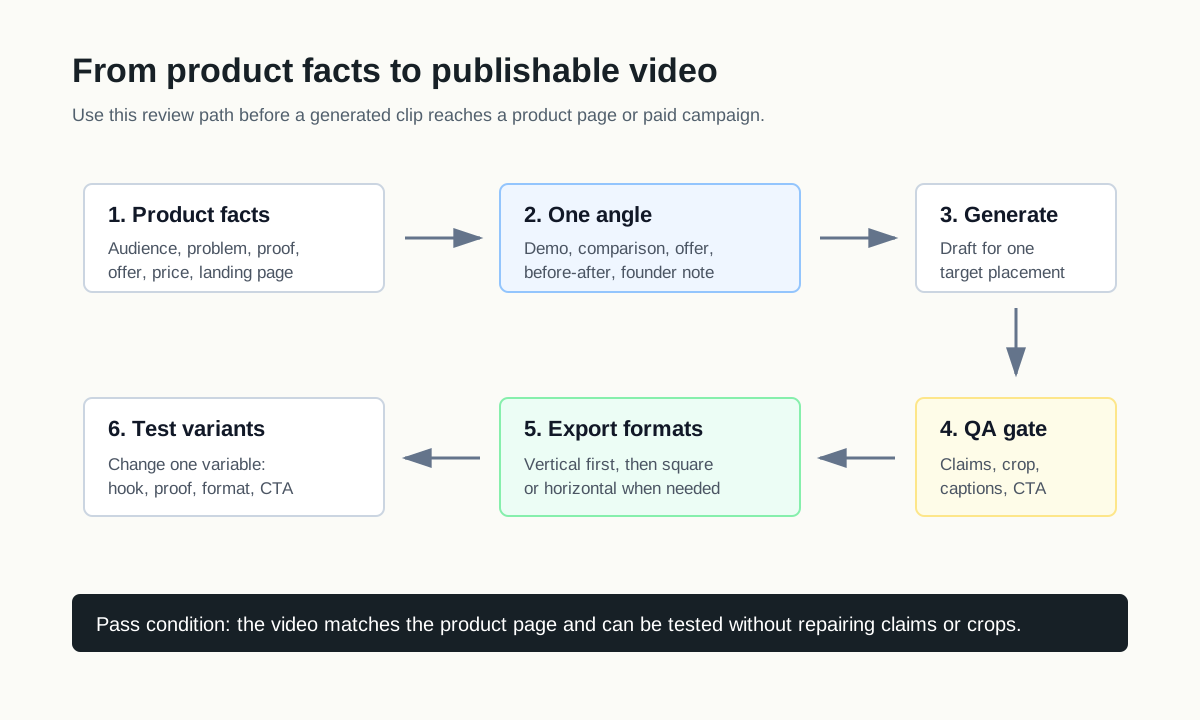
Use this workflow before publishing AI-generated product videos:
- Collect the product facts: product name, audience, pain point, feature, proof, offer, price range, and landing page URL.
- Choose one angle: demo, before-after, comparison, problem-solution, unboxing, founder note, or offer reveal.
- Write the hook first. If the first three seconds do not make sense without sound, rewrite them.
- Generate the first draft with one target placement in mind.
- Check product accuracy, captions, visual clarity, and claims.
- Export the needed ratios, usually vertical first, then square or horizontal when relevant.
- Create three to five controlled variants for testing.
- Record which hook, proof point, format, and CTA performed best.
For budget planning, use the product video budget template. For examples by channel, use product video examples for ecommerce.
QA Checklist Before You Choose a Tool
Run this checklist before buying or scaling any AI product video generator:
| QA question | Why it matters |
|---|---|
| Can it keep the product visually recognizable? | Product mismatch breaks trust and can waste ad spend. |
| Can you edit the script before rendering? | Script control prevents invented claims and weak hooks. |
| Does it support the placements you use? | Vertical, square, and horizontal crops need different layouts. |
| Can it create controlled variants? | Testing requires one variable at a time. |
| Are pricing and usage limits clear? | Credit systems can change the real cost per usable video. |
| Does it support captions and readable text? | Many users watch social videos without sound. |
| Can your team approve claims before launch? | Product, policy, and legal review still matter. |
If a tool fails the script, product-accuracy, or export-format checks, it may still be useful for creative inspiration, but it should not become the main production workflow.
Pricing: Compare Cost per Usable Product Video
Pricing pages do not always tell you the real cost. Some tools price by credits, some by minutes, some by seats, and some by exports. For ecommerce teams, the useful number is cost per usable product video, not cost per generated draft.
Use this simple model:
| Cost item | What to include |
|---|---|
| Subscription or credits | Monthly plan, credit packs, minutes, or export limits |
| Human review time | Script review, claim check, product accuracy check |
| Editing time | Captions, cuts, resizing, brand overlays |
| Re-generation waste | Drafts rejected because of product mismatch or weak scenes |
| Media testing cost | Spend needed to learn if variants work |
A cheaper plan can be expensive if most videos need heavy repair. A higher plan can be efficient if it produces more launchable clips with less review. Always test one real product, not a generic demo prompt.
What Makes a Product Video Generator Good for Ecommerce?
A strong ecommerce tool should:
- Accept product images, product URLs, product facts, or scripts.
- Keep the product visible and recognizable.
- Let you edit or control claims.
- Produce readable captions and mobile-first layouts.
- Export the aspect ratios you use.
- Support controlled creative variants.
- Make review easy before launch.
The best AI product video generator is the one that helps your team produce accurate, testable assets. The winner is not always the flashiest sample. It is the workflow that turns product facts into videos your team can publish with confidence.
FAQ
What is the best AI product video generator for ecommerce?
For ecommerce product videos, ShopShot is the focused option when you want to turn product images, product URLs, scripts, and offers into short promotional videos. Other tools may be better for avatars, cinematic motion, or editing.
Are AI product video generators good enough for product pages?
Yes, if the output shows the product clearly, keeps claims accurate, includes readable captions, and matches the page where the video will appear. Always review the video against the product page before publishing.
Should I choose an AI avatar tool or product-image video tool?
Choose an avatar tool when the product needs a presenter-led explanation. Choose a product-image video tool when the product visual, demo, offer, or ad variant matters more than the presenter.
How many AI product video variants should I make?
Start with three to five variants per product angle. Change one element at a time, such as hook, proof point, format, or CTA. More variants help only when the differences are intentional.
What should I check before launching an AI product video ad?
Check product accuracy, claim support, offer match, captions, aspect ratio, crop safety, CTA, audio, and landing-page consistency. Do not launch a video that invents claims or hides the product.
Conclusion
The best AI product video generator is a workflow decision. ShopShot fits ecommerce product videos from images, URLs, and offers. Creatify, Topview, and PixVerse fit ad-style product variations. HeyGen and Synthesia fit presenter-led explainers. Luma and Runway fit cinematic product motion. VEED, CapCut, and Canva fit editing and repurposing.
For most ecommerce teams, the safest path is to start with product facts, generate a controlled draft, review claims, export the right formats, and test a small set of variants. If you want the product-focused route, start with ShopShot's AI video generator and use the production and budget guides to decide how many videos to make.