
Quick Answer
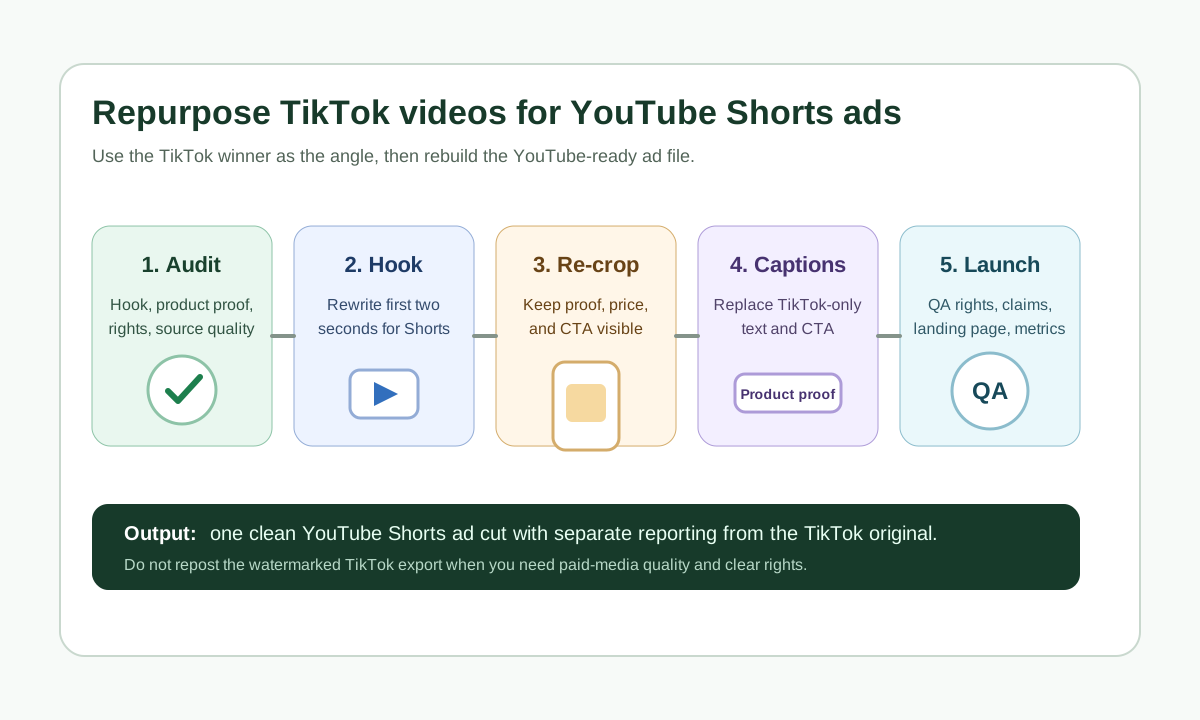
To repurpose TikTok videos for YouTube Shorts ads, do not just repost the exported TikTok file. Start from the clean source footage, rebuild the first two seconds for a YouTube viewer, remove platform watermarks, keep the edit vertical or square, check Shorts length rules, move captions and product claims away from UI-covered areas, and run a final QA pass for rights, claims, landing page match, and mobile playback.
Use the TikTok version as a proven creative angle, not as the final YouTube file. The product proof can stay the same, but the opening, title idea, caption density, CTA timing, and safe-zone layout often need a separate Shorts cut.
When a TikTok Video Is Worth Repurposing
Repurposing works best when the TikTok video has a real ecommerce signal: strong hook retention, visible product handling, clear proof, clean audio, and a claim that can be supported on the product page. A viral-looking clip is not enough. You need to know what part of the asset made it useful.
For most stores, a good TikTok-to-Shorts candidate has three traits:
- The first second shows a buyer problem, product result, or surprising use case.
- The middle shows the product in use, not just a face talking.
- The closing gives a next step that can be adapted to YouTube without sounding like copied TikTok copy.
If you are still making the original asset, start from the UGC video brief template so the creator captures clean product shots, raw footage, and usage rights for YouTube, not only TikTok. If you need to generate structured variants from product inputs, use ShopShot's AI video generator after the core claim and proof are approved.
What Changes Between TikTok and YouTube Shorts
TikTok and YouTube Shorts both reward fast vertical video, but the context is different. TikTok creative often leans into native platform signals, trending sound, and creator-style comments. YouTube Shorts can still use creator energy, but ecommerce teams should make the product promise and brand cue easier to understand without TikTok-specific context.
| Edit area | Keep from the TikTok version | Change for YouTube Shorts ads |
|---|---|---|
| Core angle | The winning buyer problem, demo, or proof moment | Rewrite the opening line so it works without TikTok caption context |
| Product proof | Close-up use, before/after, comparison, review snippet | Add clearer on-screen evidence and avoid vague claims |
| Format | Vertical 9:16 source footage when available | Re-check Shorts length, crop, title, captions, and UI-safe areas |
| Audio | Natural creator delivery or product sound | Remove sounds you cannot reuse; add captions for silent viewing |
| CTA | TikTok Shop or TikTok-style action | Use a YouTube-friendly CTA such as "see the product details" or "watch the full demo" |
| Rights | Creator permission for the original post | Confirm YouTube, paid ad, edit, subtitle, and AI-assisted variant rights |
This is why a TikTok export is usually the wrong production file. Use the project file, clean raw footage, or unwatermarked rendered master. The UGC usage rights checklist should confirm whether the brand can edit, caption, translate, advertise, and reuse the asset on YouTube.
The Repurposing Workflow
1. Audit the Source Clip Before Editing
Pull the TikTok video into a short creative audit instead of opening the editor first.
Check:
- Hook: what exact frame or sentence stops the scroll?
- Product visibility: when does the shopper first see the item clearly?
- Claim: what promise is made, and where is it proven?
- CTA: is the next step TikTok-specific or channel-neutral?
- Rights: can the clip be edited and run on YouTube as organic or paid media?
- Source quality: do you have a clean file without platform overlays or compression artifacts?
If the answer to source quality or rights is no, do not publish the repurposed Short yet. Rebuild the clip from original footage, product images, or a new AI-assisted edit. A cleaner source file usually saves more time than trying to hide a low-quality export.
2. Rebuild the First Two Seconds
The first two seconds should not assume the viewer saw the TikTok trend, comment thread, or creator context. YouTube viewers need the product job quickly.
Good ecommerce Shorts openings usually do one of these:
| TikTok-style opening | Better Shorts ad opening |
|---|---|
| "TikTok made me try this" | "This fixes the messy countertop problem in 10 seconds" |
| "Wait for the end" | "Watch how the bottle seals without leaking" |
| "I did not expect this" | "This $29 tool replaced three kitchen gadgets" |
| "POV: your order arrives" | "Unbox, test, and clean this travel steamer in one minute" |
The goal is not to make YouTube sound formal. The goal is to make the value clear even when the video is separated from its original TikTok environment.
3. Re-Crop With Safe Zones in Mind
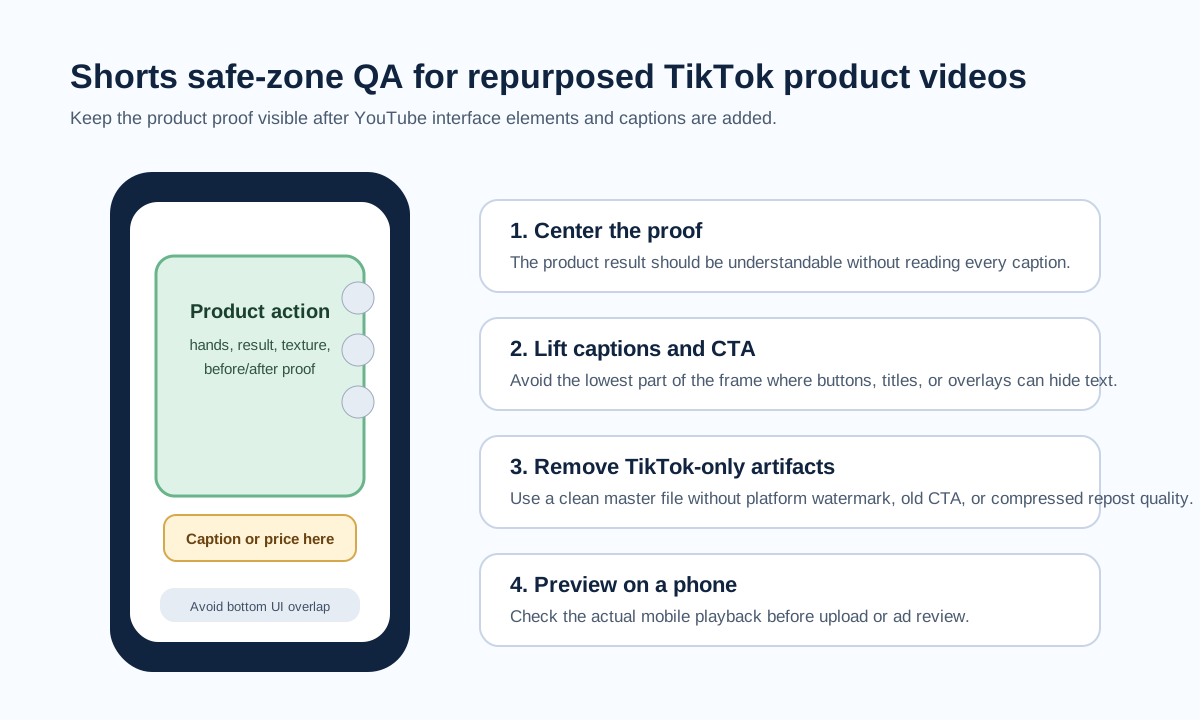
TikTok and YouTube Shorts both place interface elements around the frame. Keep the product, captions, price, offer, and CTA away from the extreme bottom, right-side button area, and top clutter. TikTok Ads Manager provides safe-zone resources for In-Feed ads, and Google Ads guidance points advertisers to safe-zone checks for YouTube video placements.
For a practical ecommerce edit, use this rule:
- Keep the product action centered.
- Put captions in the upper-middle or lower-middle only after checking UI coverage.
- Avoid placing prices, discount codes, product ratings, or CTA text at the very bottom.
- Preview the video on a real phone before upload.
If you need the exact current specs for Shorts, pair this workflow with the YouTube Shorts product video specs guide.
4. Replace TikTok-Specific Captions
Captions that work on TikTok can feel odd on YouTube when they reference TikTok-specific behavior. Replace captions that say "TikTok Shop," "link in bio," "comment for link," "this TikTok trend," or "duet this" unless that phrase is genuinely part of the campaign.
Use captions to make the ad understandable without audio:
| Caption job | Example |
|---|---|
| Problem label | "Greasy pans still look cloudy after washing" |
| Product proof | "Steam loosens wrinkles in 18 seconds" |
| Comparison | "Before: bulky lamp. After: clip-on light" |
| Trust cue | "Tested on cotton, linen, and polyester" |
| CTA | "Check the size chart before ordering" |
TikTok's creative guidance recommends captions or text overlays to add context. The same idea applies to Shorts, but caption density should serve the product proof. Do not cover the video with text if the shopper needs to see texture, fit, size, or before/after change.
5. Check Length and Ad Use Separately
YouTube Help says Shorts creation tools support short-form videos up to three minutes, and YouTube has official guidance around how longer Shorts are classified. That does not mean every ecommerce ad should be three minutes. For repurposed TikTok creative, shorter is usually easier to test.
Use this length decision table:
| Shorts cut | Best use | Keep it if |
|---|---|---|
| 6-10 seconds | Single hook or one product proof moment | The product is obvious by second two |
| 11-20 seconds | Most paid Shorts tests | You can show problem, product, proof, and CTA without rushing |
| 21-35 seconds | Demonstration or comparison | The extra time adds evidence, not filler |
| 36-60 seconds | Explainer, bundle, or higher-consideration product | You need multiple scenes to handle objections |
| Over 60 seconds | Organic education or deep product story | You have a reason beyond reusing the full TikTok clip |
If the clip will also run through Google Ads, check current Google Ads video specs and campaign requirements. Do not assume an organic Short and a paid video ad have identical review, format, or serving behavior.
Ecommerce QA Before Upload
Run this checklist after editing and before publishing the YouTube Short or launching the ad:
| QA gate | Pass condition | Common failure |
|---|---|---|
| Source rights | You can use the footage on YouTube and in paid ads | Creator only approved TikTok organic posting |
| Watermark | No TikTok watermark or platform UI in the final file | Downloaded repost instead of clean source |
| Product proof | Viewer sees the product and outcome clearly | Clip is mostly reaction or face-only commentary |
| Claim support | Every claim is true on the product page or in evidence | "Best," "guaranteed," or medical-style claim is unsupported |
| Safe zones | Captions, logo, price, and CTA are visible on mobile | CTA sits under buttons or bottom UI |
| Caption clarity | Text can be read on a small phone screen | Too many words per second |
| Landing page match | The Short points to the same product, offer, and promise | Video says bundle, page shows single item |
| Analytics label | The creative has a unique name and version | TikTok and Shorts versions are mixed in reporting |
For product-page matching, connect this workflow to the broader how to create ecommerce product videos with AI guide. For TikTok-side source planning, use the TikTok Shop product video checklist.
A Practical Edit Map
Here is a simple way to turn one TikTok product video into three YouTube Shorts cuts.
| Cut | Opening | Middle | Ending | Metric |
|---|---|---|---|---|
| Hook test | Strongest TikTok hook rewritten for YouTube | Same product proof | Soft CTA | Hook hold and view rate |
| Proof test | Product result first | Demo and comparison | Product page CTA | Click-through and conversion rate |
| Objection test | Buyer hesitation first | Feature proof plus review line | "Check if it fits your use case" | Qualified clicks and bounce rate |
You can build these variants manually, or use a structured prompt from the product video ad script template. Keep the claim and offer stable while testing the opening, proof order, or CTA. If you change everything at once, the Shorts test will not tell you what actually worked.
Common Mistakes
Reposting a Watermarked TikTok File
This is the most common failure. It looks like a shortcut, but it creates three problems: lower perceived quality, possible rights confusion, and weaker brand control. Always use the original footage or a clean rendered master.
Keeping a TikTok-Only Hook
Hooks such as "TikTok made me buy it" can work when the platform context is part of the joke. For a YouTube Shorts ad, the safer default is to lead with the buyer problem or product result.
Cropping Out the Product
Many TikTok edits focus on the creator's face. Ecommerce Shorts need product clarity. If the item is small, shiny, wearable, or texture-dependent, zoom and crop around the proof moment, not the creator reaction.
Reusing Music Without Rights
A trend sound may be available in one TikTok context but not cleared for a YouTube ad. Use licensed music, original audio, or clean voiceover when the asset moves into paid media.
Forgetting the Landing Page
The Short should not promise something the product page does not show. If the Short uses a size comparison, bundle, discount, warranty, or ingredient claim, make sure the destination page supports it.
FAQ
Can I upload the same TikTok video directly to YouTube Shorts?
You can upload a similar creative if you own the rights, but for ecommerce ads you should use a clean source file, remove platform-specific watermarks or captions, and adapt the hook, safe zones, CTA, and product proof for Shorts.
Should the YouTube Shorts version be shorter than the TikTok version?
Usually yes for paid tests. A 10-20 second cut is often easier to judge because it forces one product promise, one proof moment, and one CTA. Longer cuts can work for demos, comparisons, or high-consideration products.
Do I need a different script for YouTube Shorts?
You often need a different opening line and CTA, not a completely different concept. Keep the winning product angle, then rewrite the first sentence, captions, and closing action for a YouTube viewer.
Can I use AI to repurpose a TikTok video into Shorts?
Yes, if your rights allow editing and the final ad remains truthful. AI can help recut scenes, rewrite captions, generate voiceover variants, or create product-video versions from images, but it should not invent fake user experience or unsupported product claims.
What should I test first after repurposing?
Test the hook first if the product proof is already strong. Test the proof order first if viewers understand the hook but do not click. Test the CTA only after the first two are stable.
Sources Checked
- YouTube Help: Understand three-minute YouTube Shorts, checked June 25, 2026, for current Shorts length/classification guidance.
- YouTube Help: Get started creating YouTube Shorts, checked June 25, 2026, for Shorts creation and duration guidance.
- Google Ads Help: About video ad specs, checked June 25, 2026, for YouTube video ad requirements and safe-zone guidance.
- TikTok Ads Manager: TikTok Auction In-Feed Ads, checked June 25, 2026, for TikTok video specs and safe-zone resources.
- TikTok Ads Manager: Creative best practices for performance ads, checked June 25, 2026, for captions, CTA, and creative structure guidance.