
Quick Answer
Most AI-generated video ads still need music licensing checks. The video may be generated by AI, but the soundtrack can still contain copyrighted music, platform-limited audio, stock tracks with narrow rights, or AI-generated music with unclear commercial terms. Use original audio, a commercial-use license, or a platform-approved ad-safe library for the exact channel and placement. Keep proof before the video is uploaded, boosted, handed to a creator, or reused across platforms.
If you are building product ads at speed, plan the audio before editing. It is easier to make ten variants with safe music than to replace a trending sound after the winning ad is already in a campaign.
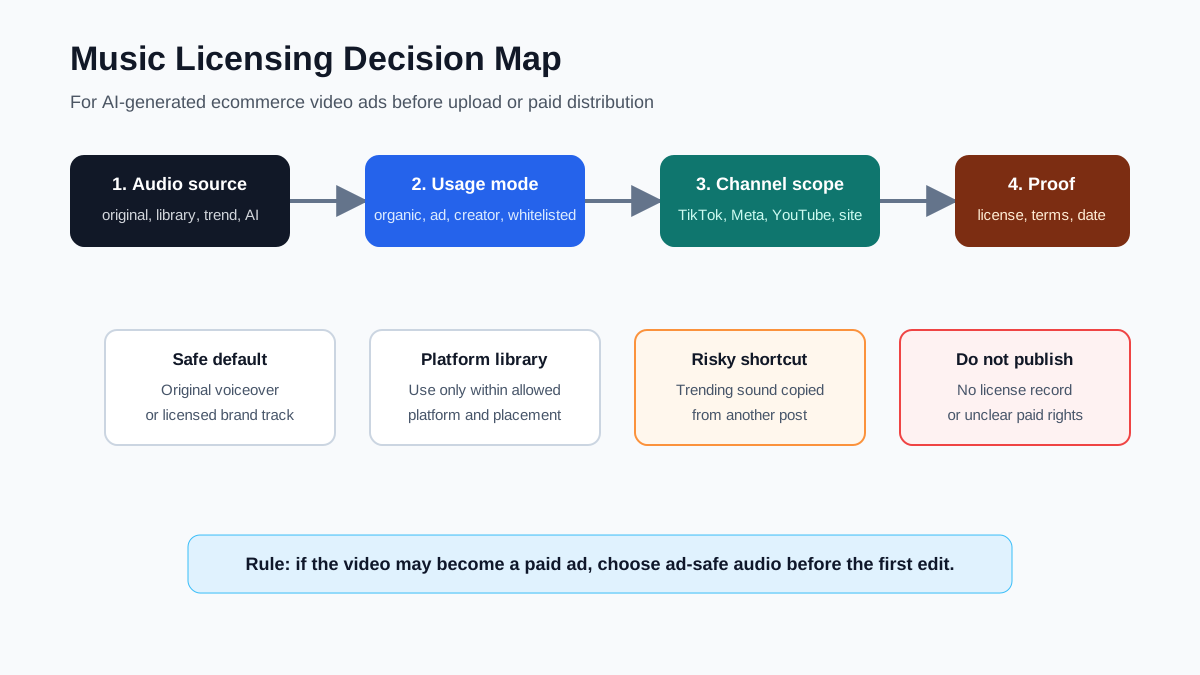
Why AI-Generated Video Ads Still Need Music Rights
AI changes how fast an ecommerce team can create video, not the basic rights question around audio. A generated video ad can include several separate creative assets:
| Asset | Rights question |
|---|---|
| Product images | Do you own or have permission to use them in ads? |
| Script and captions | Are claims supported by the product page, reviews, or test data? |
| Voiceover | Is it original, licensed, or approved by the speaker? |
| Music | Is the track cleared for the channel, brand, paid use, and campaign term? |
| Sound effects | Are the effects licensed for commercial video use? |
| Creator footage | Does the creator agreement cover paid usage and edits? |
Music is easy to overlook because it feels like a background layer. For ads, it is not background from a risk standpoint. A track can be safe for one YouTube upload, unavailable for Meta paid ads, allowed inside TikTok's Commercial Music Library, or forbidden on a product landing page download.
This article is a practical QA workflow, not legal advice. For high-spend campaigns, celebrity tracks, influencer whitelisting, marketplace ads, or TV/CTV reuse, get counsel or a music licensing specialist involved before launch.
The Five Audio Sources Ecommerce Teams Usually Use
1. Original Voiceover Or Product Audio
Original audio is often the cleanest default. A founder voiceover, product demonstration sound, customer service explanation, or synthetic voice generated under a commercial license can work across more formats than a trending song.
This is also the easiest route for localization. If you use ShopShot's AI video generator to create product-video variants, start with a script from your product page and keep the music bed optional. A clear voiceover can be adapted for TikTok, Meta, YouTube Shorts, PDP videos, and landing pages without rebuilding every asset around one song.
2. Platform Commercial Libraries
Platform libraries can be useful, but they are not universal licenses.
TikTok says its Commercial Music Library is a pre-cleared global library for businesses using music in TikTok content. That does not mean the same downloaded video can automatically use that music in a YouTube ad, Meta ad, Amazon listing, or product landing page.
Meta's music guidance also separates personal/non-commercial music use from appropriately licensed commercial use. Meta Sound Collection and ad-oriented music tools can help, but the safe question is always: does this exact track cover this exact use?
YouTube's Audio Library is copyright-safe inside YouTube Studio, and YouTube notes that it cannot give legal guidance for music issues off the platform. That matters when a product Short becomes a paid ad, a site video, or a reused TikTok clip.
3. Royalty-Free Or Stock Music
Royalty-free does not mean rights-free. It usually means you license the track once or through a subscription under defined terms.
Check whether the license covers:
- Commercial advertising.
- Paid social ads.
- Client work or only your own brand.
- Organic social, website, marketplace, and email use.
- Territory and term.
- Editing, looping, remixing, or shortening.
- AI-generated video, if the provider has AI-specific terms.
If a license says "personal use," "creator use," "one channel," or "no paid advertising," do not use it in an ecommerce ad.
4. Trending Sounds
Trending sounds are the highest-risk shortcut for brand ads. A sound can be popular in an app and still be unavailable for a business account, paid placement, whitelisted creator ad, or cross-platform download.
Use trend analysis for creative direction, not as automatic permission. You can still learn pacing, mood, beat structure, and hook timing from a trend, then rebuild the ad with licensed audio, original voiceover, or platform-approved commercial music.
For cross-posting, see the workflow in how to repurpose TikTok videos for YouTube Shorts. The safest reuse path is to separate the visual edit from the platform-specific audio layer.
5. AI-Generated Music
AI-generated music needs the same practical review as stock music. The important question is not "Was it made by AI?" The question is: what license did the tool grant, and does it cover your use?
Before using AI-generated music in ads, save:
- Tool name and account used.
- Prompt or generation record.
- Terms page or license snapshot.
- Track export date.
- Campaign owner.
- Allowed use, especially commercial and paid ad use.
If the tool's terms are unclear, use a safer source.
Music Licensing Decision Table
Use this table before a video leaves draft status.
| Scenario | Safer audio choice | Avoid |
|---|---|---|
| Organic TikTok post from a business account | TikTok Commercial Music Library, original audio, or licensed track | Personal-account trend sounds copied into brand content |
| TikTok Spark Ad or paid campaign | Audio cleared for the ad format and account type | Assuming organic availability equals paid rights |
| Meta Reels ad | Meta ad music options, Sound Collection where allowed, or separately licensed music | Popular Instagram songs with no commercial license |
| YouTube Shorts product video | YouTube Audio Library or licensed track suitable for YouTube | Uploading a track from a social trend and hoping Content ID passes |
| Product page or landing page video | Direct commercial-use license or original audio | Platform-only library music downloaded into a site video |
| Creator or affiliate video | Contracted usage rights plus music proof | Letting each creator choose unapproved music for paid reuse |
| Marketplace video | License that covers marketplace or ecommerce use | Social-only music license |
The hard rule: if the video may become paid media, choose ad-safe audio at the start.
Workflow: Clear Music Before Making Video Variants
Step 1: Decide Where The Video Will Run
Write down the intended placements before selecting music:
- TikTok organic.
- TikTok paid.
- Instagram Reels organic.
- Meta paid.
- YouTube Shorts organic.
- YouTube ad.
- Product detail page.
- Email or landing page.
- Creator or affiliate post.
Do not use "social media" as the scope. A track can be cleared for one app but not another.
Step 2: Classify The Audio Source
Label the track before editing:
| Source label | What to record |
|---|---|
| Original | Who created it, when, and who approved it |
| Platform library | Platform, track name, library name, and allowed use |
| Stock / royalty-free | Vendor, license plan, account, and campaign scope |
| Creator-provided | Creator contract, usage term, paid rights, and edit rights |
| AI-generated | Tool terms, generation date, account, and license snapshot |
| Unknown / trend | Do not use until cleared |
If the source is unknown, stop. Unknown audio should not move into a paid ad, even if the first export looks good.
Step 3: Match The License To The Highest-Risk Use
Clear for the broadest realistic use, not the first upload.
If the ad might be:
- Boosted later.
- Used by affiliates.
- Downloaded and uploaded to another platform.
- Added to a product page.
- Turned into a YouTube ad.
- Sent to agencies or resellers.
Then the music needs to cover that future state. Otherwise, plan for a no-music or voiceover-first master version and add platform-native music only inside each platform.
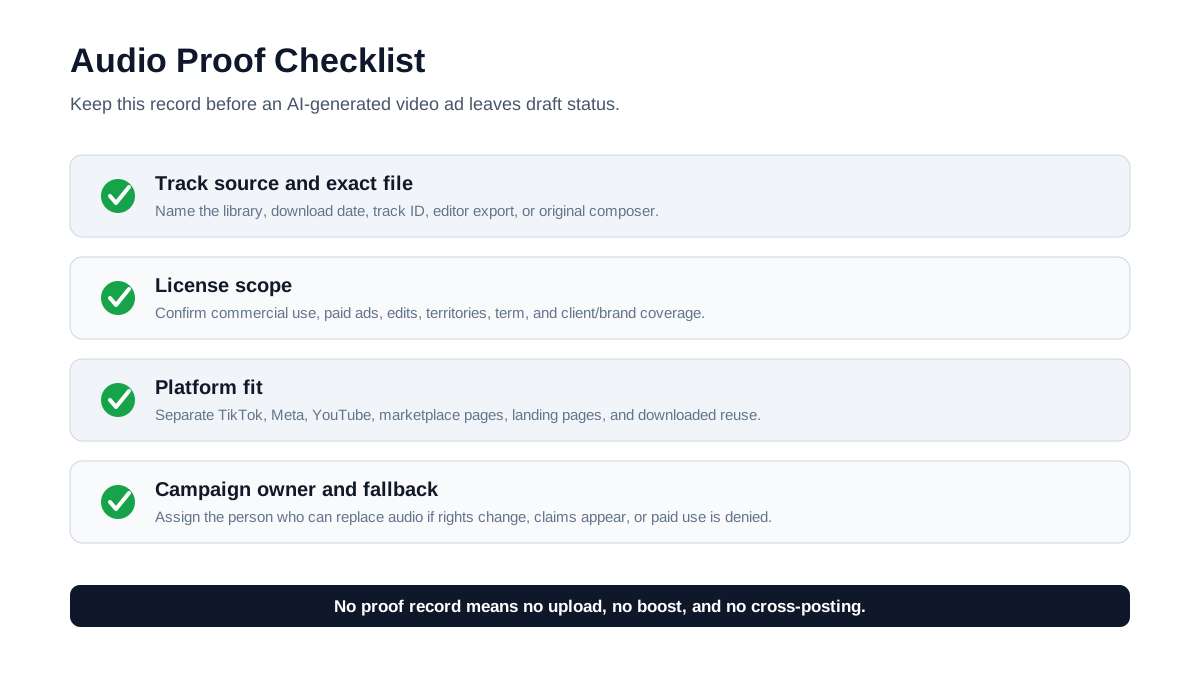
Step 4: Keep A Proof Folder
Use a folder or campaign record with the source article, music license, screenshot, and export. Do this before launch, not after a claim.
Step 5: Build One Clean Master Video
For ecommerce teams, the clean master video is the safest asset:
- Product visuals.
- Captions and overlay text.
- Original voiceover or no voiceover.
- No platform-specific trending music burned into the file.
- Safe-zone text placement.
- Exported vertical and square versions.
Then add music per platform if the platform library and placement allow it. This keeps your best-performing product proof reusable.
Pair this workflow with the product video ad script template and the video ad storyboard template so the audio choice supports the creative idea instead of driving it.
Common Mistakes That Create Music Risk
Mistake 1: Treating In-App Availability As A Commercial License
If a song is available to a personal account, that does not automatically make it available to a brand account, paid placement, or ecommerce landing page. Business and advertising use can have narrower rules.
Mistake 2: Downloading A Platform Video And Reusing It Everywhere
A video made with platform-native audio may be safe only inside that platform context. Downloading it and uploading it elsewhere can separate the track from the platform license that made it usable.
Mistake 3: Assuming "Royalty-Free" Covers Ads
Royalty-free music can still exclude paid ads, client work, broadcast, marketplace use, or large campaigns. Read the plan terms for the account that downloaded the track.
Mistake 4: Letting AI Tools Pick Music Automatically
If an AI tool auto-adds music, you still need to know the source and rights. Turn off automatic music if the tool does not show the license clearly.
Mistake 5: Letting Creators Choose Music For Ads
Creator content is often edited for organic reach first. If you plan to use the same clip as paid media, the contract should cover both the footage and the music. Otherwise, ask creators to deliver a clean version without music.
Pre-Launch Music QA Checklist
Use this before publishing an AI-generated video ad:
- [ ] The audio source is known.
- [ ] The track name, provider, account, and download date are recorded.
- [ ] The license covers commercial use.
- [ ] The license covers paid ads if the video will be boosted or used in Ads Manager.
- [ ] The license covers the exact platform or cross-platform reuse.
- [ ] The license covers the brand, client, creator, or affiliate account using the video.
- [ ] The license covers the campaign term and territory.
- [ ] The license allows edits, loops, cuts, and short-form exports.
- [ ] The team has a clean no-music version.
- [ ] The campaign owner knows who can replace the audio if rights change.
For creative testing, add the audio source to your ecommerce video ad testing plan. If a hook wins only because of a risky sound, it is not a scalable winning asset.
How ShopShot Fits This Workflow
ShopShot is useful when you want repeatable product video variants without relying on risky audio choices. Start with the product page, script, storyboard, proof points, and CTA. Generate video versions around product clarity first. Then add licensed music or platform-safe audio as a final layer.
That workflow gives ecommerce teams three advantages:
| Advantage | Why it matters |
|---|---|
| Reusable master videos | You can adapt the same product proof to TikTok, Meta, YouTube, and landing pages |
| Cleaner testing | You can test hook, proof, offer, and CTA without making music the uncontrolled variable |
| Lower publishing risk | You keep campaign files, licenses, and clean exports organized before paid spend starts |
For platform-specific formatting, use YouTube Shorts product video specs and then adapt the same clean master to the target placement.
FAQ
Do I need music licenses for AI-generated video ads?
Yes, if the ad uses music that you did not create or clearly license. AI-generated visuals do not remove the need to clear the soundtrack. Use original audio, a platform-approved commercial library, or a license that covers the exact ad use.
Can I use TikTok trending sounds in ecommerce ads?
Do not assume so. Business, sponsored, and paid uses can have different rules from personal creator use. For brand content on TikTok, start with the Commercial Music Library or separately licensed audio.
Can I use YouTube Audio Library music in paid ads?
YouTube's Audio Library is designed to be copyright-safe in YouTube Studio, but you still need to check the track terms and the exact campaign context. If you will reuse the video outside YouTube, confirm off-platform rights separately.
Is AI-generated music copyright-free?
Not automatically. AI-generated music depends on the tool's license, training/source terms, user agreement, and the usage rights granted to your account. Keep a license record just as you would for stock music.
What is the safest audio option for product video ads?
The safest default is a clean product video with original voiceover, original product sounds, or a track licensed for commercial paid use across the channels you plan to use.
Sources Checked
- YouTube Help: Use music and sound effects from the Audio Library
- Google Ads Advertising Policies: Copyrights
- Google Ads Advertising Policies: Video ad requirements
- TikTok Business Help: About the Commercial Music Library
- Meta Music Guidelines
- Meta Sound Collection Terms
- Meta Business Help: Add music using Ads Manager
Bottom Line
Music licensing for AI-generated video ads is a production workflow problem, not just a legal footnote. Pick audio based on where the video will run, how it may be reused, and whether it could become paid media. Keep one clean master export, save proof for every track, and use licensed or platform-approved music only within the scope it actually covers.
That gives your ecommerce team a video asset it can test, revise, and scale without rebuilding the campaign around a risky soundtrack.