
Quick Answer
Product video b-roll should make the product easier to understand, not simply make the ad look cinematic. For ecommerce ads, plan b-roll around five jobs: prove the main claim, show scale and texture, cover cuts in the demo, make transitions clear, and create platform-safe variants for TikTok, Reels, Shorts, Meta feed, Amazon video ads, and product pages.
Use this guide when you already have a product hook, script, or rough ShopShot output but need better supporting shots. The best b-roll is not random filler. It answers the buying questions that the main shot cannot answer alone.
Why Ecommerce B-Roll Is Different
Traditional b-roll often builds mood or covers an edit. Ecommerce b-roll has a stricter job. It has to show what the product is, how it works, what it feels like, how big it is, what comes in the bundle, or why a claim is believable.
That matches current platform guidance. Google and YouTube's ABCDs framework stresses attention, branding, connection, and direction. TikTok recommends captions, transitions, stickers, graphics, and clear CTAs when they help performance creative. Meta's guidance points to early product or brand visibility. Amazon video guidance keeps the product and shopper benefit prominent.
For ShopShot users, b-roll can come from product photos, generated scenes, creator footage, product-page assets, or short clips. The source matters less than the QA question: does this shot help a shopper decide?
For the full shot structure, pair this page with the product video shot list template and the product video editing checklist.
The 7-Shot B-Roll Plan
| B-roll shot | What it proves | When to use it | Common mistake |
|---|---|---|---|
| Product close-up | Texture, material, finish, label, build | After a quality or design claim | Over-filtering the product look. |
| Hand scale shot | Size and handling | Before a size, travel, or storage claim | Showing the product alone with no reference. |
| Use-context shot | Real setting and buyer situation | After the hook names a scenario | Generic lifestyle scene with no product clarity. |
| Process cutaway | How a step works | During tutorials or demos | Hiding the hard step with a jump cut. |
| Result shot | Outcome or finished state | After the main benefit line | Showing a result the product page cannot support. |
| Objection shot | Fit, storage, cleaning, compatibility | Before the CTA | Ignoring the most common buying doubt. |
| End-card support shot | Offer, bundle, variant, or next step | Final 2-4 seconds | Ending on a logo with no action. |
You do not need every shot in every ad. A simple product may need close-up, use context, and end-card support. A higher-consideration product may need scale, process, result, and objection coverage.
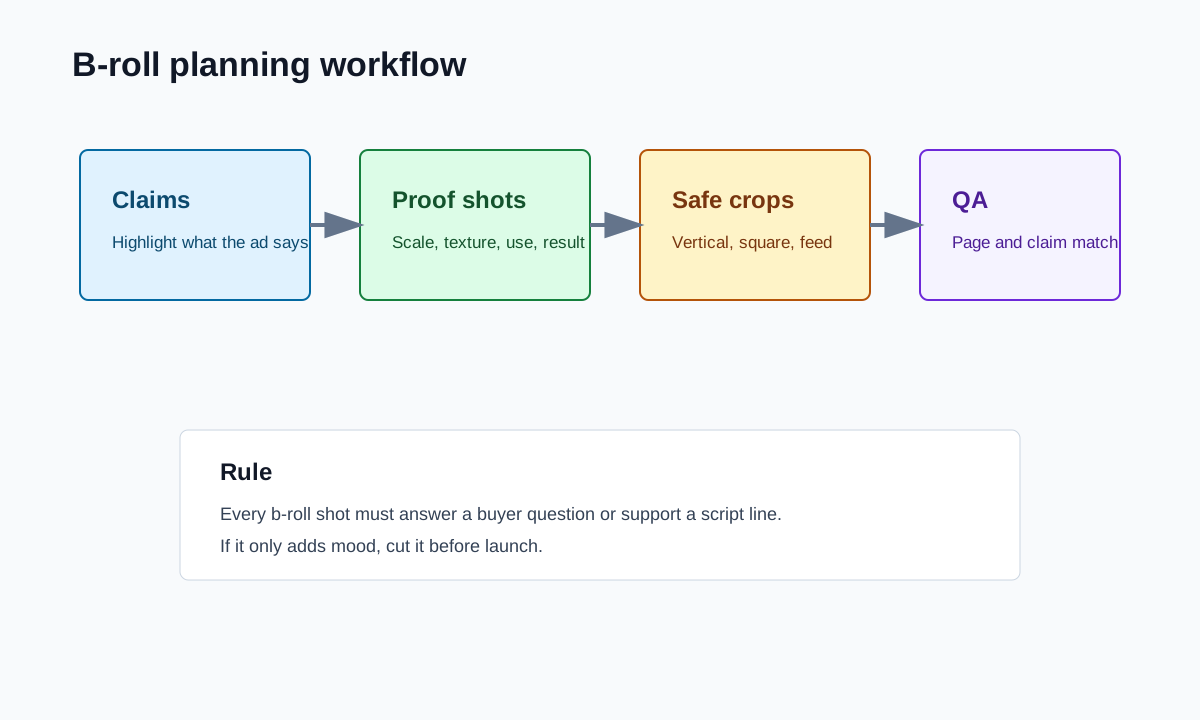
Step 1: Build B-Roll From Claims
Read the product page, script, or ad brief and highlight every claim. Then assign b-roll only where the claim needs proof.
| Claim in the ad | B-roll that supports it | Safer fallback |
|---|---|---|
| "Fits in a carry-on." | Product beside carry-on pocket or packing cube. | "Designed for compact packing." |
| "Setup takes one step." | Continuous hand motion completing the setup. | "Simple setup with fewer parts." |
| "Soft enough for daily wear." | Texture close-up and movement on body. | "Soft-touch fabric feel." |
| "Keeps the desk clean." | Before and after desk surface. | "Helps organize the desktop." |
| "Ready for gifting." | Box, insert, and bundle shot. | "Giftable packaging details." |
This prevents the usual b-roll problem: a folder full of attractive shots that cannot be connected to the script.
Step 2: Use B-Roll to Fix Pacing, Not Hide Confusion
B-roll can make an ad feel smoother. It can also hide the product logic. If the viewer has to infer how the product works because every important action is covered by a transition, the edit becomes less trustworthy.
Use b-roll for these pacing jobs:
- Cover a cut between two clear demo steps.
- Show texture while the voiceover explains material.
- Give the eye a short reset after a dense caption.
- Bridge from problem to product without a jarring jump.
- Support an offer or bundle before the CTA.
Avoid using b-roll to hide these problems:
- A missing first-frame product reveal.
- A claim that lacks proof.
- A confusing setup step.
- A product size that is never shown in context.
- A CTA that does not match the landing page.
If the rough cut has those problems, return to the storyboard before adding more b-roll.
Step 3: Plan AI-Generated B-Roll Safely
AI-generated b-roll is useful when the product image set is thin, but it needs stricter review. Generated shots can change product shape, texture, packaging, color, or scale. That is risky for ecommerce because the viewer expects the ad to match the product page.
When creating b-roll in ShopShot, write prompts around verified inputs: actual product image, real color, known use case, and a modest camera move. Avoid asking the model to invent features, testimonials, certifications, or results.
Good prompt direction:
- "Use the same white ceramic mug from the source image on a kitchen counter, close-up steam, no new logo, no text."
- "Show the backpack organizer beside a 13-inch laptop sleeve for scale, neutral desk, product shape unchanged."
- "Create a slow push-in on the skincare bottle label, clean bathroom shelf, label readable."
Risky prompt direction:
- "Make it look premium and luxury with awards."
- "Show dramatic before and after skin results."
- "Add viral TikTok style text and fake reviews."
The safe prompt protects product truth and leaves claims to the verified script.
Step 4: Make B-Roll Work Across Placements
A b-roll shot that looks good in 16:9 can fail in vertical. Product labels may crop out, captions may cover the action, and a hand-scale shot may become too small.
| Placement | B-roll priority | Export note |
|---|---|---|
| TikTok, Reels, Shorts | Product action in the center third | Keep caption-safe space above and below the product. |
| Meta feed | Strong product identity even in mixed crops | Prepare 4:5 or 1:1 from the vertical master. |
| YouTube Shorts | Clear sequence and readable first beat | Keep the opening visual simple. |
| Amazon video ads | Product and benefit clarity | Avoid unsupported comparison or lifestyle-only footage. |
| Product detail page | Instructional detail | Slow down process and scale shots. |
For export details, use the product video aspect ratio guide and product video export settings guide.
Step 5: Run the B-Roll QA Matrix
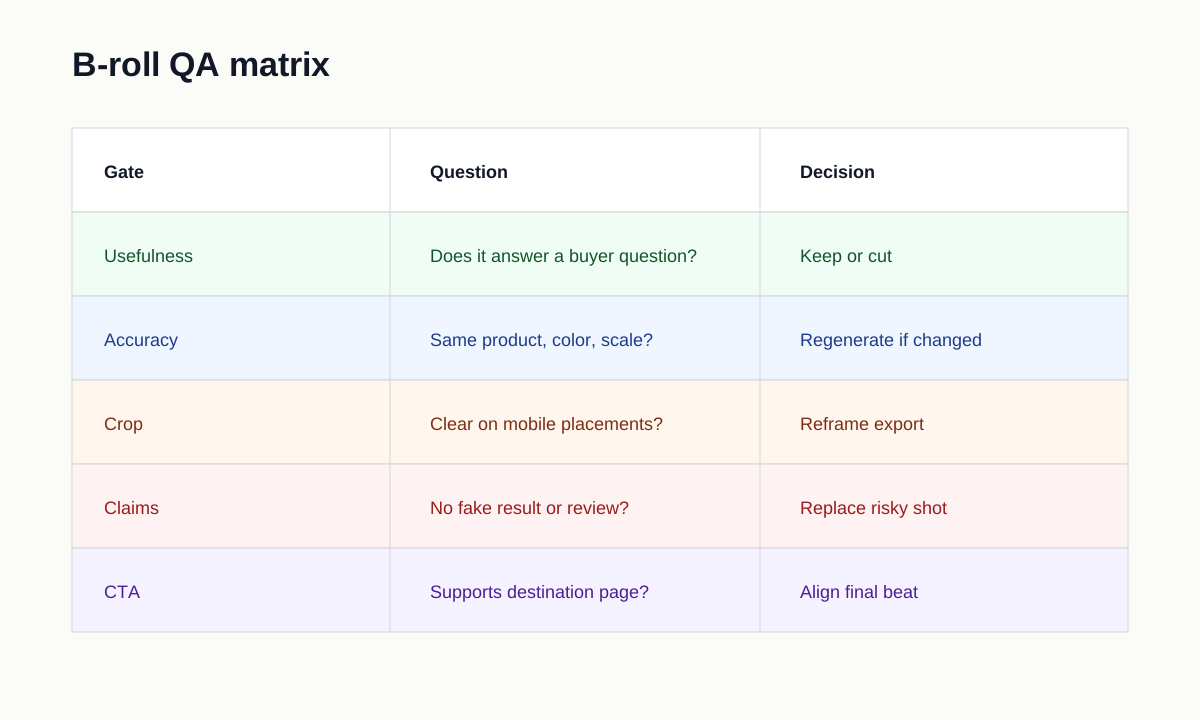
Before launch, check each b-roll shot against these questions:
- Does it show the same product, variant, color, and package as the landing page?
- Does it support a specific script line or buyer question?
- Can the viewer understand the shot on a phone?
- Does the crop keep the product visible in the intended placement?
- Does the shot avoid fake reviews, fake awards, or unsupported results?
- Does it make the edit clearer, not just busier?
- Is the product still larger than stickers, transitions, or overlay text?
- Does the end-card b-roll support the actual CTA?
If a shot fails two or more checks, cut it or regenerate it with a narrower prompt.
Example: B-Roll Plan for a 20-Second Product Ad
| Time | Main message | B-roll support |
|---|---|---|
| 0-3s | Problem and product reveal | Product in the problem context, not a logo intro. |
| 3-6s | Product identity | Close-up of feature or material. |
| 6-10s | Demo proof | Hand scale or process cutaway. |
| 10-14s | Buying objection | Size, compatibility, cleaning, bundle, or fit shot. |
| 14-18s | Result | Finished state or use moment. |
| 18-20s | CTA | Product page, bundle, or ShopShot workflow match. |
This plan keeps b-roll connected to buyer decisions. It also gives editors a shot checklist before they start hunting for generic filler.
FAQ
What is b-roll in a product video?
B-roll is supporting footage that adds product context, proof, scale, texture, transitions, or buying details around the main demo or presenter shot.
How much b-roll does an ecommerce ad need?
Use only enough b-roll to answer the buying question. A short ad may need three strong support shots, while a product detail page demo may need more process and scale shots.
Can AI create product b-roll from images?
Yes, but the output must be checked against the real product page. Reject shots that change the product shape, color, package, scale, claim, or use case.
Should b-roll replace product demo footage?
No. B-roll should support the demo, not hide it. If the product action is unclear, fix the demo sequence first.
How does ShopShot fit into b-roll planning?
ShopShot can help generate product-video variants from existing product images and page inputs. Use the b-roll guide to decide which supporting shots are safe and useful before launch.