
Quick Answer
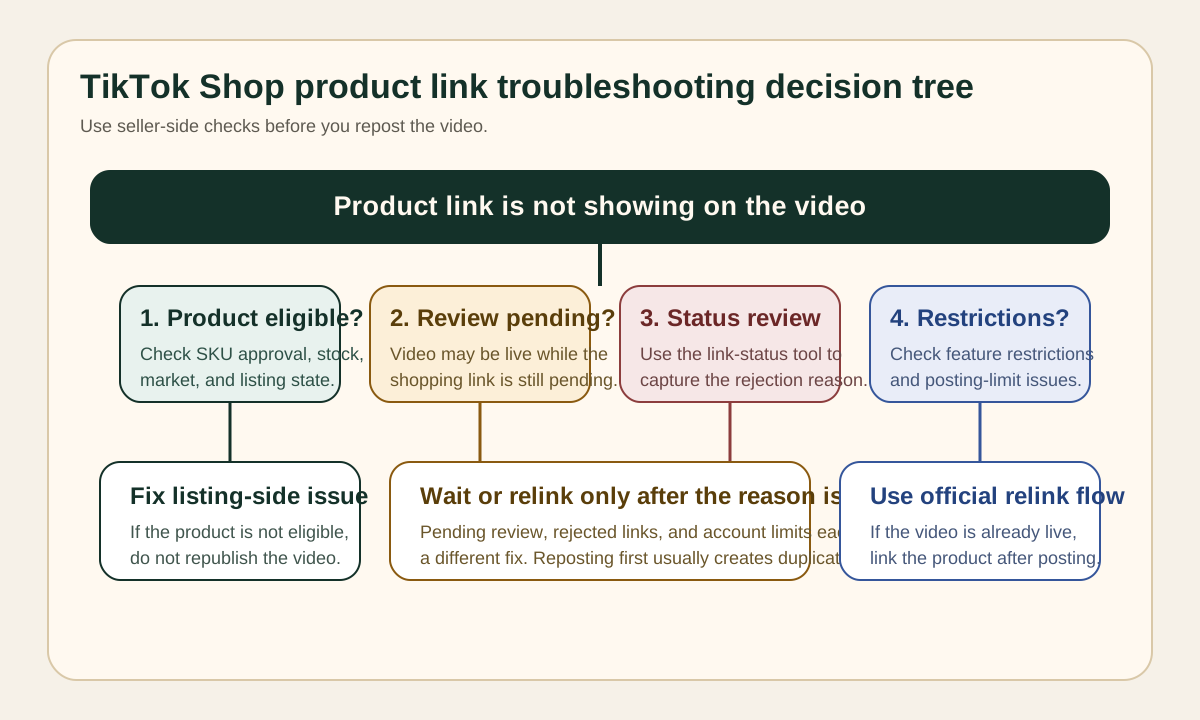
If your TikTok Shop product link is not showing, the fastest fix is to check five things in order: whether the product is eligible for video linking, whether the video or product is still under review, whether the product link status tool shows a rejection reason, whether your posting or feature permissions are restricted, and whether the video was linked correctly before or after publishing. TikTok Shop's official guidance points sellers to the product-link status review flow, the "link product after your video is posted" workflow, and current content or feature restrictions before they try to repost the same video again.
This matters because the missing link problem is rarely just a creative issue. In most ecommerce teams, the root cause sits in seller operations: a product listing state, a content review state, a feature restriction, or a mismatch between the video and the linked SKU. If you need a broader production QA layer before the post goes live, start with the TikTok Shop product video checklist. If you are still building the source asset, pair that with how to create ecommerce product videos with AI and the TikTok Shop tool workflow.
Why a TikTok Shop Product Link Goes Missing
When sellers say a TikTok Shop product link is "not showing," they usually mean one of four things:
- The product selector does not show the SKU they want to attach.
- The video publishes, but the shopping anchor never appears.
- The link appears briefly, then disappears after review.
- The seller account loses the ability to add links at all.
TikTok Shop treats these as different operational problems. A seller should not assume the video edit is wrong just because the final shoppable link did not render. TikTok's official materials separate the workflow into product linking, status review, content policy compliance, and feature availability. That is useful for SEO too because searchers with this problem want a fix checklist, not a generic "how to use TikTok Shop" article.
The lower-risk path is to debug from the commerce layer outward:
| Check area | What can fail | What you should verify first |
|---|---|---|
| Product eligibility | Product not available for linking, listing issue, shop state issue | The SKU is active, approved, and available in the target market |
| Video review | Video pending review, rejected, or limited | The video is fully posted and not blocked by content review |
| Link review | Product link has a separate rejection or warning | Use TikTok Shop's product link status review entry |
| Feature availability | Product links or posting ability are restricted | Review account notifications and feature restrictions |
| Workflow error | Product was never linked correctly | Re-run the official link-before-post or link-after-post flow |
Most brands waste time on the last row first. They edit captions, recut the video, or upload the same post again without checking whether the product was eligible or the account was temporarily limited. That is why the first operational rule is simple: do not repost until you know whether the issue is review, eligibility, or permissions.
The Official TikTok Shop Fix Path
TikTok Shop's current official documentation gives sellers three direct levers:
- Link products to the video during the posting flow.
- Link a product after the video is already posted.
- Open the product link status review view to see why the link is missing or blocked.
That means the correct troubleshooting order is not "delete and try again." It is:
- Confirm the video exists and is visible in the seller workflow.
- Confirm the target product is still approved and sellable.
- Review the link status or rejection reason.
- Check whether a restriction on posting or content features is preventing the link from rendering.
- Re-link or edit only after the system reason is clear.
For teams that create many seller videos each week, this should become a repeatable QA motion, not a one-off fix. If the video is built from a reusable ad structure, start with the product video storyboard template so the product proof, offer, and CTA match the actual listing. If the content comes from a creator, use the UGC usage rights checklist before you republish or edit the asset across paid and organic surfaces.
TikTok Shop Product Link Fix Checklist
Use this checklist in order. Do not skip to the edit step until the seller-side checks are clean.
1. Confirm the product is linkable
Open the target product in TikTok Shop Seller Center and make sure it is still approved, in stock, and available for the market where the post will run. If the SKU is hidden, paused, delisted, or otherwise not eligible, the video link problem is not a content problem.
Practical seller checks:
- The product is active rather than draft or suspended.
- The title, image set, and main claims still match the content in the video.
- The product is available in the same market as the account posting the video.
- There is no listing-level warning that blocks promotion.
This is especially important for ecommerce teams that clone creative across markets. A product that is active in one region may not be eligible in another. The video can still look valid while the product anchor quietly fails.
2. Check whether the video or link is still under review
TikTok Shop may show a delay between posting the video and surfacing the shopping anchor. If the video, link, or related commerce review is still pending, republishing the same content often creates duplicate cleanup work without solving the review queue problem.
Use the status review flow first. You want to know whether the state is:
- Pending review
- Rejected
- Restricted
- Approved but not yet surfaced
If the review state is unclear, do not treat the issue as solved just because the post itself is visible. A visible post is not the same thing as an approved shoppable link.
3. Use the product link status review tool
TikTok Shop's official seller guidance includes a dedicated status review path for product links. This is the fastest way to separate "the link is technically attached" from "the link is allowed to surface."
Use it to answer three questions:
| Question | Why it matters | Action |
|---|---|---|
| Did the link submit successfully? | Confirms the problem is not a missed workflow step | Re-link if the submission never completed |
| Was the link rejected or limited? | Tells you whether policy or eligibility blocked the anchor | Fix the listed reason before reposting |
| Is the issue tied to the product, video, or account state? | Prevents blind editing | Route the fix to listing ops, content ops, or account ops |
This is the operational step most sellers skip. If you are managing many SKU videos, save the rejection reason in your content QA log. Over time, that gives you a reusable "do not post" library for your team.
4. Review current feature restrictions and posting limits
TikTok Shop's current official guidance includes feature restrictions and content-posting limits that can reduce or remove posting privileges. If your account recently hit a posting limit or received a feature restriction, the seller may think the product link is broken when the real issue is account state.
This matters most when:
- One seller account posts a high volume of similar videos.
- Multiple drafts are uploaded quickly after revisions.
- The account recently received shop policy warnings.
- A creator or operator changed devices, markets, or permissions.
When a team is scaling content volume, a missing link can be the first visible symptom of a broader account-control issue. That is why volume planning should sit next to link QA. For batch creative planning, use how many UGC video ads to test so the team spreads testing logically instead of flooding a single posting workflow.
5. Re-run the correct product-link workflow
If the product is eligible and the account is clean, use TikTok Shop's official linking workflow again:
- Link the product during the post flow if the video is still a draft.
- Use the "link a product after your video is posted" path if the post is already live.
This is a process issue, not a rewrite issue. Many teams incorrectly delete the post when TikTok already supports post-publication linking. That creates unnecessary risk around engagement history, creator approvals, and creative testing continuity.
6. Make sure the video content still matches the product page
A common operational gap is that the product page changed after the video was created. If the listing now shows a different price framing, different variant emphasis, a different bundle, or changed claims, review can become less predictable and shoppers may bounce even if the link appears.
Check the video against:
- Product name and hero use case
- Variant shown in the video
- Key claim or proof point
- Offer framing
- Landing-page availability
If the product page and video no longer match, fix the source asset before troubleshooting deeper. The cleanest path is to rebuild the script from the product video ad script template so the open, proof, and CTA reflect the current listing.
Common Reasons the Link Still Does Not Show
Below is the fastest operator-facing matrix for triage.
| Symptom | Likely cause | Best next action |
|---|---|---|
| Product does not appear in selector | Listing not eligible or unavailable | Check SKU status, market, and seller eligibility |
| Video is live but no shopping anchor appears | Link review still pending or failed | Open status review before reposting |
| Link worked before but disappeared | Product status or account restriction changed | Review account notifications and product state |
| Team cannot add links on multiple videos | Feature restriction or posting limit issue | Check restrictions first, then resume posting |
| Post was created without a link | Workflow error, not policy | Use the link-after-posted-video flow |
| Link shows but conversion is poor | Video and listing message do not match | Rebuild proof and CTA around current product page |
The last row matters because not every "link problem" is technical. Sometimes the link renders correctly, but the shopper journey still fails because the video promised something the product page does not confirm. In that case, your solution is not seller-center debugging. It is creative alignment.
A Repeatable Workflow for Ecommerce Teams
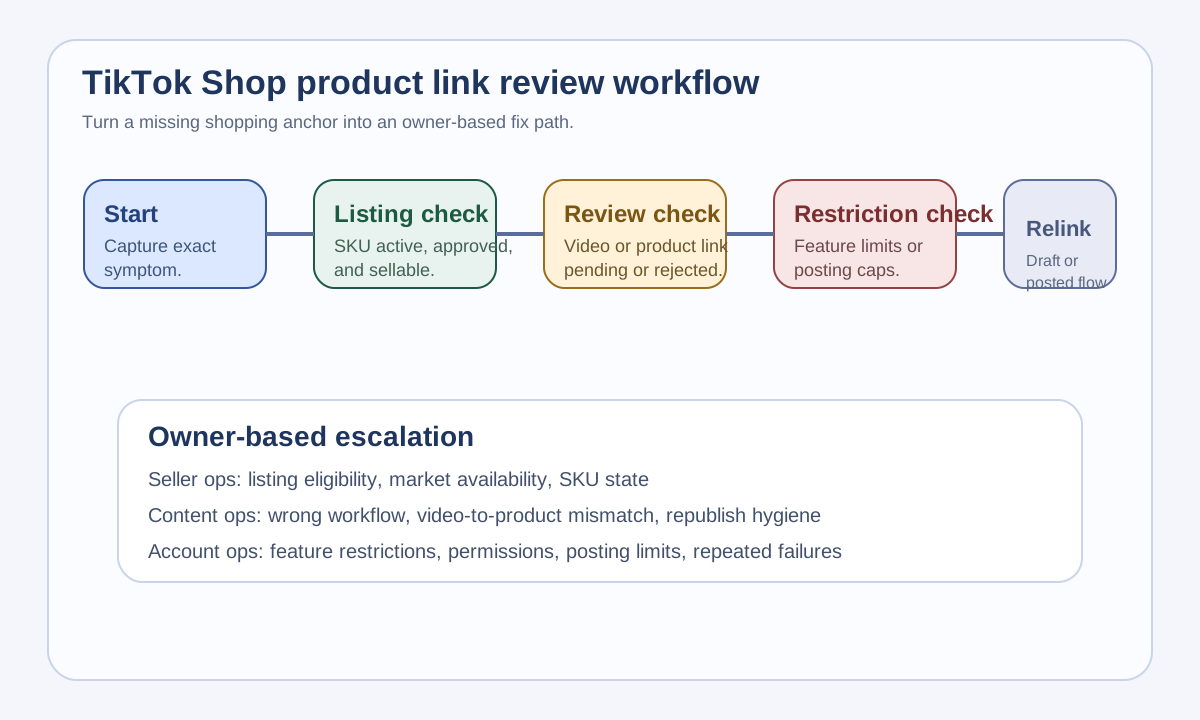
Use this operator workflow whenever a TikTok Shop shoppable video fails:
- Capture the exact symptom.
- Check the product listing state.
- Check whether the video or product link is still under review.
- Open the status review view and record the reason.
- Check for feature restrictions or posting limits.
- Re-link the product using the correct official path.
- Re-check the landing-page match before escalating.
This looks simple, but it removes most wasted motion. Without a workflow, teams jump between creative, seller ops, and account ops with no clear owner. With the workflow, each failure mode has a home:
| Owner | Responsible for | Escalate when |
|---|---|---|
| Seller ops | SKU eligibility, listing state, market availability | Product does not appear or becomes ineligible |
| Content ops | Video-to-product match, republish workflow, final QA | Link path was missed or asset no longer matches PDP |
| Account ops | Restrictions, posting limits, permissions | Linking fails across multiple posts or users |
If you sell across several channels, use the same structure outside TikTok too. The specific UI changes by platform, but the durable logic does not: eligibility, review, permissions, workflow, then creative alignment.
Before You Repost, Run This Pre-Publish QA
Many sellers solve the immediate missing-link issue and then recreate it a week later. Use this quick QA table before the next post:
| QA check | Pass standard |
|---|---|
| Product is active and in stock | Seller Center shows the SKU as approved and sellable |
| Product claim is visible on the page | Shopper can verify the key proof without guesswork |
| Video uses the correct SKU and offer | The shown product and linked product are the same |
| Seller account has no active restriction blocking links | No unresolved feature or posting limitations |
| Team knows whether the link is added pre- or post-publish | Workflow owner is clear before posting |
| Link status is checked before reposting | No duplicate posts created just to test visibility |
This is also where AI-assisted production can help. If the problem is not eligibility or permissions, you can rebuild cleaner product-proof variations quickly with ShopShot's AI video generator, but only after the seller-side issue is understood. AI is useful for creative iteration; it is not a substitute for commerce workflow QA.
When to Escalate Instead of Editing Again
Escalate the issue when:
- The status review path shows a repeated rejection reason you cannot fix in the post flow.
- Multiple products fail on the same account.
- Multiple operators lose linking ability at the same time.
- The linked product is approved, but the account has new feature restrictions.
- The link problem persists after a clean relink and a confirmed eligible SKU.
At that point, another caption tweak or export is just noise. Preserve the evidence, log the exact rejection or restriction, and route it to the right owner. The goal is not only to restore one shopping anchor. It is to keep your content system reliable at scale.
FAQ
Why is my TikTok Shop product link not showing on a live video?
The most common reasons are product ineligibility, pending or failed link review, feature restrictions, posting-limit issues, or an incomplete linking workflow. Check the status review and seller-side eligibility before reposting the video.
Can I add a TikTok Shop product link after the video is already posted?
Yes. TikTok Shop's official seller guidance includes a workflow for linking a product after the video has already been posted, so you do not always need to delete and repost the content.
What should I check before reposting a TikTok Shop shoppable video?
Check product eligibility, video review state, product-link status, feature restrictions, posting limits, and whether the current video still matches the product page. Reposting before those checks usually wastes time.
Does a missing product link always mean the video broke policy?
No. A missing link can come from listing state, account state, or workflow mistakes. Policy is one possibility, but not the only one.
Sources Checked
- TikTok Shop Academy: How to link products to your videos
- TikTok Shop Academy: How to link a product after your video is posted
- TikTok Shop Academy: Product link status review tool
- TikTok Shop Academy: Feature restriction
- TikTok Shop Academy: Content posting limits - May 26 update
- TikTok Shop Academy: Content policy