
Quick Answer
For most ecommerce ads, the best product video length plan is not one video length. It is a small set of length variants built from the same product idea: a 6-second reminder cut, a 15-second paid social cut, a 30-second demo or proof cut, and a 45-60 second product page or YouTube cut. Use longer videos only when the buyer needs education, assembly help, sizing detail, or comparison proof before purchasing.
The length should follow the job of the video. A cold TikTok or Reels ad needs to show the product and benefit almost immediately. A product detail page video can spend more time answering objections. A YouTube or Amazon placement may need enough time for proof, but still has to make sense without sound and without a slow brand intro.
Why Product Video Length Is A Conversion Decision
Product video length is usually treated as a platform spec question: "How long can the file be?" That is the wrong starting point.
Most platforms allow more length than an ecommerce shopper will actually watch. TikTok auction in-feed ads support videos up to 10 minutes for Non-Spark Ads, with Spark Ads using the organic video duration behavior. Meta placements can allow long videos in feed-style inventory. Amazon video ads allow desktop and mobile video assets up to 3 minutes, while still recommending that the core message arrive quickly. Google has specific short formats such as bumper ads, which are 6 seconds or shorter, and Shorts ads that behave like organic Shorts in the Shorts feed.
Those limits are useful, but they do not answer the operating question: how much time does this product need to sell one believable reason to click?
For ecommerce, length controls four things:
| Decision | What length changes | Common mistake |
|---|---|---|
| Hook speed | How quickly the product and problem appear | Opening with a logo or lifestyle scene |
| Proof depth | How much mechanism, before-after, review, or demo fits | Making a 15-second ad carry five claims |
| Variant testing | How many concepts can be tested per week | Making every idea a 60-second edit |
| Placement fit | Whether the video feels native in the feed or page | Reusing a PDP explainer as a cold social ad |
A strong product video can be short or long. A weak one is the wrong length for the buyer's question.
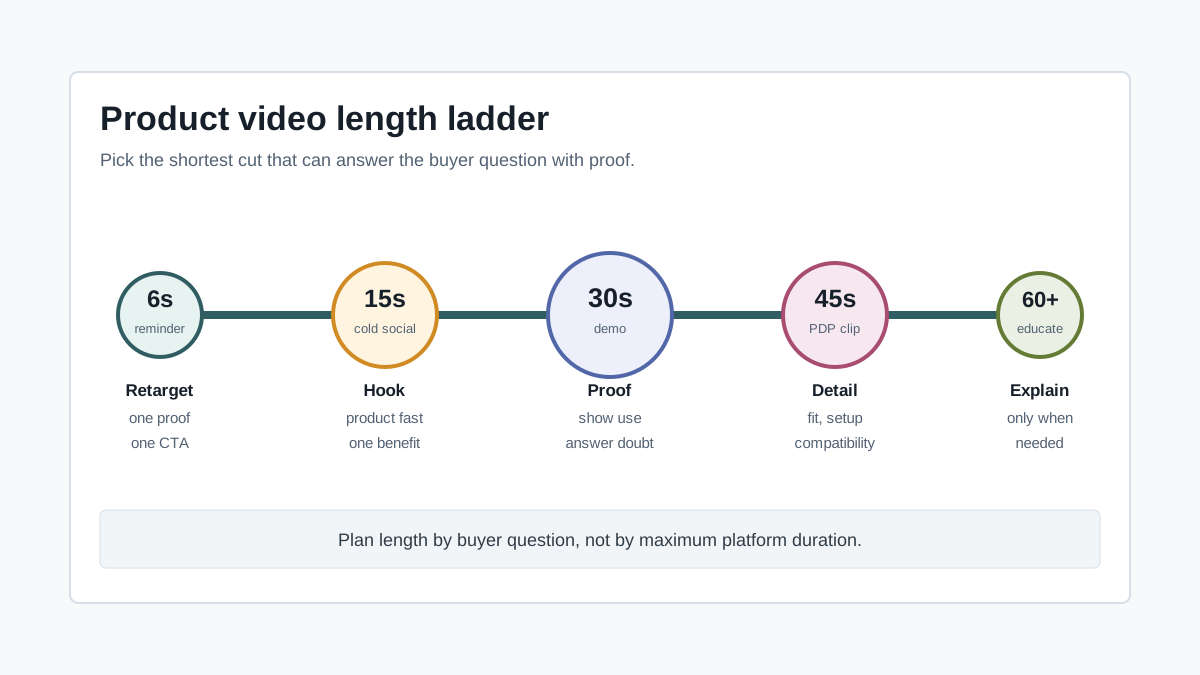
The Ecommerce Length Ladder
Use this ladder when planning the first export set from one product video concept.
| Length | Best job | Best placements | Use when |
|---|---|---|---|
| 6 seconds | Reminder, bumper, retargeting nudge | YouTube bumper, retargeting, simple remarketing | The viewer already knows the product or offer |
| 10-15 seconds | Cold paid social hook and first proof | TikTok, Reels, Stories, Shorts, Meta feed | The product is simple and visual |
| 20-30 seconds | Demo, objection answer, category education | Paid social, Amazon, YouTube Shorts, PDP snippets | The shopper needs to see how it works |
| 45-60 seconds | Product page explainer, YouTube, high-consideration ad | PDP, YouTube, retargeting, email landing page | The product needs setup, sizing, comparison, or proof |
| 60+ seconds | Deep education or founder walkthrough | YouTube, landing pages, launch content | The buyer needs context before the CTA |
This does not mean every product needs every cut. A lip balm, phone case, or kitchen brush may only need 6, 15, and 30 seconds. A stroller accessory, skincare device, supplement bundle, or furniture product may need a 45-60 second version because the buyer needs more reassurance.
6 Seconds: The Reminder Cut
A 6-second ecommerce video is not a full sales pitch. It is a memory trigger.
Use it when the audience has already seen the product, visited the page, added to cart, watched a longer ad, or searched the category. Google bumper ads are built for short, memorable messages, and they are 6 seconds or shorter. That constraint is useful for retargeting because it forces the video to make one point.
A practical 6-second structure:
| Second | Job | Example |
|---|---|---|
| 0-1 | Product visible | Show the product in use, not a logo |
| 1-3 | One proof point | "Fits under any sink" or "Dries in 10 minutes" |
| 3-5 | Offer or reason to return | Bundle, limited color, problem reminder |
| 5-6 | CTA | "Shop the kit" or "See the demo" |
Do not use 6 seconds for a complex product that needs explanation. Use it as a supporting cut after a longer video has done the education.
10-15 Seconds: The Cold Social Cut
The 10-15 second cut is the default starting point for TikTok, Instagram Reels, Facebook Reels, Stories, and many mobile-first product ads. It is long enough to show a product, one problem, one proof moment, and a CTA. It is short enough to test many hooks without turning each concept into a production project.
Use this structure:
| Time | Scene | What the shopper should learn |
|---|---|---|
| 0-2s | Hook | What problem or desire this product touches |
| 2-6s | Product reveal | What the product is and how it is used |
| 6-11s | Proof | One demo, comparison, review, or result |
| 11-15s | CTA | What to do next and why now |
For a simple product, this is often enough. A travel organizer can show the messy bag, the packing cube, the compressed result, and the CTA in 15 seconds. A desk lamp can show the glare problem, the adjustable light, a before-after workspace, and the CTA.
The risk is trying to compress too many claims into the short cut. If the script has more than one core proof point, split it into multiple 15-second variants instead of making one overloaded ad.
For scripting, start with the product video script template, then trim each scene to one job.
20-30 Seconds: The Demo And Proof Cut
The 20-30 second cut is the most useful middle length for ecommerce teams. It gives enough space for a real demonstration without asking the shopper to watch a long explainer.
Use it when:
- The product has a mechanism that must be seen.
- The benefit depends on a before-after comparison.
- The buyer may doubt the claim.
- The product is not immediately familiar.
- The video needs captions and visual proof, not only a voiceover.
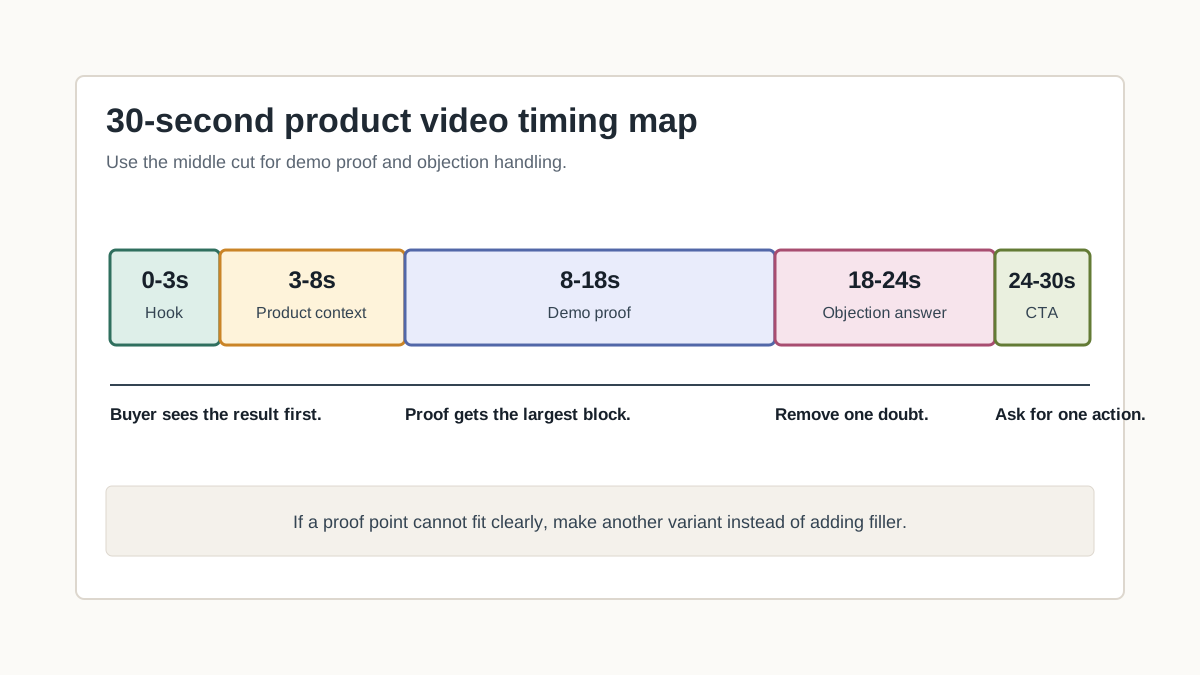
A 30-second ecommerce video can carry this structure:
| Time | Job | What to include |
|---|---|---|
| 0-3s | Hook | Problem, result, or visual contrast |
| 3-8s | Product context | Product name or category, not a long intro |
| 8-18s | Demo proof | Use, transformation, feature, texture, fit, or scale |
| 18-24s | Objection answer | Sizing, cleaning, durability, compatibility, or ingredients |
| 24-30s | CTA | Offer, bundle, page visit, or "see it in action" |
This length is also easier to adapt across channels. You can cut the first 15 seconds for a fast social version, pull the 6-second proof moment for retargeting, and use the full 30 seconds on product pages, Amazon, or YouTube-style placements.
If the product is a demo-heavy item, pair this with the product demo video script template.
45-60 Seconds: The Product Page And Education Cut
A 45-60 second product video should earn the extra time. It works when the video answers purchase blockers that a short ad cannot handle.
Good use cases:
| Product type | Why longer can help | What to show |
|---|---|---|
| Apparel and footwear | Fit, movement, sizing, material | Front, side, close-up, stretch, fit notes |
| Home and furniture | Scale and setup matter | Room context, dimensions, assembly, use |
| Beauty devices | Mechanism and safety need explanation | How it works, routine step, cleaning |
| Kitchen tools | Buyers need usage proof | Before-after, cleanup, storage |
| Electronics accessories | Compatibility is a blocker | Ports, devices, setup, edge cases |
For paid cold traffic, do not assume a 60-second ad is better because it is more complete. Longer videos can work, but the first 3-5 seconds still decide whether the rest has a chance. Put the product and the main result near the front, then use the extra time to answer objections.
For product pages, the goal is different. The shopper is already interested. The video can act like a visual FAQ: how big it is, how it works, what comes in the box, what problem it solves, and whether the buyer can trust the product.
If you are planning a longer page video, use the product video storyboard template before editing.
Platform Length Notes For Ecommerce Teams
The safest way to plan is to separate "allowed length" from "useful length."
| Platform or use case | Current source signal | Practical ecommerce recommendation |
|---|---|---|
| TikTok auction in-feed | Non-Spark Ads support up to 10 minutes; file size up to 500 MB | Start with 10-15 seconds, then test 20-30 seconds for demo-heavy products |
| Meta feed and Reels | Meta specs vary by placement; many feed placements allow long videos and large files | Use 10-15 seconds for cold hooks, 20-30 seconds for proof, longer for retargeting only |
| YouTube bumper | Bumper ads are 6 seconds or shorter | Use one product reminder or one proof point, not a full pitch |
| YouTube Shorts ads | Shorts ads appear between Shorts and can be skipped by swiping | Treat them like vertical social ads: product visible immediately |
| Amazon video ads | Amazon allows up to 3 minutes for some video ads, but recommends a short clip and first-5-second clarity | Use 15-30 seconds for most ads; use 45-60 seconds only for education-heavy product proof |
| Amazon Sponsored Products video | Product feature videos must be at least 7 seconds and focus on product features, benefits, or usage | Use 15-30 second feature demos with the product filling the frame |
| Product detail page | Store themes and marketplaces vary | Use 30-60 seconds when the video removes uncertainty |
Platform specs change by objective, placement, account, region, and campaign builder. Check the upload screen before final export, especially for file size, aspect ratio, sound behavior, and CTA placement.
For format planning, use the product video aspect ratio guide together with this length guide.
How To Decide The Right Length Before You Generate Or Edit
Use this decision tree before writing the script.
Step 1: Name The Buyer Question
Every product video should answer one primary question:
- What is it?
- Does it solve my problem?
- How does it work?
- Will it fit my situation?
- Can I trust the claim?
- Why buy now?
If the question is simple, make the video shorter. If the question requires demonstration, make room for proof.
Step 2: Match Length To Funnel Stage
| Funnel stage | Best length | Creative job |
|---|---|---|
| Cold awareness | 10-15 seconds | Stop the scroll and make one promise |
| Consideration | 20-30 seconds | Demonstrate one proof point |
| Retargeting | 6-15 seconds | Remind, reduce friction, show offer |
| Product page | 30-60 seconds | Remove uncertainty before purchase |
| Post-click landing page | 30-60 seconds | Reinforce the ad promise with proof |
The same product can need several lengths because each viewer is at a different stage. Do not make one video do every job.
Step 3: Count The Required Proof Points
One proof point can fit in 15 seconds. Two proof points usually need 30 seconds. Three or more proof points should become either a 45-60 second product page video or separate ad variants.
| Proof count | Better plan |
|---|---|
| 1 proof point | One 10-15 second ad |
| 2 proof points | One 20-30 second demo |
| 3 proof points | One 45-60 second PDP video or three short ads |
| 4+ proof points | Build a landing page video plus short cutdowns |
This is where AI-assisted production helps. With ShopShot's AI video generator, the first version can become a concept draft, then the team can produce short cutdowns for different hooks, CTAs, and proof points.
Length Templates You Can Use
15-Second Product Ad Template
Use this when the product is visual and easy to understand.
| Time | Script job | Example line |
|---|---|---|
| 0-2s | Problem hook | "Still packing shoes in grocery bags?" |
| 2-5s | Product reveal | "This travel shoe pouch keeps pairs separated." |
| 5-10s | Proof | "Water-resistant lining, clear front, and flat storage." |
| 10-13s | Outcome | "Your suitcase stays clean and organized." |
| 13-15s | CTA | "Shop the travel set today." |
30-Second Product Demo Template
Use this when the buyer needs proof.
| Time | Script job | Example line |
|---|---|---|
| 0-3s | Result hook | "This drawer went from crowded to sorted in one minute." |
| 3-7s | Product context | "The adjustable divider expands to fit the drawer." |
| 7-16s | Demo | "Slide, lock, and separate utensils, tools, or makeup." |
| 16-23s | Objection answer | "No drilling, no adhesive, and it wipes clean." |
| 23-27s | Social proof | "Use one for the kitchen and one for the vanity." |
| 27-30s | CTA | "See the sizes on the product page." |
60-Second Product Page Template
Use this when the product needs reassurance.
| Time | Script job | What to show |
|---|---|---|
| 0-5s | Product and result | Product in use, no brand intro |
| 5-15s | Problem and use case | Real buyer context |
| 15-30s | Feature proof | Close-ups, scale, materials, mechanism |
| 30-45s | Objection handling | Fit, care, compatibility, durability |
| 45-55s | Offer or bundle | What comes with it |
| 55-60s | CTA | Product page action |
Use captions carefully. Long videos become hard to scan when every second has large overlay text. For caption planning, use the product video captions QA guide.
Common Length Mistakes
Mistake 1: Starting With A Brand Intro
If the first two seconds are a logo animation, the video is already asking the shopper to wait before they understand the product. For most ecommerce ads, show the product first and let the brand appear later.
Mistake 2: Making Every Cut 30 Seconds
Thirty seconds is useful, but it is not a universal default. A retargeting reminder may be stronger at 6 seconds. A complicated product page answer may need 60 seconds. Build length variants based on the buying question.
Mistake 3: Cramming Five Claims Into A Short Ad
A short ad with too many claims feels less credible. If the product has several benefits, create separate variants:
- Hook A: pain point.
- Hook B: before-after.
- Hook C: review quote.
- Hook D: feature proof.
- Hook E: offer.
Then use the ecommerce video ad testing plan to decide which concept deserves a longer version.
Mistake 4: Ignoring Sound-Off Viewing
Many ad and marketplace environments autoplay muted or are watched without sound. Amazon video ads, for example, autoplay muted and recommend making the ad understandable without sound. If the video needs narration to make sense, the length will not save it.
Mistake 5: Reusing One Long PDP Video Everywhere
A 60-second PDP video may be useful on the product page, but it often starts too slowly for TikTok, Reels, or Shorts. Make a short social cut from the strongest visual proof moment instead of sending the full explainer into the feed.
Product Category Length Examples
| Category | First ad length | Longer cut | Why |
|---|---|---|---|
| Beauty accessory | 10-15s | 30s | Texture and before-after proof matter |
| Travel organizer | 10-15s | 30s | The use case is visual and fast |
| Skincare device | 20-30s | 45-60s | Buyers need routine and safety context |
| Home storage | 15-30s | 45s | Scale, fit, and setup matter |
| Apparel | 15-30s | 45-60s | Fit and movement need more time |
| Electronics accessory | 20-30s | 60s | Compatibility and setup need proof |
| Food or beverage | 10-15s | 30s | Texture, pour, bite, and use are fast |
The table is a starting point, not a rule. If a product is obvious, shorten it. If a product is expensive, unfamiliar, or easy to misunderstand, give the shopper enough proof.
Pre-Publish Length QA Checklist
Run this before exporting or uploading any product video:
| Check | Pass standard |
|---|---|
| Product visible fast | Product appears in the first 1-2 seconds for cold social |
| One core job | The video answers one buyer question |
| Proof matches length | 15 seconds has one proof point; 30 seconds can carry two |
| CTA timing | CTA appears before the final second, not only on the last frame |
| Sound-off clarity | Captions or visuals explain the offer without audio |
| Variant plan | There is at least one shorter cutdown for retargeting |
| Platform check | Duration, file size, and format match the current upload screen |
| Page fit | PDP videos answer objections, not just ad hooks |
If the video fails the checklist, do not just shorten or lengthen it. Fix the structure first. A bad 15-second video usually becomes a bad 30-second video with more filler.
FAQ
What is the best product video length for ecommerce ads?
For most ecommerce ads, start with 10-15 seconds for cold paid social and 20-30 seconds for product demos. Use 6 seconds for retargeting or bumper reminders, and 45-60 seconds for product pages or high-consideration products.
Is a 15-second product video enough?
Yes, if the product is simple, visual, and needs only one proof point. A 15-second video is usually not enough for products that require setup, sizing, safety, compatibility, or detailed before-after proof.
Should product page videos be longer than ad videos?
Often, yes. A shopper on a product page is closer to buying and may want more detail. A 30-60 second product page video can answer objections that would make a cold social ad too slow.
How long should an Amazon product video be?
Amazon specs vary by ad type. For many ecommerce teams, 15-30 seconds is a practical range for product feature videos, while longer videos should only be used when they add necessary product proof.
Should I make one video or several length variants?
Make several length variants when possible. A 30-second demo can become a 15-second social ad and a 6-second retargeting cut. Testing length variants helps separate a weak concept from a strong concept that was simply too long for the placement.
Sources Checked
- TikTok Ads Manager: TikTok Auction In-Feed Ads, checked July 18, 2026, for duration, file size, formats, and safe-zone guidance.
- Google Ads Help: About video ad formats, checked July 18, 2026, for bumper ad and Shorts ad behavior.
- Amazon Ads: Video ad specs, guidelines, and requirements, checked July 18, 2026, for video duration, file size, autoplay, and sound-off recommendations.
- Amazon Ads: Sponsored Products video guide, checked July 18, 2026, for Sponsored Products video length, upload count, product focus, and no-audio behavior.
- Meta Ads Guide: Facebook and Instagram video ad specs, checked July 18, 2026, for placement-specific duration and file size references where accessible.
Final Takeaway
The best product video length is the shortest version that can answer the buyer's current question with credible proof. Start with a 15-second social cut, build a 30-second demo when the product needs proof, use a 6-second reminder for retargeting, and reserve 45-60 seconds for product pages or higher-consideration items. Then test the variants instead of guessing.