
Quick Answer
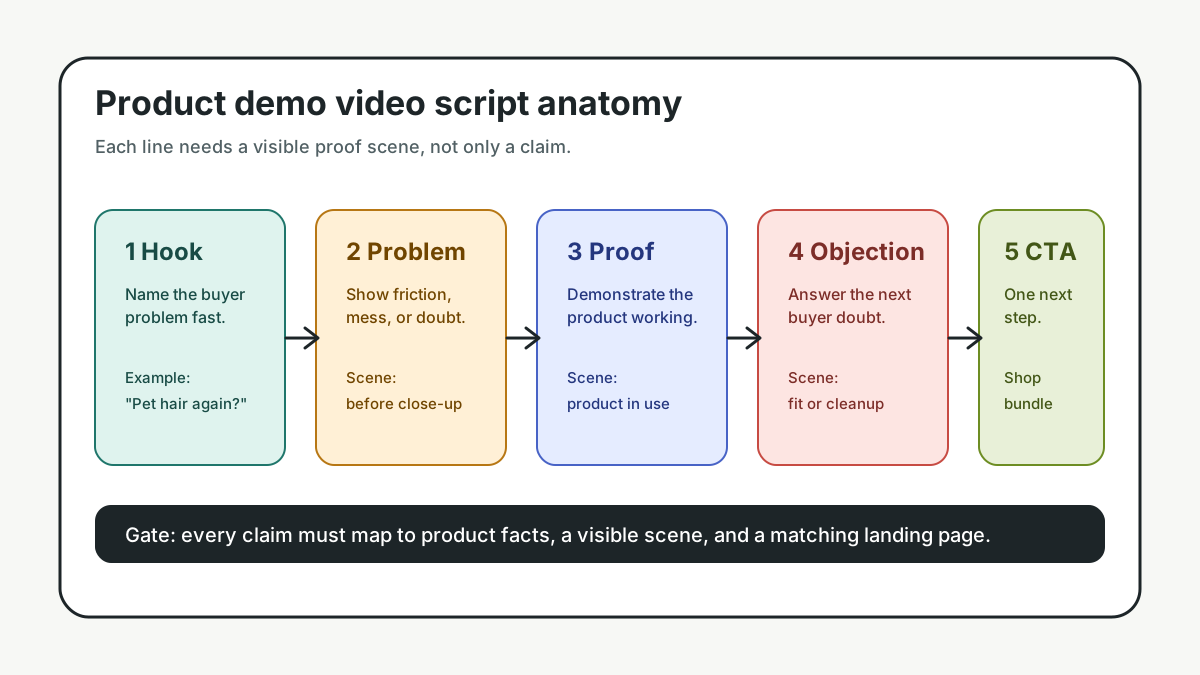
A useful product demo video script template has five parts: a hook, a buyer problem, a product-in-use proof scene, a benefit or objection scene, and a clear CTA. For ecommerce, every line in the script should map to something visible: a product close-up, a use case, a before-after moment, a comparison, an overlay, or a landing-page promise the shopper can verify.
Use the template below before you generate, film, or edit the video. It keeps the demo from turning into a feature list and makes it easier to create variants for PDPs, TikTok, Meta, YouTube Shorts, Amazon-style placements, and retargeting ads.
If you already have a broader product video ad script template, treat this page as the demo-specific version. The difference is focus: a demo script proves how the product works, while a general ad script may lead with emotion, offer, creator angle, or social proof.
When to Use a Product Demo Video Script
A product demo script is best when the shopper needs to see the product work before they believe the claim. That includes products with a visible mechanism, setup step, size comparison, texture, before-after result, assembly process, or common misuse risk.
For example, a product demo is stronger than a lifestyle montage when the buyer is asking:
- Will this fit my space, bag, shelf, skin tone, device, pet, or routine?
- Does it solve the exact problem shown in the ad?
- Is the result real, or is the product just being described?
- What happens after I open the box?
- Why should I choose this version instead of the cheaper one?
This is also why demo scripts need more discipline than brand videos. A cinematic brand intro can be attractive, but it may delay the proof. Google's ABCD framework for video ads emphasizes attention, branding, connection, and direction. Meta's creative guidance similarly pushes advertisers to focus on the product or service, use placement-aware creative, and keep mobile viewing in mind. For an ecommerce demo, that means the script should show the product early, make the buyer's problem obvious, and end with a next step.
The Five-Part Product Demo Video Script Template
Use this as the base structure for a 15-45 second ecommerce demo. Short ads can compress each part into one scene. PDP or product-page demos can give the proof section more time.
| Script part | Job in the video | What to show | Example line |
|---|---|---|---|
| Hook | Stop the scroll and name the buyer problem | The product in use, the pain point, or the outcome | "Still using three tools to clean one bottle?" |
| Problem | Make the use case specific | Mess, friction, wasted time, bad fit, setup confusion | "The narrow brush misses the corners, so residue stays behind." |
| Product proof | Demonstrate the product solving the problem | Close-up, side-by-side, before-after, hand action, screen step | "The angled silicone head reaches the bottom edge in one pass." |
| Objection or benefit | Answer the next doubt | Material, size, compatibility, cleaning, guarantee, result limit | "It rinses clean and fits standard 12-24 oz bottles." |
| CTA | Tell the viewer what to do next | Product page, offer, bundle, quiz, shop button | "Choose your color and see the starter bundle." |
Do not write the voiceover first and hope the visuals catch up. Start by choosing the proof scene. If the product proof is weak, the script will become a list of claims. If the proof is strong, the script can be short.
Copy the Ecommerce Demo Script Template
Paste this into your brief, then replace the bracketed fields with product-specific facts.
Product:
Buyer:
Primary use case:
Video length:
Placement:
Landing page:

Scene 1 - Hook
Visual:
Voiceover or caption:
Product fact used:
Risk to avoid:

Scene 2 - Problem
Visual:
Voiceover or caption:
Product fact used:
Risk to avoid:

Scene 3 - Product proof
Visual:
Voiceover or caption:
Product fact used:
Risk to avoid:

Scene 4 - Objection or benefit
Visual:
Voiceover or caption:
Product fact used:
Risk to avoid:

Scene 5 - CTA
Visual:
Voiceover or caption:
Destination:
Offer or next step:
Risk to avoid:
The most important fields are "product fact used" and "risk to avoid." They keep the script tied to the product page, packaging, specs, and allowed claims. A script that says "waterproof" when the page says "water resistant" creates a compliance problem. A script that shows a three-pack when the landing page sells one unit creates a conversion problem.
For claim-sensitive products, use the product video proof points guide before writing final copy. For scene planning, pair this script with the product video storyboard template.
Example: 20-Second Product Demo Script
Here is a practical version for a small ecommerce team selling a reusable lint remover.
| Time | Visual direction | Script / overlay | Why it works |
|---|---|---|---|
| 0-3s | Close-up of sweater with visible lint, product enters frame | "Pet hair on black clothes again?" | Names a specific problem fast |
| 3-7s | One slow pass across the fabric | "One pass lifts the visible fuzz without sticky refills." | Shows product proof, not only a claim |
| 7-11s | Split screen: before side and after side | "Reusable edge, no tape rolls, no batteries." | Answers cost and maintenance objections |
| 11-16s | Hand opens the chamber and empties lint | "Empty it in seconds after each use." | Shows the cleanup step buyers worry about |
| 16-20s | Product, color options, bundle on clean background | "Pick your color and add it to your laundry kit." | Gives a clear product-page CTA |
This script is simple, but it is specific. It avoids vague claims like "life-changing" and uses scenes the viewer can verify. That makes it easier to adapt into a 9:16 short, a square feed ad, a product-page video, or a marketplace demo.
How to Turn One Script Into Platform Variants
One approved demo script should produce several versions. The message stays consistent, but the pacing, crop, caption density, and CTA can change by placement.
| Placement | Script adjustment | Visual adjustment | CTA adjustment |
|---|---|---|---|
| Product detail page | Spend more time on product proof and setup | Stable close-ups, slower pacing, fewer jump cuts | "See specs" or "Choose your option" |
| TikTok / Reels | Put the problem and product motion in the first seconds | Vertical crop, native captions, hand-held or creator-style framing | "Tap to shop" or "See the bundle" |
| YouTube Shorts | Keep branding early and make the sequence readable without context | Strong first frame, vertical-safe text, clear ending | "Watch the demo" or "Shop the product" |
| Meta feed / Reels | Test hook, offer, and proof order as separate variants | Mobile-first framing, readable overlay, product visible early | Match the landing-page offer |
| Amazon-style product video | Remove unsupported promo language and focus on product facts | Product feature close-ups, clean backgrounds, no distracting claims | Product detail page action |
Amazon's video ad guidance is useful here because it treats product-feature videos as a way to help shoppers understand the item before visiting the product detail page. That is the right mindset for ecommerce scripts: demonstrate the product clearly, avoid unsupported claims, and make the next page match what the video promised.
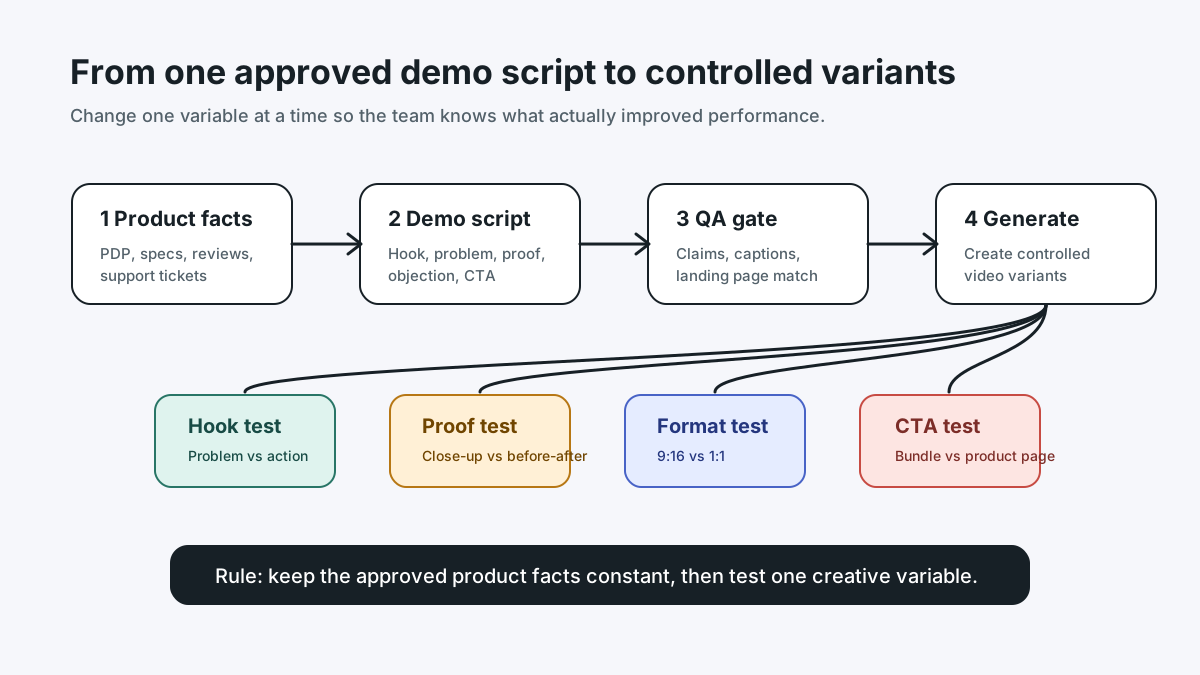
If you use ShopShot's AI video generator, keep the approved product facts, scene order, and risk notes in the prompt. Then create variants by changing one variable at a time: hook, product proof angle, offer, format, or CTA. For a broader launch structure, use the ecommerce video ad testing plan.
The Script QA Checklist
Run this checklist before the video is generated, filmed, or sent to an editor.
| Check | Pass condition | Common failure |
|---|---|---|
| Product appears early | The viewer sees the product or use case in the first 1-3 seconds | Logo, mood shot, or vague intro delays the proof |
| One core problem | The script solves one buyer problem | The video tries to cover every feature |
| Visual proof exists | Each claim has a matching scene | Voiceover says more than the video proves |
| Landing page match | Offer, bundle, size, price, and claims match the destination | Old promo or wrong product variant appears in the video |
| Mobile readability | Captions and overlays are readable on a phone | Text is too small or too long |
| Audio independence | The video still works without sound | The key proof is only in voiceover |
| CTA clarity | The final scene gives one next step | Multiple CTAs compete |
This QA step is where many demo scripts improve. Cut scenes that do not prove anything. Replace abstract benefits with visible product behavior. Move riskier claims into factual, verifiable language. If a claim needs more evidence than the ad can show, save it for the landing page or remove it.
What to Put in the First Three Seconds
The first three seconds do not need to be loud, but they do need to be clear. For a product demo video script template, use one of these hook types:
| Hook type | Best for | Example |
|---|---|---|
| Problem close-up | Cleaning, storage, beauty, home goods, tools | "This corner never gets clean." |
| Product action | Products with obvious movement or transformation | "Watch the seal close in one press." |
| Before-after | Results that can be shown responsibly | "Same drawer, 30 seconds later." |
| Size or fit | Apparel, accessories, organizers, device add-ons | "Fits under a 12-inch shelf." |
| Objection answer | Products buyers doubt at first glance | "No batteries, no sticky refills." |
Avoid hooks that are disconnected from the product. "TikTok made me buy it" might create curiosity, but it does not explain why the product works. A better demo hook starts with the buyer's actual doubt and moves quickly to proof.
Voiceover, Captions, and Overlay Text
Do not make voiceover, captions, and overlay text all say the same thing. They should carry different jobs:
- Voiceover can explain the problem and transition between scenes.
- Captions make the video understandable without sound.
- Overlay text labels the product proof, size, ingredient, feature, or CTA.
- On-screen product action does the persuasion.
A good demo script might use a voiceover line such as "The angled edge reaches the bottom corner" while the overlay says "angled silicone head" and the video shows the motion. That is stronger than repeating the exact same phrase in all three layers.
For caption-specific checks, use the product video captions guide. For CTA examples, use the product video CTA examples.
Workflow: From Product Facts to Final Demo Script
Use this six-step workflow when your team is producing more than one product demo video.
- Pull product facts from the PDP, packaging, spec sheet, reviews, and support tickets.
- Choose one buyer problem for the video.
- Select one visible proof scene that answers that problem.
- Write a five-scene script using the template above.
- Review claims, captions, landing-page match, and platform fit.
- Create two to four controlled variants by changing one variable at a time.
This process prevents the most common ecommerce demo mistake: generating ten videos that look different but all test the same vague message. A useful batch should test a clear variable. For example, compare a problem hook against a product-action hook, or compare a cost-saving benefit against a convenience benefit. Do not change hook, offer, proof, format, and CTA all at once unless you are intentionally running a broad concept test.
FAQ
What is a product demo video script template?
A product demo video script template is a reusable structure for planning the scenes, voiceover, captions, product proof, and CTA in a product demonstration video. For ecommerce, the template should connect each claim to a visible scene and a matching product-page fact.
How long should an ecommerce product demo video be?
For ads and short-form social placements, 15-45 seconds is usually enough for one problem, one product proof, one objection, and one CTA. Product-page demos can be longer if the product needs setup, assembly, or feature explanation.
Should a product demo video start with the brand or the product?
For most ecommerce demos, start with the product, the use case, or the buyer problem. Branding should appear early enough to be remembered, but a long logo intro usually delays the proof the shopper came to see.
Can I use the same demo script for TikTok, Meta, YouTube Shorts, and Amazon?
Use the same approved message, but adapt the format. TikTok, Reels, and Shorts need vertical pacing and readable captions. Marketplace-style product videos should focus more tightly on product facts and avoid unsupported promotional claims.
How do I turn a product demo script into AI video prompts?
Keep the scene order, product facts, visual proof, caption notes, and claim limits in the prompt. Ask the AI tool to create one variant at a time, such as a new hook or CTA, so you can test the change without losing message control.
Conclusion
A product demo video script template is not just a writing aid. It is a control system for ecommerce video production. It forces the team to choose one buyer problem, show real product proof, avoid claim drift, and connect the video to the landing page.
Start with one product and one visible proof scene. Write the five-part script. Review the claims. Then use the same approved script to create a small batch of platform-ready variants. If you need tool selection help, compare options in the best AI video generators for product demos. If you are ready to generate variants, start with ShopShot's AI video generator.
Sources Checked
- Google Ads Help: About the ABCDs of effective video ads
- YouTube Ads / Google Business: ABCDs of effective video ads
- Meta for Business: Ad creative inspiration and best practices
- Amazon Ads: Sponsored Brands video ad specs and guidelines
- Amazon Ads: Sponsored Products video guide
- HubSpot: Product demo video planning guide